---
title: "Register the custom parameters your ad tags send"
description: "Admin → Custom parameters is the network's registry of the cp. parameters its tags carry — name, label, the values a parameter may take, whether it carries several values and on which separator, and whether it is recorded in analytics — so the targeting editor and the Advanced report offer them by name, and One of rules match list values item by item."
type: "howto"
audience: [admin]
keywords: [record in analytics, analytics recording, unregistered parameters, only verified, other not in list, analytics configuration, custom parameters, custom parameter registry, cp parameters, key-value, several values, list value, comma separated, separator, one of, has all of, used by, targeting rules, built-in parameters, fixed values, value list, value picker, unregistered parameters, sub1, contentGenre, move it here]
ui_path: "Admin → Targeting presets → Custom parameters"
---
Fetch the complete documentation index at: https://epom.com/ad-server/docs/llms.txt. Use this file to discover all available pages before exploring further. Append .md to any documentation page URL to get its markdown version.
# Register the custom parameters your ad tags send
Ad tags carry **custom parameters** — `cp.genre=rock`, `cp.section=sport` — that targeting rules
read and macros pass on (see
[Target on custom parameters](https://epom.com/ad-server/docs/guides/targeting/custom-parameter-targeting.md)). **Admin → Targeting
presets → Custom parameters** is where the network writes down which parameters its tags send and
what they carry: a name and a human label, so a targeting editor picks `genre · Content genre`
from a list instead of typing a name that may be misspelt; the values it may take, when they are
a known set; whether one request carries several values and what separates them; and whether it
is recorded in analytics. Registering a parameter never stops a tag from sending anything: an
unregistered `cp.` parameter still reaches targeting and macros exactly as before, and reaches
reports unless you choose otherwise under [What reaches analytics](#what-reaches-analytics).
**Example.** Sports Daily's pages send `cp.genre=1,3,5` — every section the article belongs to,
numbered 1 to 5. Until `genre` is registered, a campaign rule `genre is one of 3` compares the
whole value `1,3,5` with `3` and never matches. Register `genre` with **The request can carry
several values** and the Comma separator, and within a minute the same rule matches on any page
whose list holds `3`, with no rule re-saved. Give the five numbers labels (`3=Football`) and the
targeting editor offers *Football* to pick instead of a bare `3`.
## Typical scenarios
| You want | Register | Result |
|---|---|---|
| Rules on `section` picked from a list, not typed | `section`, Label *Site section*, Values **From a list**: `sport`, `news`, `finance` | The targeting editor offers the three values; a typo such as `sprot` can no longer be saved from the list |
| Match one of several values a page sends (`cp.genre=1,3,5`) | `genre` with **The request can carry several values**, Separator Comma | `genre is one of 3` matches `1,3,5`; `genre has all of 1, 3` needs both |
| A loyalty tier with a closed set and a report on the rest | `loyalty`, From a list `gold`, `silver`, `bronze`, **Accept values that are not in the list** off, **Record in analytics** on | Anything else the tag sends reports as *Other (not in list)* |
| A cache buster out of the logs | `cb` with **Record in analytics** off | Targeting and macros still read it; the analytics and conversion parameter logs leave it out |
| Only the parameters you know of in reports | **Unregistered parameters** = **Not recorded** | Only registered parameters with **Record in analytics** on are logged; a stray `utm_x` nobody registered is not |
## Step by step
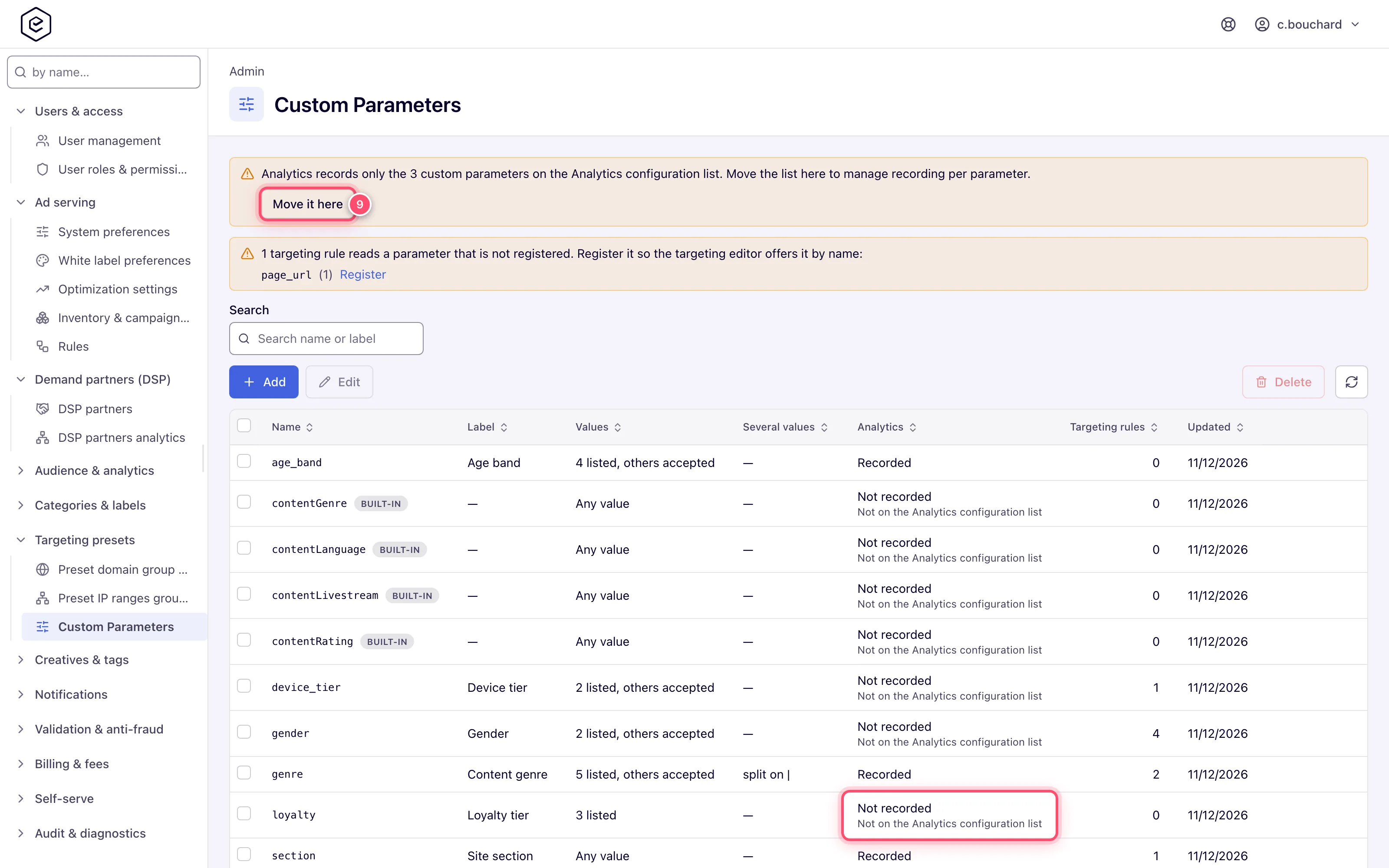
1. Open **Admin → Targeting presets → Custom parameters**. The list shows every registered
parameter; a note above it names parameters that targeting rules read but nobody registered,
each with a **Register** link.
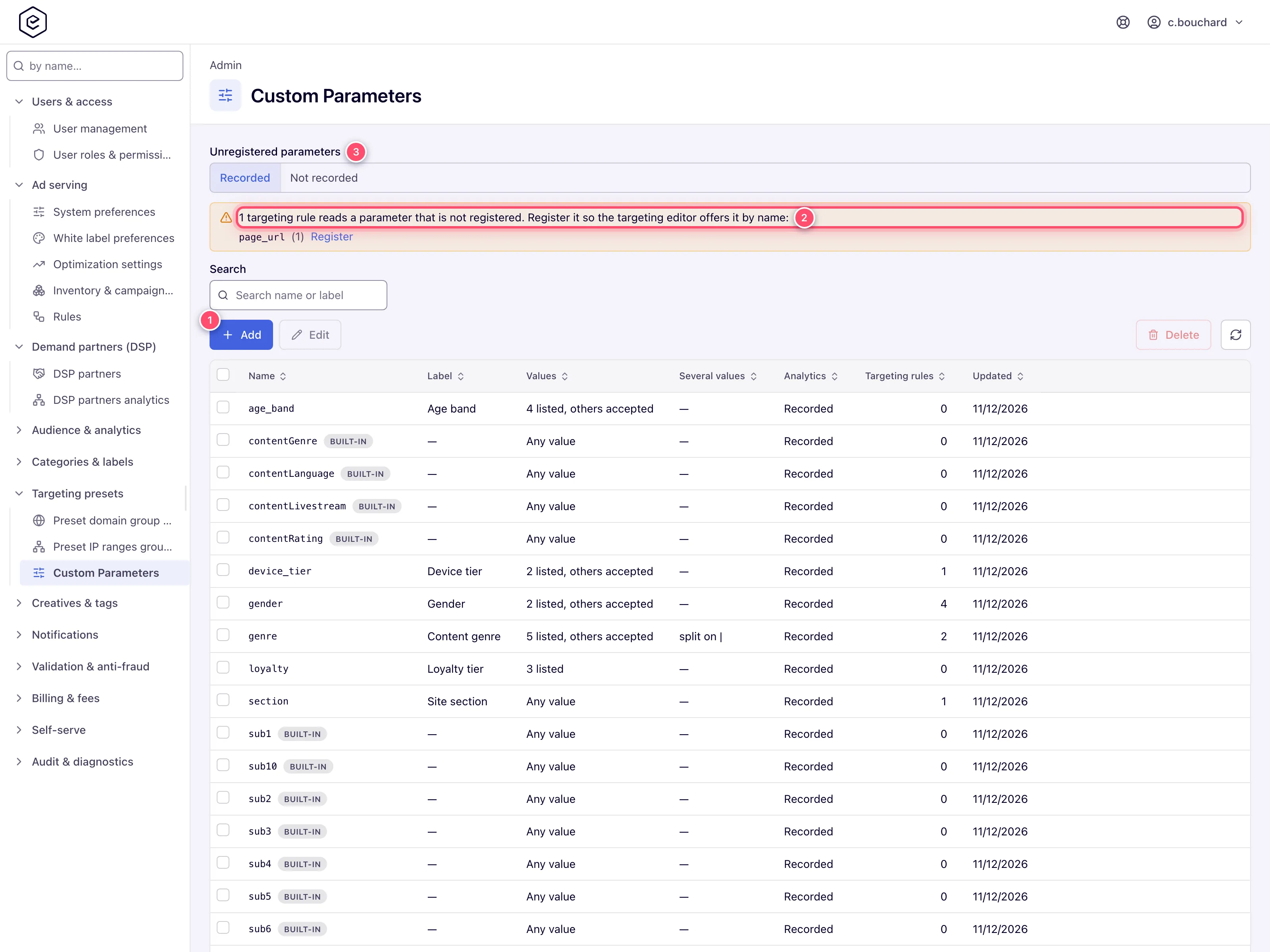
2. Click **Add** and type the **Name** — the part after `cp.`. The line under the field shows
what the tag sends, *Sent as cp.genre= in the ad tag*. Optionally give it a **Label** (what
pickers show next to the name) and a **Description** (where the value comes from and who
sends it).
3. Under **Values**, keep **Any value**, or choose **From a list** and list the values the tags
send — **Add value** one at a time, or **Paste many…** one per line as `value` or
`value=label`. Switch off **Accept values that are not in the list** when the list is
complete.
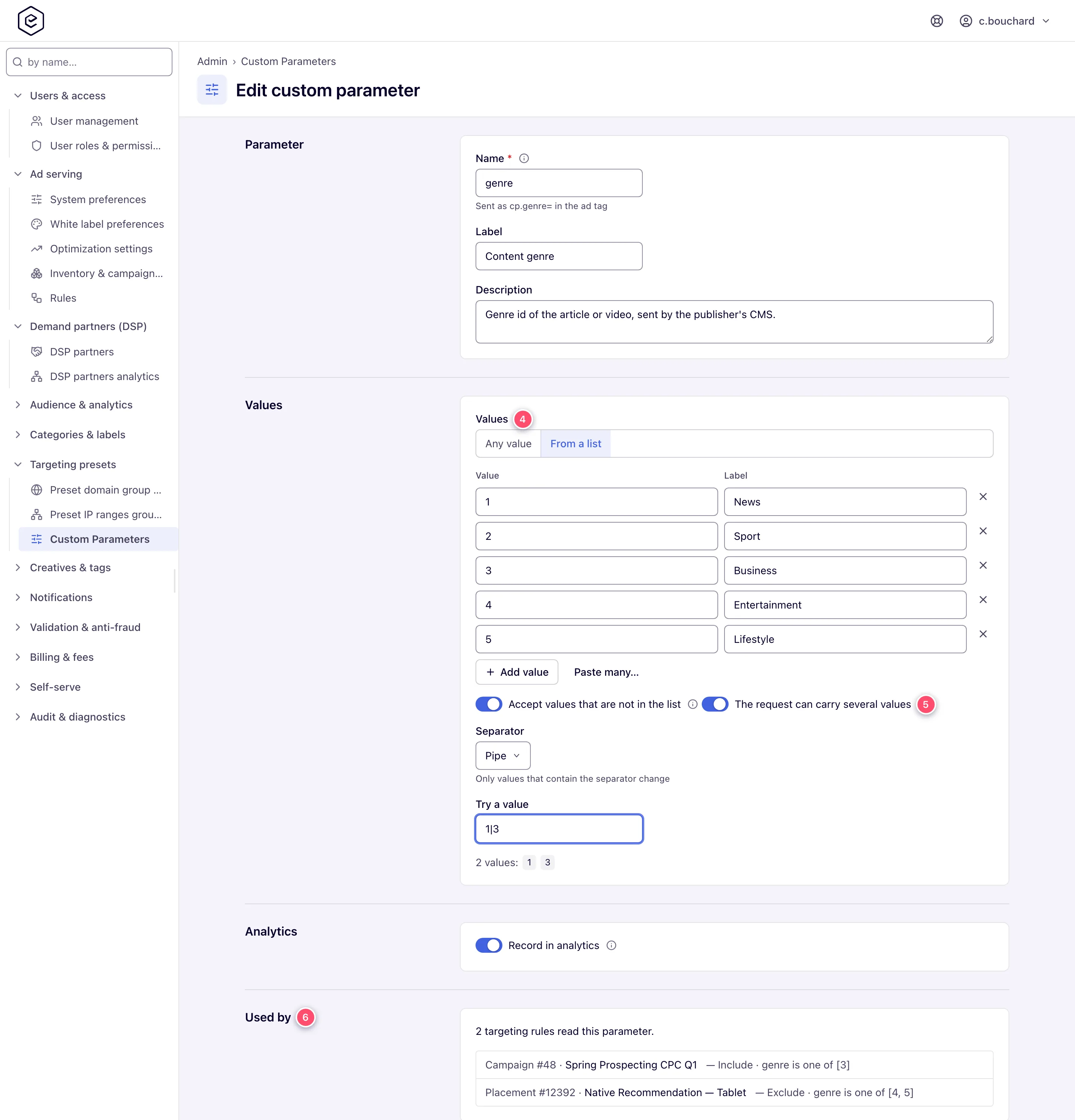
4. If one request can carry several values, switch on **The request can carry several values**
and pick the **Separator**: Comma, Pipe, Semicolon or Space. Type a sample into **Try a
value** to see how it splits — on Comma, `rock, pop,,jazz` reads as three values (the example
in the box uses the separator you picked), and an item that is not in a fixed list is marked
*Not in the list*.
5. Under **Analytics**, keep **Record in analytics** on to filter and group by the parameter in
the Advanced report, or switch it off for one that only bloats the logs, such as a cache
buster.
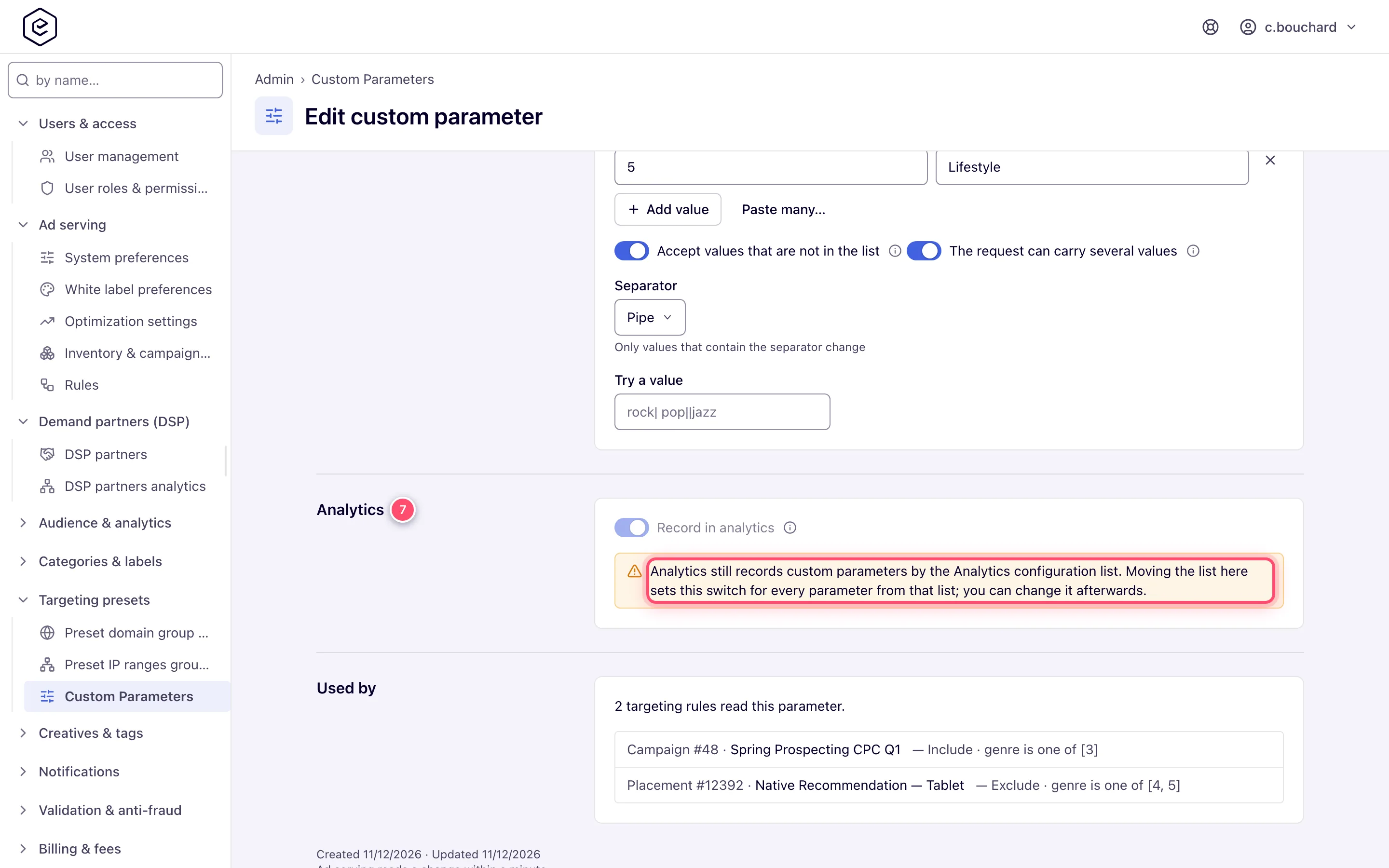
6. Click **Save**. Ad serving reads the change within a minute. When editing, **Used by** under
the form lists every targeting rule that reads the parameter.
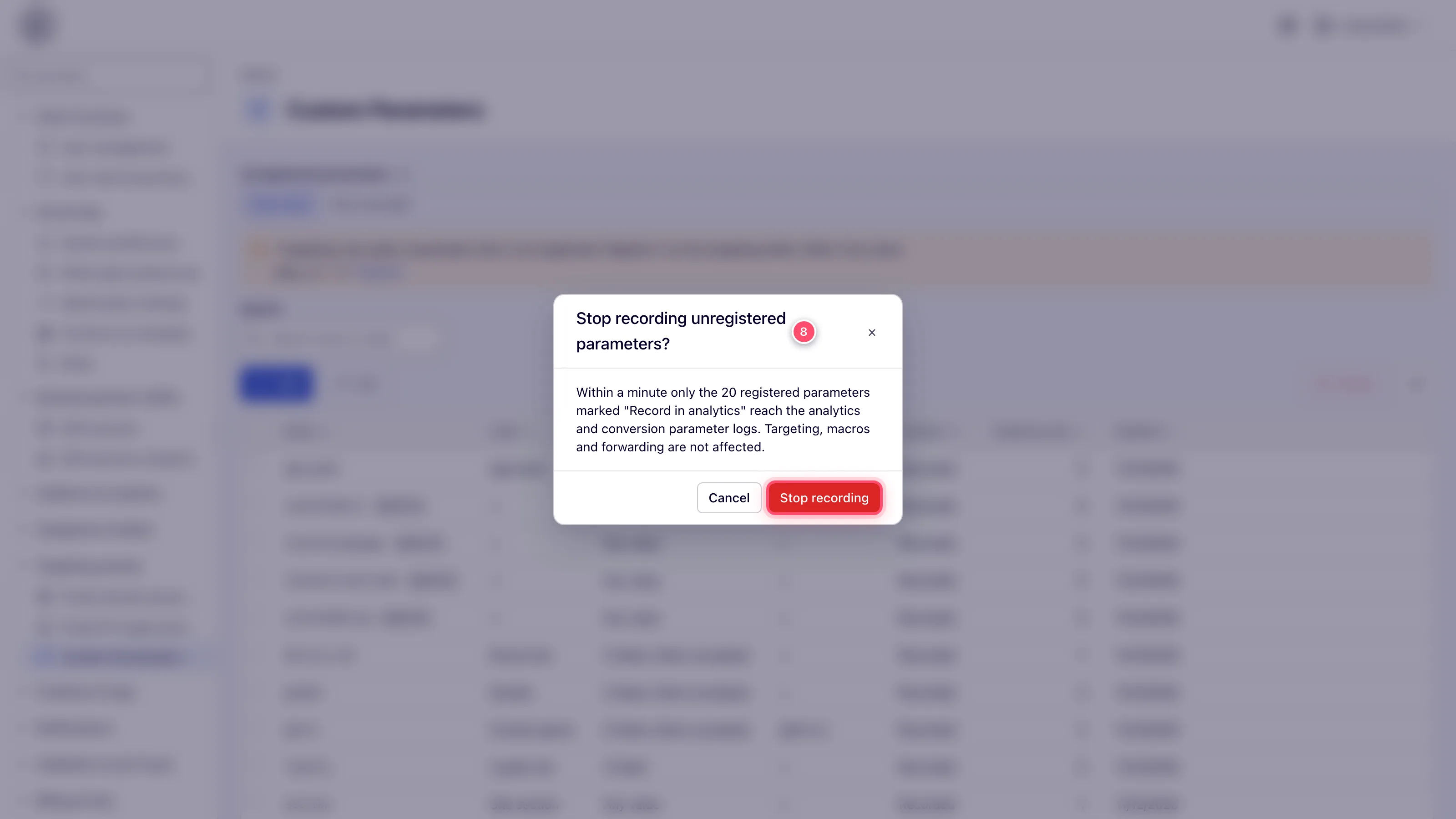
7. Back on the list, decide what happens to parameters nobody registered with **Unregistered
parameters** above it — **Recorded** (the default) or **Not recorded**; switching to **Not
recorded** asks first and says how many parameters stay recorded. See
[What reaches analytics](#what-reaches-analytics).
## Caveats and exceptions
- **Who can do this.** Network administrators whose role has the **Custom Parameters** admin
permission. It is granted with the release to every role and user that already had
**Analytics Configuration**. Everyone signed in can *read* the list — the targeting editor
needs it — but only this permission changes it, and only this permission shows the targeting
rules that read a parameter (they name other clients' campaigns, sites and targeting values)
and its **Description**, which is the admins' own note.
- **Ad serving never asks the database.** Each server keeps the registered parameters in memory
and reloads them every minute; the server you saved on reloads at once. A server that starts
while the database is unreachable uses the copy it saved on disk.
- **A rule is never changed by a change here.** The separator is read when a request is
matched, so turning the list on or off — or deleting the parameter — changes how existing One
of rules match from the next minute, without anyone re-saving them. A value without the
separator is a one-item list, so only requests whose value holds the separator can be affected.
Deleting a list parameter does not touch the rules that read it either: from the next minute
they compare the request value whole again, which is how they matched before the parameter was
registered.
- **Only One of and the Advanced report's filter split.** Value, Substring and Expression rules
and the `$$CUSTOM_PARAM()$$` macro keep the whole value. The Advanced report's custom-parameter
filter, on a parameter registered as a list, counts a request when any item is a filtered
value: `18+` finds `news,18+` (recorded as `~other,18+` under a closed list), and so does
*Other (not in list)*. Grouping by Custom parameter still shows the whole recorded value.
- **Where a value list shows up.** In the targeting editor, a One of rule on a listed parameter
picks its values from the list (labels first, values after them), a Value rule with `equals`
or `not equals` picks one. Picked values are stored so ad serving reads back exactly the value
picked: a comma or backslash inside a value is escaped and a `%` or `+` is URL-encoded for you
(see [How the Value list is split](https://epom.com/ad-server/docs/guides/targeting/custom-parameter-targeting.md#how-the-value-list-is-split)).
In the Advanced report's custom-parameter filter, the parameter name suggests the registered
names and the values field offers the listed values. A Substring rule and the numeric Value
operators keep a free text box.
- **Built-in parameters.** Fourteen parameters are **built in** on every network: `sub1` …
`sub10`, the pass-through slots an affiliate integration sends without a `cp.` prefix, and
`contentGenre`, `contentRating`, `contentLanguage` and `contentLivestream`, which a CTV
stitcher fills. They start as single, any-value parameters — exactly how they were read
before — and you can label them, list their values or mark them as lists, but not rename or
delete them.
- **A rule value that holds the separator never matches.** A One of rule whose value itself
holds the separator — `rock\,pop` with an escaped comma — can never equal a single item of a
comma-split value. **Used by** marks such a rule *never matches*, and the editor warns about
it, so you can split the value into separate entries or pick another separator.
- **Names that are refused.** `u`, which the ad server overwrites with the raw query string, and
`cps`, which carries all custom parameters packed into one value, are refused outright. A name
starting with `cp.` or `cp_` is refused too — leave the prefix out — and so is a name of digits
alone, such as `7`: the API reads digits as a parameter's id, so it could never be found by
name.
- **Renaming does not rename the rules.** They keep reading the old name, which is then no
longer registered, so its settings — the separator — stop applying to them. When rules read
the parameter, **Save** asks first and says how many; a change of case only (`genre` →
`Genre`) is not a rename and does not ask.
- **Switching a listed parameter back to Any value** deletes its list when you save, so **Save**
asks first (*Delete the value list?*). Targeting rules keep the values they picked.
- **A parameter sent without the `cp.` prefix** (a bare `genre=`, or the content parameters a
stitcher fills) reaches targeting but was never written to the custom-parameter logs, so
**Record in analytics** cannot add it there.
### What reaches analytics
Above the list, **Unregistered parameters** decides what happens to a `cp.` parameter nobody
registered:
| Setting | Recorded in the analytics and conversion parameter logs |
|---|---|
| **Recorded** (the default) | every custom parameter, except registered ones with **Record in analytics** off |
| **Not recorded** | only registered parameters with **Record in analytics** on |
Switching to **Not recorded** asks first and says how many parameters stay recorded. Either way,
targeting, macros and click or conversion forwarding read every parameter the tag sent — this
only decides what is written down. Logs follow within a minute, and rows already written are not
changed.
#### Moving from the Analytics configuration list
Until this release, **Admin → Audience & analytics → Analytics configuration** decided which
custom parameters the analytics log kept, with an include or exclude list that only took effect
where log filtering was switched on for the network. The release moves that decision here
**without changing what any network records**:
| The Analytics configuration list | What happens | Recorded afterwards |
|---|---|---|
| Empty — no custom-parameter row at all | Moved by itself within a minute; **Unregistered parameters** is *Recorded*. | everything, as before |
| *Include only these patterns*, filtering on | Waits. The page says how many parameters the list keeps and offers **Move it here**. | until moved: the list; after: exactly the listed names (**Not recorded** for the rest) |
| *Exclude these patterns*, filtering on | Waits, as above. | until moved: the list; after: everything except the listed names |
| Any patterns, filtering off on the server that shows the page | Waits too. The page says the filter is off *on this server* and offers **Move it here**, which keeps every parameter recorded. | until moved: the list, wherever filtering is on; after: everything |
Log filtering is switched on or off per server, so a list with patterns never moves by itself:
the server showing the page may have filtering off while the ad servers have it on. Check how
filtering is set on your ad servers before you move a list that the page says is off — the move
records every parameter on all of them.
Until it is moved, **Record in analytics** cannot be switched on this page, and the editor says
so: the move sets it for every parameter from the list. Moving is the one change that is not
neutral: from then on the **conversion parameter log** follows the same settings, which the old
list never filtered — the confirmation says so. The move cannot be undone from the console.
Afterwards the **Analytics configuration** page keeps its custom-parameter patterns but no longer
applies or lists them: in place of the custom-parameter filtering it shows a note that links
here, and it no longer offers **Custom parameter** as the type of a row. Its cookie-name list
works as before.
- **The page address, `u`.** `u` is not a custom parameter, so **Unregistered parameters** never
drops it. The old list did filter it, though, and moving the list keeps that: an *Include
only* list that does not name `u`, or an *Exclude* list that does, leaves a parameter `u` on
this page with **Record in analytics** off, and the page address stays out of the analytics
log. Switch it on to record the page address again.
## Not working?
| Symptom | Likely cause | Check |
|---|---|---|
| The page is missing from the admin sidebar, or the URL shows *Record not found.* | Your admin role lacks the **Custom Parameters** permission | [Users and roles](https://epom.com/ad-server/docs/guides/admin/users-and-roles.md); it came with Analytics Configuration at the release |
| `genre is one of 3` does not match `cp.genre=1,3,5` | The parameter is not registered as a list, or on another separator than the tag uses | Editor → **The request can carry several values**, **Separator**; **Try a value** with the exact value the tag sends |
| The change seems to have no effect | Ad serving reloads once a minute | Wait a minute; the server you saved on reloads at once |
| **has all of** is missing from a rule's operator list | The parameter is not a list parameter | Switch on **The request can carry several values** |
| A rule is marked *never matches* in **Used by** | Its value holds the separator (`rock\,pop` on Comma) | Split it into separate entries, or pick another separator |
| The name is refused | `u`, `cps`, a `cp.` / `cp_` prefix, digits only, or a character outside letters, digits, `_`, `.`, `-`; or the name is taken (case does not matter) | The message under **Name** says which |
| A rule stopped matching after a rename | Rules keep reading the old name, which is no longer registered | Re-save the rules with the new name, or register the old name again |
| The Advanced report has no parameter to filter or group by | **Record in analytics** is off, or **Unregistered parameters** is *Not recorded* and the parameter is not registered; or the tag sends it without `cp.` | Editor → Analytics; the list's **Analytics** column |
| **Record in analytics** is locked | The Analytics configuration list still decides | Click **Move it here** above the list ([Moving from the Analytics configuration list](#moving-from-the-analytics-configuration-list)) |
| The list says the filter is off on this server | Log filtering is per server; the ad servers may still filter | Check filtering on the ad servers before **Move it here** |
| The page address vanished from the analytics log after the move | The old list filtered `u`; the move kept that | Switch **Record in analytics** on for `u` |
| A value shows as *Other (not in list)* in reports | The list is closed (**Accept values that are not in the list** off) and the tag sent something else | Add the value to the list, or accept others |
## Reference
### The list
| Column | What it shows |
|---|---|
| **Name** | The parameter's name, with a **Built-in** badge on a parameter shipped with the platform. |
| **Label** | The label pickers show beside the name. |
| **Values** | *Any value*, or *N listed* — with *others accepted* when values outside the list are allowed. |
| **Analytics** | *Recorded* or *Not recorded* — whether the analytics log keeps the parameter now. Once the registry decides, that is the parameter's **Record in analytics**. While the Analytics configuration list still decides ([Moving from the Analytics configuration list](#moving-from-the-analytics-configuration-list)), the list does, and *Not recorded* says why: *Not on the Analytics configuration list* (an *Include only* list without the name) or *Dropped by the Analytics configuration list* (an *Exclude* list with it). |
| **Several values** | *split on ,* (or `|`, `;`, Space) for a list parameter; — for one that is read whole. |
| **Targeting rules** | How many Custom Parameter targeting rules on live advertisers, campaigns, banners, sites, zones and placements read the parameter — One of, Value and Substring rules by their **Parameter**, Expression rules by every `$name` they mention. |
| **Updated** | When the parameter was last changed. |
Select rows to **Delete** them; deleting asks first and says how many rules read the parameter.
The search box matches the name or the label. When targeting rules read parameters nobody
registered, a note above the list names each with the number of rules reading it and a
**Register** link that opens a new parameter with the name filled in — the quickest way to catch
a misspelt rule.
### The editor
| Field | What it does |
|---|---|
| **Name** | Required. Letters, digits, `_`, `.` and `-`, up to 128 characters, without the `cp.` / `cp_` prefix, and not digits alone. Names are unique ignoring case — `Genre` and `genre` are one parameter, as they are on the request. A built-in parameter keeps its name. |
| **Label** | Optional, up to 255 characters. |
| **Description** | Optional, up to 1,024 characters. |
| **Values** | **Any value** (the default) or **From a list**. A list holds up to 1,000 values, each unique (compared case-sensitively, like targeting), at most 255 characters and free of the list separator; each can have a label. The order you give is the order pickers show. Switching a listed parameter back to **Any value** deletes its list when you save, so **Save** asks first. |
| **Accept values that are not in the list** | Shown for a list. On (the default), pickers also take a value you type; off, they offer only the listed values. Targeting always reads the value the tag sent either way. |
| **Record in analytics** | On (the default): the parameter is written to the analytics log and the conversion parameter log. Off: it is left out of both. With a closed list (*Accept values…* off), a value outside the list is recorded as `~other`, shown in reports as *Other (not in list)*. |
| **The request can carry several values** | Off: One of rules compare the request value whole. On: they split it on the **Separator** first and match when any item is in the rule's list — the table in [When the request sends several values](https://epom.com/ad-server/docs/guides/targeting/custom-parameter-targeting.md#when-the-request-sends-several-values). It also unlocks the **has all of** operator, which needs every value of the rule among the items. |
| **Separator** | Comma `,`, Pipe `|`, Semicolon `;`, or Space — any run of spaces or tabs, which also covers a `+` in the tag. |
| **Try a value** | A preview only, never saved: splits what you type exactly as ad serving will. |
| **Used by** | Shown when editing: every targeting rule that reads the parameter, with the entity it sits on named by type, id and name — `Campaign #990102 · Brand Awareness Q3 — Include · contentGenre is not one of [123]`. The names are plain text, not links: the entities live on account pages, which an admin cannot open. |
### Permissions
| Permission | Lets you |
|---|---|
| **Custom Parameters** (admin) | Open the page, add, edit and delete parameters, change **Unregistered parameters**, move the Analytics configuration list, and see **Used by**, the rule counts and the **Description**. Granted at the release to every role and user that had **Analytics Configuration**. |
| Any signed-in user | Read the registered names, labels and values — what the targeting editor and the Advanced report's filter offer. |
### API
`/rest-api/custom-parameters` lists the parameters to anyone signed in, with the recording
`policy`, and changes them under the **Custom Parameters** permission. What the targeting rules
say — `?usage=true` rule counts and `unregistered` names on the list, `rules` on a single
parameter — and the old list's names (`legacy`) come back only under that permission; anyone
else gets the parameters with their values, without them. `/rest-api/custom-parameter-policy`
sets **Unregistered parameters** (`ANY` or `ONLY_VERIFIED`) and
`/rest-api/custom-parameter-policy/adopt-legacy` moves the Analytics configuration list — see the
[Custom Parameters API reference](https://epom.com/ad-server/docs/api/custom-parameters.md). A value the API
cannot read, such as `"listSeparator": 9` or `"valueMode": "ANY"`, is a `400` naming the field in
`errors`, with the values it accepts; nothing is stored.
## Related
- [Custom parameter and cookie value targeting](https://epom.com/ad-server/docs/guides/targeting/custom-parameter-targeting.md)
- [Macros](https://epom.com/ad-server/docs/reference/macros.md)
- [Ad tags and API](https://epom.com/ad-server/docs/guides/inventory/ad-tags-and-api.md)
- [Users and roles](https://epom.com/ad-server/docs/guides/admin/users-and-roles.md)
- [Admin area map](https://epom.com/ad-server/docs/guides/admin.md)