---
title: "HTML code and Template banners"
description: "Serve your own HTML/JS markup with the HTML Code type, or a rich-media system template with per-banner properties."
type: "howto"
audience: [network-manager]
keywords: [HTML code banner, code banner, template banner, passback, rich media, macros, preview]
ui_path: "Account → Advertisers → campaign → Add new banner"
---
Fetch the complete documentation index at: https://epom.com/ad-server/docs/llms.txt. Use this file to discover all available pages before exploring further. Append .md to any documentation page URL to get its markdown version.
# HTML code and Template banners
Two ways to serve markup instead of a plain file:
- **HTML Code** — you paste the markup yourself: third-party ad tags, custom HTML/JS.
- **Template** — you pick a rich-media template your network prepared and fill in its
properties.
Both render through **Preview** before they ever reach a page.
## Who this is for
- **HTML Code** — anyone trafficking third-party tags or custom creatives.
- **Template** — advertisers using ready-made rich formats (interstitials, catfish bars,
interscrollers, native blocks). The templates themselves are authored in the Templates section,
see [Templates](https://epom.com/ad-server/docs/guides/advertising/templates.md).
## Prerequisites
- A [campaign](https://epom.com/ad-server/docs/guides/advertising/campaigns.md) you can edit.
- For Template banners: at least one template enabled for the placement type you're targeting.
## Steps — HTML Code
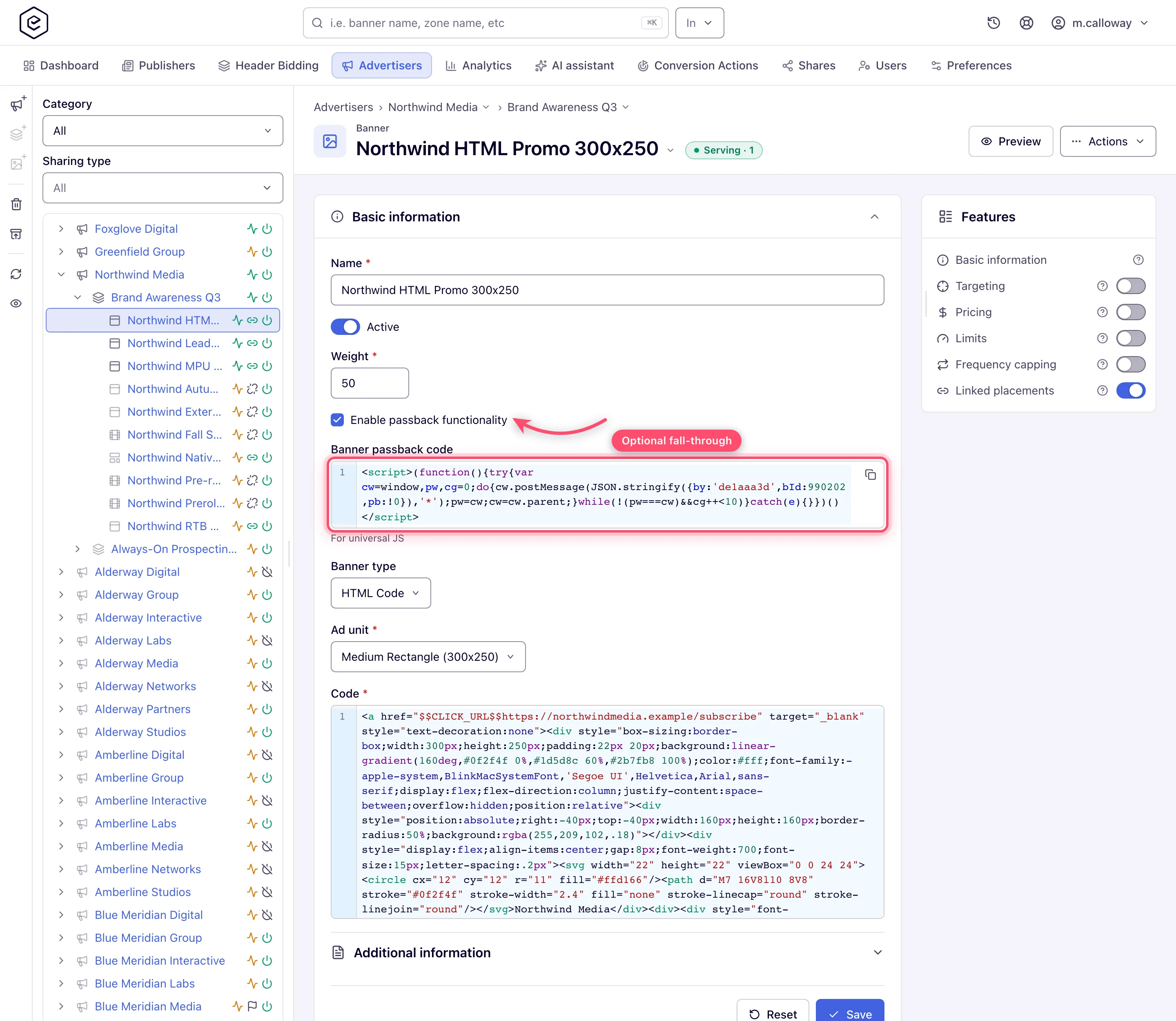
1. **Add new banner** → the placement type. HTML Code is valid on Site, Non-standard, Mobile
site, Video and Application placements — **not Email, not Native**.
2. Set **Banner type** to *HTML Code*.
3. Pick the **Ad unit** where the form shows one (see the table below — it isn't shown on every
placement, and it isn't always required).
4. Paste your markup into **Code**. Required. Macros such as `$$CLICK_URL$$`, `$$RANDOM$$` and
your own custom parameters are expanded at serve time — see the
[macros reference](https://epom.com/ad-server/docs/reference/macros.md).
5. On a **Video** placement, **Return as iFrame** wraps the markup in an iframe inside the VAST
response. It is ticked by default; untick it to return the markup as it is.
6. On Site, Non-standard and Mobile site placements, a role that holds the AJAX invocation-code
permission also sees **Enable passback functionality**, above **Banner type** — read
[Passback](#passback) first.
7. **Save**. The banner opens on its own edit page; link it to placements from the **Linked
placements** card.
### Check it with Preview
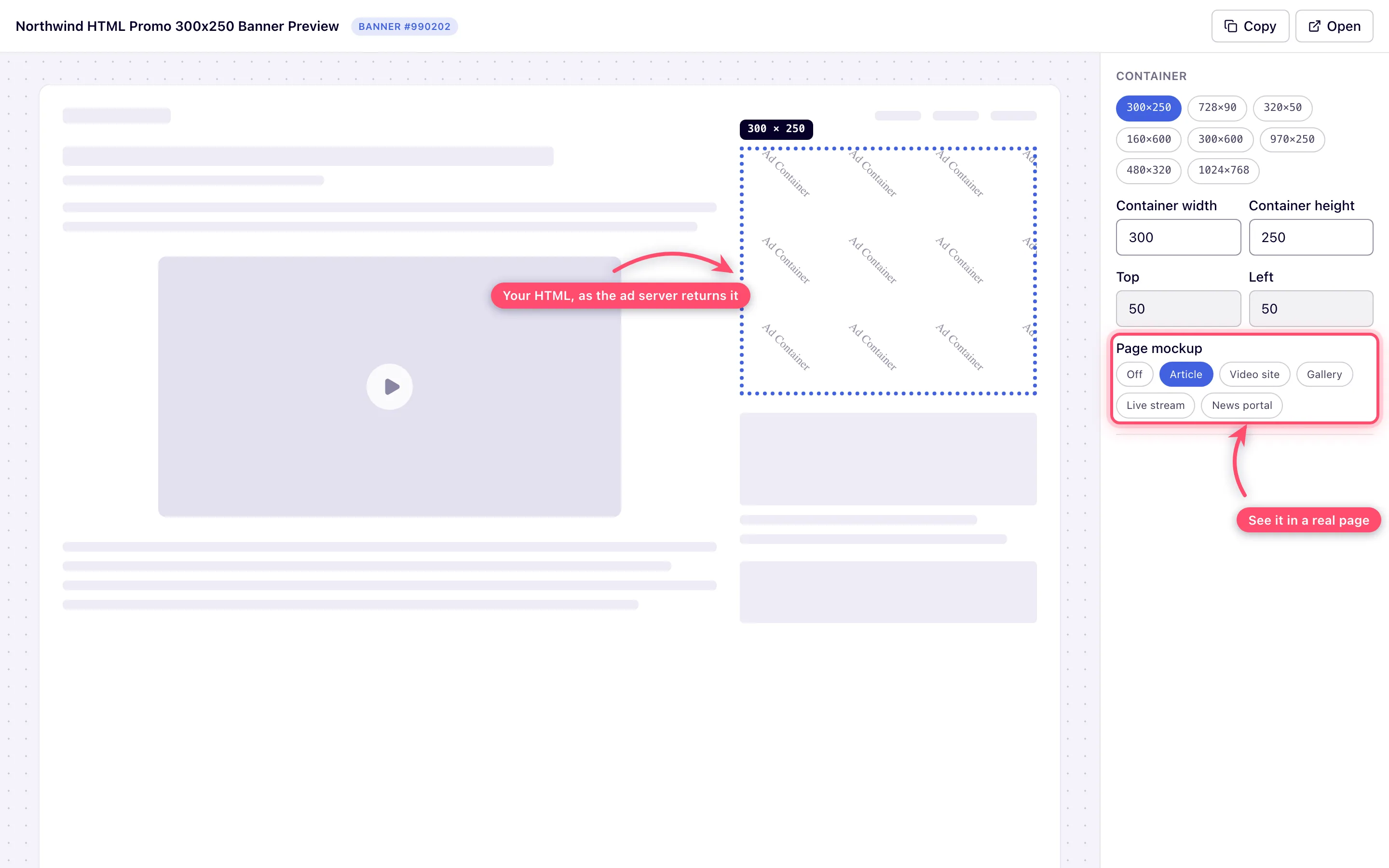
**Preview** in the page header opens the creative in a new tab and actually renders it. Resize
the container, switch between the standard ad sizes, and drop the creative into a page mockup —
article, video site, gallery, live stream or news portal — to see it the way a visitor would.
## Steps — Template
1. **Add new banner** → the placement type. Template is valid on Site, Non-standard, Mobile site
and Application placements — **not Video, not Email, not Native**.
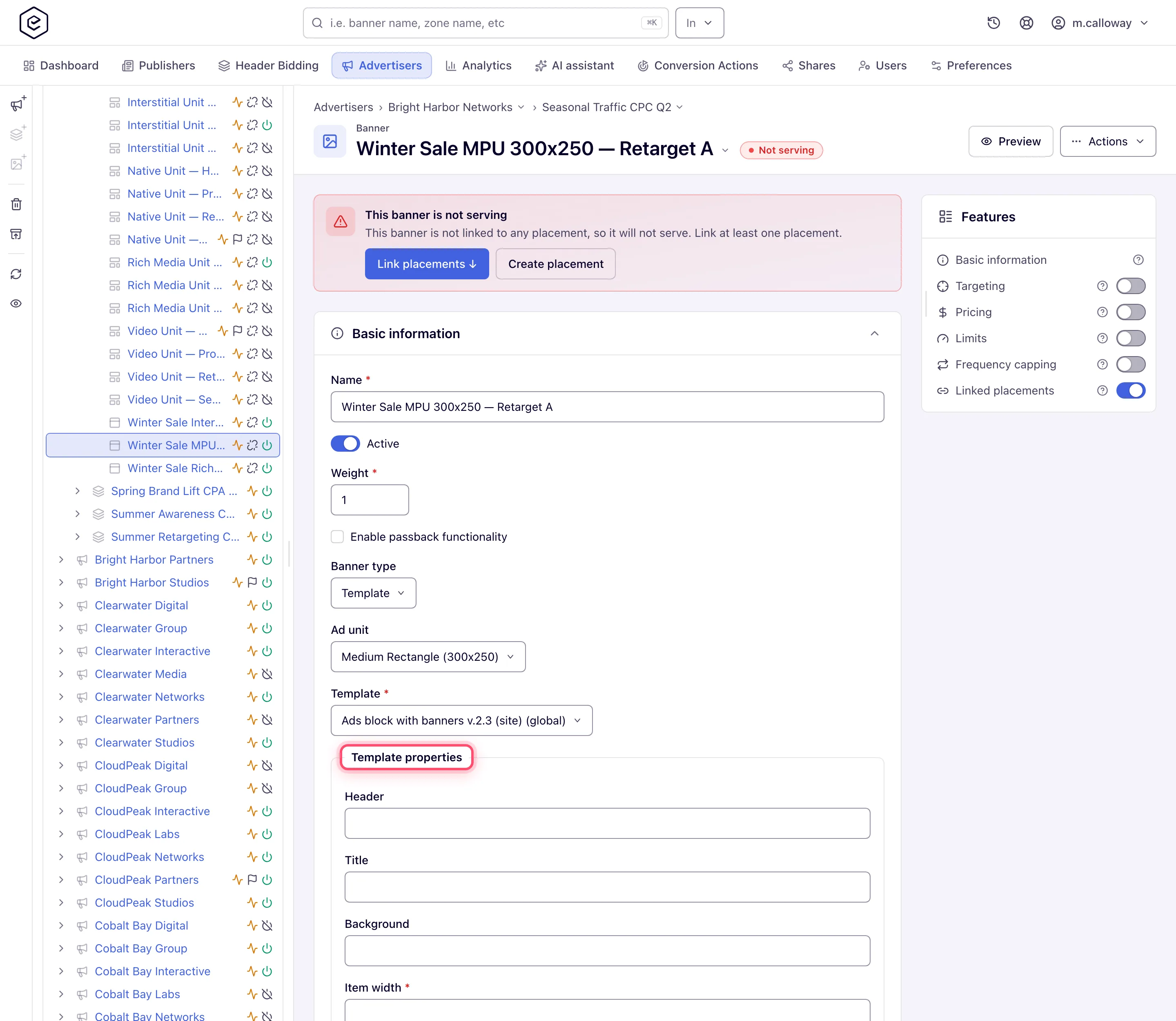
2. Set **Banner type** to *Template*, then pick a **Template**. Required. The list is filtered to
templates enabled for that placement type, and it can come back empty — see the corner cases.
3. Fill in **Template properties**. The fields come from the template itself, so every template
asks for something different: text, numbers with their own min/max, dropdowns, checkboxes and
**file uploads** (including HTML5 ZIP bundles — see
[HTML5 ZIP creatives](https://epom.com/ad-server/docs/guides/advertising/html5-zip-creatives.md)). A file field can also take a link
(**From link**): the file is downloaded once when you save and stored as if you had uploaded
it. An HTML5 ZIP field can also take a ZIP from the [Media Library](https://epom.com/ad-server/docs/guides/advertising/media-library.md)
(**Media library**). Links typed into text fields are never downloaded — the platform cannot
tell a file link from any other URL.
4. Pick the **Ad unit** where shown. For Template banners it is never required.
5. On Site and Non-standard placements, optionally enable passback.
6. **Save**. **Preview** works for Template banners too.
## What each placement asks for
| Placement | HTML Code | Template |
|---|---|---|
| Site | Ad unit **required**, Code, passback | Ad unit optional, Template, passback |
| Non-standard | Code, passback — **no Ad unit field** | Template, passback — **no Ad unit field** |
| Mobile site | Ad unit *optional*, Code, passback, Install conversion action | Ad unit optional, Template, Install conversion action — **no passback** |
| Video | Ad unit **required**, Code, **Return as iFrame** | not offered |
| Application | Code, Ad category, Application OS, Install conversion action, Customization parameters, and Display type when the category is *Interstitial Ad* on *Android* — **no Ad unit, no passback** | same, plus **Target** |
| Email, Native | not offered | not offered |
## Options and fields
| Field | Type | What it does |
|---|---|---|
| Code | HTML Code | The markup that gets served, verbatim, with macros expanded. Required. |
| Template | Template | The system template to render. Required. Filtered by placement type. |
| Template properties | Template | Per-banner values for the template's own fields. A property marked required blocks the save until it is filled; a **file** property keeps its existing file if you save without picking a new one. |
| Ad unit / Width / Height | both | Creative size. *Custom* reveals manual width and height inputs. |
| Return as iFrame | HTML Code, Video | Wraps the markup in an iframe inside the VAST response. Ticked by default. |
| Enable passback functionality | both | See below. Site / Non-standard / Mobile site for Code; Site / Non-standard for Template. |
| Target | Template, Application | Which browser window the click opens. |
| Preview | both | Header button, available once the banner is saved. |
## Passback
Passback lets a creative tell the Epom tag "I have nothing to show", so the tag can fall through
to the next line of demand. The checkbox is shown only to a role that holds the AJAX
invocation-code permission for the banner's placement type (Standard, Non-standard or Mobile site);
if you don't see it, ask your network administrator to grant it in **Admin → Users & access → User roles &
permissions**. Then tick **Enable passback functionality**, save, and reopen the banner:
a **Banner passback code** block appears below the checkbox. Paste that snippet into your
creative on the path where it decides not to render — it posts a message up the frame chain that
the Epom AJAX tag picks up.
> **Warning:** the snippet is built from your network's **AJAX invocation-code domain**. If the
> network has none configured, the checkbox still ticks and still saves, but the code block never
> appears — there is no message explaining why. If you enable passback, save, and find no code,
> ask Epom support or your account manager whether an AJAX invocation code exists for this network.
Placement-side fallback chains are a different feature — see
[Daisy chaining and passback](https://epom.com/ad-server/docs/guides/delivery/daisy-chaining-passback.md).
## Corner cases and gotchas
> **Corner case:** the passback code block **only exists on a saved banner**. Enable → **Save** →
> the block appears. There is nothing to copy while you are still creating the banner.
> **Corner case:** the Ad unit is **required for a Code banner on Site and Video**, **optional on
> Mobile site**, and **not shown at all** on Non-standard and Application. An unsized mobile code
> banner saves fine and leaves the markup to size itself.
> **Corner case:** Template is offered on **Mobile site and Application placements even when no
> template is enabled for them**. You reach a form with a required *Template* field and an empty
> list, and the banner cannot be saved. Check the catalog first if you are trafficking to those.
> **Corner case:** a template's **URL properties are validated as URLs** — a reserved
> documentation domain like `something.example` is rejected with *Must be a valid URL*. The
> banner's own click **URL** field is not validated that way, so the same address can be fine in
> one field and refused in the other.
> **Warning:** switching an existing banner between HTML Code and Template **and saving deletes
> the old type's data**. Saving as Template clears the stored image or video file name and the
> Title; saving as HTML Code clears the template, its property values, the stored files, the URL
> and the Title. Switching back does not restore them, so copy the markup or note the property
> values first. Until you save, flipping the combo changes nothing.
> **Warning:** a Code banner serves your markup verbatim into publisher pages. A broken or slow
> third-party tag degrades every placement the banner is linked to — preview it, and prefer a
> tag you can point at a test endpoint first.
## Per-role notes
- **Advertiser** — the stock role has no Template banners; ask your network manager to switch them
on for your role. With them, you build the banner from whatever the **Template** combo offers;
the templates themselves are authored elsewhere, see [Templates](https://epom.com/ad-server/docs/guides/advertising/templates.md).
- **Network manager** — the same banner form, and the section where those templates are written.
- **Can view share** — the code editor, template combo and property fields are disabled and the
card carries a **Read-only** pill; **Preview** and the passback code stay readable and copyable.
Ask the owner for **Can edit** if you need to change the creative.
## Related
- [Banner types — decision guide](https://epom.com/ad-server/docs/guides/advertising/banners-overview.md)
- [Create and manage banner templates](https://epom.com/ad-server/docs/guides/advertising/templates.md) — building the templates this page consumes
- [Serve an HTML5 creative from a ZIP bundle](https://epom.com/ad-server/docs/guides/advertising/html5-zip-creatives.md)
- [Macros reference](https://epom.com/ad-server/docs/reference/macros.md)
- [Daisy chaining and passback](https://epom.com/ad-server/docs/guides/delivery/daisy-chaining-passback.md)
- [Bulk banner operations](https://epom.com/ad-server/docs/guides/advertising/banners-bulk-operations.md) — mass-updating template properties
- [Catfish, sticky, branding (skin) and interstitial formats](https://epom.com/ad-server/docs/guides/advertising/rich-media-formats.md) — formats built on templates, and their sizing, click and "not showing" checklists