---
title: "Header bidding with Google Ad Manager"
description: "Sell a page served by Google Ad Manager through header bidding — the script and containers that go on the page, the key-values, line item and creative to create in Ad Manager, and how the tag adopts a page’s existing Google slots."
type: "howto"
audience: [network-manager, admin]
keywords: [GAM, Google Ad Manager, ad unit path, line item, sponsorship, price priority, universal creative, SafeFrame, deal id, hb_deal_epom_as, hb_pb, key-values, easPbjs, adopt, googletag, gpt.js, div-gpt-ad, refresh key, serve our demand first, document_language]
ui_path: "Account → Header Bidding"
---
Fetch the complete documentation index at: https://epom.com/ad-server/docs/llms.txt. Use this file to discover all available pages before exploring further. Append .md to any documentation page URL to get its markdown version.
# Header bidding with Google Ad Manager
Use this route when the publisher’s ads are served by Google Ad Manager: the tag brings Prebid,
prices your demand before Google is asked, and hands the result to Ad Manager through key-values
and a line item you create there. This page covers both ways the tag meets a Google page —
defining the slots itself, or adopting the ones the page already has. The tag itself is built as
under [Steps](https://epom.com/ad-server/docs/guides/inventory/header-bidding.md#steps) on the main page.
## Who this is for
Network managers and admins who build the tag, working with someone on the publisher’s side who can
edit their Google Ad Manager — the key-values, order, line item and creative are created there, not
in Epom. The tag needs the access listed under [Permissions](https://epom.com/ad-server/docs/guides/inventory/header-bidding.md#permissions).
## Prerequisites
- A saved tag whose **What the tag brings** is *Prebid and the ad slots* or *Prebid only — reuse the
publisher’s Google Ad Manager slots* — see [Create a tag](https://epom.com/ad-server/docs/guides/inventory/header-bidding-settings.md#create-a-tag).
- The **ad unit path** of every position you sell and, when adopting, the id of the div each slot
renders into.
- Access to the publisher’s Ad Manager, or someone on their side who has it.
## Steps
1. Build the tag and its slots, filling **GAM ad unit** on each slot Google should also serve — see
[Slots](https://epom.com/ad-server/docs/guides/inventory/header-bidding-settings.md#slots).
2. Open **Code** → **Our Prebid.js** and hand over the script and the containers —
[What goes on the page](#what-goes-on-the-page).
3. Create the keys, the line item and the creative in their Ad Manager —
[The Google Ad Manager line item](#the-google-ad-manager-line-item).
4. If the page keeps its own Google tag, check the rules under
[Adopting a page’s existing Google slots](#adopting-a-pages-existing-google-slots).
5. Watch who fills each slot in the
[Header Bidding report](https://epom.com/ad-server/docs/guides/inventory/header-bidding-reporting.md#the-header-bidding-report).
## If the page runs Google Ad Manager
This is the route for a page whose ads are served by Google Ad Manager today and where you want
your campaigns priced before Google is asked. You do not need to know Prebid to set it up. In one
sentence: Prebid is the open-source script that asks bidders for a price *before* the ad server is
called, then hands the winning price to Google as key-values on the ad request, where a line item
you create decides whether that price beats Google's own demand. The tag brings its own copy of
Prebid under its own variable, `easPbjs`, so nothing already on the page collides with it.
Two values of **What the tag brings** apply here: *Prebid and the ad slots* when the page has no
Google tag yet, or the publisher is happy to replace their `googletag` calls with one container per
position; *Prebid only — reuse the publisher's Google Ad Manager slots* when the page already runs
Google Publisher Tag and must keep it. The second has rules of its own under
[Adopting a page's existing Google slots](#adopting-a-pages-existing-google-slots).
Before you start, get from the publisher the **ad unit path** of every position you will sell — it
looks like `/12345678/Site_Desktop_160x600` and is in their existing `googletag.defineSlot` call —
and, if you are adopting, the **id of the div** each slot renders into (`div-gpt-ad-…`) or that ad
unit path; either identifies the slot. Then build the tag ([Create a tag](https://epom.com/ad-server/docs/guides/inventory/header-bidding-settings.md#create-a-tag),
[Slots](https://epom.com/ad-server/docs/guides/inventory/header-bidding-settings.md#slots)), create the key, the line item and the creative in their Ad Manager
([The Google Ad Manager line item](#the-google-ad-manager-line-item)), hand over the two snippets
([What goes on the page](#what-goes-on-the-page)), and watch who fills each slot
([Reporting](https://epom.com/ad-server/docs/guides/inventory/header-bidding-reporting.md#reporting)). Everything you hand over for this route is on the **Code** face under
**Our Prebid.js**.
### What goes on the page
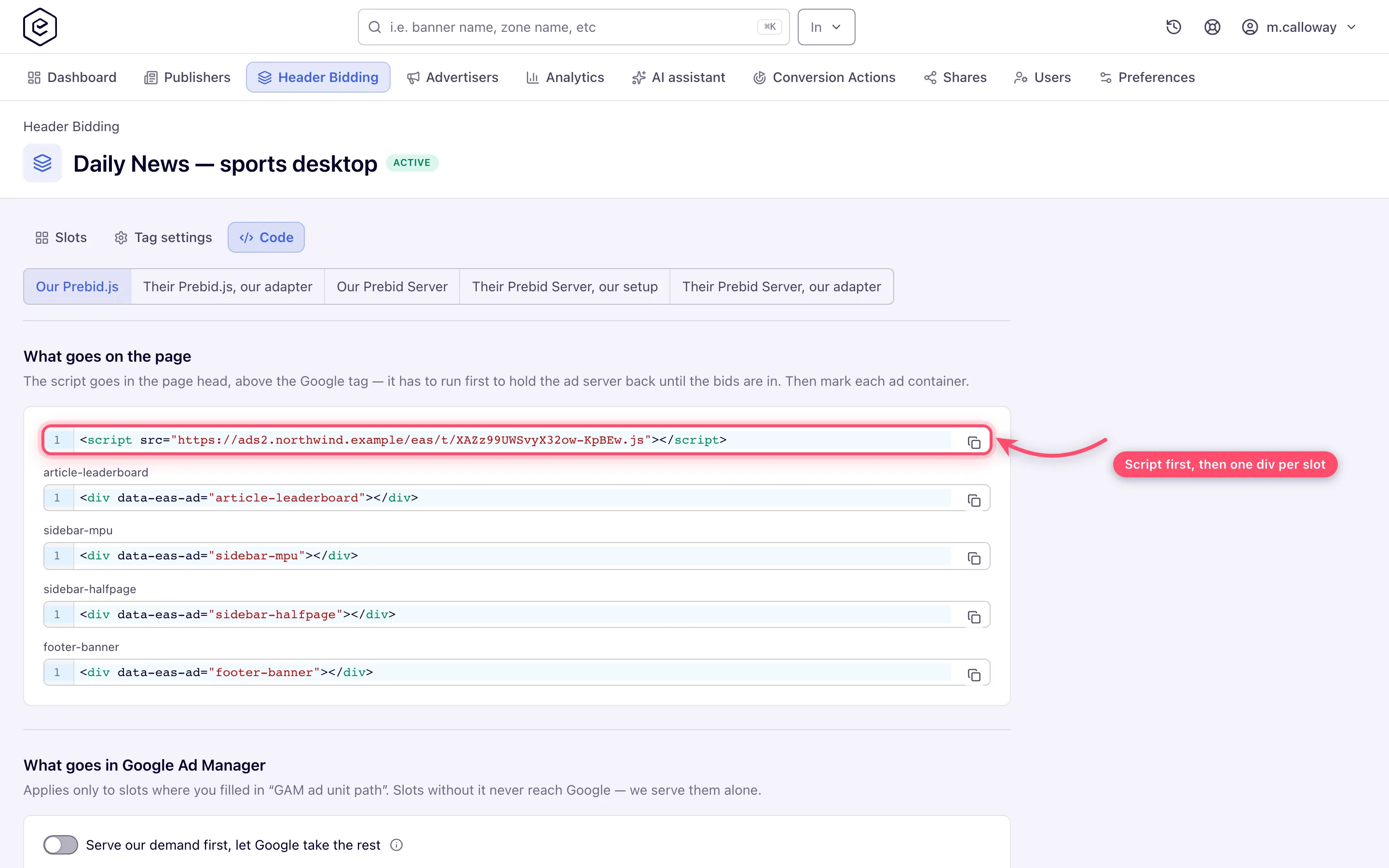
One script in the head, above the Google tag — it has to run first to hold the ad server back until
the bids are in — and one attribute per ad position:
```html
```
`{serving-domain}` is the serving domain's CDN host when it has one, as the **Serving domain**
picker shows (`domain → cdn`). The container blocks appear on the face as soon as a slot has a name,
saved or not; the script exists only once the tag has been saved, because its address carries the
tag's public id. Do not
add `async` to the script: it is written to run before Google's tag, and an asynchronous copy can
lose that ordering. A tag edit reaches the CDN through an automatic purge; a page that already
holds the script picks the change up within about five minutes.
### The Google Ad Manager line item
Google never sees your creative. What reaches Ad Manager is a handful of key-values on the ad
request — the price, an id, the size, the bidder, and the deal key — and a line item you create
decides whether they beat Google's own demand. When it does, the line item's creative is a small
script that pulls the already-won ad out of the browser and draws it. All of this is created once
per publisher network, in their Ad Manager, and applies only to slots with a **GAM ad unit**.
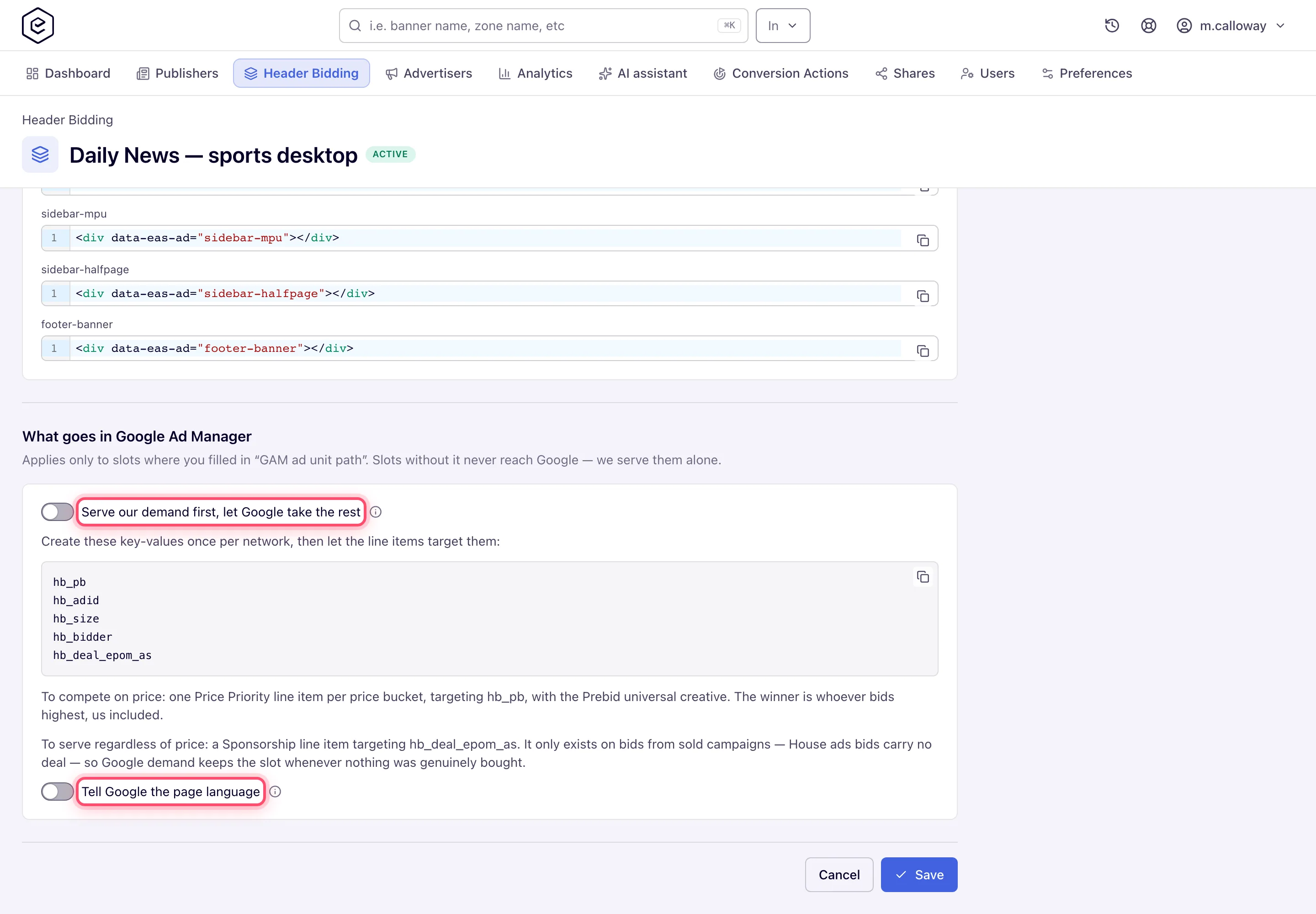
The **Code** face, under *Our Prebid.js → What goes in Google Ad Manager*, prints the key list and
the two line-item recipes for the tag you are on. The steps behind them:
1. **Register the keys.** Ad Manager refuses to target a key it does not know. Under *Inventory →
Key-values*, create these as free-form (dynamic) keys, values to be added later: `hb_pb`,
`hb_adid`, `hb_size`, `hb_bidder`, `hb_deal_epom_as`.
2. **Create an advertiser (company) and an order** to hold the line item, named so the publisher
can tell it apart from their own campaigns.
3. **Create the line item.** Two recipes, and the first is the one this route is built for:
- *To serve regardless of price*: a **Sponsorship** line item, goal 100%, with **Custom
targeting** `hb_deal_epom_as` **is** `epom-direct`. The deal id exists only on bids from
campaigns the network sold itself — neither House ads nor a programmatic partner's win carries
one — so Google demand keeps the slot whenever nothing was genuinely bought. A Sponsorship at 100% also outranks the publisher's own
lower-priority line items, so **scope its inventory targeting to the ad units in the tag**,
never to run-of-network.
- *To compete on price*: one **Price Priority** line item per price bucket, each with **Custom
targeting** `hb_pb` **is** that bucket's price and a rate to match, using Prebid's standard
buckets. The winner is whoever bids highest, us included. Use this only if the publisher wants
Epom to fight Google on price rather than take the slot when a campaign was sold.
4. **Add the creative.** One **third-party** creative per trafficked size, carrying the Prebid
universal creative, attached to the line item — that is the recipe the Code face prints. Its
job is to ask the Prebid on the page to render the bid whose id Ad Manager passes in
`hb_adid`. The tag's Prebid lives under the global `easPbjs`, not `pbjs`: a creative that
addresses the page's Prebid by name has to use that one. Tick **Serve into a SafeFrame** on the
universal creative and it asks the page's Prebid by message, whatever the global is called.
5. **Serve our demand first, let Google take the rest** — off by default, and leave it off unless
the advertiser bought the inventory outright. With it off, every winner is handed to Google and
competes there through the line item, and Google counts and measures the impression like any
other. With it on, a sold campaign's winning bid is drawn by the tag without asking Google for
that slot at all; House ads and partner bids still go through Google. Owned only — hidden in
Adopt, because bypassing Ad Manager on a slot the publisher created would paint over an
impression Ad Manager has already counted. Turning it on also hides the key list and the two
line-item recipes on the **Code** face — the face shows them only while the setting is off (or in
Adopt) — so copy them first if you still need them for the slots that go through Google.
6. **Tell Google the page language** — off by default. Passes the page's `` to Ad
Manager as the `document_language` key-value so line items can target it, and does nothing when
the page carries no `lang`. Google infers the language itself, and a wrong `lang` attribute
narrows your targeting rather than widening it. The key is page-wide, which is why Adopt never
sets it on the publisher's own GPT.
**What fills and what Google keeps.** The serving order per slot is **sold campaign → Google →
House ads campaign → fallback markup** (or the container is hidden). A sold campaign wins whenever
it bids, because its bid carries the deal id and the Sponsorship line item outranks everything
else. A bid priced from a programmatic partner does not carry it: the money behind that bid is a
cleared partner price, not a rate the publisher agreed with you, so it competes in Ad Manager on
price like any other bidder. When it does not bid, the key is absent, the line item is not eligible, and Ad Manager serves
exactly as it did before the tag — its own direct campaigns, then AdX or AdSense. Only when Google
returns empty does the tag fall back to a House ads bid it is holding, then to the slot's fallback
markup. A House ads backfill campaign reaches that step only if its bid survives Prebid: bids
priced at exactly zero are discarded before they can render, so either give the campaign a nominal
CPM above zero or turn on **Let our bids priced at zero still win**, which exempts Epom's bidder
from that rule and leaves the rest of the page's demand alone. The
[Header Bidding report](https://epom.com/ad-server/docs/guides/inventory/header-bidding-reporting.md#the-header-bidding-report) shows this split per slot.
**Prices.** Epom bids what the publisher earns — the net price after site and placement pricing
and revenue sharing — in US dollars, so the `hb_pb` value Google sees is comparable with every
other bidder's. The tag also writes a `refresh` key on every Google slot — `false` on the first
round, `true` on every refresh — so the publisher can target or exclude refreshed impressions in
any line item.
## Adopting a page’s existing Google slots
Adopt is the mode for a page that already runs Google Publisher Tag. Instead of creating slots of
its own, the tag takes over the ones the publisher's Google tag has already defined — a second slot
for the same ad unit would make Ad Manager count two ad requests per pageview and treat them as two
units for competitive exclusion and frequency capping.
Three things follow from that, and all three surprise people:
**The page must already load `gpt.js` itself.** Adopt deliberately does not load it. On a page with
no Google tag there is nothing to adopt, and the tag says so in the browser console rather than
sitting silent.
**A slot's name is their element id *or* their ad unit path.** Either matches — `div-gpt-ad-top` and
`/12345678/Homepage_Top` are both valid entries for the same slot, in the field the editor labels
**Their slot id or ad unit path**. Use whichever the publisher can give you reliably.
**Slots you do not list are left to Google, untouched.** The tag holds the page's first ad request
back so bids can join it, which holds back the publisher's other slots too — so it releases those
straight away, once each. It only does this when the hold actually applied; if the tag loaded after
the Google tag had already started, nothing was held and nothing is released.
The tag keeps watching for about ten seconds after it loads, because a publisher's Google setup is
usually asynchronous and the slots may not exist yet when the tag runs. If a slot in the tag never
matches anything on the page by then, the console names it. Slots Google collapsed come back into
auction, and a container the page hides while empty is probed for three rounds rather than forever.
Adopt writes Prebid's key-values, and the `refresh` key, onto the publisher's own slot objects.
Slot-level targeting persists until it is cleared, so check with the publisher that neither collides
with a key their own setup already uses. A bid priced at exactly zero hides the whole mode until
**Let our bids priced at zero still win** is on — the symptom is a tag that adopts every slot and
never renders.
## Corner cases and gotchas
> **Corner case:** the tag must load **before** the Google tag on Adopt pages. Loaded after, Google's
> services are already enabled: the first ad request cannot be held back any more, so the page's first impression
> goes without our bids and header bidding only joins from the first refresh. The browser console
> says so in as many words.
> **Corner case:** **Keep the container, and keep it visible, while Google's ad loads.** Once Ad Manager answers a
> slot with an ad, the tag leaves that creative alone, whatever size it reports. The page has to
> do the same. A single-page app that rebuilds its ad containers on every route change discards the
> rounds still on their way: the tag drops a removed container's Google slot and never asks Ad
> Manager to fill it, but an ad already chosen for it is a win Ad Manager counts and never sees
> rendered. The same happens when a page hides an empty container with `display: none` and a later
> round fills it while it is hidden. Google reports such slots as having a low render rate, and
> buyers stop bidding on them. Reuse the same container element across route changes, and
> reserve or collapse its space without `display: none`.
> **Corner case:** **Let our bids priced at zero still win** does not let house demand overtake Google. *Serve our
> demand first* renders a winner without asking Google only when the bid carries the deal id, and
> House ads bids never do — so a zero-priced house bid still waits its turn behind Google, exactly
> as a priced one does. Partner-priced bids do not carry it either.
## Per-role notes
- **Network manager** — builds the tag and copies what the **Code** face prints; the Ad Manager
work is done in the publisher’s own account.
- **Publisher** — pastes the script and the containers; see
[Header bidding: what a publisher installs](https://epom.com/ad-server/docs/guides/inventory/header-bidding-for-publishers.md).
- **Can View share** — sees the site’s tags but cannot save or delete them; see the
[per-role notes](https://epom.com/ad-server/docs/guides/inventory/header-bidding.md#per-role-notes) on the main page.
## Related
- [Header bidding](https://epom.com/ad-server/docs/guides/inventory/header-bidding.md)
- [Header bidding tag settings and slots](https://epom.com/ad-server/docs/guides/inventory/header-bidding-settings.md)
- [Header bidding on a site that runs its own Prebid.js](https://epom.com/ad-server/docs/guides/inventory/header-bidding-own-prebid-js.md)
- [Header bidding through a Prebid Server](https://epom.com/ad-server/docs/guides/inventory/header-bidding-prebid-server.md)
- [Header bidding in an app with Prebid Mobile](https://epom.com/ad-server/docs/guides/inventory/header-bidding-prebid-mobile.md)
- [Header bidding reports and targeting](https://epom.com/ad-server/docs/guides/inventory/header-bidding-reporting.md)
- [Header bidding: what a publisher installs](https://epom.com/ad-server/docs/guides/inventory/header-bidding-for-publishers.md)
- [Ad tags and the ad API](https://epom.com/ad-server/docs/guides/inventory/ad-tags-and-api.md)
- [Create a placement](https://epom.com/ad-server/docs/guides/inventory/placements-create.md)