---
title: "Sell ads in an email newsletter"
description: "Recipe for email inventory — an email placement whose creative and landing URLs go into your template, what demand can serve there, why capping is unreliable in mail clients, and how to measure honestly."
type: "howto"
audience: [network-manager]
keywords: [email ads, newsletter, email placement, creative URL, landing page URL, static tag, open tracking, capping, limits]
ui_path: "Account → Publishers → site → zone → placement (Email)"
---
Fetch the complete documentation index at: https://epom.com/ad-server/docs/llms.txt. Use this file to discover all available pages before exploring further. Append .md to any documentation page URL to get its markdown version.
# Sell ads in an email newsletter
A newsletter slot is the most constrained ad environment there is: no JavaScript, no
iframes, often no cookies — just an image and a link. Epom's **Email placement** is built
for exactly that: it gives you two URLs, one for the `![]() ` and one for the ``, and
rotates the creative server-side each time the image is fetched.
## Who this is for
Publishers with a newsletter audience and network managers selling it. Neither the stock
Publisher nor the stock Network Manager role can create an Email placement; ask your network
manager (or, as a network manager, your network administrator) to switch it on for your role. The
**Email** tab of the placement's **Ad tags & API** card carries no permission of its own — it
appears whenever the placement is of this type and switched on.
## Prerequisites
- A [site and zone](https://epom.com/ad-server/docs/guides/inventory.md) representing the newsletter.
- Edit access to your email template (or the merge-tag features of your sending platform).
- Image demand: an email placement links **Local File** and **External File** banners (the
uploaded or hosted image creatives) and the two video types, **Local Video** and **External
Video**. HTML-code, template, native and OpenRTB banners do not link to it — mail clients
execute no scripts. The banner has to be created for the Email type (**Add new banner → Add
banner for Email Placement** on the campaign): a banner built for a site placement never
links to an email placement, whatever its size.
## Steps
1. **Create the placement** (network manager, unless your role has Email placements switched on). On the zone, choose **Add new placement... → Email Placement**,
set the name and the **Size** matching the slot in your template (required for this type),
and **Save** — the integration URLs exist only after the first save, and only while the
placement's **Active** switch is on.
2. **Copy the two URLs.** Open the **Ad tags & API** card; it has one code tab, **Email**
([field reference](https://epom.com/ad-server/docs/guides/inventory/placement-mobile-email-other.md#email-placements)).
Under the ready-made code block it shows two read-only, copyable fields:
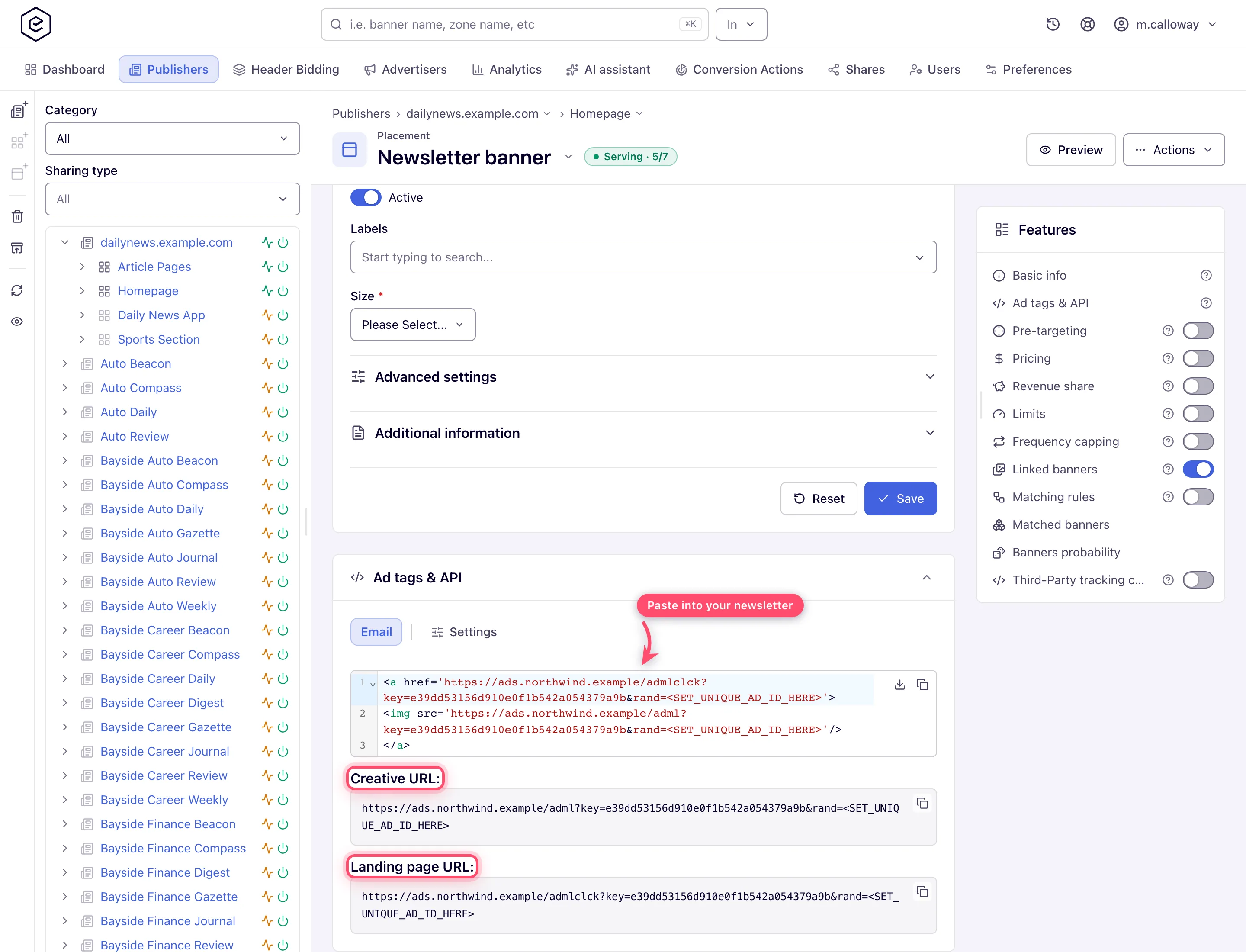
- **Creative URL** → the `src` of your `
` and one for the ``, and
rotates the creative server-side each time the image is fetched.
## Who this is for
Publishers with a newsletter audience and network managers selling it. Neither the stock
Publisher nor the stock Network Manager role can create an Email placement; ask your network
manager (or, as a network manager, your network administrator) to switch it on for your role. The
**Email** tab of the placement's **Ad tags & API** card carries no permission of its own — it
appears whenever the placement is of this type and switched on.
## Prerequisites
- A [site and zone](https://epom.com/ad-server/docs/guides/inventory.md) representing the newsletter.
- Edit access to your email template (or the merge-tag features of your sending platform).
- Image demand: an email placement links **Local File** and **External File** banners (the
uploaded or hosted image creatives) and the two video types, **Local Video** and **External
Video**. HTML-code, template, native and OpenRTB banners do not link to it — mail clients
execute no scripts. The banner has to be created for the Email type (**Add new banner → Add
banner for Email Placement** on the campaign): a banner built for a site placement never
links to an email placement, whatever its size.
## Steps
1. **Create the placement** (network manager, unless your role has Email placements switched on). On the zone, choose **Add new placement... → Email Placement**,
set the name and the **Size** matching the slot in your template (required for this type),
and **Save** — the integration URLs exist only after the first save, and only while the
placement's **Active** switch is on.
2. **Copy the two URLs.** Open the **Ad tags & API** card; it has one code tab, **Email**
([field reference](https://epom.com/ad-server/docs/guides/inventory/placement-mobile-email-other.md#email-placements)).
Under the ready-made code block it shows two read-only, copyable fields:

- **Creative URL** → the `src` of your `![]() ` tag;
- **Landing page URL** → the `href` of the `` wrapping that image.
The code block is the same pair as one ready-to-paste snippet. If your network serves from
several domains, the **Settings** tab of the same card has a **Domain** picker; the URLs are
rebuilt for the domain you pick. Where the picker is missing from your role, the URLs use
the network's default ad-serving domain.
3. **Harden the tag in your template.** Both URLs carry `rand=`.
Replace that placeholder with a unique value per send or per open — a merge tag from your
sending platform — otherwise aggressive caches may pin one creative for many opens. Any
default parameters you set on the **Settings** tab follow it in the URL.
4. **Connect demand** (network manager). Link [image banners](https://epom.com/ad-server/docs/guides/advertising/banner-image.md) created for
the Email type with the same size as the slot (or let Rules do it). Pricing works as usual —
CPM on the demand side pays per image load, CPC per click; your payout comes from the
placement or site [pricing or revenue share](https://epom.com/ad-server/docs/guides/delivery/pricing.md).
5. **Control volume with Limits, not caps** (network manager). If a sponsor bought "50 000 impressions in this
newsletter", put an impression [Limit](https://epom.com/ad-server/docs/guides/delivery/limits.md) on their campaign —
limits count server-side and don't depend on the mail client. (Why not frequency capping:
see the gotchas.)
6. **Measure.** In **Account → Analytics** run a General report with **Group by → Placement**
and **Time granularity → Day**: impressions are image loads, and clicks and CTR come from
the landing URL. Compare against your sending platform's open counts, expecting a gap (see
gotchas).
## Corner cases and gotchas
> **Corner case — the ad is frozen at open time.** Mail clients run no JavaScript, so the
> creative is chosen when the image is fetched and never rotates within an open. Reopening
> the email fetches again and may show a different creative — screenshots from readers can
> legitimately disagree with each other.
> **Corner case — never retire the serving domain used in sent newsletters.** The URLs you
> pasted are literal; emails already in inboxes keep pointing at that domain forever. If the
> network migrates domains, past issues lose their images and clicks — keep the old domain
> serving or accept the loss.
> **Corner case — a paused placement has no URLs.** The **Placement key** and the whole **Ad
> tags & API** card disappear as soon as the **Active** switch is off (live, before you save).
> Switch the placement on to get the URLs back; the URLs already in sent mail keep pointing at
> a placement that now serves nothing.
> **Corner case — a banner of the wrong placement type just never links.** An email placement
> matches only banners created with placement type **Email** (**Add banner for Email
> Placement**); an image banner made for a site placement stays invisible to it even at the same
> size. Video banners link without a size check; every other eligible banner must match the
> placement's size exactly, unless the placement ticks **Flexible placement size** (under
> **Advanced settings**, where your role has it), where a banner no
> larger than the slot links too.
> **Corner case — frequency capping is unreliable on email traffic.** Default caps count per
> visitor via a browser cookie, but many mail clients proxy image requests through their own
> servers: cookies don't persist and many recipients appear behind the same proxy IPs. Cookie
> caps under-count; IP-subject caps (which exist only where the network has server-side capping
> storage and IP capping switched on, and your role may pick an IP subject) can lump
> thousands of readers together and block them as one "visitor". Sell email inventory on volume
> (Limits) rather than per-user frequency — full subject semantics in the
> [capping matrix](https://epom.com/ad-server/docs/reference/capping-matrix.md).
> **Note — impression counts ≠ opens.** Some mail providers prefetch images before the user
> ever opens the mail, and users with images disabled load nothing. Treat the impression
> column as "image fetches", not "human opens", and expect discrepancies against your email
> platform's analytics in both directions.
## Per-role notes
- **Publisher:** your network manager creates the Email placement (or switches Email placements on
for your role); you copy its **Email** tag. Pricing, limits and revenue share are set by your
network manager.
- **Network manager:** create the placement once your role has Email placements, plus the
commercial cards and the **Domain** picker where your network administrator has switched them on.
- **Can view share:** the form is read-only, but both URLs still display and copy.
- **Demo account:** **Preview** on an email placement opens the built-in preview.
## Related
- [Application, email and click-through placements](https://epom.com/ad-server/docs/guides/inventory/placement-mobile-email-other.md)
- [Image banners](https://epom.com/ad-server/docs/guides/advertising/banner-image.md)
- [Set volume limits and budgets](https://epom.com/ad-server/docs/guides/delivery/limits.md)
- [Capping matrix](https://epom.com/ad-server/docs/reference/capping-matrix.md)
- [Monetize a website with display ads](https://epom.com/ad-server/docs/use-cases/monetize-website-display.md)
- [Email ad codes on a site](https://epom.com/ad-server/docs/guides/inventory/site-email-codes.md)
` tag;
- **Landing page URL** → the `href` of the `` wrapping that image.
The code block is the same pair as one ready-to-paste snippet. If your network serves from
several domains, the **Settings** tab of the same card has a **Domain** picker; the URLs are
rebuilt for the domain you pick. Where the picker is missing from your role, the URLs use
the network's default ad-serving domain.
3. **Harden the tag in your template.** Both URLs carry `rand=`.
Replace that placeholder with a unique value per send or per open — a merge tag from your
sending platform — otherwise aggressive caches may pin one creative for many opens. Any
default parameters you set on the **Settings** tab follow it in the URL.
4. **Connect demand** (network manager). Link [image banners](https://epom.com/ad-server/docs/guides/advertising/banner-image.md) created for
the Email type with the same size as the slot (or let Rules do it). Pricing works as usual —
CPM on the demand side pays per image load, CPC per click; your payout comes from the
placement or site [pricing or revenue share](https://epom.com/ad-server/docs/guides/delivery/pricing.md).
5. **Control volume with Limits, not caps** (network manager). If a sponsor bought "50 000 impressions in this
newsletter", put an impression [Limit](https://epom.com/ad-server/docs/guides/delivery/limits.md) on their campaign —
limits count server-side and don't depend on the mail client. (Why not frequency capping:
see the gotchas.)
6. **Measure.** In **Account → Analytics** run a General report with **Group by → Placement**
and **Time granularity → Day**: impressions are image loads, and clicks and CTR come from
the landing URL. Compare against your sending platform's open counts, expecting a gap (see
gotchas).
## Corner cases and gotchas
> **Corner case — the ad is frozen at open time.** Mail clients run no JavaScript, so the
> creative is chosen when the image is fetched and never rotates within an open. Reopening
> the email fetches again and may show a different creative — screenshots from readers can
> legitimately disagree with each other.
> **Corner case — never retire the serving domain used in sent newsletters.** The URLs you
> pasted are literal; emails already in inboxes keep pointing at that domain forever. If the
> network migrates domains, past issues lose their images and clicks — keep the old domain
> serving or accept the loss.
> **Corner case — a paused placement has no URLs.** The **Placement key** and the whole **Ad
> tags & API** card disappear as soon as the **Active** switch is off (live, before you save).
> Switch the placement on to get the URLs back; the URLs already in sent mail keep pointing at
> a placement that now serves nothing.
> **Corner case — a banner of the wrong placement type just never links.** An email placement
> matches only banners created with placement type **Email** (**Add banner for Email
> Placement**); an image banner made for a site placement stays invisible to it even at the same
> size. Video banners link without a size check; every other eligible banner must match the
> placement's size exactly, unless the placement ticks **Flexible placement size** (under
> **Advanced settings**, where your role has it), where a banner no
> larger than the slot links too.
> **Corner case — frequency capping is unreliable on email traffic.** Default caps count per
> visitor via a browser cookie, but many mail clients proxy image requests through their own
> servers: cookies don't persist and many recipients appear behind the same proxy IPs. Cookie
> caps under-count; IP-subject caps (which exist only where the network has server-side capping
> storage and IP capping switched on, and your role may pick an IP subject) can lump
> thousands of readers together and block them as one "visitor". Sell email inventory on volume
> (Limits) rather than per-user frequency — full subject semantics in the
> [capping matrix](https://epom.com/ad-server/docs/reference/capping-matrix.md).
> **Note — impression counts ≠ opens.** Some mail providers prefetch images before the user
> ever opens the mail, and users with images disabled load nothing. Treat the impression
> column as "image fetches", not "human opens", and expect discrepancies against your email
> platform's analytics in both directions.
## Per-role notes
- **Publisher:** your network manager creates the Email placement (or switches Email placements on
for your role); you copy its **Email** tag. Pricing, limits and revenue share are set by your
network manager.
- **Network manager:** create the placement once your role has Email placements, plus the
commercial cards and the **Domain** picker where your network administrator has switched them on.
- **Can view share:** the form is read-only, but both URLs still display and copy.
- **Demo account:** **Preview** on an email placement opens the built-in preview.
## Related
- [Application, email and click-through placements](https://epom.com/ad-server/docs/guides/inventory/placement-mobile-email-other.md)
- [Image banners](https://epom.com/ad-server/docs/guides/advertising/banner-image.md)
- [Set volume limits and budgets](https://epom.com/ad-server/docs/guides/delivery/limits.md)
- [Capping matrix](https://epom.com/ad-server/docs/reference/capping-matrix.md)
- [Monetize a website with display ads](https://epom.com/ad-server/docs/use-cases/monetize-website-display.md)
- [Email ad codes on a site](https://epom.com/ad-server/docs/guides/inventory/site-email-codes.md)