
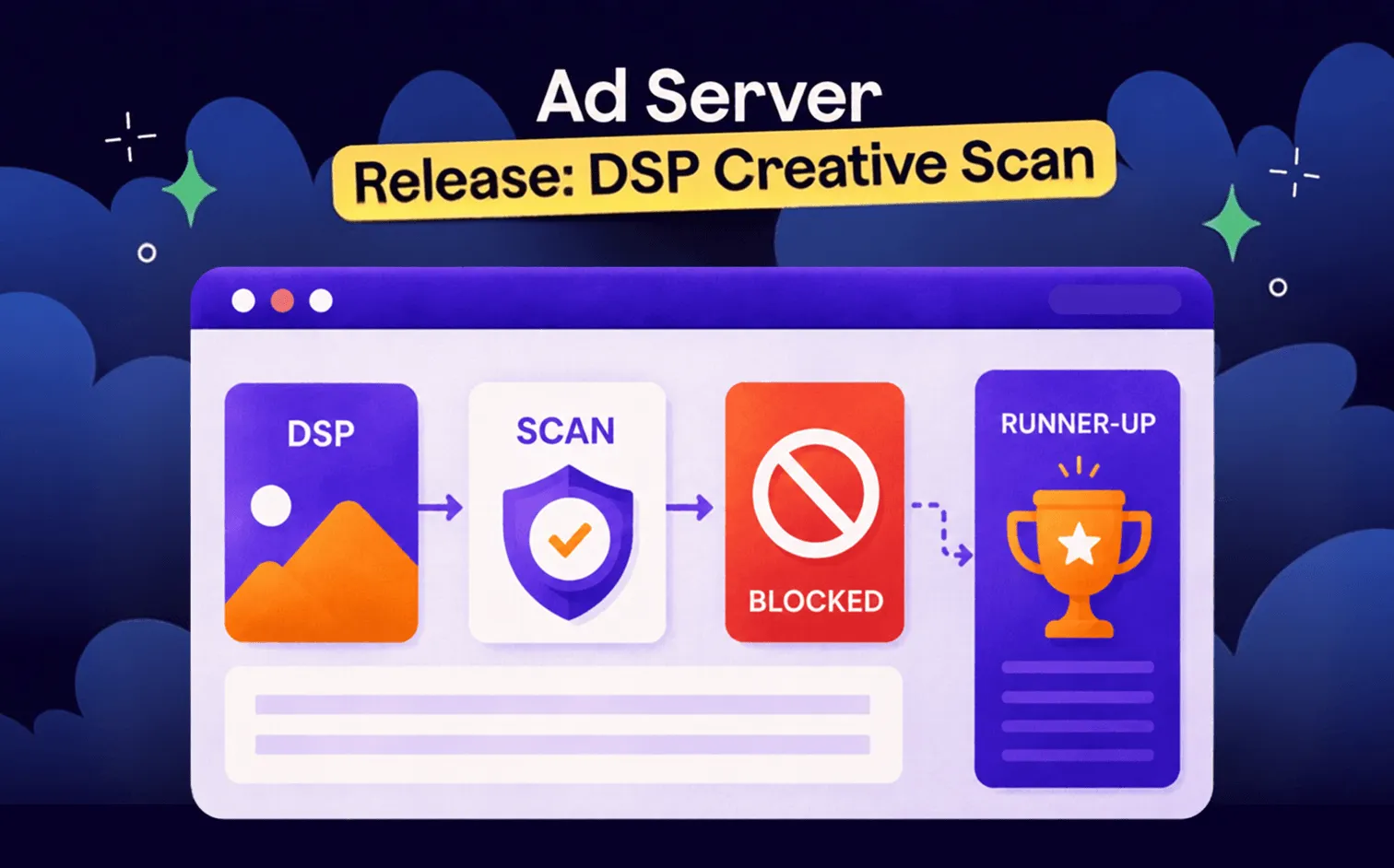
Ad server operators who sell programmatic inventory via oRTB endpoints had no built-in review step for the creatives that come through. DSP Creative Scan closes that gap: every creative is scanned via The Media Trust or GeoEdge before it can win an auction. Unsafe ones are blocked at the bid stage, while the runner-up fills the slot.
Your direct advertisers submit creatives. You review them, approve them, they go live. Creatives coming from demand-side platforms are unlike that. They send a bid response in milliseconds, the auction runs, and the creative serves — with no step in between where anyone checks what’s inside it.
That’s how programmatic is designed, not the issue on your side. When you opt in for selling inventory programmatically, speed and fill of remnants are often the point.
But speed means the review step that exists for direct deals is simply being skipped for oRTB demand — since there is no control over creatives by design for the sake of automation. A new feature in Epom Ad Server’s upcoming release 146 restores it. Welcome DSP Creative Scan and read on.
The Control Layer Programmatic Was Always Missing
When you open an oRTB endpoint to demand-side platforms, you’re connecting to automated buying systems running thousands of creatives across hundreds of campaigns. The DSP partner may not know when something problematic slips through their own stack. Creatives rotate, campaigns change, and the bid path has no natural pause.
The result is a risk that doesn’t exist in direct ad inventory management: a creative that reaches your users was seen only by them, but never by you. You do not know what they could see alongside your website options: was it another premium product ad or a questionable affiliate offer — that remains a mystery hidden in the black box of an auction. And it’s not hypothetical, but a reason why the industry built entire product categories around creative-side verification.
3 Layers of Protection in Epom Ad Server, Covering All Stages
Epom ad server has been building a layered security model across its last three releases. DSP Creative Scan completes the third layer.
"Every DSP partner you add is more demand, but also more exposure. Our new anti-fraud stack means you can grow your DSP list without increasing risk. That changes the conversation when you're signing new demand sources."

Pixalate Risk Analyzer: Who is Asking?
In the traffic risk analyzer introduced in release 143, every incoming ad request is scored for traffic fraud: bots, click farms, datacenter proxies, and app spoofing. Pixalate's extensive analytics is used for benchmarking.
Risk level and category serve as targeting dimensions — you INCLUDE or EXCLUDE traffic at the campaign, site, placement, or banner level. Overall, it stops fake traffic from generating impressions.
Traffic Quality Fraud Analyzer: Are Patterns Abnormal?
The newer release 145 added something even better. Aggregated impression, click, and conversion patterns across the entire network are analyzed by Anthropic Claude and returned as a structured fraud-risk report for each placement.
Traffic quality fraud analyzer surfaces slow-burn patterns, such as coordinated bot networks or anomaly clusters, that per-request rules miss because no single request looks suspicious.
DSP Creative Scan: Is the Ad Itself Safe?
And here is the newest arrival: creatives from DSP partners are scanned before they can win. Unsafe content is blocked at the bid stage. This is the layer that protects your users, not just traffic metrics.
Each layer catches something the others don’t. Layer 1 filters fake traffic. Layer 2 finds patterns invisible to single-request analysis. Layer 3 verifies the creative content. Running all three covers both major fraud vectors — fake traffic and unsafe demand — at every stage of the serving lifecycle.
How DSP Creative Scan Works
Every creative accumulates impressions as it serves through your inventory. Once it crosses a configurable threshold — 100 impressions by default — it enters the scan queue and is blocked from winning new auctions until a verdict comes back.
The scan runs through The Media Trust or GeoEdge, depending on the DSP partner. Both providers run independently across different DSPs, each with their own monthly budgets, thresholds, and TTLs.
The creative moves through seven states:
| State | What it means | Bid path |
|---|---|---|
| Counting | Accumulating impressions toward the threshold | Serves normally |
| Pending Scan | Threshold crossed, queued for submission | Blocked |
| Scanning | Submitted to the provider, awaiting verdict | Blocked |
| Passed | Verified clean, whitelisted for TTL | Serves normally |
| Blocked | Flagged by the provider | Blocked |
| Passed (Rescanning) | TTL expired, rescan in flight, previously verified clean | Serves normally (fail-open) |
| Auto Approved | Markup shape unsuitable for scanning | Serves normally |
When a creative is blocked, the runner-up bid wins the slot. The impression fills. Revenue from the placement is preserved.
💡 On the fail-open rule: a creative that has been verified once is not blocked for 15–20 minutes during each TTL renewal cycle while the provider rechecks it. Only a fresh Blocked verdict from the rescan changes anything.
The Two Providers
DSPs are assigned to either The Media Trust or GeoEdge. Switching is a single dropdown change on the partner edit page.
| Provider | Strengths | Best for |
|---|---|---|
| The Media Trust | Granular classification, deep landing-page categorization, and a large emulator catalog | Display, native, and banner creatives where the destination URL matters as much as the markup |
| GeoEdge | Strong VAST emulation, regional and carrier targeting, alert-trigger taxonomy | Video creatives and mobile-specific scans |
Adaptive Budget Pacing
Scan budgets are finite. A budget pacer monitors monthly consumption per provider and automatically adjusts the impression threshold.
| Pacer state | What happens |
|---|---|
| Burning under the target rate | Threshold lowers toward the configured floor — coverage expands |
| Burning over the target rate | Threshold raises — budget is protected |
| Budget exhausted | Threshold pins at maximum — new scans pause until next billing cycle |
TTLs follow the same logic: a tight budget means TTLs extend, reducing rescan load. A plentiful budget means TTLs shorten and creatives are re-verified more often.
You set the base threshold and monthly budget once. The pacer handles the rest.
When a Creative Can’t Be Scanned
Some ad formats are unsuitable for scanning. The system doesn’t silently pass them through — it records them as Auto Approved with a documented reason, visible in the same admin grid as scanned creatives.
The most common skip reasons:
| Skip reason | What it means | What to do |
|---|---|---|
| Oversized markup | Payload over 2MB. Most legitimate creatives are 30–60KB. | Investigate the DSP — oversized markup usually means a misconfigured wrapper |
| VAST VPAID | VPAID JavaScript runtime, which scanners can’t emulate | Consider blocking VPAID at the placement level. It’s being phased out by major DSPs |
| VAST Wrapper | Unresolved wrapper chain | The DSP should be returning inline VAST. Contact the partner if frequent |
| VAST Incomplete | Missing MediaFile or ClickThrough URL | Likely a malformed DSP response — investigate the partner’s logs |
| Native No Link | Missing landing URL | DSP bug. Contact the partner |
| Scan Timeout | No verdict after 3 attempts over 6+ hours | Check provider account status |
Auto-approved rows are visible in the grid with original markup preserved. Filter by Skip Reason to spot patterns: “this DSP is shipping all VPAID” or “every oversized creative is from the same partner.”
Where to Look for DSP Creative Scan in My Account?
DSP Creative Scan lives under Admin → DSP Creative Scan. Every scan record is visible here, with filtering by date range, DSP partner, provider, skip reason, and status. All filters apply instantly.
Click Open in the Details column to see the full investigation context for any creative:
- Flags / Reasons (Blocked rows): every flag the provider returned — severity, type code, message, and a deep-link to the provider’s incident page when available
- Creative preview: the actual markup as the scanner saw it — HTML in an iframe, VAST as readable XML, native as image-with-link
- Raw provider response: verbatim JSON from the provider, collapsible, for forensic audit
- Scan context: the device, geo, and consent snapshot passed to the provider — confirms the render environment matched real traffic
A budget panel at the top of the grid shows real-time consumption per provider: scans used vs. monthly budget, current effective threshold, current TTL, and budget status. Refreshes every 30 seconds.
How to Set It Up
Enable scanning per DSP: open the partner edit page under Admin → Partners → DSP Partners, select The Media Trust or GeoEdge in the Creative Scan Provider dropdown, save. Takes effect immediately for new bid responses.
Setting it to None disables scanning for that partner. Switching providers mid-flight takes effect immediately.
One permission controls access to the admin grid: DSP Creative Scan Tab Visible. Without it, the user can’t see the grid or open previews — but the scan pipeline still runs in the background.
What This Looks Like in Practice: Use Cases
Let’s review some examples of typical occasions you might be experiencing after you incorporate the DSP creative scan feature in your daily ad operations.
A DSP starts shipping unsafe creatives
An advertiser reports that ads from a specific DSP are redirecting to scam pages.
- Open the grid and filter by the offending DSP partner, Status = Blocked.
- Open previews for a few rows and review the flags table to confirm the verdict.
- The creatives are already blocked from new auctions. Share the preview reports with the DSP.
Budget running tight mid-month
The Media Trust scan budget is at 85% on day 18.
- Check the budget panel for the usage bar.
- The pacer should already have raised the threshold. Verify in the panel.
- If still concerning, increase the monthly budget, or confirm the pacer’s floor is set appropriately.
Investigating a high block rate on one DSP
A DSP partner shows 18% of creatives as Blocked — well above average.
- Filter by DSP Partner + Status = Blocked.
- Open several previews — check for a common flag type across rows.
- Shared root cause (e.g., same ad network rotation): discuss remediation with the DSP. Varied flags: the DSP may be testing many small advertisers with low quality controls.
Compliance audit
A regulator requests evidence that ad creatives are scanned for compliance.
- Filter the grid to the audit period. The verdict distribution (Blocked / Passed / Auto Approved counts) is visible.
- Open a sample of Blocked rows — the preview window includes the full provider response and flag list as audit-grade evidence.
What DSP Creative Scan Changes for Epom Ad Server Clients
Until now, trusting a DSP partner meant trusting every creative they sent. There was no structural mechanism to inspect demand at the bid level, only post-impression analysis after the fact.
DSP Creative Scan adds that checkpoint. Creatives earn their place in your inventors, and the ones that don't pass don't serve. The ones that do are whitelisted and re-verified on a cycle, without interrupting delivery.
For operators building a programmatic business on top of Epom Ad Server, this is the control layer that makes that growth defensible.