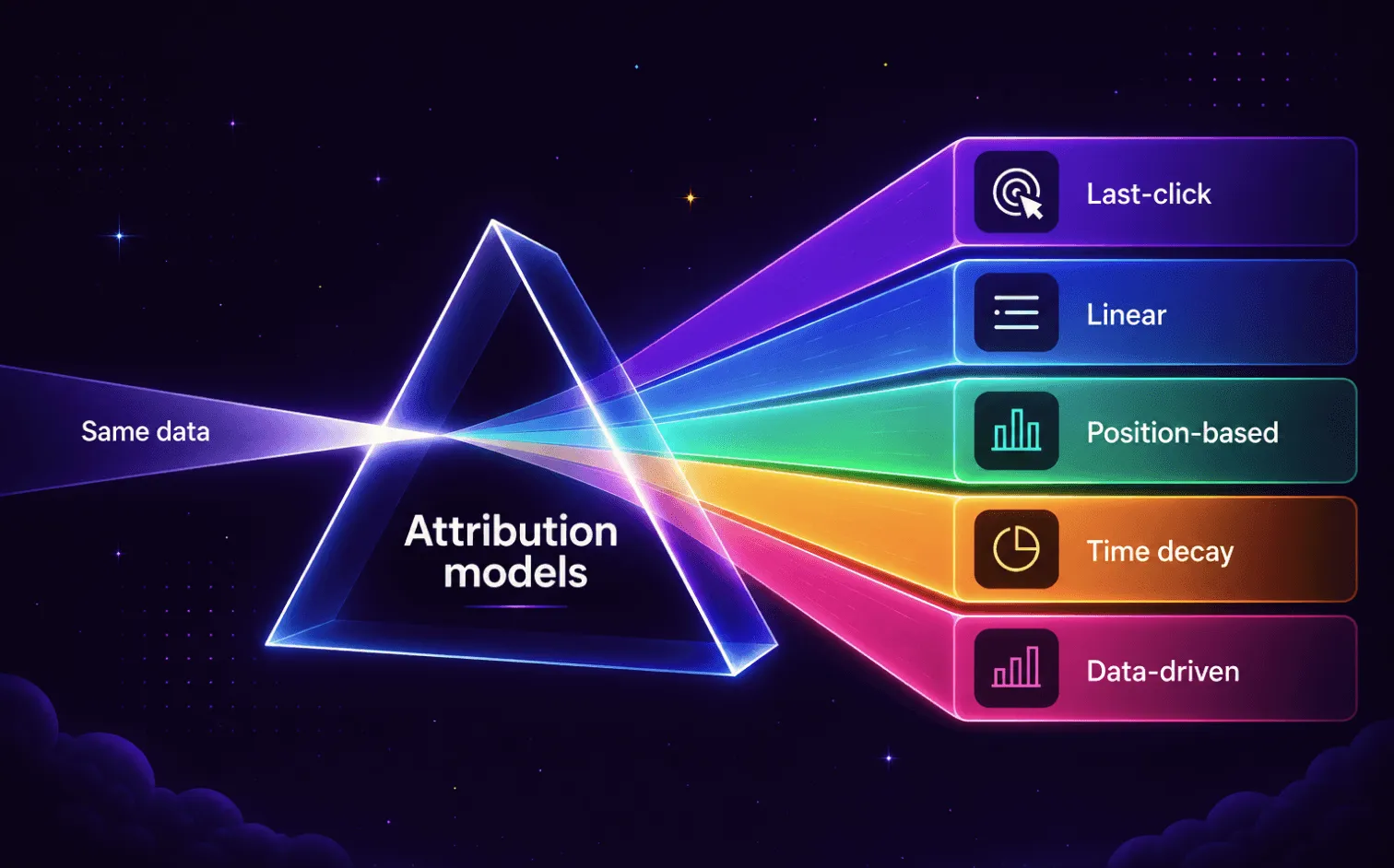
- The attribution model you choose determines which channels get budget next cycle — not just which ones look good in a report.
- Last-click is the default in most tools and systematically undercredits awareness and mid-funnel channels.
- Match model to sales cycle: short paths → last-click or time-decay; B2B or multi-touch → linear or position-based; high-volume with clean tracking → data-driven.
- Tracking quality matters more than model choice. A misconfigured postback or missing pixel corrupts every model equally.
- Around 60% of performance campaigns run without postback tracking configured, according to Epom client statistics. Without it, spend distributes across all sources with no visibility into which ones convert.
At some point, you cut a channel that wasn't converting. You made that call based on your attribution data: conversion rates were noticeably lower than for the rest of your campaigns. While this looks justifiable from the first glance, here is the rub: not all attribution methods track the decisive moments in your customer journey.
A 2024 EMARKETER/Snap survey of 282 senior marketers spending $500K+ on digital advertising found that 78% use last-click to measure campaigns. Yet, fewer than one in five trust that it accurately reflects what drove the result.
The channel you cut might have been doing exactly its job. You just couldn't see it because the model gave all the credit to the last ad before the sale, and nothing to your efforts that came before.
Attribution modelling fixes that. It distributes conversion credit across every touchpoint in the customer journey, not just the final click. Change the model and the same data tells a different story about which channels are working — and that story is what determines where your budget goes next month.
Epom DSP tracks conversions at the placement and source level via pixel and S2S postback. Create your self-serve account now to follow along with a live campaign.
What is Attribution Modeling
Attribution modelling assigns conversion credit across the touchpoints a user went through before converting. It takes a single result — a purchase, a lead form, an install — and distributes credit backward across every interaction that happens.
The practical consequence is that attribution is not a measurement tool. It is a budget-allocation mechanism. The model you choose defines which channels look effective and which you avoid — and those decisions compound across every campaign cycle.
Why Your Default Model Can Be Wrong
Last-click attribution is the most commonly used model that assigns 100% of the conversion credit to the final touchpoint before the user converts. It is the default in GA4, the default in most analytics tools, and the mental default for most media buying teams reporting campaign performance.
For a single-step path — a user searches, clicks an ad, buys — last-click is accurate. The problem is that most conversion paths are not single-step.
Often the conversion story looks like this: the user sees a display ad, reads a blog post two days later, clicks a retargeting ad a week after that, and only then converts. Under last-click, the retargeting ad receives all the credit. The display campaign that first introduced the brand receives nothing.
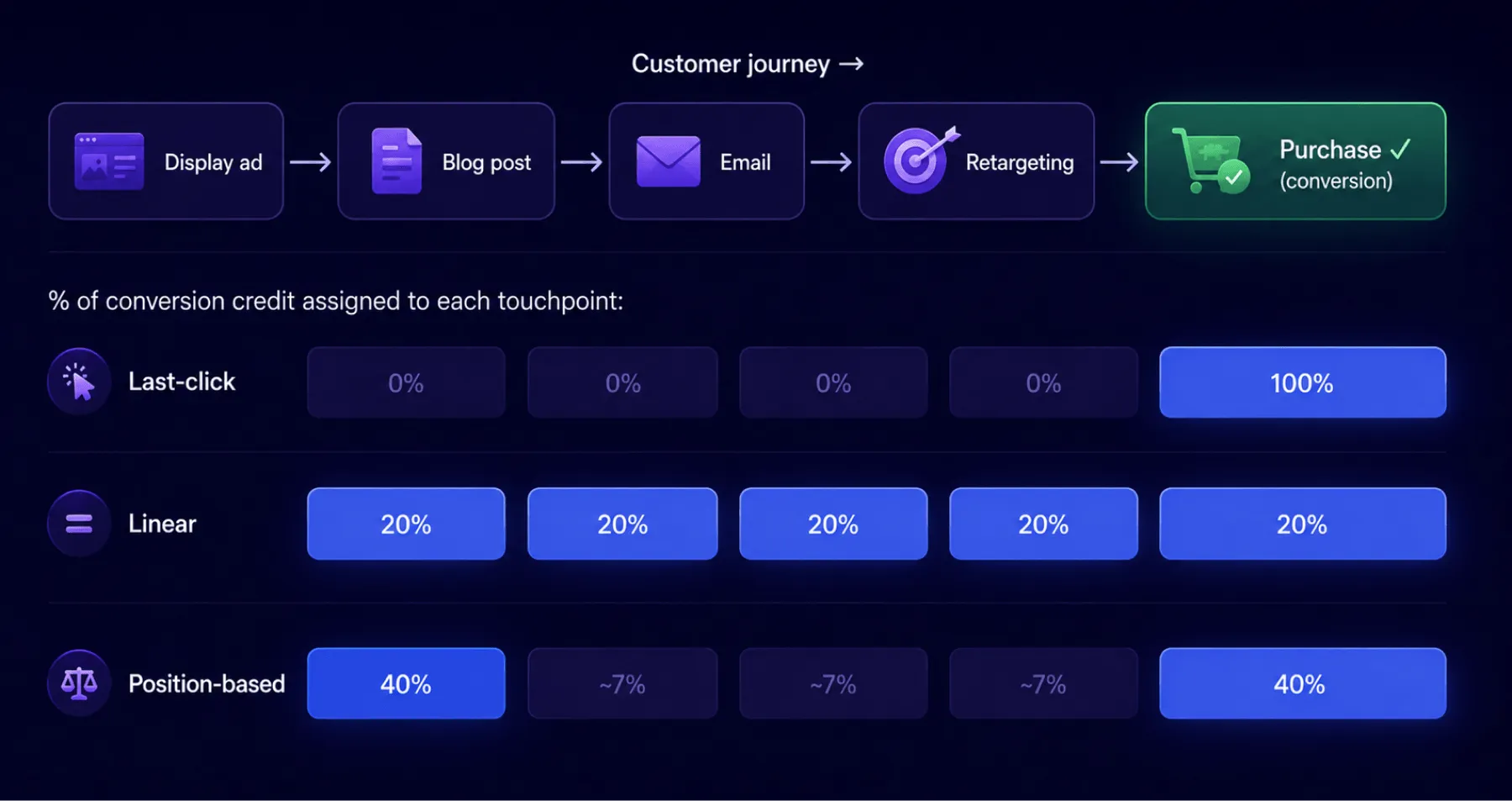
The budget follows those numbers. The display campaign looks inefficient, so it gets deprioritized. This leads to shrinking of retargeting audiences, as there is less prospecting to fill it. Over several cycles the team ends up spending more on retargeting a smaller audience while ROAS declines — and the model never shows why, because the channel that caused the decline is no longer being measured.
The same Emarketer study I mentioned above confirmed the pattern: 63.5% do not think last-click reflects how people actually make purchasing decisions, and 77% describe it as the easiest — not the best — way to measure campaigns.
The Main Attribution Models Compared
Six models cover the overwhelming majority of what media buying teams use. The 'when to avoid' column is what most model descriptions ignore and it is the most operationally useful column in the table.
| Model | How credit is assigned | Best for | Main drawback | When to avoid |
|---|---|---|---|---|
| Last-click | 100% to final touchpoint | Short single-channel paths; simple lead gen | Blinds you to everything before the final step | Any multi-channel or multi-step campaign |
| First-click | 100% to first touchpoint | Measuring awareness channel contribution | Ignores everything that happened after introduction | Conversion-focused or performance campaigns |
| Linear | Equal split across all touches | Long cycles, channel-diverse mix; early tracking maturity | Treats all touches as equally valuable | When some channels clearly carry more weight than others |
| Time-decay | More credit to touches closer to conversion | Short-to-mid cycles where recent interactions matter most | Undervalues early awareness and top-funnel activity | Long B2B research cycles with extended consideration phases |
| Position-based (U-shaped) | 40% first touch, 40% last touch, 20% distributed middle | Brands that need to credit both acquisition and close | Middle-funnel weighting is arbitrary, not data-driven | When mid-funnel touchpoints are the real conversion driver |
| Data-driven | Algorithm assigns credit by actual contribution | High-volume accounts with clean tracking | In GA4 silently reverts to last-click below 400 conversions/month | Low-volume accounts, new campaigns, unreliable tracking |
A note on data-driven in GA4: GA4 does not notify you when your account falls below the 400-conversion threshold required for data-driven attribution. If conversion volume has dropped, you may be running last-click while the settings still show data-driven. Check the attribution settings under Admin → Attribution Settings before interpreting any cross-channel data.
A note on Google Ads: Google Ads removed its minimum conversion threshold for data-driven attribution. If you run primarily Google Ads traffic, data-driven is available regardless of account size. The threshold issue applies to GA4 cross-channel attribution specifically.
Outside GA4, the data-driven threshold varies by platform. Most demand-side platforms (DSPs) and mobile measurement partners (MMPs like AppsFlyer, Adjust) apply their own attribution logic independently.
Check your platform's settings to confirm which model is active and whether it requires a minimum conversion volume to run correctly. If you are unsure, linear is the safest default: it makes no assumptions about which touchpoints matter most.
How to Use Attribution Modelling: 3 Real Case Scenarios
Scenario 1: Short Ecommerce Path (3 touches, 5 days)
A user sees a display ad on Monday. On Wednesday they click a paid search ad. On Friday they click a retargeting ad and purchase. Here is how each model distributes the credit:
| Model | Display ad | Search click | Retargeting click |
|---|---|---|---|
| Last-click | 0% | 0% | 100% |
| First-click | 100% | 0% | 0% |
| Linear | 33% | 33% | 33% |
| Time-decay | ~15% | ~25% | ~60% |
| Position-based | 40% | 20% | 40% |
For a three-touch path over five days, last-click and time-decay are both defensible — the path is short enough, so the final interaction carries significant weight.
Linear is a fair starting point if you have no strong prior belief about which touchpoint mattered most. First-click would misallocate the budget toward prospecting display by overvaluing the introductory touch.
Scenario 2: B2B SaaS Path (8 touches, 60 days)
A prospect sees a LinkedIn ad in week one. They visit the blog in week two. They attend a webinar in week four. They receive an activation email in week six. They request a demo in week seven. A sales call closes the deal in week eight.
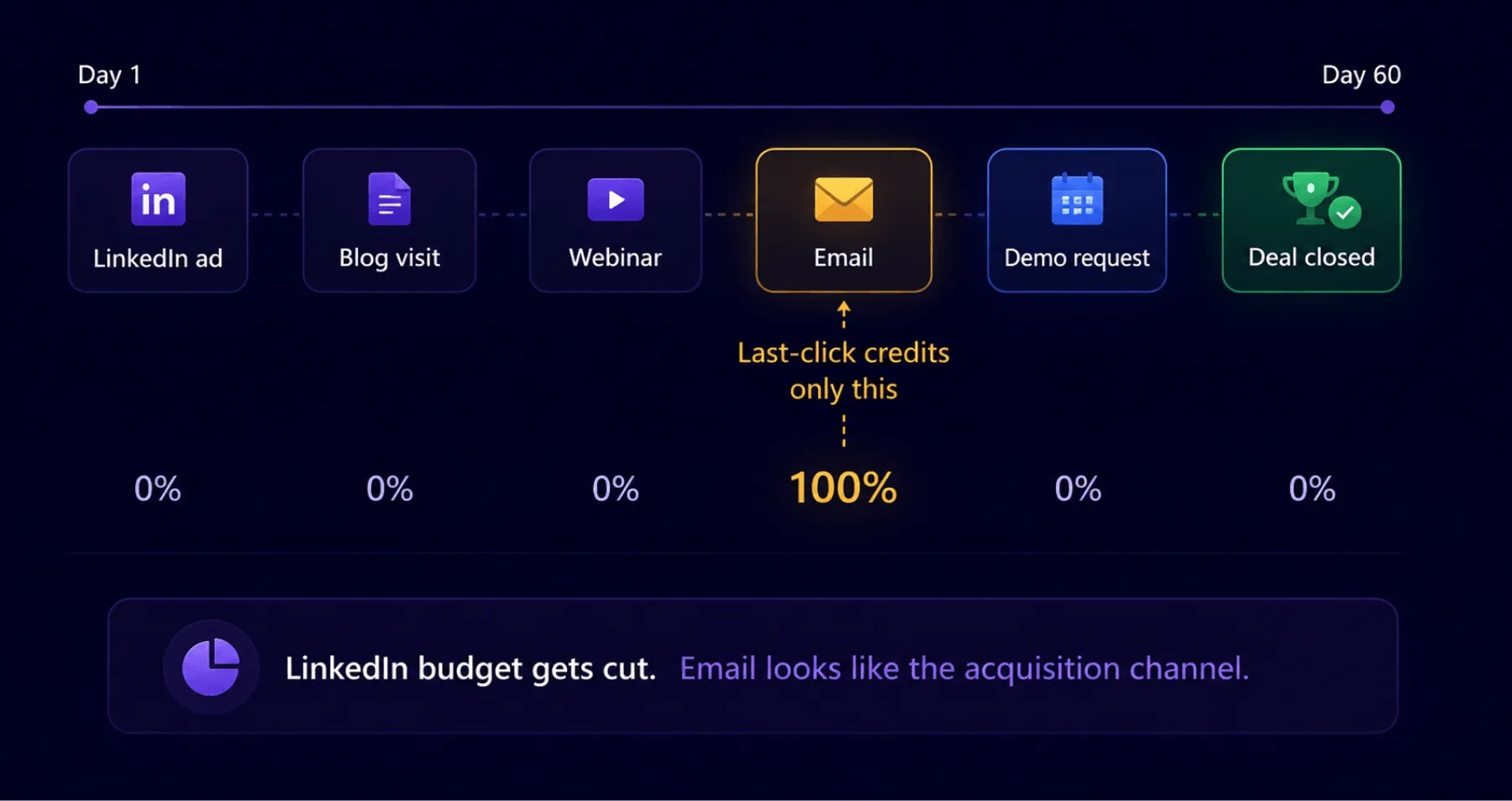
Under last-click attribution, the email in week six receives all the conversion credit — it was the last tracked digital touchpoint before the demo request. The LinkedIn ad, the blog visit, and the webinar receive nothing.
The practical result: the LinkedIn campaign looks like it brings no leads. The webinar is treated as overhead. Email gets credited with every enterprise deal, and the team over-invests in nurture sequences while the awareness channels that filled the pipeline at the top are defunded.
For a 60-day, eight-touch journey, linear or position-based attribution gives a significantly more accurate picture of where each channel contributed. Data-driven would be ideal if the account has sufficient volume and would likely identify the webinar and demo request as the highest-weight touches.
Scenario 3: iGaming Campaign (3 touches, 9 days)
A sports betting operator runs a user acquisition campaign across programmatic display and paid search. A user sees a display ad on a sports news site on day one. On day seven they search for the brand by name and click a paid search ad. On day nine they register and make a first deposit.
| Model | Display ad (day 1) | Paid search (day 7) | Registration / FTD (day 9) |
|---|---|---|---|
| Last-click | 0% | 0% | 100% |
| First-click | 100% | 0% | 0% |
| Linear | 33% | 33% | 33% |
| Time-decay | ~10% | ~30% | ~60% |
| Position-based | 40% | 20% | 40% |
Under last-click, paid search receives 100% of the credit. The programmatic campaign that introduced the brand loses budget next cycle.
This is the standard iGaming attribution problem. Programmatic display runs on sports content to build brand familiarity with relevant audiences. Paid search captures users who already decided to act — most of them because they remember seeing the brand somewhere. Last-click systematically credits the capture channel and defunds the introduction channel, until the branded search volume starts declining because there is nothing feeding it.
Position-based or linear attribution gives the display campaign partial credit and makes the relationship between the two channels visible. Data-driven attribution applied to the FTD event would likely show that users introduced via display convert at a higher LTV than direct search traffic, because the display audience self-selects by interest before any retargeting occurs. Last-click will never surface that relationship.
Choosing the Right Attribution Model for Your Case
No single model fits every campaign. The right choice depends on how your customers actually move toward a conversion — the length of the cycle, how many channels they touch, and how much data you have to work with. Answer the four questions below in order and you will land on a model that matches your setup, not just the platform default.
| [object Object] | [object Object] | [object Object] | [object Object] | [object Object] | [object Object] | [object Object] | [object Object] | [object Object] |
|---|---|---|---|---|---|---|---|---|
| Sales cycle | Under 7 days | Last-click or time-decay | ||||||
| 7–30 days | Time-decay or position-based | |||||||
| Over 30 days | Linear or position-based | |||||||
| Touchpoints | Fewer than 3 | Last-click | ||||||
| 4 or more | Any multi-touch; avoid last-click and first-click | |||||||
| Channels | Single channel | Last-click is accurate | ||||||
| Multiple (awareness + conversion) | Multi-touch | |||||||
| Conversion volume in GA4 | Under 400/month | Linear — data-driven will revert to last-click anyway | ||||||
| Over 400/month, clean tracking | Test data-driven alongside your current model |
One practical note: running two models side by side for a month is usually more informative than any industry benchmark. The channels where credit assignment changes most significantly are the ones worth investigating first with your actual campaign data.
Where Attribution May Go Wrong for Your Campaign
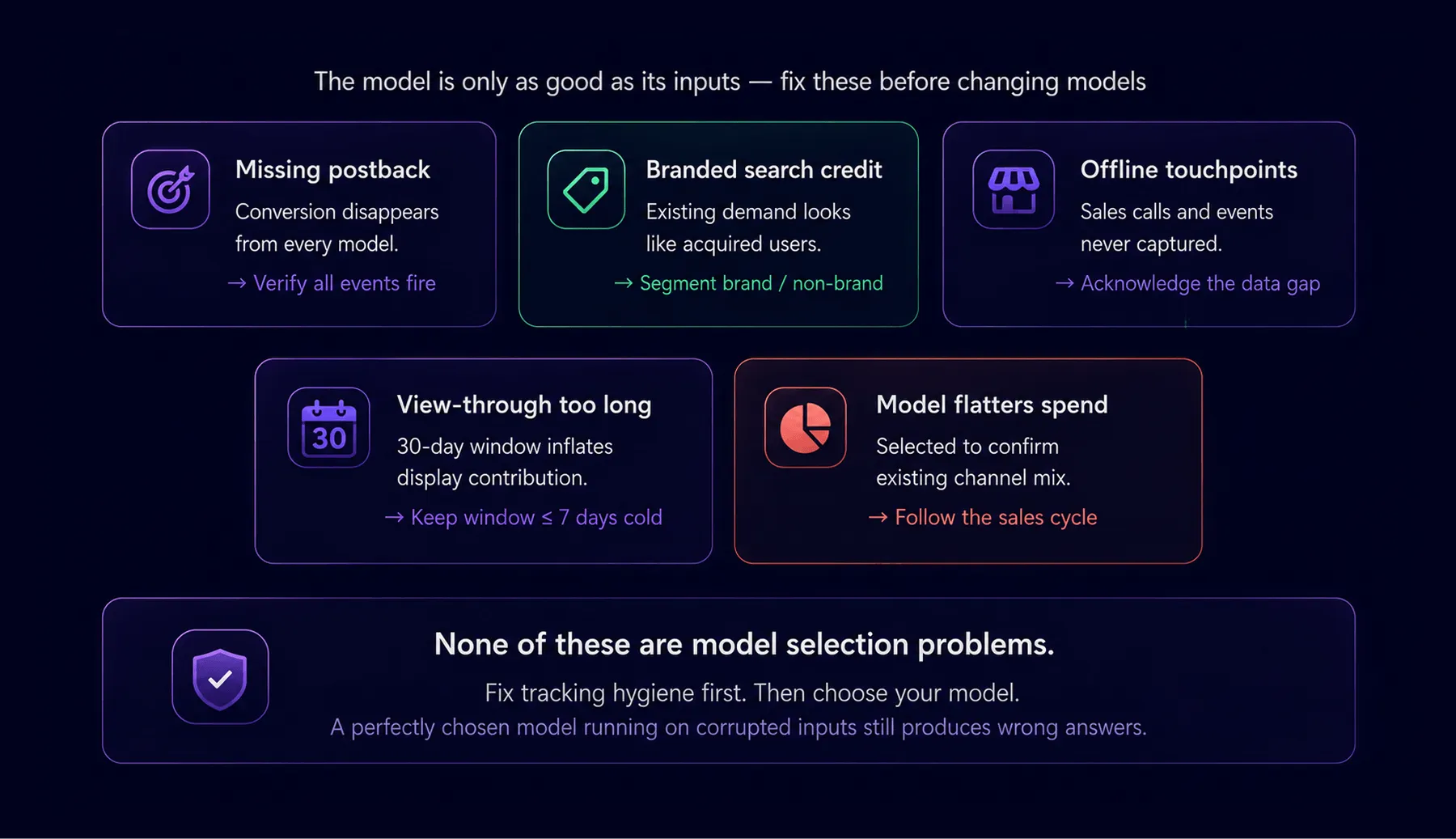
Attribution modelling fails in specific ways, and understanding them matters more than choosing the right model, because even the best model produces wrong answers when the inputs are corrupted.
The Postback is Not Set at All
If a conversion event is not being captured because the postback URL was misconfigured, the macro was not passed through, or the pixel fired on the wrong page — that conversion disappears from every model.
The channel that drove it receives no credit. Verify that every conversion event is actually firing before you interpret attribution data. This is the most common error and the least visible.
Around 60% of performance-based advertisers and agencies on Epom need postback tracking configured. In practice, a significant share either skip it or configure it incorrectly. The most common issue is not knowing which macro goes into which field in the postback URL. Without it, a campaign runs without visibility: spend goes across every available source with no way to identify which ones produce results.

Branded Search is Getting the Credit
Branded search clicks look like high-performing touchpoints because they convert at high rates. But users typing your brand name were mostly already going to convert, you didn't acquire them with that click. Attributing that revenue to the branded search rather than to the awareness channels that built the brand is one of the most common sources of budget misplacement. Separate branded from non-branded traffic before running any attribution analysis.
The Offline Journey is Invisible
Sales calls, events, and direct outreach do not appear in digital attribution data. In B2B or high-ticket campaigns this is a reason to treat the output with scepticism and prefer linear or position-based models, which distribute credit across what is tracked rather than concentrating it at the last digital touch.
Claiming Credit for Impressions That Never Converted
Some platforms claim conversion credit for users who saw an ad impression but never clicked it — this is view-through attribution.
It is legitimate only when the window is short and the audience is genuinely new. A 30-day view-through window on a retargeting campaign reaching users already likely to convert inflates display and video contribution substantially. Keep windows tight and apply them only to cold audiences.
Choosing Model Only to Justify Ad Spend
Teams tend to adopt models that confirm the value of channels they already believe in. The model should follow the sales cycle. If it was selected to make current spend look efficient, the attribution report is telling you what you wanted to hear.
This is a mistake to avoid, if you want your reports to be truthful, and not only pretty.
Struggle to attribute your conversions correctly in a DSP? We know how to set it up and will gladly help. Talk to our ad tech expert →
How Epom DSP Supports Attribution-Ready Tracking
Epom DSP does not perform attribution modelling in the mathematical sense — first-touch, linear, data-driven, and similar models run in your analytics platform or MMP. What Epom provides is the conversion signal that any model depends on, and makes it reliable enough to be worth modelling.
Once tracking is set up correctly, the same budget that was distributed across fifteen sources can be redirected toward the three that are actually converting. That is the direct business consequence of getting attribution-ready tracking in place.
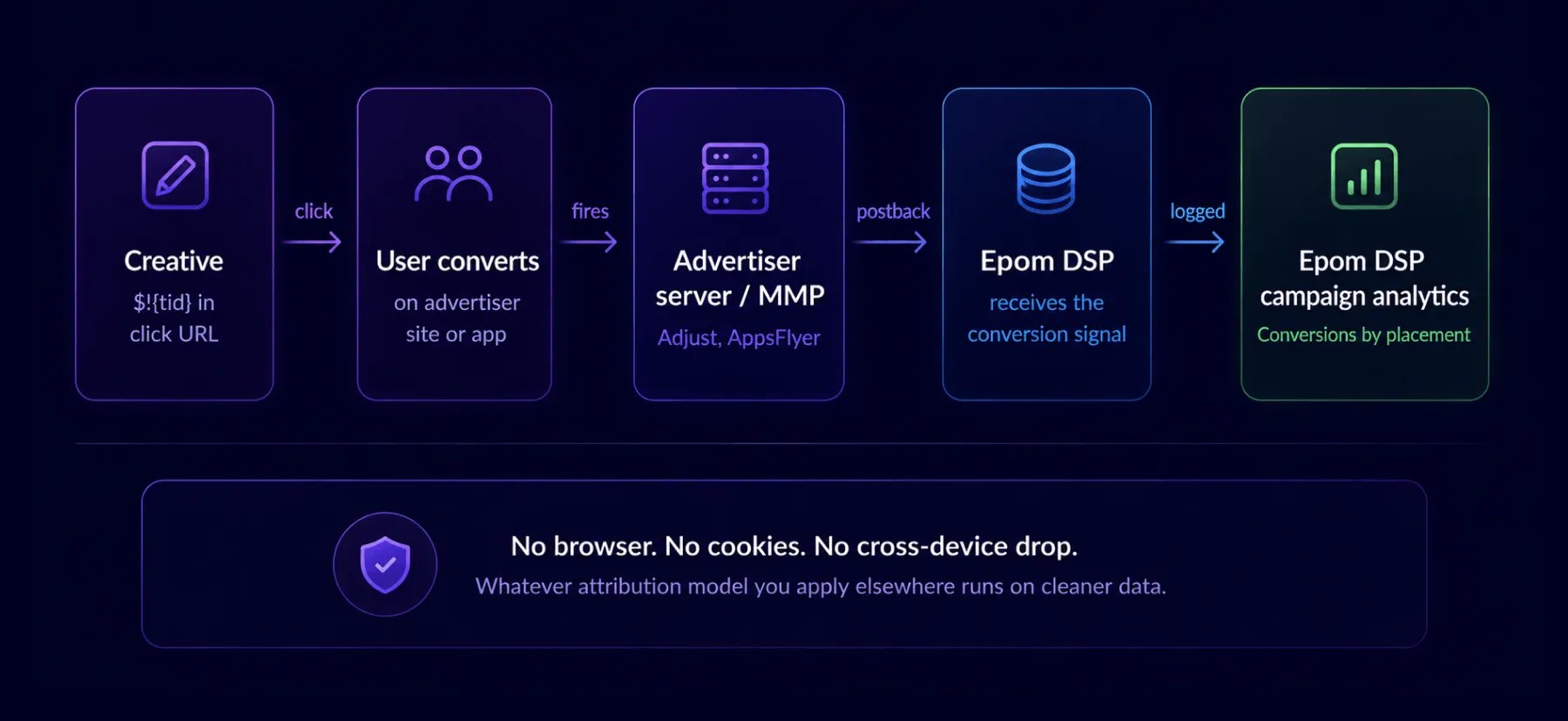
Epom uses S2S (server-to-server) postback as the primary tracking method. When a click fires, the $!{tid} macro captures a unique token ID for that event.
When the user converts — on the advertiser's site or inside a mobile app — the advertiser's server or MMP fires a postback URL back to Epom with that token, completing the attribution loop. S2S does not depend on the user's browser, ad blockers cannot interrupt it, and it does not lose events when a user switches devices.
Here is how that signal travels from a click to your analytics dashboard — without a browser, without cookies, and without losing the event when a user switches devices.
Epom DSP Tracking Specifics
- Up to three conversion events per campaign. Install, registration, and deposit can each be tracked simultaneously under separate postback URLs. For verticals like iGaming or crypto this distinction is what makes attribution actionable rather than decorative.
- S2S attribution links. For campaigns where Epom notifies third-party networks about user interactions, the DSP counts the events directly rather than relying on a supply-side platform pixel. This reduces the gap between buy-side and sell-side reporting.
- SKAdNetwork. Full support for Apple's privacy-compliant attribution framework for iOS mobile install campaigns, where device-level tracking is unavailable.
Conversions appear by placement and source in the campaign analytics dashboard, so you can identify which specific placements produce post-click results and reallocate budget toward those sources. The postback setup guide covers the full implementation.
Frequently Asked Questions About Attribution Modelling
Ready to Build a Cleaner Attribution Setup?
Attribution modelling only works when the data going in is reliable. The model you choose matters less than whether your tracking captures conversion events at the right placement and source — consistently, without dropping events when users switch devices or block cookies.
Epom DSP tracks conversions via S2S postback and reports by placement, so you know which sources produce results before any attribution model interprets them.