
REST API overview
Base URL, the three authentication methods with a worked hash example, where your API key lives, what happens after repeated failed credentials, response shapes, pagination, URL conventions, error codes and where to find the interactive API docs.
Nearly everything you can do in the control panel — managing advertisers, campaigns, creatives,
sites, placements, targeting, capping and reporting — is also available over a REST API.
This page covers the conventions shared by all endpoints. The other pages in this section
walk through each functional area with curl examples and link every call to its full entry
in the generated reference.
Base URL
The API is served from the same domain as your control panel:
https://<your-network-domain>/rest-api/...Every endpoint path starts with /rest-api/ and ends in .do, with no exceptions. Some
paths answer more than one HTTP method; the per-tag reference lists every
path and method and gives the current totals. If your network runs under a white-label domain, use that domain; API access,
permissions and data scope are identical.
Authentication
Three methods are supported. Pick one per request; you don’t combine them.
| Method | Best for | How it works |
|---|---|---|
Hash (username + timestamp + hash) | Server-to-server integrations | Signed request: an MD5 signature built from your password and a timestamp |
API key (X-Api-Key header) | Scripts and integrations | One header on any REST call that needs a signed-in user |
| Session cookie | Browser-based tools, quick tests | Log in to the control panel, reuse the session cookie |
Hash authentication (recommended)
Add three query parameters to any request:
| Parameter | Value |
|---|---|
username | Your control-panel login |
timestamp | Current Unix time in milliseconds |
hash | MD5( MD5(password) + timestamp ) — hex digest, either letter case |
Worked example with password MySecret42 and timestamp 1751712000000:
MD5("MySecret42")→307ec992a5c1e4622ae2f7c909a0992f- Concatenate with the timestamp →
307ec992a5c1e4622ae2f7c909a0992f1751712000000 MD5of that string →9ece291919268a203f248e81a969253f— this is yourhash
TS=$(($(date +%s) * 1000)) # milliseconds!
PWD_MD5=$(printf '%s' 'MySecret42' | md5 -q) # Linux: md5sum | cut -d' ' -f1
HASH=$(printf '%s%s' "$PWD_MD5" "$TS" | md5 -q) # Linux: md5sum | cut -d' ' -f1
curl "https://<your-network-domain>/rest-api/advertisers.do?username=john.doe×tamp=$TS&hash=$HASH"Warning: the timestamp must be in milliseconds, and the server accepts it only within ±5 minutes of its own clock. A timestamp in seconds, or a machine with a skewed clock, produces
Request is obsolete.A wrong password or a wrong concatenation order producesData fingerprint mismatch., and an unknownusernameproducesNo matching credentials found.— all three arrive as HTTP 401.
Corner case: the signature is checked before the clock. A request whose hash is wrong reports the fingerprint mismatch even if the timestamp is also stale, so fix the hash first and re-test before blaming clock drift.
Because the timestamp is part of the signature, a long-running script must recompute
timestamp and hash per request, not once at start-up.
Three endpoint families take the same three values as path segments rather than query parameters — the formula is identical:
/rest-api/analytics/{format}/{login}/{hash}/{timestamp}.do
/rest-api/analytics/reports-layout-settings/{login}/{hash}/{timestamp}.do
/rest-api/self-serv/dashboard/{login}/{hash}/{timestamp}.do
See Analytics reports via API.
Note: because
hashandtimestampare signature values rather than business parameters, the generated reference and Swagger UI omit them from query-parameter lists. They still have to be sent. They are listed where they are path segments, as above.usernameandapiKeyare ordinary parameters and are shown normally.
The $AUTH shorthand
The curl examples on the other API pages abbreviate the three signature parameters as
$AUTH and append it to the URL. Build it from the TS and HASH above, fresh for each
request:
AUTH="username=john.doe×tamp=$TS&hash=$HASH"
curl "https://<your-network-domain>/rest-api/sites.do?$AUTH"To authenticate with an API key instead, set the key once and send it as a header
in place of $AUTH — every example works the same either way:
APIKEY="<your API key>"

curl -H "X-Api-Key: $APIKEY" "https://<your-network-domain>/rest-api/sites.do"
API key
Send your key in the X-Api-Key header (or as Authorization: Bearer <key>) on any REST call
that needs a signed-in user. The key is a 32-character value tied to your user account,
generated on your Preferences page; the call runs with exactly your permissions. Your role
needs the API Key Access permission, and no stock role has it — on a new network your
network administrator switches it on for the roles that should use the API. Without it the key is refused
with 401 and API key access is not enabled for this account; the key of a deactivated
account is refused with Account is not active. The analytics report (/rest-api/analytics/{format})
and the MCP endpoint (/mcp) refuse it with 403 instead.
curl -H "X-Api-Key: $APIKEY" "https://<your-network-domain>/rest-api/sites.do"A request that carries more than one key has them tried in order — X-Api-Key, then
Authorization: Bearer — and the first that belongs to an account allowed to use API keys
wins, so a proxy that adds its own Bearer header does not hide your X-Api-Key.
On general REST calls the key works only in a header: in the query string it would end up in
proxy logs and browser history, so a query-string apiKey is not read there — the call is
authenticated by hash or session, or answers 401. Send the key as X-Api-Key on the analytics
report too:
curl -H "X-Api-Key: $APIKEY" "https://<your-network-domain>/rest-api/analytics/JSON.do?range=YESTERDAY"As a fallback for a client that cannot set a header, that one endpoint
(/rest-api/analytics/{format}.do, GET and POST) also accepts the key as an apiKey query
parameter; a header wins when both are sent.
Unlike a signed hash, which expires after five minutes, a key is valid until you generate a new one — treat it like a password and rotate it if it leaks.
Where your key lives. It is your own, not the network’s, and you mint it yourself: Account → Preferences → Change personal information → API key. Click Generate next to the field: the server mints a fresh 32-character hex value, saves it at once and shows it in the field — there is nothing to submit afterwards. The AI assistant (MCP) card on the same page shows the same key and has its own Generate API key button while you have none; see Connect an AI assistant (MCP).
| What you see on the Change personal information card | Why |
|---|---|
| The API key field with a Generate button | API Key Access is enabled and Manage Preferences is enabled |
| The field, read-only, with no button | API Key Access is read-only; or Manage Preferences is read-only, and then the card is titled Personal information |
| No API key field at all | Your role has no API Key Access, or Manage Preferences is off and the whole card is hidden — ask your network administrator |
Warning: Generate replaces the key permanently the moment you click it — there is no confirmation, no grace period and no second key slot. Every integration using the old key stops authenticating at that moment. Roll it only when you are ready to update the callers.
Corner case: a wrong, revoked or unknown API key is refused with 401 on both doors, but the body differs. On a general REST call it is
{"success": false, "errors": {"error": "Not logged in"}}. On the analytics endpoint it carriesrest_error(No matching credentials found.) next toerrors.user(invalid user) — the analytics endpoints use their own body shape for authentication failures, noterrors.error.
Failed credentials and the lockout
Repeated refused credentials — a wrong hash, an unknown login, a wrong API key — temporarily block
further attempts from the caller’s address. While it is blocked, every request that presents a
credential is refused with 401 and Too many failed attempts, even one with a valid key or
hash. Wait a few minutes and try again; if it persists, ask your network manager. A console session
that is already signed in keeps working.
Session cookie and token login
For browser-based access, log in to the control panel and the session cookie
(APPSESSIONID) authenticates subsequent API calls from the same browser.
For programmatic session creation there is a two-step token flow:
POST /rest-api/auth/token.dowithusernameandpassword. Returns{"success": true, "authToken": "...", "role": "..."}.GET /rest-api/auth/{authToken}/login.do— establishes the session.
Corner case: step 2 redirects to
/index.doby default, even on failure. Addjson=trueto get{"success": …, "redirectUrl": …}back instead, or acallbackparameter for JSONP. Without one of those, a script that follows redirects cannot tell a good token from a bad one.
There is also POST /rest-api/auth/forgot.do to trigger a password-reset email. It
succeeds silently for an address that has no account, on purpose — that response tells you
nothing about whether the address exists.
Signing a user in from another website: navigate, do not fetch. Step 2 has three answer
modes. The default answers with a redirect to the control panel; json=true answers JSON and
callback=<fn> answers JSONP. Only the default mode works when the call comes from a page on
another site: open the URL as a top-level navigation (window.location, a link, or a form
target="_top"), and the session cookie is set while the browser loads it. Called from another
site through <script>, fetch or XHR — which is what the JSONP and json=true modes are for —
the response still reports success: true, but the browser discards the session cookie
(SameSite=Lax), so following redirectUrl lands on the login page and the token is already
spent. Use those two modes only from pages served by the control panel’s own domain.
Corner case: the token is valid for one minute and is invalidated after a single use — the server evicts it from the cache as it reads it. The token endpoint requires HTTPS unless the server was explicitly configured to allow HTTP; over plain HTTP it answers 403 with
{"success": false, "error": "Secure channel required"}. Every refusal — unknown username, wrong password, deactivated account, an address outside the user’s IP whitelist — answers 401 with the sameUsername or password is incorrect, so check each of those when a known-good password is refused. After repeated failures the answer is the lockout message instead (also 401), whatever the password; wait a few minutes.
Writes over a session need the CSRF token. A POST, PUT or DELETE authenticated only
by the session cookie must also send the session’s CSRF token in the X-CSRF-TOKEN header
(or a _csrf parameter); without it the call is refused with 403 and nothing is changed.
The control panel and Swagger UI add the token for you. A script that logs in through the
token flow and then writes with a cookie jar should switch to hash or API-key authentication,
which need no token. Reads (GET) are unaffected.
Note: cross-origin calls get no access to the session cookie: browser code on another site can call the API, but only with hash or API-key authentication. The session cookie is sent as
SameSite=Lax, and the session id changes at login.
Your first call
A good first call lists the sites your account can see: GET /rest-api/sites.do (an advertiser
account starts with advertisers.do, which answers in the same bare-array form). Every role can
sign a request with hash authentication; no permission is
needed for it. The API key route needs API Key Access on your role, which no stock role holds
— on a publisher or advertiser account, ask your network administrator to switch it on for your role
before you look for a key (see API key).
curl -H "X-Api-Key: $APIKEY" "https://<your-network-domain>/rest-api/sites.do"The answer is a bare array — there is no success key — with one object per site you can view,
ordered by id. Deleted sites are left out, and an account that may view no inventory gets 403:
[
  {"id": 5001, "name": "Sports Daily", "enableTargeting": false},
  {"id": 5002, "name": "Northwind Recipes", "enableTargeting": true}
]
enableTargeting is the site’s pre-targeting switch. Add basicInfo=true to get a basicInfo
object on every row (or basicInfoIds=5001,5002 for only those sites):
[
  {
    "id": 5001,
    "name": "Sports Daily",
    "enableTargeting": false,
    "basicInfo": {
      "isActive": true,
      "hasTraffic": true,
      "created": {"timestamp": 1751712000000, "formatted": "05/07/2025"},
      "url": "https://sportsdaily.example",
      "email": "ads@sportsdaily.example",
      "monthlyVisitors": "-",
      "monthlyImpressions": "-"
    }
  }
]
hasTraffic says whether the site has served recently. created, url, email and
description appear only when the site has a value; monthlyVisitors and monthlyImpressions
are the ranges picked on the site, or -. isPrivate and categoryIds (comma-separated) appear
only for a role that may see the Private flag and inventory categories. To trim rows, pass
fields=name (the id is always kept), and page with offset and limit — see
Pagination and list conventions.
Response format
There is no single envelope. Which shape you get depends on the endpoint family, so read the shape before you write the client.
| Shape | Looks like | Who returns it |
|---|---|---|
| Bare array | [{…}, {…}] | Most entity list and tree endpoints — advertisers.do, campaigns.do, sites.do, banners.do, placements/all.do, advertisers-tree.do, sites-tree.do |
| Bare object | {"name": "…", "id": 4, …} | Most single-entity reads — advertisers/{id}.do, zones/{id}.do |
| Grid page | {"data": […], "total": 12, "overflowed": false} | Grid-backed lists, e.g. template/list.do |
| Status envelope | {"success": true, "id": 1001} | Create, update, delete and action endpoints |
| Error envelope | {"success": false, …} | Every failure — see Error codes |
Warning:
successexists only on the last two shapes. A client that doesif (!response.success) fail()treats every successfulGET /rest-api/advertisers.doas a failure, because a bare array has nosuccesskey. Branch on the HTTP status first, then onsuccesswhere the body is an object that has one.
On the status envelope:
success—falseon every failure. A failure is also answered with the 4xx status that describes it (see Error codes), so you can rely on either the status or the flag; the body keeps the same keys it always had.msg— human-readable message, usually only on errors.errors— map of field name → validation message on validation failures. A failure whose reason is only inmsg(or in anerrorcode) repeats it aserrors.error, so one reader handles every refusal.- Create endpoints typically add an
idfield with the new entity’s ID. - Empty collections are serialized, not dropped: an empty grid page is
{"data": [], "total": 0, "overflowed": false}and an empty list endpoint is[]. overflowedon a grid page means the result was truncated by a server-side ceiling rather than by yourlimit.
Parameters that were not applied
The create and update calls — advertisers, campaigns, banners, sites, zones and placements, limits and pricing writes, saved reports, templates, and the site/placement piggyback and own-profile updates — set only the fields they are made for and that your role may change. A parameter outside that set does not fail the call — the rest of the update is still applied — but it is named back so a success is never mistaken for “everything I sent was saved”:
{
  "success": true,
  "ignoredFields": ["active", "contactNmae"],
  "ignoredFieldReasons": {
    "active": "not permitted",
    "contactNmae": "not a field of this operation"
  }
}
not permitted— a real field of the call that needs a permission your role lacks (the stored value is kept);not a field of this operation— a misspelt name, a field managed by another endpoint, or one the call never changes;- a sentence naming the cause, where the call itself could not apply the value and says why — the
permission a changed limit cap or a banner
statusneeds (Your role lacks the TOTAL_CLICKS_LIMIT permission.), athirdTrackingCode[…]key that is not*or two letters, abrowserVersionthe browser cannot be targeted by, alinkToPlacementswith no auto-linking rules or no linking permission. The field is not applied and the rest of the call is saved.
Both keys are absent when everything was applied. Authentication parameters and parameters the
call reads itself (ids, categoryId, labels, …) are never listed.
Pagination and list conventions
Three parameter styles exist, depending on the endpoint family:
| Style | Parameters | Used by |
|---|---|---|
| Entity lists | offset (0-based), limit, fields (comma-separated; id is always kept), filter[…] (on/off settings and has… relation flags) | /rest-api/advertisers.do, campaigns.do, sites.do, banners.do, placements/summary.do. Advertisers, campaigns and sites come ordered by id, and without limit they return every row. /rest-api/sites/{siteId}/zones.do takes fields and filter only |
| Trees | start (0-based), limit (omit it for every entry) | /rest-api/advertisers-tree.do, /rest-api/sites-tree.do; entries are advertisers or sites, ordered by id, each with everything beneath it. A page shorter than limit is the last one |
| Grid style | start (0-based offset), limit, plus sort, dir (ASC/DESC), multisort (JSON array of {property, direction}), query (name search), activeOnly, onlyData, onlyTotal | Grid-backed lists, e.g. /rest-api/template/list.do |
Analytics reports page with offset and limit too, but their limit defaults differently —
see Analytics reports via API. A requested fields name that no
returned row carries is listed in the X-Ignored-Fields response header, and an unknown
filter key is a 400 that lists the valid keys. /rest-api/placements/all.do is the one
list that is not paged and takes no parameters: it returns every accessible placement. The
per-endpoint rules (bounds on limit, the filter keys of each list) are in
Entities: create, read, update, delete.
URL and parameter conventions
- Kebab-case paths are the convention for new endpoints (
/frequency-capping,/no-click-capping,/price-adjustment-rules), and most paths already use it. A few older paths still carry a camelCase segment —/advertiserShares.do,/siteShares.do,/floorCPMs.do,/banners/sendToApprove.do,/sites/{siteId}/changeAdServingDomain.do,/adsHosts.do,/invocationCodeHosts.do,/banner/dspPartners.doand the rest. They work; expect new features in kebab-case. - One path is snake_case:
/rest-api/placements/update/click_through.do. Every neighbouring placement endpoint is kebab-case (update/non-standard.do), so this one is easy to guess wrong. Copy it exactly. - Parameters are form/query parameters, not JSON bodies, for nearly all endpoints.
Send POSTs as
application/x-www-form-urlencoded. The exceptions (JSON or multipart bodies) are called out on the pages that document them. - Enum parameters are per-parameter, not uniform. Most take the enum name
(
priority=PREMIUM,bannerType=EXTERNAL_FILE), several also accept the legacy numeric ID, and a few take the numeric ID only. The generated per-tag reference prints the accepted values for each parameter — when it shows a list of names, names are what that endpoint takes. - Dates are
yyyy-MM-ddon most endpoints; the limits endpoints useyyyy-MM-dd-HH-mm. Each page states the format it needs. - Repeatable array parameters are passed by repeating the name:
countryCode=US&countryCode=DE.
Calls that change data do not answer GET. Endpoints that delete, toggle, recalculate or
reload — for example /rest-api/rules/{entity}/{entityId}/enable.do, …/remove.do and
/rest-api/template/delete.do — accept POST only; a GET gets 405 Method Not Allowed.
Which method a delete takes. Deletes are split between DELETE and POST, and the wrong
one gets 405. The main families:
| Method | Delete endpoints |
|---|---|
DELETE | Advertiser (/advertisers/{id}/delete.do) and banner (/banner/{id}/delete.do); targeting rules (/{entity}/{id}/targeting/{targetId}/delete.do, /{entity}/{id}/targetings.do) and preset domain, app-package and IP-range lists; capping by kind (/{campaign|banner}/{id}/frequency-capping.do and the other kinds); entity limits (/{entity}/{id}/limits.do); country prices (…/pricing/{countryCode}.do); price adjustment rules; conversion actions; labels; shares; campaign piggybacks; VAST companions, files and events; saved reports; advertiser payments and publisher payouts |
POST | Campaign, site, zone and placement (…/{id}/delete.do); rule groups (/rule/{ruleId}/delete.do) and detaching them (/rules/{entity}/{id}/remove.do); cappings by id (/capping/delete.do); per-action limits; pricing models (…/pricing/{paymentModel}/remove.do); bid floors; templates with their files and properties; placement and site piggybacks; server-side trackers; tracking codes; PMP deals; media library files; dashboard widgets; site CPM thresholds |
The per-tag reference gives the method of every endpoint.
Where the full field list lives. The task pages in this section name the fields a call
needs and the ones that change its behaviour. Every field of an operation — with its type,
description, accepted values and an example request — is in the generated reference, and each
task page links to the exact entry, e.g. POST /rest-api/sites/update.do.
Error codes
| HTTP status | Meaning | Body |
|---|---|---|
| 200 | Request processed | Envelope with success: true. A batch that applied some of its items and refused others also answers 200: success: false, the saved ids in updated and every refused one in failures |
| 400 | Validation error, malformed parameter, missing required parameter or upload file (Parameter missing: file), a parameter combination the endpoint does not take (the message names the accepted ones, e.g. Expected one of: t=PLACEMENT; t=SITE), a value the database refuses | errors map and/or msg. A JSON body names the unknown field (with the accepted ones) or the field whose value is invalid (with accepted values for an enum). A value the database refuses — out of range, too long, a duplicate — is A value in the request is out of range or too long for its field. or The request conflicts with stored data…, without the SQL |
| 401 | Authentication failed: bad hash, expired timestamp, unknown or unauthorised API key, no credential at all, a locked address, wrong password on auth/token | errors.error on general REST calls and on auth/token (error): Data fingerprint mismatch., Request is obsolete., No matching credentials found., Not logged in, API key access is not enabled for this account, Account is not active, Too many failed attempts, Username or password is incorrect. The analytics report endpoints put the text under rest_error instead |
| 403 | Authenticated but not permitted (missing role permission or share) | errors.error (and msg with permissionDenied: true where the endpoint always sent it); the missing grant is named — Your role lacks the OPEN_RTB permission. or You have no UPDATE permission on Campaign 2001. — so you know what to ask your network admin for |
| 404 | Entity or endpoint not found, including a delete or update of something that does not exist. A deleted entity outside your shares answers exactly as an id that never existed — it is not a 403 | errors.error and/or msg naming the missing entity and id, e.g. Placement 4001 not found. |
| 405 | Wrong HTTP verb for that path | {"success": false, "message": "This method is not allowed for the requested URL."} |
| 409 | The write clashes with an existing record (e.g. a PMP deal with the same deal ID, buyer and country), or a creative’s file is missing on the server — nothing was written | conflict: true or bannersFileMissingOnFS: true, with the reason in msg / message (for a missing file, upload it again). Switching targeting on or off never checks files, so it is not refused this way |
| 406 | The Accept header names no type the endpoint can answer with (REST endpoints answer JSON) | Empty body |
| 415 | Unsupported media type (wrong Content-Type on body endpoints) | message, e.g. Content-Type 'text/plain' is not supported. Expected: application/json |
| 429 | The caller’s daily analytics request limit is reached | errors["Too Many Requests"]: Daily requests limit reached. |
| 500 | Internal error | Generic Internal server error (as message, as errors.error on endpoints that answer that shape, or as msg on the analytics report endpoints) — details are logged server-side, never returned |
| 503 | A service the answer depends on did not respond (e.g. the geo service behind region, city and carrier lists) | errors.error; retry later rather than reading an empty list as “none” |
Note: failures carry the HTTP status above, never a 200 with
success: false. The body still explains the failure, so a client that treats any 4xx as a transport error should read the body of a 4xx before discarding it.
Warning: the error text is not always under the same key. Framework-level failures (missing parameter, wrong verb, unreadable body, unsupported media type, no handler, internal error) use
message. Application-level failures use anerrorsobject keyed by field name — witherroras the field name when the failure isn’t attributable to one field. A handful of endpoints use a flatmsginstead. Read all three before deciding a response carried no explanation.
Corner case: a URL that does not end in
.donever reaches the API at all — the container answers it, and the 404 comes back in a different shape:{"success": false, "status": 404, "msg": "Not Found"}. If you see astatuskey, your path is malformed, not your parameters.
Analytics has two ceilings of its own, both set per network: Daily requests per user limit
(default 100) and Records per request limit (default 10,000). Exceeding the
first answers 429; asking for more rows than the second answers 400 with an
errors.limit message naming the ceiling. A report refused for an earlier reason —
permission, bad parameters, or the record-count ceiling — never counts against the daily quota;
see Analytics reports via API for how the day is counted.
Interactive documentation
- Swagger UI:
https://<your-network-domain>/swagger-ui.html - Raw OpenAPI spec (JSON):
https://<your-network-domain>/v3/api-docs
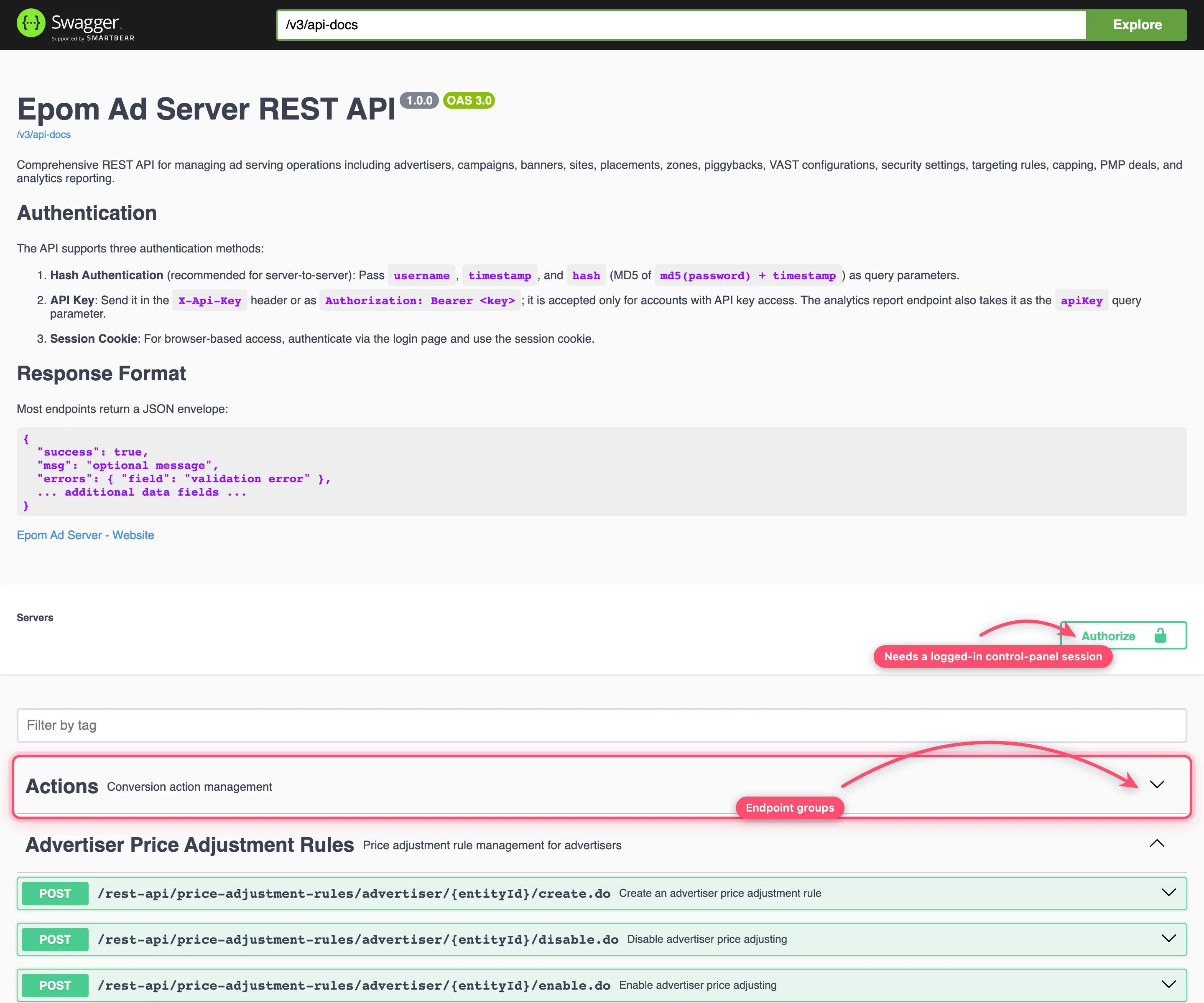
Both require an authenticated session — open them in a browser where you are logged in to
the control panel; anonymous requests get 401. The spec is the authoritative parameter
reference; the pages in this section
summarize the parts you’ll use most. Groups are sorted alphabetically and each one renders
already expanded, so use the Filter by tag box to get to one. Try it out rides on your
session; to call as an API key holder instead, paste the key into Authorize under
apiKeyAuth (sent as X-Api-Key) or bearerAuth (sent as Authorization: Bearer).
Note: Swagger UI itself is loaded from a public CDN (
unpkg.com). On a network that blocks outbound CDN traffic the page renders blank while/v3/api-docskeeps working — fetch the raw spec and open it in your own viewer.
Per-tag endpoint reference
For the exhaustive endpoint-by-endpoint reference — every path, parameter, request body
and response per OpenAPI tag — see the generated
API endpoint reference by tag. One page per tag (Advertisers,
Campaigns, Banners, Targeting Rules, …), regenerated from the spec, so it always matches
what Swagger UI shows. Use the hand-written pages below for task-oriented walkthroughs
with curl examples, and the per-tag pages when you need the full parameter table of a
specific endpoint.
API quotas: how many requests can I make per day?
Only analytics reports are metered. Creating, editing, switching on/off, linking and changing limits, targeting or pricing through the API are not counted against any quota.
| Quota | Default | Applies to | When exceeded |
|---|---|---|---|
| Daily requests per user limit | 100 reports per user per day | /rest-api/analytics/... report calls, counted per API user | 429 with Daily requests limit reached. until the server’s next calendar day |
| Records per request limit | 10,000 rows | One report call; also the row count you get when limit is left out | A limit above it is a 400; page with offset instead |
How to check where you stand: GET /rest-api/network/settings.do returns
analyticsApi.dailyRequestLimit, analyticsApi.requestsUsedToday (your own count) and
analyticsApi.recordsPerRequestLimit. Only a report that actually runs is counted — a call
refused with 400, 401 or 403 costs nothing.
When the count resets. At midnight of the ad server’s own clock — the time zone the
server runs in, which is neither your network’s reporting time zone nor yours. requestsUsedToday
falls back to 0 at that moment, which shows you when it happens; Epom support can tell
you the server time zone.
Raising the quota. Both values (Daily requests per user limit, Records per request limit) are network-wide settings; ask Epom support or your account manager to raise them.
Staying under it. Ask for one report grouped by the dimension you need
(groupBy=PLACEMENT&groupRange=DAY) instead of one call per entity, pull yesterday once a
day instead of polling, and use a separate API user per integration — the count is per user.
See Automate reports.
Statistics by my own parameter (creator id, sub-id) through the API
Reports can only group by what the ad request carried, so the value has to be in the tag first — see Ad request parameters. Two ways, depending on how many labels you need:
| You pass in the tag | Group the report by | Report type |
|---|---|---|
ch=<value> (data-channel) — one label per request | groupBy=CHANNEL (filter: eqStr[CHANNEL]=<value>) | General (default) and Advanced |
cp.<name>=<value> (data-cp-<name>) — any number of named parameters | statisticType=HADOOP&groupBy=CUSTOM_PARAMETER&actionCustomParameterFragment=<name> — rows per value of that one parameter | Advanced only |
# Yesterday's impressions per creator, per country, from the Advanced report
curl -G "https://<your-network-domain>/rest-api/analytics/JSON.do" -H "X-Api-Key: $APIKEY" \
  --data-urlencode "statisticType=HADOOP" \
  --data-urlencode "range=YESTERDAY" --data-urlencode "groupBy=CUSTOM_PARAMETER" \
  --data-urlencode "groupBy=COUNTRY" --data-urlencode "actionCustomParameterFragment=creator_id"
A grouping that comes back empty almost always means the requests did not carry the parameter (a VAST URL or a passback that drops it, a different tag version on the page) — check one live request URL before suspecting the report. Full parameter list: Analytics reports via API.
Usage expectations
- Reference data (targeting values, categories, ad units) changes rarely — fetch it once and cache it rather than per request.
- The one-time login token expires in 60 seconds; request it immediately before use.
Related
- Entities: create, read, update, delete
- Targeting, capping and limits
- Analytics reports via API
- Network services and miscellaneous APIs
- API endpoint reference by tag — generated, exhaustive per-endpoint tables
- Connect an AI assistant (MCP) — the same API through Claude or another MCP client
- Glossary
