
Connect an AI assistant (MCP)
Let Claude or another MCP client work in your account through the ad server's MCP endpoint — connecting with your API key, the task tools, the generic REST API tools, and what the assistant can and cannot do.
The ad server speaks the Model Context Protocol, so an AI assistant such as Claude can work in your account: set up an advertiser and campaign, create inventory, fetch a tag, or run any documented REST API operation except the ones that handle credentials. The assistant acts as you — with exactly your permissions and shares, nothing more.
Note: you don’t need an MCP client to use these tools. The console’s own AI assistant tab runs the same tools as you, without your Epom API key — when your role has the AI Assistant Chat permission, the assistant is switched on for your network and an Anthropic key is available (yours, the network’s, or the platform’s, which is billed). Connecting your own Claude subscription here instead costs the network nothing.
Connect
The quickest way is the AI assistant (MCP) card on your Preferences page — open it from the user menu at the top right (Connect AI assistant) or go to Account → Preferences.
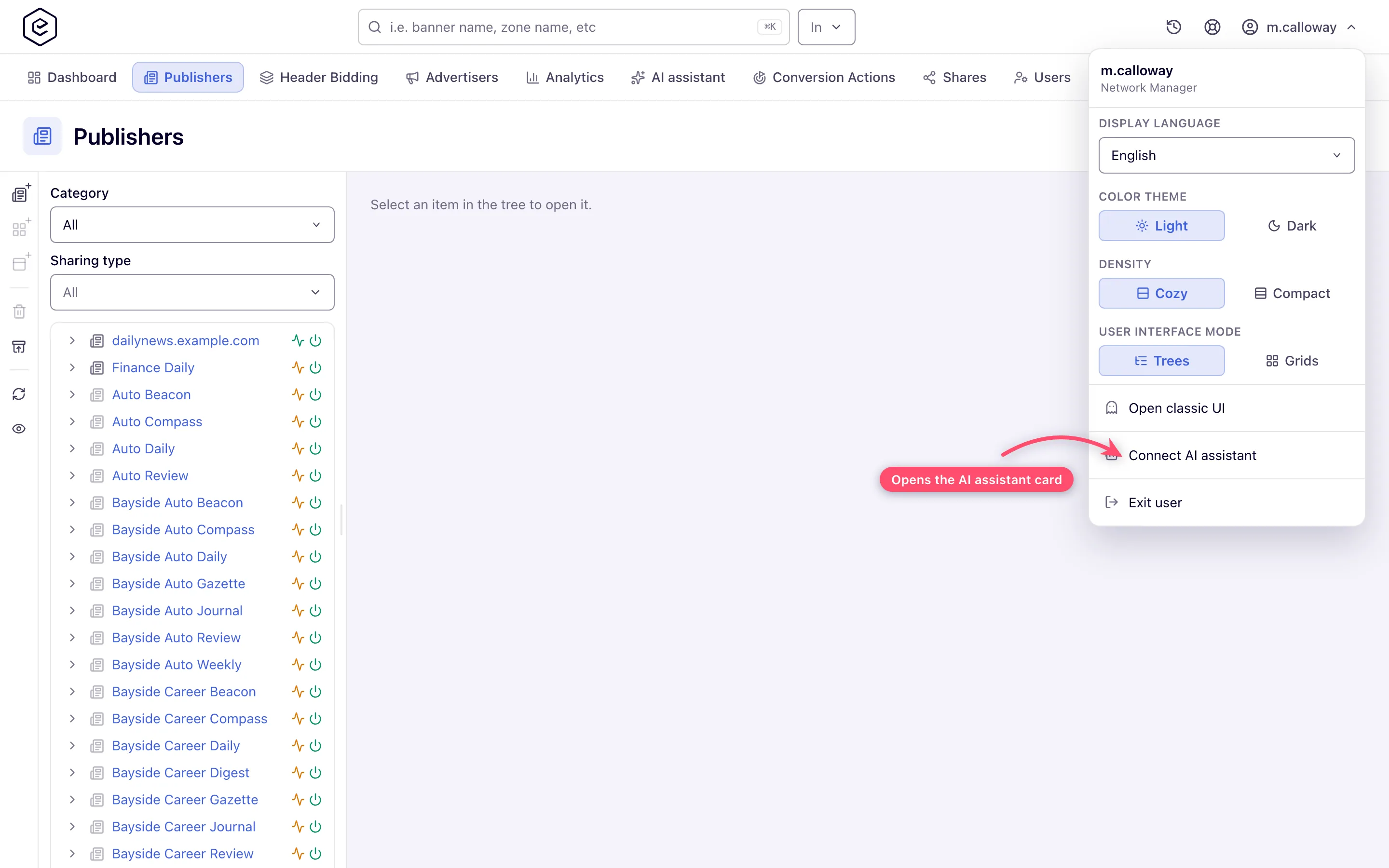
The card and the menu entry appear when your role has the API Key Access permission (enabled or
read-only) and you can open the Preferences tab. API Key Access is switched off in every stock
role; release 153 switched it on for every role that already had the AI Assistant Chat permission, so the
chat’s users see the card. For any other role your network administrator switches API Key Access on for the
users who should use the API and the assistant — ask your network manager. The card is part of the new
console only; the classic UI has no equivalent. The endpoint enforces the same rule:
/mcp answers 403 to the key of a role without API Key Access, even if the key was issued
before the permission was switched off.
Until you have a key, the card shows the endpoint, a Generate API key button and the tools your role can use. With API Key Access set to read-only the button is replaced by Ask your account manager to issue an API key for you.
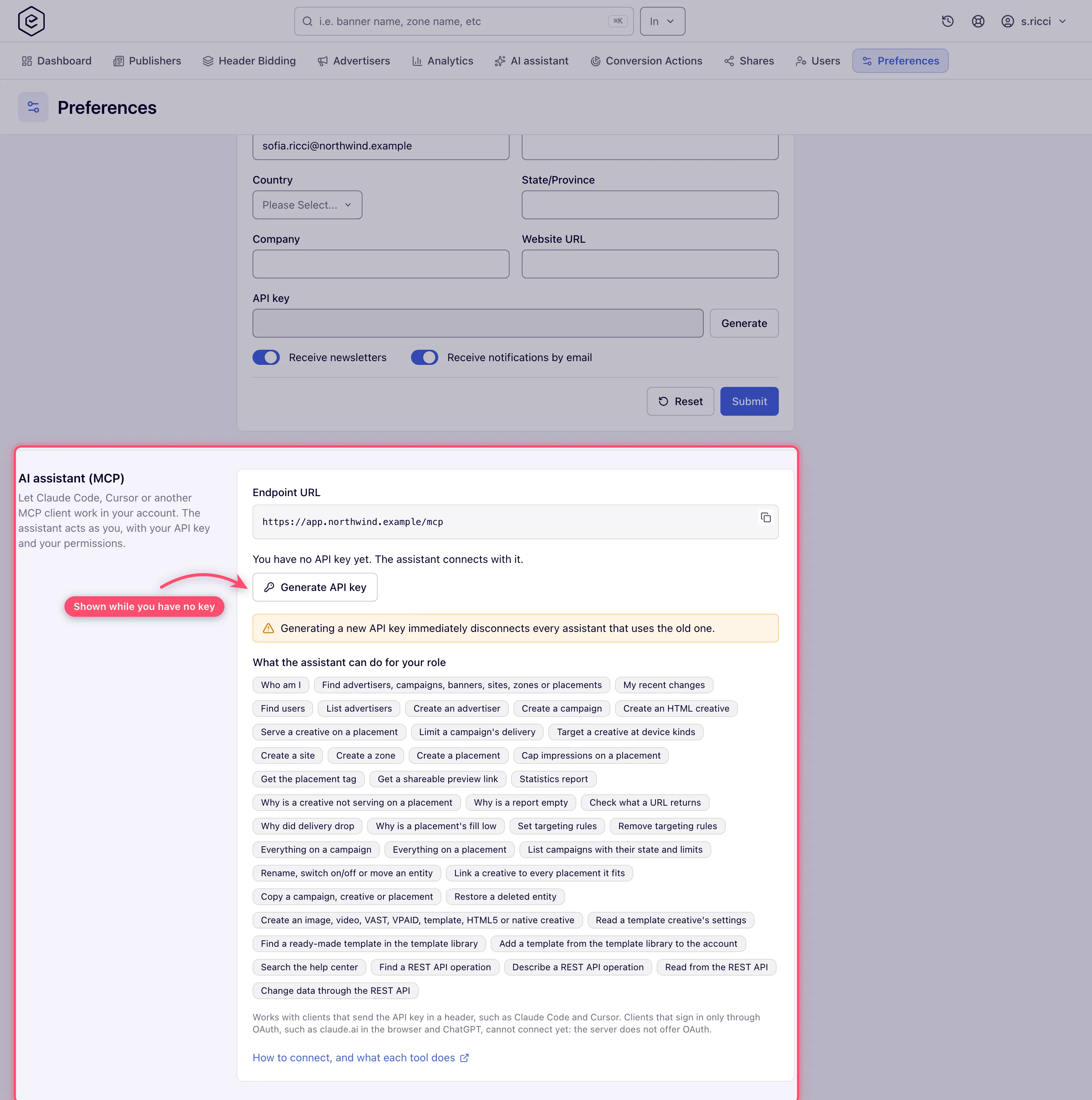
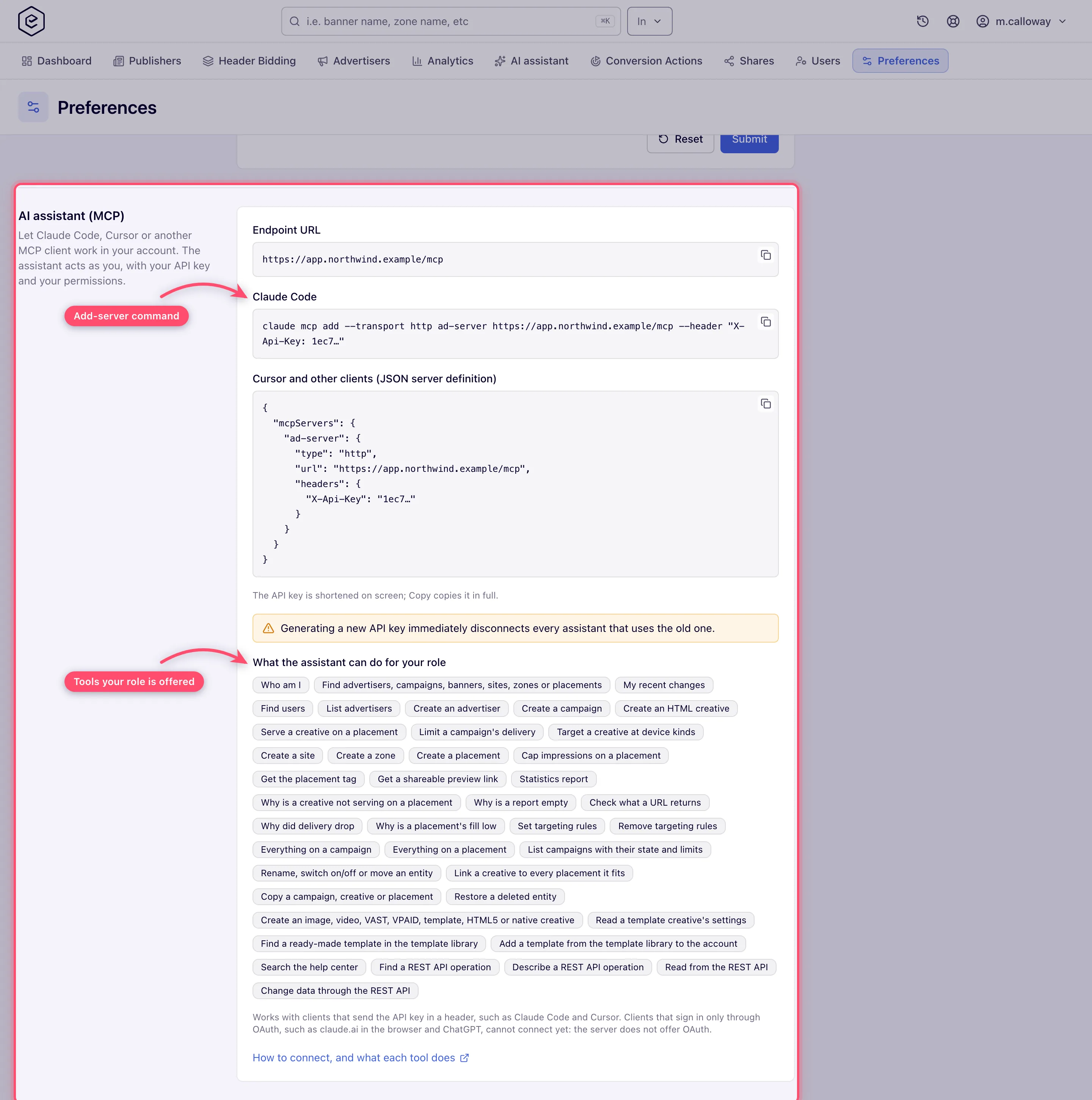
Once you have a key, the card shows:
- the Endpoint URL — the
/mcpaddress on the domain of your control panel, with a copy button; - ready-to-paste snippets for Claude Code and for any client that takes a JSON server definition. Your API key is shortened on screen (its first four characters), but the copy button puts the full key on the clipboard;
- What the assistant can do for your role — the same tools your assistant is offered (see below);
- a link to this page.
The endpoint lives on the same domain as your control panel:
https://<your-network-domain>/mcpIt authenticates with your API key in the X-Api-Key header. An Authorization: Bearer <key>
header or an apiKey query parameter work too; when a request carries several, they are tried in
the order X-Api-Key, Authorization, apiKey, and the first that belongs to an account wins —
a key that matches nobody does not hide one that does (a deactivated account is then refused).
To replace a key, use Generate on the Change personal information card of the same page (the API key row) — the AI assistant card offers its Generate API key button only while you have none. The assistant card’s button needs API Key Access enabled; the Generate on the Change personal information card also needs Manage Preferences enabled. Either way the new key is saved and replaces the old one at once, there is no confirmation, and both cards show it.
MCP is on for every network unless Epom has switched it off for yours. Then the card and
the menu entry are hidden, and the /mcp address answers 404 Not Found to a valid key (a missing
or wrong key is still a 401) — ask Epom support or your account manager.
The snippets register the server under a name taken from your network’s domain — its first part,
lower-cased (for example northwind for northwind.example.com), with anything but letters, digits
and hyphens dropped. When that part says nothing about the network — an IP address (IPv4 or IPv6),
a number, or one of www, app, ui, admin, panel, console, portal, login,
dashboard, my, ad, ads or localhost — the name is ad-server. The name is only a label in
your client — change it freely.
Claude Code (one line):
claude mcp add --transport http ad-server https://<your-network-domain>/mcp --header "X-Api-Key: <your-api-key>"Any client that takes a JSON server definition (Cursor and others):
{
  "mcpServers": {
    "ad-server": {
      "type": "http",
      "url": "https://<your-network-domain>/mcp",
      "headers": {
        "X-Api-Key": "<your-api-key>"
      }
    }
  }
}
It works with clients that send the API key in a header, such as Claude Code and Cursor. Clients that sign in only through OAuth — claude.ai in the browser, ChatGPT — cannot connect yet: the server does not offer OAuth.
What the assistant can use
Task tools cover the common flows in one step each. Twenty-three of the 47 tools are offered
to every role — whoami, find, recent_changes, user_find, analytics_report,
report_check, delivery_drop, help_search, the targeting, overview, edit, copy, linking and
restore tools, creative_create, creative_template_properties and the four API tools. The other
twenty-four appear only when your role can use them: listing and creating advertisers, creating
campaigns and HTML creatives, linking to a placement, campaign limits, device targeting, creating
inventory, placement capping, tags and preview links, serving_check, serving_trace_start /
serving_trace_result, fill_check, url_check, creative_weights, hb_tag_setup,
analytics_advanced, raw_log_analyze, and template_catalog / template_install (those two
only when the network’s template library is not switched off). A tool your role is offered still
refuses a call your permissions do not allow. The in-product
AI assistant chat additionally gets report_gap,
request_submit and model_switch_suggest, which a connection to /mcp does not.
| Tool | Does |
|---|---|
whoami | The account the connection acts as, and per capability — switching entities on and off, targeting, capping, pricing (and, for sites and placements, whether it may read or set their pricing), price rules, bid floors, labels, the in-product AI assistant (aiAssistantChat), the Advanced report (advancedAnalytics), managing the network’s publisher video spec presets (videoRequirementPresets), banner and campaign weights (bannerWeights, campaignWeights) and their weights on one placement (placementWeights, on top of those) and more — whether its role may use it, plus the targeting rule types and the ad-tag formats per placement kind it may use, the network’s currency, reporting time zone and analytics request limits, the network’s on/off default for new entities and its creative file-size limits |
user_find | Active users you may see — to share an advertiser or site with — by part of the name, username or e-mail, optionally of given roles (25 by default, up to 100) |
recent_changes | Your own changes of the last hours (24 by default, up to 31 days) — in the control panel, over the API or through the assistant — newest first, one entry per change, with their arguments (secrets masked), paged (30 per page by default, up to 100); for reporting what was done or undoing it. level + id narrow it to one entity: assistant calls whose arguments, REST path or ids name it, and log entries made elsewhere that name it — an api_write to /rest-api/placements/4012/openrtb.do is found for placement 4012. A change through the assistant or the REST API to an operation that records what it replaced also carries before: for each thing it changed (type, id, sometimes key), the values it replaced, under the names the operation takes — so it can be undone by sending them back with the same operation. absent: true means it did not exist before (undo = delete it); removed: true means it was deleted and is listed whole (undo = add it again, under a new id) — a deleted advertiser, campaign, banner, site, zone or placement itself is brought back with entity_restore instead. A countryPrices value lists every country price there was ({} for none): countries the change added are not in it, so delete those too. Operations that record nothing, console changes and older entries have no before. A call that failed after part of it was applied — a rename went through, the move did not — is listed too, marked isError. Other users’ changes are not shown |
analytics_report | Statistics for a date range — impressions, clicks, CTR, requests, fill rate, conversions, revenue and eCPM — broken down by hour, day, week, month or year and by advertiser, campaign, banner, site, zone, placement, country, ISCI / Ad-ID code and more (request-level details such as region, referrer or device are in analytics_advanced), sorted, cut to the top rows (50 by default, up to 500), with totals rounded like the rows; the answer names the column it sorted by (eCPM sorts by eCPM Gross, revenue by Gross). When the period is empty — rows empty, totals {} or no impressions — it can look up the latest day with data (findLatestData, one more request, remembered for the day); an empty hourly breakdown says hourly figures are kept for a shorter time. Each report that runs counts toward your daily limit of analytics requests; the answer says how many are left. A grouping or filter your role lacks the reporting permission for (for example ISCI / Ad-ID without Banner ISCI / Ad-ID Code) is refused before the report runs, naming the permission by its code (BANNER_UNIVERSAL_AD_ID), and costs no request; so is a country code the country list does not know (ZZ, usa), which would otherwise filter the report down to nothing, and a sortBy that is not a figure of the report (a typo such as Impresions), with the figures it can sort by; columns are named in English whatever the language of your account, and where your role sees the Base, Publisher and Advertiser variant of a figure the Base one keeps its name (Impressions) and the others come under their column ids (publisher_impressions, advertiser_impressions); it runs the General report, so a device, browser or OS grouping (DEVICE_FORMAT, BROWSER, OPERATING_SYSTEM) is refused up front saying the Advanced report has it and how to run that one (api_read on the report with statisticType=HADOOP), instead of passing for a missing permission. Pass metrics to get only the figures you need; publisher and advertiser columns that repeat the base ones are left out and named in leftOut. |
analytics_advanced | The Advanced report — shown only to a role with the Advanced Analytics permission on a network whose analytics cluster is set up (whoami → advancedAnalytics). Breaks traffic down by what each ad request carried: region and city (LOCATION, “region - city”), the page (TOP_DOMAIN; REFERER is still accepted as a deprecated alias of it), custom parameter name and value, device format, vendor and model, OS, browser and their versions, connection type, carrier, language, app package, incognito, risk — as well as by day or hour and by advertiser, campaign, banner, site, zone, placement, country or conversion action (VAST playback events included where the network tracks them as system actions). Its figures are the request funnel the general report does not keep — requests, direct, repeated, filled and returned requests, No ads (requests answered without an ad), fill rate (impressions per direct request) and effective fill rate (impressions per delivery) — plus impressions, clicks, CTR, conversions and revenue, the Duplicate and Expired impressions and clicks that tracking validation flagged, and Unique impressions, clicks and conversions (one per transaction, in the Unique view only); figures picks which (fewer figures scan fewer logs), and the ones your role’s Advanced view (Simple, Extended or Unique) does not have are listed in notInReport. It also groups by REJECT_REASON. Filters: entities, countries, device formats, connection types, languages, incognito, rejection reasons (rejectReasons), a custom parameter (and value), text in the Top Domain (referrerContains) or app package; days and hours are counted in the timeZone you give (UTC by default). Sorting, top rows and totals work as in analytics_report, and column names are English whatever the language of your account. The data comes from logs flushed to the analytics cluster periodically, so today is provisional and a call can take a minute or more. A grouping or filter your role lacks the permission for (for example Group By Referer) or that this network’s Advanced data does not keep is refused before the report runs, naming why, and costs no request; every call that runs counts toward the daily analytics request limit |
find | Finds advertisers, campaigns, banners, sites, zones and placements by part of the name or by #id (10 by default, up to 100), with whether each is on, its parents’ ids and its link; banners in moderation or rejected are found too, with their approval status. With deleted: true it lists instead what was deleted in the last 90 days and can be restored — newest first, each with when and by whom, what its delete took down with it (cascaded, links, linksLost), canRestore and blockedBy (a deleted parent to restore first); query is optional then |
help_search | Looks things up in this help center: what a macro such as $$CUSTOM_PARAM(name)$$ expands to, how targeting, capping, limits, pricing and linking work, ad tag formats, and what to check when an ad does not serve. Answers the best-matching sections (3 by default, at most 5), each with its page title, heading and text (plus, for an administrator, a link to the section), cut at about 1,500 characters. It knows the product, not your account’s data |
advertiser_list, advertiser_create | List advertisers (newest first, 25 by default, up to 500, each with its link; total, more and nextOffset say whether more were left out, and offset pages on) or create one with a contact name and e-mail, and its advertising categories (categoryIds) — required when your role must categorise advertisers |
campaign_create, campaign_limit_set | Create a campaign (it starts with your network’s default status — switch it with entity_update); set when it runs (start and end, UTC — yyyy-MM-dd, yyyy-MM-dd HH:mm, or the ISO-8601 form recent_changes shows a replaced date in; none removes a date) and cap its delivery. Limits need your role’s capping and limits permission and update rights on the campaign, and each cap the same limit permission the REST limits operation checks; a cap your role may not set is left as it was and the answer names it under notApplied with the permission by its code (for example TOTAL_CLICKS_LIMIT), while the other caps and dates of the call are saved. recent_changes lists what a limit change replaced under the REST names (dailyImpressionsLimit, startDate…); the assistant sends them back as dailyImpressions, start… to undo it |
banner_create, banner_link_placement, banner_targeting_device | Create an HTML creative (needs the Code permission) — moderated like any other: a role whose creatives need approval gets one waiting for it, and the answer gives its approval status and whether it is on — serve it on a placement (your Link Placements to Banners permission must reach the placement’s site, as over the REST API), optionally with its own weight there instead of its banner weight (weight, needs Manage Weights on Placements and Manage Banner Weight; the answer reads it back as weightOnPlacement, and calling it again on a linked pair only changes the weight), target it at device kinds — through the same operation as targeting_set, so each created rule carries its id |
placement_weight_set | Give a campaign (campaignId) or a creative (bannerId) its own weight on one placement, replacing its campaign or banner weight there only — a campaign weight 0–32 767 (0 keeps it off that placement), a creative weight 1–32 767 — or drop the override with reset: true. Needs Manage Weights on Placements plus Manage Campaign Weight or Manage Banner Weight, and edit rights on the advertiser; offered only to a role that has them. The answer reads it back: weightOnPlacement (null when the default applies), defaultWeight and effectiveWeight. See Weights on one placement |
site_create, zone_create, placement_create | Build inventory — a site with its address (http:// or https:// and a host under a registered top-level domain such as .com; reserved names like .example or .test are refused, and the refusal says so — on a network whose URL-validation switch is on, the check is the relaxed one described under URL fields), contact e-mail and publisher categories (categoryIds, required when your role must categorise sites); a new site enters your network’s approval queue unless your role may approve sites, and the answer’s approvalStatus says which. A placement of any kind your role may create (an e-mail placement needs the Email Placements permission, as over the REST API; a native one needs no size, a video one defaults to 640×480 and can be given the server-side ad insertion service that calls its VAST tag and how competitors are kept apart in its ad pods) starts with the network’s default labels and settings and is linked at once to the creatives whose auto-linking rules match it — linkedCreatives counts them. Sites, zones and placements are created switched on |
hb_tag_setup | Set up a header-bidding page tag in one call, or change one (tagId): its slots — each a placement of the site, with the sizes it accepts (728x90, 320x50; the placement’s own size when left out), its Google Ad Manager ad unit path and other Prebid bidders — and its settings by name (refresh, on-screen and in-view rules, idle stop, Google Ad Manager options, integration). Settings left out keep their value; slots given replace the tag’s slots, and a slot with the same name keeps its id. Uses the network’s default serving domain unless told otherwise. Answers the stored tag, the code the page pastes (script, containers, gamKeys), anything not applied (notApplied), and how the tag differs from the site’s other tags (differsFromOtherTagsOfTheSite) — a desktop and a mobile tag usually share their refresh and Google settings. A placement of another site, or one header bidding cannot sell, is refused before anything is saved. Goes through POST /rest-api/hb-tags and /rest-api/hb-tags/{tagId}, which api_read / api_write also reach. Needs the Header Bidding permission and update access to the site |
placement_capping_set | Cap impressions per visitor on a placement. A cap with the same window (period and period type) as an existing one replaces it and says so (replaced, previousAmount); the answer carries the cap’s id and the placement’s other caps. Needs the Manage Inventory Capping and Inventory Frequency Capping permissions enabled and a view of inventory (whoami → inventoryCapping reports exactly this) |
targeting_set | Add targeting to any advertiser, campaign, banner, site, zone or placement in one call — countries, device kinds, days of the week, a daily time window, operating systems, browsers, languages — reporting which rules were created (with their ids), were already set (a note, not an error — nothing changed) or were refused and why. It also switches targeting on for the entity. Every argument is checked before the first rule is set, so an invalid time window refuses the whole call and changes nothing; when the server refuses some rules (a rule type your role may not add) the others are still created and the answer warns that the targeting was set only in part |
targeting_remove | Remove targeting rules from any of those entities: the rules given by id, every rule of some types (optionally only some values, or only include or exclude rules), or all of them. Each removed rule is answered the same way — targetId, type, value, rule — and a type with nothing to remove is not reported as a removal. Targeting stays switched on, so the remaining rules keep applying. Removing a campaign’s or an advertiser’s rules leaves the rules set on its banners (and campaigns), which the answer’s scope points out |
stale_locations, stale_locations_fix | Find the location and country rules, on every entity you may manage, that name a place the geo database no longer knows, each with what removing it would do: SAFE (nothing — the ad server already ignores it), OPENS_ALL (the entity’s only includes of that type are stale; removing them lifts the location limit) or STARTS_DELIVERY (a stale exclude keeps everyone out; removing it starts delivery) — and remove them, or replace one with the place it is called now. Without confirmChanges only SAFE rules are removed; the others come back as CONFIRM_REQUIRED, and the tool is told to ask you first. While the geo service is down it says so and lists nothing. Each change is written to the action log, as in Stale locations |
campaign_overview, placement_overview | Everything configured on one campaign (settings, run dates and limits, pricing, capping, targeting, creatives with the placements each is linked to and each creative’s own targeting — for the first 20 creatives — and every reason it does not deliver, including no creative switched on or none linked to a placement — plus creativesNotServed: creatives linked to a site whose video creative requirements their file misses, with what fails) or one placement (settings — for a video placement also its ad formats, player, skip button, VMAP pre-rolls, default ad title, server-side ad insertion service, competitive separation in a pod and RTB playback methods and API frameworks — the ad-serving domains its serving domain may be set to, its Open RTB settings, its pricing and the site’s, which of them applies, bid floors, capping, targeting, linked creatives, content replacement rules and whether they are switched on, and for a video placement its bare VAST tag URL, its site’s video creative requirements — the switch, the spec and the publisher preset it came from — and videoCompliance, the linked creatives they stop) in one answer. Capping reads the same on both: each rule with its id, type, subject, amount, period and period type. A link where the creative has its own weight on the placement carries it as weightOnPlacement (with Manage Weights on Placements and Manage Banner Weight), and one where its campaign has as campaignWeightOnPlacement (with Manage Weights on Placements and Manage Campaign Weight). An unknown id is refused by id; a section your role may not read says so and names the permission or share it lacks. A placement’s overview also lists its daisy chain, in serving order, when it is on. |
campaign_list | Campaigns — of one advertiser or all, newest first, 20 by default and up to 500, with total, more and nextOffset saying whether some were left out (pass offset for the next page; a page holds only whole rows, so fewer than limit can come back) — with their switch, whether they actually deliver (delivery: delivering, or every reason they do not — switched off, not started, ended, stopped by a limit, no recent traffic), run dates, how much of each limit set is used, and their link. campaign_overview adds the per-reason list deliveryBlockers and checks the creatives and their links |
entity_update | Rename, switch on or off, or move an advertiser, campaign, banner, site, zone or placement under another parent — any combination in one call; only the name, switch and parent you give are sent. A moved zone or placement keeps its placement keys, so tags already published for it keep working; a move answers moved (from, to) and a note that what the entity inherits now comes from its new parent. A creative the server declined to switch on — its rich-media template is inactive — is reported as not switched on, not as done. Nothing is moved into, or out of, a deleted entity or one under a deleted parent For a creative made from a rich-media template, templateProperties changes some of its property values by key (a video overlay’s $$PARENT_SELECTOR$$, a catfish’s position or close button) and keeps the rest, through POST /rest-api/banner/{bannerId}/template-properties.do — the banner edit’s own validation, the banner’s update permission; recent_changes lists the values it replaced under the same keys. File properties are not set this way |
creative_template_properties | A template creative’s settings as its template defines them: each property’s key, title, type, whether it is required, its options and limits, and the creative’s current value (a file property shows only its file name and link), plus whether you may change them. Read-only; the assistant reads it before changing a value with entity_update |
creative_create | Image, video, native, VAST, VPAID, rich-media template and HTML5 ZIP creatives without an upload: an image, video or native ad whose files are downloaded once and stored (*_FILE) or loaded from their host on every impression (*_URL) — or, with hostExternalFiles, kept at their links but served from a downloaded copy (refreshed through api_write with refreshHostedFiles on the banner update) — a VAST tag, a VPAID framework creative with its parameter values, a template creative with its values and files, or an HTML5 ZIP by URL. kind VIDEO_RENDITIONS makes one video creative served from several encodings of the same spot (an Advanced Local Video(s) creative, whoami → advancedLocalVideos): each link in videoUrls is downloaded once and stored, each id in mediaAssetIds adds a media library video — all library ids together or none — and the answer lists the files in served order (highest bitrate first). A rendition that could not be added is named under notApplied; when none could, the empty creative is removed again and nothing is created, since a creative without a file is never served. A video creative — several renditions included — or a VPAID creative can carry its ISCI / Ad-ID code. An image, video or HTML5 ZIP already in the Media Library is used by its mediaAssetId instead of a URL. labels puts label names on it (whoami → bannerLabels, and bannerLabelsRequired when the network requires at least one). Plain HTML goes through banner_create |
template_catalog, template_install | Epom’s public template library of ready-made rich-media formats — catfish and sticky bars, interstitials, skins, pop-unders, push-downs, video sliders and overlays, native and placement adapters — searched by words, devices or placement type — a longer list comes as one short row per template (name, what it does, devices, placement type, whether the account has it) with total, more and nextOffset, and asking for one template by its id gives the full card: what it does, the devices it is made for (desktop, mobile or both), when it last changed, links to its README and its desktop / mobile preview screenshots, its placement type, its properties and whether the account already has it (AVAILABLE, INSTALLED with its template id, UPDATE_AVAILABLE when the library has a newer build, NOT_SHARED when it is on the network but not shared with you). The assistant offers to add a format the account lacks and installs it only after you agree; installing is the console’s template import from the library’s copy, it is never installed twice, and the new template is then used by creative_create with kind TEMPLATE. Asked for one template’s file instead (template_catalog with entryId and xml), it answers the template XML — what Templates → Import takes — and installs nothing. Both tools, and the REST operations under them (/rest-api/template-catalog/list.do, install.do, xml.do), need the Templates create permission and Templates view on all templates — view of shared templates only is not enough, because the library reports what the whole network holds (whoami → installTemplates). Shown unless the network’s template library is switched off |
entity_copy | Copy a campaign, creative or placement under the name you give; answers each copy and whether it is on. A campaign copy starts switched off unless you keep it active. count makes several copies of any of the three, named ” 2”, ” 3”… after the first; at most 20 per call — a larger count is refused, and the refusal suggests splitting it. If a campaign or creative copy fails part-way, the answer lists the copies made and warns. A copied campaign or creative is not linked to placements — the answer says so (notCopied) — so link it with banner_link_matching |
entity_restore | Restore an advertiser, campaign, banner, site, zone or placement deleted in the last 90 days, with what its delete took down: its on/off state, its rule groups, its banner–placement links, and the campaigns and banners (or zones and placements) deleted along with it. Links to a placement or banner that is deleted now or no longer fits stay out (skippedLinks), as does a banner whose creative files are gone (notRestored); the answer then says to tell you. Refused, changing nothing, while a parent is still deleted — blockedBy names the one to restore first — and for deletions made before deletions were recorded. Needs the permission to delete the entity. See Restore something you deleted |
banner_link_matching | Link a creative to every placement it fits and is not linked to yet, optionally only on some sites or zones; dryRun lists them first. Each placement comes with its kind and size, and skipped lists (up to 50 of) the placements of the creative’s size it cannot be linked to, with the reason (for example a mobile placement for a desktop creative) |
serving_check | Why a creative does not serve on a placement — or, without a placement, on up to 5 of its linked placements, with the blockers they all share (the creative’s, its campaign’s, its advertiser’s) split from each placement’s own and the placements it could serve on: any level deleted or switched off — and when the ad server switched it off itself because a total impressions, clicks or conversions limit was reached or its end date passed, which one, since raising the limit or moving the date does not switch it back on (switch it on again afterwards); a delivery limit that is full on any level (daily, weekly, monthly, a budget), and when it frees up; moderation that switched the creative off (pending or rejected — approving it does not switch it back on); the link, or links switched off on the creative or the placement (a pair the matching rules bring together counts as linked); kind and size; a video file that misses the site’s video creative requirements — each failed requirement named, or, for a role without the Video Creative Requirements permission, only that they are the cause — the creative or the campaign not started yet or ended; and each level’s targeting your role may read (supply levels with Manage Supply Pre-targeting, demand levels with Manage Demand Targeting) — country rules evaluated for a visitor country you give; a level you may not read still shows up as a blocker, without its rules; a location rule naming a place the geo database no longer knows, which keeps every visitor out when it is an exclude or when all location includes are such places. warnings names what does not stop serving but explains a question: an approval still pending on a creative that is on, a site the network has not approved, a creative that reaches the placement only through a matching rule, stale location includes next to ones that still exist. Each cause is listed once. One REST check per placement, no analytics request. Needs view rights on both the creative and the placement. When the placement serves a daisy chain, says where the creative stands in it (a creative left out of a chain that takes every request is a blocker). |
serving_trace_start, serving_trace_result | When the setup explains nothing: records a few minutes (1-15, default 10) of live ad selections on the creative’s linked placements you may view, then adds them up across the ad servers — how often the creative was served, how often it was left out and why (capping, limits, targeting, daisy chaining…), how often it competed and lost, and which creatives won instead (named only when you may view them). Starting a trace asks for your confirmation; one runs per network at a time, and only its starter can read it. A busy trace is read as a sample (truncated), and ad servers that do not answer within 20 seconds are listed in failedServers instead of delaying the answer. |
report_check | Why a report you ran (General or Advanced) came back empty — pass the same dates, breakdown and filters. Answers the first reason that alone explains it: dates in the future, a missing report permission or column, dates older than the statistics are kept (hourly ones sooner), a filtered entity that does not exist, is not visible or was created after the period, filters that contradict each other; for Advanced, data not yet flushed to the analytics cluster or a detail filter its data does not keep. Otherwise it re-runs the General report without filters, then without one filter at a time, to name the filter that leaves nothing or to say nothing was delivered at all — up to 5 analytics requests, counted against the daily limit |
delivery_drop | Why impressions (or requests, clicks, revenue) of a campaign, advertiser, placement or site dropped: compares the day with the same weekday a week earlier (or, compare: week, the last 7 days with the 7 before) through the General report, breaks the change down by country, creative, placement, device format or hour, and names the dimension and the rows that explain most of it (movedMost; a row that served before and now does not is marked gone). Beside it: what stands in the way now — the entity’s own state and, for a drop, serving_check on the creative that dropped most — and your own changes to the entity since the earlier period (recentChanges; other users’ changes are not in your log, so an empty list does not mean nobody changed anything). Costs exactly 2 analytics requests per dimension — 6 by default, at most 8 — and is refused before any report runs when you have fewer left today; a dimension your role may not report by is skipped at no cost |
fill_check | Why a placement fills little: requests, impressions, unfilled requests and fill rate for a period (the last 7 full days by default); impressions by creative and by campaign with their share; the linked creatives that never won an impression, each with serving_check’s blockers (up to 5 — a creative with none is eligible and lost the rotation to priority, weight, capping or time targeting); what stops the placement itself; its bid floors and pricing; its capping and that of its busiest campaigns. Costs 2 analytics requests (1 when your role may not report by creative). Linked creatives are listed for banner placements; on a video or native placement the creatives come from the report alone |
url_check | What a URL actually returns, requested from the ad server’s network as a desktop, iPhone or Android browser: the final status, every redirect (status, hosts in full, paths shortened, queries left out), content type and size, and the time taken — for a media file, click URL or pixel that answers 404 or redirects oddly. A VAST response is summarised (version, InLine or Wrapper per ad with wrappers followed up to 3 levels, ad system, duration, media files with type, size, bitrate and VPAID, tracking counts, click-through host; no ad at all is answered noAd with why a datacenter request can get one), and an HTML page answers its title and the player-like elements of its raw HTML, each with a CSS selector. No JavaScript runs; only public http/https addresses are requested, every redirect hop included; at most 5 redirects and 2 MB of body; 30 checks a minute. Needs view access to campaigns or to inventory |
raw_log_analyze | Questions about single events, from the Impressions, Clicks, Conversions or Actions Log of up to 3 days: counts per value of one or two columns (groupBy — domain (the domain the event’s own request came from, which can be a player or ad frame), origin (Top Domain: the page the ad was served on), the headers the event arrived with (hdrOrigin, hdrReferer without its query string, hdrXReferer), IP, user (uuid), user agent, country, device, entity, day or hour, or custom_param.<name> for the values a custom parameter arrived with), the top ones with the rest folded into other, distinct IPs, users, user agents and domains, and a few sample rows with the columns you name. With link it matches clicks to the impressions, and conversions or actions to the clicks, of the same days by transaction id — clicks without impressions, conversions without a click (a view-through one has none), with samples. Reads at most 50,000 rows per log (capped says when a period had more), needs the log report’s permission and view access to all inventory and all campaigns like the console’s log reports, and costs one analytics request. Offered only on a network whose analytics cluster is set up |
creative_weights | Which creatives are heaviest: your creatives sorted by the bytes one impression downloads from the network’s servers and CDN, split by file (image, video, the largest rendition of an advanced video, native assets, template files, the unpacked HTML5 files, the VPAID script). Files a creative loads from the advertiser’s own host count 0 and are left out unless includeExternal is set. Each creative carries its limit (limitBytes, limitBasis) and heavy when it is over — the IAB subload limit for its size, or the network’s own display or video limit; heavyOnly lists only those over. media (VIDEO — serves a video file of the network’s — or DISPLAY) and minBytes narrow the list, so video creatives over 4 MB is media: VIDEO, minBytes: 4194304; a size threshold without media mixes banners with videos that are normally megabytes. The answer carries total, more and totals by media, so a long list is never shown as complete. Filter by advertiserId, campaignId or bannerIds; limit up to 500, start for the next page. Multiply a creative’s bytes by its impressions from analytics_report (groupBy: BANNER) to estimate the CDN traffic it caused — an estimate, since players pick one rendition and browsers cache. A creative saved a few minutes ago may not be weighed yet |
placement_invocation_code, placement_preview_link | Get the tag — of a type your role may generate; the answer lists which — and a full preview link, valid for 30 days, which also needs the permission of the tag type it renders. The preview link opens without signing in, so anyone you send it to can open it. For a video placement the answer also carries vastTagUrl, the bare VAST tag a player or a server-side ad insertion service (AWS MediaTailor, Google DAI…) calls, with the service’s macros already in it; MediaTailor passes the viewer’s user-agent as the User-Agent header rather than a macro |
API tools reach everything else the REST API documents:
| Tool | Does |
|---|---|
api_search | Finds operations by keywords (10 by default, up to 25) and returns their method, path and which of the two tools below runs it; for the write operations whose permission it knows, it names it (needs, the key of whoami’s capability list) and whether your role has it (allowed); for creating a targeting rule allowed also accounts for that rule type (ruleType, see whoami’s targetingTypes) |
api_describe | Shows one operation’s meaning, parameters and request body; for a credential operation the assistant may not run, it says why. Each parameter is summed up in one line — type, whether it is required, the values it accepts, a short example and the first 160 characters of its description; naming parameters in parameters shows just those in full |
api_read | Runs one GET operation that only reads, as you, and returns the response |
api_write | Runs one operation that changes data, as you — POST, PUT or DELETE, and a GET whose summary says it changes data, should the spec have one. The change is immediate. A batch that saved some items and not others is answered as done in part — applied, failed and a warning — not as an error. Fields of an operation’s JSON body sent as parameters are refused with a pointer to body |
The assistant is told both the ad server’s names for its entities and the words the industry uses for them:
| Ad server name | Also called |
|---|---|
| Advertiser | brand, client |
| Campaign | order, insertion order |
| Banner | creative, ad |
| Site | publisher, website, app, property |
| Zone | section of a site that groups placements |
| Placement | ad spot, ad slot, ad unit |
| Invocation code | ad tag |
api_search matches most of these too — creative, ad spot, slot and unit, publisher, website,
app and property, section, order, brand and ad tag — but not client or a bare ad. Ad unit is
also the name of the size catalogue (/rest-api/ad-units.do), so a search for it can return both.
A typical exchange: the assistant searches for “campaign frequency capping”, reads the operation it found, then calls it with your campaign’s id.
The API tools reach only operations that are in the published spec. A few operations exist
but are not in it — the referral reads under /rest-api/referral-program/, for one — and the
assistant cannot find or call those; neither can it reach anything that has no REST operation
at all, such as the default sharing settings or the IP whitelist.
How it behaves
- Your permissions, enforced by the server. Every tool runs as your account.
api_readandapi_writehand the operation to the same REST handler a direct API call reaches, with the same permission checks: a field your role may not change is refused or left untouched exactly as it would be for a direct call. The task tools make every change through those same REST operations, so a create gets the network’s defaults, moderation, approval queue and auto-linking exactly as an API client would — and read through them too, so what a task tool shows you is what the REST reads show you, masked and refused the same way (findreadssuggest-items,serving_checkreadsserving-check,delivery_dropandfill_checkread the General report andserving-check,url_checkreadsurl-check,recent_changesreads your own General report andserving-check,raw_log_analyzereadsanalytics/raw-log-analyze,recent_changesreads your ownaction-log/mine, the tag and preview tools readplacements/{id}/invocation-code*andpreview-link). - Switched on or off at creation. A new campaign or creative starts with your network’s
default status (switch it with
entity_update); a new advertiser too, unless you ask for it on and your role may switch advertisers on and off. Sites, zones and placements start switched on. - Links to the console.
find,advertiser_list,campaign_list, the two overviews, the create tools,entity_updateandentity_copyanswer each advertiser, campaign, banner, site, zone or placement withlink: the path of its edit page in the account console (/v2/account/…) on the host you are signed in to, so the assistant can hand you a link to it. An entity whose parents the answer does not know gets no link rather than a wrong one. - Unapplied fields are named. A save — through a task tool,
api_readorapi_write— that skips a field — your role may not set it, or it is not a field of that operation — still succeeds, but the answer lists the field undernotAppliedwith the reason, so the assistant tells you what did not change instead of reporting the whole change as done. A CSV price upload whose answer lists lines inrejected(orcsvErrors/csvWarnings) carries a warning the same way, with the rejected lines said once — asrejected,{line, reason}, next to the warning and not repeated in the body: those lines changed nothing. An answer that stores a United Kingdom price adds acountryNote: the code isUK, and aGByou sent was saved asUK. - Refusals name what is missing. A task tool that refuses for your role — or leaves a field
unapplied for it — names the permission the role lacks — usually by its code, as the REST API does (
Your role lacks the TOTAL_CLICKS_LIMIT permission.) — and adds the label the role editor shows for it and thewhoamikey that tells whether the role has it; or it says that the entity is not shared with you for editing. An entity that does not exist or was deleted is refused by id. - Writes are immediate. There is no draft and no one-step undo — review what the assistant
proposes before it runs a write. To take a change back, the assistant reads
recent_changes, which lists the values each recorded assistant or API change replaced, and sends them back through the same operation; a deleted advertiser, campaign, banner, site, zone or placement is brought back for 90 days withentity_restore. Every tool tells the client whether it only reads or changes data, so clients can run reads without asking and ask you before each change. - Every change is in the action log. Each change the assistant makes is recorded under your
user as an entry named
mcp_<tool>(for examplemcp_campaign_createormcp_api_write) with the arguments it used, its result and the values it replaced (before) — secrets such as passwords are masked — and the address it came from. A call that fails is not logged, unless part of it was applied before it failed: that call is logged markedisError. A change that reaches an operation which logs itself also leaves that operation’s usual entry;recent_changesshows themcp_<tool>entry only.
Corner cases
Corner case:
api_readandapi_writereach only the documented/rest-apioperations, on this server. Pass path parameters in the path (/rest-api/campaign/2001/update.do), query and form parameters inparams, and a JSON body — an object or an array — inbody. A map parameter is passed as an object and sent asname[key]=value; a list of objects (such asmultisort) is sent as one JSON array. A file cannot be sent, so an operation that needs an upload cannot be completed — except where the operation also takes the file’s content as text: the CSV price uploads take it incountryPricesCsv, andapi_describesays so.*(the global country price) may be written in a path as it is.
Corner case: nothing is sent on a guess. A task tool refuses an argument it does not take, and
api_read/api_writerefuse a parameter the operation does not document or a required one left out — naming the ones that are wrong or missing — instead of acting on part of the request. A template’s own keys ($$KEY$$,fileUrl[$$KEY$$]) and a VPAID framework’s parameters are accepted as they are.A path that is not a documented operation is refused too, and the refusal names the closest documented ones —
GET /rest-api/site/20.doanswers withGET /rest-api/sites/{siteId}.do— so the next call does not need a search.
Corner case: sign-in, sign-up, password-reset and password-change operations, the profile save that also changes your e-mail and password, user-account management, and the reports that authenticate with a signed hash in their path are refused through the assistant — do those in the control panel. For a hash-signed report that also exists without the login segments (the analytics report), the refusal points at that form, which the assistant can call. Your name, phone, company, language and display preferences can still be changed: the assistant uses
/rest-api/user-preference/update-profile.do, which never touches credentials. Ausername,hash,timestamp,pHash,tsorapiKeyparameter, and the parameters that override the visitor’s IP address, are dropped: the call always runs as the account the connection authenticated.
Corner case: answers of
api_readandapi_writelonger than 60,000 characters come back shortened. A list is cut after the last item that fits and says how many of how many it holds, so it stays readable; any other long answer is cut mid-text. When even the first item is too long, the note says so and suggests fewer columns or reading that entity alone. Few list operations page: narrow the request instead — a filter the operation accepts, fewer report columns, or the per-parent operation (the campaigns of one advertiser rather than every campaign).
Corner case: files come back as text only when they are text. A report in
CSV,JSONorHTMLarrives as text (cut at 60,000 characters like any answer);XLSXandJSONreport read withjsonKeys=idnames each figure by its column id, so the Base, Publisher and Advertiser Impressions do not share one key.
Corner case: the API key is a credential — treat it like a password. Generating a new key revokes the old one immediately, which disconnects every assistant using it. Repeated requests with a wrong key temporarily block your address, and while it is blocked every request that presents a key is refused with Too many failed attempts — even one with a valid key.
Corner case: the endpoint does not offer OAuth. A refused connection is answered
401with aWWW-Authenticateheader that says to send the API key. When it refuses the connection, some clients fall back to an OAuth sign-in and report something like “Dynamic Client Registration rejected (HTTP 404)”. That means the server answered not authorized, for one of four reasons: no key reached it; the key is wrong or has been revoked; your address is locked for a few minutes after repeated failed sign-ins or API authentications (wait before changing anything); or your account is deactivated. Generate a new key only after ruling out the lockout, and first remove the old key from any other client still retrying with it. In Claude Code a key set in a project’s own MCP configuration takes precedence over one set for your user, so update the one the client actually reads.
Per-role notes
- Admin users: the card and menu entry are account-area only. An admin generates a key on their own user in admin user management and configures the client from the examples above.
- Custom-role users: only the task tools your role can use are listed, plus eighteen that are always listed; the server refuses what your role cannot do.
- Demo account: the card appears only if the demo role holds API Key Access, which no stock role does.
