
Invocation code types
Every ad tag type the platform can generate — what each produces, per-placement availability, preview support, the Settings tab and the default tag parameters.
An invocation code (ad tag) is the snippet generated per placement that a page, app, email or video player uses to request ads. The Ad tags & API card on the placement editor shows one tab per code type available for that placement type — filtered further by your per-tag permissions — followed by a separated Settings tab that configures all of them. Copy the code, or use Download code to save it as a file.
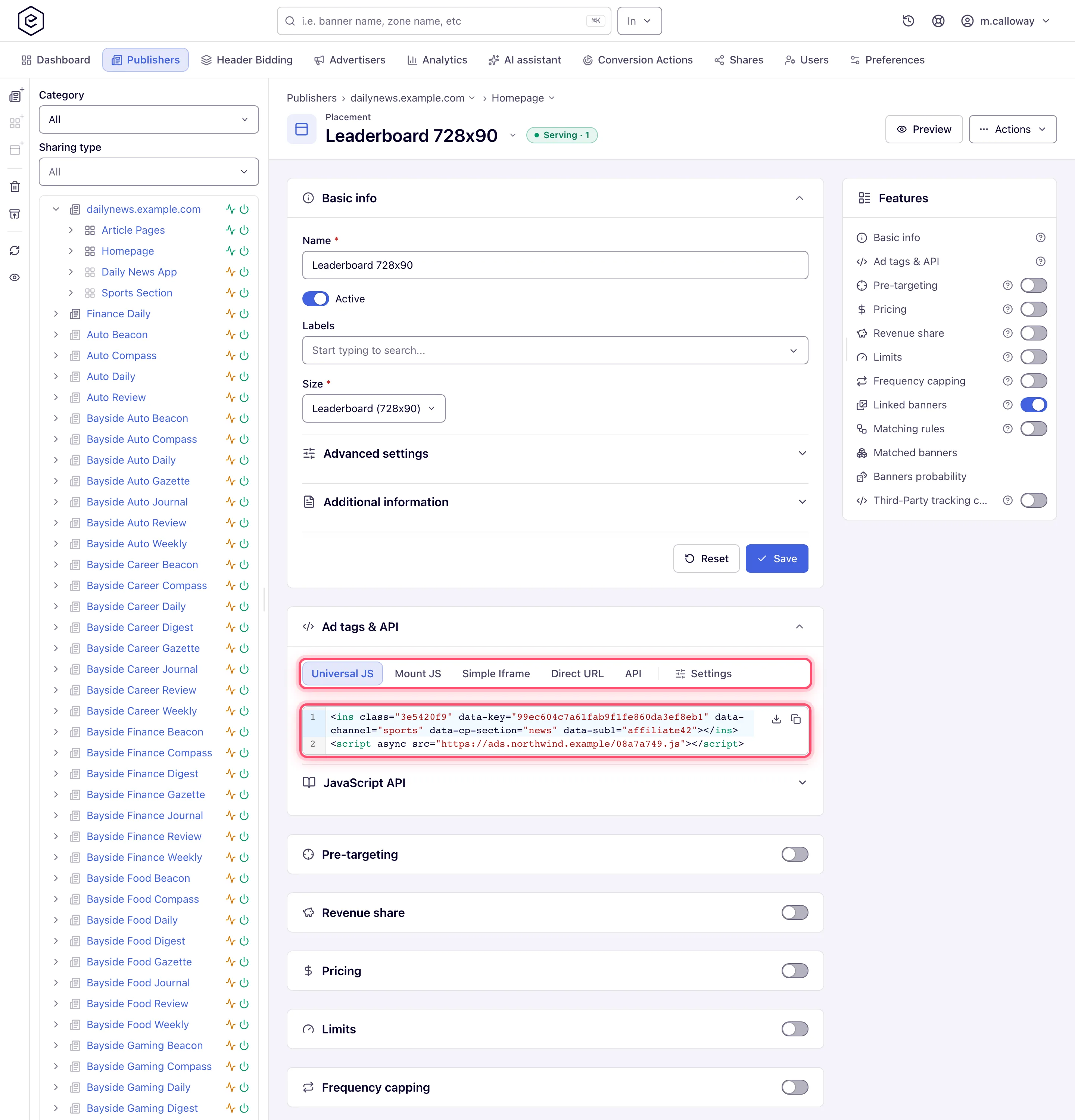
Active code types
The platform generates seven code types. The VAST tags tab is an eighth entry in the tab strip but is not a code type of its own: it is a panel of tag URLs built for video placements.
Scope: the table describes the new interface. The classic placement page renders the VAST tags as a fixed row per version — VAST 3.0 tag, VAST 4.0 tag, VPAID, VMAP — with no version picker, so 4.1 and above are unreachable there.
| Tab | What it generates | Loading model | Available on | Preview page |
|---|---|---|---|---|
| Universal JS | An <ins> element plus an async loader <script> | Asynchronous, non-blocking | Site, Mobile Site, Non-standard | Yes |
| Mount JS | A function you call with your own container element — it falls back to the element after the script when you call it with none | Asynchronous loader, mounts into the container you name | Site, Mobile Site, Non-standard | Yes |
| Direct URL | An ad-serving URL returning the markup. With a Domain set on the placement (a new placement gets one) the generated URL, key included, is passed through Epom’s URL encryption | Synchronous fetch — you place the call | Site, Mobile Site, Non-standard | No |
| Simple Iframe | Basic <iframe> embed | Iframe isolation | Site | Yes |
| API | Documentation tab: request URL, placement key, parameter table and response samples for direct server/client calls | HTTP request (HTML, JSONP, JSON, XML formats) | Site, Mobile Site, Non-standard, Application, Native | No |
| Email-safe tag (image + link, no scripts) plus the copyable Creative / Landing page URLs | Static, renders in mail clients | Yes | ||
| Video Player | A ready-to-embed demo player that renders the placement | Player fetches VAST XML | Video | Yes |
| VAST tags (not a code type) | A VAST tag URL with a version picker, plus VPAID and VMAP tag URLs, each at its own server-fixed version. Below the tags: a Request parameters section (maxAds, maxPodDuration) and, when the placement names a server-side ad insertion service, a macros table for it | Player fetches VAST XML | Video | — |
Click-through placements produce no invocation code at all — see the corner case below for what their card shows instead.
“Preview page” means the type can be exercised on the standalone ad preview page: its code type selector lists exactly the types marked Yes.
Corner case: Universal JS and Mount JS disappear from every placement when the network has no ad-serving domain configured, whatever your permissions say — the tabs are conditional on the domain list being non-empty. If both are missing everywhere rather than on one placement, that is the cause, and it is not a permission fix: ask your network or Epom support to add an ad-serving domain. The same condition also removes Universal JS from the preview page’s code-type selector.
Corner case: the VAST version picker offers 2.0, 3.0, 4.0, 4.1, 4.2 and 4.3, and defaults to 4.2. (4.3 is validated against the 4.2 schema.) The VPAID and VMAP URLs beside it are pinned server-side and do not follow the picker — changing the version changes the VAST URL only.
Retired code types
These types are gone from the interface, from the permission list and from the API. Most of them have also stopped serving — the URLs their tags call are no longer answered, so a tag of that kind still pasted into a live page fetches nothing, renders nothing and counts nothing. Neither the page nor any report says so. Re-issue those tags before you rely on the slot.
| Retired type | URLs it depends on | Serving | Re-issue as |
|---|---|---|---|
| JS Sync | /js/show_ads.js, /ads-sync.js | Dead — both answer 404 | Universal JS |
| JS Async | /js/show_ads.js, /ads-async.js | Dead — both answer 404 | Universal JS |
| Iframe Sync | /js/show_ads.js | Dead — answers 404 | Simple Iframe, or Universal JS |
| Iframe Async | /js/show_ads.js | Dead — answers 404 | Simple Iframe, or Universal JS |
| API JS Sync | /ads-api-sync.js | Dead — answers 404 | The API tab’s request URL |
| Lite | /www/delivery/asyncjs.php, then asyncspc.php for the ad and lg.php for the impression | Dead — all three answer 404 | Universal JS |
| JSP, PHP | /ads-api | Still served | Nothing urgent — but see the note below |
JSP and PHP are the exception. They were never browser tags: each was a server-side snippet that
called the ad API from the publisher’s own backend, and /ads-api is still answered. Those pages
keep working; only the generator that wrote the snippet for you is gone.
Note:
/ads-apiis not the endpoint the API tab documents. The tab builds its request URL against/ads-api-v3(or/ads-api-nativefor native placements) — a newer endpoint with a different response contract. Both are live, so an old JSP/PHP snippet keeps working, but you cannot paste the API tab’s parameters onto an/ads-apicall and expect a match. Move the integration to the URL the tab shows when you next touch it.
Everything else in the table has lost the endpoint it depends on. Open the placement, copy the replacement from Ad tags & API, and swap it into the page: Universal JS wherever a script may be appended to the page, Mount JS where the page names its own container, Simple Iframe or Direct URL where a script is unwanted, and the API tab’s request URL where the call comes from your own server.
Finding them: the JS and iframe tags pasted into a page name only the loader, so search for
show_ads.jsand/www/delivery/first — the rest of the URLs above are fetched by the loader and never appear in your HTML. If Epom set a custom invocation-code base or prefix for your network, the loader was served under that filename instead ofshow_ads.js; ask which one, or search for/js/on your ad-serving host.
The Settings tab
Four controls shape every other tab, so they are configured once, on the last tab in the strip — labelled Settings. They save on change: adjusting one updates the placement itself, not just the displayed snippet, and every tab’s code is regenerated immediately.
| Option | Shown for | Effect |
|---|---|---|
| Domain | Every placement whose tag / URL uses one | Which ad-serving domain the tag / URL calls — one per placement, shared by the JS tags, Direct URL, the API request URL and the video / email URLs. Needs the Set Ad-Serving Domain (Placement) permission; without it the control is hidden entirely and the tag simply shows the domain in use |
| Ad wrapper | Site, Mobile Site and Non-standard (JS tags only) | Wrapper element handling for the rendered ad |
| Protocol | Every placement that produces a tag / URL | http / https / protocol-relative — applied to the Universal JS / Mount JS tags, Simple Iframe, Direct URL, the API request URL, and the VAST / VMAP + email URLs |
| Fit container | Mobile Site and Non-standard | Scales the ad to its container |
Download code is not on this tab — it sits on each code tab, next to the snippet. The API tab and the VAST tags tab have no download button, because neither shows a single copyable tag.
The whole Settings tab is hidden on non-editable shares, and each of its controls is disabled when you cannot update the placement.
Corner case: Domain does not change the Simple Iframe host. That template is built against the site’s ad-serving host, not the placement’s Domain setting. Protocol does apply to it. If a Simple Iframe points somewhere the Universal JS tag does not, that is why — change it on the site, not the placement. Direct URL does follow the placement’s Domain whenever one is set, and falls back to the site’s host only on a placement with none.
How the default Domain is picked: a new placement is created on the network’s default ad-serving domain — the one Epom flagged as default, or the first configured one if none is flagged. The placement keeps that domain afterwards, so adding another domain to the network later never moves an existing placement onto it. Creatives for a placement are served from the CDN attached to that same domain. In the combo itself the site’s own legacy ads host is listed first for a saved placement and last for a new one, so the order you see is not purely the configured order.
Corner case — a doubled port in the external preview link. On a deployment reached through a non-standard port, the external (shareable) placement-preview link can come out with two ports stacked on the host, like
https://host:8080:8443/…, and the link then fails to open. It happens when the host the request arrived on already carries a port and the configured HTTPS port is a different one; the link builder only skips appending when the port already there is the same one. Normal port-80/443 deployments never hit it. If you see it, use the in-app preview and report the deployment’s port configuration to Epom support or your account manager rather than editing the link by hand.
Default tag parameters
The Settings tab also manages the parameters baked into every generated tag for the placement. There are thirteen types, and they appear in this order:
| Parameter | Value format | Carried as |
|---|---|---|
| Channel | single value | Traffic-source identifier, later usable in targeting, analytics and the channel macro |
| Custom Parameter | Key + Value fields, repeatable | Feeds custom-parameter targeting and $$CUSTOM_PARAM(key)$$ macros; data-cp-<key> in tags, cp.<key> in URLs |
| Partner Sub-value | Key picked from sub1 to sub10 + Value, repeatable | Stored like a custom parameter but carried bare: data-sub1 in tags, &sub1=… in URLs. A name outside sub1–sub10 is refused: Sub-value name must be one of sub1 to sub10 |
| 3rd Party Click Tracking Url | single URL | Third-party click-tracking URL prepended to click redirects |
| GDPR Applies | value / macro (${GDPR}) | data-gdpr in tags, gdpr in URLs |
| IAB TCF Consent String | value / macro (${GDPR_CONSENT_849}) | data-gdpr-consent-iab in tags, gdprConsentIab in URLs |
| App Bundle | value / macro | data-bundle / bundle |
| Advertising ID (IFA) | value / macro | data-ifa / ifa |
| User ID (Advanced) | value / macro | data-uuid — tag only, never added to a URL |
| Transaction ID (Advanced) | value / macro | data-trx-id / ad.trans.id |
| Page Domain (Advanced) | value / macro (%%SITE%%) | data-page-domain / o. The page the ad is on, for a tag called from a player or another ad server’s frame — see Passing the page from a player or ad server |
| Page URL (Advanced) | value / macro (%%REFERRER_URL_ESC%%) | data-page-url / requestUrl |
| Ad-Loaded Handler (Advanced) | JS handler | Written to the slot as data-ad-loaded and run on the ad-loaded event — tag only. See The JavaScript API |
The three original types (Channel, Custom Parameter, Click) keep their bespoke rendering, and Partner Sub-value follows Custom Parameter’s shape; the other nine are pass-through signals the ad server forwards verbatim.
Values are emitted into URLs without url-encoding, deliberately: most of them are macro
placeholders (${GDPR}, [GDPR], %%CONSENT%%, …) that a downstream CMP has to recognise and
substitute, and encoding them would break that. In tags they are HTML-escaped, which is a different
thing.
These defaults reach every JS tag, the Simple Iframe and Direct URL, the VAST / VMAP URLs, the email tag’s link and image URLs, and the API request URL — including on native placements, which is why the block shows there even though native has only the API tab. Adding or deleting a parameter re-generates the code on every tab at once.
Corner case: the two tag-only parameters (User ID, Ad-Loaded Handler) are silently skipped when the code is a URL rather than a tag. Setting them and then reading the Direct URL or the API request URL will not show them — that is by design, not a truncation.
The API tab
The API tab is documentation, not a generated snippet: it shows the request URL, the placement key, a parameter table and response samples for calling the ad server directly. What it shows differs by placement type.
| Placement type | Response samples shown, in order | Extra parameters |
|---|---|---|
| Native | JSON success + JSON error | count, rank, tmax |
| Mobile Site | HTML, JSONP, JSON, XML | — |
| Site, Non-standard | JSON, then the XML bid list (format=xml-bids) | — |
| Application | None — only the “response code is 200” and “no banner” notes | — |
The request URL defaults to format=json for every type except native, which carries no
format parameter at all.
Corner case: for server-to-server calls the parameters that must be supplied for targeting to work are
clientIpandclientUa— the caller’s IP and user agent, which the ad server cannot see when your backend makes the request.requestUrlis optional; it improves referer-based targeting but nothing depends on it.
Ad request parameters (key, ch, cp.*, o origin, requestUrl, consent)
What the ad server reads from an ad request. On the Universal JS / Mount JS tag you set them as
data- attributes on the <ins> element (the loader turns them into request parameters and
encrypts the query); on the Direct URL, Simple Iframe, API and VAST URLs you append them as
query parameters.
<ins> attribute | Request parameter | Meaning |
|---|---|---|
data-key | key | The placement key — the only mandatory one; it decides which placement (and so which zone and site) the request belongs to |
data-channel | ch | Channel — your own traffic label, groupable in reports, targetable, $$CHANNEL$$ in macros. An explicit value replaces the placement’s default channel |
data-cp-<name> | cp.<name> | Custom parameter <name> — for custom parameter targeting and $$CUSTOM_PARAM(<name>)$$ |
data-click | click | Third-party click-tracking prefix |
data-page-url (formerly data-page, still read) | requestUrl | The page URL the ad is on, for $$PAGE_URL$$. When you set nothing the loader sends the top page’s URL if it can read it, else its own URL unless it runs inside a frame from another site, else nothing; set it when the tag runs in such a frame or in an app. A URL-encoded value (https%3A%2F%2F…, as %%REFERRER_URL_ESC%% gives) is decoded first. It replaces the Referer in the page macros and is one of the hosts Domain targeting checks |
| — | rd | A domain for Domain targeting to check first, ahead of the Referer, requestUrl and origin |
data-page-domain | o | The top page (https://news.example.com or a bare news.example.com; scheme, host and a non-default port — not a path). The loader fills it itself unless the attribute is set; it is the report’s Top Domain, travels into every impression and click URL, and feeds $$PAGE_ORIGIN$$ and $$PAGE_DOMAIN$$, the OpenRTB request, the Domain as default channel fallback and, as the last source, Domain targeting. A value naming no page — null, file://, the Google IMA SDK frame, a Google ad frame, your own serving or CDN host — is ignored, and a macro left unexpanded (%%SITE%%, {PAGE_DOMAIN}) makes the loader report the origin it detects itself |
data-width, data-height | plWidth, plHeight | The slot’s size, when it is not the placement’s |
data-exc | excluded | Comma-separated banner IDs not to serve in this slot |
data-gdpr, data-gdpr-consent-iab | gdpr, gdprConsentIab | GDPR applies (1/0) and the TCF consent string. Without them the loader asks the page’s CMP |
data-user-consent | uc | 1 = the visitor consented, 0 = not (for sites without a TCF CMP) |
data-cookie-policy | cookie-policy | 0 normal; 1 no cookies and no server-side capping; 2 no cookies, server-side capping still on; 3 no user-ID cookie only |
data-bundle, data-ifa | bundle, ifa | App bundle and device advertising ID |
data-trx-id | ad.trans.id | Your transaction ID (when your network allows setting it from the tag) |
data-ad-loaded | — | Handler for the ad-loaded event, run in the page |
| — | tz, tzn, im, sw, sh, t | Filled by the loader: UTC offset, time-zone name, private-window flag, screen size, cache-buster |
| — | clientIp, clientUa, requestUrl | Server-to-server calls of the API URL: the visitor’s IP, user agent and page |
Note:
lang,rnd,l,us_privacyandgdpr_consentare not read — language comes from the browser’sAccept-Languageheader, the TCF string goes ingdprConsentIab.
Corner case — a channel or zone “missing” from reports is almost always the tag: the placement (and with it the zone and site) is decided by
keyalone, and the channel by thechvalue the tag sends. Check thedata-keyanddata-channelyour page actually renders.
Passing the page from a player or ad server
A VAST tag called by a video player, or any tag called from inside another ad server’s frame, is
requested by the player or frame — not by the page. Without help the ad server sees the player’s
host (Google’s IMA SDK requests from imasdk.googleapis.com) or nothing at all, and Top Domain,
the page macros ($$PAGE_DOMAIN$$, $$PAGE_URL$$) and the OpenRTB site domain come out empty. Hand the page over with the two Advanced
tag parameters, filled with the macro of whatever calls the tag:
| Caller | Page Domain (o) | Page URL (requestUrl) |
|---|---|---|
| Google Ad Manager, VAST redirect creative | %%SITE%% — the domain of the ad tag’s url parameter | %%REFERRER_URL_ESC%% — the page URL; Google expands it only with the IMA SDK, with script access, and not inside an iframe |
| JW Player | __domain__ | __page-url__ |
| Your own player page calling the IMA SDK | location.hostname, set by your script when it builds the tag URL | encodeURIComponent(location.href) |
Use the escaped (_ESC) form of a Google URL macro, because the value sits inside a URL. Where
the page URL cannot be had, GAM’s %%DESCRIPTION_URL_ESC%% gives the description_url your Google
Publisher Tag declares. Other players have their own macro lists; check the player’s ad-tag macro
reference for its page-domain and page-URL macros.
Corner case: the parameters ride the tag URL unencoded, so the macro reaches the caller intact — but whatever the caller substitutes is taken as given. Top Domain is reduced to
https://hostin lower case, and a value that names no page is ignored, so an unexpanded macro leaves Top Domain to the request’s own headers rather than reporting%%SITE%%.
Corner cases
Corner case: Click-through placements generate no invocation codes at all, but they do get the card. In the new interface it opens on a Show tracking URLs tab — the per-creative URL list — plus the Settings tab, because Domain, Protocol and the default parameters are what those URLs are built on. The classic page has no such tab and keeps a Show tracking URLs button in the placement header instead.
Corner case: if a tab you expect is missing on a site-family placement, a per-tag permission is the usual cause — each of those tag types has its own. Video Player and Email have no permission of their own: they appear whenever the placement is of that type.
Per-role notes
- Publisher: out of the box only the API tab on Mobile Site and Native placements, plus Email, VAST tags and Video Player, which need no permission. Ask your network manager for other tag types. Codes use the placement’s own domain, because the Domain picker is off.
- Network manager: each tab and the Domain picker are granted per role by your network administrator.
- Administrator: the ad-serving domain list and CDNs are not set on the placement; Epom support manages them on request.
- Can View share: you can copy and download codes, but the Settings tab is hidden.
Related
- Ad tags & API guide
- Placement types
- Macros — tokens you can add to tags and creatives
- Tags & preview troubleshooting
- Email ad codes on a site
