
What's new in Epom DSP 8.0–8.2?
- Endless Budgets: Run campaigns without end dates or spend limits — your campaign bids continuously until you decide to stop it.
- SSP Labels & Visibility Control: Traffic sources in campaign setup are now labeled, filterable, and role-controlled, so you find the right SSPs faster, and your team only sees what's relevant to them.
- Copy Audience: Duplicate any existing audience in one click and get a fully pre-configured copy ready to edit.
- Campaign Folders Reorder: Drag and drop folders into any order you want — your workspace, your layout.
Two things slow down campaign management at scale: budgets that force you to plan further than you want to, and traffic source lists that grow faster than anyone can organize them. This release fixes both.
Epom DSP 8.2 — together with incremental updates in 8.0 and 8.1 — ships always-on budgets for campaigns, a full SSP labeling and visibility system that brings order to your traffic source setup, one-click audience duplication, and a set of workspace improvements that make daily operations cleaner.
The through-line across all three releases is the same: less friction between what you want to do and what the platform allows. Scroll on to see how each feature works in practice.
Run Campaigns Without Limits: Meet Endless Budgets
Until now, every budget required a flight end date and a spend limit. That logic works for time-boxed campaigns. It breaks down for everything else — retargeting, always-on awareness, lead gen with no natural stop date.
When the budget ran out, the campaign stopped. Someone had to go in, create a new budget, and restart. Every time.
Endless Budgets removes that loop. You can now create a budget with no end date and no spend cap. The campaign bids until you stop it.
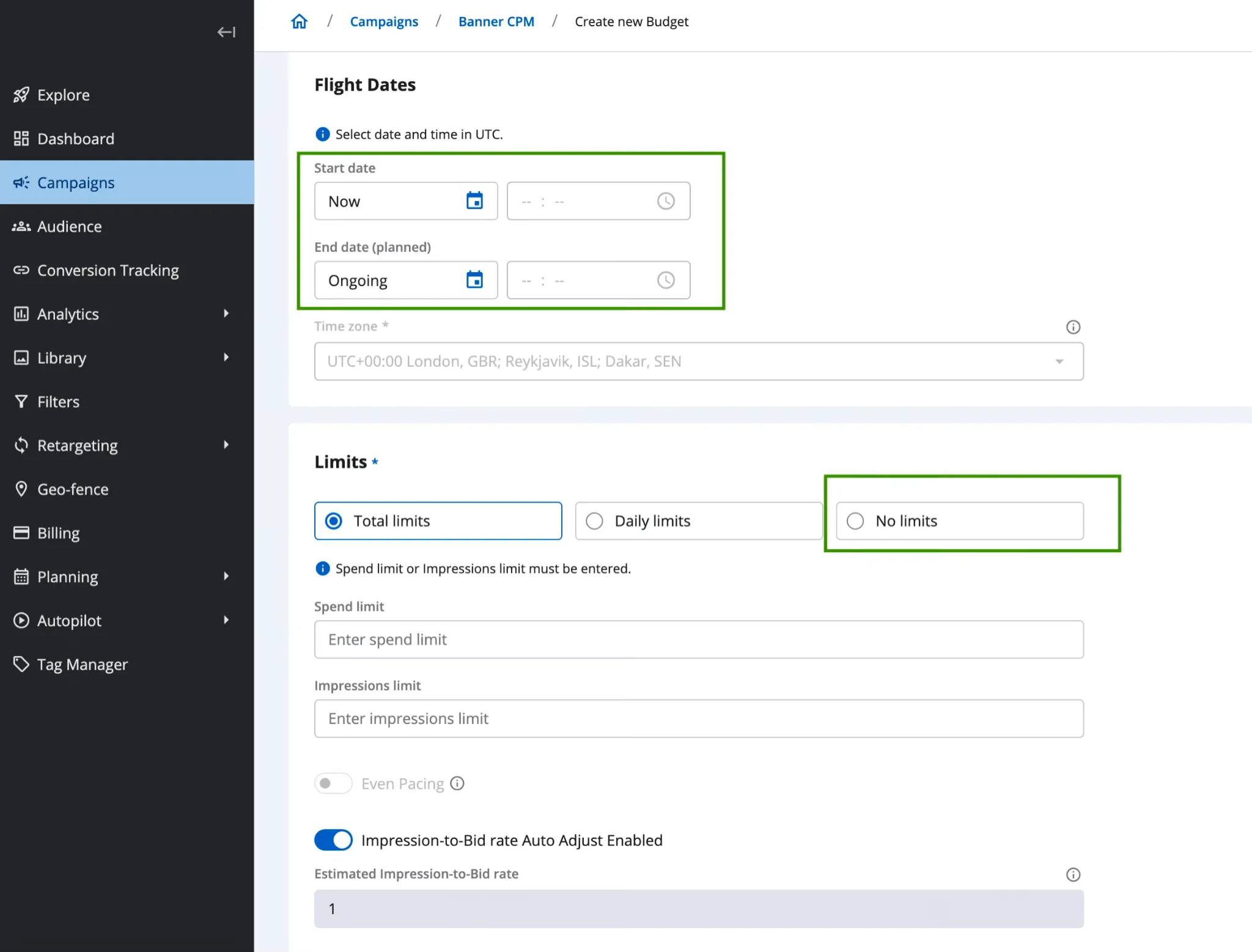
How to Set Up an Endless Budget
When creating a budget, the Start Date now defaults to "Now," and the End Date defaults to "Ongoing." Leave them as-is, and the campaign runs from activation with no scheduled stop.
For spend limits, a new No Limits option is available. Enabling it:
- Hides the spend, impressions, and click limit fields.
- Disables Even Pacing, since pacing requires a total budget to distribute over time.
- Disables Auto Adjust Click-to-Bid, which also relies on a defined spend ceiling.
💡 One Rule: You cannot create a second active budget while an Endless Budget is already delivering. Stop the current budget first if you need to switch to a different budget configuration.
The No Limits permission is disabled by default for all tenants. Your DSP administrator needs to enable it before this option appears in your account.
Cleaner Traffic Setup: SSP Labels and Visibility Control
Epom DSP connects to more than 50 SSP sources, with many sub-sources organized by channel. For a long time, the traffic source list in the campaign editor showed all of them: unfiltered, unsorted, and ungrouped.
If you knew what you were looking for, you searched by name. If you didn't, you scrolled. Either way, selecting sources was slower than it needed to be. For agencies managing multiple clients, it also created risk: the wrong source selected for the wrong campaign, with no structural guardrail to prevent it.
This release closes that gap with a full SSP labeling system, label-based filtering inside the campaign editor, and role-based visibility controls.
What Advertisers See: Labels in Campaign Setup
In the Traffic Source tab, every SSP endpoint now shows its assigned labels next to its name — custom labels first, auto-assigned labels after.
Above the list, a Select Labels filter lets you narrow sources by one or more labels at once.
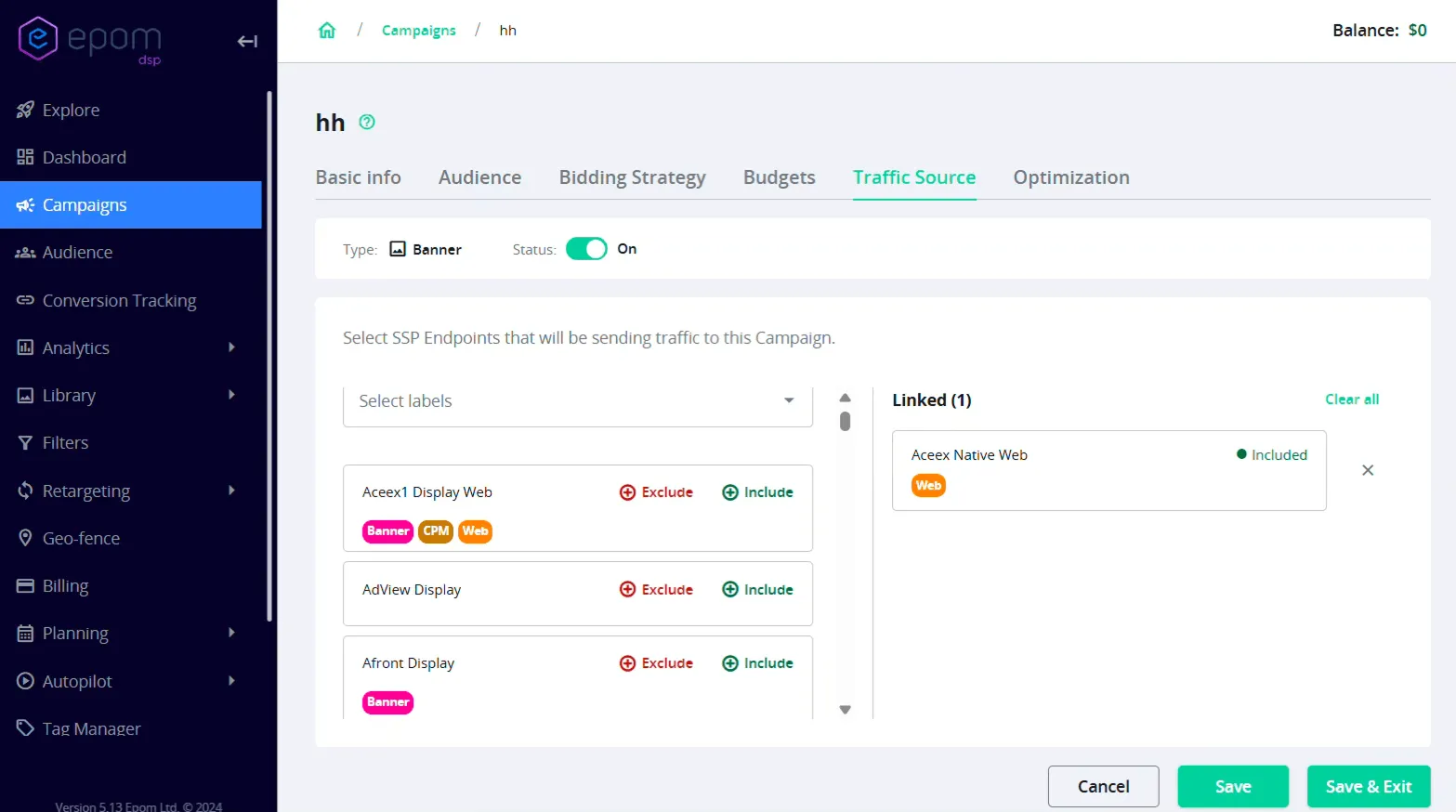
The filter runs on AND logic. Select "Mobile" and "Tier-1," and you see only sources tagged with both. The list updates in real time. No matches? The list shows: "No matches for the selected label group."
The Include All / Exclude All bulk action only appears once a label filter is applied, so bulk actions always run on an intentional, filtered set.
A media buyer running mobile video can filter to "Mobile" + "Video" and see only what's relevant. What used to take several minutes of scrolling and cross-referencing now takes seconds.
How Labels Are Managed in the Background
Labels are created and assigned by a DSP administrator in the Labels Manager — a settings page that campaign managers don't access directly.
Each tenant can create up to 50 custom labels. Up to three custom labels can be assigned to a single SSP endpoint at a time.
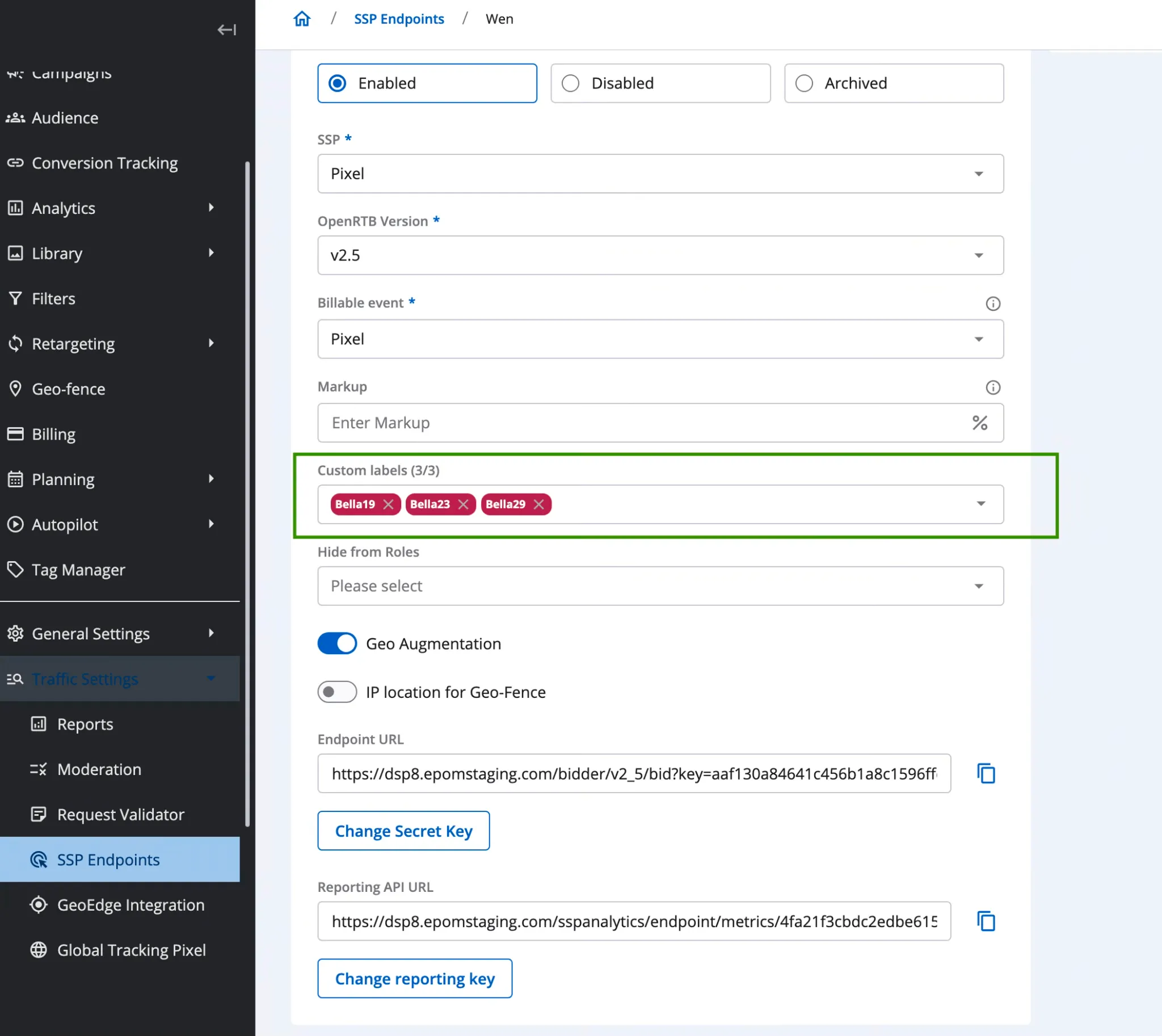
Some labels are auto-assigned based on the SSP endpoint's properties; these are applied automatically and cannot be renamed. Custom labels can be edited or deleted. If a label is deleted while it is assigned to active campaigns, all assignments are removed at once.
Role-Based SSP Visibility
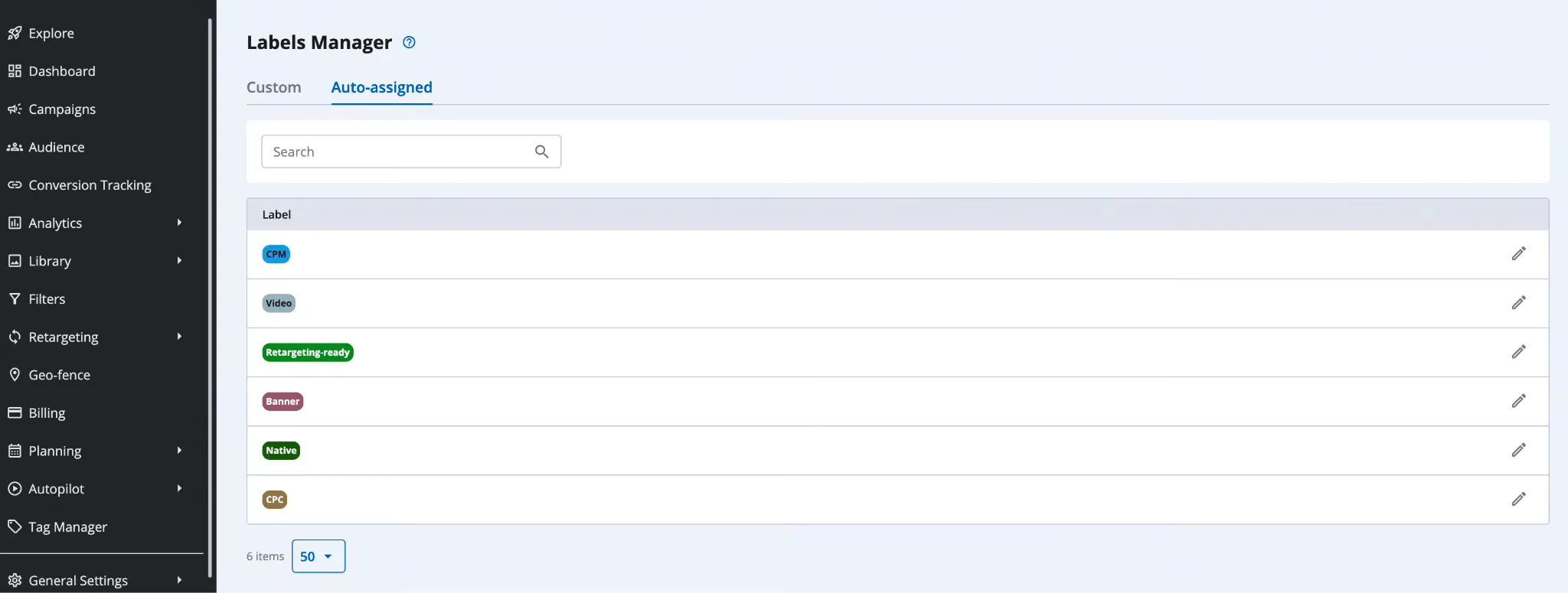
Admins can now hide specific SSP endpoints from specific user roles entirely. Not greyed out. Not behind a toggle. Just not there.
Each endpoint has a "Hidden from Roles" setting. Select the roles that shouldn't see it, and it disappears from their traffic source list.
A dedicated Manage Hidden SSP Endpoints page gives admins a single place to manage visibility across all roles. Those are two lists, Visible and Hidden, with filtering and bulk move support.
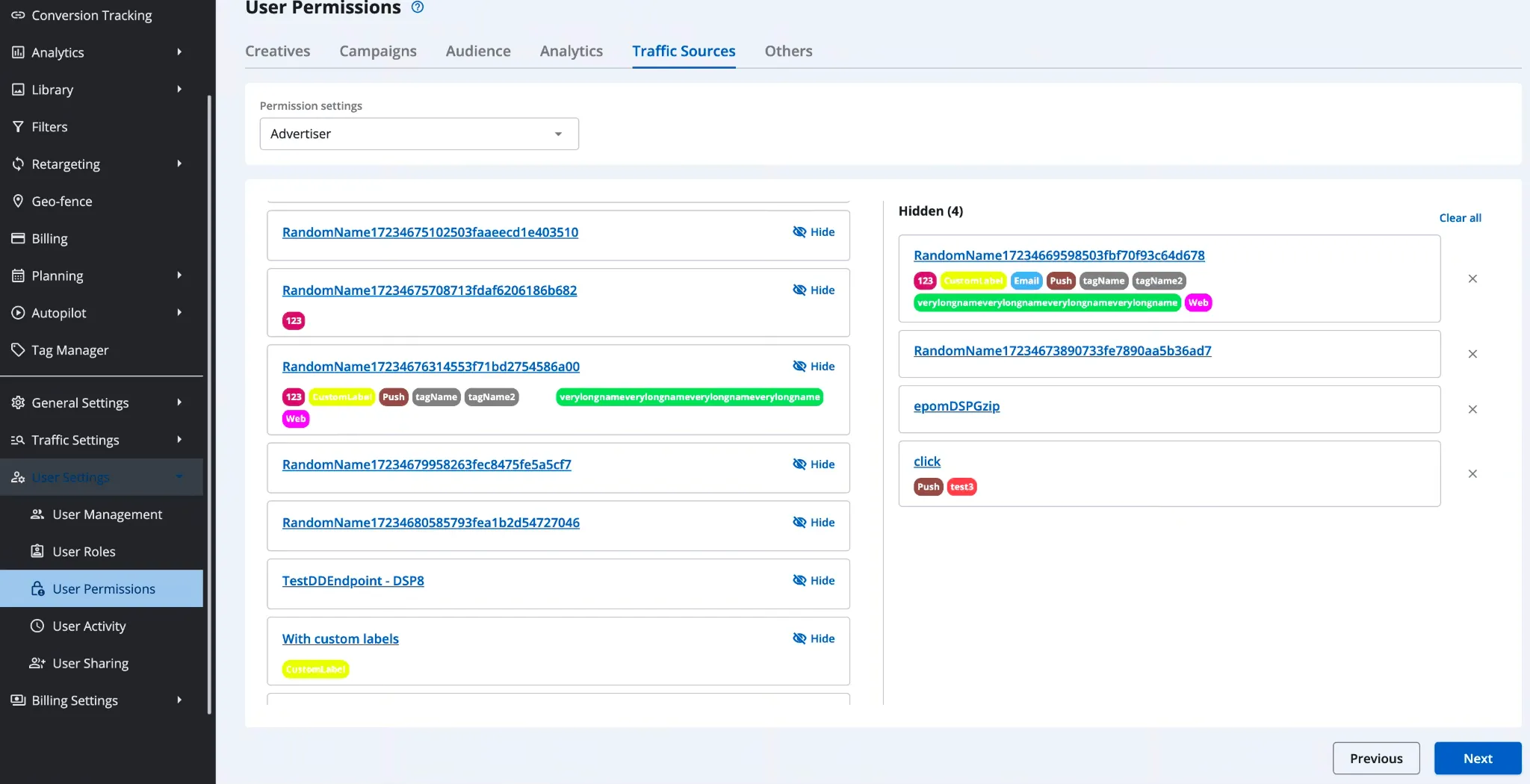
⚠️ Heads-up: The migration from the previous Labels permission system to the new role-based model is automatic. Existing configurations carry over, but it is worth reviewing your visibility settings after the update to confirm everything reflects your current team structure.
Copy Audience Settings in One Click
Before this update, duplicating an audience meant opening it, manually recreating every setting in a new record, and hoping nothing was missed.
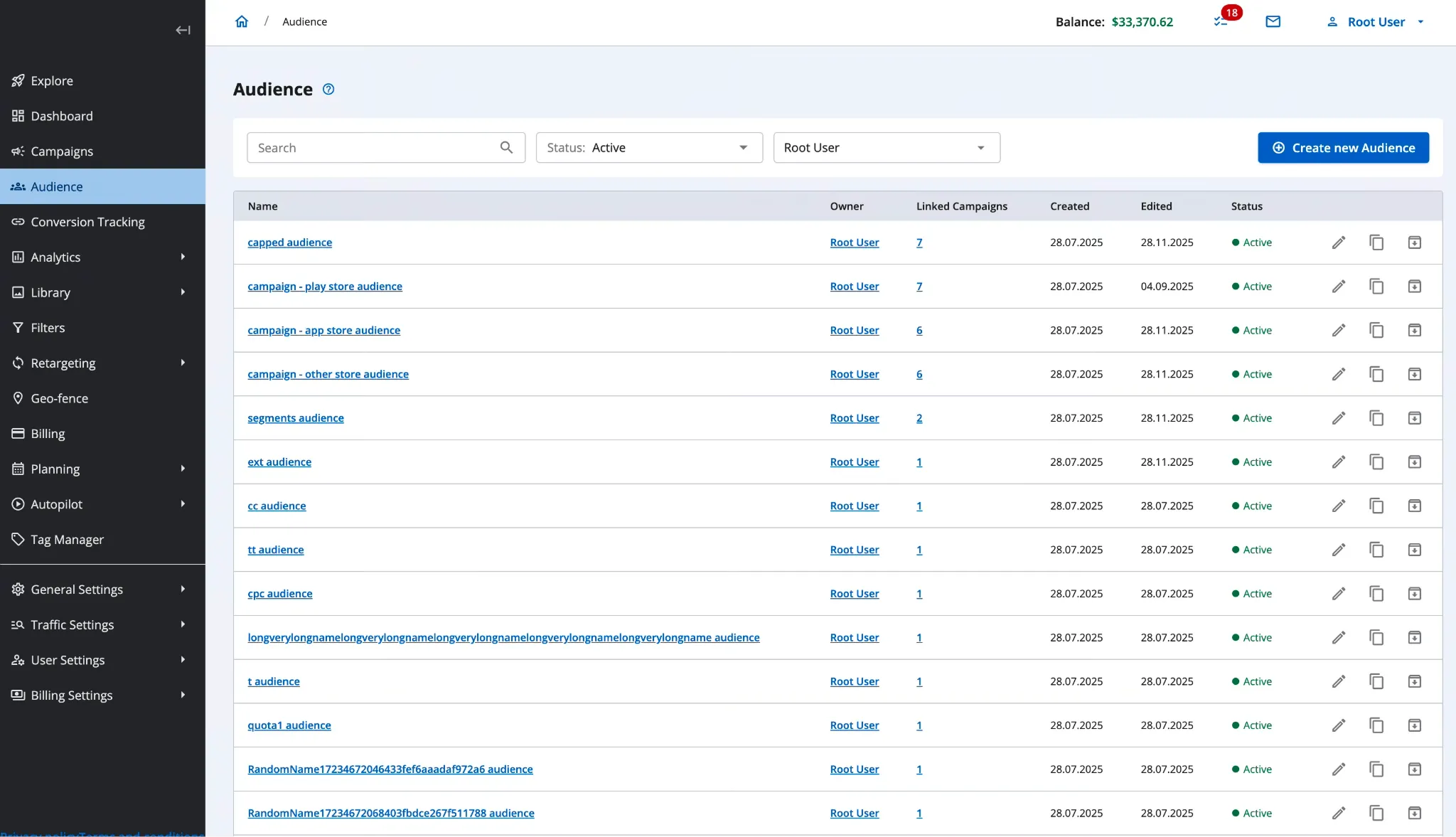
Now there's a Copy icon on every audience record. Click it, confirm or edit the name, and the system creates a fully pre-configured duplicate. You land directly on the new audience, ready to adjust.
Campaign Folders: Reorder Your Workspace
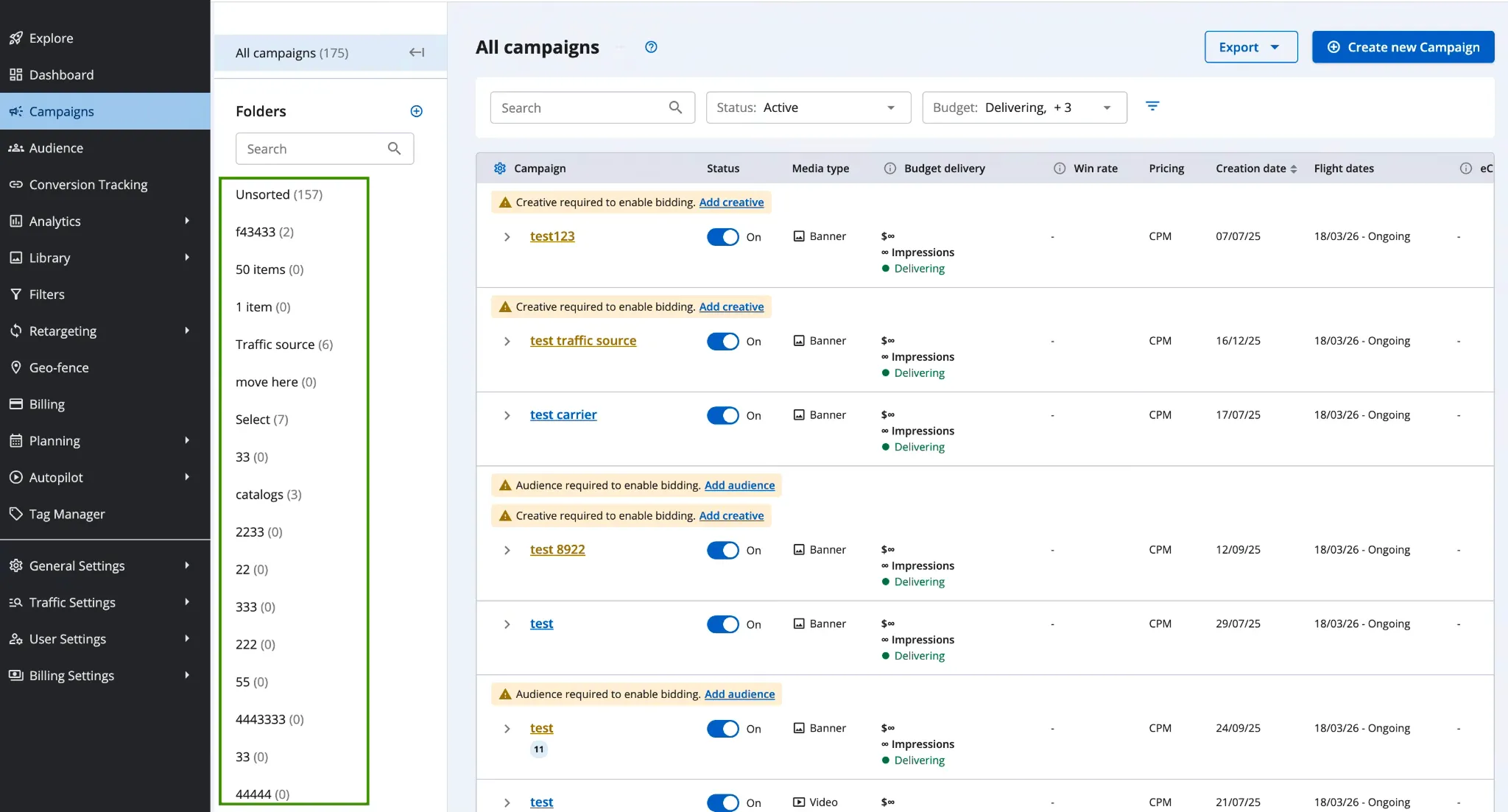
Campaign folders were introduced in 7.2.2. They added a way to group campaigns by client, project, or goal. What was missing was control over the order in which those folders appeared.
Folders can now be reordered using drag-and-drop, including the default Unsorted folder. The order is saved per user — each team member can arrange their workspace independently without affecting anyone else's view.
Admin Registration Notifications
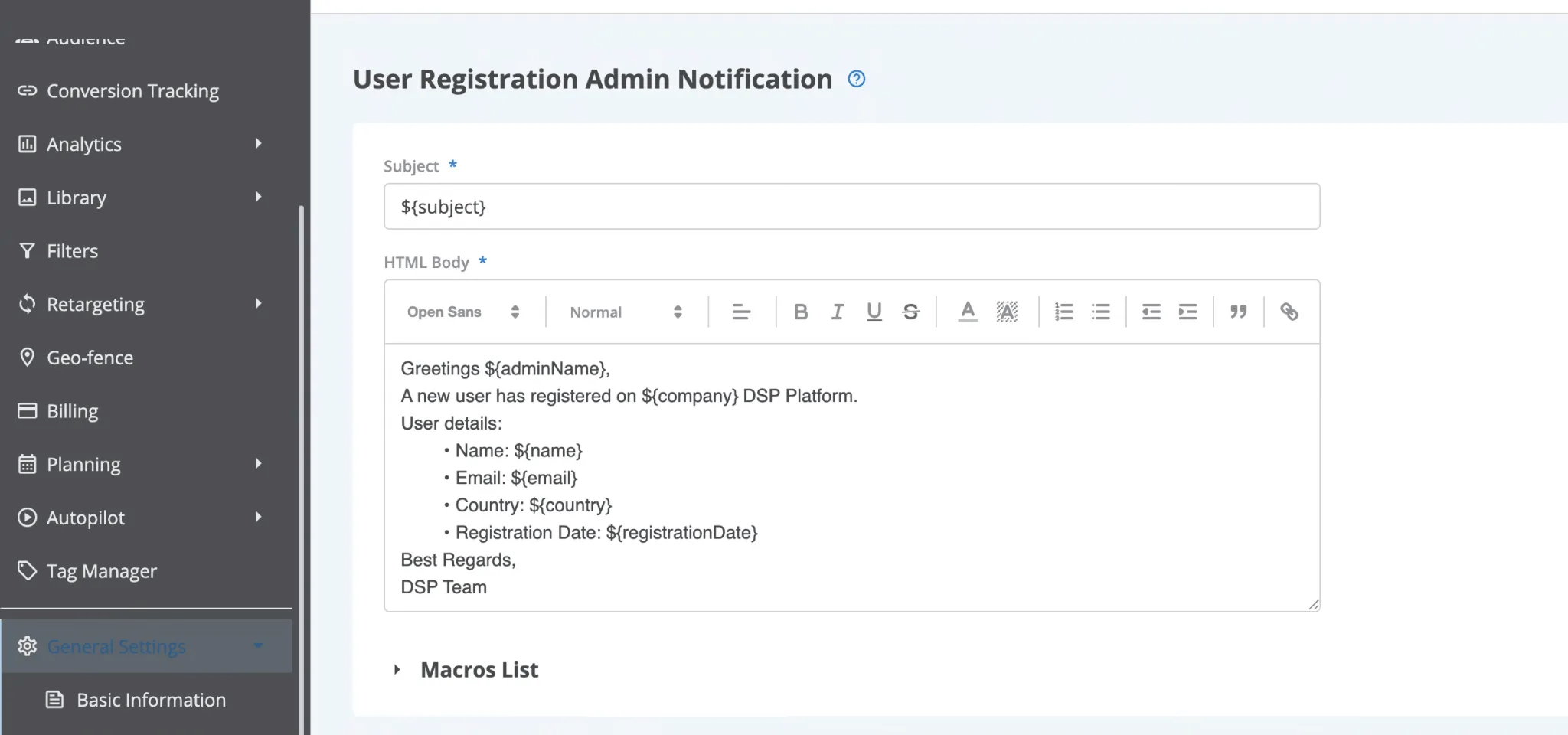
DSP administrators can now receive an email notification each time a new user registers. It's sent to administrator-role accounts only and can be disabled if your team doesn't need it.
The default template is editable. Add dynamic placeholders for the user's name, email, or sign-up timestamp. Managed from the Email Sender settings page.
This is primarily useful for white-label DSP operators and agencies with controlled onboarding flows.
Smaller Tweaks That Still Matter
Smarter Spend Alerts
The anomaly detection system now builds a baseline from historical hourly spend data before firing any alert. The old formula triggered on normal fluctuations.
The new one waits for a genuine statistical anomaly, attaches a score from 1 to 100, and enforces a 3-hour cooldown between repeated alerts for the same spike. Sensitivity is configurable in System Settings.
Even Pacing Toggle During Delivery
Previously, changing the Even Pacing setting required stopping the active budget first. You can now toggle Even Pacing on or off while a budget is in Delivering status, without interrupting delivery.
Traffic Funnel: SSP Endpoints Auto-Loaded
SSP endpoints now appear automatically in the Traffic Funnel filter, without requiring a manual search and selection first.
What This Release Adds Up To
Epom DSP 8.0–8.2 is a release cycle focused on removing friction that builds up when managing campaigns at scale.
Endless Budgets eliminate a recurring rebuild task for always-on campaigns. SSP labels and visibility controls bring the kind of organization to traffic sources that the platform's growing supply library has needed. And smaller changes like audience duplication, folder reordering, and smarter alerts each remove a step that previously had no shortcut. Less time configuring. More time optimizing.