
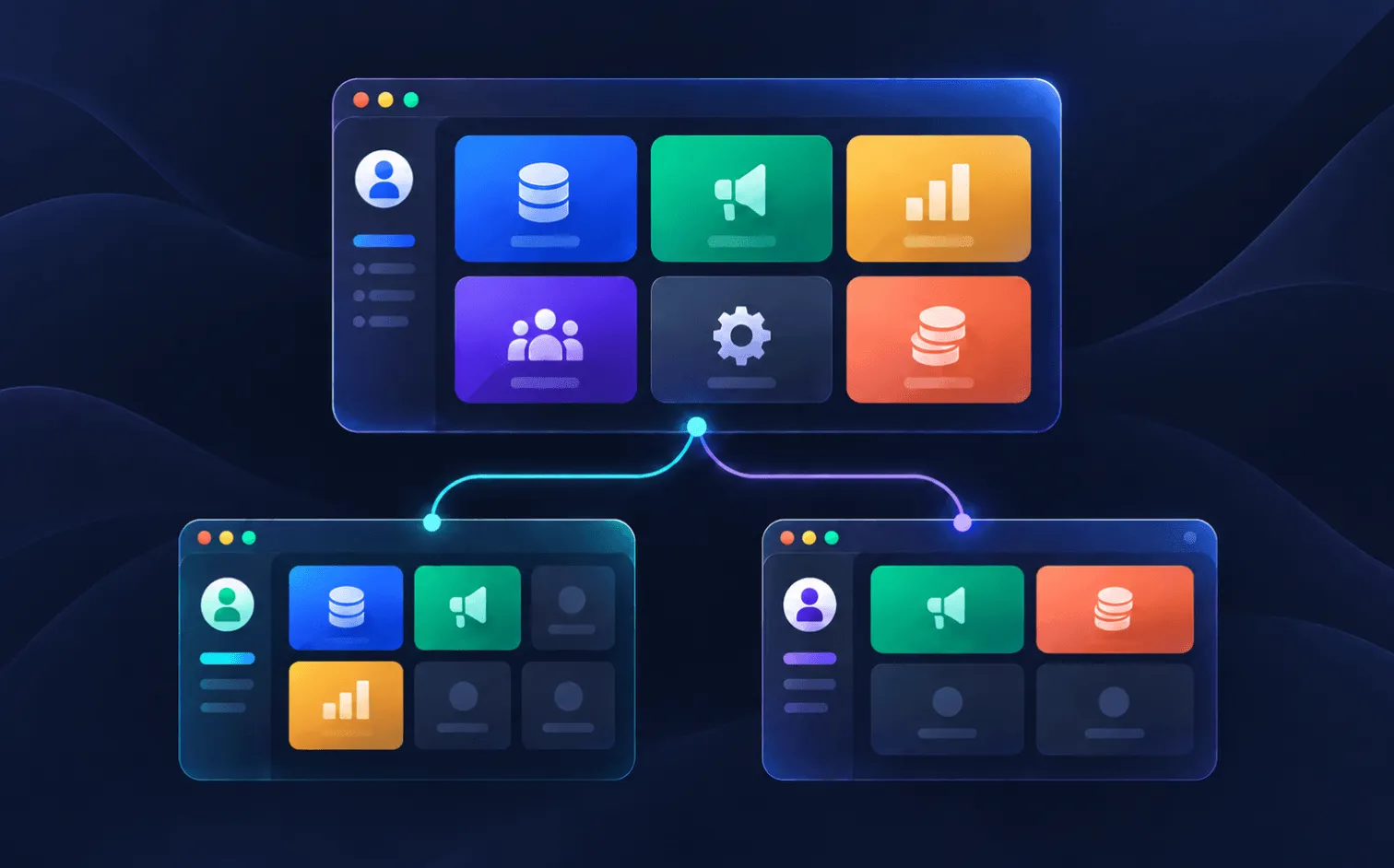
A publisher signs on Monday. By Tuesday they want a login, their own inventory inside it, and their earnings on the dashboard — and nothing on that screen belonging to anyone else.
So what goes on that screen? Their sites, obviously, and the advertisers buying their inventory if it's under your agreement. What those advertisers paid you, definitely not. And next month, when the second publisher signs, neither of them should find the other.
Every ad server can serve ads. Not every one, though, lets you decide, feature by feature, what each person logging in is allowed to configure.
Some give you three or four fixed roles and leave it there. More advanced ones let you build your own and tie each user to specific clients. Only a few will let you switch off a single revenue column while the rest of the report keeps working, which is the difference between showing a publisher their payout and showing them your margin.
Epom Ad Server has 459 of those switches across 36 areas, plus nine ready-made roles if you would rather not start from a blank matrix.
Epom lets you switch into any account you create. Start a free trial and see your publisher's screen before they do.
- Ad server roles and permissions are the rules deciding what each user can see and change — your own staff, your publishers and your advertisers, all inside one account rather than separate installations.
- Most networks build four kinds of access: their own team split by job, publishers who see only their inventory, advertisers who see only their campaigns, and tighter rules again for regulated verticals like betting.
- Three things define what a user sees: the account type behind their role, the permissions on that role, and which entities have been shared with them.
- Margin is the commercial reason networks care. Report columns are permissioned one by one, so a publisher can see their payout without seeing what the advertiser paid.
- Clients cannot see each other unless you share something with them. A publisher scoped to one site reaches that site and nothing else in the network.
What Are Ad Server Roles and Permissions?
Ad server roles and permissions are the rules deciding what each user can see and change, and every user gets exactly one role. That role governs everything from which tabs load to which columns appear in a report.
Ad networks need them for three reasons, and only one of the three is really about security.
- Your business stays private. Your margin, your pricing rules and what your other clients are spending have no business appearing on a publisher’s screen.
- Your clients’ data stays private. One publisher’s advertiser relationships are nobody else’s business, and in regulated verticals that is written into the contract rather than left to good manners.
- Everyone gets a smaller product. An ad server has hundreds of screens, and a publisher who logs in once a week to grab a placement code should not have to walk past campaign pacing, moderation queues and billing to find it.
Role-based access control solves all three at once, which is roughly the difference between a platform you operate and a platform your partners are happy to work in.
"Roles and permissions in Epom exist so a network can hand each party exactly the access it needs and nothing more."

Four Roles and Permissions Setups Your Ad Network Might Need
Almost every network ends up with some version of the same four setups: your own staff split by job, publishers who see only their own inventory, advertisers who see only their own campaigns, and a stricter version of all three once regulated demand is involved.
Roles For Your Own Team
Four roles, and the useful way to draw them is by what each person should not be able to do rather than what they should.
- Super-admin, or root user — full access: users, billing, moderation, ad-serving domains, system preferences.
- Network manager, account manager or ad ops — manages advertisers, publishers and campaigns but cannot finalize an accounting period or touch system settings.
- Support and QA — analytics and traffic quality always, edit rights depending on how you work. Some networks keep support read-only and escalate every fix; others grant campaign edit so a problem gets solved without a handoff.
- Finance — the billing tab, advertiser funds and publisher payments, and nothing else.
Whatever the split, gate the sensitive levers on their own. Bid floor management, minimum margin and moderation approval are each individual permissions, so they can stay with senior people no matter how much else a role is given.
Access For Publishers
Publisher account access is the most common sub-accounts request, and the role is a simple one: manage your own sites and placements, copy your ad codes, check what you earned.
Two settings do most of the work. Entity scope set to Shared means the publisher only reaches inventory you handed them, and setting the analytics column family to Publisher means the advertiser and net columns never appear in their interface at all.
After that it is a matter of taste. You decide which ad code formats they can copy, which domain their ads serve from, and whether they can block advertisers they would rather not work with.
Access For Advertisers
An advertiser self-serve account is the demand-side mirror of the above: own campaigns, own banners, own conversion tracking, and Advertiser analytics columns only.
The setting that matters most decides which ad inventory they can point a creative at. Scope it to Shared and they run only on the placements you gave them, which saves everyone the conversation that starts with an advertiser browsing your full inventory list and asking for a better slot.
Alongside it, floor prices and campaign types let you package what you sell. That is closer to publishing a rate card than to restricting anyone — the advertiser gets a working platform, and you get consistent deals without negotiating each one.
Extra Gates For Casino And Betting
Regulated verticals are where a permission model stops being a convenience and starts being a licence condition. Five things get added to the pattern above, and none of them are optional if you want to keep the demand at your betting or igaming ad network.
- Mandatory moderation. Gambling creatives route through banner approval before serving, and you restrict who can approve. This is what keeps non-compliant creatives off the network.
- Geo lockdown. Betting is licensed per country. Demand targeting and pre-targeting are permissioned separately, so these advertisers can be restricted to approved geos while publishers enforce their own allowed regions.
- Category blocking. A publisher who does not accept gambling can block an advertiser on one placement, across their whole site, or everywhere at once, and exclude casino demand by domain category on top of that.
- Server-to-server conversion tracking. Deposits and first-time deposits come back via S2S postbacks, so those tracking permissions go to the vertical’s role specifically.
- Traffic quality and fraud. Gambling attracts bots. Traffic Quality Reports, DSP Creative Scan and risk-score columns get enabled for whoever oversees it.
On pricing in regulated verticals. High-value gambling deals are a reason to restrict minimum margin, revenue share and pricing overrides to senior roles only. Each is a separate permission, so this does not require taking anything else away.
How to Show Publishers Net Revenue Instead of Gross
This is the commercial reason networks care about permissions.
Your margin is the difference between what the advertiser pays and what the publisher receives, which means that if your platform shows publishers the gross figure, your margin is public information.
Take Epom Ad Server as an example. Every report column there is its own permission. Gross, Net, Profit, Revenue (Net) and Charges (Gross) switch on and off separately, and so do the three column families — Basic, Publisher and Advertiser analytics.
So a publisher sees their payout, and the gross figure is not in their interface at all.
The same applies to the levers behind it. Manage Publisher Revenue Share, Manage Minimum Margin and Show Publishers’ Payouts are three distinct permissions.
"You set the revenue share and they see only those parameters, only those amounts of money that you have already deducted from your profit."

How to Isolate Client Data in an Ad Server
This is what the roles and sub-accounts exist for. A client-facing role reaches only the sites or advertisers you gave it, and nothing else is in their account to find.
The version that comes up on evaluation calls is more specific: one of my publishers brings their own direct advertiser. Does the next publisher see that advertiser?
"They cannot. Other publishers cannot see it. You as an administrator can see everything."
Anything you did not share simply is not there.
There is one place a client sees a trace of someone else, and it is deliberate. A publisher checking which banners run on their own placement gets full detail for the advertisers you shared with them and a name-only row for everybody else’s, because otherwise the list would not add up and they would assume the report was broken.
Separately, you can share something at view-only level, and that entity shows up masked: name in italics, edit page greyed out, statistics still running. Masking stops people editing, not measuring.
Pro Tip: Masked is not the same as read-only. Read-only is a role-level grant. Masked is a per-entity share state. A user can have full editing permissions and still see one particular advertiser masked, because that advertiser was shared as Can View.
How Many Ad Server Roles and Permissions Do You Actually Need?
Far fewer than exist. Most networks run three to five roles in total, and never open the matrix.
Ready-made roles are why. Almost every ad server ships a similar starting set, because the shape of the problem is the same everywhere: somebody administers, somebody runs campaigns, publishers supply, advertisers buy.
| Platform | Roles out of the box |
|---|---|
| AdButler | 3 |
| Revive | 4 |
| Magnite | 5 |
| Google Ad Manager | 6, plus custom |
| Epom Ad Server | 9, plus custom |
Epom’s nine are Super-Admin, Network Manager, Network Supervisor, Publisher, Advertiser, Self-serve Publisher, Self-serve Advertiser, and a statistics-only account for each side. A network with staff, publishers and advertisers uses four of them and never touches the rest.
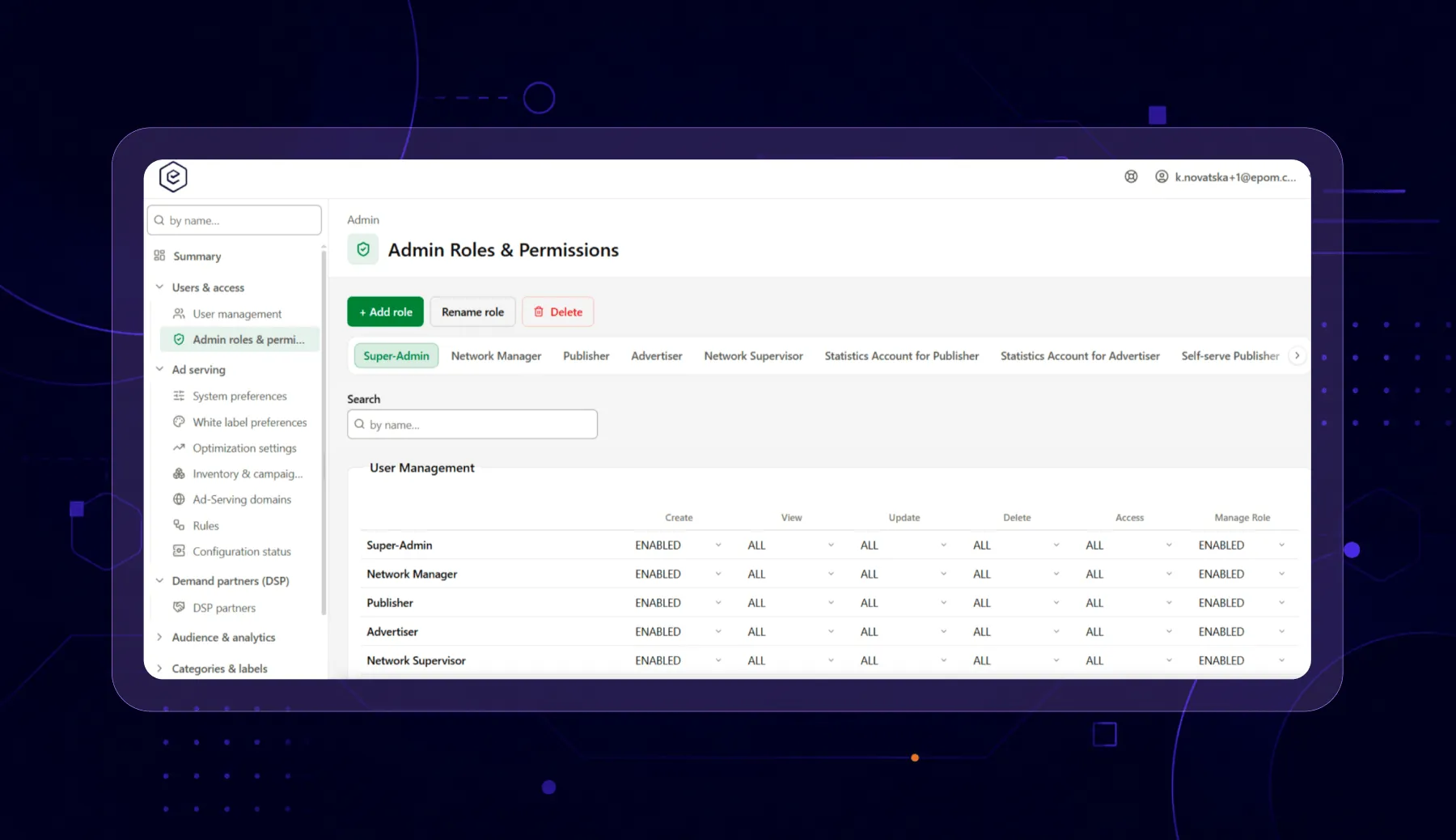
Ask a different question instead: can the platform draw the one line your business actually needs drawn?
Four fixed roles will happily give a publisher their own inventory. What they usually cannot do is give that publisher their payout without also handing over the gross figure, because reporting is one switch on those platforms rather than forty.
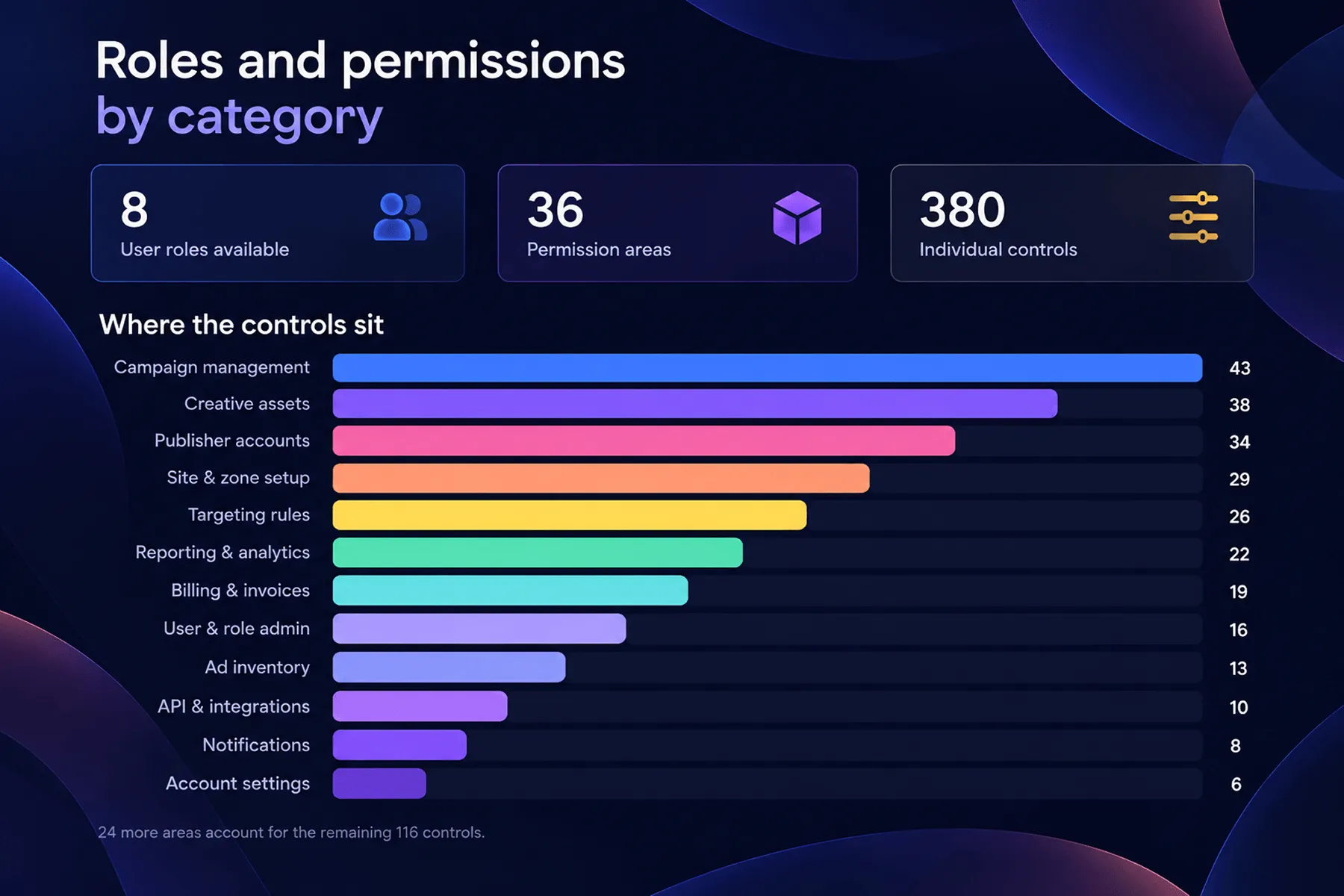
Epom has 459 switches across 36 areas, and here is where they sit.
Analytics accounts for 106 of the 459 on its own. Reporting is where margin leaks, which is why it gets that much attention.
Ad Server Account Hierarchy: Checks That Decide What a User Sees
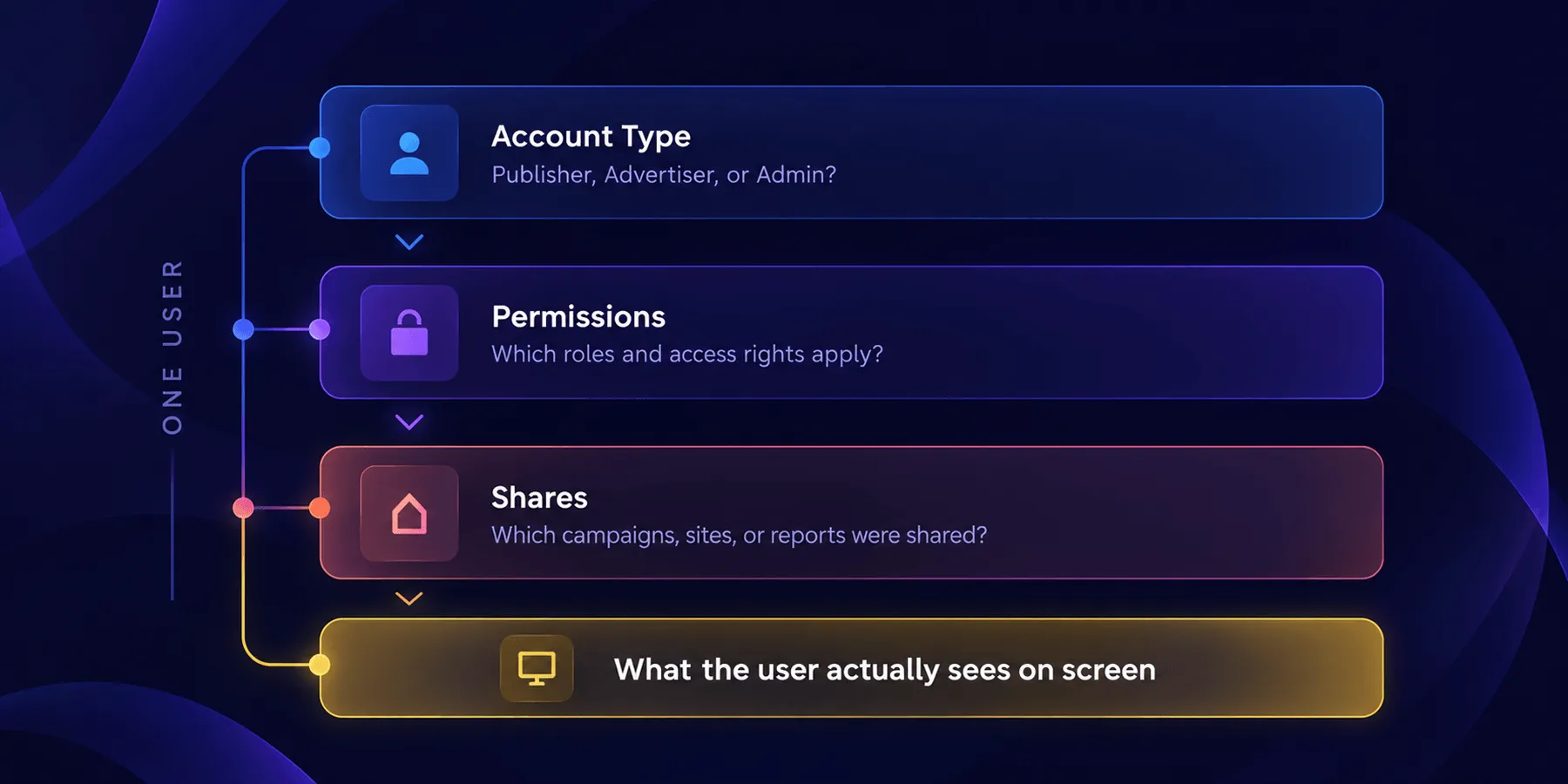
Different platforms structure this differently, and Epom runs three checks before a user sees anything at all. If an account ever looks wrong, one of the three is the reason.
Check One: The Account Type
Every role is built on a platform account type, and that decides which console the user lands in. Administrators get the admin console — system setup, white-label, role management. Everyone else gets the account area, which is the working interface.
One thing worth knowing: a set of admin-only capabilities can never be granted to a network-user role. The platform enforces this when the role is saved, so a client-facing role cannot be escalated into an administrative one.
Check Two: The Permission Matrix
Entity families — inventory, campaigns, templates, conversion actions — each carry Create, View, Update, Delete and Share as separately scoped actions. Everything else is a feature toggle with three levels.
| Setting | What the user experiences |
|---|---|
| Enabled | The field or button is there and editable |
| Read-only | Values are visible, controls greyed out |
| Disabled | The field, card or tab is not rendered at all |
Check Three: Shares
Permissions decide how much of an entity family a user can reach. Shares decide which specific advertisers, sites, templates and actions that is. Each share is set to Is Owner, Can Edit, or Can View.
How Roles and Permissions Work Across Ad Servers
Every ad server lets you restrict some access. They differ on two things: whether you can build your own roles, and whether one client can be walled off from another.
| Platform | Custom roles | Client isolation |
|---|---|---|
| Epom Ad Server | Yes, unlimited, from nine templates | Entity scope per role, plus per-entity shares |
| Google Ad Manager | Yes, permission checkboxes by category | Teams — Ad Manager 360 only |
| AdButler | Yes | No Publisher Access / Select Publishers / All Publishers |
| Revive | Sub-accounts | Publisher and advertiser levels |
| Magnite | No — five fixed role types | Not published |
| Kevel | Tri-level, managed through the API | Not published |
| Exads | Admin and self-serve | Not published |
Two things matter if you are moving from Google Ad Manager.
- Teams is a paid-tier feature. Google marks every Team's help page "Only available in Google Ad Manager 360". Standard Ad Manager gives you roles, so you can say what a user may do — but not which clients they may see. On the free tier, walling one publisher off from another is the gap.
- Isolation there is opt-in. When Teams is first switched on, every non-admin user lands on the "All companies and inventory" team until someone moves them.
The deeper difference is who the users are. Google’s examples are internal departments — a team on APAC clients, another on EMEA. Five of Epom’s nine templates are built for people outside your company.
Credit where it is due: Google’s permission list is deep, and if everyone logging in works for you, Teams handles it well.
Running a network where your publishers and advertisers log in alongside your own team? Start a free trial to test out the solution built exactly for your case.
Three Things That May Go Wrong With Roles
Keeping publishers apart is the part everyone plans for before they sign. These three are the ones that turn up afterwards, usually in the first fortnight.
When You Do Not Need Separate Accounts
Networks with several properties often assume they need one account each, because that is how it worked on Revive. One publisher arrived expecting five accounts for five apps.
They run one. Each team is scoped to its own inventory, and the operator gets all five properties in a single report — which is the one thing five separate accounts can never give you.
When Restrictions Are Set in the Product, Not the Contract
A video network cleared some of its publishers for VAST 4.0 and nothing else. You can write that into an agreement and check on it now and then, and most people do.
The better move is to switch the other formats off so those publishers never see them in the first place. Placement types and ad code formats are separate permissions, and the same logic applies to geo limits on regulated demand.
When An Empty Account Looks Broken
A role scoped to Shared with nothing shared to it yet behaves exactly like an empty platform: the user logs in fine, the tabs are all there, and every single screen is blank. No error, no warning, no hint about why.
Share their sites before you send the credentials, and you will save yourself the email.
FAQ
Give Each Client Exactly the View You Intend
Most platforms let you restrict access. The question at evaluation is whether the lines you need to draw match the lines the platform can draw — between your ops team and your finance team, between two publishers who must never meet, and between what an advertiser pays and what a publisher earns.
Epom gives you 459 places to draw them, and nine ad server user roles to start from rather than nothing.
Epom gives you 459 places to draw them, and nine ad server user roles to start from rather than nothing. Schedule a demo to see how it works live.