


A sponsor's pre-roll goes live across your network. Some players show a black screen, the advertiser's report shows zero quartiles, and every empty break is inventory you can't bill. What to do in this situation? We explain.
In most cases the creative is fine and the VAST tag is to blame. The tag is a URL that asks for the ad; the response is the XML that tells the player what to play and what to count. This guide shows where each one breaks, how to read the error codes, and how to fix them.
Got a tag that plays nothing right now? Paste it, or the raw XML, into the free Epom VAST Inspector. It plays the tag in a real player and, if it fails, shows the error code, what it means and where in the wrapper chain it broke.
- A VAST tag is an ad request URL that returns an XML response telling a video player which ad to play, where the media file is, and which events to track.
- The tag goes wherever a player asks for ads: a web player's ad settings, Google's IMA SDK, an SSP or Google Ad Manager line item, or a server-side ad insertion (SSAI) stitcher.
- Many failures report an error code. VAST codes 100–102 mean broken XML or an unsupported version, 301–303 point to wrappers, and 400–405 to media files. Google's IMA SDK adds its own codes from 1000.
- Request the highest VAST version your player supports. VAST 4.1 added Open Measurement (OMID, the IAB's shared viewability interface) and VAST 4.2 added SIMID (the IAB standard for interactive video ads).
- The player must fill a few macros: a cache buster, the page URL or app bundle, the device ID and the consent string. Without them, targeting and frequency capping break.
- A VAST ad server generates the tag and decides what comes back. Epom Ad Server serves VAST 2.0 through 4.3 (4.2 by default in the new interface), fills ad pods of up to 20 ads, and adds Open Measurement on VAST 4.1+.
What Is a VAST Tag?
A VAST tag is an ad request URL that returns an XML response telling a video player which ad to play, where the media file is, and which events to track. It's also called a VAST ad tag or a VAST URL. VAST stands for Video Ad Serving Template, a standard the IAB introduced in 2008 and IAB Tech Lab maintains today.
The tag and the response are two different things. The VAST tag is the URL, with parameters and macros; the VAST response, or VAST XML, is what comes back.
VAST tag (the request the player sends):
```text
https://ads.example.com/vast?placement=12345&vastv=4.2&cb=[CACHEBUSTING]&pageurl=[PAGEURL]
```
VAST response (the XML that comes back, shortened):
```xml
<VAST version="4.2">
  <Ad id="20026">
    <InLine>
      <AdTitle>Spring Sale 15s</AdTitle>
      <Impression><![CDATA[https://track.example.com/imp]]></Impression>
      <Creatives>
        <Creative>
          <Linear>
            <Duration>00:00:15</Duration>
            <MediaFiles>
              <MediaFile type="video/mp4" width="1920" height="1080"><![CDATA[https://cdn.example.com/spring.mp4]]></MediaFile>
            </MediaFiles>
          </Linear>
        </Creative>
      </Creatives>
    </InLine>
  </Ad>
</VAST>
```
VAST tags run in-stream (pre-roll, mid-roll and post-roll), in outstream video ads, in apps and on CTV. The ads they deliver are often called VAST ads, and a VAST tag is one type of ad tag.
Why Do Advertisers and Publishers Use VAST Tags?
VAST advertising works because every party shares one format. An advertiser sends the same tag, tracking pixels and companion banners to every player. A publisher can fill its player from any ad server, DSP or SSP that speaks VAST.
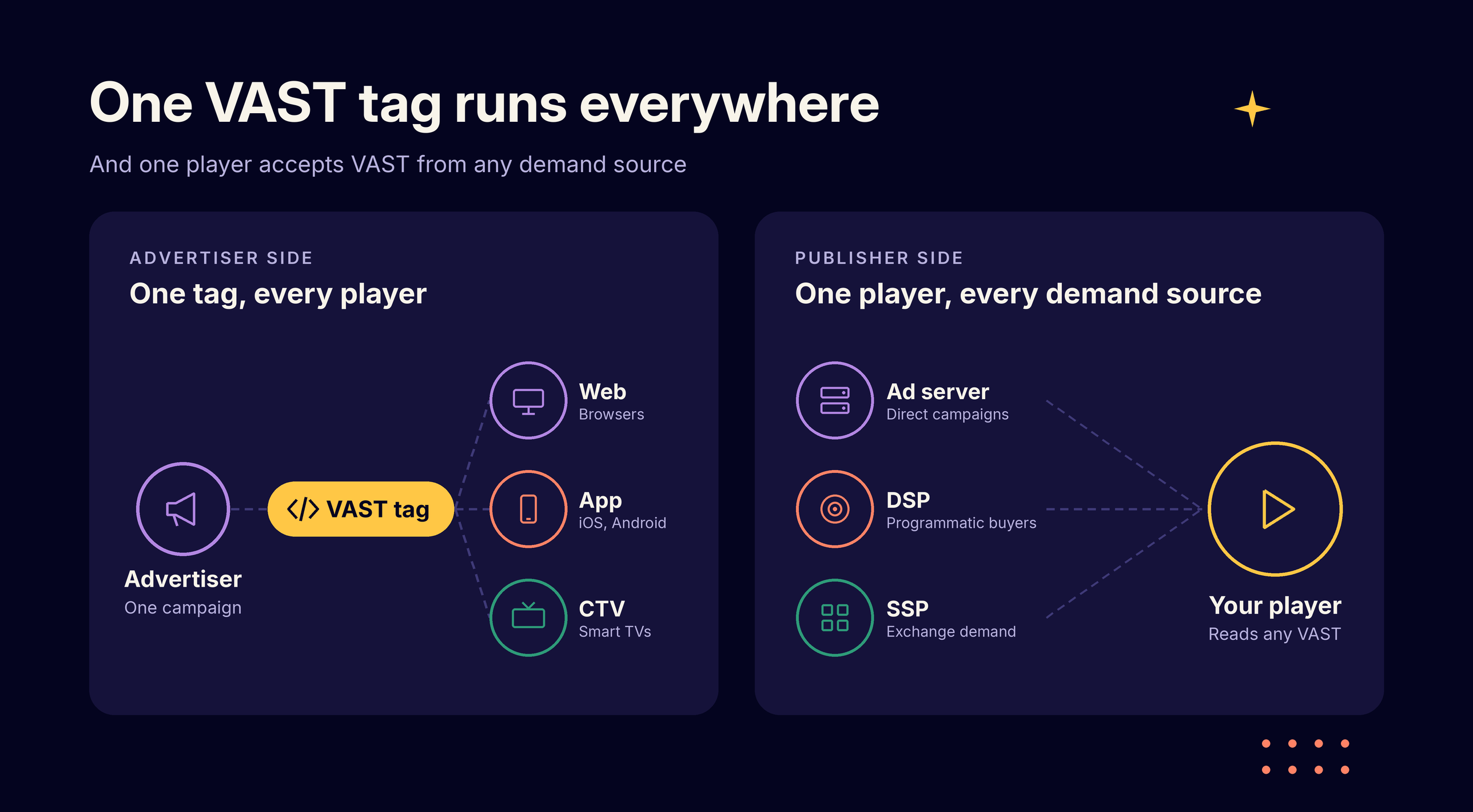
How Does a VAST Tag Work?
A VAST tag works in five calls between four parties. The player calls the tag with macros filled in, and the ad server returns the VAST response.
The player then loads a media file from the CDN and fires tracking URLs as the ad plays. If anything fails, it calls the Error URL with a code.
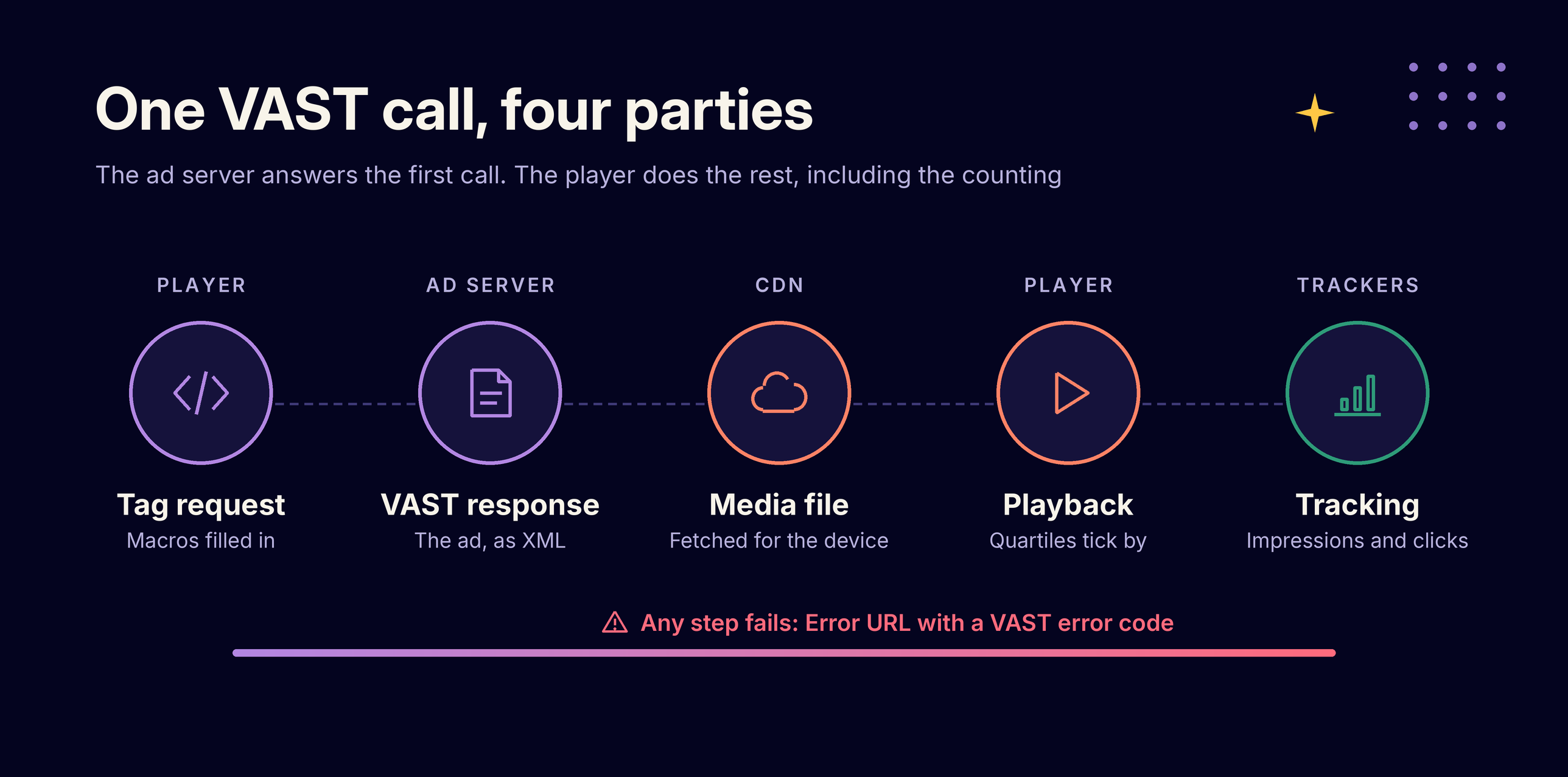
The ad server answers only the first call. Everything after it, including the counting, happens between the player, the CDN and the trackers.
Where Does a VAST Tag Go?
A VAST tag goes into whatever component requests ads for the VAST player. That choice decides who calls the tag, who fills the macros and how many hops stand between the player and the ad.
| Where | How the tag is used |
|---|---|
| Player configuration | Most web players take an ad tag URL in their advertising settings, for example JW Player's VAST client or Video.js with the IMA plugin. |
| Google IMA SDK | Set as `adTagUrl` in the ad request, on web, Android or iOS. IMA plays third-party VAST tags. |
| SSP, ad network or Google Ad Manager | Added as third-party demand: a VAST redirect creative in Google Ad Manager, or a demand tag in an SSP. The SSP calls your tag and passes the response on. |
| SSAI stitcher | Set as the ad decision server URL in the stitcher, such as AWS MediaTailor. The stitcher calls the tag server-side. |
A player fills macros from the page or device, while a stitcher must forward the viewer's data. An SSP or Google Ad Manager in the middle usually adds a wrapper, which means more latency and one more place to fail.
VAST Tag Example: Anatomy of a VAST Response
This VAST example shows a complete inline VAST 4.2 response for a 15-second linear ad. Domains are placeholders.
```xml
<VAST version="4.2" xmlns="http://www.iab.com/VAST">
  <Ad id="20026" sequence="1">
    <InLine>
      <AdSystem version="1.0">Example Ad Server</AdSystem>
      <AdServingId>a1b2c3d4-e5f6</AdServingId>
      <AdTitle>Spring Sale 15s</AdTitle>
      <Impression id="imp-1"><![CDATA[https://track.example.com/imp?cb=[CACHEBUSTING]]]></Impression>
      <Error><![CDATA[https://track.example.com/error?code=[ERRORCODE]]]></Error>
      <AdVerifications>
        <Verification vendor="verifier.example.com-omid">
          <JavaScriptResource apiFramework="omid" browserOptional="true">
            <![CDATA[https://verify.example.com/omid.js]]>
          </JavaScriptResource>
        </Verification>
      </AdVerifications>
      <Creatives>
        <Creative id="cr-501" adId="ad-501">
          <UniversalAdId idRegistry="ad-id.org">ABCD1234000H</UniversalAdId>
          <Linear skipoffset="00:00:05">
            <Duration>00:00:15</Duration>
            <TrackingEvents>
              <Tracking event="start"><![CDATA[https://track.example.com/start]]></Tracking>
              <Tracking event="firstQuartile"><![CDATA[https://track.example.com/q1]]></Tracking>
              <Tracking event="midpoint"><![CDATA[https://track.example.com/mid]]></Tracking>
              <Tracking event="thirdQuartile"><![CDATA[https://track.example.com/q3]]></Tracking>
              <Tracking event="complete"><![CDATA[https://track.example.com/complete]]></Tracking>
              <Tracking event="skip"><![CDATA[https://track.example.com/skip]]></Tracking>
            </TrackingEvents>
            <VideoClicks>
              <ClickThrough><![CDATA[https://advertiser.example.com/spring]]></ClickThrough>
              <ClickTracking><![CDATA[https://track.example.com/click]]></ClickTracking>
            </VideoClicks>
            <MediaFiles>
              <MediaFile delivery="progressive" type="video/mp4" width="1920" height="1080" bitrate="4000">
                <![CDATA[https://cdn.example.com/spring-1080.mp4]]>
              </MediaFile>
              <MediaFile delivery="progressive" type="video/mp4" width="640" height="360" bitrate="800">
                <![CDATA[https://cdn.example.com/spring-360.mp4]]>
              </MediaFile>
              <Mezzanine delivery="progressive" type="video/mp4" width="1920" height="1080">
                <![CDATA[https://cdn.example.com/spring-mezzanine.mp4]]>
              </Mezzanine>
            </MediaFiles>
          </Linear>
        </Creative>
      </Creatives>
    </InLine>
  </Ad>
</VAST>
```| Element | What it does |
|---|---|
| `<Ad>` / `sequence` | One ad; the sequence number orders ads inside an ad pod. |
| `<InLine>` | Marks the response as carrying the ad itself, not a pointer to another server. |
| `<Impression>` | URL the player calls when the ad starts rendering. This is where an impression is counted. |
| `<Error>` | URL the player calls with an error code when playback fails. |
| `<AdVerifications>` | Loads verification scripts. The element arrived in VAST 4.0; Open Measurement became the standard path in VAST 4.1. |
| `<UniversalAdId>` | A creative ID, such as an Ad-ID code, that stays the same across ad servers. Required for linear ads since VAST 4.0. |
| `<Linear>` / `skipoffset` | An in-stream ad; skipoffset sets when the Skip button appears. |
| `<TrackingEvents>` | VAST tracking URLs that fire at playback milestones: start, quartiles, complete, skip. |
| `<VideoClicks>` | ClickThrough is the landing page; ClickTracking records the click. |
| `<MediaFiles>` / `<Mezzanine>` | The video renditions the player picks from, plus a high-quality source file for stitchers to transcode. |
Overlays use a <NonLinear> element, and companion banners use <CompanionAds>. For more samples, see IAB Tech Lab's VAST repository on GitHub.
What Is a VAST Wrapper? Inline vs Wrapper Tags
A VAST wrapper is a VAST response that points the player to another ad server's VAST tag. It carries no ad itself: it adds its own tracking URLs and hands the player a new tag to call.
Each hop adds latency and a new point of failure. Players cap the number of hops they follow, and past the cap they report error 302. Ask demand partners for inline tags where possible.
How to Debug a VAST Tag: Symptoms, Error Codes and Fixes
Start with the symptom, find the error code in the player log or your Error URL reports, then check the likely cause. Run every tag through a VAST tag tester and validator before launch.
| Symptom | VAST error | Likely cause | What to check |
|---|---|---|---|
| Black screen, no ad request in the network panel | none | The player never called the tag | Ad tag URL in the player config; ad blockers; CORS errors in the console |
| Response arrives but the player rejects it | 100, 101 | XML is malformed or fails schema validation | Run the response through a validator; look for unescaped characters in URLs |
| Player ignores a valid response | 102 | VAST version not supported by the player | Request a version the player supports |
| Empty response, nothing plays | Empty `<VAST/>` (303 if it came through a wrapper) | No eligible ad: targeting, frequency cap, budget or unfilled macros | Campaign targeting and pacing; whether macros were replaced |
| Long delay, then nothing | 301 | A wrapper hop timed out | Response time of each partner in the chain |
| Nothing plays after several redirects | 302 | Wrapper chain longer than the player allows | Number of hops; ask for an inline tag |
| Ad loads in a tester but not on the site | 401, 402 | Media file not found or too slow to load | Open the file URL; CDN and CORS settings; a lower-bitrate rendition |
| Nothing plays on CTV or mobile | 403 | No media file matches the device, for example a VPAID-only creative | Add an MP4 rendition in a supported size |
| Ad plays, quartiles stay at zero | none | Tracking URLs blocked, not fired or not URL-encoded | Watch the tracking calls in the network panel |
| Your impression count is higher than the advertiser's | none | Different counting points, or trackers blocked on some devices | Compare counting definitions; see our guide to ad discrepancy |
Paste a failing tag into the Epom VAST Inspector to see which code it triggers and what to fix.
Your Player Says X: IMA and VAST Error Codes Side by Side
Most players don't show the IAB code alone. Google's IMA SDK passes VAST codes (below 1000) through unchanged and adds its own codes from 1000 up. They run 1000–1099 for requests and responses, 1100–1199 for SDK usage and 1200–1299 for playback.
JW Player shows the same IMA errors with a five-digit prefix, so 1009 appears as 21009.
| Your player says | It means | Fix |
|---|---|---|
| IMA 1009 (JW Player 21009) | The ad server answered with an empty VAST response: no eligible ad | Check targeting, frequency caps and pacing; check that macros were replaced |
| IMA or VAST 303 | A wrapper led to a third-party server that returned no ad | Test the third-party tag on its own; your campaign setup is usually fine |
| IMA or VAST 301 | The tag or a wrapper hop timed out. IMA gives each request only a few seconds, and every hop spends part of that time | Check each partner's response time; remove hops |
| IMA or VAST 302 | Too many wrapper redirects | Ask the partner for an inline tag |
| IMA 1010 | The response couldn't be parsed as VAST, the IMA counterpart of VAST 100 | Validate the XML; look for HTML error pages or unescaped characters |
| IMA 1007 (JW Player 21007) | No media file this player can use, close to VAST 403 | Add an MP4 rendition in a supported size; drop VPAID-only creatives |
| IMA 1005 (21005) or 1012 (21012) | The ad request itself failed: network, CDN, CORS or a badly encoded tag URL | Open the tag URL in a browser; URL-encode macros; serve over HTTPS |
| IMA or VAST 402 | The media file took too long to load | Offer a lower-bitrate rendition; check the CDN |
| IMA 1205 | The browser blocked autoplay | Start the ad muted, or after a user click |
| IMA or VAST 901 | The VPAID creative failed | Ask for MP4 with Open Measurement instead of VPAID |
Sources: Google IMA SDK error code reference (HTML5 and iOS) and JW Player's ad errors reference. The Epom VAST Inspector shows whichever code your tag triggers, VAST or IMA, with what it means and how to fix it.
From Epom Support: Three More Questions Behind "My VAST Tag Doesn't Work"
These questions came to Epom's support and product team. Each answer was checked against the ad server's code.
Why does the partner say they filled, while the report shows lost opportunities?
The ad server did its part: it picked the third-party banner and returned the wrapper. The third-party server then returned an empty VAST or timed out in the player, which counts as a lost opportunity, not as "no ads". The fix is to test the third-party tag in the Epom VAST Inspector, not your campaign setup.
Why do ads behind an SSAI stitcher get the wrong geo and low fill?
The ad server sees the stitcher's server, not the viewer. Geo then comes from the data centre, and the stitcher's user agent can trip bot filters.
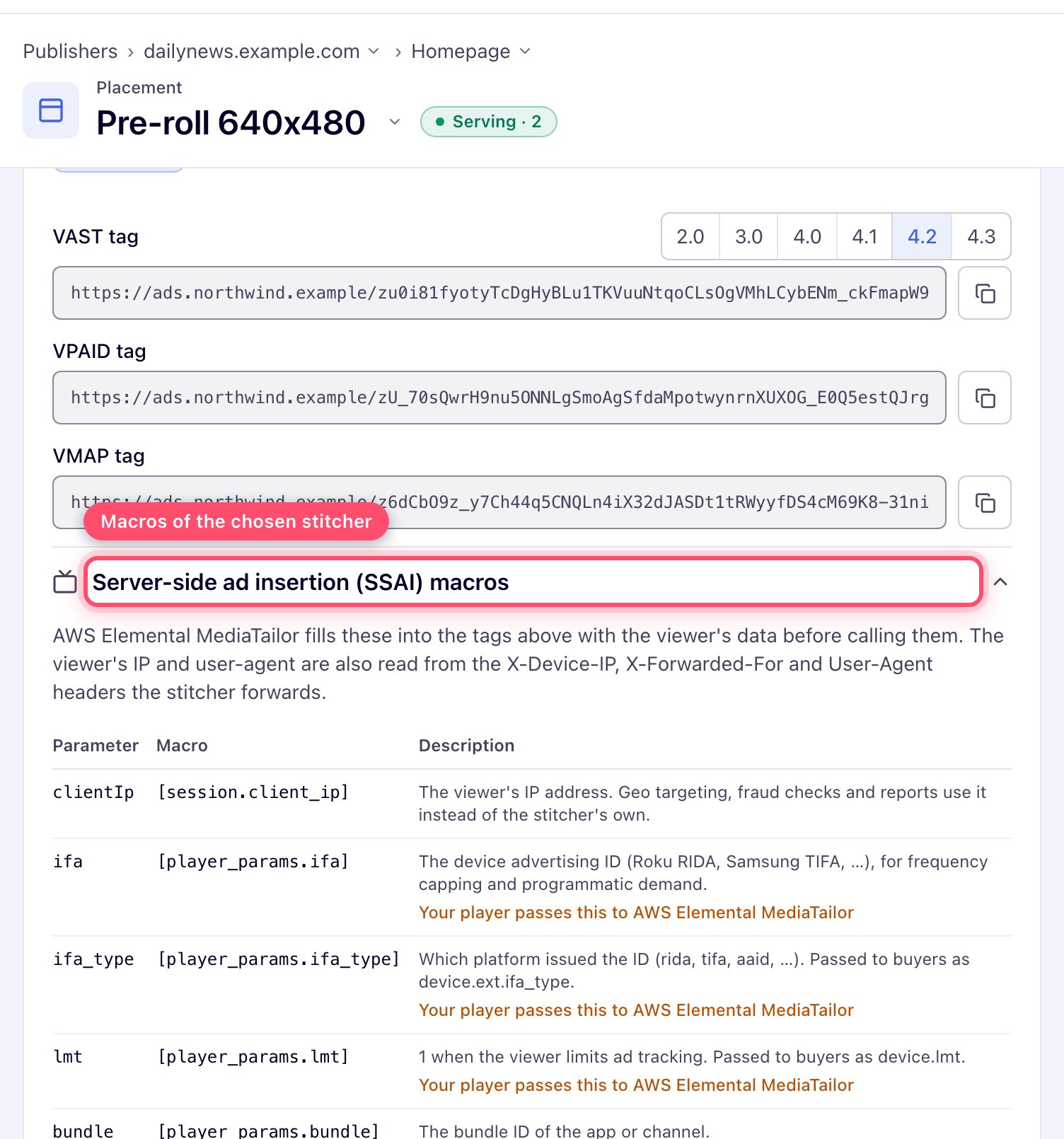
The fix is to pass the viewer's IP address and user agent through the stitcher's macros. Epom video placements have an SSAI picker that adds them for AWS MediaTailor, Google DAI, SpringServe and Brightcove.
How do you run a mid-roll every five minutes on a 24/7 live stream?
Not with VMAP, because a live stream has no fixed timeline to schedule breaks on. The fix is a timer in the player that calls the same VAST tag every five minutes.
Which VAST Version Should You Use? VAST 2.0 to 4.3 Compared
Request the highest VAST version that both your player and your demand partners support. Older versions silently drop features: a VAST 2.0 response can't carry Open Measurement or a mezzanine file.
| Version | Released | Key additions |
|---|---|---|
| VAST 2.0 | 2009 | Standardized tracking events and companion ads. |
| VAST 3.0 | 2012 | Ad pods, skippable ads (skipoffset), error codes, progress events. |
| VAST 4.0 | January 2016 | Mezzanine files for server-side insertion, Universal Ad ID, viewable impression, the AdVerifications element. |
| VAST 4.1 | November 2018 | Ad request guidance, Open Measurement as the standard verification path, audio ads merged in. |
| VAST 4.2 | June 2019 | SIMID interactivity, macros for ad break information, multiple Universal Ad IDs per creative. |
| VAST 4.3 | December 2022 | CTV viewing confirmation, earlier access to creative files for vetting; macros maintained separately on GitHub. |
Sources: IAB Tech Lab VAST specifications (4.2, 4.3) and the IAB VAST repository.
Which Version and Media File to Request, by Environment
The version table shows what each release added. This one shows what to ask a demand partner for.
| Environment | VAST version | Media file | Verification and interactivity | Avoid |
|---|---|---|---|---|
| Web player with Google IMA | VAST 4.x (Epom's default is 4.2) | MP4 (H.264) in several bitrates | Open Measurement through AdVerifications; SIMID if interactive | VPAID |
| Mobile app (IMA or native SDK) | VAST 4.x | MP4 renditions sized for mobile | OM SDK through AdVerifications | VPAID; desktop-only file sizes |
| Roku and other CTV apps (client-side) | VAST 4.x | MP4 only | Pass the device ID macros (IFA and its type) | VPAID and any JavaScript creative |
| Behind an SSAI stitcher | VAST 4.1 or later | A mezzanine file plus MP4 renditions, with a Universal Ad ID so the stitcher can reuse its transcodes | Viewer IP address and user agent through macros or headers | VPAID and interactive formats |
| Epom VMAP pre-roll breaks | VAST 3.0 inside the VMAP | MP4 | No Open Measurement in these breaks | Per-break VAST 4.x calls when you need OM or mid-rolls |
What about VPAID? VPAID let video ads run their own code inside the player. The IAB has replaced it with SIMID for interactivity and Open Measurement for verification. VPAID also doesn't run on most CTV devices or behind server-side insertion.
Accept VPAID only for legacy web demand, and ask partners for MP4 plus Open Measurement instead. The VAST vs VPAID comparison covers the migration.
Which VAST Macros Must the Player Fill?
Macros are placeholders in the tag that the player fills in at request time. If the player sends the literal text, the ad server can't target, cap or dedupe, and many requests come back empty.
| Macro | What it carries | Why you need it |
|---|---|---|
| `[CACHEBUSTING]` | A random number | Stops browsers and CDNs from serving a cached response |
| `[PAGEURL]` / `[DOMAIN]` | Where the ad will show (web) | Brand safety, site targeting, reporting |
| `[APPBUNDLE]` | App ID (in-app, CTV) | App targeting and reporting |
| `[IFA]` / `[IFATYPE]` | Device advertising ID (IFA) and its type | Frequency capping and audience targeting in apps and on CTV |
| `[LIMITADTRACKING]` | Whether the user opted out of tracking | Respecting device privacy settings |
| `[GDPRCONSENT]` | The TCF consent string from the site's consent platform | Legal basis for personalized ads in the EU |
| `[DEVICEIP]` / `[DEVICEUA]` | Viewer's IP address and user agent | Geo targeting and fraud checks when a server makes the request |
On a web page, the viewer's browser calls the tag, so the IP address and user agent travel with the request. They need macros only when a server, such as a stitcher, calls the tag on the viewer's behalf.
How Do You Run Pre-Roll, Mid-Roll and Post-Roll Ads With a VAST Tag?
The player decides when to call the VAST tag: before, during or after the content. Use one tag per position, and per region if targeting differs, so pricing and reporting stay separate.
For long content with several breaks, use VMAP (Video Multiple Ad Playlist) to schedule the breaks, or call the VAST tag at each break. In Epom Ad Server, VMAP generates pre-roll breaks with VAST 3.0 inside, so call the tag per break for mid-rolls or Open Measurement.
What Is an Ad Pod in VAST?
An ad pod is a group of ads played back to back in one break, ordered by the sequence attribute on each <Ad> element. Ad pods arrived in VAST 3.0.
If a pod ad fails to load, the player can swap in a "buffet" ad: an ad in the same response without a sequence number. In Epom Ad Server, set the pod size with the maxAds parameter or the placement's "Return (ads in pod)" field, up to 20 ads.
Can VAST Tags Run on CTV and With Server-Side Ad Insertion?
Yes. On CTV, VAST tags run in the app's own player or behind an SSAI stitcher. The stitcher requests the tag for the viewer and inserts the ad into the stream.
Behind a stitcher, the stitcher must pass the viewer's IP address, user agent and device ID through macros or headers. Otherwise geo targeting, frequency capping and fraud checks see the stitcher instead of the viewer.
How Epom Ad Server Generates and Serves VAST Tags
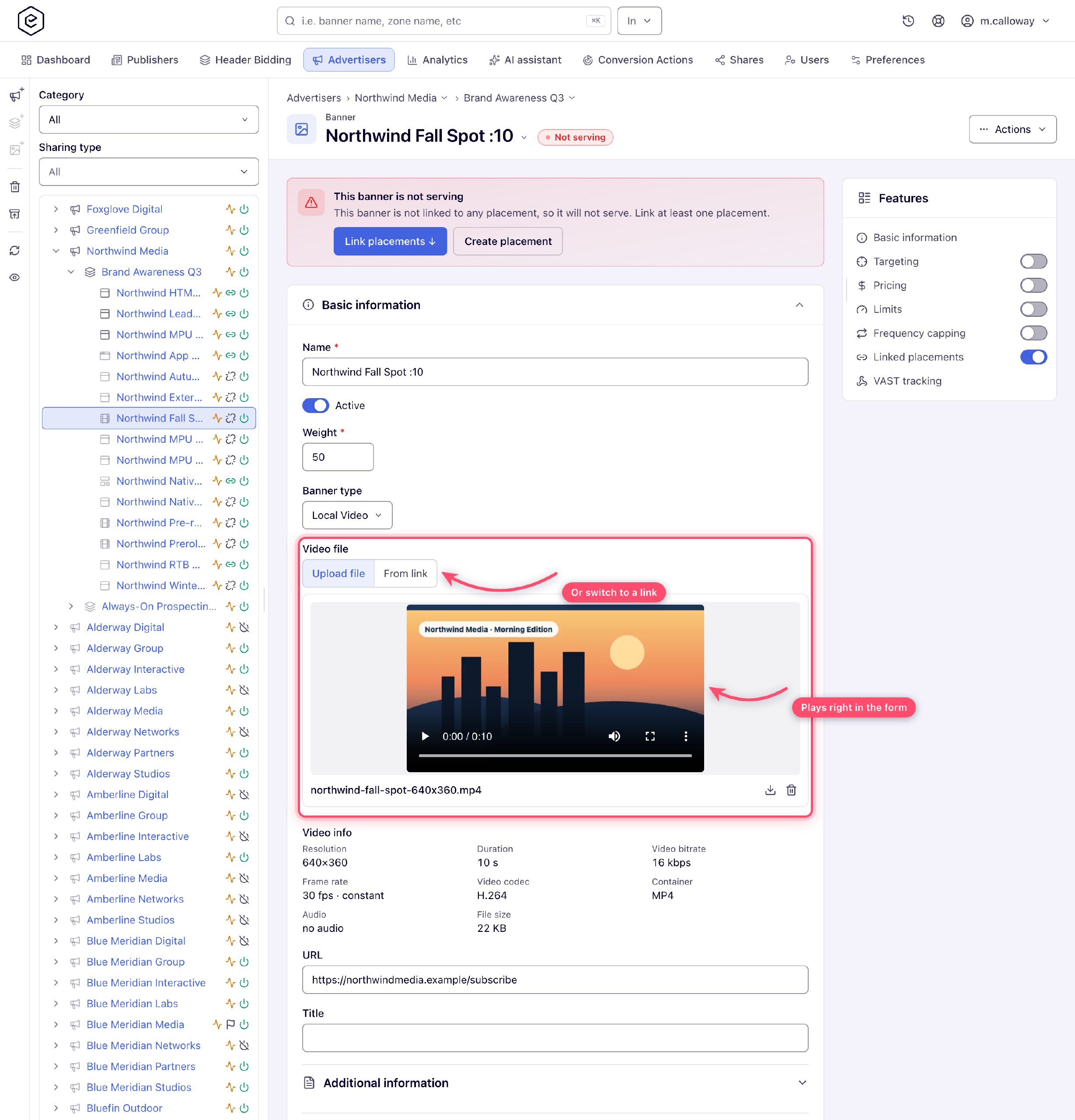
Generate the tag from a video placement. Epom Ad Server works as both the VAST ad server and the VAST tag generator. Create a video banner, link it to a video placement and copy the tag from the new interface. It sets VAST 4.2 by default and lets you pick another version; the help docs cover the settings.
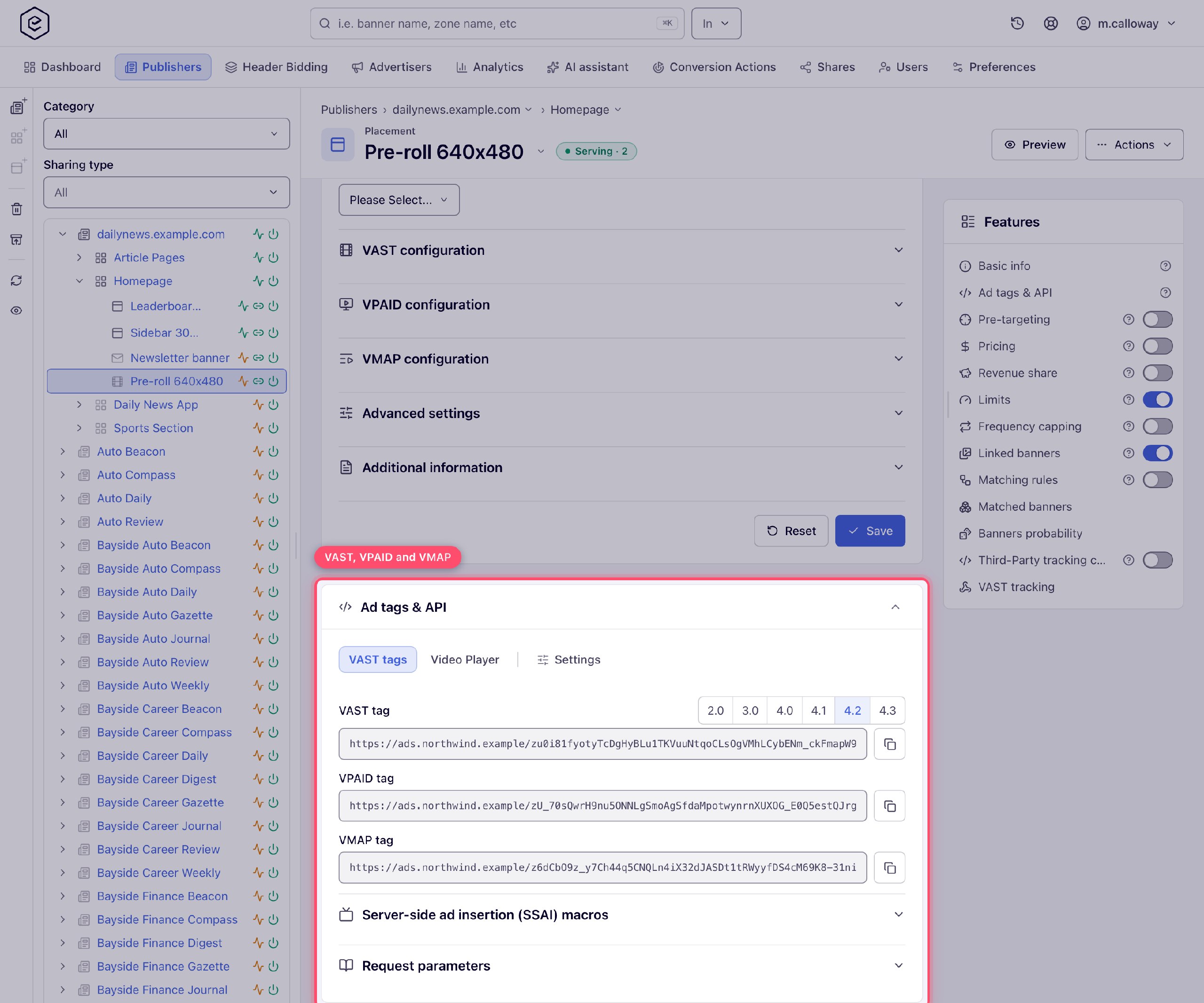
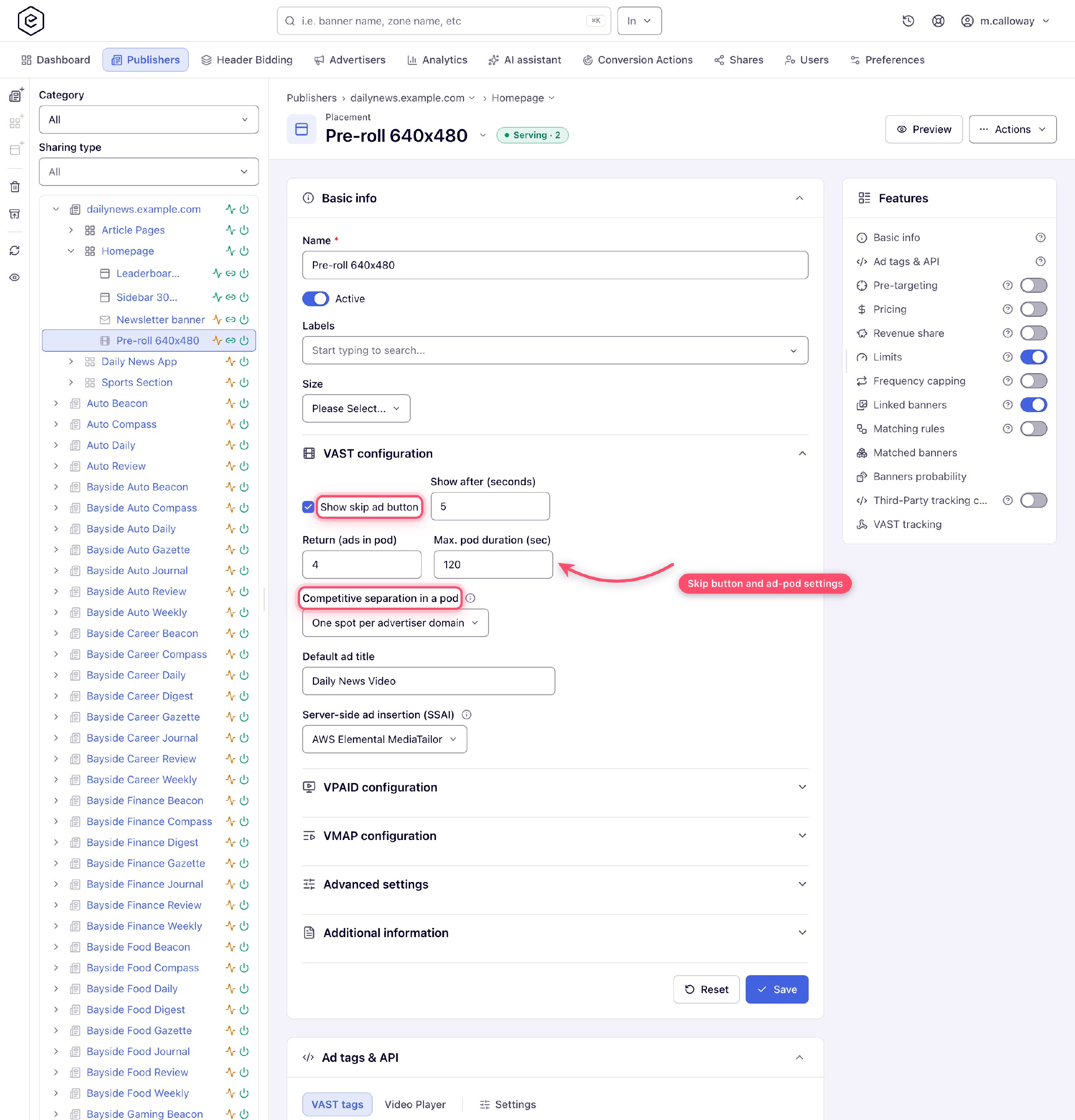
Fill every break with ad pods. Epom serves VAST 2.0 through 4.3 and returns pods of up to 20 ads. You can also set a maximum pod duration and competitive separation inside a pod. A skip button setting and the SSAI stitcher picker sit on the same placement screen.
Measure viewability without a vendor contract. On VAST 4.1 and higher, Epom adds its own Open Measurement verification to the response. The player reports viewability back into your normal Epom reports; see viewability and Open Measurement in the docs.
Mix direct and third-party demand. Your own video files and third-party VAST campaigns serve from the same placement, ordered by priority. Custom parameters pass your own values into targeting and reports.
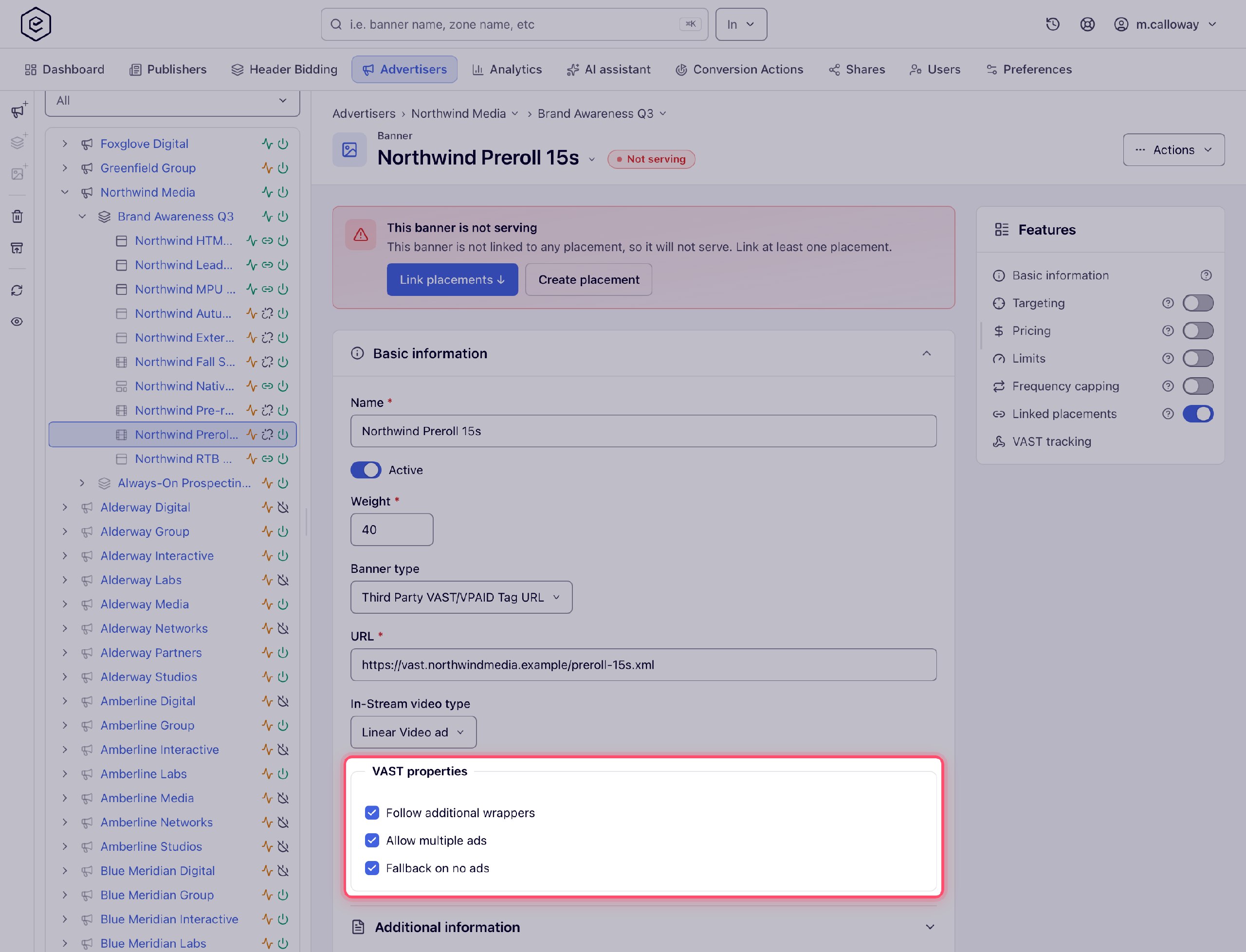
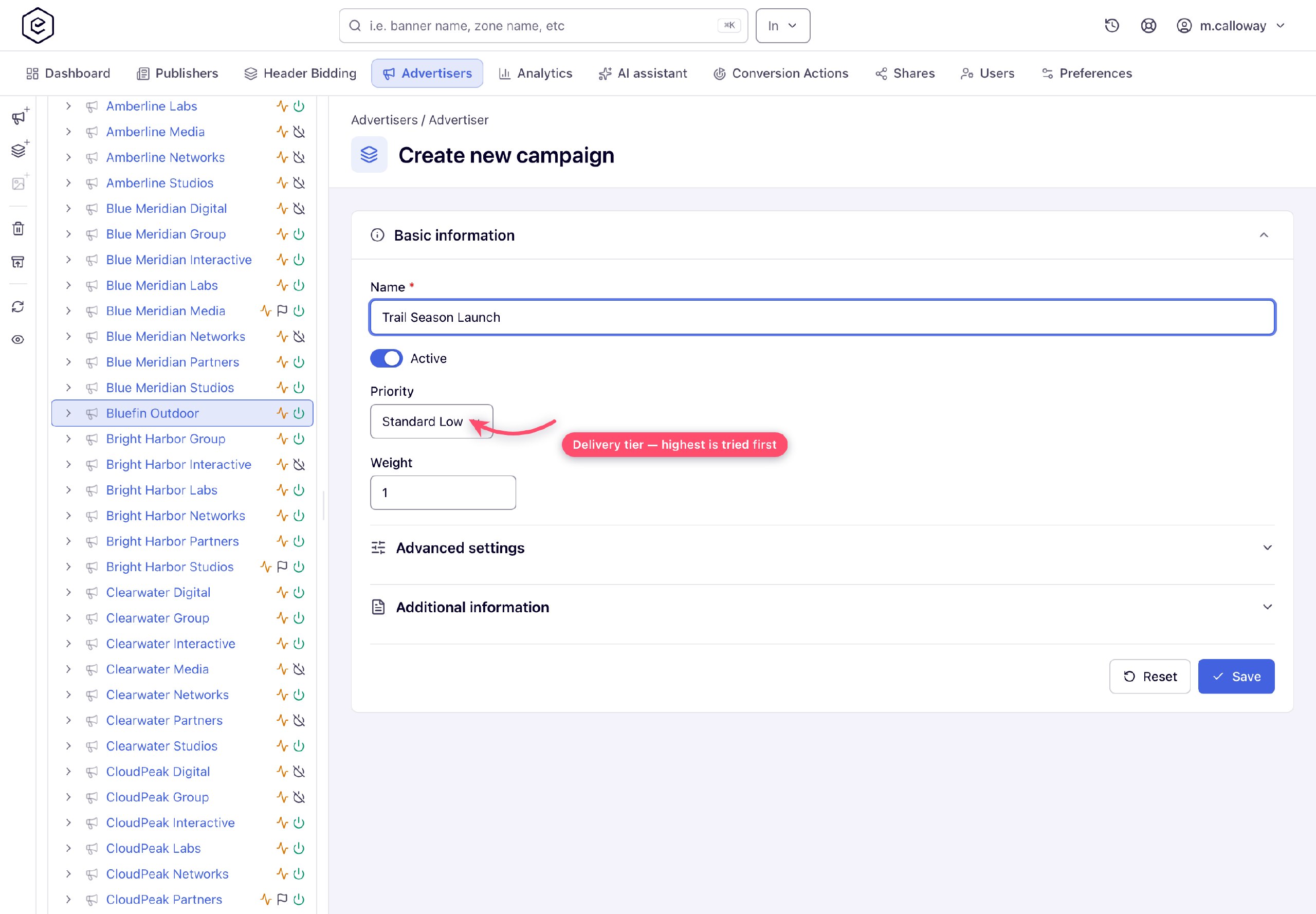
Run behind a stitcher. A video placement records which SSAI stitcher calls it: Google DAI, AWS MediaTailor, SpringServe or Brightcove. The tag then carries that stitcher's macros, including the viewer's IP address and user agent.
Run outstream without your own player. Epom's players, built on IMA and Video.js, render outstream ads in a page slot as an overlay, in-feed or slider unit. For in-stream ads, use your own player with the VAST tag.
Want VAST 4.x tags with pods, priorities and full quartile reporting? Set up video ad serving with Epom Ad Server.