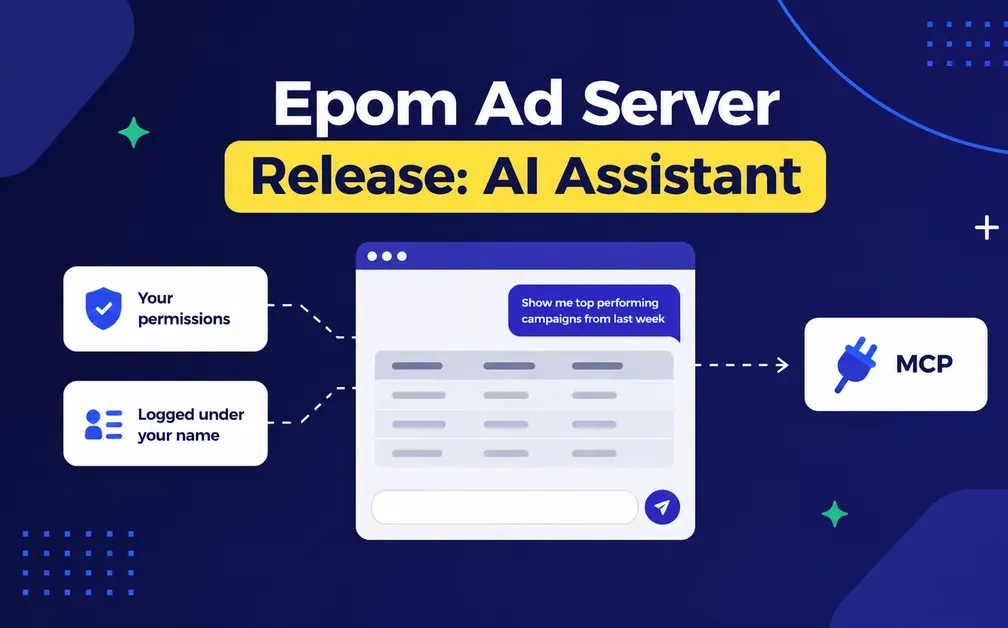
Epom Ad Server now has an AI assistant built into the console. You describe what you want — pull yesterday's revenue by campaign, explain why this placement is not filling, build a 300×250 from this image and link it — and it does the work with your own permissions. It can do nothing you could not do yourself, it takes instructions only from you, and every change lands in the action log under your name. Anything deleted in the last 90 days can also be brought back.
Epom Ad Server now has an AI assistant built into the console. Open Account → AI assistant and tell it what you need.
It builds campaigns, creatives and placements, sets targeting and limits, links banners and runs reports. It also diagnoses the things that take longest to work out on your own: why a placement stopped filling, why a report came back empty, which creative or country moved when revenue dropped.
Everything it does runs under your own role, with your own permissions. It asks before anything expensive or irreversible, and every change lands in the action log under your name. Anything deleted in the last 90 days can be brought back.
There are two ways to reach it: the chat in the console, and the MCP connector from the previous release, which works the same account from Claude or Cursor. On Epom's key, your first month is free.
Ask the assistant why something is not filling. It comes with a free trial of Epom Ad Server, and the first month on Epom's key costs nothing. Your trial account becomes your production account. Start a free trial
Campaigns, Creatives, and Reports From a Prompt
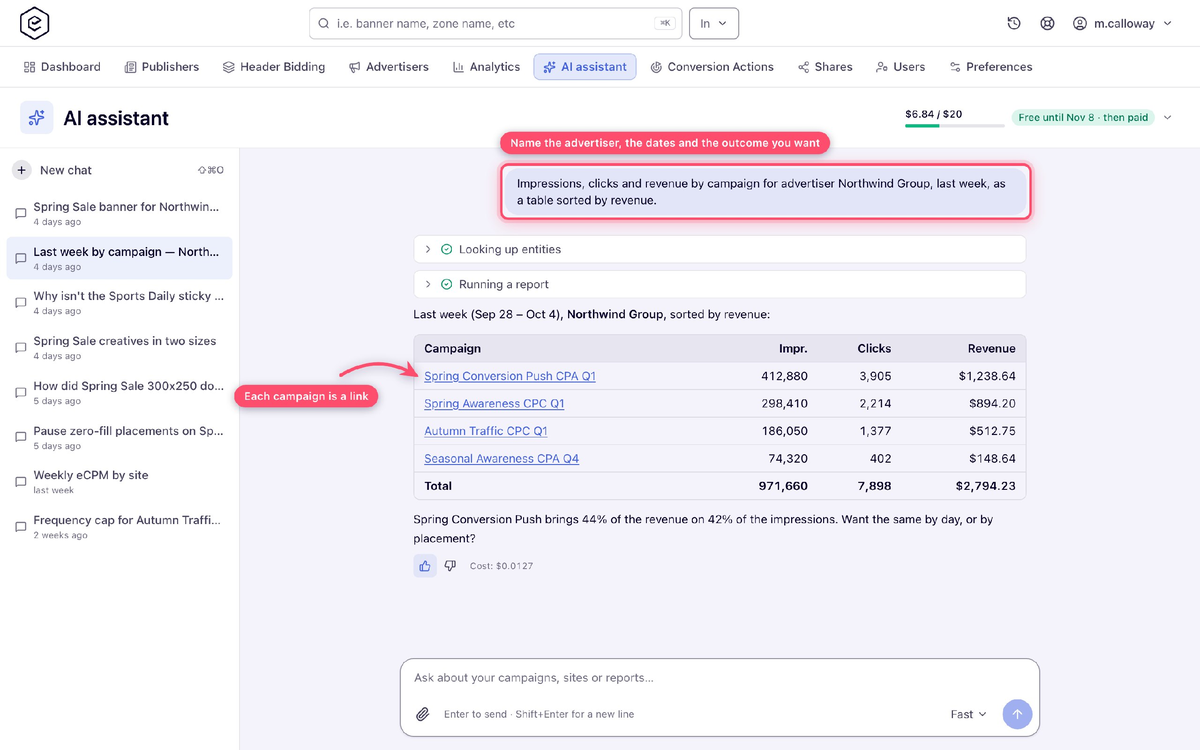
Across advertisers, campaigns, creatives, sites, zones and placements, our AI assistant can find, create and edit. Three examples of the kind of thing people ask it:
- "Pull yesterday's revenue by campaign, highest first."
- "Make a 300×250 banner from this image and link it everywhere it fits."
- "Why isn't this placement filling?"
Every tool it runs appears as a step you can open and read, so you can see exactly what it did. Entities it creates or finds come back as links straight into the console. And it answers in whatever language you write in.
"Why Isn't This Serving?": It Checks the Whole Chain
Delivery troubleshooting is the job the assistant is most useful for, because the answer is usually in a place you did not think to look.
Ask why something is not serving and it checks the whole chain: a level switched off by a reached total limit, an expired end date, a full placement or site limit, links switched off, the creative's own dates, which half of a type or size mismatch is failing, and device targeting that no real visitor could pass on both sides at once.
Three more questions it can answer:
- Why is my report empty? Names the first reason — future dates, a missing permission, data older than you keep, an entity that did not exist yet, filters that contradict each other — and otherwise finds the filter leaving nothing.
- Why did it drop? Compares two periods and names the country, creative, placement, device or hour that moved most. Low fill is explained by creative, requests against impressions.
- What does this link return? Checks a media file, click URL, pixel, VAST tag or page from the ad server's own network: status, redirects, a VAST summary, and the player's CSS selector on a page. It also reads the source of a script or tag, which is how click hijacking and forced redirects show up.
It can also read the raw event logs — clicks without impressions, repeated addresses, where clicks are coming from — over the last three days, with the same permissions the log reports need. Product questions are answered from the help center rather than invented.
A Confirmation Step Before Anything Expensive or Irreversible
The assistant has no access of its own. It acts as you: each tool is offered only if your role can use it, and every call goes through the same permission checks as the console. It can do nothing you could not do yourself by clicking.
It also does not manage people at all. Users, roles, sharing, your profile and notification recipients are outside what it can touch, because those are the settings that would let a mistake spread.
And it takes instructions only from you. Entity names, the contents of a creative, the text on a page it checks and the results of its own tools are all treated as data, never as commands — so a line in a log or a title on somebody's website cannot tell it to do something. Anything you did not ask for, it asks about first.
Every change it makes lands in the action log under your name, marked as made through the assistant. An audit later shows who asked for what, which is the part a regulated publisher needs.
Before it deletes something, changes several entities at once, or touches a budget, price, bid or payout, it lists what it is about to do and waits for you to say yes.
Everything else it does straight away, which keeps the back-and-forth for the decisions that deserve it.
Attach a File, Get a Creative Back
You can attach images, video, HTML5 ZIPs, PDFs, CSV or text, up to 50 MB each, and ask for something to be built from them. The creative always stores its own copy of the file. Very large images are the one exception: anything over 8000 pixels on a side is refused.
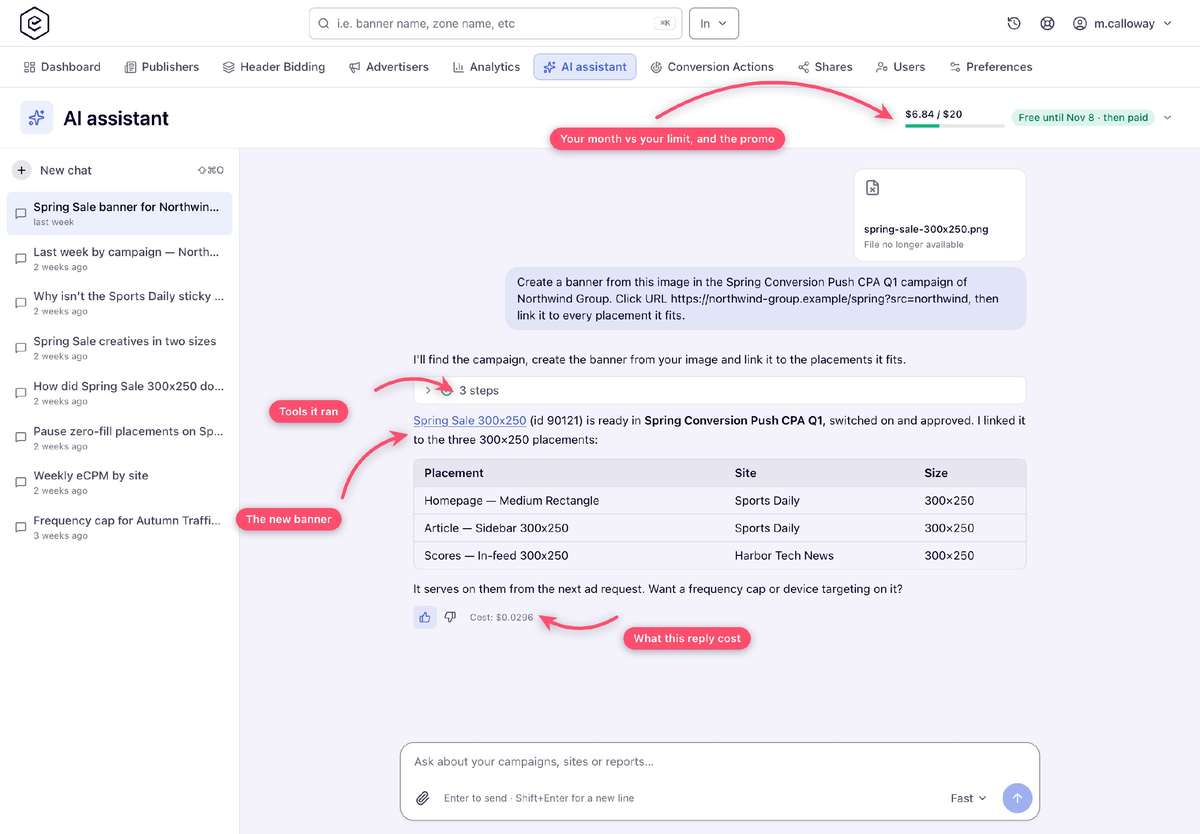
If you ask for a format your account does not have — a catfish, say — the assistant describes the template, adds it from Epom's library once you agree, builds the creative on it and links it. It never adds the same template twice, and it can adjust a template creative's own settings afterwards, like a video overlay's parent selector or a catfish's close button.
The template library is available to roles that can create templates.
90 Days to Undo a Delete
An advertiser, campaign, banner, site, zone or placement deleted in the last 90 days can be restored. From the new Recently deleted page on the advertiser and publisher trees, from Undo in the message right after the delete, over the REST API, or by asking the assistant.
A restore puts back what the delete took down with it: the on or off state, banner and placement links, targeting, and everything that was removed alongside.
Two things to know. Deletions made before this release cannot be restored this way. And a restore is refused while the parent entity is still deleted, or where the creative's files have gone — put the parent back first.
Three Keys It Can Run On: Yours, Your Network's, Ours
The assistant runs on Anthropic's Claude. Which key pays for it depends on what exists, read in order:
| Key | Who pays |
|---|---|
| Your own | Set in Preferences → AI assistant. Paid to Anthropic directly; Epom bills nothing for it. |
| Your network's | Set by an administrator in Admin → White label → API keys. Also paid to Anthropic directly. |
| Epom's | Used when neither of the above exists and your billing plan offers it. Billed on your Epom invoice. |
Keys are verified with Anthropic before they are saved and stored encrypted, and only their last four characters are ever shown again.
Each chat runs on one of three models. Fast is the default; Balanced costs four times as much and Deep eight times. Every reply shows what it cost, and the assistant offers a stronger or a cheaper model with a single button when the question calls for it.
Preferences → AI assistant shows which key you are on, what you have spent this month and the limit that applies. Administrators see every user's usage under Admin → Billing & Fees → Ad Server Fees. Ask in analytics and the traffic-quality AI analysis stay free and separate from all of this.
Your First Month Runs Free
Usage on Epom's key costs your network nothing for the first month after the release reaches it. The exact date depends on when your installation was upgraded, and the spend meter in the assistant shows yours.
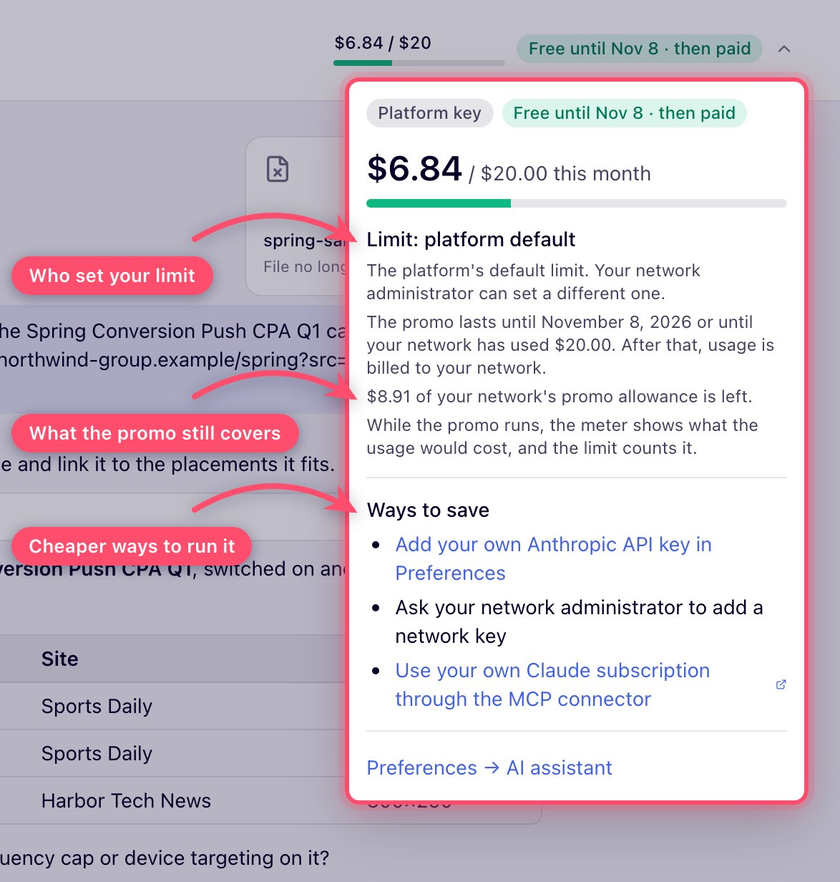
The free allowance is $20 across the whole network, counted as what would otherwise have been billed. On top of that, every user has their own monthly cap, $20 by default, which an administrator can change. When a user reaches their cap the chat stops until the first of the next month, so there is no way to run up a bill nobody expected.
When the free month ends, the assistant explains the options: carry on billed, add your own Anthropic key, or use your own Claude through MCP.
Or Point Your Own Claude at It Instead
The chat is one way in. The other is MCP, which shipped in the previous release and reaches the same tools.
Point an MCP client at your installation's /mcp address with your own API key and work the account from there: Claude, Cursor or anything else that speaks the protocol. Beyond the task tools, the assistant can find and call any documented REST operation.
The rules are the same either way. It acts as you, each tool is offered only if your role can use it, and every change lands in the action log marked as coming from the assistant. The key's role needs API Key Access, and Epom can switch the endpoint off for a network that would rather not have it.
For anyone already paying for Claude, this is also the way to use the assistant without a second bill.
Two Things to Set Up First
Decide which roles get it. The assistant is on from day one for every account role that views all campaigns and all inventory, which is usually the network manager roles. No other role has it until an administrator grants the permission in Admin → Users & Access.
Decide which key you run on. With no key anywhere, the assistant page explains the three ways to get one. If you would rather not have the spend on your Epom invoice, add your network's own Anthropic key before the free month ends.
What It Changes in an Ad Ops Day
The assistant adds nothing new to your ad server. It does the things you already do, in fewer steps, explains the ones that are hard to work out, and leaves every decision with you.
- Get a straight answer to why something is not serving or why a report is empty.
- Build campaigns, creatives and placements by describing them.
- Attach a file and have the creative built and linked from it.
- Bring back anything deleted in the last 90 days.
- Keep every change in the action log under your own name.
And the first month on Epom's key is free to try.
AI assists, every decision stays yours.
Already on Epom? Open Account → AI assistant. Otherwise start a free trial — the assistant is included, free for your first month.