
Check video creatives against a publisher's spec
Record a publisher's video spec on its site — resolution with bitrate, duration, frame rate, codecs, audio, loudness — so a video file that misses it is not served there, and see which linked creatives miss it and why.
CTV publishers reject a spot that is a fraction of a megabit or a few frames off their spec. Record each publisher’s spec once on its site, and Epom checks every video file linked to that site’s placements against it: a file that misses it stays linked but is not served there, and every place the creative is linked says why.
Who this is for
Network managers and publishers who sell CTV or OTT inventory with a published video spec. The card appears only for roles with the Video Creative Requirements permission — if it is missing, ask your network admin to turn it on. Networks without CTV see nothing new. Read-only access shows the spec without letting you change it.
Prerequisites
- A site for the publisher, with its video placements.
- Video creatives uploaded to Epom (Local Video or Advanced Local Video(s)). External video URLs, third-party VAST tags and DSP bids have no file in Epom and are never checked.
Steps
-
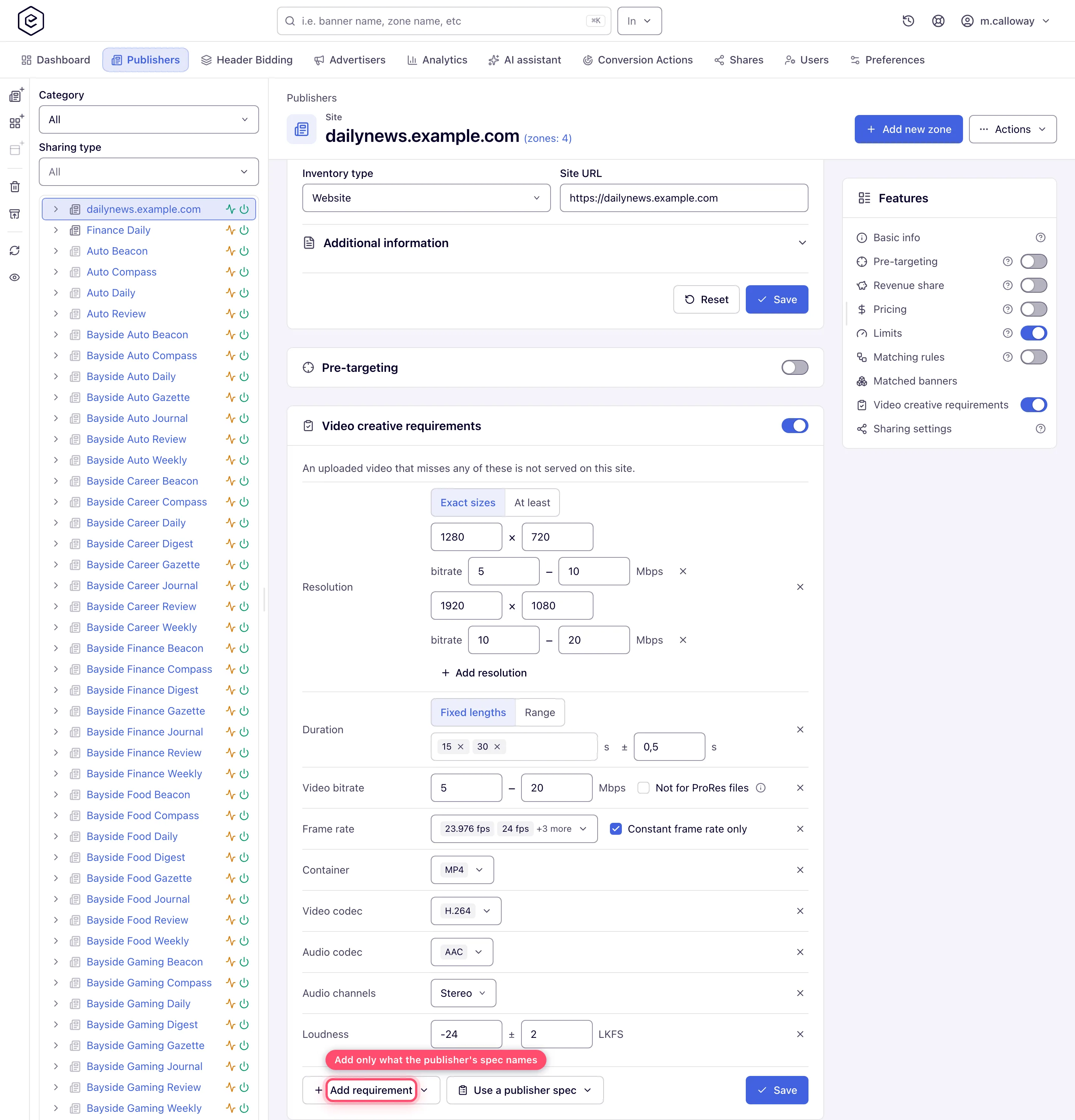
Open the site and switch on Video creative requirements — on the card or in the Features list beside it. The card stays closed while the switch is off, and nothing is checked.
-
If the publisher is one of the major streaming services, click Use a publisher spec and pick it — the form fills in with that publisher’s published spec (see the list below), which you then check against the spec the publisher sent you. Otherwise click Add requirement and pick each criterion the publisher’s spec names; add only those. A new row starts from the most common CTV value, which you then adjust.
-
Click Save. The ad servers apply the spec within seconds.
Switching the card off stops the check but keeps the spec, so switching it back on applies the same requirements again.
-
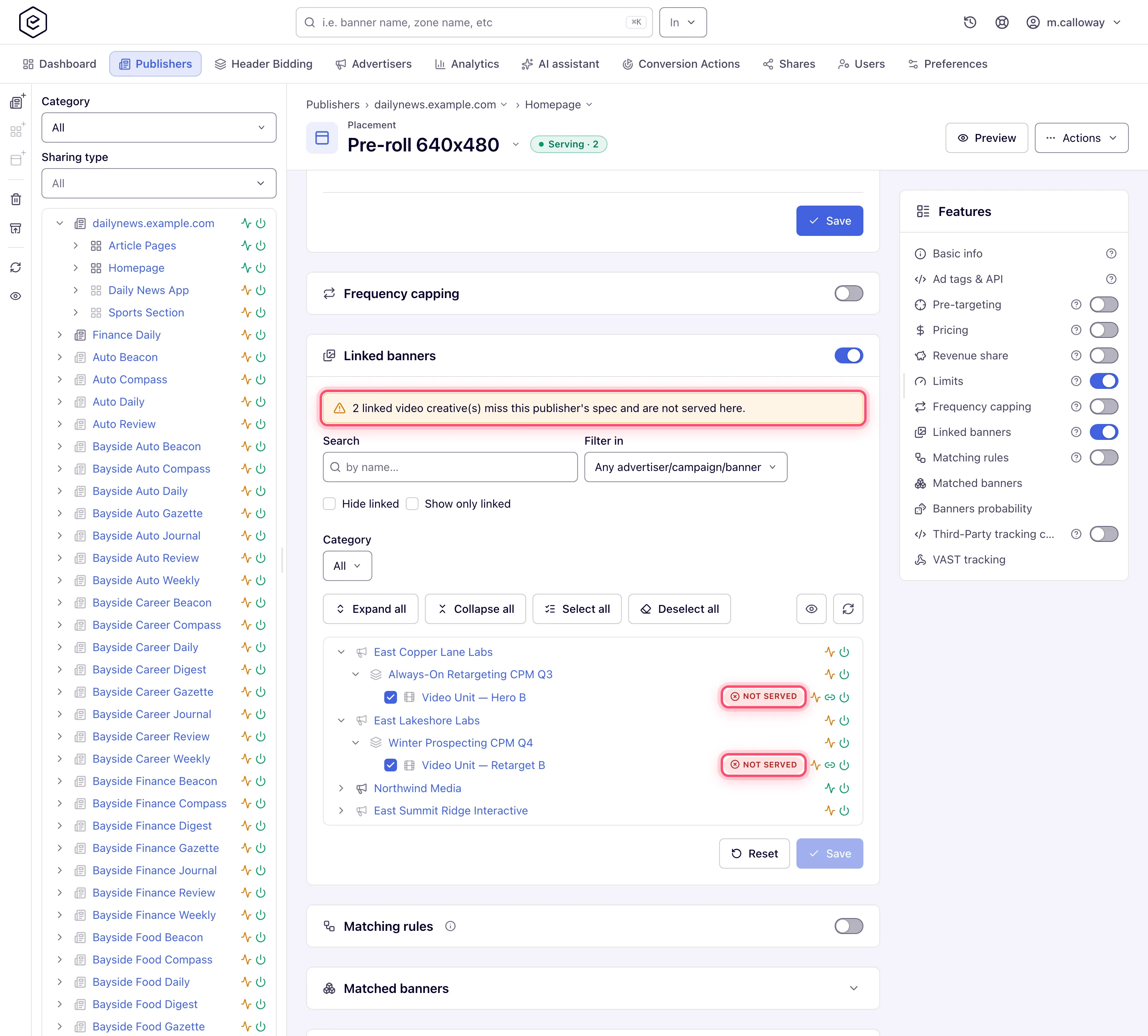
Check what is linked. On each of the site’s video placements, Linked banners warns how many linked creatives miss the spec and marks each of them Not served; hover the mark for the reasons. A creative not yet linked is marked too, and ticking one shows a warning above Save, so you know before linking it that it will not be served.
-
On the creative, Linked placements does the same from the other side: it warns on how many linked placements the file is not served and marks each of them. Video info lists what was read from the file — resolution, duration, video bitrate, frame rate and whether it is constant, video codec, container, audio codec, audio bitrate, channels and sample rate, loudness and file size — and, for each linked site whose requirements are switched on, whether it is served there.

While the switch is on, the video placement’s VAST configuration shows the site’s spec in one line under Publisher video requirements, with a link back to the site.
Options and fields
Video stream:
| Requirement | What you set | Passes when |
|---|---|---|
| Resolution | Exact sizes: one or more width × height, each with an optional bitrate range in Mbps. At least: a minimum width × height, for specs that say “1920x1080 minimum” | Exact sizes: the file’s size is in the list, and a range on that size then replaces Video bitrate. At least: the file is at least that wide and that high |
| Duration | Fixed lengths in seconds with a tolerance (0.5 s by default), or a Range from–to | The file is within the tolerance of one of the lengths, or inside the range |
| Video bitrate | Minimum and/or maximum in Mbps, and Not for ProRes files | The video stream’s bitrate is in range. With Not for ProRes files, a ProRes file is not checked against this range or a resolution’s range |
| Frame rate | Accepted rates (23.976, 24, 25, 29.97, 30, 50, 59.94, 60) and Constant frame rate only (on by default) | The rate is one of them and does not vary through the file |
| Container | MP4, MOV, WEBM | The file is one of them |
| Video codec | H.264, HEVC (H.265), ProRes, VP9, AV1, MPEG-2 | The video stream uses one of them |
Audio and file:
| Requirement | What you set | Passes when |
|---|---|---|
| Audio codec | AAC, PCM, AC-3, E-AC-3, MP3, Opus | The audio stream uses one of them |
| Audio bitrate | At least … kbps | The audio stream’s bitrate is at least that |
| Audio channels | Mono, Stereo, 5.1 | The audio has exactly that many channels |
| File size | At most … MB | The file is no larger |
| Loudness | Target and tolerance in LKFS (−24 ± 2 by default) | Integrated loudness (ITU-R BS.1770) is within the tolerance |
A file with no audio fails every audio requirement that is set.
Not for ProRes files. ProRes is the near-lossless master (the mezzanine) publishers transcode from; it runs at 150–220 Mbps. Specs that accept both give their bitrate range for the compressed H.264 file only, so a ProRes file would fail a 10–40 Mbps range it was never meant for. Leave this on whenever the publisher’s spec accepts ProRes.
Publisher specs
Use a publisher spec fills the form from one of the network’s publisher video specs. A network starts with the major streaming publishers’ published video ad specs — Hulu, Disney+, Disney programmatic, ABC / Freeform, Peacock / NBCUniversal (standard and programmatic), Amazon Prime Video, Amazon Fire TV Channels, Roku, Paramount+, HBO Max / discovery+ (international), FOX, Netflix (ProRes and H.264) and Samsung Ads — each taken from the publisher’s own spec page. Your network admin keeps the list under Admin → Creatives & tags → Video requirement presets: corrects a spec when the publisher revises it, and adds the specs your own publishers send you (see Video requirement presets). It offers the specs your network admin keeps active; a spec retired since a site was filled from it is still named on that site, marked Inactive, and the site keeps its requirements. The note above the form says which spec and as of when. Picking one over requirements already on the card asks Replace the requirements? first. A requirement the publisher does not state is left out, never guessed. The spec a publisher sends you wins — check the filled form against it before you click Save.
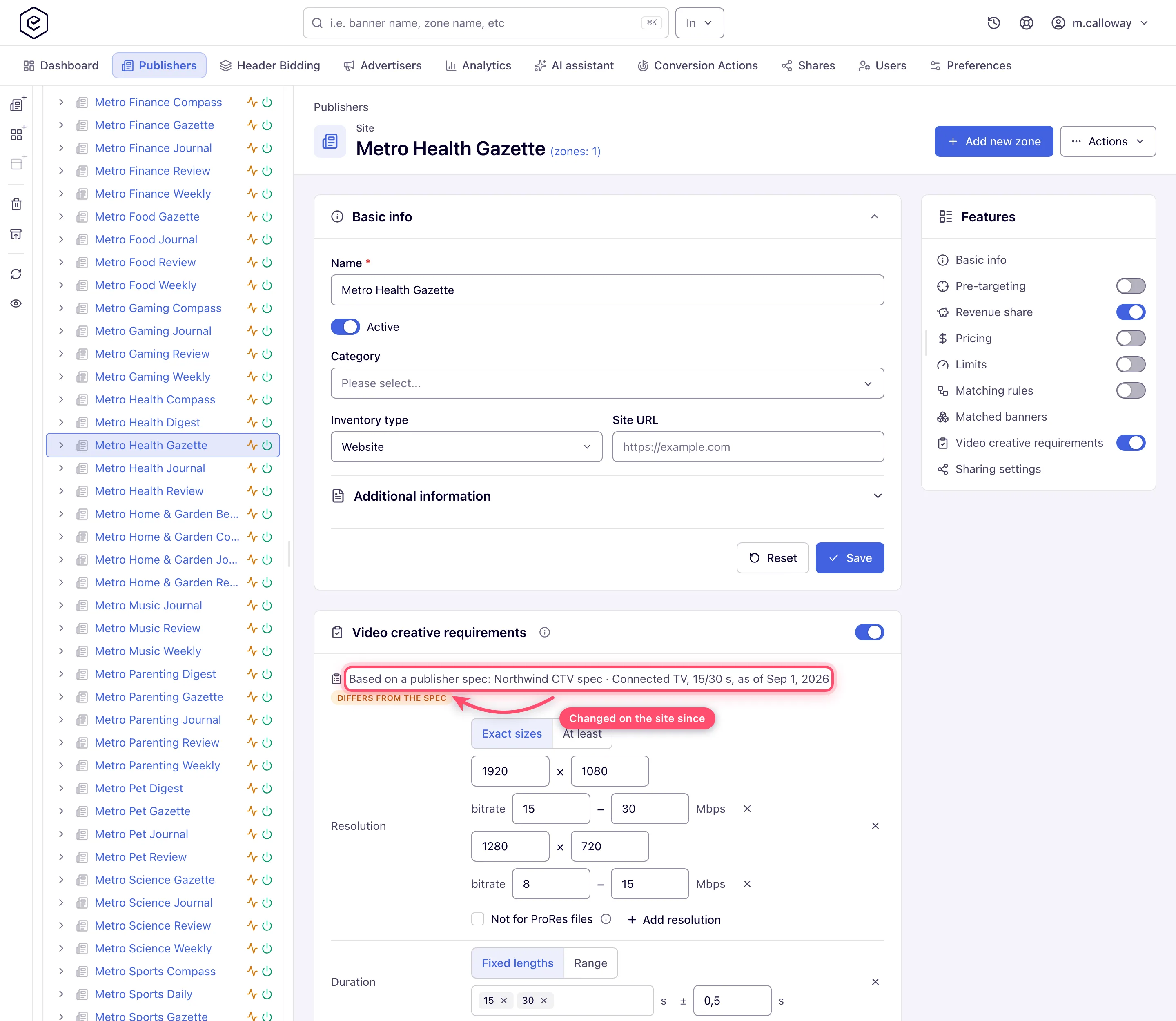
Once saved, the card names the spec it was filled from — Based on a publisher spec: Hulu · …, as of … — and marks it Differs from the spec when the site’s requirements no longer match the spec: because you changed them on the site, or because the spec was edited under Admin since. The site keeps its own copy, so an edited spec changes no site until you pick it again with Use a publisher spec, or until your network admin pushes it to every site using it with Apply to N sites (see Video requirement presets). The video placement’s Publisher video requirements line names the spec too. Removing every requirement removes the reference with them; a site whose spec is deleted from the list keeps its requirements, and they are still checked.
How it works
- The facts come from the file. Every uploaded video is read on upload: resolution, duration, video bitrate, frame rate and whether it is constant, codecs, container, audio bitrate, channels and sample rate, file size, and integrated loudness.
- Advanced Local Video(s) are judged rendition by rendition. The creative is served on the site when at least one of its files meets the spec, and the site’s VAST carries only the files that do — still highest bitrate first, so the first is the best file this publisher accepts and the one its stitcher transcodes from (the mezzanine). Only when no file meets the spec is the creative not served there. The creative’s Video files card names, for each file, the linked sites it is served on — see Video files.
- Linking is never refused. A creative that misses the spec can be linked; it is simply not served on that site’s placements, and the next eligible creative wins the impression instead.
- The check runs in the ad server’s memory, so a spec costs no request time.
Corner cases and gotchas
Corner case: files uploaded before this check was introduced. They were read only for size, bitrate, duration and type. Until Epom re-reads them in the background (gradually, for sites whose check is switched on) — a frame rate, codec, audio or loudness requirement counts as not yet checked for them and does not stop them. Why: a creative is not blocked for a fact nobody has read yet. Workaround: re-upload the file to have it read at once.
- Older Advanced Local Video(s) files are not re-read; re-upload them for frame rate, codecs, audio and loudness to be checked.
- Frame rates are matched to the standard values, so a spec’s “23.98” matches a 23.976 file, but 29.97 and 30 are different rates.
- Switched on with no requirement added, the card checks nothing; the site’s creatives are served as before.
Over the API
GET/POST /rest-api/sites/{siteId}/video-requirements.do— read or replace the spec as JSON ({}clears it); invalid values come back per field inerrors. The answer carriesenabled.POST /rest-api/sites/{siteId}/video-requirements/enable.doand…/disable.do— switch the check on or off; the spec is kept either way.GET /rest-api/video-requirements/presets.do— the network’s publisher specs, each with its source page, date and how many sites were filled from it (usedBy);POST /rest-api/sites/{siteId}/video-requirements/apply-preset.do?presetId=hulusets one on a site. A site that had no requirements yet gets the check switched on with them; a site that already had some keeps its switch as it was. An AI assistant asked to “make it like Hulu’s” finds both throughapi_search. Adding, editing and deleting specs is described under Video requirement presets.GET /rest-api/banner/{bannerId}/video-compliance.do— the file’s facts and its verdict for each linked site that has a spec; for an Advanced Local Video(s) creative,renditionsgives each file’s verdict per site as well.GET /rest-api/placements/{placementId}/video-compliance.do— the placement’s linked video creatives with their verdicts, andnotServed, how many of them are not served there.- An AI assistant connected over MCP reaches both through
api_read/api_write;whoamireportsmay.videoRequirements.
See the Sites and Banners API reference.
Per-role notes
- Video Creative Requirements read-only: the card shows Read-only in place of the switch; the spec and the verdicts are visible, but Add requirement and Save are not.
- Masked inventory or advertisers: the verdict is still shown, but a site or creative the role
may not see is named by its id only (
SITE_12,BANNER_34) and is not a link — as in the link grids. - Without the permission: no card, no column, no marks, no warning — creatives are still not served where they miss a spec someone else set.
