
Optimize ad rotation
How Epom picks a winner among eligible banners — priority tiers, weighted lotteries, the CTR and I2C bandits, and the Banners probability diagnostic.
When several banners survive targeting, capping and limits for the same request, rotation decides which one is returned. Rotation is not a single dial: it is a fixed sequence of nested picks — delivery priority narrows the field to one tier, a weighted lottery picks a campaign inside that tier, and a second weighted lottery picks a banner inside that campaign. Two optional bandit optimizers can take over the last step, and OpenRTB demand joins the same sequence rather than running beside it.
This page explains the algorithm exactly as ad serving runs it, then covers the controls that change it and the diagnostic panel that shows the result.
Who this is for
- Network managers — the per-campaign controls: delivery priority, campaign and banner weight, and the CTR, I2C and eCPM optimizer checkboxes. The network-wide algorithm is not theirs; that lives on Admin → Ad serving → Optimization settings and needs the administrator permission of the same name.
- Advertisers — read their campaign and banner weight. On the stock Advertiser role weight is read-only and the optimizer checkboxes and delivery priority are not shown, so the network manager sets them (see Per-role notes).
- Anyone checking how a placement’s demand will split — the Banners probability card on the placement. The stock Network Manager has it; other roles need Banners Probability Visibility and view access to campaigns, so the stock Publisher does not.
Prerequisites
- More than one banner must actually be eligible for the same request. With a single eligible banner there is nothing to rotate.
- The banners must be linked to the placement — rotation only ever considers the placement’s linked set.
- For the CTR or I2C optimizers: the campaign must be collecting impressions and clicks (or conversions) while the optimizer is switched on. Historical statistics recorded before you ticked the box do not count.
How the winner is chosen
Every ad request runs these stages in order.
1. Build the candidate set
The placement’s linked banners are narrowed by pretargeting and targeting, capping, limits, blocked-entity rules and GDPR mediation restrictions. Anything excluded here never reaches rotation.
2. Priority tier — the field is narrowed to exactly one tier
Campaigns carry a delivery priority. Ad serving walks the six tiers in this fixed order and, for each one, considers only the campaigns of that exact priority:
Premium → Standard High → Standard Medium → Standard Low → Non-guaranteed → House ads
The first tier that yields a banner wins and the walk stops. A lower tier is consulted only when everything above it produced nothing at all. So House ads serve only what nobody else could fill, and a Premium campaign with weight 1 outserves a Non-guaranteed campaign with weight 10 000 — every time, not usually.
Note: the tier order is the order the levels are listed in, not their numeric ids. The ids run 1, 5, 6, 2, 3, 4, so sorting a report by the raw priority id will not give you serving order. Use the names.
3. Campaign lottery inside the tier
With Manual Weighting (the default network algorithm) the surviving campaigns of that tier enter a weighted random draw: a campaign with weight 100 is twice as likely to be drawn as one with weight 50. A campaign’s weight on this placement, when it has one, stands in for its campaign weight (see Weights on one placement). Two exceptions:
- A campaign whose weight is 0 cannot win the draw. Neither can a campaign on House ads priority: ad serving substitutes 0 for its stored weight whatever the field says.
- If that leaves the whole tier at total weight 0 — which is exactly what the House ads tier always looks like — the pick falls back to a uniform random choice. House-ads campaigns therefore rotate evenly and their weight value is ignored entirely.
The two eCPM algorithms replace this draw with a price ranking — see The network algorithm below.
4. Banner lottery inside the chosen campaign
The chosen campaign’s surviving banners enter a second weighted random draw on banner weight — or, where a banner has its own weight on this placement, on that weight (see Weights on one placement). If the campaign has I2C or CTR optimization ticked, the corresponding bandit is asked first and the plain draw only runs when the bandit declines to answer — see The CTR and I2C optimizers.
5. If the drawn banner is an OpenRTB creative, the auction runs
An OpenRTB DSP banner sits in the lottery as an ordinary weighted candidate. Only once the lottery draws it do the bid requests go out; the responses are then settled in one auction across every OpenRTB banner eligible for this placement — first price by default, see First-price vs second-price auctions. If no bid comes back, all OpenRTB banners are excluded and stages 3–4 are re-run for the remaining direct banners.
Programmatic demand is therefore not a separate rotation, and bid prices never compete with direct campaigns. A DSP only gets to bid at all when its stand-in banner wins the priority tier and both weighted draws; a $20 CPM bid behind a Non-guaranteed campaign still loses to a Premium house-direct banner. To let programmatic compete on price, put the OpenRTB campaign in the same priority tier as the direct campaigns and give it the weight you want it to have.
Note: rotation is a lottery run per request, not a rota. Weight biases the draw, it does not schedule it. Over a few hundred impressions the realised split wobbles around the configured one; over a few dozen it can look nothing like it.
Worked example — one campaign, three banners
Placement Pre-roll Player has three banners linked, all under the campaign Video Preroll Autumn (Standard Low, weight 50). It is the only campaign linked, so it wins the campaign draw with probability 1 and the whole split is decided by banner weight:
| Banner | Weight | Share of the campaign | Probability |
|---|---|---|---|
| Northwind VAST Tag 15s | 50 | 50 ÷ 115 | 43.4783 % |
| Northwind Preroll 15s | 40 | 40 ÷ 115 | 34.7826 % |
| Northwind Autumn — multi-rendition | 25 | 25 ÷ 115 | 21.7391 % |
| Total | 115 | 100 % |
Those are the figures the Banners probability card reports for that placement.
Worked example — two tiers and two campaigns
Now suppose the same placement also carries a Premium campaign:
| Campaign | Priority | Campaign weight | Banner | Banner weight |
|---|---|---|---|---|
| Winter Takeover | Premium | 10 | Winter Hero | 1 |
| Video Preroll Autumn | Standard Low | 50 | three banners | 50 / 40 / 25 |
Winter Hero takes 100 % of the traffic. Its weight of 1 against the other campaign’s 50 is irrelevant: the two campaigns are never in the same draw, because Premium is exhausted before Standard Low is looked at. The Video Preroll Autumn banners serve only on requests where Winter Takeover is ineligible — capped out, over its limit, outside its targeting, or out of dates.
This is the single most common surprise on this page. Priority partitions; weight divides within a partition. They never combine into one score.
Steps
1. Set the campaign’s priority and weight
- Go to Account → Advertisers → advertiser → campaign. Both controls are on the Basic information card.
- Pick a Priority. The list is Premium, Standard High, Standard Medium, Standard Low, Non-guaranteed, House ads; new campaigns default to Standard Low.
- Set Weight — the campaign’s share of its own tier. New campaigns start at 1; the documented range is 0–32 767, and 0 means “never chosen”.
- Click Save.
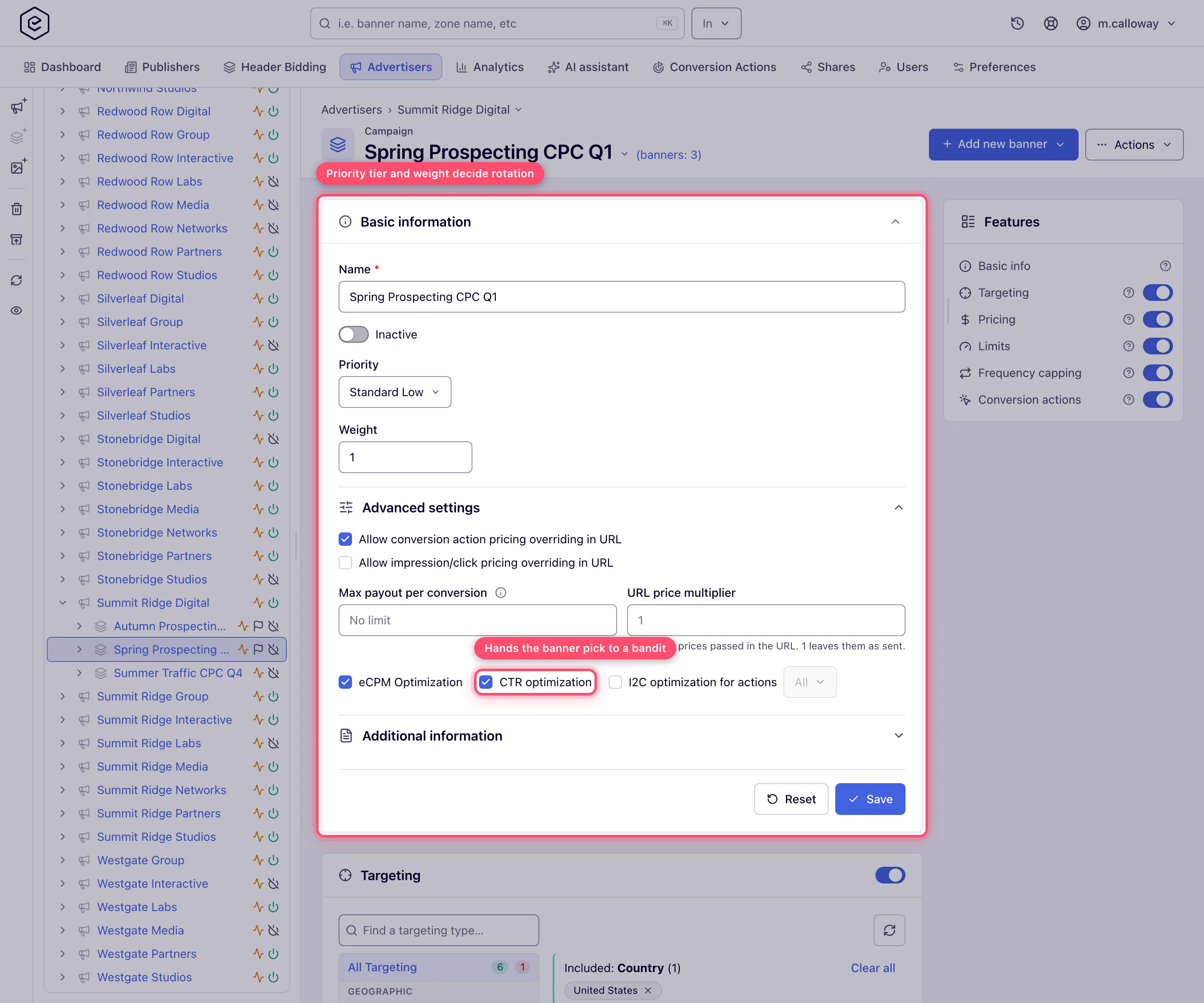
Corner case — House ads zeroes the weight. Choosing House ads sets the Weight field to 0 and disables it, and disables the CTR and eCPM checkboxes with it: a house campaign fills leftovers and shares that tier evenly, so weighting it is meaningless. Switching back to any other priority restores the saved weight, or 1 if the saved value was 0.
2. Set banner weights
Open each banner under the campaign and set Weight on its Basic information card. The field is required and accepts 1–32 767; new banners start at 1. Unlike campaign weight, 0 is not accepted.
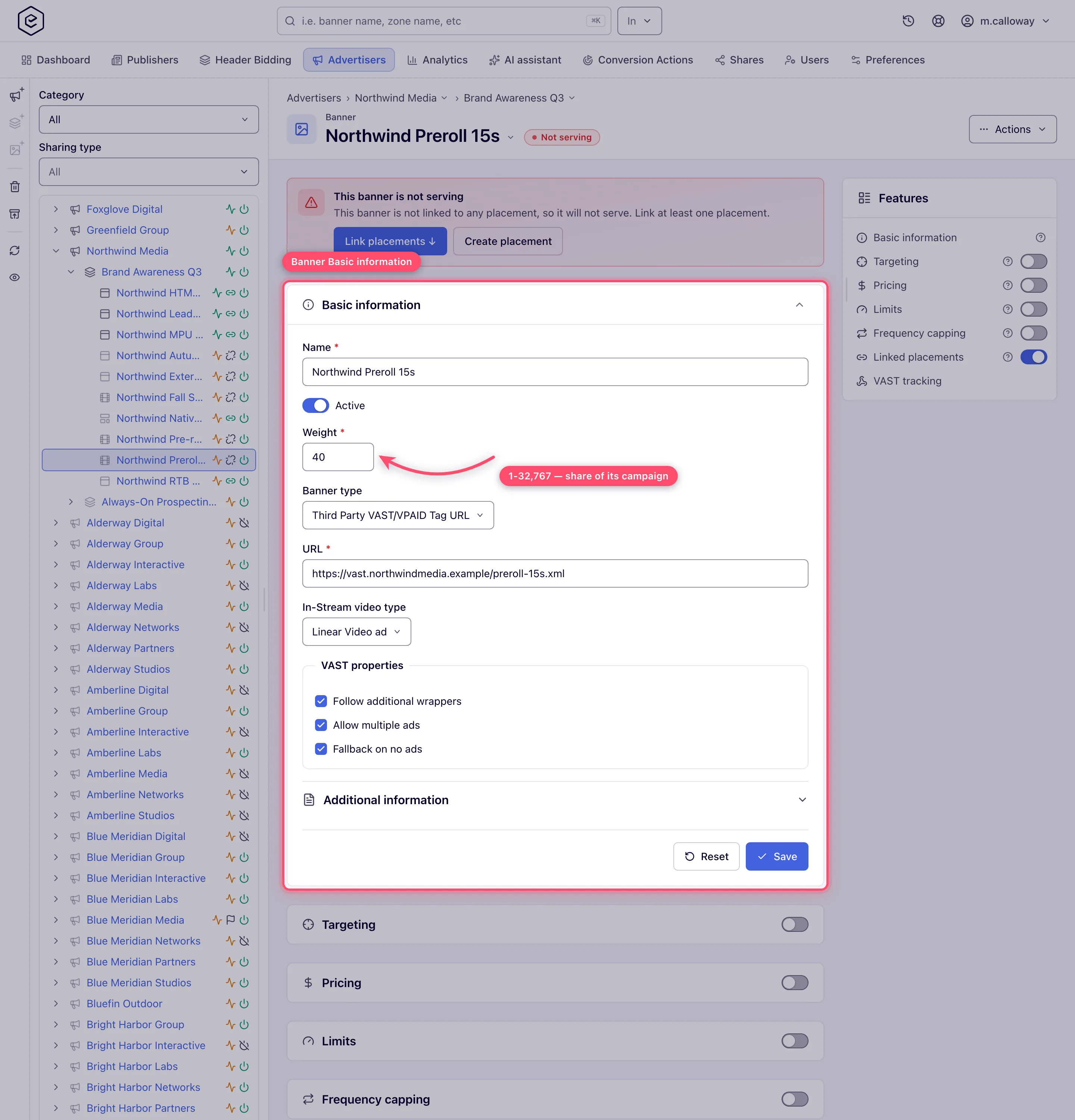
Weight decides the banner draw outright on a campaign without CTR/I2C optimization, and decides the exploratory slice of traffic on a campaign with it.
Weights on one placement
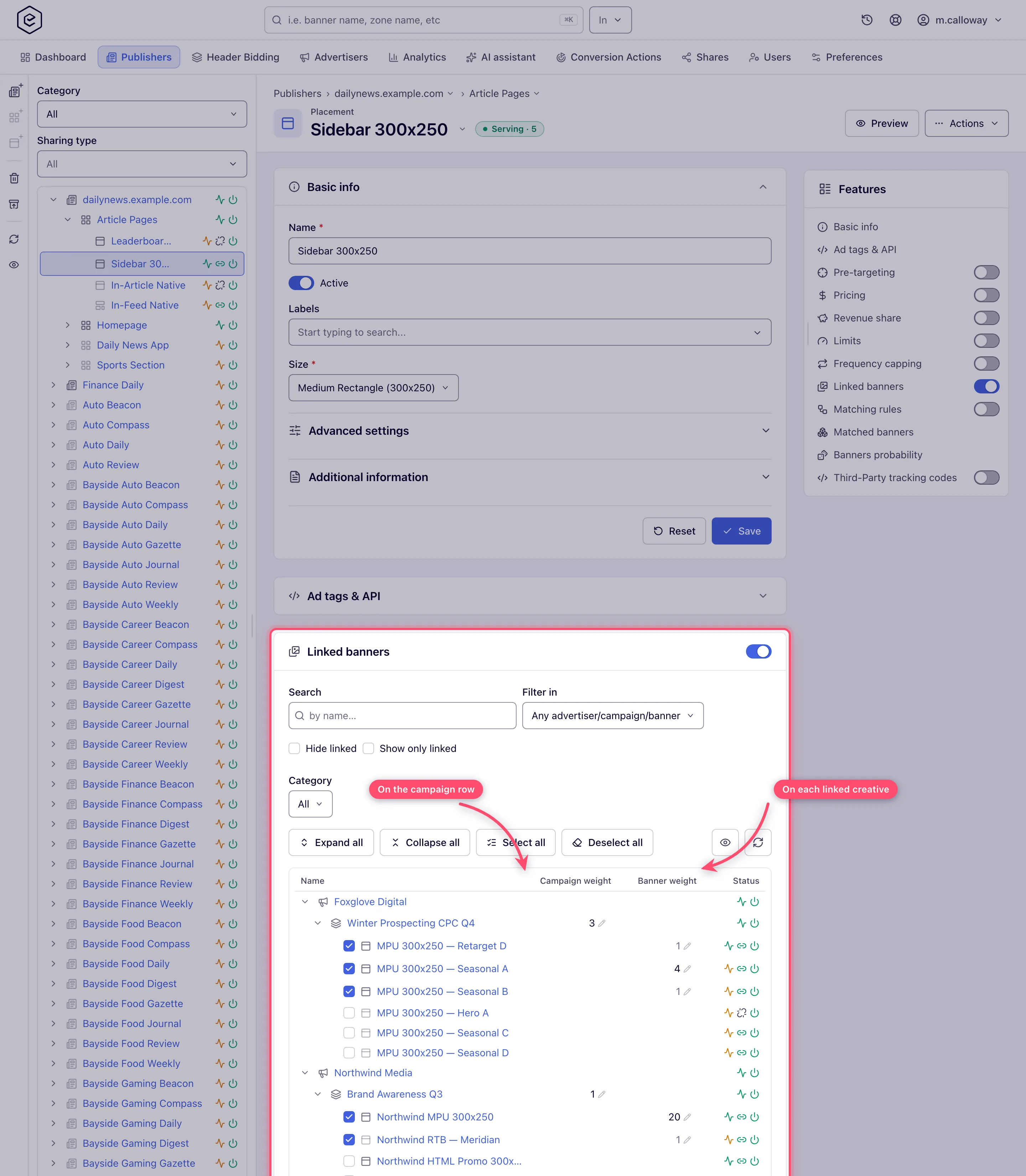
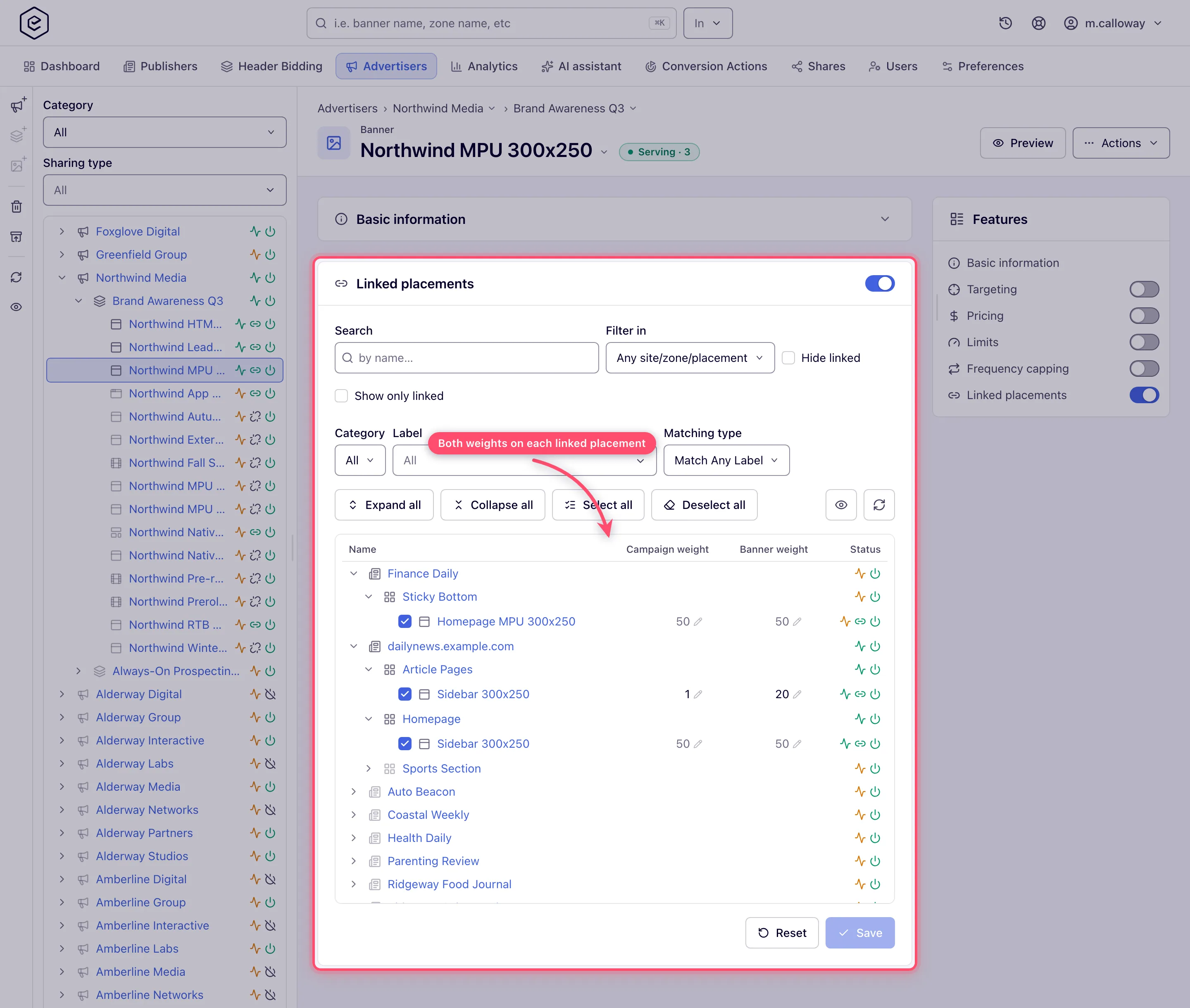
One VAST tag per publisher usually carries several campaigns, and one creative often runs on several publishers’ placements that need different shares. Both weights can be set per placement, and each placement without its own value keeps the default:
- Campaign weight on the placement replaces the campaign’s Weight in the campaign draw there — Summer 3 against Fall 1 sends three requests in four to Summer on that placement only. 0 keeps the campaign out of the draw on that placement. Range 0–32 767.
- Weight on the placement replaces the banner’s Weight in the draw inside its campaign — the campaign’s 60/40 split of two creatives becomes 50/50 on one publisher and 20/80 on another. Range 1–32 767.
Where to set them:
-
Open the placement and go to its Linked banners card, or open the banner and go to its Linked placements card.
-
In the tree view, the placement’s tree shows the campaign weight on each campaign row and the weight on each linked banner; the banner’s tree shows both on each linked placement, under the Campaign weight and Banner weight columns. In the grid view the same values are the Campaign weight and Banner weight columns; every advertiser, campaign, banner, site, zone and placement name there opens that entity’s page.
-
A value without an override is greyed out: it is the default. Click it, type a whole number and press Enter; it is saved at once, separately from the tree’s Save, and the old value comes back with the reason if the server refuses it. Clear it and press Enter to go back to the default.
Only linked rows carry weights: a banner or placement you have just ticked gets them once the link is saved. Weights on placements have their own permission, Manage Weights on Placements, off for every role until an administrator grants it; read-only shows the columns without letting you change them. On top of it, seeing a campaign weight needs the Manage Campaign Weight permission and a banner weight Manage Banner Weight (enabled or read-only); changing one also needs both permissions enabled and edit rights on the advertiser. A row whose advertiser you may not view shows only its masked name: no weights, and the name does not open anything. On a network whose link tree is too large to show, the card opens on the grid, which carries the same columns.
The Banners probability card on the placement carries the same two columns, editable the same way, next to the share they produce, and shows the resulting split: with the example above it lists Summer creatives at 37.5 % each and Fall at 15 % and 10 %.
Corner case: the banner’s weight on a placement belongs to the link. Unlinking the placement drops it and relinking starts from the banner weight. Restoring a deleted banner or placement brings each weight back with its link, unless a weight was set on the link again in the meantime. A campaign’s weight on a placement stays while none of its banners is linked there and applies again when one is.
Corner case: House ads stay at weight 0 whatever is set on the placement, and the eCPM algorithms do not read campaign weights at all. The cards say so: a campaign weight the draw does not read is greyed out with an ⓘ that names the reason — the network’s eCPM Optimization algorithm, House ads priority, or, under eCPM with Burn-up, the campaign’s own eCPM Optimization checkbox. You can still edit it; it starts to count once the reason goes away. An optimized campaign uses the banner weight on the placement only for its exploratory slice, like the banner weight.
Ad servers pick a change up with their next cache update for the placement or banner. Through the
API: PUT / DELETE /rest-api/campaign/{campaignId}/placements/{placementId}/weight.do and
/rest-api/banners/{bannerId}/placements/{placementId}/weight.do set and remove them,
GET .../placements/weights.do on either lists them, and the linked-placement and linked-banner
lists carry them as campaignWeightOnPlacement and weightOnPlacement.
3. Optionally hand the banner pick to an optimizer
On the campaign’s Basic information card, expand Advanced settings:
- CTR optimization — steer the campaign’s banner rotation toward the best click-through rate.
- I2C optimization for actions — steer it toward the best impression-to-conversion rate. The picker beside it limits which conversion actions count; leaving it on All counts every action.
Tick at most one: the form unticks the other as soon as you tick one. If both flags end up set anyway — through the API, say — ad serving asks I2C first and only falls through to CTR when I2C returns nothing.
Click Save. Nothing changes immediately — see the timings below.
4. Verify with the Banners probability card
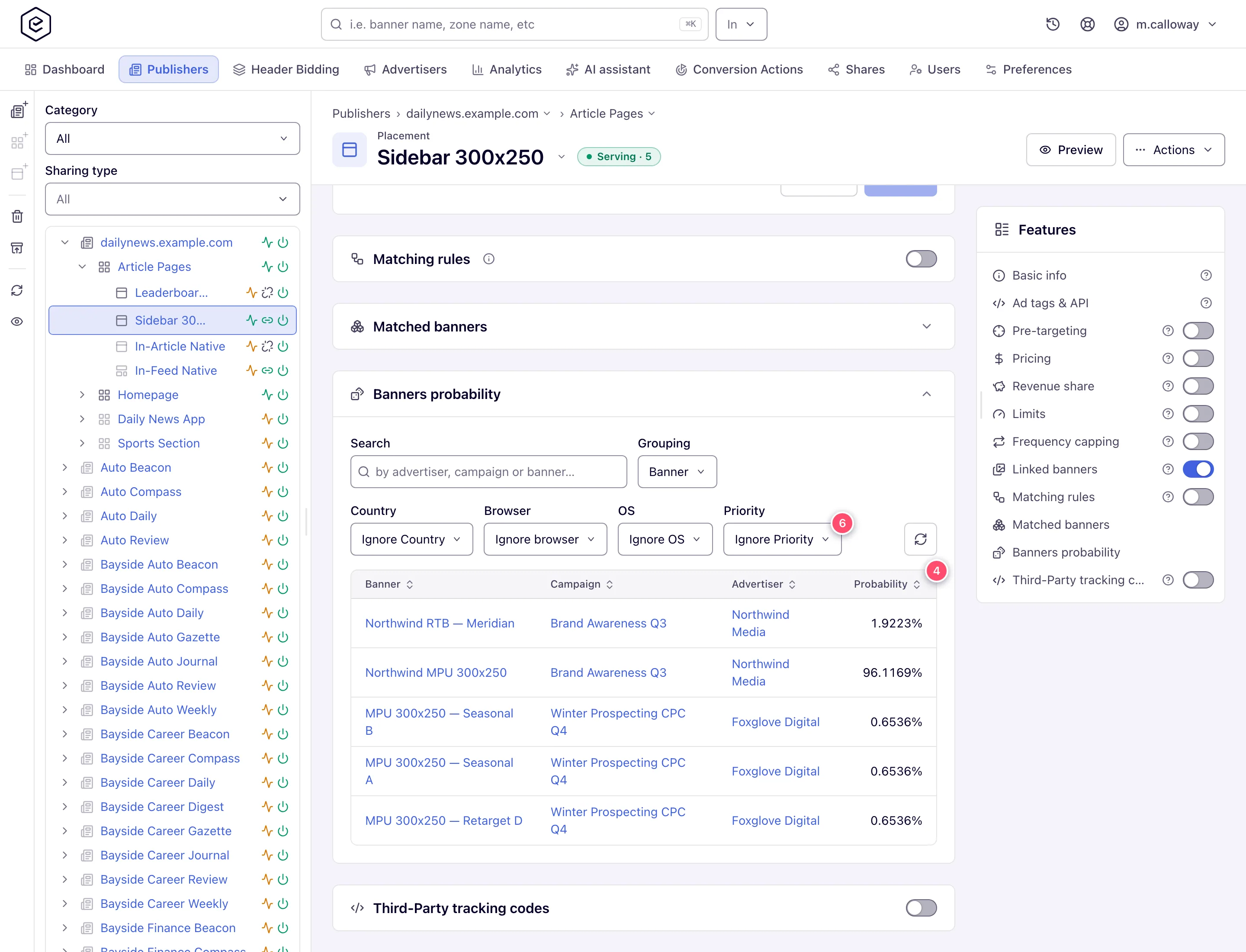
On a placement (Account → Publishers → site → zone → placement), the Banners probability card lists every banner the placement can serve with its computed share.
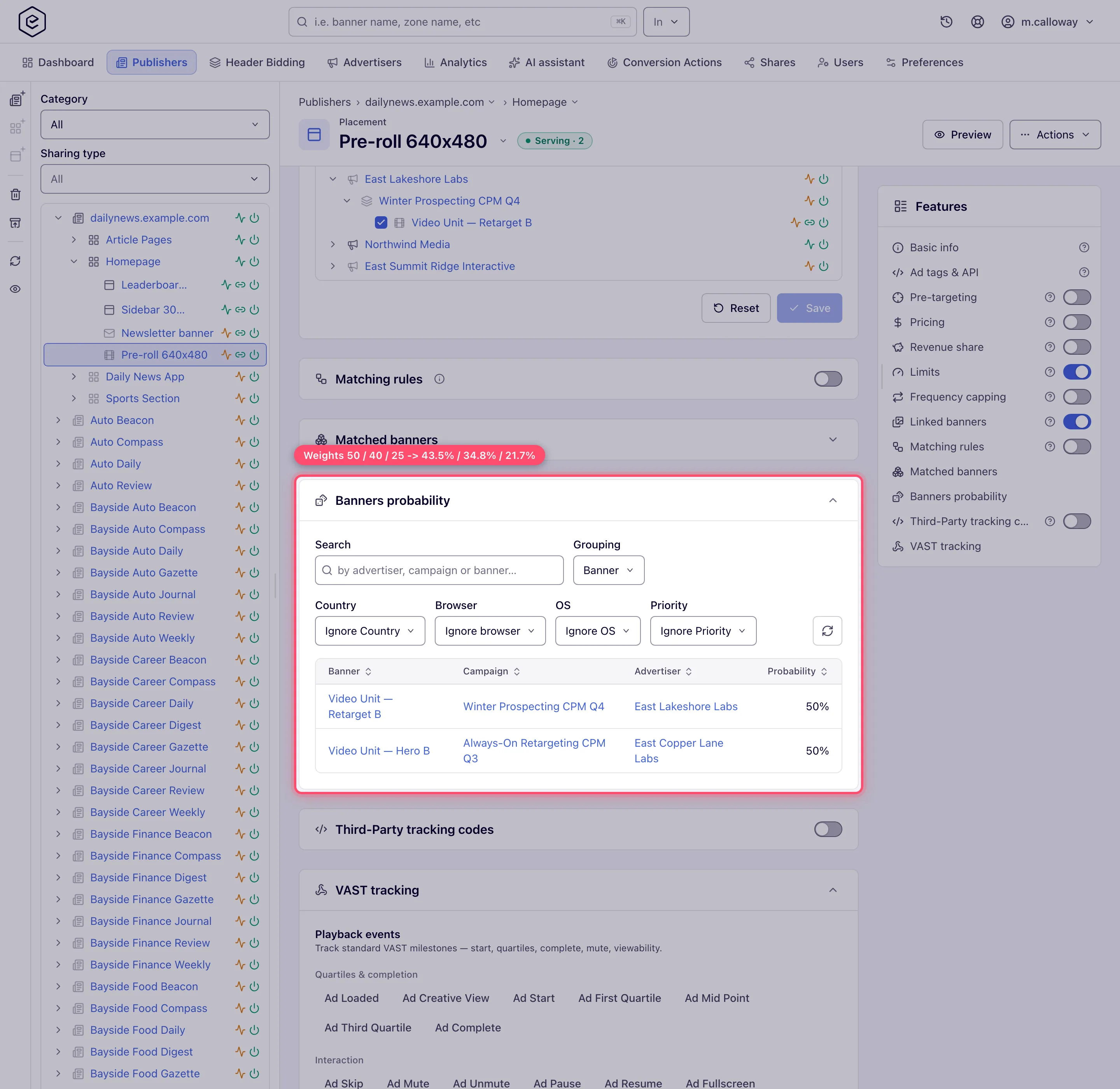
- Search filters by advertiser, campaign or banner name.
- Grouping collapses the grid to Banner, Campaign or Advertiser level; the grouped row
sums its children’s probabilities and blanks the columns below the grouping level to
-. - Country / Browser / OS — and Mobile Carrier on mobile-site and application placements — narrow the simulated request. Each starts at its own Ignore … value.
- Priority starts at As served (highest priority only), which shares the traffic out inside the top tier that still has a competing campaign, the way ad serving does. Pick a tier to see that tier on its own, or Ignore Priority to spread the shares across every tier at once.
- Probability is shown to four decimal places. NA means the row cannot be given a share at all — see the table under Options & fields.
- The block button on a row (a crossed-out circle) blocks that banner, campaign or advertiser on this placement, its site, or all sites. It needs edit rights, and writes an EXCLUDE pretargeting rule.
The card is a read-only diagnostic: it computes, it never changes weights or priorities.
The CTR and I2C optimizers
Both are multi-armed bandits that live in the ad server’s memory, one model per campaign. Neither reads a report table, and neither adjusts the banner’s stored Weight.
| CTR optimization | I2C optimization for actions | |
|---|---|---|
| Optimises for | clicks per impression | conversions per impression |
| Method | UCB1 — score is clicks ÷ impressions + √(2 · ln(campaign impressions) ÷ banner impressions) | Thompson sampling — one draw from a Beta posterior per banner |
| Model rebuilt every | 5 seconds | 60 seconds |
| First rebuild after ad-server start | 1 minute | 1 minute |
| Prior for a banner with no conversions | — | the network’s own impression-to-conversion rate over the last 14 days |
| Exploration share | 100 − CTR optimized traffic share | 100 − I2C optimized traffic share |
| Survives a restart | yes — counters are written to disk every 15 minutes and reloaded at startup | yes, same |
On each request for an optimized campaign the service does three things in order:
- Roll for exploration. With probability
100 − <the optimizer's traffic share>the request skips the model entirely and picks by plain banner weight. At a traffic share of 100 there is no exploration at all. - Serve anything untried. Every banner that has no impressions yet in the model is gathered and one is picked from them by weight, so a newly added creative is guaranteed traffic before the model can dismiss it.
- Otherwise take the top scorer. The banner with the highest score that is still active, not deleted and not excluded wins. This is a single winner, not a blend — within one model snapshot an optimized campaign serves one creative until the scores move.
What it needs before it does anything, and how long that takes. Counters only start
accruing once the checkbox is on; a campaign with the box off collects nothing. They are
fed from the ad logs, so a live campaign starts contributing within seconds of the
checkbox being saved. The model itself is rebuilt on the cadence in the table above. In
practice the first few thousand impressions are spent giving every banner its opening
impression (step 2) and letting the exploration term shrink; the ranking only becomes stable
once each banner has enough impressions for √(2 · ln N ÷ n) to be small next to its measured
rate. There is no configurable minimum and no “learning finished” indicator.
Warning: unticking CTR or I2C optimization deletes that campaign’s learned model — impressions, clicks/conversions and scores. Ad serving clears it on the very next request the campaign takes. Toggling the box off and on again restarts learning from zero.
Note: there is no per-creative “optimization coefficient” to read — compare CTR per banner in Analytics instead.
The network algorithm (Admin → Ad serving → Optimization settings)
One network-wide setting decides stage 3, the campaign pick. It does not affect priority tiers or the banner pick.
| Algorithm | How the campaign inside a tier is chosen | Does campaign Weight matter? |
|---|---|---|
| Manual Weighting (default) | Weighted random draw on campaign weight | Yes — it is the mechanism |
| eCPM Optimization (beta) | The campaign with the highest eCPM for the request’s country wins outright; ties broken at random | No — weight is not read at all |
| eCPM Optimization with Burn-up Period (Beta) | Non-optimized campaigns compete on weight first; if the draw lands on an eCPM-optimized campaign, only optimized campaigns continue and the one with the best measured eCPM over its burn-up window wins | Yes, for the first split |
Under Burn-up, Optimized traffic share splits the optimized campaigns between the winner
and the rest: the remainder (100 − the share) goes to a random non-winner, so a campaign that
is losing on eCPM still gets a trickle. The stock value is 95, i.e. 5 % to the losers.
Only Burn-up puts an eCPM Optimization checkbox on the campaign’s Advanced settings, and only for a role holding the Set “eCPM Optimization” permission — under Manual Weighting and plain eCPM the checkbox is not rendered, and a campaign’s stored flag has no effect.
Corner case: the per-campaign eCPM inputs are not the ones on the admin page.
Burn-Up period,Start-Up period,Minimal clicks,Minimal conversions,Estimated CTRandEstimated conversion rateall exist a second time on each campaign’s Pricing card, and it is the campaign’s copy that ad serving reads. The admin page sets the network defaults. The campaign-level estimates appear only under Burn-up, only on CPC/CPA campaigns, and only with the Manage “eCPM Optimization” permission.
Corner case:
Minimal clicksandMinimal conversionsare not floors on CTR or I2C learning, despite sitting on the same page. They belong to the eCPM burn-up algorithm: once a CPC or CPA campaign has recorded that many clicks or conversions on a given placement + country since its last reset, that combination may use its measured eCPM even if the start-up window has not elapsed yet. They do nothing for a CPM campaign, and nothing at all under Manual Weighting.
The same computation is available over the API as
GET /rest-api/placements/{placementId}/banner-probability. Describe the simulated visitor
with countryCode, browser, operatingSystem (any operating system — WINDOWS, ANDROID, …) and mobileCarrier, and list the dimensions to
leave out of the match in ignore (COUNTRY, BROWSER, OPERATING_SYSTEM, MOBILE_CARRIER,
comma-separated; any other value is a 400 that lists these four) — the equivalent of the panel’s Ignore choice. A dimension you neither send
nor ignore is simulated as unknown, which still fails a rule that targets it. priority,
group (BANNER, CAMPAIGN, ADVERTISER), query, sort, dir, start and limit match
the panel’s controls. The response is {success, total, data} with the rows the panel shows —
under Manual Weighting. The API hands the network’s optimization algorithm to the calculation
and the panel does not, so on a network running eCPM with Burn-up the two can disagree. A banner that matches the simulated visitor but gets no share of the rotation — zero
weight, or House ads priority beside other campaigns — comes back with probability -1, the
panel’s NA. A linked banner that does not match the visitor, is paused, or belongs to a
paused or ended campaign is not part of the simulation and is not listed at all; list the
placement’s banners (GET /rest-api/placements/{placementId}/banners.do) to see those. It needs
the Banners Probability Visibility permission and view access to the placement’s site (403
otherwise), and a missing or deleted placement is a 404.
Options and fields
Campaign controls (Account → Advertisers → campaign → Basic information)
| Field | Where | What it does | Default |
|---|---|---|---|
| Priority | Basic information | Puts the campaign in one of the six delivery tiers. Higher tiers are exhausted before lower ones are looked at. | Standard Low |
| Weight | Basic information | Share of the campaign’s own tier in the weighted draw. 0 means never chosen (unless every campaign in the tier is 0). Forced to 0 and disabled on House ads. Documented range 0–32 767. | 1 |
| CTR optimization | Advanced settings | Hands this campaign’s banner pick to the CTR bandit. Mutually exclusive with I2C. Disabled on House ads. | off |
| I2C optimization for actions | Advanced settings | Hands the banner pick to the I2C bandit. Mutually exclusive with CTR. | off |
| Actions (beside I2C) | Advanced settings | Restricts which conversion actions the I2C model counts. All counts every action. | All |
| eCPM Optimization | Advanced settings | Enters the campaign into eCPM ranking. Rendered only when the network algorithm is eCPM with Burn-up and your role holds Set “eCPM Optimization”. Disabled on House ads. | off |
Banner control (Account → Advertisers → campaign → banner → Basic information)
| Field | What it does | Range | Default |
|---|---|---|---|
| Weight | Share of its campaign’s traffic in the banner draw, and of the exploratory slice on an optimized campaign. Required. | 1–32 767 | 1 |
| Campaign weight / Banner weight on Linked placements / Linked banners | The campaign’s and the banner’s own weight on that one placement, replacing their defaults there. Empty means the default applies. | 0–32 767 / 1–32 767 | empty |
Network settings (Admin → Ad serving → Optimization settings)
| Field | Section | Shown when | What it does |
|---|---|---|---|
| Optimization algorithm | Campaigns optimization | always | Manual Weighting / eCPM Optimization (beta) / eCPM Optimization with Burn-up Period (Beta). |
| Optimized traffic share | Campaigns optimization | Burn-up only | 0–100. Share of optimized traffic given to the eCPM winner; the rest goes to a random losing campaign. |
| Estimated CTR | Campaigns optimization | eCPM and Burn-up | 0–1. Turns a CPC price into an estimated eCPM (1000 × CTR × price) before real data exists. |
| Estimated conversion rate | Campaigns optimization | eCPM and Burn-up | 0–1. Same for CPA (1000 × CR × price). |
| Burn-Up period (hours) | Campaigns optimization | Burn-up only | The lookback window, in hours, that a campaign’s measured eCPM is averaged over. |
| Start-Up period (hours) | Campaigns optimization | Burn-up only | How many hours of history a campaign must have before its measured eCPM is trusted instead of the estimate. |
| Minimal clicks | Campaigns optimization | Burn-up only | Clicks on a placement+country that let a CPC campaign skip the start-up wait. |
| Minimal conversions | Campaigns optimization | Burn-up only | The same for a CPA campaign. |
| CTR optimized traffic share | CTR / I2C optimization | always | 0–100. Share of an optimized campaign’s traffic the CTR bandit steers. The remainder is served by plain banner weight. 100 means no exploration at all. |
| I2C optimized traffic share | CTR / I2C optimization | always | The same for the I2C bandit. |
Saving shows Auto-optimization settings are saved…. The SSP bidding thresholds are not on this page: they open from the SSP bidding optimization button on Admin → DSP Partners.
Banners probability card
| Control | What it does |
|---|---|
| Search | Filters loaded rows by advertiser, campaign or banner name. At Campaign grouping the banner name is no longer searched; at Advertiser grouping only the advertiser name is. |
| Grouping | Banner / Campaign / Advertiser. Summing is done server-side; columns below the grouping level read -. |
| Country | Simulates a request from that country. Ignore Country leaves country targeting out of the calculation. |
| Browser | Simulates that browser. Ignore Browser skips browser targeting. |
| OS | Simulates that operating system. Ignore OS skips OS targeting. |
| Priority | As served (highest priority only) — the default — keeps the highest tier with a campaign still competing, as ad serving does, and lists the campaigns of lower tiers as NA. A named tier restricts the calculation to that tier. Ignore Priority skips tiering and spreads the shares across every tier at once. |
| Mobile Carrier | Mobile-site and application placements only. Ignore Carrier skips carrier targeting. |
| Refresh | Re-runs the calculation against the current ad-server cache. |
| Block (crossed-out circle) | Writes an EXCLUDE pretargeting rule for that banner / campaign / advertiser on this placement, this site, or all sites. |
How the number is computed. For each surviving banner:
probability = campaign weight ÷ Σ campaign weights
            × banner weight   ÷ Σ banner weights of that campaign
where a campaign’s and a banner’s weights on this placement, when they have them, stand in for their campaign and banner weights.
with House-ads and zero-weight campaigns contributing 0 to both the numerator and the sum. When no competing campaign has any weight (every one is on House ads, or every weight is 0), ad serving picks one of them at random, so each competing campaign gets an equal share and the rows still add up to 100 %. The card uses the network’s Campaign optimization algorithm from Admin → Ad serving, so under eCPM with Burn-up it shows the burn-up split.
On a placement with daisy chaining the weights do not decide: the first creative (or, for a campaign chain, the first campaign) in the chain that matches the simulated visitor takes 100 %, split by banner weight inside that campaign, and the rest of the chain is listed as NA. The card shows a fresh visitor’s first request — views per visitor and rotation pass later requests of the same visitor down the chain, which a simulation cannot see. A chain set to apply only to some delivery priorities changes the card only in those priorities.
What NA means. The card shows NA whenever the stored value is negative, which happens in
these cases:
| Cause | Why |
|---|---|
| The campaign’s weight is 0 | It can never win the campaign draw. |
| The campaign is on House ads priority | Its weight is forced to 0 in the same calculation. |
| The banner’s or campaign’s limit is reached | Added deliberately as an NA row, so an exhausted creative is visible rather than absent. |
| The advertiser or campaign is blocked on this placement or its site | It never serves here, so it is listed as NA rather than dropped. |
| A higher priority tier has a competing campaign | Shown in the default As served view: the lower tier only serves requests the top tier cannot take. |
When one banner is taking all the traffic
Work down this list in order. The checks near the top cost nothing and account for most reports; the weights, which is where people start, are almost never the answer.
- Is it a priority tier, not a weight? Open the losing campaigns and compare their Priority against the winner’s. Anything below the winner’s tier serves only the requests the winner cannot take. Move them into the same tier if you want them to compete.
- Is the placement daisy-chained? Check the placement’s Daisy chaining card — it is drawn only for a role holding the Daisy Chaining permission, so without it ask your network administrator to look. A Banner chain without grouping serves link 1 on every request; that is a chain doing its job, not rotation misbehaving. Turn the chain off, or reorder it, rather than adjusting weights.
- Is the campaign optimized? A campaign with CTR optimization or I2C optimization for actions ticked serves its single best-scoring creative, not a blend — and with the network’s traffic share at 100 there is no exploratory slice at all. Either lower CTR optimized traffic share / I2C optimized traffic share on Admin → Ad serving → Optimization settings so a percentage of traffic keeps going to the others, or untick the box (which also wipes the learned model and returns the campaign to plain weights).
- Are the losers actually eligible? Check the Banners probability card for NA rows: a limit-exhausted banner or a zero-weight campaign is not competing at all. Then check limits, capping and the campaign’s dates.
- Is a pretargeting rule removing them? An advertiser or campaign blocked on the placement or its site is listed as NA. A banner blocked there is unlinked from the placement in the ad server’s cache, so it has no row at all — compare the card’s row count with the placement’s Linked banners count; a gap means a banner block, not a weight.
- Only now, look at the weights. With the card’s Priority filter on its default As served view, the shares are the exact ratio the weights produce inside the tier that is actually serving.
- Is the sample just small? Rotation is a per-request lottery. A 50/50 split will not look
like 50/50 over 200 impressions. Compare over a day, not an hour.
Corner cases and gotchas
Corner case — Ignore Priority is not a forecast. With the Priority filter on Ignore Priority, the calculation skips tiering and spreads probability across every tier at once, so a Premium and a House-ads campaign appear side by side with a share each. Ad serving gives the top tier with a competing campaign everything, which is what the default As served view shows. Use Ignore Priority only to compare weights across tiers.
Corner case — enabling daisy chaining on a placement switches this algorithm off. What survives depends on the chain’s type and on Group by delivery priority:
Chain What decides the winner Banner, grouping off The chain alone. The first link that is eligible and within the lookup depth wins, every request. Priority tiers, campaign weight, banner weight and both bandits are all bypassed. Banner, grouping on Priority tiers still run; inside a tier the chain covers, the chain orders the banners. Tiers it does not cover fall back to the weighted draw. Campaign, grouping off The tier loop is skipped and the chain picks the campaign; the banner inside that campaign is still drawn by weight (or by its bandit). The Banners probability card does not model any of this, so it is hidden on a placement with daisy chaining switched on. A role without the Daisy Chaining permission still sees it there, and its weight-based shares do not apply. See Daisy chaining & passbacks.
Corner case — the chain’s “priority” is a different number. A daisy-chain row’s Priority is its 1-based position in the chain, not a delivery priority. A chain row of priority 1 has nothing to do with a campaign set to Premium.
Corner case — the card evaluates only nine kinds of targeting. Blocked advertisers, campaigns, banners, placements and sites, plus Country, Browser, Operating System and Mobile Carrier. Day of week, time range, device, language, connection type, custom parameters, incognito and every other rule are not applied, so a banner that real targeting will reject can still show a healthy share.
Corner case — a blocked banner has no row. An advertiser or campaign blocked on the placement or its site is listed as NA. A banner blocked there is different: the ad server drops its link to the placement, so the card has no row for it. If the card is missing creatives you expect, check pretargeting and blocking on the placement and on its site before you suspect the weights.
Corner case — the card does not know about the CTR/I2C bandits. It always reports the weight split. On a campaign with CTR or I2C optimization on, the real split is whatever the bandit decides — usually far more concentrated. The card is a forecast of the weighted path only.
Corner case — the card does not model eCPM Optimization (beta). Under eCPM Optimization (beta) campaign weight is not read by ad serving at all, yet the card still divides by it. Under eCPM with Burn-up the card follows the network algorithm and shows the burn-up split. Read the card as authoritative under Manual Weighting and eCPM with Burn-up.
Corner case — “Show only this campaign banners on page”. With this ticked, once a campaign has won one slot on a page every further slot on the same page is filled from the same campaign, whatever the weights say. If a campaign alias is set, the restriction applies across every campaign sharing that alias.
Corner case — a video pod is filled one spot at a time. A placement that returns more than one ad per request runs the selection above once per spot, and each winner is compared with the spots already in the break before it joins: the same ISCI / Ad-ID spot never plays twice, and with the placement’s Competitive separation in a pod switched on a second spot from the same advertiser domain — or domain and category — is passed over and the next winner is tried. A pod can therefore come back shorter than the placement asks for; on a VMAP request a campaign also supplies at most one spot per break. The Banners probability card does not model any of it. See Keeping competitors apart in a pod.
Note: an optimizer never overrides a delivery control. A capped or limit-exhausted banner cannot be picked no matter how well it is scoring, and the probability card reports it as NA rather than 0 %.
Note: the eCPM Optimization Details window — reachable from the Actions menu on a campaign or a placement — lists the learned per-country / per-placement eCPM records and lets you delete a selection of them. It appears only when the network algorithm is eCPM with Burn-up and the matching permission is held. Clearing the records after a landing-page overhaul stops stale learning from holding a campaign back.
Corner case — masked advertisers on the probability card. If you can see a placement but not a given advertiser, that advertiser’s rows appear with the names masked; rows of an advertiser flagged private are dropped from the card altogether.
Per-role notes
- Network manager — Priority, campaign and banner weight, the CTR, I2C and eCPM checkboxes and the Banners probability card on the stock role. The eCPM checkbox appears only while the network algorithm is eCPM with Burn-up, and the algorithm itself needs an administrator.
- Advertiser — on the stock role, campaign and banner Weight are shown read-only, and the CTR and I2C checkboxes and Priority are not shown: the network manager sets them. The same goes for the campaign’s and the banner’s weights on a placement. See What your network controls.
- Publisher — no Banners probability card on the stock role; the card also needs view access to campaigns, which the stock Publisher does not have.
- Can View share — Priority, weights and optimizer checkboxes are read-only; blocking needs edit rights on the site.
Exact grants: see User roles.
Related
- How ad selection works — the full request pipeline this page zooms into
- First-price vs second-price auctions
- Daisy chaining & passbacks — replaces rotation on a placement
- Pricing — where a campaign’s own eCPM estimates and burn-up windows live
- Limits and Frequency capping — what removes a banner before rotation sees it
- Pretargeting & blocking — why a linked banner can be missing from the probability card
- Delivery controls overview
