
Restore something you deleted by accident
Bring back an advertiser, campaign, banner, site, zone or placement deleted in the last 90 days — with its on/off state, its rules, its banner-placement links and everything deleted along with it.
Deleting an advertiser, campaign, banner, site, zone or placement does not erase it: it is marked deleted, stops serving and disappears from the lists. For 90 days you can bring it back, and the restore undoes what the delete did — not just the “deleted” mark.
Who this is for
Anyone who can delete the entity. Restoring takes the same permission as deleting it: Delete on Campaigns for an advertiser, campaign or banner, Delete on Inventory for a site, zone or placement — and, for a shared entity, an Is Owner share. A user who may only view it sees it in the list with Restore greyed out.
Prerequisites
- The entity was deleted less than 90 days ago, after restore became available (release 153). Older deletions are not listed.
- Delete on Campaigns (advertisers, campaigns, banners) or on Inventory (sites, zones, placements) — and, for a shared entity, an Is Owner share.
- Its parent is not deleted, or you restore the parent first.
- The new interface: the Recently deleted page exists only there.
Before and right after deleting
Every delete confirmation says what goes with the entity and that it can be restored within 90 days — for example “The campaign will be deleted along with its banners. You can restore it within 90 days. Are you sure?”. A delete from the tree’s action rail names the page: “Delete “Spring Sale”? You can restore it on the Recently deleted page within 90 days.”
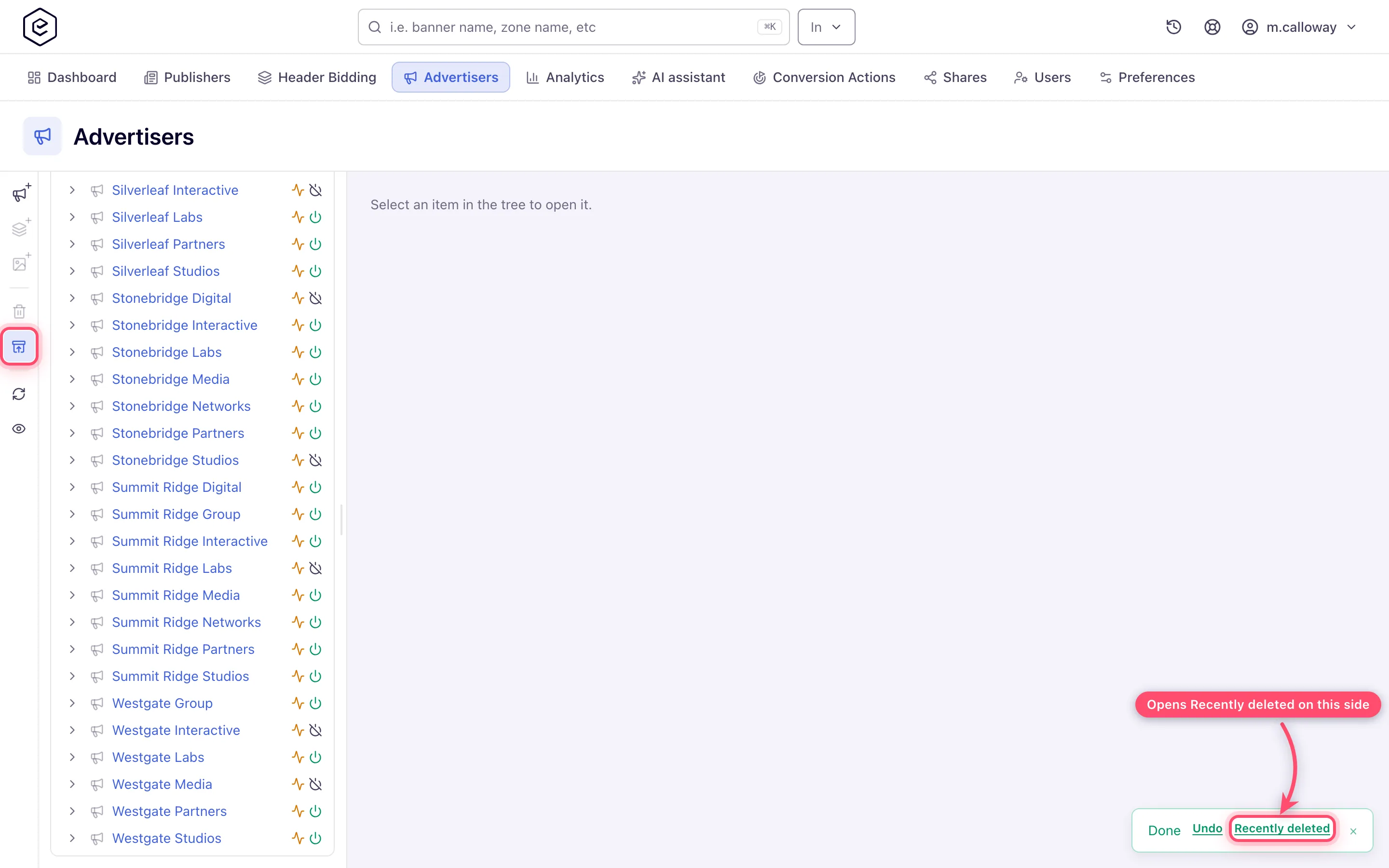
After the delete, the success toast carries a Recently deleted link that opens the page filtered to the side you deleted from — from the action rail, from an edit page’s Actions menu, and from the Advertisers / Publishers grids alike. A delete from the action rail also gets an Undo button next to it, which restores the entity exactly as the page below does, for as long as the toast is on screen; and the rail’s Recently deleted button lights up for a few seconds so you can see where the entity went.
The classic (non-SPA) interface shows the same “You can restore it within 90 days” wording in its delete confirmations; the restore itself is done on the Recently deleted page of the new interface.
Steps
- Go to Account → Advertisers (or Publishers) and click Recently deleted in the action rail beside the tree — the box-with-arrow icon right under the delete (bin) button, whose tooltip reads “Recently deleted: restore what was deleted in the last 90 days” — or the Recently deleted link on a delete toast. The page opens filtered to that side; Type switches to all types or one kind.
- Find the row. Each row is one delete a user made, newest first: what it was, what it was
under (advertiser › campaign, or site › zone), when and by whom it was deleted, and
Comes back with it — the campaigns and banners of a deleted advertiser, the zones and
placements of a deleted site or zone, and the banner–placement links the delete removed.
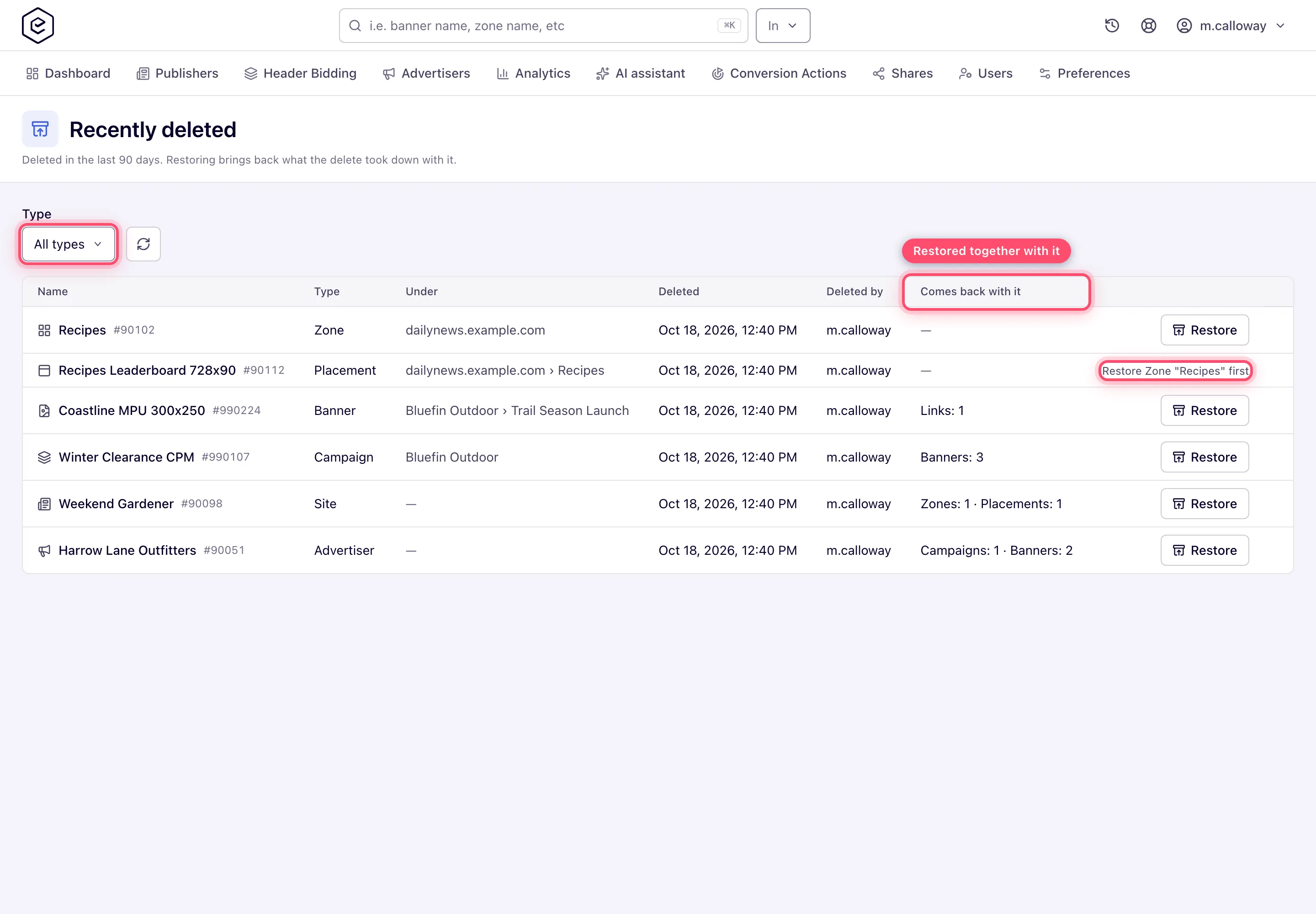
- Click Restore. A single banner or placement with nothing else to bring back is restored at once. If the restore also brings back other entities, or some of its links cannot come back, a dialog says what will happen first; confirm with Restore.
- The row disappears and a message confirms it. If not everything came back, the message says how many links, banners and rule groups were left out.
The restored entities are back in the trees and grids straight away. The ad server picks them up on its next scheduled reload, after which they serve again.
What comes back
| What the delete did | What the restore does |
|---|---|
| Marked the entity deleted | Clears the mark |
| Switched an advertiser, campaign or banner off | Switches it back on — or leaves it off, if it was off before the delete |
| Deleted the campaigns and banners of an advertiser, the banners of a campaign, the zones and placements of a site, the placements of a zone | Restores exactly those — not the ones that had been deleted separately, earlier |
| Removed every link between a banner and its placements, with the banner’s weight on each placement | Links them again, where the placement (or banner) still exists, is not deleted, still fits the banner and you may still see and link it; each link gets its weight back |
| Removed the entity’s rule groups | Adds them back with the same rules, as long as the rules still exist |
Everything else — targeting, capping, limits, pricing, labels, shares, placement keys and invocation-code settings — was never touched by the delete and is simply there again. A restored placement keeps its placement key, so ad tags already on publishers’ pages start serving again.
Corner cases and gotchas
Corner case: a banner or placement under a deleted campaign, advertiser, zone or site cannot be restored on its own — it would come back under a deleted parent and never serve. Its row says Restore … first and names the parent; restore the parent, which brings the child back with it if they were deleted together.
Corner case: a link comes back only if the other end is still there. If you deleted a banner and later the placement it was linked to, restore the placement first, then the banner. A link that cannot come back is counted on the row (Links that cannot come back) and named in the result.
Corner case: a link also stays off when you could not make it today — you no longer have the permission to link placements to banners, or the site of the placement (for a banner restore) or the advertiser of the banner (for a placement restore) is no longer shared with you. The result lists it with the reason forbidden; whoever can see both sides can link it again.
Corner case: a banner whose creative file was removed from storage while it was deleted — its Media Library file deleted and purged, or its uploaded file gone — is not restored: it would serve a broken creative. Restoring it alone is refused; restoring its campaign or advertiser brings everything else back and leaves that banner in the list.
Corner case: only deletions made since this feature was released are listed. An entity deleted before that, or more than 90 days ago, cannot be restored here — ask Epom support or your account manager.
Corner case: each delete is restored once. Delete the same entity again and it is listed again, as a new row.
Corner case: deleting a site with unsubscribe the owners also unsubscribed its owners from email; restoring the site does not re-subscribe them — they turn it back on in Preferences.
Per-role notes
- Read-only / shared (Can view / Can edit): the row is listed, Restore is disabled — restoring needs the right to delete.
- Custom-role users: the page needs View on Campaigns or on Inventory; each side’s rows need their own.
- AI assistant and MCP:
findwithdeleted: truelists the same rows, andentity_restorerestores one — see Connect an AI assistant (MCP). - REST API:
GET /rest-api/deleted-entities/listandPOST /rest-api/deleted-entities/{type}/{id}/restore— the Recently Deleted section of the API reference.
