
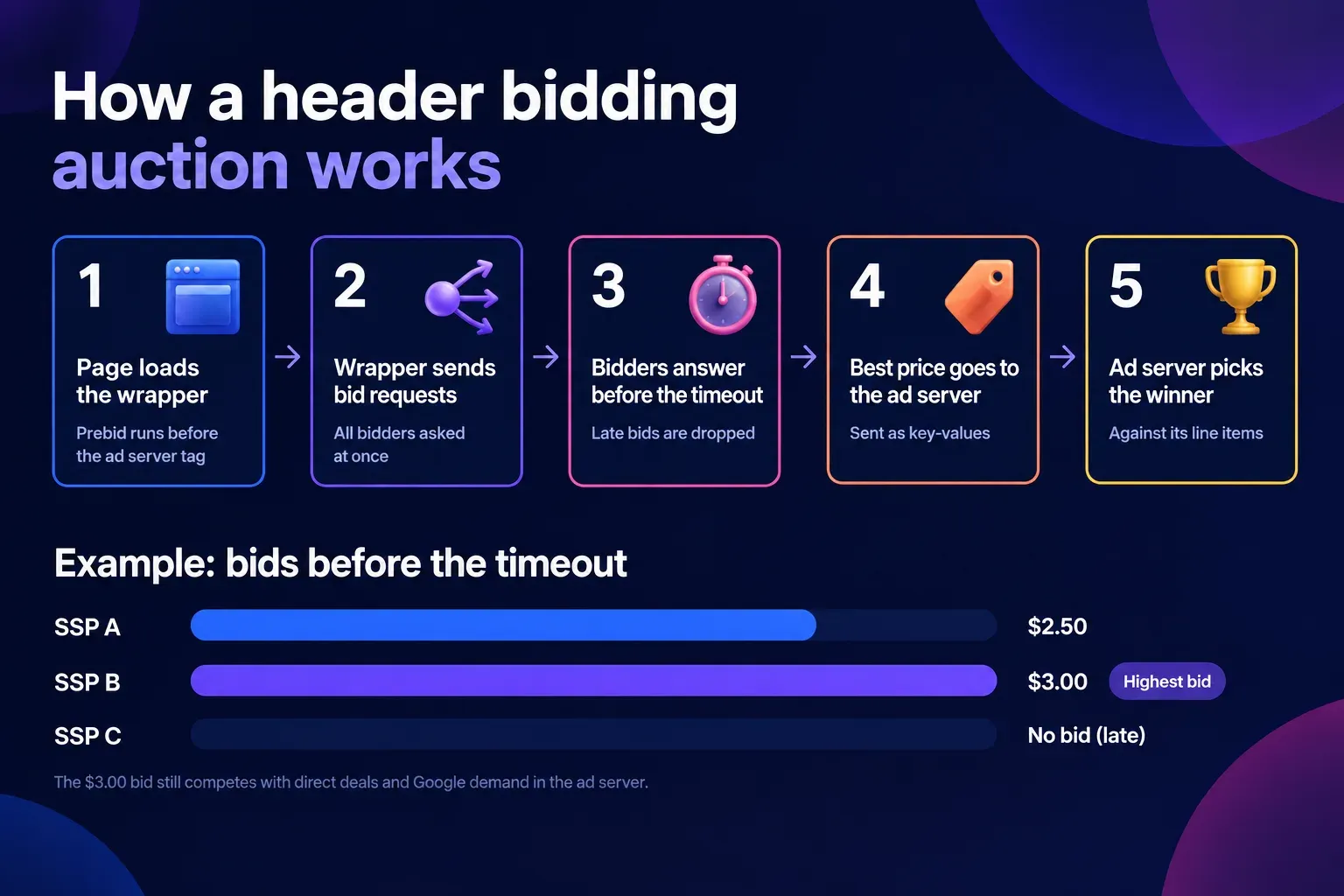
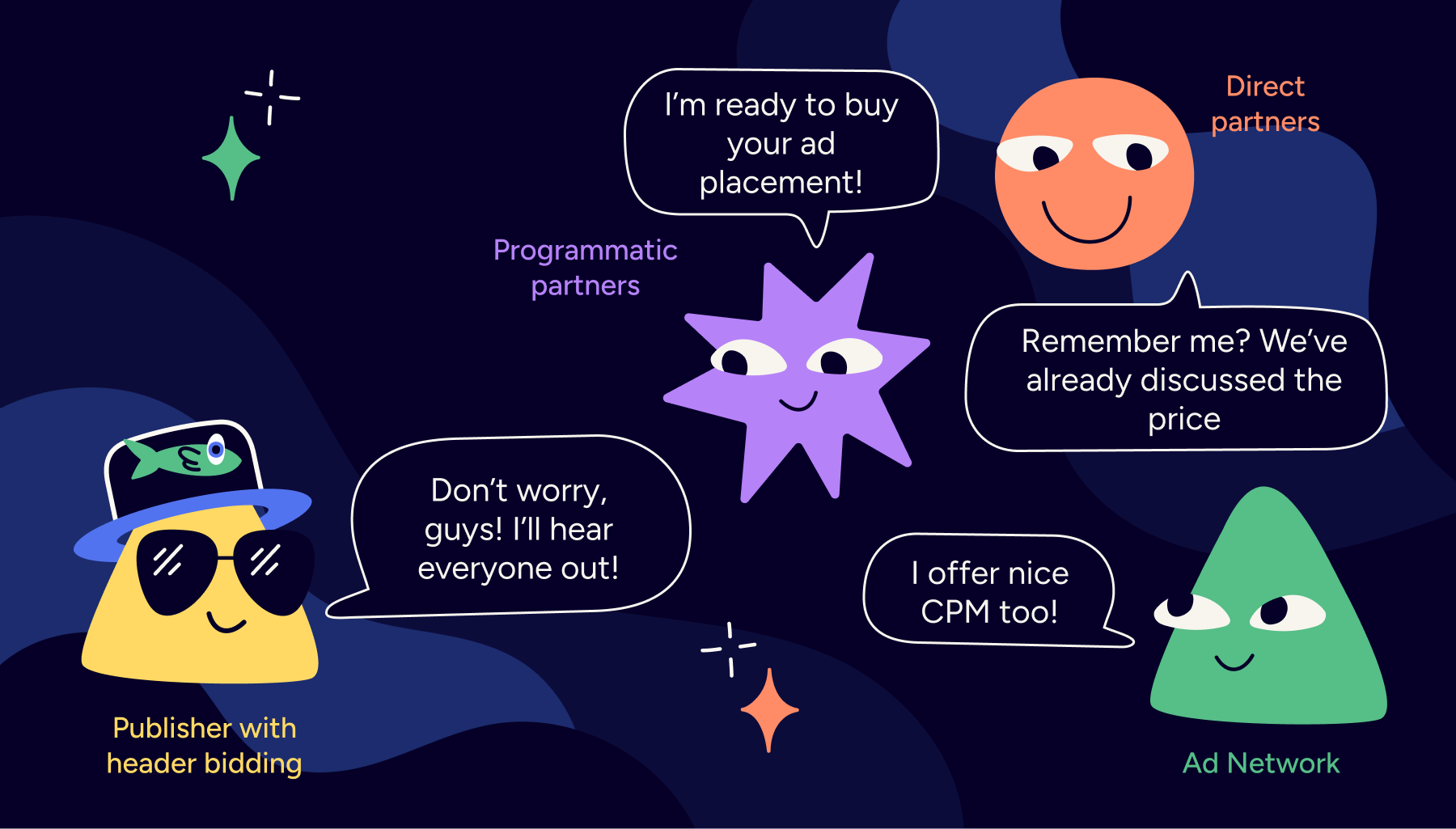
Every impression gets one chance to be priced. In a waterfall, it goes to whoever is first in line: fixed line items with no live price, then one partner after another through passbacks. Header bidding asks every buyer for a price at once, before the ad server decides.
What you gain depends on your side of the auction. A publisher gets more buyers competing for each slot. An ad network gets its campaigns priced on each publisher page before Google is asked.
Both face the same three questions: which setup fits the stack, how it plugs into Google Ad Manager, and how long the page can wait for bids. This guide answers them in that order.
Want your own campaigns priced before Google is asked, without rebuilding your ad stack? Epom Ad Server hosts your Prebid tag and bids into Google Ad Manager through one line item. Start a free trial.
- Header bidding is a programmatic auction in which a publisher offers each ad impression to several demand partners at once, before calling its ad server. The best price then competes with direct deals and Google demand inside the ad server.
- Prebid is the standard way to run it. Prebid.js runs the auction in the browser, Prebid Server runs it server-to-server, and Prebid Mobile brings it to apps. All three are free and open source.
- The first decision is who runs the auction. Your setup depends on whether you already use Google Ad Manager, already run Prebid, or sell app inventory.
- Google AdX cannot bid inside Prebid. There is no Google adapter, so Google Ad Manager stays the ad server and Prebid bids into it through line items.
- Timeouts decide the speed–revenue trade-off. Revenue drops when the page waits too long, and Prebid advises setting a server-side timeout at 50–75% of the auction timeout.
What Is Header Bidding?
Header bidding is a programmatic auction in which a publisher offers each ad impression to several demand partners at the same time, before calling its ad server. Bidders include SSPs, ad exchanges and ad networks. The highest bid goes to the ad server as key-values, where it competes on price with direct deals and Google demand.
Say three SSPs bid $2.50, $3.00 and $2.75. The $3.00 bid goes to the ad server. A $2.80 guaranteed deal can still win there, because the ad server applies your priorities as well as price.
“I started hearing the term ‘header’ in late 2014. We enable our SSP in the header so it can submit bids in advance of the ad call. But that was only to describe the location.” recalled Chip Schenck, VP of Programmatic at Meredith, confirming the label first emerged around then among industry insiders.
Google's exchange could also see competing bids before it answered: the European Commission fined Google €2.95 billion in 2025 for that kind of self-preferencing. For a side-by-side of both methods, see header bidding vs waterfall.
What is a header bidding wrapper?
A header bidding wrapper is the script that runs the auction on the page. It calls every bidder, enforces the timeout, picks the best bid and hands it to the ad server.
Today almost every wrapper is built on Prebid.js. You can install it yourself, get it from a managed service, or have your ad server host it.
Prebid.js, Prebid Server and Prebid Mobile
Prebid supports more than 300 demand partners. It is run by Prebid.org, a membership organization that takes no fees from its use. Its three products cover three environments:
| Product | Where the auction runs | Use it for |
|---|---|---|
| Prebid.js | In the visitor's browser | Web pages |
| Prebid Server | On a server, with 230+ bid adapters | Apps, AMP, CTV and long-form video, server-side web |
| Prebid Mobile | iOS and Android SDK that calls Prebid Server | In-app inventory |
Who Runs the Auction? Choosing Your Header Bidding Setup
Your header bidding setup follows from one question: who runs the auction, and which parts of it are yours. Pick the row that matches your stack.
"Everything hangs off one question: who runs the auction, and what of it is theirs."

| Your situation | Setup | What you need |
|---|---|---|
| Google Ad Manager, no Prebid yet | A hosted Prebid tag that loads Prebid and defines the ad slots | One script on the page, one container per position, line items in GAM |
| Google Ad Manager with your own GPT slots you must keep | A hosted Prebid tag that adopts your existing slots | The same script; your slot ids or ad unit paths |
| Your own Prebid.js already on the page | Add bidders to your existing ad units | One bids entry per ad unit, per bidder |
| Mobile apps | Prebid Mobile calling a Prebid Server | The server endpoint, an account id, one config id per ad unit |
| Web, but you want bidders off the page | Prebid.js routing bidders through Prebid Server | An s2sConfig block and a Prebid Server host |
| Google Ad Manager only | Open Bidding inside GAM | No page code; Google takes a revenue share |
Based on info we at Epom are getting from inbound requests, three situations come up again and again.
An SSP has approved the site for Prebid, but the team has no developer to set it up. A network runs many small sites and wants one place to manage header bidding. A publisher serves its own campaigns next to Google's and wants both priced in one auction.
So what to do in any of these cases?
You have SSP approval but no developer. Use a hosted Prebid tag, so nobody has to build or maintain a wrapper.
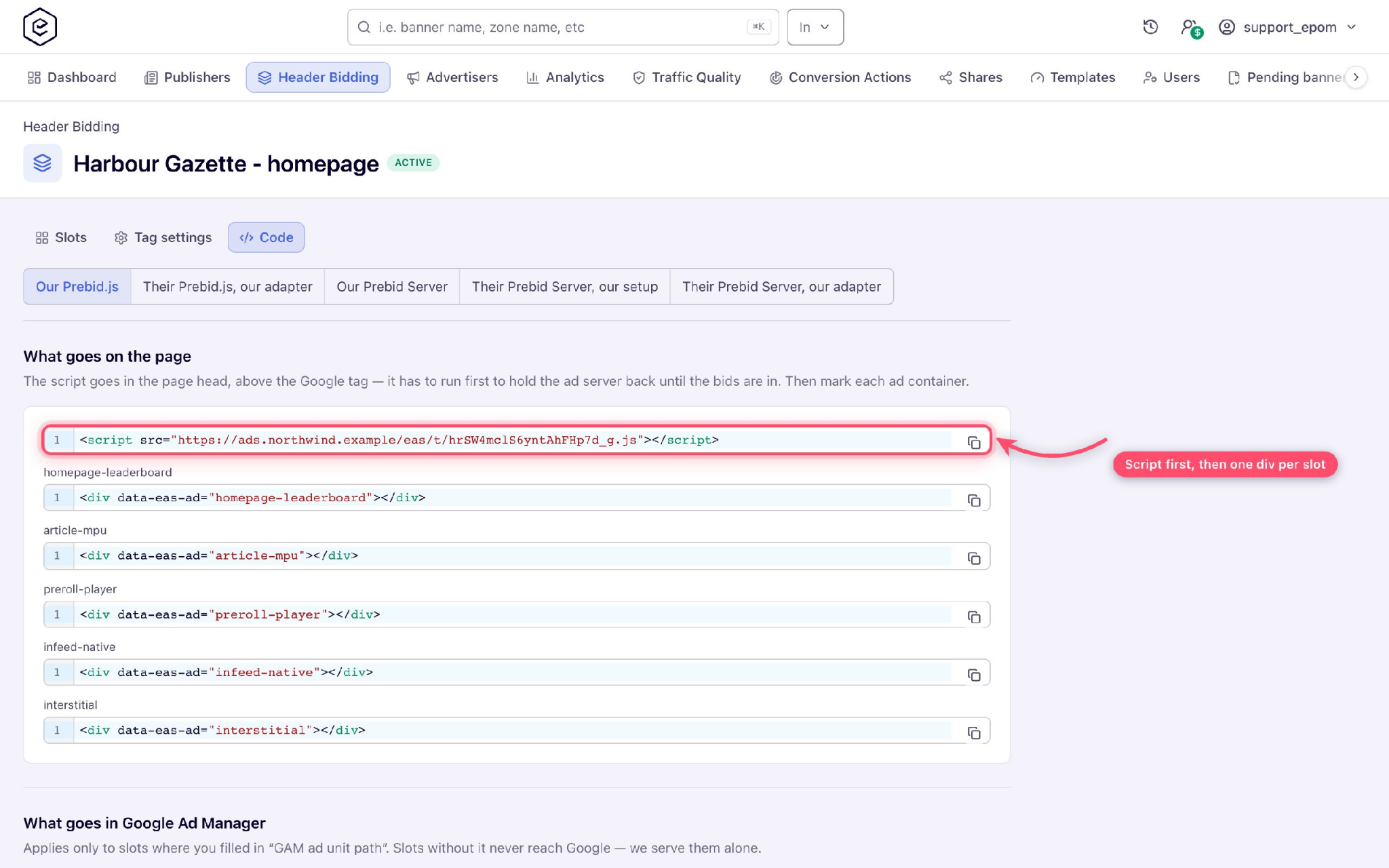
- Paste one script in the page head, above the Google tag, and mark each ad position with one container attribute.
- Add the SSP as a bidder in the tag, with the parameters the SSP gave you.
- In Google Ad Manager, register the hb_ keys and create the line items (see the setup steps below).
- Load a page with
?pbjs_debug=trueand check that the SSP bid arrives before the timeout.
You run one wrapper across many sites. Add new demand once, in the wrapper, never site by site. Add one bids entry per ad unit for the new bidder. If two deployments of the same bidder share a slot, give one an alias. Keep the build lean, and split it by region if bidders differ by geo.
“Two Prebid builds on one page means two auctions, and the second overwrites the first one’s targeting.”
Your direct sales can’t fill all the inventory. Set the priorities in Google Ad Manager so each source knows its place:
- Sold campaigns go first, through a Sponsorship line item scoped to the ad units in the tag.
- SSP bids from Prebid compete next, on price, against Google’s AdX and AdSense, through Price Priority line items per price bucket. Google can outbid them.
- House ads and fallback markup fill whatever is left.
Check the split weekly: how much direct deals filled, how much SSPs filled, how much Google kept, and how much went unfilled. An ad server runs this auction but doesn’t bring the demand, so the SSP accounts are yours to sign.
Why AdX can't bid inside Prebid
Prebid has no Google adapter, so AdX and AdSense cannot bid in a Prebid auction. Google Ad Manager stays the ad server. Prebid passes its best price in as key-values, and a line item decides if it beats Google's demand.
Open Bidding, formerly Exchange Bidding, is Google's server-side alternative. There the highest net bid after Ad Manager's revenue share wins.
In September 2026 a US court ordered Google to connect AdX and its ad server to Prebid, so this may change.
What Is Server-Side Header Bidding?
Server-side header bidding is a header bidding setup in which a server, not the visitor’s browser, calls the demand partners. The page sends one request to Prebid Server. The server asks every bidder and returns the bids that arrive before the timeout.
It is also called server-to-server (S2S) header bidding.
How server-side header bidding works
- Prebid.js on the page, or Prebid Mobile in an app, sends one request to Prebid Server.
- Prebid Server calls each bidder through its server adapter.
- Bids that arrive before the server timeout go back to the page or app.
- The best bid goes to the ad server as key-values, the same as client-side.
Client-side vs server-side vs hybrid
| Client-side (Prebid.js) | Server-side (Prebid Server) | Hybrid | |
|---|---|---|---|
| Where bidders are called | Browser | Server | Both |
| Page load impact | Grows with each bidder | One call from the page | Split |
| Cookie matching | Direct | Needs user sync per bidder | Mixed |
| Setup effort | Lowest | Hosted provider or your own servers | Highest |
| Best for | Most web publishers starting out | Apps, video, pages with many bidders | Large sites tuning per bidder |
Pros and cons of server-side header bidding
- Pro: the page makes one request, however many bidders you add.
- Pro: it is how Prebid runs in apps, AMP and CTV, where there is no browser auction.
- Con: the server has to sync user IDs with each bidder. Users it can’t match usually draw lower bids.
- Con: someone runs the server: your team or a hosted provider. Bid requests also leave the browser, so debugging needs server logs.
Prebid's own documentation warns that self-hosting Prebid Server is "not nearly as easy as Prebid.js" and calls a hosted provider the simplest route.
Which SSPs support server-side header bidding?
Any SSP with a Prebid Server adapter can bid server-side, and Prebid Server lists 230+ bid adapters. Check the SSP is on that list. Then ask whether its server adapter supports the same formats and deals as its Prebid.js adapter.
How to set up server-side header bidding with Prebid.js
- Pick a Prebid Server: your own or a hosted one.
- Add an s2sConfig block to Prebid.js with the server endpoint, your account ID and the bidders to move.
- Set the server timeout at 50–75% of the auction timeout.
- Turn on user sync so the server can match users with each bidder.
- Move the slowest bidders first and keep the rest client-side. That is a hybrid setup, and most large sites end up there.
Epom’s hosted tag runs client-side on the web. In apps, it works through your Prebid Server or one we configure for you.
SSP, Ad Exchange or Header Bidding Wrapper: What Should You Set Up First?
Set up the ad server and the header bidding wrapper first, then add SSPs and ad exchanges as bidders inside it. The ad server decides which demand wins each impression, and the wrapper runs the auction.
An SSP is one source of bids. On its own it cannot replace either.
If you already serve ads through Google Ad Manager, keep it and add a Prebid tag in front. If you run a publisher ad server or an ad network, check whether it can host the tag. Then you don't need a separate wrapper.
SSP vs header bidding: which setup gives publishers higher yield?
It is not a choice between the two. Header bidding is how several SSPs compete for the same impression, so yield comes from the competition between them and your direct deals.
In Prebid's own test, five and ten bidders earned the same at short waits. Ten bidders pulled ahead only when the ad server waited longer, and ads loaded at about 1,200 ms even with a two-second wait.
Is it worth adding a second SSP if header bidding is already running?
Add a second SSP when it brings demand the first one doesn't. Check it after two to four weeks.
A partner with a low bid rate and almost no wins adds requests, not revenue. Prebid's sustainability guidance says the same: drop bidders that are consistently slow or don't respond.
How to Set Up Header Bidding with Google Ad Manager
A header bidding integration with Google Ad Manager (formerly DFP) runs on key-values. Ad Manager never sees the winning creative; it sees the price on the ad request, and a line item you create decides whether that price wins.
"What your campaigns take, they take at a known price; what they leave, Google Ad Manager fills exactly as before."
- Step 1. Register the key-values. In Inventory → Key-values, create free-form keys for the price bucket (hb_pb), the bid id (hb_adid), the size (hb_size) and the bidder (hb_bidder). Ad Manager refuses to target a key it doesn't know.
- Step 2. Create an advertiser and an order. Name them so the team can tell header bidding apart from your own campaigns.
- Step 3. Create the line items. Use Price Priority line items, one per price bucket, each targeting hb_pb at that price. For sold deals you want to serve regardless of price, use one Sponsorship line item that targets a deal key, scoped to the ad units in the tag.
- Step 4. Choose price granularity. Prebid's default "medium" uses $0.10 steps up to $20 CPM; "dense" uses $0.01 steps up to $3. Finer steps mean more line items and less rounding.
- Step 5. Add the Prebid universal creative. One third-party creative per size renders the bid Ad Manager picked, using the id in hb_adid.
- Step 6. Load the tag above the Google tag. It must run first so it can hold the ad request until bids arrive. Loaded after Google's tag, the first impression on each page goes out without bids.
Skip the line-item work: Epom Ad Server prints the GAM key-values and line-item recipe for your tag. Try it free.
Already on Prebid? What Prebid.js 10 changed
Prebid.js 10 changed defaults that many setups depend on. Check your build against this list before you upgrade:
- The dfp modules are renamed to gam.
- bid.userId is no longer filled; read EIDs instead.
- TCF purposes P4 and P7 are on by default.
- The Prebid Server adapter needs an explicit endpoint.
How to Set Up Header Bidding Without Slowing Down Your Site
Header bidding slows a page when bidders answer late and the page waits for them. Five settings control that: timeout, bidder count, auction timing, script loading and refresh.
Set the timeout from data. Prebid gives no single number; its rule is to measure your own page. For server-side bidders, set the server timeout at 50–75% of the auction timeout, and keep the failsafe timeout well above both. Epom's hosted tag starts at 1,000 ms.
Pick bidders by response time. Any SSP with a Prebid adapter can bid in header bidding. The page slows when you call too many or they answer late, so check each bidder's response time in Prebid's debug mode before you keep it.
Keep the build lean. Build Prebid with only the bidders and modules you use, and consider separate builds per region.
Auction slots when they can be seen. Bidding on below-the-fold ad placements as they scroll into view saves requests on long pages.
"A slot inside a closed dialog or collapsed panel has no box, so it is deliberately not auctioned until it opens."
Load scripts in the right order. The tag that holds the ad request must run before Google's tag. Other ad scripts should not block content from rendering, so watch Core Web Vitals in Search Console.
Refresh by the rules. Google sets 30 seconds as the minimum for time-based refresh and requires you to declare refreshing inventory in Ad Manager. Refresh only while the tab is in front.
How Header Bidding Works for Web vs In-App (and Video)
On the web, Prebid.js runs the auction in the browser. Apps have no browser auction: Prebid Mobile sends each ad request to a Prebid Server, which calls the bidders and returns the winner to the app.
Each ad unit in the app carries a config id that the server resolves to a slot.
Video works differently from display. An instream bid returns VAST, which your own player plays; the wrapper does not draw it.
Native bids return assets such as a title, an image and a call to action, and your template renders them. Full-screen formats such as interstitial and rewarded are requested at screen size from the SDK.
What Does Header Bidding Cost?
The Prebid code is free. What you pay for is running it: engineering time, hosting, or a provider's share of revenue. The cost depends on the provider model you choose.
| Model | What you pay | What you control |
|---|---|---|
| DIY Prebid | Your in-house team's time to build, upgrade and monitor | Everything |
| Hosted Prebid Server | Hosting fees or a hosted provider's terms | Server-side bidders; you still run Prebid.js |
| Managed wrapper service | Usually a share of ad revenue | Less: the provider tunes bidders and timeouts |
| Hosted tag inside your ad server | Your ad server plan | Bidders, timeouts and line items in one account |
| Open Bidding | Google's revenue share on each win | Google's partner list and settings |
Google doesn't publish the Open Bidding fee. Its auction compares bids net of Ad Manager's revenue share. For Epom Ad Server plans, see pricing.
Which Header Bidding Metrics Should Ad Ops Watch for Yield?
Track who fills each slot and how fast bidders answer. Revenue alone hides whether a bidder is helping or only adding requests.
| Metric | What it tells you | When it's off |
|---|---|---|
| Bid rate | How often a bidder answers with a price | Low and stable: the bidder has little demand for your traffic |
| Win rate | How often its bid wins and renders | Near zero for weeks: remove the bidder |
| Timeout rate | Share of auctions where bids arrive late | Vendor guidance flags a timeout as too short above 10–15% of auctions |
| Bid response time | How long each bidder takes | Consistently slow bidders cost page speed |
| Fill by source | Who filled: direct, Google, a partner, or unfilled | A rising unfilled share means demand or floors need work |
| eCPM | Average price per thousand impressions | Compare by bidder and by slot, not as one average |
| CLS and INP | Layout shift and responsiveness | Ad slots without reserved space push content |
Header Bidding with Epom Ad Server
Epom Ad Server hosts your Prebid.js header bidding tag: add your own bidders, sell in apps via Prebid Mobile, through your Prebid Server or one we configure for you, and bid into Google Ad Manager through one line item. Google Ad Manager stays on your ad server. Your sold campaigns get priced before Google is asked.
For ad networks: one tag per publisher site, and every later change comes from your account. You never ask hundreds of publishers to re-install code.
For publishers with a sales team: sold campaigns serve first. For the rest, SSP bids and Google compete on price, and the higher one wins.
For app publishers: the same slots sell in apps via Prebid Mobile, through your Prebid Server or one we configure for you, including interstitial and rewarded formats.
One script in the page head and one attribute per ad position. Every later change is made in the tag in your Epom account and reaches pages through the CDN, with nothing to reinstall. The tag ships its own Prebid build under its own name, so it doesn’t collide with other scripts.
How it works with Google Ad Manager. Epom bids into GAM through one Sponsorship line item that targets Epom’s deal key. Each slot fills in this order: your sold campaign, then the best price between partner bids and Google, then House ads, then fallback markup. Epom bids the net price the publisher earns, in US dollars.
Each slot can carry other Prebid bidders from the catalogue, with aliases and supply chain settings. The tag loads only the adapters a slot uses.
Display, native and instream video (VAST handed to your player) on the web. Interstitial and rewarded slots in apps through Prebid Mobile.
Reporting. The Header Bidding report shows who filled each slot: direct campaigns, Google Ad Manager, AdX or AdSense, a partner, or unfilled. You also get fills, fill rate, gross revenue and eCPM.
Set Up Your First Header Bidding Tag in Epom
- Create a tag for the site and pick its serving domain.
- Add one slot per ad position and link it to a placement.
- Add the SSPs you already work with as bidders on each slot.
- Hand the publisher the script and the container code from the Code tab.
- In Google Ad Manager, create the keys and the line item from the recipe Epom prints for your tag.
What changes after the first week
Before, direct campaigns took the slot first. Whatever is left drops into a passback chain, and no one can say which partner paid what. After, the same SSPs bid at once, and the winning price reaches Google Ad Manager as a key. The report shows who filled each impression. The question stops being “why is fill down?” and becomes “which bidder should we drop?”
FAQ
Find Out Who Fills Your Inventory Today
Before you add bidders, answer one question: who fills each of your ad slots today, and at what price? Most setups can’t tell you. Direct campaigns, Google and passbacks report in different places, and unfilled impressions often aren’t counted at all.
Run a header bidding tag on one site for a week, then read the Header Bidding report. It shows, slot by slot, how much your campaigns won, how much Google kept and how much went unfilled. That split tells you whether to add bidders, raise floors or sell more directly.
Epom Ad Server hosts the Prebid tag, keeps Google Ad Manager in place and shows who filled every slot. Start a free trial and build your first header bidding tag.