
Hierarchy and linking
The supply and demand trees, the three ways banners get linked to placements, and the size-compatibility rules that decide which links are allowed to serve.
Everything in the ad server hangs off two three-level trees — one for supply, one for demand — and a many-to-many bridge between their leaves. Understanding the trees and the bridge explains most of the platform: where settings inherit, what shares apply to, and why an ad does or does not appear in a slot.
The two trees
Supply (publisher side)          Demand (advertiser side)
Site                             Advertiser
 └─ Zone                          └─ Campaign
└─ Placement ←── links ──→ └─ Banner| Level | What it represents | Typical settings that live here |
|---|---|---|
| Site | A website, app, or traffic source | Categories, revenue share, pre-targeting, site-wide blocks |
| Zone | A section of the site | Grouping, pre-targeting |
| Placement | One concrete ad slot with a type and size | Ad unit/size, invocation code, default code, daisy chaining, capping |
| Advertiser | A buying client or house demand bucket | Shares, budget-level limits, targeting, price rules |
| Campaign | One buy: pricing, flight, optimization | Pricing type, weights/priority, capping, conversion actions |
| Banner | One creative | The creative itself, size, targeting, per-creative caps |
Settings cascade down each tree: pre-targeting is checked site → zone → placement, and targeting advertiser → campaign → banner, before any ad serves (see How ad selection works). Sharing and visibility are granted at the top of each tree — sharing an advertiser or a site includes everything under it (Sharing & permission model).
The bridge: banner ↔ placement links
Ads flow only across the bridge: a banner can serve in a placement when the two are linked and the pair is suitable (compatible type and size — see below). One banner can serve in many placements and one placement can serve many banners.
Links come into existence three ways:
1. Manual linking
The linking card on a banner’s edit page (link placements) and on a placement’s edit page (link banners) — plus the tree views — let you connect the two sides explicitly. Only suitable counterparts are offered. This is the predictable, recommended baseline: the header pill on both edit pages counts exactly these direct links (Serving state).
What either picker offers is the role’s Link Placements to Banners grant, which carries two things at once — how far it reaches, and whether anything new may be linked at all:
| Grant | Reaches | New links |
|---|---|---|
| None | — | the linking card is gone |
| All | the whole network | yes |
| Shared | entities shared with the user | yes |
| Linked | the whole network | no — only the links that already exist |
| Shared linked | entities shared with the user | no — only the links that already exist |
The two linked values are the self-serve setup: the account sees what someone else linked and can unlink it, but never adds a link of its own. Network-manager roles that do the linking are set to All or Shared.
Corner case: changing the links from the placement side (the placement’s banner list,
PUT /rest-api/placements/{id}/banners.do) also needs the right to edit that placement’s site — your own, shared with you for editing, or Inventory → Update: All. A network-wide grant (All, Linked) therefore reaches other customers’ banners from your placements, but never another customer’s placement. Linking from the banner side is unchanged.
Reach is separate again from whether the user may see what those entities are called — names
come from the entity-scope view grant and the mask permissions. So a role can be allowed to link
into inventory it only ever sees as SITE_456, and a publisher can accept creatives from
advertisers it only ever sees as ADVERTISER_123
(Sharing and permission model).
2. Auto-linking
A banner can opt in with New placements auto-linking and narrow it with two independent, optional filters: Auto-link site categories (publisher categories) and Auto-link placement labels. A placement that passes the filters is then linked to the banner by the auto-linking pass, provided the pair is suitable (see below):
| Banner has | A placement auto-links when |
|---|---|
| Categories only | Its site carries at least one of the categories, and the placement has no labels |
| Labels only | The placement carries at least one of the labels — the site’s categories don’t matter, a site with no categories included |
| Categories and labels | Both of the above hold |
| Neither | Never — nothing links, so a banner can’t end up on every placement in the network; the banner form refuses this combination |
A campaign can turn auto-linking on for all its banners with its own categories; a banner’s own setting, when on, overrides the campaign’s. A campaign with no categories auto-links only those of its banners that carry auto-link labels, by label. Placements can opt out individually with their Disable auto-Linking switch.
Labels-only matching skips banners of private advertisers — nothing about a label scopes them to a publisher. Category-scoped auto-linking includes them as before.
The pass runs at these moments, and only at these:
| Moment | What happens |
|---|---|
| A placement is created in the console | When matching banners exist, a prompt asks Link the matching auto-linkable banners to this placement (N)? — Yes links them, No skips the pass |
| A placement is created over REST or MCP | The matching banners are linked straight away, with no prompt |
| Labels are added to an existing placement | The same prompt appears |
| A site’s categories change | The console asks whether to link the relevant auto-linkable banners to the placements of that site |
| An existing banner with auto-linking on is saved | The console offers to link it to the matching placements that already exist; the REST parameter is linkToPlacements |
Note: turning auto-linking on for a banner does not retro-link anything by itself, and saving a banner for the first time never offers it. To link existing placements, accept the prompt on a later save or use the bulk tool Link to all matching placements in category (Bulk operations).
Re-applying auto-linking after a change
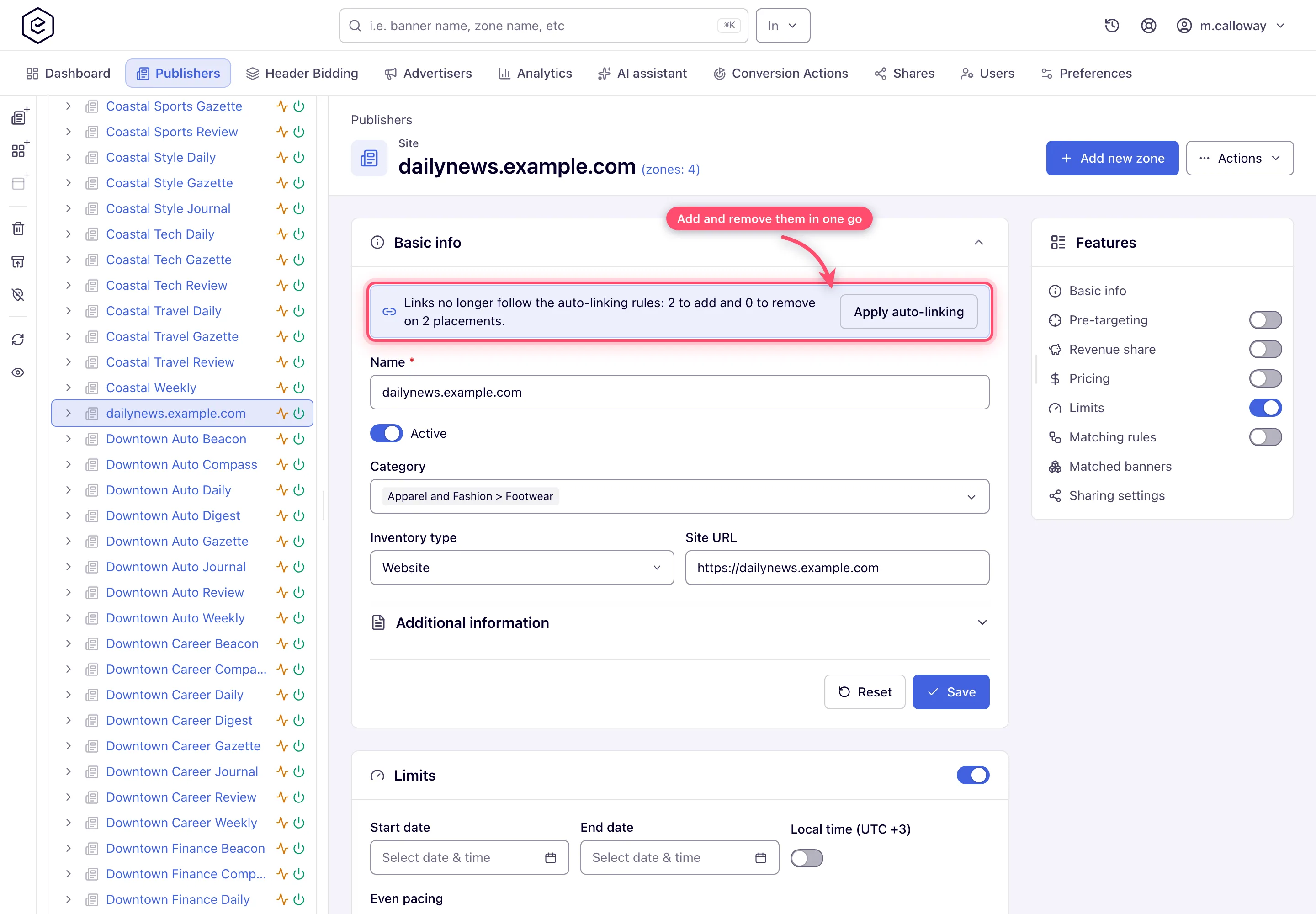
The passes above only ever add links. When a site moves to another category (Adult to Mainstream), a placement’s labels change (Video to Banner) or a creative’s auto-linking rule changes, the creatives linked for the old values stay linked until auto-linking is re-applied. Re-applying brings the links in line with the rules in both directions:
- it links the creatives whose rules the placement now matches, and
- it unlinks auto-linking creatives whose rule the placement no longer matches.
A creative without an auto-linking rule (linked by hand) is never unlinked, and a placement with Disable auto-Linking on is left alone. A link counts as matching when the site shares one of the rule’s categories (if it names any) and the placement shares one of its labels (if it names any).
| Side | Where | Permissions |
|---|---|---|
| Publisher | Site or placement edit page: Check auto-linking, then a notice Links no longer follow the auto-linking rules: N to add and M to remove with Apply auto-linking | Update on the site, plus Apply auto-linking to own inventory |
| Advertiser | Campaign or banner edit page (when its auto-linking is on): the same notice | Update on the campaign, plus Auto-linking settings (enabled) |
| API | GET /rest-api/{sites,placements,campaigns,banners}/{id}/auto-linking previews, POST …/auto-linking/apply applies | The same as the page |
The check reconciles every link of the entity on the server, so it does not run when the page opens: click Check auto-linking, or save a change to the categories, labels or auto-linking rule and the page checks on its own. The notice appears only when something would change (otherwise the page says the links follow the rules), and only for roles that can apply it.
Apply auto-linking to own inventory is off by default except for roles with Auto-linking settings enabled; the network turns it on for publisher roles that should be able to re-apply auto-linking themselves.
3. Rules
Rules match demand to inventory dynamically by category and label conditions, without writing persistent links. An entity participates only while its Rules switch is on, and a match needs Rules on at both ends: at the demand side (the banner, its campaign or its advertiser) and at the supply side (the placement, its zone or its site). Rules-driven serving is flexible but less predictable — the edit-page pill shows Rules only (amber) for an entity with no direct links whose own Rules switch is on, which says nothing about whether the other side has Rules on too.
Direct links and rules coexist: a placement can have explicit links and accept rules-matched demand at the same time.
Size compatibility (“suitable”)
A link is allowed — and keeps serving — only while the pair is suitable. The rules:
| Situation | Suitable when |
|---|---|
| Standard case | Banner size equals the placement’s ad-unit size exactly |
| Placement ad unit is Any size | Any banner size fits |
| Placement has Flexible placement size ticked | Banner fits inside the placement: banner width ≤ placement width and banner height ≤ placement height |
| Programmatic (OpenRTB DSP) banner with Use placement size | Fits any placement that has a concrete size; placements without a defined size are refused |
| Native banner ↔ native placement | Matched by native asset compatibility, not pixel size |
| Native banner ↔ non-native placement | Allowed only if the placement has a native adapter template configured |
| Application placements | Size rules as above, plus the app OS and app ad category must match between banner and placement |
| Click-through placements | Every banner is suitable — there is nothing to render |
| Email placements | Video files are accepted in addition to the standard display matching |
The banner’s placement type must also match: a video banner never links to a display placement, and so on — the full matrix is in Banner types and Placement types.
Corner cases and gotchas
Corner case — the silent unlink. Whenever a banner is saved, the platform re-checks all of its existing links and silently removes any placement that is no longer suitable. Change a banner from 300×250 to 336×280 and every exactly-sized 300×250 placement quietly disappears from its linking list — no warning, no confirmation. After resizing a creative, re-open the linking card and re-link (or check the header pill count). The same holds from the other side: saving an existing placement unlinks every banner that no longer fits it and answers with an ordinary Done toast.
Corner case: each banner and each placement also carries its own links switch (the switch on its Linked card). A direct link serves only while both sides have linking enabled — an entity switched over to rules-only operation ignores its stored links even though they still appear in the lists. The header pill only appears while the entity’s own switch is on, and it does not look at the other side’s switch.
Corner case: links survive deactivation and deletion of parents — they just stop serving. Reactivating the campaign brings the same links back; nothing needs re-linking.
Corner case: categories are matched on the site, labels on the placement. A placement without labels never receives a banner that has auto-link labels, and a labelled placement never receives a category-only banner — so a labels-only banner reaches only labelled placements, and a labelled placement under a site with no categories still auto-links every suitable banner whose labels it shares.
