
Exclude competitive campaigns
Stop competing campaigns' ads from serving together on the same page view, using the campaign's Exclude competitors campaigns card.
Two rival brands on the same page is an awkward look — and often a contractual violation. The Exclude competitors campaigns card lets a campaign name other campaigns it must not appear alongside: once one of them wins a slot on a page view, the others are skipped for the remaining slots of that page view and the next eligible campaign serves instead.
Who this is for
Advertiser users, and network managers whose role has been given the card. Exclude competitors campaigns needs the Manage Competitor Campaigns permission — without it the card is hidden entirely, and the server refuses to flip the switch. The stock Advertiser role holds it; the stock Network Manager role does not until your network administrator switches it on. Changing it also needs a campaign you can edit; on a shared campaign the toolbar follows the share.
Prerequisites
- Both campaigns exist. You need at least view access to a campaign to list it as a competitor — the picker offers campaigns from advertisers you own or that are shared to you.
- Multiple placements of the same page actually serve together — the exclusion works within one page view (see How it is enforced).
Steps
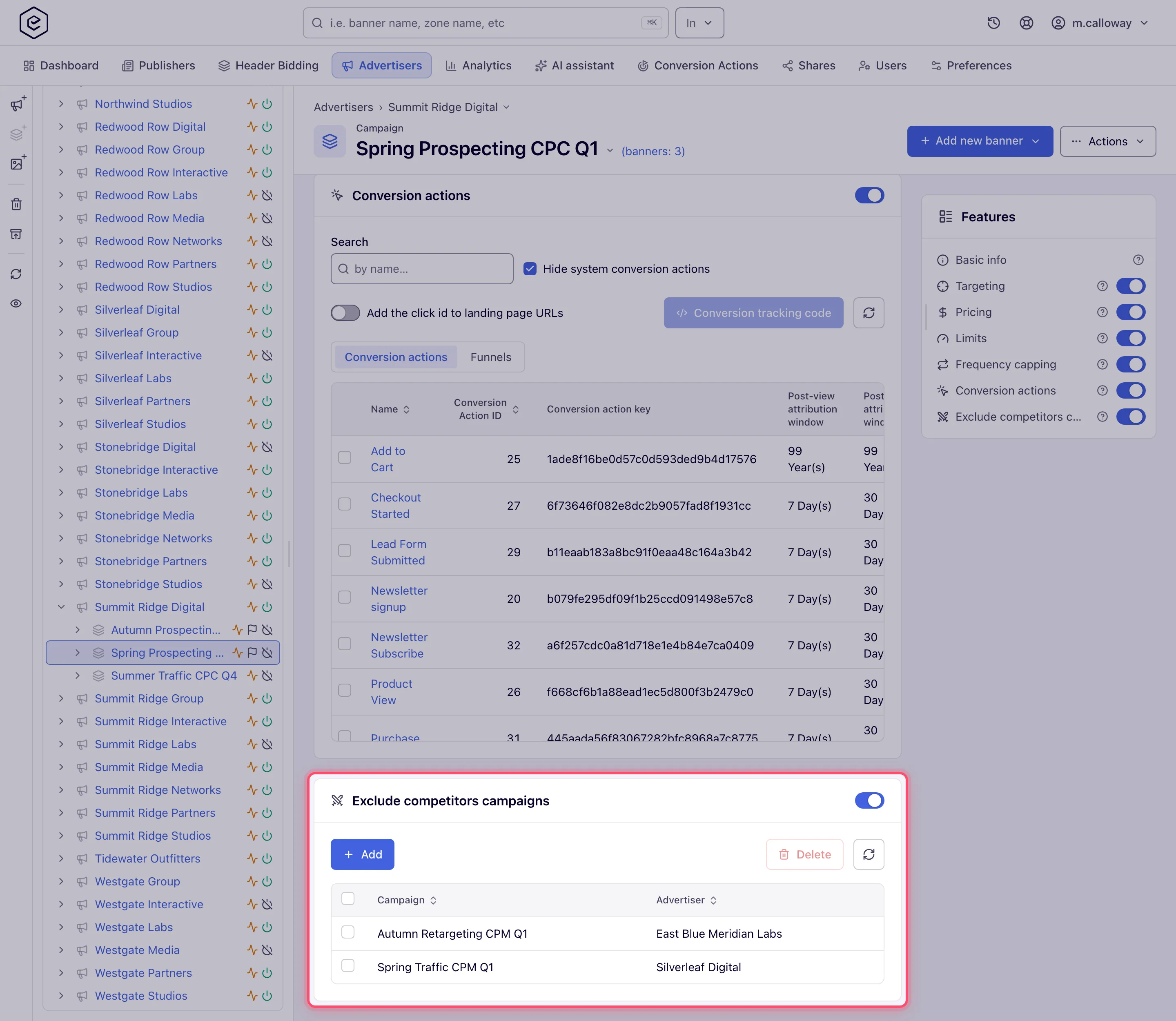
- Open Account → Advertisers → advertiser → campaign and scroll to Exclude
competitors campaigns (that is its exact name on screen). Turn the card’s switch on — rows are only enforced while it
is on.
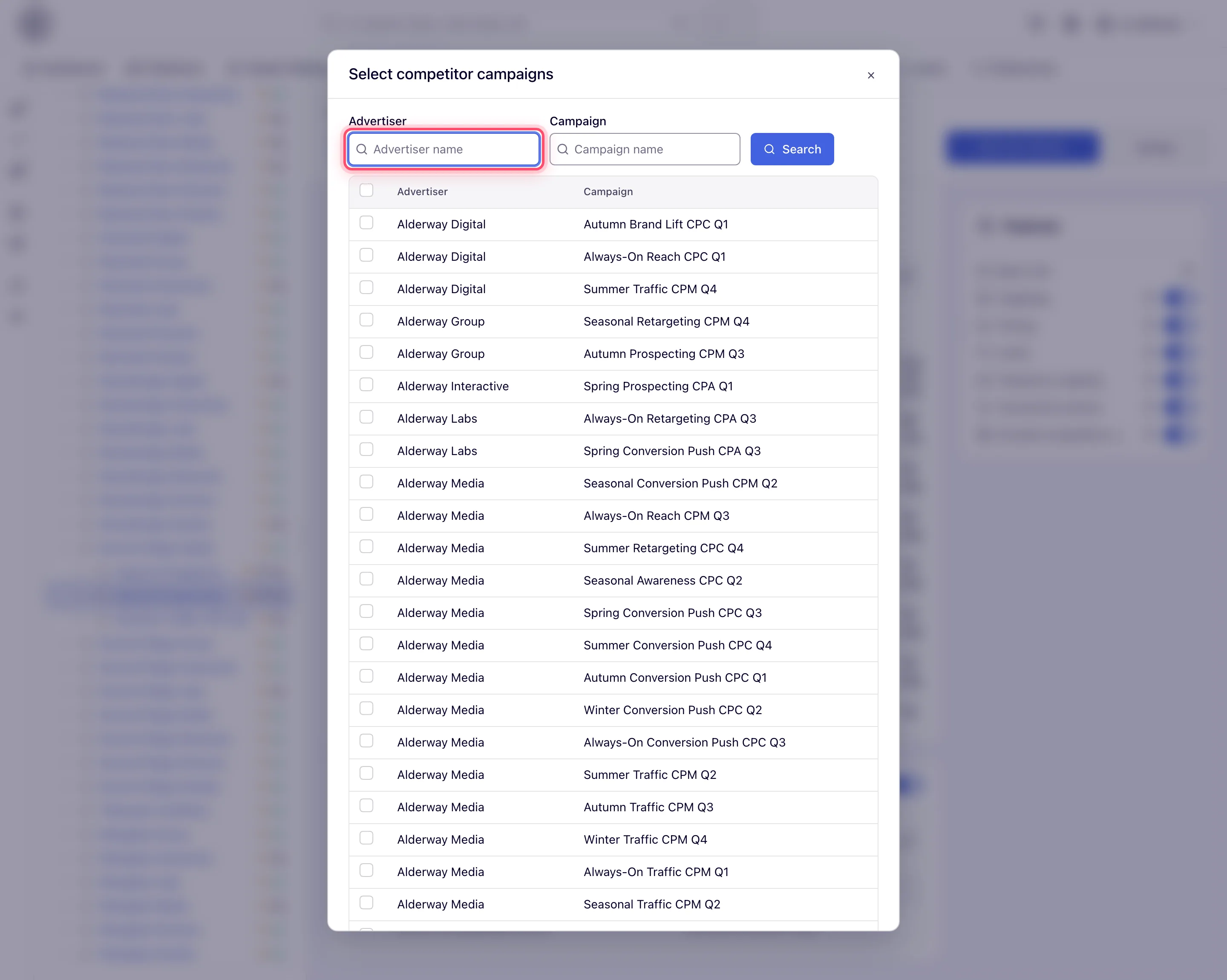
- Click Add. In the Select competitor campaigns dialog, filter by Advertiser
and/or Campaign name (prefix match, Enter or the Search button), tick the campaigns
and click Add selected. With nothing ticked it answers “Select campaigns please.”; the grid
pages by 25 once there are more.
- The rows appear in the grid (Campaign + Advertiser columns). Rows save immediately — there is no card-level Save.
- To remove, select rows and click Delete (N), then confirm “Delete N record(s)?” — all the selected rows go in one request. Removal also clears the mirror row on the other campaign (see below).
How it is enforced
Enforcement happens during banner selection, per page view:
- When a campaign wins a slot, the ad server records it — together with its competitor list — against that page view.
- For the page’s next ad requests, any campaign on the recorded competitor list is rejected during selection; the selector excludes it and picks the next eligible campaign, so the slot still fills.
- A “page view” is identified by the visitor, the IP and the page — either the page
URL/referer of the ad request or, when the ad tag passes one, an explicit
pageIdparameter that groups requests deliberately.
The relationship is stored both ways: adding campaign B as a competitor of campaign A also adds A to B’s list, and force-enables B’s competitors switch — whichever of the two serves first blocks the other.
Video ad pods
A video placement that returns several ads in one pod has its own, separate setting for this: Competitive separation in a pod keeps advertisers with the same domain — and, in its second mode, the same advertiser category — out of one ad break, and never plays the same ISCI / Ad-ID twice in it. That check compares the advertisers’ domains and categories; it does not read this card’s list. See Keeping competitors apart in a pod.
Corner cases and gotchas
Corner case: adding a competitor silently modifies the other campaign — it gets a mirror row and its competitors card is switched on, even if its owner never touched it. Deleting the row removes both directions again.
Corner case: flipping the switch carries over to linked competitors you can manage: turning it on switches their cards on too, turning it off drops your campaign’s rows and switches off any of yours left with no competitor. A linked campaign of an advertiser you have no update share on is never touched — it keeps its switch and its mirror row pointing at your campaign.
Corner case: the exclusion is only mutual while both switches stay on. If the other campaign’s owner later turns their card off, that direction’s rows drop out of the ad-serving data: when your campaign serves first the competitor is still blocked, but when the competitor serves first your campaign is no longer blocked.
Corner case: the scope is one page view, not a session or a site. The same two campaigns can serve on consecutive pages, or on the same URL to different visitors. And if ad requests from one page are not recognizable as the same page (stripped referers, single-page apps changing URLs), the grouping — and the exclusion — silently degrades. Passing a shared
pageIdparameter in the page’s ad tags makes the grouping explicit.
Corner case: with the Mask campaigns permission active, other owners’ campaigns appear in the card and picker as
CAMPAIGN_<id>/ADVERTISER_<id>instead of names — you can still add and remove them.
Corner case: the picker does not hide campaigns that are already competitors, and it excludes only the campaign you are editing. Re-adding an existing competitor is a harmless no-op.
Note: like all delivery settings, changes take effect when the ad-serving cache next reloads — not on the very next impression.
Per-role notes
- Advertiser — the card is on the stock role’s campaigns.
- Network manager — not on the stock role. Your network administrator switches on Manage Competitor Campaigns for the role in Admin → Users & access → User roles & permissions; until then the card is hidden and the API calls below are refused.
- Can view share — the grid renders without the Add/Delete toolbar and the switch is locked. A card that is already switched on keeps enforcing regardless.
- Masked users — see the masking corner case above.
Via the API
| Method | Path | Purpose |
|---|---|---|
| GET | /rest-api/campaign/{campaignId}/competitors.do | The switch state (enableCompetitors) and the competitor rows (id, campaignName, advertiserName, masked like the card) |
| POST | /rest-api/campaign/{campaignId}/competitors/enable.do | Switch the card on |
| POST | /rest-api/campaign/{campaignId}/competitors/disable.do | Switch it off |
| POST | /rest-api/campaign/{campaignId}/competitors/add.do | Add competitors: competitorIds (repeated or comma-separated) |
| POST | /rest-api/campaign/{campaignId}/competitors/remove.do | Remove competitors: competitorIds |
All of them need Manage Competitor Campaigns; reading needs view access to the campaign’s
advertiser, everything else update access. Adding and removing work like the card’s
toolbar: the link is made (or dropped) on both campaigns, and an added competitor has its
own separation switched on. Adding answers 400 while the campaign’s own switch is off —
turn it on with competitors/enable.do first. Every call answers 404 for a campaign id that does not
exist. Adding and removing answer the competitor rows as they stand afterwards; a requested id that
does not exist comes back in notFound, and a campaign whose advertiser you cannot update in
accessForbidden — it is left untouched.
