
Test pages and your ad-serving domain
What your network's ad-serving domain controls, how to get your own domain (CNAME) set up through Epom support, and how to load a real tag on a hosted test page.
An ad-serving domain is the hostname your ads are actually requested from. It is not cosmetic: it is put into every invocation code, every impression beacon, every click redirect and every conversion URL the platform generates, and it owns the cookies the ad server reads back. Your ad tags are served from your network’s ad-serving domain; to add a domain, change the one your network or a set of sites and advertisers uses, or retire an old one, ask Epom support or your account manager.
This page also covers the hosted Test pages you use to load a real tag on a real page — for example after a domain change.
Who this is for
Network administrators. The Test pages grid needs the Test Pages admin permission (ask Epom support or your account manager to add it if your role lacks it) — see Users and roles.
What a “network” means here
One installation is one network. There is no tenant switcher: branding and the default domain apply installation-wide. Running several networks means running several installations, each with its own data and its own domains — Epom support sets those up. See White-label & multi-tenancy.
Prerequisites
- For a test page: the invocation code you want to check, copied from the placement’s Ad Tags & API card.
Steps
Maintain test pages
A test page is a small hosted HTML page you own, served anonymously at /test/<id>.do,
whose body is whatever markup you paste in. It is the standard way to load a real
invocation code on a real page, on the host it will really serve from.
- Go to Admin → Audit & diagnostics → Test pages. The grid lists ID, Title and Ad cache, with Add, Edit, Open and Delete in the toolbar.
- Add (or select a row and Edit) opens Test page information: Title (required, at most 64 characters), a Serve as test creative checkbox and a Content code editor. Paste your invocation code into Content and save; the toast reads Done.
- Select the row and click Open to load
/test/<id>.doin a new tab. The editor has the same Open button in its footer once the page has an ID.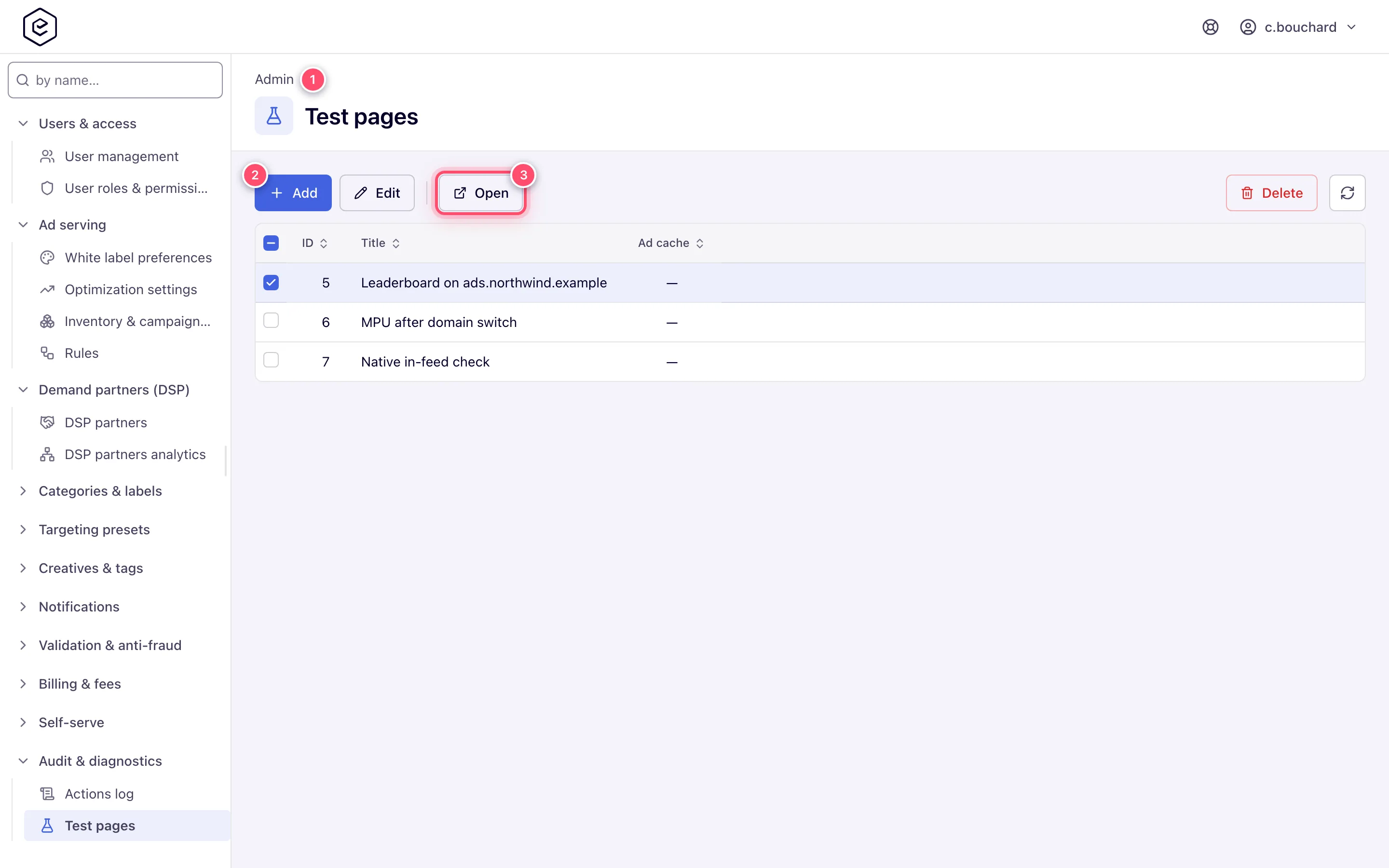
Use my own domain (CNAME) for ad tags, the control panel or files
Your account starts on Epom-provided hostnames. To serve from your own brand — say
ads.northwind-media.com for tags and panel.northwind-media.com for the control panel —
the new names have to exist in two places, and only the first one is yours to do:
- DNS (you). In your domain’s DNS, create a CNAME record for each subdomain, pointing to the Epom hostname Epom support gives you. Use separate subdomains for separate jobs (ad serving, control panel, creative files), so each can be moved on its own later.
- Registration (Epom). Send the names to Epom support or your account manager. A hostname only becomes usable once it is registered for your network — until then it is not offered anywhere in the console, however correct the DNS is. Tell Epom support or your account manager which sites and advertisers (or the whole network) should move to the new name.
- Use it. A registered ad-serving domain appears in the Domain picker on a placement’s ad tag settings (with the Set Ad-Serving Domain (Placement) permission — see Ad tags & API); new tags are generated on the new name.
Tags already on publishers’ pages keep working on the old hostname as long as it stays registered and pointed at Epom — re-issuing codes is needed only for traffic you want on the new name. Ask Epom support or your account manager to remove a domain only once nothing calls it any more.
Corner case — retargeting and cookie matching: a browser lets a domain read only the cookies it set itself. If your retargeting pixel runs on one domain and the ad tag or VAST URL on another, the cookie the pixel set is never seen at ad time and cookie/DMP targeting matches nobody. Put the pixel and the tags that should match it on the same serving domain.
Corner cases and gotchas
Warning: moving to a new domain rewrites the hostname in every newly generated tag, but tags already deployed on publisher pages keep pointing at the old host. Keep the old domain serving until every publisher has re-deployed. The same applies to conversion pixels and Postback URLs already handed to partners; see Get the pixel and S2S tracking code.
Corner case: if the white-label Redirect URL for ad-serving domain is set, a console page requested on an ad-serving host is redirected to that URL. Hosted test pages are deliberately exempt, which is why a test page still loads on an ad-serving domain — the one way to exercise a tag on the host it will really serve from.
Corner case: the Serve as test creative checkbox on a test page is not a CDN control. It loads the page into the ad servers’ cache so they can serve its content themselves, as a creative. Leave it off for an ordinary tag-preview page.
Per-role notes
-
Administrators need Test Pages for the test-page grid. Epom support adds it to your role on request.
-
Publishers and advertisers have no host controls. The host is applied silently to the tags they copy, and a domain change tells them nothing — pasted tags keep the old hostname.
Related
- Configure white-label branding — the redirect URL for console pages requested on an ad-serving host
- White-label & multi-tenancy
- Get the pixel and S2S tracking code — the Ad-serving domain selector advertisers see, and what it governs
- Ad tags & invocation API
- Review the actions log and troubleshooting log tasks — the rest of Audit & diagnostics
