
How limits behave
How limit counters fill and start over, how far a cap can overshoot, what happens when a cap is reached, how even pacing spreads volume across a period and a daypart, and why an entity delivers less than its limit.
A limit you set on the Limits card is enforced by counters that fill as the entity delivers, start over when their period ends, and can be cleared by hand. This page explains how those counters move, how quickly a cap stops delivery and by how much it can overshoot, what the product does to an entity once a cap is reached, and how even pacing spreads volume across a period. To set the caps themselves, see Set volume limits and budgets.
Who this is for
- Network managers and advertisers who set caps and need to predict when delivery stops, resumes or switches off.
- Anyone diagnosing delivery — a campaign marked Finished, a cap that seems to be ignored for a minute or two, or an entity that delivers less than its limit.
Limit vs counter: Total Impressions Limit vs Total Impressions
Each cell shows two numbers. The one you type is the limit (for example Total Impressions Limit); the figure under the bar is the counter (Total Impressions) — how much the entity has delivered against that limit so far.
- The counter starts when the card is switched on. Switching the Limits card on creates fresh counters at zero; switching it off deletes them. Traffic delivered while the card was off is in your reports but not in the counters, so a campaign that ran a week before you set a total budget starts that budget at 0.
- Counters are updated with the hourly statistics update, so the figure in the card trails the live numbers. Blocking itself reacts faster — see How fast a cap stops delivery.
- Day, week and month counters start over by themselves; the total only grows.
Raise the limit or reset the counter — you cannot edit a counter
The counter cannot be typed over — only cleared with the eraser. So:
- To give a capped entity more volume, raise the limit. Raising a total impressions limit from 1,000,000 to 1,500,000 allows 500,000 more.
- To start counting from zero (a new flight on the same campaign), clear the counter with the eraser. The reset lands within the next hour.
- To make the counter “include” traffic it missed — say a total budget set after the campaign already spent 200 — lower the limit by that amount instead: a 1,000 budget set late becomes 800.
When a counter starts over
Each rolling counter remembers which period it belongs to. On the next update, if that is no longer the current period, the counter starts over from that update — that is the reset. Nothing is cleared at midnight as such; a counter that gets no traffic simply keeps showing the old period’s figure until it does.
| Period | Boundary | Evaluated in |
|---|---|---|
| Daily | Midnight | The platform’s time zone (ask Epom support or your account manager which one your network uses) |
| Weekly | Start of Monday (ISO week) | The platform’s time zone |
| Monthly | Start of the 1st | The platform’s time zone |
| Total | Never rolls over | — |
Warning — “Local time” does not move the reset. The Local time (UTC ±X) toggle converts the start and end dates between your browser’s clock and storage, and nothing else. It is never consulted when a counter rolls over. A daily cap on an entity with Local time switched on still resets on the platform’s day, exactly like one without it.
Note — the toggle follows the viewer, not the entity. The timezone offset is sent by the browser on every read and every write and is not stored. Two colleagues in different timezones each see the same flight window shifted into their own local clock, and whichever one saves converts it back using their offset. The entity carries no timezone of its own.
Clearing a counter by hand
The eraser beside a cap does not zero anything immediately. It queues a reset, and the queued resets are applied by the hourly statistics update — so the counter clears at the top of some following hour, not at once. Until it does, an entity that had stopped on a full cap keeps not serving.
Three things about that hourly update are worth knowing:
- If an hour’s statistics arrive late, the queued reset waits another hour. “Within the next hour” is the best case, not a guarantee.
- Pressing the eraser again changes nothing — the queue is unique per counter, and a second request for a reset already queued is discarded.
- The amber “Warning: Limit will be reset within the next hour” note is read when the edit page loads. Clicking the eraser shows a toast but does not make the note appear; reload the page to see it.
Corner case — switching the card off is the fast route. Turning the Limits switch off deletes the limit record outright, and the counters go with the caps rather than waiting for the hourly job, so a capped entity is serving again within a couple of minutes. The price is that it is not undoable: switching the card back on creates a fresh record with every cap at 0 and every counter at 0. Lifetime totals accumulated over months are gone. An entity a Total cap has already switched off stays off until you switch it on (see When a Total cap is reached).
When a Total cap is reached
A Total impressions, clicks, conversions or budget cap does more than block serving: when the hourly statistics update finds the total counter at or above the total limit it switches the entity off (its on/off toggle goes to off). Raising the limit, clearing the counter or switching the Limits card off does not switch it back on. After raising a total, turn the advertiser, campaign, banner, site or placement on again yourself.
Daily, weekly and monthly caps never switch anything off — they only hold delivery until the period rolls over or the cap is raised.
While a cleared counter is waiting for its reset (the eraser’s within the next hour), the switch-off check skips it, so clearing a full total counter does not get the entity switched off again in the meantime.
A Budget counts the advertiser price (gross). A campaign with no price, or one priced on another event — a CPC campaign’s impressions — adds nothing to it, so a budget on an unpriced campaign never fills and never switches it off.
How fast a cap stops delivery
The ad servers share what they delivered with each other continuously, and every ad server learns within about a minute and a half that a limit is reached. Until then they keep serving, so a busy entity can overshoot a cap by up to a minute or two of its traffic. Budget or volume that must never be exceeded needs some headroom in the cap.
How far a limit can overshoot
A limit does not stop delivery on the exact impression that fills it. Your traffic is served by several ad servers at once. Each one sees its own count instantly and stops itself with no lag at all, but learns what the others have served only through a periodic exchange. So from the moment a cap is genuinely reached across all ad servers, up to about 90 seconds can pass before every one of them has stopped, and during that window the rest are still serving. The overshoot is therefore roughly 90 seconds of your delivery rate for that entity — it scales with your traffic, not with the size of the cap.
Practical consequences:
- Small caps overshoot proportionally more. A 100-impression daily cap on high-volume inventory can be exceeded by a large fraction of itself; a 100,000-impression cap will not notice. Do not use volume limits to enforce an exact contractual number.
- A tight budget behaves the same way — the budget counter is shared the same way.
- During a platform incident the exchange between ad servers can pause. Enforcement then falls back to each ad server counting only its own traffic, which is more permissive. An incident always makes delivery more permissive, never more restrictive.
Note — the figures on the card are slower still. The consumption bars are refreshed with the hourly statistics update. A counter shown in the card can be up to an hour behind what ad serving is already enforcing. A cap the card shows at 60% may already have stopped the entity.
There is one more, slower gate. The ad servers refresh campaign and inventory settings roughly every 10 minutes, and an entity whose counters already meet a cap is left out of that refresh entirely. So after you raise a cap or clear a counter, delivery can take up to ten minutes to resume even though the record is saved.
What happens when a cap is reached
A cap is reached when the counter is greater than or equal to the cap, and only when the cap is above zero. Hitting the number exactly counts as reaching it.
The whole chain is weighed. On the demand side that is the banner, then its campaign, then the advertiser; on the supply side the placement and then its site. A cap reached at any level stops everything below it. An entity outside its start / end dates is treated exactly as though a cap were full, before any counter is read.
Daily, weekly and monthly caps just pause
The entity is skipped while the condition holds and resumes on its own when the period rolls over, when you raise the cap, or when a queued counter reset lands. Nothing is written to the entity.
Total caps switch the entity off — permanently
Warning: when a total impressions, clicks, conversions or budget cap fills, the hourly job sets the entity’s own active flag to false. Its On/Off switch flips to Off and stays off after you raise the cap — you must switch it back on by hand. The same applies when the CPA no-conversions pair is reached, and when a per-conversion-action total limit fills. Total opportunities and total requests caps do not do this; they only pause.
That deactivation happens on the hourly statistics update, so it lags the pause: the entity stops serving within ~90 seconds and its switch flips within the hour. Queueing a counter reset before the hour turns exempts the entity from that sweep.
In the interface, an entity stopped by a level above it carries an amber note at the top of its Limits card naming the level and the cap — Delivery stopped by campaign “Brand Awareness Q3” — Total Clicks reached — with the name linking through to that entity so you can go and lift it. The note appears whether or not this entity’s own limits are switched on, which is the case where whoever is investigating has least else to go on. It names the nearest blocking level, so clearing that one can reveal another further up.
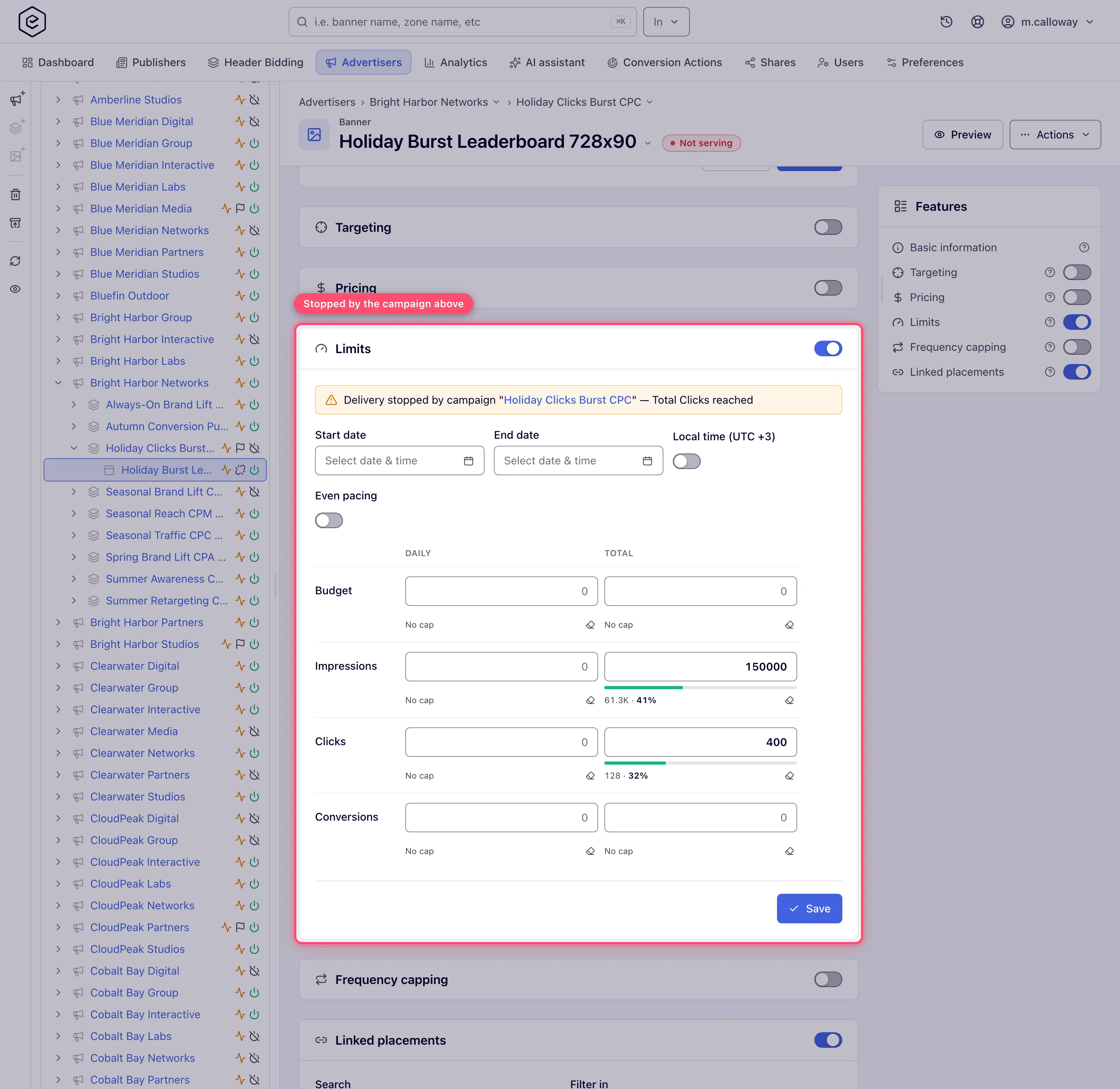
In the tree and grids, the entity takes a grey flag badge whose tooltip reads “Finished”. The words “limit reached” appear nowhere in the interface outside the Limits card’s own note, so Finished is the signal to learn.
In the troubleshooting log, a request that skipped the entity records the bare reason
LIMITS against the banner or campaign id. It does not say which cap, and advertiser, site
and placement exclusions are not logged at all.
By email, a limit-reached notification fires for a subset of the caps. Coverage is uneven, so check before relying on it:
| Notified | No notification exists |
|---|---|
| Total impressions, clicks, conversions, budget | Anything weekly or monthly |
| Daily impressions, clicks, conversions, budget | Any opportunities cap |
| The CPA no-conversions pair (campaign, banner) | Site and placement budget (they have none) |
| Per-conversion-action limits |
Two things about these mails surprise people:
- They go to every user holding Receive network notifications — the network’s own managers and administrators — not to the advertiser or publisher who owns the entity.
- There is no “80% of budget” warning. The check is strictly “cap reached”, so the first mail arrives when delivery has already stopped.
- Nothing ships pre-written: an administrator has to author the subject and body of each notification template before any of them send.
Even pacing when a limit is newly set or raised mid-period
With Even pacing on, the remaining volume is spread over the time left in the period: the rate is (limit − delivered) ÷ time remaining, recalculated continuously.
- Raising or lowering the limit mid-period simply changes that rate for the rest of the period. There is no catch-up beyond what is already banked.
- Switching pacing (or a new limit) on mid-period grants the share the entity would have had since the period started, but at most two hours’ worth of allowance at once (the network’s burst setting; two hours by default). After that opening burst the entity paces normally. The same two-hour cap applies to allowance an entity saves up while traffic is short.
- A Total limit is paced only when the entity has an End date; without one there is no period to spread it over, and the total is a plain cap.
- Overshoot is not forgiven: if the entity delivered ahead of pace, it waits until the allowance catches up.
Even pacing and time targeting
A campaign that may only run part of the day — office hours, say — used to be paced against the whole clock. Two things followed: it opened its window with a rush, spending a large share of the day’s budget in the first hour, and if the window closed before the day did it could not reach its budget at all. A six-hour window delivered little more than half a daily cap.
Pacing now reads the entity’s Time Range, Day of Week and Day and Time targeting and spreads the budget across the minutes those rules allow. A six-hour window gets a sixth of the budget in each of its six hours, and the whole budget is delivered.
The budget and the hours it may be spent in do not have to sit on the same entity. Pacing reads the entity carrying the limit and the levels above it, exactly as matching does: a banner inherits from its campaign and advertiser, a placement from its zone and site. Where several levels each state a window, the budget is spread over the minutes all of them allow.
The one link that cannot be followed is from a creative down to the supply side. A creative runs on many placements, and which ones is decided by matching rather than fixed on the creative, so a time rule on a placement, zone or site does not narrow a creative’s or campaign’s pacing. Set the daypart on the demand side too if a budget there should follow it.
Four cases fall back to pacing against the clock, behaving exactly as previous releases did:
- the entity carries no Time Range or Day of Week rule — nothing constrains it in time;
- a time rule follows the visitor’s local time, so the entity is allowed for some visitors and blocked for others at the same instant and no single window exists;
- the entity’s rule types are combined with OR, where being outside a time rule says nothing about whether the entity can serve;
- the rules between them leave no minute at all, so there is nothing to spread.
Falling back is not an error and needs no action. If even delivery across a daypart matters, set the window with Time Range, Day of Week or Day and Time rules on the demand side, with the visitor-local option off.
Three more things worth knowing about pacing:
- It allows a burst of about two hours’ worth of allowance. Unspent budget banks up to that ceiling and no further, so a quiet morning does not turn into an evening dump.
- A cap with no deadline is not paced. A total cap on an entity with no end date has no period to spread across, so the cap alone governs. Give the flight an end date if you want a lifetime budget paced.
- Pacing is decided across all ad servers, on the same roughly one-minute cycle as the cap checks. During a platform incident each ad server paces against its own share instead.
Campaign delivers fewer impressions than its daily limit — is it the traffic?
A limit is a ceiling, not a target: nothing makes an entity deliver up to it. When a campaign stops at, say, 560,000 impressions a day against a 650,000 daily cap, work down this list — the first item that fits is usually the answer.
- Is a limit holding it at all? Open the Limits card. If no counter is at its limit and no amber Delivery stopped by … note shows, limits are not what stops delivery — skip to step 4.
- Even pacing. With pacing on, the entity is held back by design: at any moment it may only have delivered the share of the cap that matches the share of the period gone by, plus at most two hours’ allowance banked. Two thirds into the day, a paced 600,000 daily cap is on plan at about 400,000. Pacing that looks “stuck” for a day usually means the entity ran ahead earlier and is waiting for the allowance to catch up.
- Another cap or another level. A weekly, monthly or total cap, a budget, or a cap on the campaign’s advertiser (or a creative’s campaign) can bind first — the amber note names it. A frequency cap also limits delivery without ever showing on the Limits card: with few unique visitors, the cap per user runs out before the daily limit does.
- The traffic itself. Targeting decides how many requests the entity can ever see: a single country, a device type, a time window or a narrow custom parameter can simply not carry 650,000 impressions a day. Check the requests on the linked placements for the targeted geo in analytics — if the campaign already wins most of them, it is traffic-bound.
- Competition on the same placements. A higher priority tier is always tried first, and inside a tier the campaign only gets its weight’s share (or loses to a higher eCPM in eCPM mode). A daisy chain on the placement also hands requests to entries above it first.
- Floors and filters. A bid floor or minimum margin can drop the campaign on some placements entirely.
- Picked but not shown. Compare Opportunities with Impressions: an opportunity is counted when the ad is picked to serve, an impression only when it is confirmed. A large gap means the ad is chosen but does not render or is not counted on the page — a tag or creative problem, not a limit.
Ad requests where nothing served are not impressions and do not count against an impressions limit or a budget. Only a Requests cap, which exists on sites and placements, counts requests.
Corner cases and gotchas
Note — the blocked-by note is not only about grid caps. It also fires for a per-conversion-action limit and for the CPA no-conversions pair. Neither has a cell in the grid, so in those cases the note says only that a limit is reached without naming which.
Note — masked names stay masked. Where your network masks entity names from partners, the blocking entity is named as
CAMPAIGN_634here exactly as it reads everywhere else, and a cap you have no permission for is not named at all.
