
Third-party tracking codes
Attach a third-party HTML or JavaScript snippet per country, plus a global fallback, to a banner or a placement — the ad server appends it to the served markup.
The Third-Party tracking codes card holds a third-party HTML or JavaScript snippet — an impression tag from a verification vendor, an agency or a partner network — that the ad server appends to the markup it serves. You store one snippet per country plus a Global one that covers every country without its own row.
The same card sits on a banner and on a placement, and both snippets can land in the same served ad: a banner snippet travels with the creative, a placement snippet with the slot.
Note: older material calls this feature “Tracking Pixels”. It is the same card and the same storage — the interface labels it Third-Party tracking codes, on the card header and on the feature rail alike.
Who this is for
Network managers, advertisers and publishers who can edit the entity. The banner card and the placement card are separate things that are set separately per role, so which of the two you have is worth checking rather than assuming — see Per-role notes.
Prerequisites
- A saved banner or placement. The create form renders only Basic information; the feature cards, this one included, appear after the first save.
- The snippet from your third party. It must be markup — an
<img>pixel, a<script>tag, an<iframe>— and not a bare URL: the string is dropped into the page as-is, so a naked URL renders as visible text next to the ad. - On a banner, the creative’s uploaded file must still be present in storage (see the corner case below).
Steps
- Open the entity that should carry the snippet:
- Account → Advertisers → advertiser → campaign → banner → Third-Party tracking codes — travels with this creative wherever it serves.
- Account → Publishers → site → zone → placement → Third-Party tracking codes — applies to everything this placement serves. The card is on Site, Mobile site and Non-standard placements only; the other placement types do not carry it.
- Switch the card on. The switch flips optimistically and rolls back if the server refuses. Turning it on creates an empty holder — the grid stays empty until you add a row.
- Click Add. A dialog opens with two fields:
- Country — a searchable select, pre-set to Global.
- Tracking code — a code editor. Save stays disabled while it is empty.
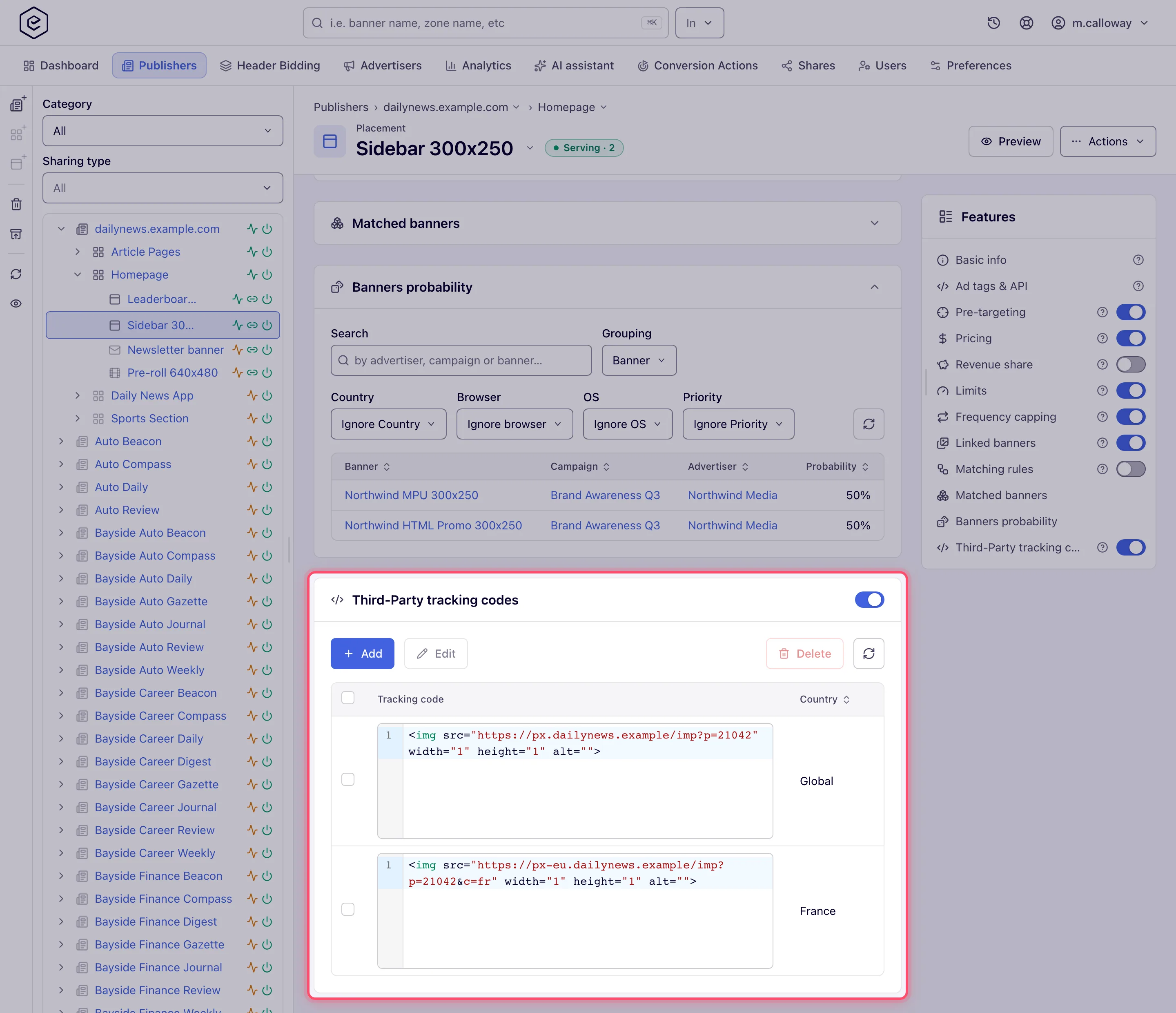
- Click Save. A Done toast confirms it and the grid reloads. The row shows the snippet (read-only, syntax-highlighted) and the resolved country name — the Global row reads Global.
- Add a row per country you need. Global is the fallback for every country that has no row
of its own.
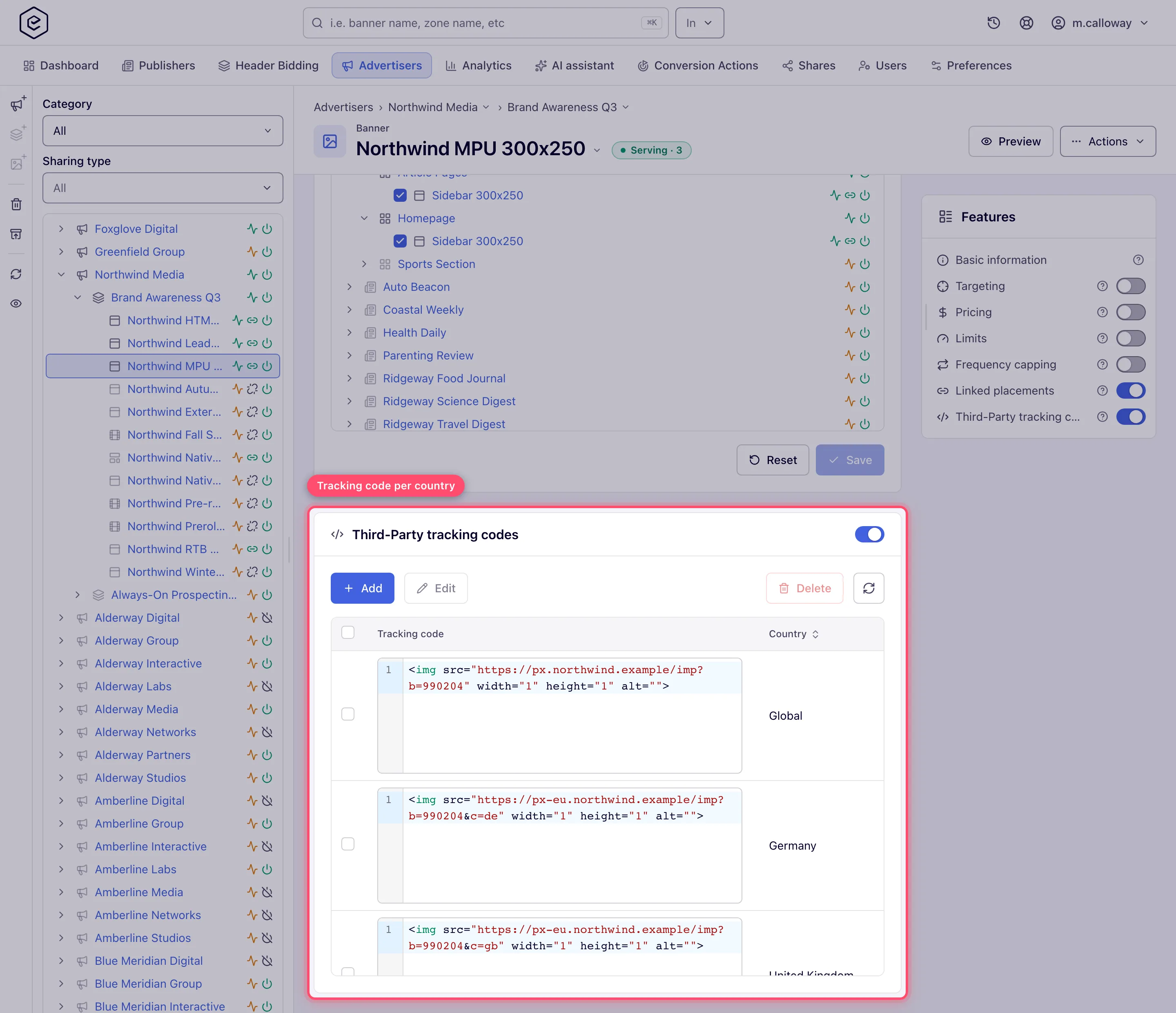
- To change a row: select it and click Edit, or double-click it. The same dialog opens with the row’s country and code. Editing in the grid itself is not possible — that column is read-only.
- To remove rows: tick them and click Delete (the button counts your selection, e.g. Delete (2)), then confirm Delete 2 record(s)?. Selection is multiple, so the Global row and country rows can go in one call.
On a placement the card, the dialog and the grid are identical — the same component serves both entity types; only the entity and the endpoints differ.
Options and fields
| Field | What it does | Notes |
|---|---|---|
| Country | Which country’s traffic gets this snippet | Global (stored as *) is the fallback. One row per country — re-adding a country overwrites its row |
| Tracking code | The HTML/JS snippet | Required. Stored verbatim, up to about 16 MB; macros are expanded at serve time |
Grid columns: Tracking code (read-only editor) and Country (sortable). The toolbar is Add, Edit, Delete and Refresh; it is absent entirely when you cannot edit the entity.
Snippets go through the publisher macro set before they are served, so $$RANDOM$$ (the
usual cache buster), $$BANNER_ID$$, $$TRANSACTION_ID_STR$$ and the rest resolve exactly as
they do in creative markup. See the Macros reference.
Where the snippet actually ends up
Both snippets are appended to the served content — the banner’s inside the markup pipeline, the placement’s at the end of the assembled ad response. What serves decides whether they fire at all:
| What is serving | Banner snippet | Placement snippet |
|---|---|---|
| Local File / External File creative | Appended after the creative | Appended at the end of the response |
| Template creative | Appended after the creative | Appended at the end of the response |
| HTML Code creative | Appended after the creative’s code | Appended at the end of the response |
| OpenRTB (DSP) creative | Appended to the winning bid’s markup | Appended at the end of the response |
| Native creative | Not appended | Not appended |
| Video creative / VAST or VMAP response | Not appended | Not appended |
| No ad matched (empty response) | Not appended | Only when the placement has a default code, appended after it (see the corner cases) |
The SDK content endpoints return that same assembled markup — a live /ads-api-v4 response
carries the placement snippet inline, macros already expanded — so they follow the rows above.
Note: the older multi-bid mobile API (
/ads-api-v2) is the exception — for image and template creatives it returns structured fields rather than markup, and there the banner snippet is reduced to a single beacon URL: the ad server takes the firsthref/srcof a leading<a>,<img>or<script>tag and hands the SDK just that URL. A snippet that is more than one tag, or whose first attribute is notsrc/href, yields an empty beacon and nothing fires. An HTML Code creative is returned as markup there, and its banner snippet rides inside that markup rather than as a separate beacon.
Corner cases and gotchas
Note: on a no-fill the placement snippet goes through the same macro expansion as on a filled impression, so a
$$RANDOM$$cache-buster is fresh on unfilled responses too.
Corner case: on a no-fill the placement snippet is emitted only if the placement has a default code. Every passback builder assigns the tracking code inside an “if the default code is not blank” branch, so an unfilled request against a placement with no default code carries no third-party snippet at all. If you expect a pixel on every request, the placement needs a default code.
Corner case: “Global” is a fallback for an unmatched country, not for a missing one. If the request reaches the lookup with no country value at all, it is skipped outright and nothing is emitted — not the country row, not the Global row.
Corner case: matching is exact, then Global. There is no region, continent or country-group matching here — a row keyed to
USfires for US traffic only, and everyone else gets the Global row. The country is the ad request’s geo-resolved country, not a property of the placement or the site.
Corner case: switching the card off deletes every row; the console asks you to confirm first. The switch removes the whole tracking-code record, and the per-country rows are cascaded away with it. There is no paused state — switching it back on starts with an empty grid, so copy the snippets somewhere first if you only want a pause; to stop one country, delete that row instead. The REST
disable-tracking-codeoperations behave the same way;enable-tracking-codeon a banner or placement whose card is already on changes nothing and keeps its codes. An unknown or deleted banner or placement is a404, and a role without the Banner Third-Party Tracking Code (or Placement Third-Party Tracking Code) permission gets a403naming it — never a bare success.
Corner case: the REST
…/edit.dochanges the row’s code and its country: sending another two-lettercountrymoves the row there (400if the entity already has a code for that country). The Global row is edited withcountry=*andid=0. Both…/add.do(single and batch) and…/edit.dotake*or a country from the country list —ZZis a400namingcountryrather than a code no visitor ever matches; onadd.do,gbis stored asUK. The same setting sent with a banner —thirdTrackingCode[<key>]onbanner/create.doorupdate.do— takes the key in any case (usis stored asUS,gbasUK) and is checked less: two letters suffice, and a key that is not*or two letters is listed inignoredFieldswhile the rest of the banner is saved.
Corner case: deleting the Global row does not orphan the country rows. The Global snippet is stored as the record’s own code, so removing it clears that field while the country rows continue to fire for their own countries. What you lose is the fallback: traffic from every other country now gets nothing.
Corner case: Add with a country that already has a row overwrites that row instead of creating a second one, with the same Done toast: there is one row per (entity, country) pair.
Corner case: the snippet is stored and served exactly as you typed it. There is no URL check and no HTML sanitising on the way in — a
<script>reaches the page untouched, and a typo in the vendor’s tag simply breaks silently in the browser. Treat the field as arbitrary code execution on your publishers’ pages and only paste snippets from a party you trust. A snippet holds at most 100 000 characters; a longer one is refused with Must be at most 100000 characters.
Corner case: on an HTML Code creative the banner snippet is appended after your code, so do not also paste the same vendor tag into the creative’s HTML — it would fire twice per impression. Keep the tag in one of the two places.
Corner case: on a banner, adding, editing or deleting a snippet resets the creative’s moderation status. If your network runs banner moderation, an Approved or Rejected creative goes back to Pending, and under moderation-with-deactivation it is also switched off until it is approved again. Placement snippets have no such effect.
Corner case: if a banner’s uploaded file has gone missing from storage — a local image or video, a native asset, a template file — the server refuses to touch it, and this card is where you meet that refusal twice. Add fails with a bare Can’t save toast and no explanation, and Delete of the Global row reports success while silently leaving the snippet in place (the country rows do get deleted). Re-upload the creative, then try again.
Corner case: the card is offered on placement types that never use it. The classic UI restricted it to Site, Mobile Site and Non-standard Site placements; the new UI shows it on every saved placement, video, native and application included, where the snippet is stored but never served. Only add placement snippets on the three site-ish types.
Corner case — not on video banners. A banner’s codes are added to image (Local / External File), HTML Code, Template and OpenRTB banners. A video banner uses the VAST event tracking pixels instead. The placement’s codes apply whatever the banner type. To wrap a partner’s code and count it, see Track impressions of a partner’s ad code.
Corner case — a snippet, not a URL. Paste the whole
<img>or<script>tag. For a fresh request each time put$$RANDOM$$or$$TIMESTAMP$$in the vendor’s cache-buster slot; a barernd=you invent is not filled in by anything.
Corner case: on a placement with Always redirect on, the placement snippet is not served. That setup returns a bare URL as the whole response, so nothing is appended to it. To notify a third party there, use a server-side tracker instead.
Corner case: this is not conversion tracking. These snippets fire with the ad, not on an attributed conversion. To notify a partner when a conversion is attributed, use a piggyback. For a fire that does not depend on the browser at all, use a server-side tracker.
Corner case: a read-only setting for the card’s permission behaves like none at all — the card does not render and the list endpoint answers with an empty result. Without the permission the tracking-code endpoints answer
403, and a banner create or update leavesthirdTrackingCode[…]unapplied (listed inignoredFields).
Per-role notes
- Any role — the banner card and the placement card are set separately per role, so having one and not the other is normal. Your network administrator changes either in Admin → Roles.
- Without the permission — no card, and the REST API refuses the codes too.
- Can view share — the card shows a read-only pill and the snippets, with no Add, Edit or Delete.
Exact grants: see User roles.
Related
- Conversion tracking overview
- Server-side trackers
- Piggyback pixels
- Track impressions of a partner’s ad code
- Get the pixel and S2S tracking code
- Macros reference
- REST API — Banners — the
/rest-api/tracking-code/**endpoints, including the batch add and batch global-clear calls that have no UI equivalent. The placement endpoints are filed under the Banners tag too.
