
Rewrite served markup with Content replacement
Per-placement find-and-replace pairs applied to every ad markup the placement serves — add target/replacement rows, understand exactly how serving applies them and how they interact with macros.
Content replacement is a per-placement find-and-replace: you define pairs of target → replacement strings, and the ad server rewrites every occurrence of each target in the ad markup it returns for this placement. Use it to patch third-party creative code for one specific slot — swap a domain, inject a publisher-specific token, or strip a fragment you don’t want on that page — without touching the banner itself.
Who this is for
Publishers and network managers who need to post-process creatives on a specific placement. The card is not part of either default role — see Per-role notes — and changing anything additionally requires update rights on the parent site, as its owner or through an editable share.
Prerequisites
- A saved placement — the card appears only after the first save, on every placement type.
- Update rights on the parent site, as its owner or through an editable share.
- The Placement Content Replacement permission on your role — if the card is missing, ask your network admin to switch it on.
Steps
- Open the placement (Account → Publishers → site → zone → placement) and scroll to the Content replacement card (it is also listed in the feature rail).
- Turn the card’s switch on. Rules are only applied to live traffic while this switch is on; rows you add stay saved either way.
- In the add bar, enter the Target (the exact string to find — required) and the
Replacement (what to put in its place — may be left blank), then click Add.
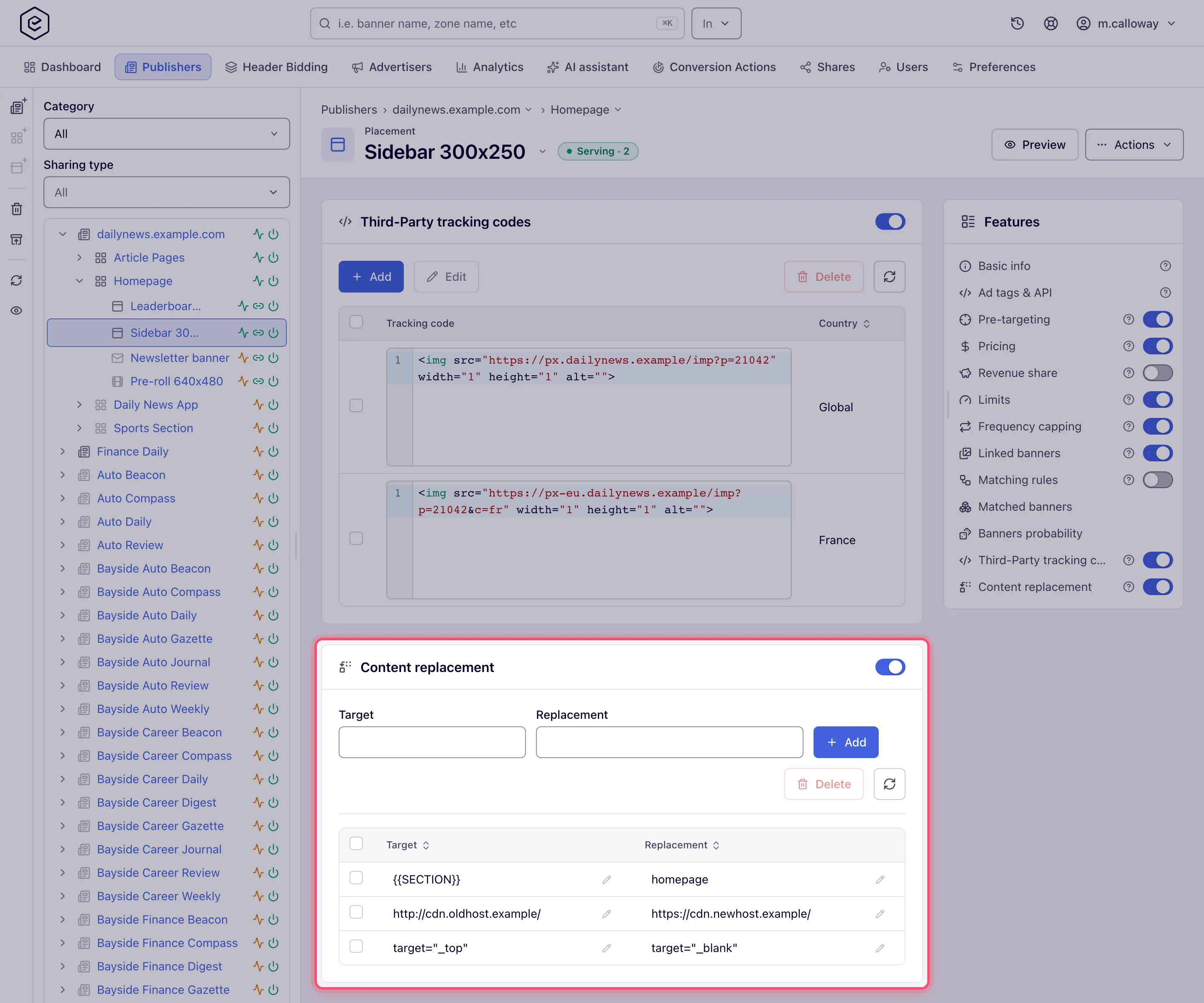
- Repeat for each pair. Existing rows are edited inline — click a cell, change the text and commit; each edit saves immediately.
- To remove rules, tick their rows and click Delete (asks for confirmation).
There is no page-level Save for this card — add, inline edit, delete and the on/off switch each persist on the spot.
Options and fields
| Field | What it does | Notes |
|---|---|---|
| Switch (card header) | Turns applying the rules on/off for serving | Off = rows kept but ignored by the ad server |
| Target | The exact string to find in the served markup | Required; must be unique within the placement — adding a duplicate target is rejected |
| Replacement | The string every occurrence of the target becomes | May be blank — a blank replacement deletes the target from the markup. Leading and trailing spaces are stripped before serving |
How serving applies the rules
Verified against the serving code, this is exactly what happens:
- Rules run on every ad response of this placement, whatever banner wins, as part of the markup-processing pipeline.
- Matching is literal and case-sensitive — no wildcards, no regex.
Example.comdoes not matchexample.com. - All occurrences of a target are replaced, not just the first.
- Rules run before macros are expanded. Two practical consequences:
- a replacement value may contain macros (
$$RANDOM$$,$$TRANSACTION_ID$$, …) — they resolve normally afterwards; - a target may be a macro token: replacing
$$SOMETHING$$with an empty string removes that macro from the creative before it ever resolves.
- a replacement value may contain macros (
- A replacement that happens to contain its own target again is not re-processed — the scanner moves past inserted text, so rules cannot loop.
Corner cases and gotchas
Corner case: changes are not instant on live traffic. The ad server works from an in-memory snapshot that is reloaded periodically, so a new rule (or the switch flip) takes effect on the next cache reload, not on the next request. Wait a couple of minutes before concluding a rule “doesn’t work”.
Corner case: the switch off state unloads the rules entirely — the ad server does not even load rows of a disabled card. Toggling back on restores them on the following cache reload.
Corner case: matching is exact-string. If your target contains quotes or whitespace, copy it verbatim from the served markup (view the tag’s response source), not from a prettified view — one changed quote character and nothing matches, with no error anywhere.
Corner case: the target must be unique per placement. To change what an existing target produces, edit its Replacement cell inline instead of adding a second row with the same target — the add is rejected with a “Wrong values” error.
Corner case: the Replacement value is trimmed when the ad server loads it — leading and trailing whitespace you typed is gone from what actually gets served. The Target is not trimmed, so a target with a trailing space matches only markup that has one. If a rule “does nothing”, check the target for stray spaces first.
Corner case: uniqueness is checked case-insensitively even though matching is case-sensitive:
Example.comandexample.comcannot both be targets of one placement, although serving would treat them as different strings.
Through the API or an AI assistant
The rules can be managed over the REST API, with the same permission and site rights as the card:
| Method | Path | Does |
|---|---|---|
| GET | /rest-api/placements/{placementId}/content-replacement.do | Every rule (id, target, replacement), their number (total) and whether the card’s switch is on (contentReplacementEnabled) |
| POST | /rest-api/placements/{placementId}/content-replacement/create.do | Add a rule: target (required, up to 255 characters), replacement (optional) |
| POST | /rest-api/placements/{placementId}/content-replacement/{ruleId}/update.do | Change a rule’s target and/or replacement; what you do not send stays |
| POST | /rest-api/placements/{placementId}/content-replacement/{ruleId}/delete.do | Remove a rule |
The switch itself is the contentReplacementEnabled parameter of the placement’s
update/* operation. A duplicate, blank or over-long target, or a replacement over 65,535
bytes, is refused with a 400 naming the field; a rule id of another placement is a 404.
An AI assistant connected through MCP shows the rules in
placement_overview, and whoami says whether your role may manage them
(contentReplacement).
Per-role notes
- Publisher and network manager — the card appears once your network administrator switches Placement Content Replacement on for the role, and then behaves the same for both.
- Can View share — the rules are visible, but the switch is locked and there is no add bar or delete.
- Masked share — the same as Can View; masking does not change the card.
Exact grants: see User roles.
