
Other admin tools
The six small admin CRUD pages — custom ad units & sizes, system banner templates, VPAID frameworks, video requirement presets, auto placements and additional entity fields — and exactly where each one takes effect elsewhere in the platform.
Six small admin CRUD pages don’t warrant a page each, but they are easy to miss because each one is really a lever on a feature that lives somewhere else: custom ad units & sizes decides which sizes a network manager and an advertiser can pick, system banner templates stocks the catalogue a Template creative renders from, VPAID frameworks feeds the video-creative flow, video requirement presets are the publisher specs a site’s video creative requirements are filled from, auto placements feeds new-site setup, and additional entity fields adds columns to account edit forms.
This page covers all six: what the row holds, where it takes effect, and what it does not do.
Who this is for
Network administrators. Each of these pages is its own Admin UI permission on your role, so you may well see one and not the others — see Users, roles & permissions. Opening the URL of a page your role does not grant shows Record not found. instead of the page.
Prerequisites
- An admin role that grants the relevant Admin UI permission.
- For auto placements to actually generate anything, whoever creates or approves the site also needs the account-side Automatic placements creation for approved sites permission. That is a separate grant on a separate role.
Steps
All six pages share the same shape, so the routine is the same each time.
- Open Admin. Four of the six sit in the sidebar group Creatives & tags
(Custom ad units & sizes, System banner templates, VPAID frameworks, Video
requirement presets);
Auto placements and Additional entity fields configuration sit under Ad
serving.
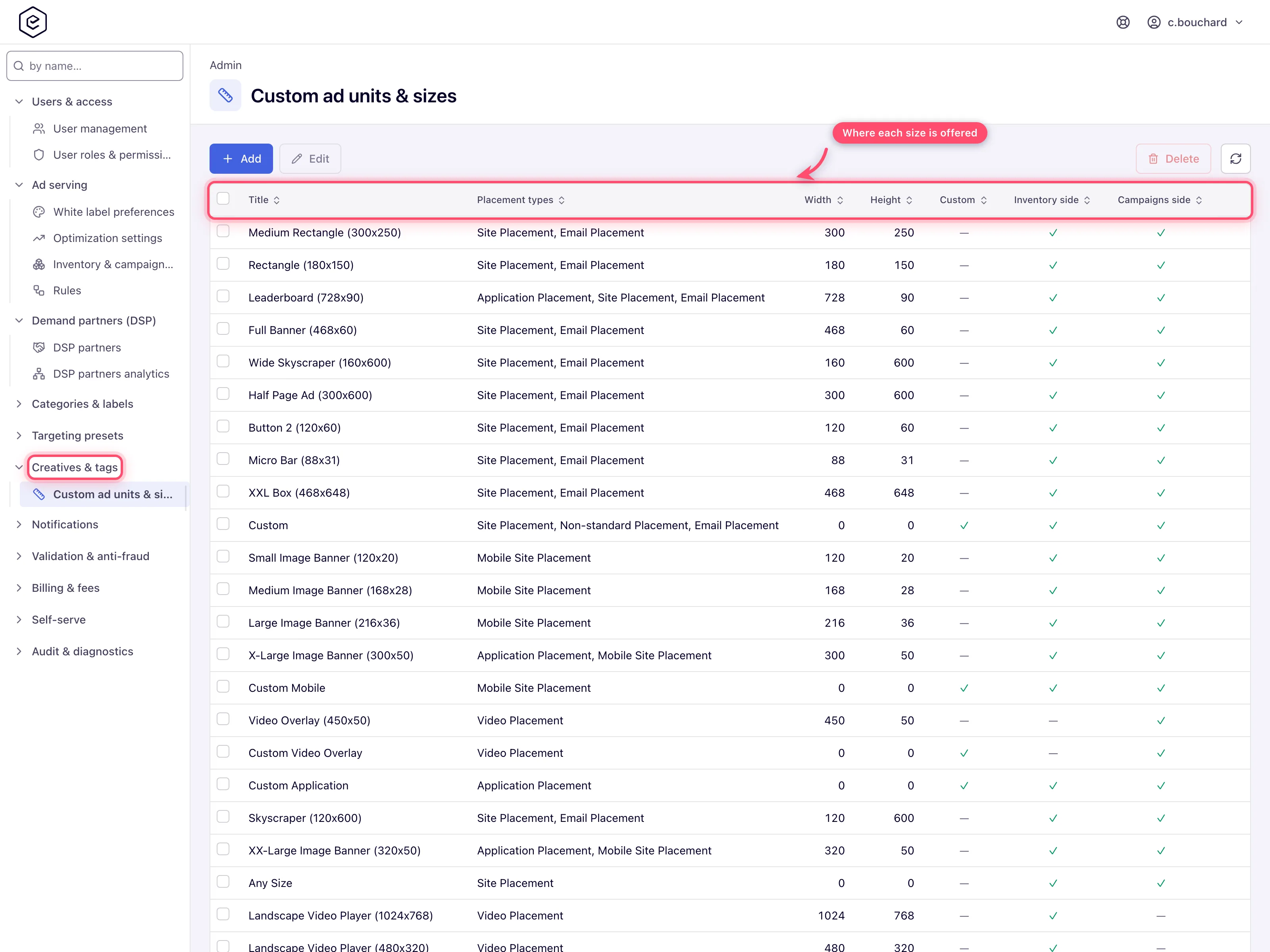
- Pick the page. Each opens on a grid with Add, Edit and Delete above it (Video requirement presets adds Duplicate and Apply to N sites for the ticked row).
- Add, or select a row and Edit, to reach the form. Field-by-field detail is in Options & fields below.
- Save. On VPAID frameworks and System banner templates the first save is load-bearing: their sub-grids (framework parameters; template files, properties and target-related bodies) only appear once the row has an id, and the page navigates itself to the new edit URL to reveal them. A successful save raises a Done toast (saving a VPAID framework parameter raises Record successfully processed. instead).
- Delete removes the row. Only custom ad sizes refuse a delete that would break something, and video requirement presets warn first — see the corner cases.
Options and fields
Custom ad units and sizes
Admin → Creatives & tags → Custom ad units & sizes. An ad unit is a named creative size. The catalogue here is what every size dropdown in the product is drawn from — the placement’s Size combo, the creative’s Ad unit combo, the header-bidding slot editor, the auto-placement template.
| Field | What it does |
|---|---|
| Title | The label shown in every size dropdown. Required, max 255 characters. Convention in the shipped catalogue is Name (WxH), e.g. Leaderboard (728x90). |
| Width / Height | Pixel dimensions, 0–3000 each. Left at 0 for a Custom unit, whose dimensions are typed per placement instead. |
| Custom | Marks the unit as a size-less placeholder. Picking it on a placement or a creative reveals manual width/height inputs rather than fixing the size. Each placement type conventionally has one — Custom, Custom Mobile, Custom Video Player, Custom Application. |
| Any size (deprecated) | Legacy wildcard flag. Do not set it on new units. Creative-side lists (the creative form, the mass banner upload and the REST banner ad-unit list) skip units carrying it — see the corner cases. |
| Inventory side | Offer this size on the supply side — placements, header-bidding slots, template test pages. Ticked on a new unit. |
| Campaigns side | Offer this size on the demand side — creative Ad unit combos and the advertiser grid filters. Ticked on a new unit. |
| Placement types | Eight checkboxes: Site Placement, Mobile Site Placement, Non-standard Placement, Video Placement, Application Placement, Email Placement, Click-through Placement and Native Placement. A size is only offered on a placement of a ticked type. |
Where a size shows up. Placement types plus the two side flags are the whole answer — there is no per-role tick-list that also has to be satisfied before a new size appears:
| Where | Needs |
|---|---|
| Placement Size combo | matching placement type + Inventory side |
| Creative Ad unit combo, advertiser grid size filter | matching placement type + Campaigns side |
| Header-bidding slot editor | Inventory side + a non-zero width and height, and a placement type that matches the slot’s kind |
| Template test page | Inventory side — and only for a Site-placement template; the page offers no size for any other type |
| Auto placements Size combo (on this same admin area) | matching placement type, and the unit must not be Custom |
Note: a size with no placement type ticked appears nowhere at all. The lookup is driven entirely by the placement-type set, so an empty set matches no query.
System banner templates
Admin → Creatives & tags → System banner templates. A banner template is a reusable HTML/JS body the ad server interpolates per impression, which an advertiser then picks on a Template creative and fills the properties of.
The editor here is the same editor as the account-side one — Template information, Target related templates, Template files, Template properties, Export/Import, Template test. It is documented once, in Create and manage banner templates; everything in that page’s Options & fields, property-type table and grid actions applies verbatim. What follows is only what is different about the admin copy.
| Admin-specific behaviour | Detail |
|---|---|
| New templates are global | A template created (or imported) here is marked global. Accounts see it in the creative’s Template picker with a “(global)” suffix and cannot edit it. Templates an account user creates are not global — see Create and manage banner templates. |
| The grid is not global-only | Account-owned templates are listed here too, tagged “(local)” after the title. |
| Filters | A Search box plus Type, Placement type and Status dropdowns, which the account grid does not have. |
| No Share action | Sharing is an account-side concept; the admin grid offers Add / Edit / Export / Import / Import as new / Delete only. |
Template types and the content macro each expects in the body — the one thing the account page states only by name:
| Type | Body must contain |
|---|---|
| General | nothing special — the whole body is the creative |
| Content Adapter (deprecated) | $$CONTENT$$ |
| Placement Content Adapter | $$AD_CONTENT$$ (the older $$NATIVE_CONTENT_JSON$$ is still accepted) |
| Video Companion | nothing special |
VPAID frameworks
Admin → Creatives & tags → VPAID frameworks. A VPAID framework is the JavaScript adapter Epom hands to the video player so it can run an interactive creative from a specific integration.
| Field | What it does |
|---|---|
| Name | Framework label, shown in the creative’s framework dropdown. Required. It is also the served filename — the adapter is published as …/vpaid/<id>/<Name>.js. |
| Active | When off, the framework is hidden from the creative dropdown. Defaults on. |
| File | The single JavaScript adapter, uploaded as one .js file. Required when you create a framework; when you edit one, leave it empty to keep the stored file. Download current file re-fetches the stored one. |
Framework parameters (a second card, present only on a saved framework) are the knobs
the advertiser fills in per creative. Each is a Name (the label), a Key (what the
adapter receives), an optional Default value and a Required flag. Type is
displayed but locked — String is the only implemented parameter type.
At serve time, an in-stream VPAID Framework creative produces a VAST <Linear> whose
<MediaFile apiFramework="VPAID"> is the adapter’s URL, and whose <AdParameters> is a
JSON object of the parameter values. Epom adds skipOffset, clickThrough, bannerUrl
and the viewability trackers to that object itself.
Note: one parameter key is special. A parameter named
durationsupplies the VAST<Duration>in seconds. Without a usable value there, Epom emits the placeholder00:00:00— schema-valid, but not what a player expects.
Video requirement presets
Admin → Creatives & tags → Video requirement presets. The publisher video specs a network manager picks from with Use a publisher spec on a site’s Video creative requirements card. The network starts with the major streaming publishers’ published specs — Hulu, Disney+, Peacock / NBCUniversal, Amazon, Roku, Paramount+, HBO Max, FOX, Netflix, Samsung Ads and the rest. They are yours to correct when a publisher revises its spec, to duplicate for a publisher whose spec differs a little, or to delete, exactly like the specs you add. The grid shows each spec’s name and profile, its requirements, its source page, the date it was checked, its Status (Active or Inactive) and Sites, how many sites were filled from it. Show active hides the inactive ones. Tick one row for Edit, Duplicate (a copy named ”… (copy)”, opened for editing) and Apply to N sites in the toolbar.
| Field | What it does |
|---|---|
| Name | The publisher, as the site card lists it. Required; up to 128 characters. |
| Profile | Which of the publisher’s delivery profiles this is, when it has several (Mezzanine, Programmatic / VAST). Shown beside the name. |
| Id | How the API and apply-preset name the spec — lower-case letters, digits and hyphens. Set it when you add a spec, or leave it empty to have it made from the name and profile; it never changes afterwards. |
| Source | The publisher’s spec page the values come from (http:// or https://). |
| Checked on | The date on the spec, or the day you checked it — YYYY-MM-DD, or YYYY-MM when the spec gives only a month. The site card shows it with the spec’s name. |
| Notes | What the spec says that the requirements cannot check, and what was left out because of it. |
| Active | Whether site editors are offered the spec under Use a publisher spec. Untick it to retire a spec without deleting it: it stays in this list, editable, and can be ticked again; sites already filled from it keep their requirements, are still checked against them and still name it (marked Inactive), and Apply to N sites still works for them. On for a new spec and for a duplicate. |
| Requirements | The same rows as on the site card — resolutions with their bitrate ranges, duration, video bitrate, frame rate, container, codecs, audio, file size and loudness; see Options and fields. At least one. |
A value the server refuses is named under the field or the requirement row it belongs to. A site keeps its own copy of the spec it was filled from, so saving a preset changes no site: the sites filled from it show Differs from the spec until the spec is applied to them again. The edit form says how many sites that is. The ad servers never read this list — only the sites’ requirements.
Apply to N sites pushes the spec’s current values to every site filled from it at once. It is offered, in the toolbar for a ticked spec and in the spec’s edit form, while at least one of the sites filled from it no longer matches it; it asks first, naming how many sites it replaces. It pushes the saved spec, so in the edit form it is greyed out while the form holds unsaved changes — Save first, then apply. Each site gets what Use a publisher spec would give it — including over changes made on the site itself — and keeps its on/off switch. It goes through the same checks as applying the spec site by site: a site your role may not change is left as it is, and the result names how many sites were updated and why the others were not. The sites’ Differs from the spec marks clear, and the ad servers pick up the new requirements within seconds.
Auto placements
Admin → Ad serving → Auto placements. Each row is a template for a placement Epom creates automatically when a new site is set up.
| Field | What it does |
|---|---|
| Name | Template name, max 64 characters, trimmed on save. Required. Also the name given to the generated placement, and what generation de-duplicates against. |
| Type | The placement type to create — Site, Mobile Site, Non-standard, Video, Application, Email, Click-through or Native. Required. |
| Size | An ad unit, filtered to the picked type and to non-custom units. Optional in the form, but a row without a size is skipped when placements are generated, so set one. |
| Active | Only active rows are used during generation. The grid shows this as a Status column reading Active or Inactive. |
The grid lists Name, Type, Size and Status.
When generation runs. Four paths create a site and then ask for auto placements: publisher signup (site created from the user card), approving a site on the network Sites page, saving a new site from the account Publishers UI, and creating a site through the REST API. Two conditions gate it, and both must hold or nothing happens and nothing is reported:
- the site’s network status is Approved at that moment, and
- the acting user’s role grants Automatic placements creation for approved sites.
What it creates. A zone named “<site name> Placements” (reused if it already exists; a zone created now gets the default zone rules), then one placement per active auto-placement row. Each generated placement gets the template’s type and size, the default labels configured for that object type and placement type, an automatic link to the site’s categories, and the default placement rules.
Additional entity fields configuration
Admin → Ad serving → Additional entity fields configuration. This page adds a custom free-text field to an entity type’s edit form.
| Field | What it does |
|---|---|
| Name | Machine-readable field name, e.g. custom_field_1. Required, 1–64 characters. |
| Title | The label shown on the form. Required, 1–128 characters. |
| Entity | Which entity gets the field: Site, Zone, Placement, Advertiser, Campaign or Banner. Required. |
Once saved, the field appears as a plain text input on the Basic info card of every entity of that type, labelled with its Title, and account users can type a value per entity — up to 255 characters. There is no type system: every additional field is free text.
The grid lists ID, Name, Title and Entity type. The entity is shown there
as the raw enum name — SITE, ADVERTISER, PLACEMENT — while the edit form’s picker
uses the friendly labels; same value, two spellings.
Also in these sidebar groups
The Targeting presets group is a different subject, documented elsewhere:
| Page | Where |
|---|---|
| Preset domain / IP ranges / application package group management (Targeting presets) | Reusable domain, IP-range and app-package lists for targeting. Fully covered — building a group here, and using it in a rule — in Preset groups. |
Corner cases and gotchas
Corner case — sizes: a custom ad unit is deliberately excluded from the Auto placements Size combo — a size-less unit cannot be an auto-placement template, even though the same unit is selectable on a hand-made placement of that type. (The header-bidding slot editor drops it too, for the different reason that it requires a non-zero width and height.)
Corner case — sizes: deleting a size used by any non-deleted placement is refused with Cannot delete size, it is used by not deleted placements. The check looks at placements only — a size used solely by creatives deletes without a warning, and those creatives lose their ad unit.
Corner case — sizes: Any size (deprecated) is a legacy flag, not a convenience. It describes a placement slot, so every creative-side list — the creative form, the mass banner upload and the REST banner ad-unit list — drops units carrying it, whatever their Campaigns side box says. A creative given such a unit would be stored at 0×0 and match no placement.
Corner case — templates: the System banner templates grid is not restricted to system templates. Templates an account user created appear in it too, tagged (local) after the title. Editing one from here leaves it local — only a template created here (or imported here) is global — but deleting one from here deletes that user’s template. The same in-use warning applies as on the account side — here it also names the banners and placements — and confirming detaches the template from them; see Create and manage banner templates.
Corner case — templates: a template serves exactly one placement type, and the admin form offers seven of them — including Video, Email and Click-through, where the Template creative type is not offered at all. A template authored for those types is saved and then unreachable.
Corner case — VPAID: an uploaded adapter is not published the moment you save it. Saving writes the JavaScript into the database; a scheduled worker copies it to the file store and purges the CDN copy once a minute. Expect up to a minute between saving a new adapter and players receiving it.
Corner case — VPAID: because the served filename is built from the framework’s Name, renaming a framework changes the adapter’s URL. The next sync writes the file under the new name; the old file is not removed. Deleting a framework likewise leaves its
.jsbehind in the file store.
Corner case — VPAID: the framework dropdown on a creative is gated by the account role’s VPAID Framework permission and loads active frameworks only. Deactivating a framework hides it from new creatives but does not touch creatives that already reference it.
Corner case — VPAID: a framework can also be preselected network-wide. Default VPAID framework on Inventory & campaigns settings picks one for every new video creative, and it lists active frameworks only.
Corner case — video requirement presets: deleting a spec that sites were filled from asks first, naming how many. Confirmed, the spec is deleted and those sites keep their requirements and are still checked against them; they only stop naming the spec they came from. A spec the network started with does not come back once deleted.
Corner case — video requirement presets: the list is per network. An edit to one of the specs the network started with is yours alone; it does not reach other networks.
Corner case — auto placements: a row with no size is skipped entirely during generation. The size is optional in the edit form but mandatory for the row to do anything, and nothing warns you. Always set one.
Corner case — auto placements: the size list here is filtered differently from every other size picker: custom units are dropped, but the deprecated Any Size unit is not — the reverse of the creative-side lists. A template sized Any Size is legal, and on the publisher-signup path it is special-cased so the generated placement is named after the site alone rather than “<site> Any Size”.
Corner case — auto placements: de-duplication compares placements already in the auto-placements zone against the template’s name. In the three paths that name a generated placement after its template that works as expected, and re-approving a site creates no duplicates. In the publisher-signup path the placement is named “<site> <size>” instead, so it never matches the template name and the guard does not fire.
Corner case — auto placements: renaming a template later does not rename the placements it already produced — and, because de-duplication keys on the name, a renamed template will generate a second placement next to the first on a site it has already run against.
Corner case — auto placements: on the paths that create a site, a new site is Approved when the acting user holds the Sites approval permission (a switched-into session also counts in the account Publishers UI). Otherwise the publisher signup and the Publishers UI give it the network default site status — and if that is not Approved, the new site generates nothing until someone approves it on the Sites page, which then runs generation.
Corner case — additional entity fields: these fields are storage only. They are shown on the edit form and saved per entity, but they never reach the ad server — they are not targeting keys, macros or report dimensions. Use them for internal notes and external reference IDs, not for ad-serving logic.
Over the API
The values an entity carries in these fields are read and set with
GET / POST /rest-api/additional-fields/{entityType}/{entityId}.do (entityType is ADVERTISER, CAMPAIGN,
BANNER, SITE, ZONE or PLACEMENT). The POST body is a JSON object mapping a field id or name to its value,
e.g. {"cost_center": "EU-42"}; only the fields sent change, and an empty string clears one. A field that does not
exist or belongs to another entity type refuses the whole request, and a value is at most 255 characters. Reading needs
view rights on the entity and writing needs update rights, as in the Basic Info card.
The single-entity reads — GET /rest-api/advertisers/{id}.do, /rest-api/campaign/{id}.do, /rest-api/banner/{id}.do,
/rest-api/sites/{id}.do, /rest-api/zones/{id}.do and /rest-api/placements/{id}.do — carry the same values as
additionalFieldValues, keyed by field id: {"7": {"name": "cost_center", "value": "EU-42"}}, with value null for a
field the entity has no value for. The list endpoints leave them out; read them per entity.
Video requirement presets have their own operations: GET /rest-api/video-requirements/presets.do lists them
(total, more, and usedBy per spec), GET …/presets/{presetId}.do reads one with every field and the sites filled
from it, POST …/presets.do adds one and POST …/presets/{presetId}.do changes only the fields sent (a sent
requirements replaces the whole spec). POST …/presets/{presetId}/copy.do duplicates one, and
POST …/presets/{presetId}/delete.do deletes one — refused with 409 and usedBy while sites were filled from it,
unless force=true. POST …/presets/{presetId}/apply-to-sites.do re-applies one to every site filled from it and
answers updated, the sites changed and notUpdated (each site left as it was, with the reason); the list rows carry
sitesDiffering, how many of a spec’s sites no longer match it. Every preset carries active; GET …/presets.do?active=true
is the list sites pick from, and {"active": false} on the update deactivates a preset (an inactive one can still be
applied by id). Invalid values come back per field in errors. Every change needs the Video Requirement
Presets admin permission; an AI assistant connected over MCP finds these through api_search (“publisher spec”,
“video spec”, “push spec to all sites”) and whoami reports may.videoRequirementPresets.
Per-role notes
- Administrators see only the pages their role grants. Video requirement presets is its own permission, Video Requirement Presets; release 153 gives it to every role that holds Custom Ad Units & Sizes.
- Network managers with the Video Creative Requirements permission do not manage presets but read the list — it is what Use a publisher spec offers them.
- Auto placements needs two grants: the admin permission to edit templates, and the account-side Automatic placements creation for approved sites on whoever creates or approves the site — without it no placements appear.
- Network managers, publishers and advertisers never see these pages; they meet the results in their size, template and framework dropdowns, generated placements and extra form fields. Switch into a user’s account to check — see Manage users, roles and permissions.
Related
- Admin area map
- Rules & platform defaults — the default VPAID framework is set there
- Create and manage banner templates — the template editor itself, field by field
- HTML code and Template banners — where a system template is chosen and its properties filled in
- Video creatives — where a VPAID framework is chosen
- Create a placement — placement types and sizes
- Preset groups — the other admin CRUD pages in these groups
