
Conversion tracking overview
How conversion actions, tracking pixels, server-to-server postbacks, attribution windows and piggybacks fit together.
Conversion tracking tells the ad server when a user who saw or clicked your ad later did something valuable — signed up, bought, installed. This section explains the moving parts; the guides linked at the bottom walk through each task.
The building blocks
- Conversion action — the definition of one trackable event (“purchase”, “signup”). Actions live at the account level under Account → Conversion Actions and can be shared with other users. Each action carries its attribution windows, optional per-conversion pricing (CPA value, global or per country), and duplicate-protection settings. See Create and edit conversion actions.
- Campaign link — a campaign only counts conversions when its Conversion actions card is switched on. The card lists the actions available to the campaign. There are two keys, and mixing them up is the commonest integration mistake: the card’s Conversion action key column shows the action’s own key, which is the same everywhere and is what a postback or a snippet sends, while the pixel code carries a second, campaign-specific key generated for that campaign alone.
- Tracking code — a pixel placed on your confirmation page, a server-to-server call from your backend, or the landing-page helper below. See Get the pixel and S2S tracking code.
- Landing-page helper — a JavaScript block the advertiser pastes on their own site. It captures the click id out of the landing URL, keeps it in the advertiser’s own first-party storage, and posts the conversion from the page — so nothing depends on a cookie set by your ad-serving domain. See Install the landing-page helper.
- Piggybacks — third-party pixels the ad server mirrors each recorded conversion to, configured on a campaign, site or placement. See Piggyback pixels.
- Funnel — a named, ordered set of conversion actions, saved once and picked by name when splitting a report’s columns, so the sequence is not rebuilt on every report. See Save a conversion funnel and report on it.
Two more surfaces in this section fire on ad events rather than on conversions, so they are neighbours of conversion tracking rather than part of it:
- Server-side tracker — a URL the ad server itself requests on an ad request, a validated impression or a click. Nothing runs in the browser, so it survives blocked scripts. Set per banner or per placement. See Server-side trackers.
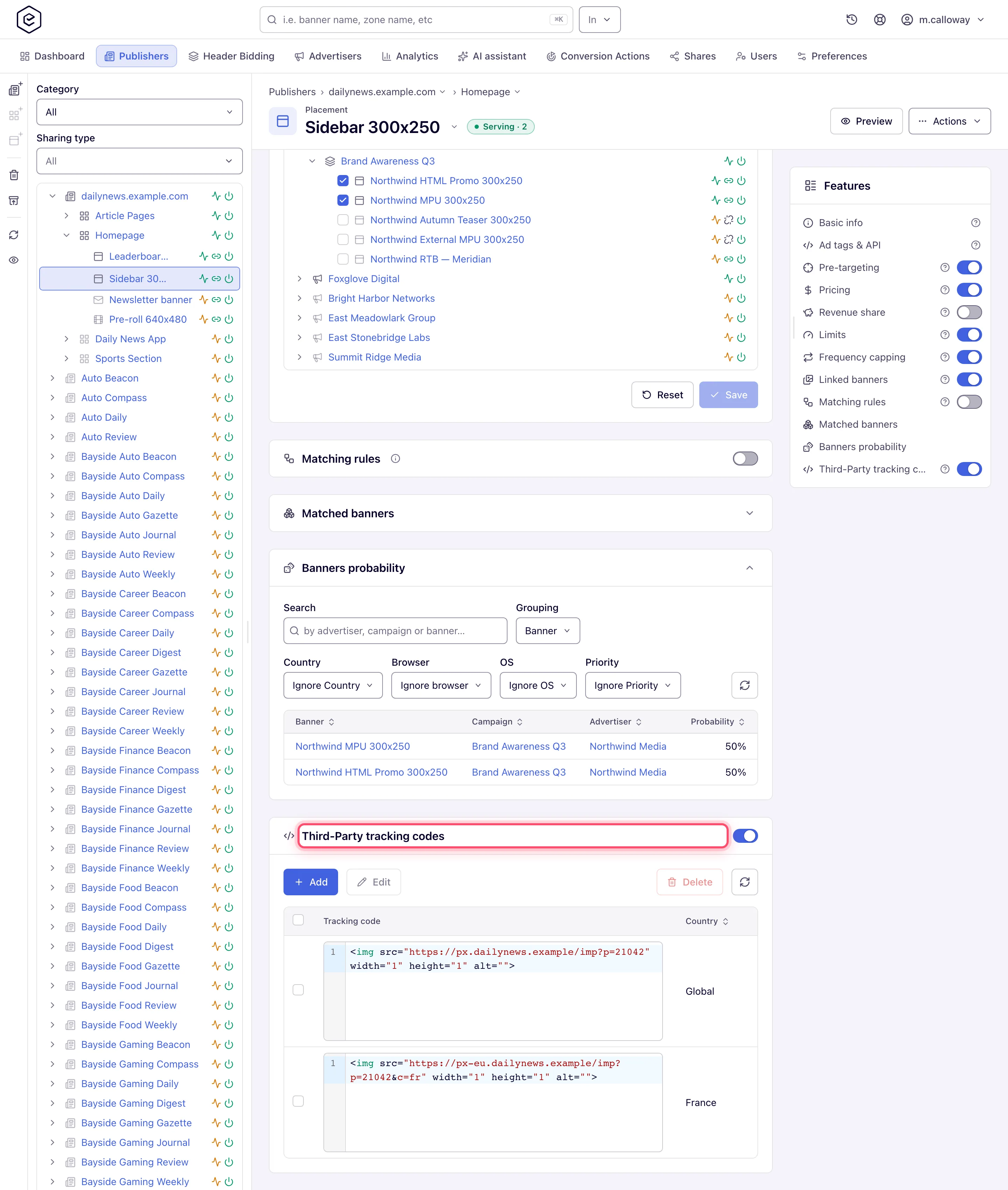
- Third-party tracking code — a verification or measurement snippet injected into the served markup, one per country plus a global fallback, on a banner or a placement. See Third-party tracking codes.
On a placement the three inventory-side surfaces — Piggybacks, Third-Party tracking codes and Server-Side trackers — sit one after another, which is the quickest way to see which is which:
How a conversion is attributed
ad served / clicked                conversion event fires
        │                                   │
        ▼                                   ▼
 ad server remembers the           pixel hit or S2S postback
 view / click for the user                  │
        │                                   ▼
        └────────► match: same user, banner from this campaign
                   (or any campaign sharing the same alias)
                          │
              click found within the post-click window?
                    yes ──► post-click conversion (click beats view)
                    no  ──► view found within the post-view window?
                              yes ──► post-view conversion
                              no  ──► an out-of-window click or view matched?
                                        yes ──► expired diagnostic row
                                                (zero revenue, not counted)
                                        no  ──► conversion not counted
Key rules:
- Click beats view. A qualifying click always wins over a qualifying view; post-view attribution is only used when no click matches.
- Attribution windows are set per action: a number from 0 to 255 combined with a period (seconds, minutes, hours, days, weeks, months, years) — one window for post-click and one for post-view conversions. Events older than the window do not attribute — but they are no longer invisible; see the expired diagnostics below.
- Campaign alias. Campaigns that share the same alias (set on the campaign’s Conversion actions card) are treated as one group for attribution — a click on campaign A can convert a pixel installed for campaign B if both use the same alias. A campaign with no alias set falls back to its own id, so it groups only with itself.
Note: a window value of 0 effectively disables that attribution path — no click or view can fall inside a zero-length window.
Attribution types
The outcome of the waterfall is stored on every conversion as its attribution type, and reporting splits by it — dedicated post-click/post-view report columns, an Attribution Type group-by dimension, and an Attribution Type column in the Conversions Log (see Analytics metrics and Analytics dimensions):
| Attribution type | Assigned when | Counted in conversion totals? |
|---|---|---|
| Post-click | A click matched within the action’s post-click window (click beats view) | Yes |
| Post-view | A view matched within the post-view window and no eligible click existed | Yes |
| System | The action is a system tracking action (VAST video / viewability tracking events) | No — left out of the Conversions total, see below |
| Unattributed | Nothing declared one: a server-to-server postback with no att= on an action whose Default attribution type is left at Unattributed, historical data recorded before the feature, or self-reported render-time pixels | Yes |
| Post-click (expired) | A click matched but was older than the post-click window | No — diagnostic only |
| Post-view (expired) | Only a view matched and it was older than the post-view window | No — diagnostic only |
The split itself does not change the total: Conversions = post-click + post-view + unattributed. An expired row keeps its count in a counter of its own and holds the ordinary conversion counter at zero, so a report that existed before attribution types reads as it did.
System rows are the exception. One video impression can fire twenty playback events, so a system tracking action does not add to the Conversions column of the General report or of the Advanced report built from raw logs. Its money is still billed as configured, a report grouped by conversion action still lists it, and conversion caps and the “no conversions” auto-pause still count it. The General report keeps its old totals for days before release 152; an Advanced report on a network running compacted logs keeps the old count.
Corner case: that is also why a report grouped by Attribution Type does not add up to the ungrouped total. Grouped, the two expired rows have to show their counts somewhere, so the Conversions cell reads the expired counter for those rows rather than a flat zero — and the column then sums higher than the total on the same report without the grouping. The Publisher Conversions and Advertiser Conversions cells go blank on those rows instead of showing a zero: the publisher’s and advertiser’s shares of an expired conversion were never recorded, so there is no honest number to print.
Corner case: the two expired types are diagnostics, not conversions. They are recorded with zero revenue, excluded from every conversion and revenue total, and never trigger CPA pricing, capping, limits or piggybacks. Before this existed, an out-of-window conversion simply vanished without a trace; now it shows up in the Expired post-click conversions / Expired post-view conversions report columns, so a partner’s “missing” conversions can be told apart from conversions that never arrived.
Who declares the attribution, and in what order
The pixel path classifies itself: it reads the click/view cookie, so it always knows which event it matched. A server-to-server postback carries no cookie, so its type comes from whoever declares one. Five sources, most authoritative first:
- System — the action is a system tracking action (VAST video / viewability events). Always System; nothing below it is read.
- The postback’s
att=parameter — what the partner’s own tracker measured. The Postback (S2S) tab listsattamong its optional parameters for exactly this; it is not part of the generated URL, so the partner adds it. - What the ad server observed — a stored value it expanded while processing a click carries that click. Only the click redirect and the mail-ad click hand out a value marked that way; a value expanded by the ordinary ad render claims nothing.
- The action’s Default attribution type — the answer set on the action for an integration that declares nothing. Unattributed unless someone sets it.
- Unattributed — nothing said anything.
Each source is read only when every source above it is silent, so the action’s default is a
fallback and never an override: setting it cannot relabel a conversion that declared its own
attribution. Piggyback and postback URLs can forward the resulting type downstream with the
$$ATTRIBUTION_TYPE$$ macro. See
Get the pixel and S2S tracking code for the att= recipe and
Create and edit conversion actions for the default.
Note: the default decides more than a label. A conversion recorded as Unattributed is counted unconditionally, because there is no event to measure a window against. Choosing Post-click or Post-view gives it one — so on an action that also has Apply attribution window to server-to-server conversions ticked, a postback arriving after that window closes becomes a zero-revenue expired diagnostic instead of a counted conversion.
Note: action settings reach ad serving through a cache the ad servers reload on a schedule — every 10 minutes on a standard network. A Default attribution type you just saved therefore classifies nothing for up to one reload, and a test conversion fired in that gap is still classified the old way. It is not a broken setting, just one that has not arrived yet.
Pixel, landing-page helper or server-to-server
| Pixel (JS or image) | Landing-page helper | Server-to-server (postback) | |
|---|---|---|---|
| Where it runs | User’s browser, on your confirmation page | User’s browser, on the advertiser’s own pages | Your server calls a tracking URL |
| Matching | Browser cookie set at ad view/click time | Click id read out of the landing URL and stored first-party by the advertiser’s own site | Click id you stored from the landing URL and send back as clickid |
| Setup effort | Paste one snippet | Paste one block on every page | Store a URL parameter, then make an HTTP request |
| Fragility | Needs the same browser and intact cookies | Needs the same browser, but no cookie from your domain; on Safari the stored click id is swept after seven days without interaction with the site | Cookie-independent; survives app installs and cross-device flows |
| Where to get it | Campaign → Conversion actions card → Conversion tracking code | Same button, Snippet tab | Same place, or the global Conversion Actions page |
The Postback (S2S) tab offers two methods. Click ID is the current one. Below it sits Click ID
(per action, legacy), which matches on a per-action subid instead; the panel’s own note says it
is “Kept for integrations that already use it. New integrations should use Click ID above.” If a
runbook of yours still describes the subid flow, that is the one it means.
Duplicate and fraud protection
Before a conversion is counted, the ad server can reject it as a duplicate or as fraud:
- Duplicate detection — the same conversion reported twice is dropped. The two paths are controlled separately: a server-to-server postback is de-duplicated only when the network setting and the action’s own Reject duplicate conversions are both on, while the pixel path has its own network-level check that the per-action checkbox does not affect. System tracking actions are never de-duplicated. How long a conversion is remembered is derived, not configured: it is the longer of the action’s two attribution windows, capped by a network ceiling and never under a minute.
- IP blocklist — conversions from blocklisted IPs are rejected.
- Duplicate conversion window (per IP) — at most one conversion per IP per action within the configured number of minutes (two separate windows: one for the visible client IP and one for the last external source IP). Both windows are configured on the action’s edit page.
A rejected conversion is not discarded. It is kept out of your Conversions total and it fires no piggyback — neither the server-side URL kind nor the client-side one — but it is counted in the separate Conversions Fraud column, which is the number to reach for when a partner reports a discrepancy.
Corner case: a rejected conversion still consumes the user’s action capping allowance. Capping is applied before the rejection is acted on, so on an action capped at one conversion per user per day, a duplicate postback uses the slot even though it is not counted. Expired conversions do not behave this way — they skip capping entirely.
Where conversions appear
- Activity badge on the Conversion Actions grid: Live means the action recorded at least one conversion in the last 2 days; Idle means it did not.
- Aggregate reports — the Conversions and Conversion Rate columns in analytics, plus the opt-in post-click / post-view split columns and the expired-window diagnostics (see Analytics metrics).
- Conversions Log — a per-event report listing individual conversions with their Attribution Type and Time to Convert; an action’s conversions only appear there while its Detailed conversion log option is on. See Report types.
