
Banner types
All 12 banner (creative) types — the placement types each one is offered on, the fields it shows and the type each placement pre-selects.
A banner’s type decides what you upload or paste and which fields the editor shows. The placement type a banner is created for is fixed for life; the banner type is a normal editable field and can be changed later, within the set that placement type allows.
This page is the exhaustive matrix. The how-to pages (HTML & template, image, native, video, OpenRTB) walk through creating each one, and Creative ad specs carries the file and field limits.
There are 12 types. Each is switched on per role by a permission named after it (HTML Code is Code, Template is Predefined Rich-media Templates), so your network may show fewer than the table lists.
The 12 types
The Offered on column is what the Banner type combo lists — it is filtered by placement type, by your permissions, and by one extra native rule (see the corner case below). Types are listed here in the order the combo shows them.
Display and rich media
| Type (UI label) | Offered on |
|---|---|
| Local File | Site, Mobile Site, Application, Video, Non-standard, Email |
| External File | Site, Mobile Site, Application, Video, Non-standard, Email |
| HTML Code | Site, Mobile Site, Application, Video, Non-standard |
| Template | Site, Non-standard, Application, Mobile Site |
Video
| Type (UI label) | Offered on |
|---|---|
| Local Video | Video, Email |
| External Video | Video, Email |
| Third Party VAST/VPAID Tag URL | Video |
| VPAID Framework | Video |
| Advanced Local Video(s) (Beta) | Video |
Native and programmatic
| Type (UI label) | Offered on |
|---|---|
| OpenRTB | Native, Site, Application, Mobile Site, Video, Non-standard |
| Local Native | Native only |
| External Native | Native only |
Corner case: the two native types are declared for five placement types but the editor offers them on Native placements only — a dedicated server-side filter drops them everywhere else. That filter is deliberate: outside a native placement the editor renders no native fields at all, so the banner would have nothing to fill in. The REST API is looser and still accepts, say, a Local Native banner on a Site placement; such a banner is unreachable from the UI editor. See Creating one through the API below.
Which type a placement offers
The same matrix read the other way. This is the complete list per placement type, in combo order — assuming every banner-type permission is enabled.
| Placement type | Banner types offered | Count |
|---|---|---|
| Site | Local File, External File, HTML Code, Template, OpenRTB | 5 |
| Non-standard | Local File, External File, HTML Code, Template, OpenRTB | 5 |
| Mobile Site | Local File, External File, HTML Code, Template, OpenRTB | 5 |
| Video | Local Video, External Video, Third Party VAST/VPAID Tag URL, VPAID Framework, Advanced Local Video(s) (Beta), Local File, External File, HTML Code, OpenRTB | 9 |
| Application | Local File, External File, HTML Code, Template, OpenRTB | 5 |
| Local Video, External Video, Local File, External File | 4 | |
| Click-through | (none) | 0 |
| Native | OpenRTB, Local Native, External Native | 3 |
The combo for a banner on a Video placement, which offers the longest list:
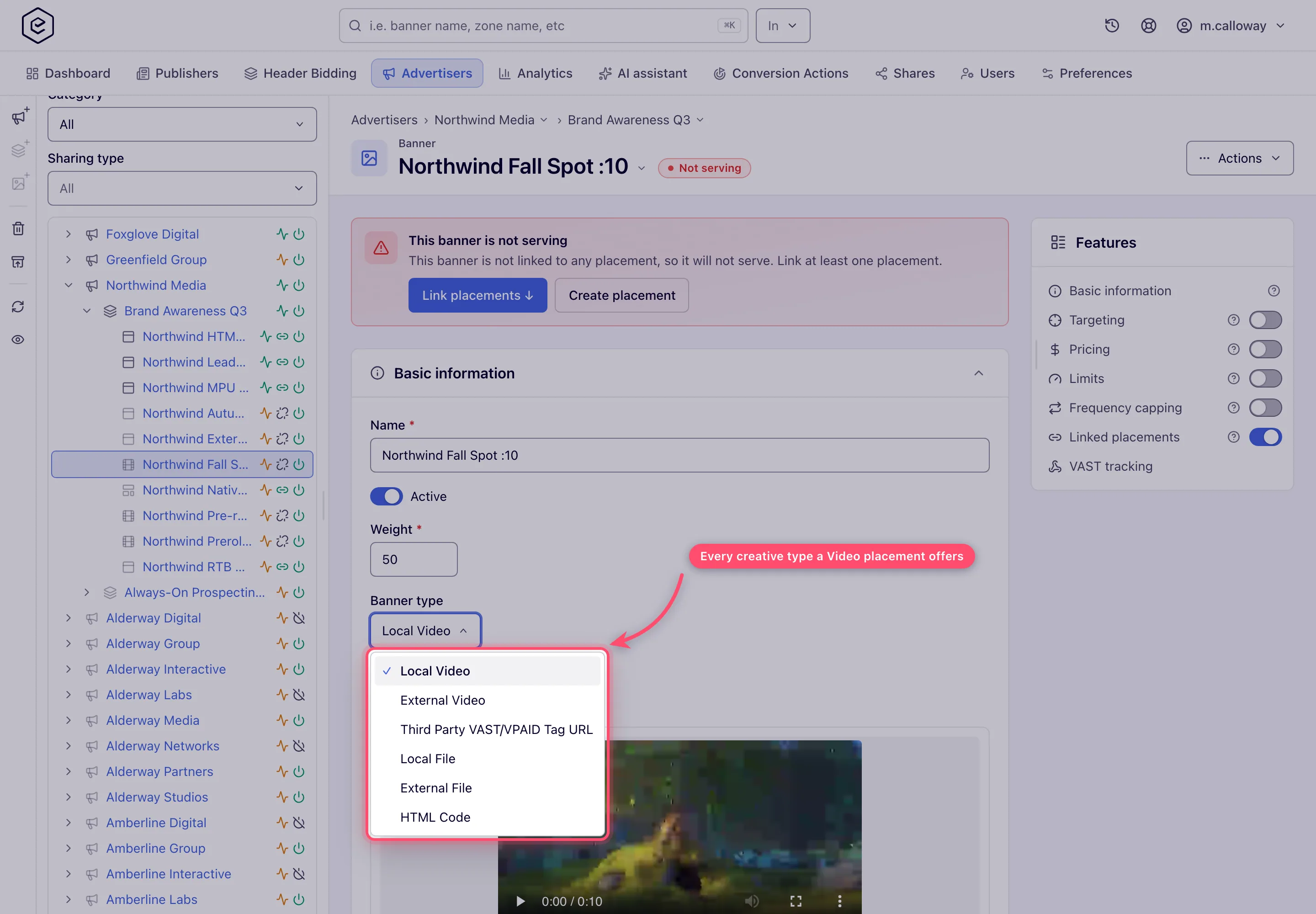
Corner case — Click-through placements have no banner type. No banner type declares the click-through placement type, so the Banner type combo comes back empty and a creative cannot be completed there. Click-through placements are driven by their per-creative tracking URLs instead (Ad tags & API → Show tracking URLs), not by a creative you build in the editor. See Placement types.
Which type a new banner starts on
Creating a banner does not leave the combo blank on every placement type — three types pre-select a creative, and the rest fall back to the first type in combo order that your permissions allow.
| Placement type | Type pre-selected on a new banner |
|---|---|
| Video | Local Video |
| Native | Local Native |
| Site / Non-standard / Mobile Site / Application | Local File (first allowed type) |
| Local Video (first allowed type) | |
| Click-through | none — nothing to fall back to |
Note: the pre-selection is skipped when you lack that type’s permission, and the first type you do have is chosen instead. On Email placements the first allowed type is Local Video, not Local File — video is declared ahead of the file types.
Fields each type shows
The editor hides everything that does not apply, and a hidden field is never submitted. This is the full per-type field set, with the labels the editor prints; where a field depends on the placement type, the condition is in the cell. URL is always the click-through address, never the creative file.
| Type | Fields |
|---|---|
| Local File | Creative upload (Banner creative before the first save, Image file after; a file, From link, or a pick from the media library when the role holds Media Library) · URL (required) · Ad unit (required) · Title · Target · VAST tracking card (saved banners on Video placements) |
| External File | Image creative URL (not on Video) · Banner link, the creative file’s address (Video only) · Serve from our server · URL (required) · Ad unit (required) · Title · Target · VAST tracking card (saved banners on Video placements) |
| HTML Code | Code (required) · Ad unit (Site, Video, Mobile Site — required on Site and Video) · Return as iFrame (Video only) · Enable passback functionality (Site, Non-standard, Mobile Site; needs the Ajax invocation-code permission) |
| Template | Template (required) + its Template properties · Ad unit (Site and Mobile Site) · Enable passback functionality (Site and Non-standard; same permission) · Target (Application only) |
| Local Video | Video upload (Banner creative before the first save, Video file after; a file, From link, or a media-library pick) · URL (refused empty on Email placements) · Title · VAST tracking card (saved banners on Video placements) · ISCI / Ad-ID (Video placements) |
| External Video | Banner link, the video file’s address (required) · Serve from our server · URL (refused empty on Email placements) · Title · Video info (saved banners with a file) · VAST tracking card (saved banners on Video placements) · ISCI / Ad-ID (Video placements) |
| Third Party VAST/VPAID Tag URL | URL, the tag address (required) · In-Stream video type (Linear Video ad / Non-linear Video ad) · VAST properties (Follow additional wrappers, Allow multiple ads, Fallback on no ads) · VAST tracking card (saved banners) |
| VPAID Framework | VPAID framework (required) + the framework’s own parameters · URL · Title · ISCI / Ad-ID (Video placements) |
| Advanced Local Video(s) (Beta) | URL · Title · Video files section (saved banners; a banner with no file is not served) · VAST tracking card (saved banners on Video placements) · ISCI / Ad-ID (Video placements) |
| Local Native | Native assets uploads (icon, image, video) + the shared native texts. No ad unit, no Target, no Preview |
| External Native | Native assets URLs + Serve from our server + the shared native texts. No ad unit, no Target, no Preview |
| OpenRTB | DSP (a deactivated partner is not listed, except on a banner that already uses it, greyed with Inactive and a warning that it serves nothing) + its parameters · Always 2nd price as +$0.01 · Use placement size (not on Video or Native) · Ad unit (Site, Mobile Site, Application, Non-standard — never required) · Mime types (Video only) · Adapter template (Mobile Site only, optional) |
The shared native texts are Title, Subtitle, Description, Call to action, Rating, URL (the click URL) and Customization parameters — see Creative ad specs for their limits.
Four more things depend on the placement or on a grant rather than on one creative type:
- Install conversion action appears on Mobile Site and Application placements for every creative type except OpenRTB.
- The ISCI / Ad-ID entries above are two fields, ISCI / Ad-ID code and Ad-ID registry.
They appear on Video placements for Local Video, External Video, Advanced Local Video(s) and VPAID
Framework, and only for a role holding Banner ISCI / Ad-ID Code. The permission is
seeded disabled for every role, so your network administrator turns it on per role. The code goes out
as the VAST
UniversalAdId; an empty registry with a code meansad-id.org. - Companions section: on saved Local Video, External Video and Advanced Local Video(s) banners on Video placements, for a role holding VAST Companion Ads.
- Pick from library and the media-library buttons need the Media Library permission, which is also seeded disabled for every role.
Preview
Four types have a preview — HTML Code, Local File, External File and Template. The Preview button in the banner page header appears for exactly those four, on any placement type that offers them. The eye icon in the creatives grid has one more rule: it is dropped for every banner under a Video placement, whatever its type. The other eight types have no preview at all.
Creating one through the API
Creating or updating a banner through the Banners API validates the pair differently from the
editor: it checks only that the banner type declares the placement type, and answers 400 with
Banner type X isn't compatible with placement type Y (both names are the enum names, such as
LOCAL_NATIVE and SITE_PLACEMENT). Two consequences:
- The extra native filter does not apply, so the API accepts Local Native and External Native on Site, Mobile Site, Application and Non-standard placements. The resulting banner opens in the editor with no native fields.
- The API rejects every banner type on a click-through placement, exactly as the editor does.
Corner cases
Corner case: the ad unit is shown but never required for OpenRTB banners — and on Video and Native placements it is not shown at all. The server mandates an ad unit only for Local File, External File and HTML Code (the last on Site and Video placements). Leaving an OpenRTB size empty is valid, especially with Use placement size on.
Corner case: the passback toggle appears only on HTML Code and Template banners, and only on site-family placements — Site, Non-standard and Mobile Site for HTML Code, Site and Non-standard for Template. The passback code block itself renders only after the banner is saved with the toggle on.
Corner case: the VAST tracking card is offered only on saved banners on a Video placement — a new banner must be saved first — and never for OpenRTB banners.
Corner case: the Target combo follows creative-type logic, not a fixed rule. It always shows for Local File and External File; on Mobile Site and Application placements it shows for every type except HTML Code and OpenRTB — and except Template, which shows on Application but not on Mobile Site; it never shows on a Video placement; and on the remaining placements it appears only when the creative is an image.
Corner case: changing a saved banner’s type is allowed and the combo stays enabled, but it only offers the types valid for that banner’s placement type. Fields belonging to the old type are dropped from the form and are not submitted, so switching type discards them on save.
Related
- Banners overview
- Creative ad specs — file types, size caps and field limits
- Placement types — the inverse matrix, and what each placement serves
- Invocation code types
- Statuses & indicators
