
Configure GDPR / TCF consent enforcement
Set the platform GDPR policy and no-consent restriction so the ad server honours IAB TCF 2.x consent — refusing to serve, or serving with cookies and identifying data stripped — and read the per-request consent verdict out of a troubleshooting log task.
Epom’s ad server can decide, per ad request, whether the user in front of it consented under the IAB Transparency & Consent Framework — and if not, either refuse to serve or serve with cookies and identifying data stripped. You set that behaviour once, on one card, for the whole platform. This page covers where the card is, what each control does, exactly what “no consent” costs the request, and how to read the server’s verdict for a single request when delivery drops and nobody knows why.
Who this is for
Network administrators. The GDPR controls are the last card on the System preferences admin page, so you need the System Preferences permission on your admin role — the whole page rides on it, and there is no separate GDPR-only permission. See Manage users, roles and permissions.
Prerequisites
- A TCF 2.x consent string has to reach the ad request. The standard Epom JavaScript tag already
fetches one for you: it looks for a
__tcfapiv2 CMP on the page (and, when the CMP lives in an ancestor frame, talks to it through the__tcfapiLocatorframe bypostMessage), waits up to 5 seconds, and sends the result asgdprandgdprConsentIabon the request. You only have to wire the string yourself for server-to-server, VAST and header-bidding integrations, or when you put it on the tag asdata-gdpr-consent-iab— which makes the tag skip the CMP lookup entirely. - The IAB vendor id you are registered under in the IAB Global Vendor List. Epom’s own is 849.
Note: only TCF 2.x is accepted. A string that decodes to any other version is treated as no consent, silently. There is no TCF 1.1 support: the ad tag reads no
__cmp, and the/rest-api/tcf/1.1/…endpoints answer 404.
Steps
-
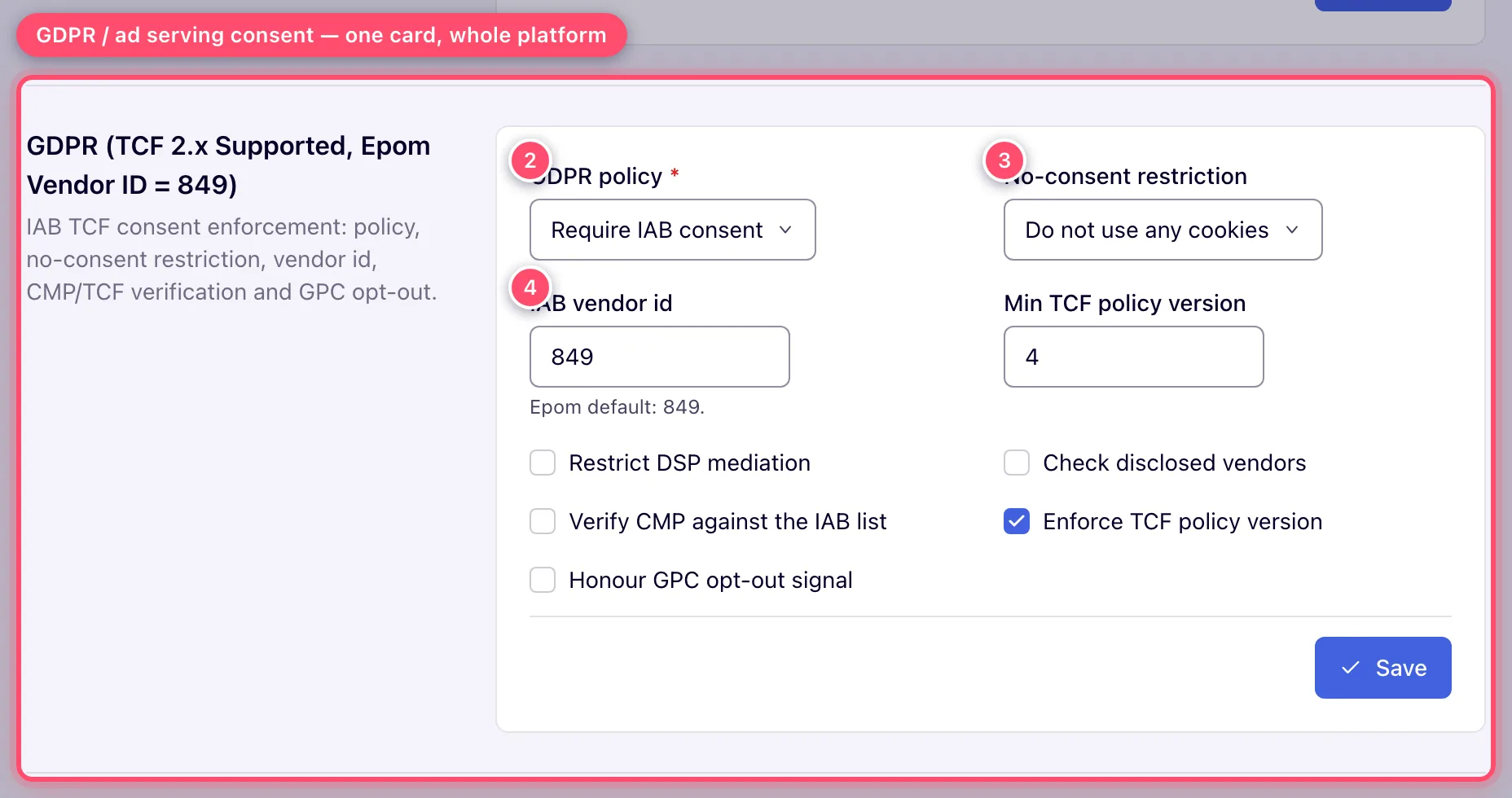
Go to Admin → Ad serving → System preferences and scroll to the last card, GDPR (TCF 2.x Supported, Epom Vendor ID = 849).
-
Set GDPR policy. Default leaves ad serving alone; Require IAB consent switches enforcement on and enables the rest of the card.
-
Pick a No-consent restriction. This is the decision that matters — see What “no consent” actually costs below. The select is disabled while the policy is Default, and the save is rejected if you leave it empty with the policy set to Require IAB consent.
-
Check the IAB vendor id. It prefills to 849 whether or not a value has ever been stored; the field is required once the policy is Require IAB consent.
-
Tick whichever of the five verification options apply. Min TCF policy version sits next to IAB vendor id and stays greyed out until Enforce TCF policy version is ticked; the field takes 2–10 (a browser-side limit — the server does not check the range).
-
Click Save. A green Done toast means the card was stored; a refused save shows an error toast and marks the field to fix instead. The save is recorded in the Actions log.
The ad servers pick up a saved change within a minute; there is no button to apply it sooner.
Options and fields
The two decisions
| Field | What it does |
|---|---|
| GDPR policy — Default | GDPR does not affect ad serving at all. The restriction, the IAB vendor id and every verification option except GPC opt-out are ignored and greyed out. This is the shipped default. |
| GDPR policy — Require IAB consent | Enforcement is on. Every in-scope request is checked for consent for your vendor id, and a failing one gets the No-consent restriction below. |
| No-consent restriction | What an in-scope, no-consent request gets. Four values, and only the first withholds the ad — see the next section. Required when the policy is Require IAB consent. |
Consent-verification options
These tighten what counts as valid consent. All five are off by default, and none of them has any effect while the policy is Default.
| Field | What it does | Default |
|---|---|---|
| IAB vendor id | The vendor whose consent the TC string must grant. The request passes only when this id is in the string’s vendor-consent list. | 849 (Epom) |
| Restrict DSP mediation | Additionally drops OpenRTB creatives from the auction for no-consent requests, whatever the restriction says — they are excluded with the reason GDPR_MEDIATION_RESTRICTED. No other creative type is affected. | off |
| Check disclosed vendors | Also requires the vendor id in the string’s disclosed-vendors segment, not just the vendor-consent segment. Only works when the CMP actually emits that segment; when it does not, every string fails this check. | off |
| Verify CMP against the IAB list | Rejects the string when its cmpId is not on the IAB Europe Global CMP List, or is on it but marked deleted. The list is refreshed daily from IAB Europe. | off |
| Enforce TCF policy version | Rejects strings whose TCF policy version is below Min TCF policy version. | off |
| Min TCF policy version | The floor for the check above; enabled only when it is ticked. 4 = TCF v2.2. The field limits input to 2–10 in the browser; the server stores whatever it is sent. | 4 |
| Honour GPC opt-out signal | Treats a Global Privacy Control opt-out — gpc=1 on the request, or a Sec-GPC: 1 header — as no consent. It is checked only for requests in GDPR scope, where it comes before every other consent check; a request outside GDPR scope is not affected. | off |
What “no consent” actually costs
Three of the four restrictions still serve an ad. What changes is how much of the user the ad server is allowed to keep.
| Restriction | Ad served? | Cookies | Server-side capping | Request anonymised |
|---|---|---|---|---|
| Do not serve ads | No — no banner is selected at all | none | no | yes |
| Do not use UID cookies | yes | all except the user-identifier cookie | yes | no |
| Do not use any cookies | yes | none set or read | yes | no |
| Do not use any cookies or server-side processing | yes | none set or read | no — skipped, and noted in the troubleshooting log | yes |
Anonymised is the strong one, and it is the same treatment under both Do not serve ads and Do not use any cookies or server-side processing. For that request the ad server:
- truncates the IP — the last IPv4 octet, or the last IPv6 group, becomes zero, in the request
itself, in
X-Forwarded-For, and in everything logged; - keeps only country from geo — region, city, latitude, longitude and mobile carrier are discarded by the lookup, so sub-country geo targeting and carrier targeting cannot match;
- replaces the user agent with the literal string
GDPR, and skips OS and OS-version detection altogether; - drops the user id, so cookie-based capping and frequency counting have no subject;
- strips the identifying headers from server-side trackers —
X-Forwarded-For,X-Real-IPand the six high-entropy client hints (sec-ch-ua-model,-full-version-list,-full-version,-platform-version,-arch,-bitness) are not forwarded to the tracker URL. See Server-side trackers.
The two cookie-only restrictions leave all of that intact — they change nothing but which cookies may be written and read.
How the decision is made
For each ad request the server evaluates, in order:
- Is GDPR in scope? Yes when the ad request carries
gdpr=1; no when it carriesgdpr=0; and when the parameter is absent, yes when the request carries aucvalue at all, otherwise yes when the IP geolocates to a country on the EEA list. So the gate self-activates for European traffic even from tags that never send agdprflag. Clicks and the tracking hits that follow an ad apply the same rule, so they land on the same side of the gate as the ad request. - If it is not in scope, or the policy is Default → serve normally.
- If it is in scope, check consent, in this order: an honoured
GPC opt-out fails immediately; then
uc=1passes anduc=0fails without looking at the string; then a blank or undecodable string fails; then a string that is not TCF 2.x fails; then the policy-version, CMP-list, vendor-consent and disclosed-vendors checks, in that order. - On a failed check, apply the restriction: no banner is selected (Do not serve ads), or the ad serves under the cookie and anonymity rules above. With Restrict DSP mediation on, OpenRTB creatives are additionally removed from the auction, so a direct creative wins instead.
Request signals the ad server reads
| Signal | Meaning |
|---|---|
gdpr | 1 = GDPR applies, 0 = does not. Absent → inferred, see step 1. Tag attribute: data-gdpr. |
gdprConsentIab | The TCF 2.x consent string. Tag attribute: data-gdpr-consent-iab; set it and the tag stops asking the CMP. |
uc | Shortcut verdict: 1 = consented, 0 = not. Overrides the consent string. Tag attribute: data-user-consent. |
cookie-policy | Per-request cookie switch, 0–3 — see How do I stop Epom setting cookies until the visitor consents?. Tag attribute: data-cookie-policy. |
gpc / Sec-GPC | Global Privacy Control opt-out — gpc=1 as a request parameter, or Sec-GPC: 1 as an HTTP header. Read only when Honour GPC opt-out signal is on, and only for requests in GDPR scope (step 1). |
Header-bidding callers do not use those names: /hb/bid reads the consent string from
user.consent or user.ext.consent, and the applies-flag from regs.gdpr or regs.ext.gdpr. A bare regs.gdpr = 0 with no consent string is deliberately
ignored rather than forwarded — it is the shape a CMP that timed out leaves behind, and forwarding
it would let an EEA visitor through ahead of the country fallback.
How do I stop Epom setting cookies until the visitor consents?
The network policy above decides what happens to EU traffic without consent. A site can also switch cookies off per request, whatever the policy — useful while your own consent banner is still open, or for a site with no TCF CMP.
| Where the ad is requested | What to add |
|---|---|
| JavaScript tag | data-cookie-policy="1" on the tag element |
| VAST, native or API request URL | &cookie-policy=1 on the URL |
| A VAST or ad URL inside a creative or template (video slider, outstream, a wrapped partner tag) | &cookie-policy=$$COOKIE_POLICY$$, so the inner request inherits the outer one’s value |
cookie-policy values: 0 normal; 1 no cookies read or set and no server-side capping; 2 no
cookies, server-side capping still on; 3 no user-ID cookie only, other cookies and capping on.
Any value other than 0 is carried into that ad’s impression and click URLs, so the tracking hits
stay cookie-free too. (uc=0 / data-user-consent="0" is different: it marks the visitor as
not consenting, and the network’s no-consent Restriction decides what that means.)
Corner case: a format that loads a second ad request of its own (a video slider’s inner VAST, an outstream player) does not see the outer tag’s attribute. If cookies still appear with
cookie-policy=1set, look for an inner request URL without$$COOKIE_POLICY$$.
Passing consent downstream
Two macros carry the signal into any banner code, click or impression URL, piggyback or server-side tracker:
| Macro | Expands to |
|---|---|
$$GDPR$$ | The applies flag, 0 or 1. The IAB spelling ${GDPR} is accepted and normalised to it. |
$$GDPR_CONSENT_IAB$$ | The consent string. ${GDPR_CONSENT_XXXX} (XXXX = any vendor id, digits only) is accepted and normalised to it. |
$$GDPR$$ always resolves, to 0 or 1. $$GDPR_CONSENT_IAB$$ is removed when no string
reached the request, so a partner URL gets no gdpr_consent= at all rather than an empty one. See
the macros reference.
Warning: these macros are the only route. Epom does not populate
regs.ext.gdproruser.ext.consenton the OpenRTB bid requests it sends to DSP partners — it reads those fields on inbound header-bidding requests, and writes neither on outbound ones. If a DSP needs the consent signal, put the macros in its endpoint URL or custom parameters on the DSP partner, and confirm with the partner that they arrive.
Troubleshoot a single request
When delivery drops and you need to know whether GDPR is the reason, run a troubleshooting log task (Admin → Audit & diagnostics → Troubleshooting log tasks) over the affected traffic. Two lines answer the question:
TCF Consent Info: version=… , cmpId=… , vendorId=… , vendorConsent=… , vendorDisclosed=… , vendorLI=… , checkDisclosedVendors=… , purposes=[…]— the decoded string as the server read it.vendorConsent=falsemeans your id is not in the string;vendorDisclosed=falsewithcheckDisclosedVendors=truemeans the CMP is not emitting the disclosed-vendors segment.No banner can be selected due to failed GDPR policy constraints.— the request was in scope, failed the check, and the restriction is Do not serve ads.
Corner case: the TCF line is written only when the request carried a consent string at all. A request with no string produces no TCF line — so a log that shows the refusal line and nothing else is telling you the string never arrived, which is a CMP or tag problem, not a settings problem.
Corner cases and gotchas
Corner case: Require IAB consent needs a No-consent restriction. Leave it empty and click Save: the server rejects the whole card (Valid value is required), marks the field and shows an error toast, and stores nothing. A missing IAB vendor id is rejected the same way. Only a green Done means the card was saved — this holds for every card on this page.
Corner case: while the policy is Default, only GDPR policy and Honour GPC opt-out signal can be edited; the rest of the card is greyed out and keeps its stored values. To prepare the enforcement settings, switch the policy to Require IAB consent first, then edit the rest and save them together.
Corner case: the “EEA” list is configuration, and it is not literally the EEA. It ships with 32 country codes, and two of them — CH (Switzerland) and GB (United Kingdom) — are not EEA members; the UK is covered by its own UK GDPR rather than the EU one. The list is a server-side setting, not in the UI: ask Epom support or your account manager to show or change it before you assume the gate covers exactly the countries you have in mind.
Corner case: switching to Require IAB consent / Do not serve ads without consent strings flowing takes European delivery to zero. In-scope requests with no string are no-consent by definition. Verify with a troubleshooting log task that
TCF Consent Infolines are appearing before you pick the hard restriction; if they are not, pick a cookie-only restriction first.
Corner case: a wrong IAB vendor id is indistinguishable from a total consent failure. No string will ever grant a vendor you are not registered as, so every in-scope request reads as no-consent. Leave it at 849 unless you have your own GVL registration.
Corner case: Verify CMP against the IAB list accepts every
cmpIdwhile the IAB list has not been loaded yet. Once it has loaded it rejects unknown and deleted ids.
Corner case: Honour GPC opt-out signal outranks a valid consent string and
uc=1. A user who accepted everything in your CMP but sendsSec-GPC: 1is treated as no-consent. That is the intent (CPRA-style), but it will visibly lower your consent rate — turn it on deliberately. It also does nothing at all while the policy is Default, even though it is the one checkbox that saves in that state, and nothing for a request outside GDPR scope: a GPC signal alone does not bring a request into scope.
Corner case: Restrict DSP mediation is independent of the restriction level. You can serve your own direct creatives to no-consent European traffic under a cookie-only restriction while still pulling OpenRTB demand out of the auction — pick a serving restriction and tick the box.
Corner case: a tag can ask for a cookie policy of its own with
data-cookie-policy. GDPR overrides it only for in-scope requests that fail the consent check; every other request keeps whatever the tag asked for.
Per-role notes
- Administrators get this card with System Preferences; there is no GDPR-only permission. Without it the sidebar entry is hidden and the page’s cards fail to load (403 Access denied).
- Network managers, publishers and advertisers cannot see or override consent enforcement. They see only the consequence: under Do not serve ads, EEA traffic without consent produces no impression and no error.
Related
- Admin area map
- Actions log and troubleshooting log tasks — where the save is recorded, and how to capture the consent verdict for real requests
- Macros —
$$GDPR$$and$$GDPR_CONSENT_IAB$$ - Configure DSP partners — where to put the macros for outbound demand
- Server-side trackers — the headers anonymity removes
