
Delivery controls overview
Which delivery control lives on which entity, what stops delivery versus what only changes the price, the order the ad server applies them, and how stale each counter is.
Once a banner is linked to a placement and both sides’ targeting agrees, the delivery controls decide how often it may serve, how much of it may serve, and at what price. This page is the map of the section: which control lives on which entity, which ones stop delivery and which ones only move money, the order the ad server applies them in, and how far behind reality each counter can be.
Who this is for
Anyone tuning delivery: network managers on both sides, advertisers pacing a budget, publishers protecting inventory. The three roles get very different subsets of the table below — an advertiser gets most of the demand side, a publisher almost none of the supply side — so read Per-role notes before looking for a card that is not there.
The controls
| Control | What it decides | Documented in |
|---|---|---|
| Limits | How much may serve in total — impressions, clicks, conversions, opportunities, requests, budget — per day, week, month and lifetime, plus start/end dates and even pacing | Limits; How limits behave |
| Per conversion action limits | The same idea narrowed to one conversion action | Per-action limits |
| Frequency capping | How often one visitor may see, click or convert on an entity — five different kinds share this one card | Frequency capping |
| Pricing | The price model (CPM / CPC / CPA / cost per day / cost per month) and the per-country price, on both sides of the trade | Pricing; Pricing precedence |
| Minimum margin | Drops direct demand that does not clear the publisher payout by the margin the inventory requires | Bid floor and minimum margin |
| Bid floor | The imp.bidfloor sent to DSPs, and the price a DSP bid must beat | Bid floor and minimum margin |
| Revenue share | Publisher payout as a percentage of gross instead of a fixed price | Pricing |
| Price adjustment rules | Rewrites the gross price for traffic from a named placement | Price adjustment rules |
| CPM threshold | A per-country minimum eCPM for a site, used as the last-resort RTB bid floor and as a reporting figure | CPM threshold |
| Optimization | How the winner is picked among everything still eligible: campaign and banner weights, eCPM, CTR, conversion-rate | Optimization |
| Banners probability | A read-only grid of every banner still eligible for a placement and the share of traffic it would take, with an optional block action | Optimization |
| Daisy chaining | Replaces rotation with a fixed waterfall order for one placement | Daisy chaining & passbacks |
Which control exists on which entity
This is the table worth bookmarking. The pattern is not uniform: the same control often exists on only some levels, and a few exist on exactly one.
| Control | Advertiser | Campaign | Banner | Site | Zone | Placement |
|---|---|---|---|---|---|---|
| Limits | ● | ● | ● | ● | — | ● |
| Per conversion action limits | ● | ● | ● | ● | — | ● |
| Frequency capping | ● | ● | ● | — | — | ● |
| Pricing | — | ● | ● | ● | — | ● |
| Minimum margin | — | — | — | ● | — | ● |
| Bid floor | — | — | ● | ● | — | ● |
| Revenue share | — | — | — | ● | — | ● |
| Price adjustment rules | ● | ● | ● | — | — | — |
| CPM threshold | — | — | — | ● | — | — |
| Weight (rotation) | — | ● | ● | — | — | — |
| Banners probability | — | — | — | — | — | ● |
| Daisy chaining | — | — | — | — | — | ● |
Three things to take from it:
- A zone carries no delivery control at all. Zones exist for targeting and OpenRTB settings only; nothing between the placement and the site is capped, priced or limited.
- Price adjustment is demand-only and pricing is not. An advertiser has no Pricing card — the price the advertiser pays is set on the campaign, and optionally overridden on the banner.
- A site cannot be frequency-capped. Per-visitor caps on the supply side exist on the placement only.
What a limit can cap
The Limits card is a grid of metric × period, not a pair of fields. Every combination below is a real column with its own counter, and each is separately permissioned.
| Metric | Daily | Weekly | Monthly | Total | Side |
|---|---|---|---|---|---|
| Budget | ● | ● | ● | ● | Demand only |
| Opportunities | ● | ● | ● | ● | Demand only |
| Impressions | ● | ● | ● | ● | Both |
| Clicks | ● | ● | ● | ● | Both |
| Conversions | ● | ● | ● | ● | Both |
| Requests | ● | ● | ● | ● | Supply only |
“Demand only” means an advertiser, campaign or banner can cap it; “supply only” means a site or placement can. A publisher never sees Budget or Opportunities; an advertiser never sees Requests.
The same card also carries start and end dates, even pacing, and a local-time / timezone offset pair that decides when “daily” rolls over. On a campaign or banner only, it adds a No conversions within period subsection — stop after N impressions with no conversion, and stop after N hours with no conversion — which is neither a metric nor a period and has its own permission.
What a cap can count
“Frequency capping” is the card’s name, not the feature’s. Five kinds of cap share it, and which ones are offered depends on the entity and on your permissions.
| Cap kind | Advertiser | Campaign | Banner | Placement |
|---|---|---|---|---|
| Frequency — impressions per visitor | ● | ● | ● | ● |
| Clicks per visitor | — | ● | ● | ● |
| Actions — conversions per visitor | — | ● | ● | ● |
| No-Click — stop after N impressions with no click, and start again once the visitor clicks | — | ● | ● | — |
| Request — ad requests per visitor | — | ● | ● | ● |
On a stock network Request capping is not offered, so the Type list shows four kinds, not five. Which kinds you see depends on your role — see User roles.
Corner case: No-Click capping has no permission of its own — it is hidden and shown by the Frequency Capping permission, the same one that gates the plain frequency cap. Revoking Frequency Capping removes two rows from the Type list, not one.
Each cap row also carries a subject: USER_COOKIE, USER_SERVER_SIDE or USER_MIXED. That is
a per-cap setting, not a network-wide one, and it decides where the counter is kept — see
How current the numbers are.
What stops delivery, and what only changes the price
Reaching for a limit when you wanted a price rule — or the reverse — is the most common mistake in this section.
These can stop a banner serving:
- Limits and per-action limits, at any of the five levels that carry them.
- Frequency capping, at any of the four levels that carry it.
- Minimum margin, which drops a direct banner whose gross does not clear the publisher payout by the required amount.
- Bid floor, which rejects a DSP bid priced below the floor.
- Daisy chaining, when view-per-entity is on and an entity has had its allowance.
These never stop anything — they only move money or numbers:
- Pricing decides what is charged and paid after a winner is chosen. Setting a price of zero does not remove a banner from the auction; it makes it serve for nothing.
- Price adjustment rules rewrite the gross for a named placement. A rule cannot exclude anything.
- CPM threshold is a reporting figure and the last fallback for the RTB bid floor. It never filters direct demand; it can turn a DSP bid away only by acting as that floor.
- Optimization and weight change which eligible banner wins, never whether one exists.
Corner case: minimum margin is the one price setting that does stop delivery — and it skips CPC and CPA demand entirely. A click- or conversion-priced banner cannot be priced per impression at selection time, so it serves against CPM inventory unchecked however low its effective eCPM turns out to be. A banner with no price at all is treated as a gross of zero and is dropped by any positive margin requirement.
Order of application
Everything below happens inside a single ad request, in this order. The rules come from a copy of your settings each ad server refreshes on a schedule, which is what How current the numbers are is about.
Before the request even arrives, the candidate pool for a placement is built from the cache: it contains only banners that are linked to that placement, not deleted, active, whose campaign and advertiser are both active, and where linking is enabled on both the banner and the placement.
- Placement, zone and site are all active. If any of the three is off, nothing serves.
- Supply-side pretargeting — site, then zone, then placement, broadest first. The first rule that rejects the request ends it.
- Limits and per-action limits, evaluated across every level at once. A site or placement limit that is reached removes every campaign from the request; an advertiser limit removes all of that advertiser’s campaigns; a campaign limit removes its banners; a banner limit removes just that banner.
- Format filters — VAST in-stream type must match for a video request, a site that declares video creative requirements drops an uploaded video creative whose file does not meet them (external video, VAST tags and DSP bids are never stopped here), and a native placement drops banners that lack the fields its template requires.
- Same-page exclusions — campaigns already shown on this page, and competitor campaigns excluded by the campaign’s Exclude-competitors setting.
- Demand-side targeting — advertiser, then campaign, then banner.
- Frequency capping — every cap kind, at every level that carries one. Cap counters are read live at this point.
- Minimum margin, if the placement or its site declares one. It runs here, after capping, so the price arithmetic is spent only on banners still in the running.
- Daisy-chaining filter, when the placement’s chain uses view-per-entity: house ads and entities that have used their allowance are dropped.
- Size filter, for any-size ad units only.
- Inventory-side request capping is counted for the placement.
- Selection. Delivery-priority groups are tried in order — Premium, Standard High, Standard Medium, Standard Low, Non-guaranteed, House ads — and the first group that yields a banner wins. Inside a group, a campaign is chosen (by weight, or by eCPM if the network is on eCPM optimization), then a banner is chosen inside it: conversion-rate optimization first if the campaign has it, then CTR optimization, then weighted random.
- RTB auction, if the chosen banner is a DSP creative. The bid floor is enforced here; if no bid clears it, the auction re-runs over the non-RTB candidates.
- Advertiser-side request capping is counted for the winner.
- Price is calculated — gross first (banner price, else campaign price; then the price adjustment rules), then net (the publisher payout). This happens after the winner is known and changes nothing about the selection.
- Nothing matched? The placement’s default code or the banner’s passback tag is returned.
Two consequences worth stating plainly:
- A group that is not empty is not necessarily the group that wins. Step 12 falls through: if the highest non-empty priority group produces no banner, the next group is tried. A Premium campaign that is capped does not block Standard traffic behind it.
- Debug in pipeline order. “Why is my banner not serving” is almost always steps 1–11. See Ad not serving.
How current the numbers are
The ad servers work from a copy of your settings and counters that is refreshed on a schedule — so “takes effect immediately” is true of some things here and false of others. Frequency caps are the exception: those counters are checked live on every request.
| What | How current it is |
|---|---|
| A limit, or the price on a campaign, banner or site, that you just saved | About a second — the save refreshes just that entity on the ad servers. |
| Everything else — a frequency cap, a price adjustment rule — and any update that was missed | Up to 10 minutes — the ad servers refresh all settings every 10 minutes (at 5, 15, 25, 35, 45 and 55 minutes past the hour). |
| A limit counter, on the ad server that served the impression | Immediate. Each ad server counts its own traffic and stops itself with no delay. |
| A limit counter, across all ad servers | Up to about 90 seconds before every ad server knows the entity is capped. |
| The counters shown in reports and on cards | Hourly by default. Some networks are configured to update every 5 or 10 minutes. |
| The counters shown in the Limits card | That stored value, plus up to 20 seconds of UI caching. The card does not include what the ad servers have counted since the last update. |
| A frequency cap counter | Live. Caps are checked on every ad request; cookie caps are written into the response immediately, server-side caps within a fraction of a second. |
| CTR optimization weights | Every 5 seconds. |
| Conversion-rate (CPA) optimization | Every 60 seconds. |
| eCPM optimization | Hourly, with the campaign eCPM map rebuilt four times a day. |
Corner case: the impression and click counters in the Limits card are the last stored values, not what the ad servers are enforcing. On a busy campaign the card can read tens of thousands of impressions behind the live count for most of an hour. A campaign that has stopped delivering while its card still shows headroom has usually reached its limit already.
Corner case: during a platform incident the ad servers can stop sharing their counts. Each then paces against its own share of the budget. Delivery keeps flowing but a total limit can be overshot while that lasts.
When two levels disagree
| Situation | What happens |
|---|---|
| Advertiser, campaign and banner all have limits | All three are checked. A reached advertiser limit removes every one of its campaigns; a reached campaign limit removes that campaign’s banners; a reached banner limit removes only that banner. |
| Site and placement both have limits | Either one, when reached, stops the whole placement for every advertiser. |
| A cap is set on the campaign and the banner | Both apply. Caps never override each other. |
| Campaign has a price and the banner has a price | The banner wins. Campaign pricing is only the fallback when the banner has none. |
| Price adjustment rules on advertiser, campaign and banner | All three apply, cumulatively, in that order — advertiser, then campaign, then banner on the running value. This is the one place where levels compound instead of overriding. |
| Placement and site both price the inventory | Placement first, in this order: placement per-advertiser/per-campaign revenue share → placement fixed price → placement global revenue share → the same three on the site. The first one that resolves wins. |
| Placement and site both declare a minimum margin | Placement wins — independently of which level supplied the price. |
| Several things could be the RTB bid floor | The first non-zero of: banner bid floor, placement bid floor, site bid floor, banner price, campaign price, site CPM threshold. A zero at one level is skipped, not treated as “free”. |
Corner case: a cap of zero is not a cap — everywhere a limit is evaluated, a limit value of 0 means “unset” and is skipped. You cannot stop delivery by setting a limit to zero; delete the entity’s limit, deactivate it, or set an end date instead.
Turning a control off is destructive
Every delivery card has an on/off switch, in its header and again in the Features rail on the right of the edit page.
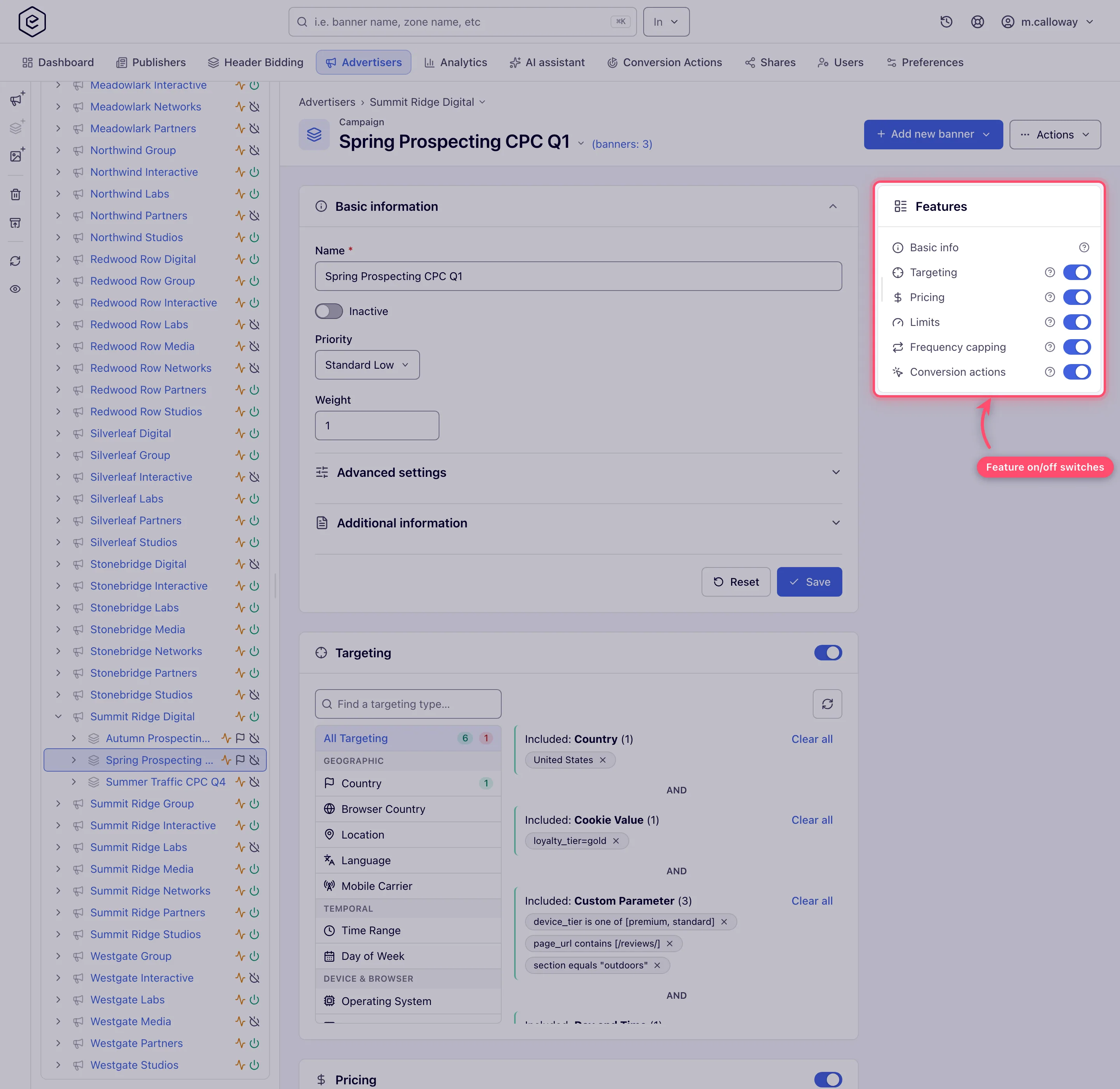
The rail lists only the cards your role is granted, so yours may show fewer than this frame.
For most of these controls the switch is not a “pause”. Turning it off deletes the configuration:
| Card | What the off switch does |
|---|---|
| Limits | Deletes the whole limit row — every cap and its counters. |
| Per conversion action limits | Deletes every per-action limit on the entity. |
| Frequency capping | Deletes every Request, Frequency, Click, Action and No-Click cap on the entity. |
| Pricing | Deletes the pricing row and its per-country prices. |
| CPM threshold | Deletes the threshold and its per-country values. |
| Daisy chaining | Deletes the chain settings. |
| Revenue share | Deletes every binding. |
| Price adjustment rules | Only clears a flag. The rules survive and come back when you switch it on. |
Turning capping back on does not restore what was there: it creates one blank cap row for each kind you have permission for.
Warning: switching one of these cards off asks Turn this off? first, but once confirmed there is no undo. If you want to pause a limit rather than lose it, note the numbers first — or set the entity inactive, which stops delivery without touching the configuration.
The two sides of the platform
The same idea often exists on both sides with different owners, and the supply side is where the cards differ most.
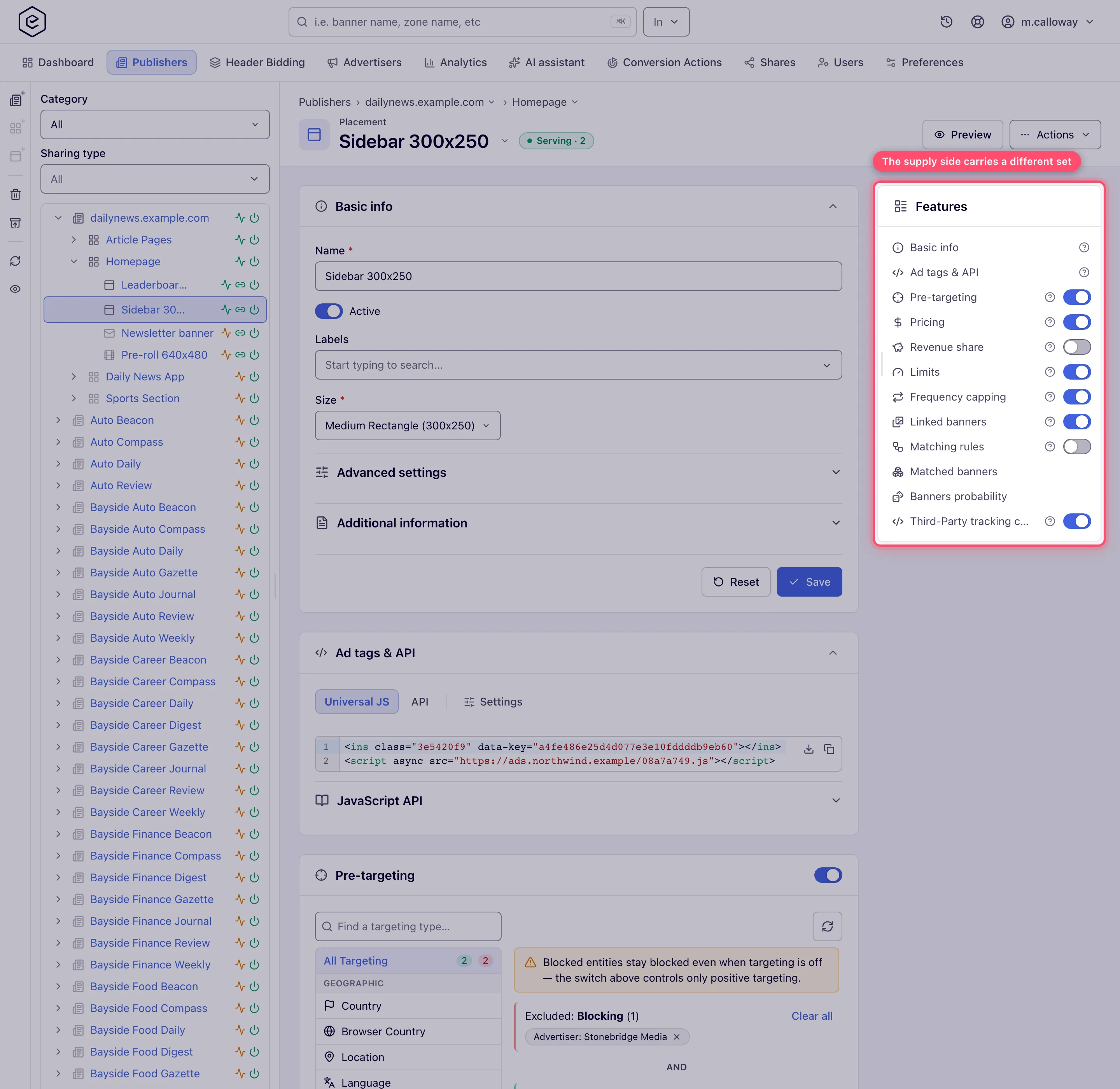
Which of these cards the rail shows depends on your role — see User roles.
- Demand side (Account → Advertisers) protects the advertiser’s money: budgets, per-visitor caps, conversion limits, and the price the advertiser pays.
- Supply side (Account → Publishers) protects the publisher’s inventory: request and impression limits, per-visitor caps on a placement, minimum prices, revenue share, and the waterfall.
A banner serves only when both sides allow it.
Corner cases and gotchas
Corner case: every price field in this section is one row of a by-country table. What the cards present as “the price” is the row whose country is
*, shown as Global. Adding a country row does not replace the global one — it takes precedence for that country and the global row still covers everywhere else.
Corner case: CPM threshold lifts what the publisher is reported and paid, not what the advertiser is charged. In the General report the Net column takes, for every banner × placement × country × day, the greater of the real net and impressions × threshold ÷ 1000, and a separate Minimal Net column shows the floor on its own. The top-up comes out of the network’s margin: Profit goes negative wherever the threshold is above what the demand pays. See CPM threshold.
Corner case: the two No conversions within period fields stop delivery like any other limit, but they are not part of the metric × period grid and no cell names them. When an entity is blocked by one of them the platform can only report that a limit was reached, not which one. They exist on campaigns and banners only.
Corner case: on an entity shared with Can View, the Frequency capping and Price adjustment rules cards do not render at all when the entity has none, so a viewer cannot tell “not configured” from “cannot look”.
Corner case: enabling frequency capping on a campaign or banner immediately creates one blank cap row of every kind you have permission for — Request, Frequency, Clicks and Actions. A blank row caps nothing, so this is harmless, but the grid is not empty when you first open it.
Corner case: the counters on a limit are maintained by ad serving and cannot be edited from the form. To zero one, use the card’s reset control — and read its confirmation literally: it says “Limit will be reset within the next hour”, because the reset is applied by the hourly statistics update, not on the click.
Per-role notes
- Advertiser — gets Limits, Frequency capping and Pricing on their own advertiser, campaigns and creatives; no per-action limits or price adjustment rules.
- Network manager — can work both sides, but each card is a separate grant and several are off on a stock network — see What your network shows by default.
- Publisher — sees almost none of these cards; reads the outcome in analytics and asks the network to change the controls.
- Can View share — every card opens read-only; ask for Can Edit to change anything.
Exact grants: see User roles.
Related
- How ad selection works — the same pipeline from the auction’s point of view
- Capping matrix reference — every cap kind, subject and period
- Serving state — what “Not serving” on an entity means
- Targeting guides — the filters that run either side of this section
- Ad not serving
- How limits behave — counters, resets, overshoot and pacing
- Pricing precedence — which price is charged and which is paid
