
Plug programmatic DSP demand into your network
End-to-end recipe for filling inventory with external OpenRTB demand — partner onboarding, OpenRTB banners, bid floors, second price, QPS, revenue accounting and a no-bids troubleshooting ladder.
You run inventory that your direct-sold campaigns don’t fully fill, and an external DSP is ready to bid on the remainder — or programmatic demand is your business model. This recipe wires an OpenRTB partner into the platform end to end: the partner connection, the demand entities that trigger bidding, the price floors that protect your publishers, the auction economics, and how to read (and fix) the numbers afterwards. For per-feature depth, each step links to the dedicated guide.
Who this is for
- Network administrators own steps 1, 2 and 6 — the partner connection and its protections — and the DSP partners analytics grid in step 5, in the admin console. The same screens are also in the account area under an RTB tab for a role that has them, so a network manager can do these steps too once the network administrator grants the tab (see DSP partners).
- Network managers (account area) own steps 3 and 4 — the demand entities and pricing. The OpenRTB banner type is off for every stock role; ask your network administrator to switch it on for your role.
Prerequisites
- The partner’s bid endpoint URL, their OpenRTB protocol version, and an agreed billing basis (CPM, CPC or CPI).
- Serving inventory — sites, zones and placements that already work with direct demand. If you are starting empty, do the network quick start first.
- If you plan to scan the partner’s creatives: a scan provider set up for your network by Epom support (see Protect your inventory).
Steps
1. Onboard the DSP partner (network administrator)
- Go to Admin → Demand partners (DSP) → DSP partners → Add (or Account → RTB → DSP
partners on a role that has the RTB tab).
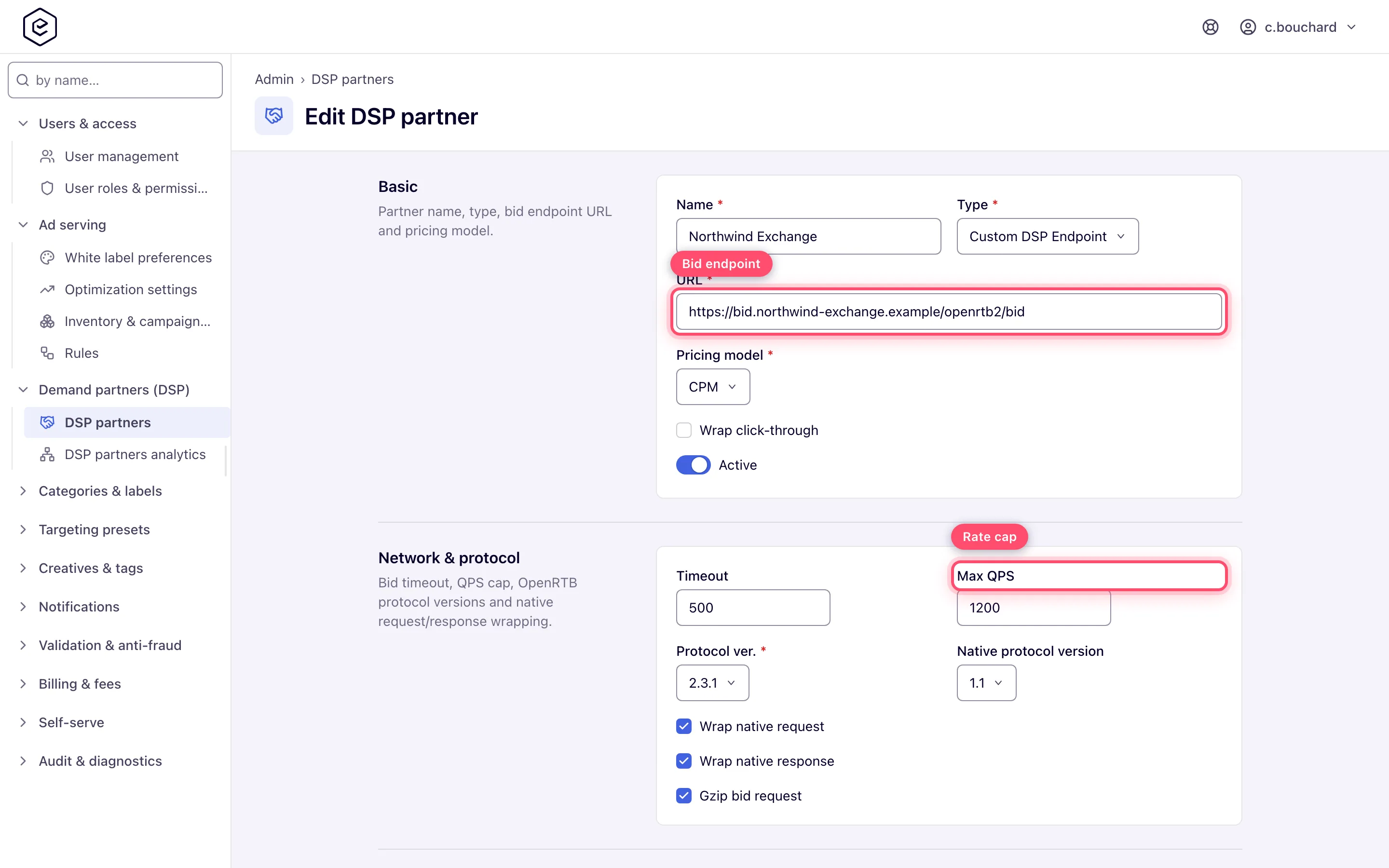
- Pick the Type (a pre-built integration or Custom DSP Endpoint for plain OpenRTB), paste the URL of the bid endpoint, and set the Pricing model to the agreed billing basis. Tick Wrap click-through for a CPC partner: it is what lets the ad server count the click that CPC bills on.
- Set the Timeout (default 300 ms) and, if the partner asked for a traffic cap, Max QPS — bid requests beyond the cap are simply not sent.
- Match the Protocol ver. and native settings to what the partner expects. The full field walkthrough is in Configure DSP partners.
2. Decide the auction economics (administrator + partner)
- Require a competing DSP (partner form) — does not change any price. It withdraws the partner from an auction where its banner would be the only DSP candidate, so tick it only if you want that. Second-price clearing itself is the per-banner Always 2nd price as +$0.01 checkbox in step 3.
- Creative scan provider — pick a provider if this partner’s creatives should be scanned; None (trusted) skips scanning entirely. See Protect your inventory for when you want this.
- User matching (Shortname + Enable user sync) gives the partner a User sync URL to match its own user ids to your visitors — hand them the generated URL. The shortname takes lowercase letters and digits only.
3. Create the demand entities (network manager)
- Create (or reuse) an advertiser and a campaign to own this partner’s demand. A dedicated campaign per partner keeps revenue reporting clean — in standard reports, programmatic revenue shows up under the campaign that owns the OpenRTB banner.
- In the campaign, add a banner per placement type you want to fill: Add new
banner → placement type → Banner type: OpenRTB → pick the DSP. One OpenRTB
banner per DSP per campaign is the usual pattern. The OpenRTB option appears only on roles
it is switched on for (see Who this is for), and the DSP picker lists active partners only.
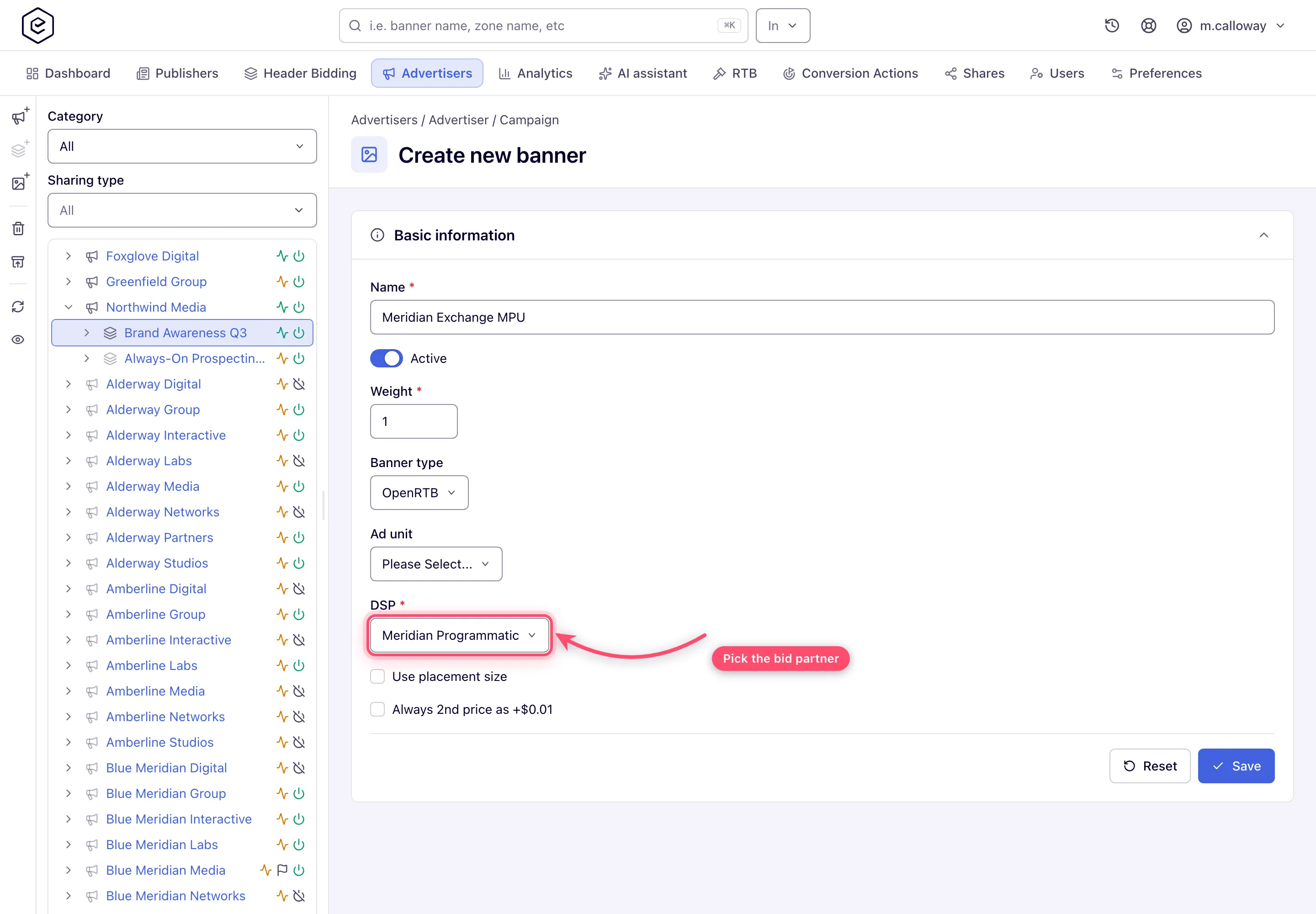
- Tune the banner’s auction options: Always 2nd price as +$0.01 (see gotchas), Use placement size on display placements, Mime types on video. Full field reference: OpenRTB (DSP) banners.
- Link the banners to the placements they should fill, exactly like any other banner — see Hierarchy and linking.
4. Set the price floors (network manager)
Setting a bid floor needs the Bid Floor Management permission, which no stock role holds; your network administrator grants it on Admin → Users & access → Admin roles & permissions.
The floor rides inside every bid request, and bids below it are rejected. The ad server sends the first price it finds along this chain, per country: banner Bid Floor → placement Bid Floor → site Bid Floor → the banner’s own price → the campaign price → the site CPM Threshold. Set floors where they belong:
- Per-placement or per-site Bid Floor cards protect specific inventory.
- A site CPM Threshold acts as the site-wide quality floor.
- Each card takes per-country rows plus a Global (
*) fallback row.
See Configure pricing for the cards themselves.
5. Verify delivery and revenue
- Send test traffic to a linked placement and confirm the DSP creative renders.
- Watch Admin → Demand partners (DSP) → DSP partners analytics: pick date, partner,
placement or country in the Group by multi-select and read
Requests / Bids / Wins / Impressions / Clicks / Spend. Spend is the gross booked
on the delivery the endpoint won — an auction won by a creative that never rendered
adds a Win and no money — and it follows the partner’s own pricing model, which is
why both counts sit beside it. Grouped by partner, one row is one invoice line;
Export CSV, or
GET /rest-api/rtb/dsp-analytics/search.do, gives the same rows for billing. The date range defaults to today, so a partner that only ran yesterday shows nothing until you move From back.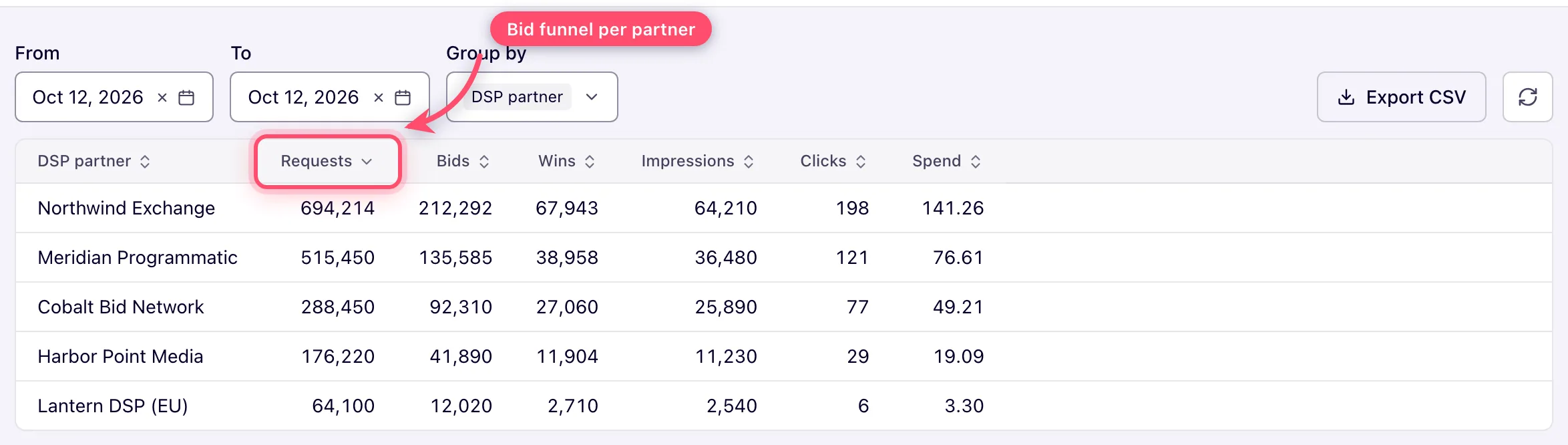
- Revenue accounting works like this:
- The cleared auction price (bid price, or the reduced second price where a second-price option applies) is what the impression earns — there is no manual price list on OpenRTB banners.
- The partner’s pricing model decides the billing event: CPM books the cleared price per thousand impressions, CPI books it per impression, CPC books it per click; an event that does not match the model books zero.
- The publisher side is unchanged: payouts follow the placement/site pricing and revenue-share setup, same as for direct demand — see Configure pricing.
- Per-partner revenue no longer needs the dedicated-campaign pattern: Spend on DSP Partners Analytics is the same gross the standard report books for that partner’s creatives, and the two reconcile line for line. Keep a dedicated campaign only when you also want the partner separated in the standard report. Invoice before deleting a partner — deleting the partner is what breaks the attribution; creatives deleted since still count. See DSP partners.
6. Keep it protected (administrator)
- QPS cap protects the partner; Timeout protects your page latency.
- Creative scanning protects your publishers from malicious markup — blocked creatives lose the auction and the runner-up wins. See Protect your inventory.
Troubleshooting no-bids
Work down the funnel in DSP Partners Analytics — each stage has different causes:
| Symptom | Where to look |
|---|---|
| Requests = 0 | The bid request is never sent: the OpenRTB banner isn’t linked to serving placements or never wins selection (run the ad-not-serving checks); the partner is disabled or not available for that placement type; the Max QPS cap is throttling; the partner’s Require a competing DSP is ticked and its banner is the only DSP candidate. |
| Requests > 0, Bids = 0 | The partner declines: your floor is higher than they pay (the floor rides in the request — try lowering it on test inventory); the geo/inventory mix doesn’t interest them; the protocol version or native wrapping doesn’t match their parser; or their bids arrive after your timeout and are discarded — on the partner’s dashboard this looks like bids, on yours like silence. |
| Bids > 0, Wins = 0 | Bids are rejected or outbid: below your floor; not in USD (a response in another currency is discarded unless the banner carries the custom-currency parameters); outbid by another DSP partner in the same auction; or the creative was blocked by creative scanning. |
| Wins > 0, but revenue looks wrong | Check the partner’s pricing model (CPC revenue only appears on clicks) and the second-price options — a cleared price just above the floor is correct behavior, not a bug. |
Corner cases and gotchas
Corner case: bid responses must be in USD — a partner bidding in any other currency is silently rejected as invalid, at 100% of their volume. If a partner shows healthy bids on their side and zero wins on yours, ask what currency they respond in before debugging anything else. The one exception is per banner: tick DSP Custom Currency and USD to DSP Custom Currency Rate in the partner’s Parameters, fill them on the banner, and the bid is converted back to USD at the static rate you typed (see DSP partners).
Corner case: the bid floor is resolved per country. When geo lookup fails for a request, no floor is sent at all (zero floor) — floor-protected inventory can clear at very low prices on unresolvable traffic.
Corner case: Always 2nd price as +$0.01 takes effect when this partner is effectively alone in the auction — the win then clears just above the floor instead of at the bid price. If the partner disputes the cleared prices, this checkbox is usually the explanation.
Corner case: the partner’s Require a competing DSP checkbox is not a pricing setting. It removes the partner from any auction where its banner would be the only DSP candidate, so ticking it to “get second-price billing” costs you delivery and changes no price.
Corner case: deal bids play by different rules — a bid carrying a deal ID skips the open-auction floor check entirely. If you run PMP deals, deal traffic can legitimately clear below your open floors.
Per-role notes
- Network administrator: the partner form, DSP partners analytics and the creative-scan settings are admin-area pages; an administrator who wants to build the demand entities signs in as a network user.
- Network manager: builds the advertiser, campaign, OpenRTB banners and floors, once the network administrator has switched the OpenRTB banner type on for the role. With the RTB tab granted, the partner form and DSP partners analytics are in the account area too; without it, ask your network administrator for the figures in step 5.
- Publisher and Advertiser: the OpenRTB banner type is not in the stock roles; ask your network manager.
