
Video placements
Configure a video placement — VAST skip button and ad pods, VPAID and VMAP blocks, RTB video settings, the VAST tag URL and its version picker, and VAST event tracking.
A video placement serves in-stream and out-stream video through standard tag URLs — VAST (any version from 2.0 to 4.3), VPAID and VMAP. You configure the player behavior (skip button, pods), the RTB video constraints, and per-event tracking; the player just loads one URL.
Who this is for
Publishers integrating a video player and network managers running video demand.
Prerequisites
- A saved placement of the Video type (create one).
- A VAST-capable player (for VPAID/VMAP: a player supporting those specs).
Note: a video placement also carries a Size — the player dimensions. The list offers two Landscape Video Player units (1024×768 and 480×320) and Custom Video Player. Unlike a Site Placement, the size is not required: leave it unset and the slot takes any video creative.
Steps
-
Open the placement. The video preference blocks (VAST / VMAP / VPAID / RTB) live inside the Basic info card; the generated tag URLs live on the Ad tags & API card (step 6).
-
In VAST configuration, decide on the skip button and pods:
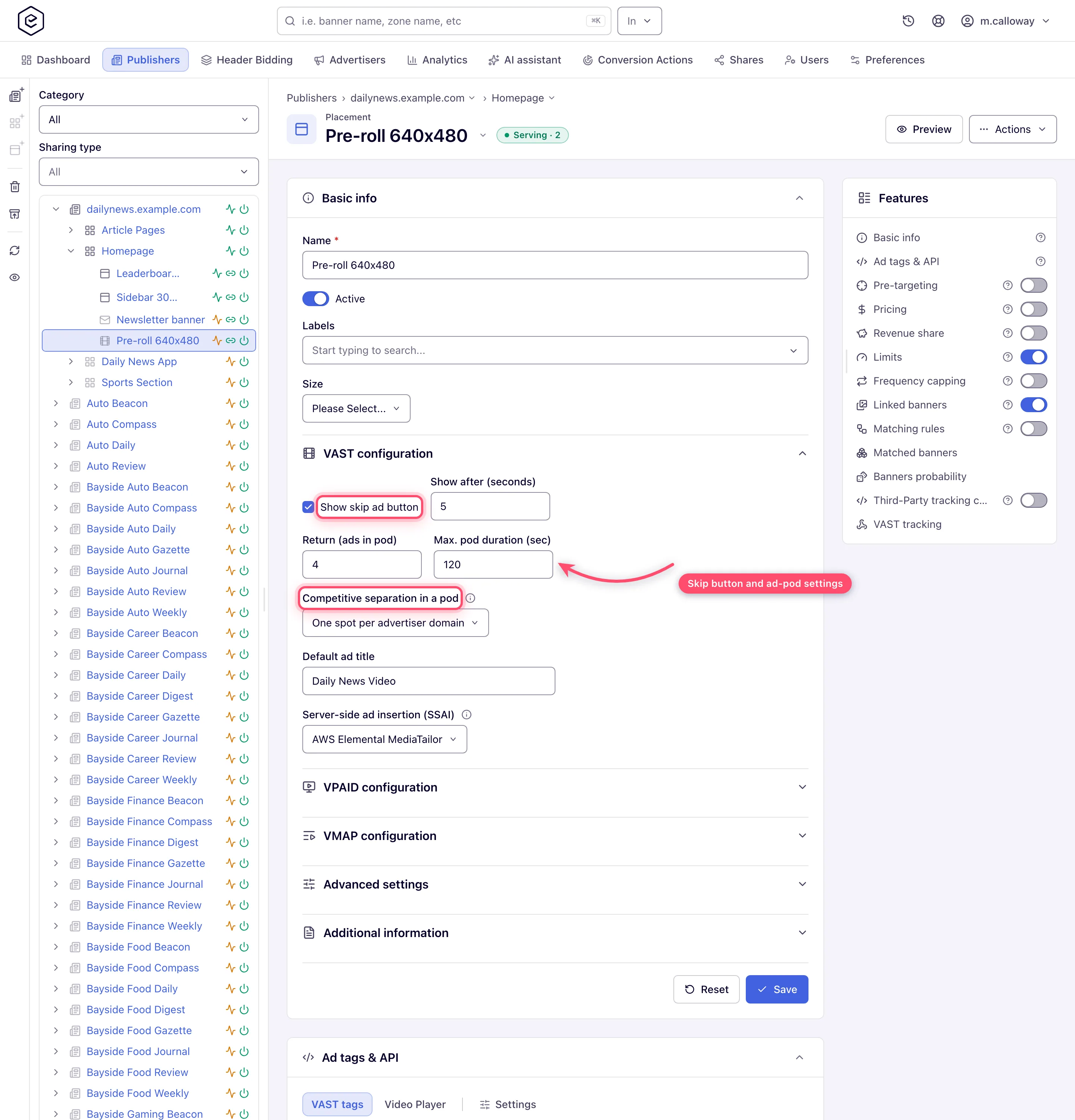
- Show skip ad button + Show after (seconds) (0–60; the seconds field unlocks only when the checkbox is on);
- Return (ads in pod) — how many creatives one request returns (1–20);
- Max. pod duration (sec) — total pod length cap (10–1800, empty = no restriction; the arrows move by 10, any whole number in range is accepted);
- Competitive separation in a pod — keeps competing advertisers out of one ad break (see Keeping competitors apart in a pod);
- Default ad title — used when a creative carries no title;
- Server-side ad insertion (SSAI) — names the stitcher that calls the tag, if any (see below);
- Publisher video requirements — read-only, shown only when your role can view video creative requirements and the site’s requirements are switched on: the site’s video spec, which decides which uploaded videos are served here, with an Edit on the site link.
-
The three groups sit in the order VAST configuration → VPAID configuration → VMAP configuration. VPAID configuration shows the linear-break cap (“Show no more than … ads”), read-only and reflecting the placement’s stored value; VMAP configuration carries Max pre-rolls (1–10) for VMAP responses.
-
In RTB configuration — drawn only if your role holds Video RTB Configuration; ask your network admin if it is missing — declare what your player supports so programmatic demand bids correctly:
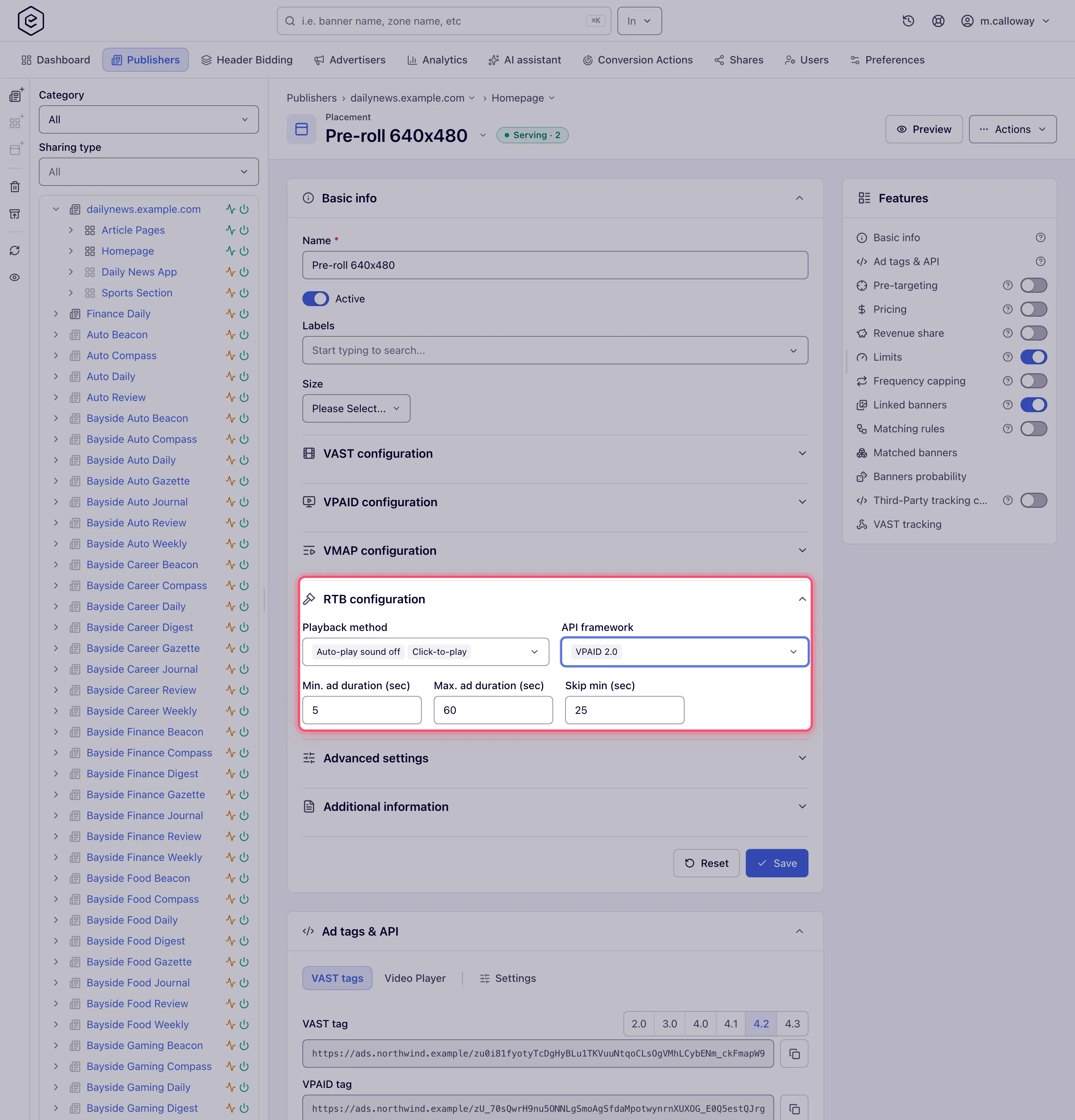
- Playback method and API framework (multi-select);
- Min. / Max. ad duration (sec) and Skip min (sec).
Over the REST API these are
videoPlaybackMethod,videoApiFramework,videoAdMinDuration,videoAdMaxDurationandvideoAdSkipMinonPOST /rest-api/placements/update/video.do, read back byGET /rest-api/placements/{placementId}.do. Playback methods and API frameworks are named by their OpenRTB names or ids (AUTO_PLAY_SOUND_OFFor2,VPAID_2_0or2), comma-separated; an empty value clears the list and leaving the parameter out keeps it. Without the Video RTB Configuration permission the call still saves the rest of the placement and lists these fields underignoredFieldsasnot permitted. The placement’s other bid-request settings — custom tag id, IAB categories, blocked categories and blocked creative attributes — are on the separate RTB configuration card: see Set a placement’s OpenRTB settings. -
Click Save — one save writes Basic info together with all VAST/VPAID/VMAP and RTB preferences.
-
Copy the tag for your player from the Ad tags & API card’s VAST tags tab (it sits before the Video Player demo tab):
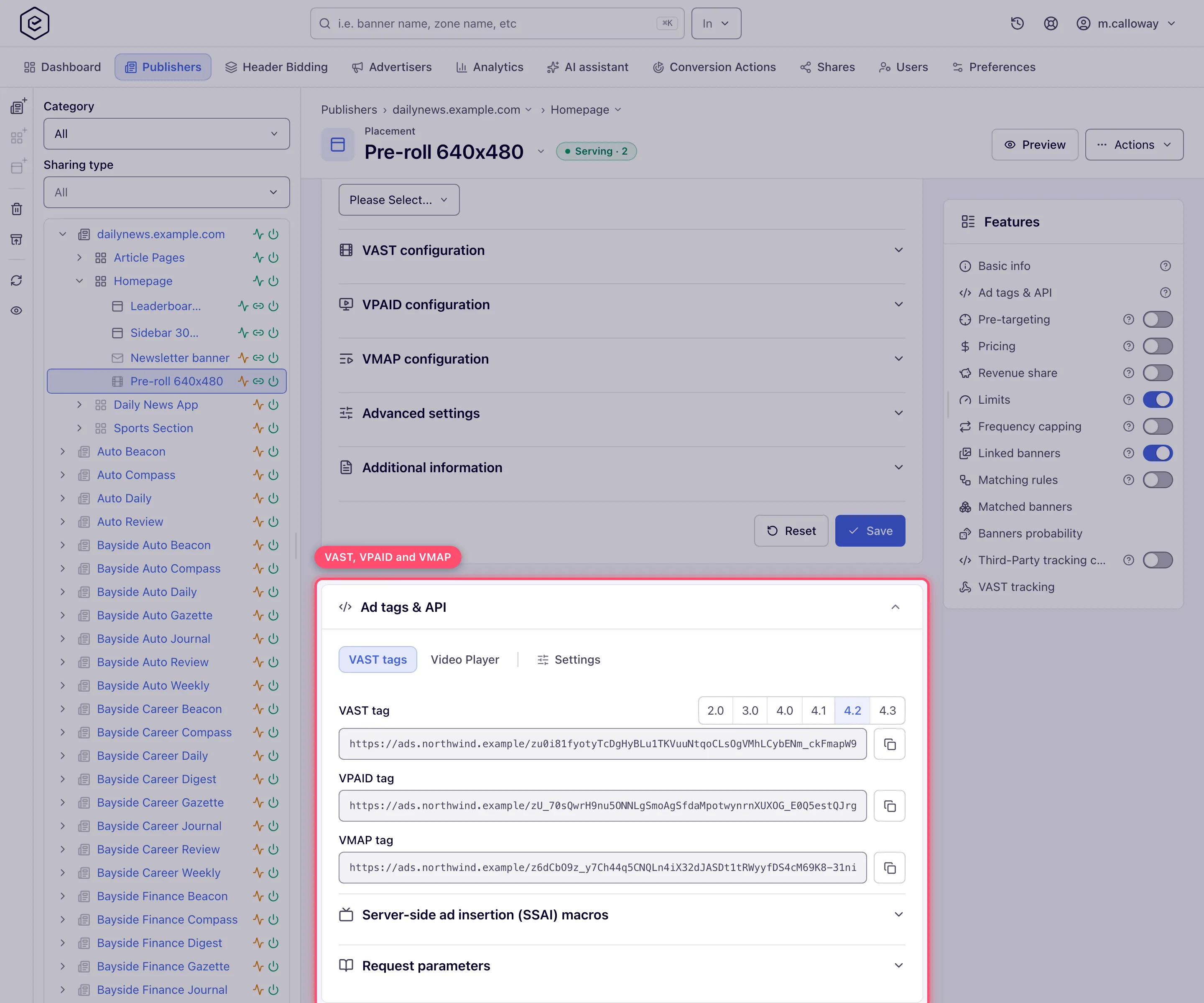
- if your network has more than one ad-serving domain, pick the Domain on the Settings tab first — the picker is there whenever at least one domain is configured, and the choice saves on the placement the moment you make it;
- pick the spec your player asks for in the VAST version picker on the VAST tag row — 2.0, 3.0, 4.0, 4.1, 4.2 or 4.3, 4.2 by default. The field reloads with the tag for that version; only the version changes, not the key, domain or defaults. Leave it at 4.2 unless your player demands otherwise — 4.1 is the lowest version that can be viewability-measured;
- copy the VAST tag, VPAID or VMAP URL with the copy button. VPAID and VMAP do not follow the picker — each is served at its own fixed version, below the 4.1 viewability floor. All three URLs carry the Domain, Protocol and any default parameters you set in Settings, and the tab refreshes them when you change a setting.
-
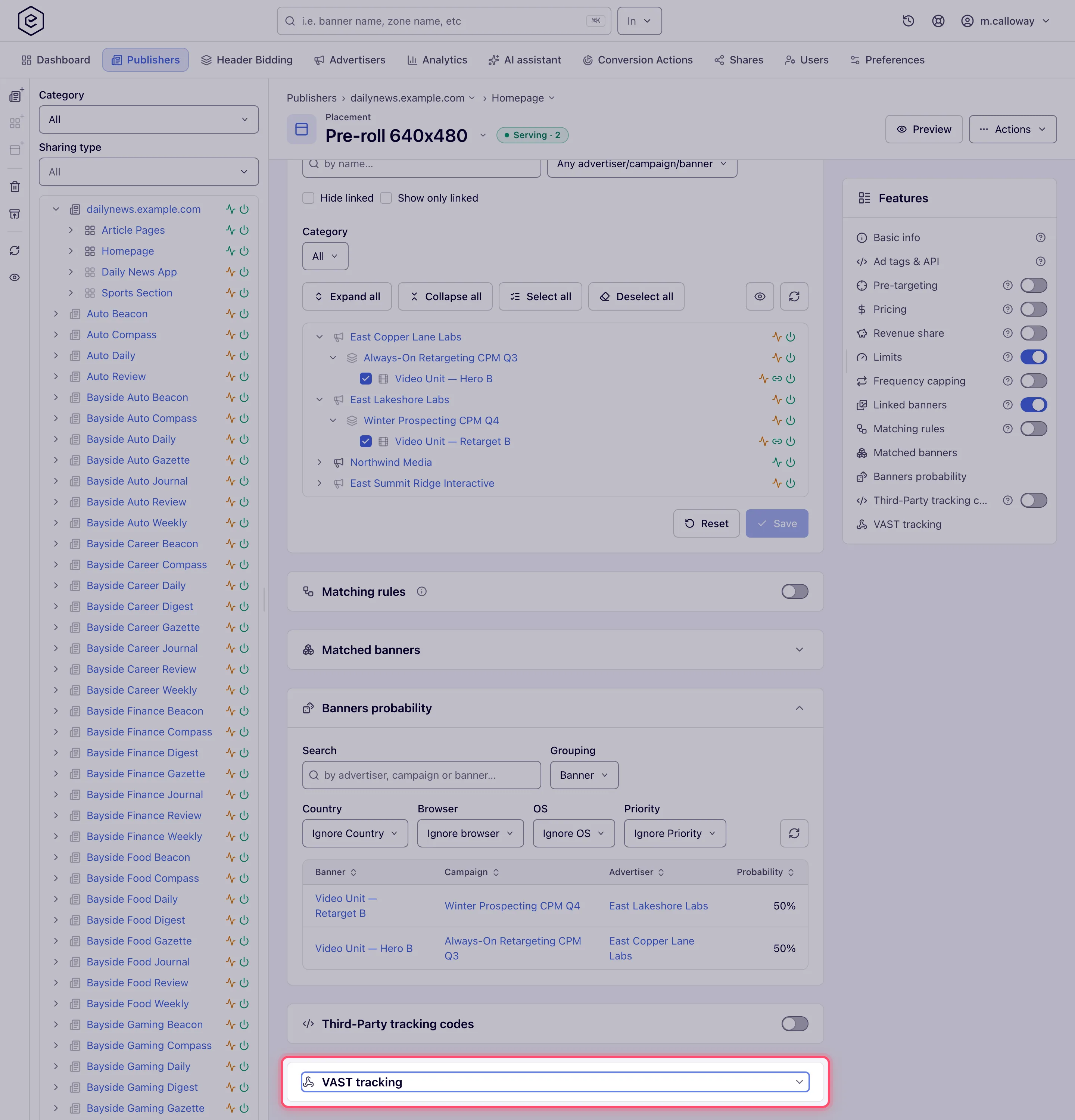
Optionally configure the VAST tracking card (see below).
VAST tracking card
Appears on saved video placements; editing it needs the Manage Placement’s VAST Events permission. Three sections:
-
Playback events — toggle which standard VAST events are recorded, grouped as Quartiles & completion (loaded, creative view, start, first quartile, midpoint, third quartile, complete), Interaction (skip, mute/unmute, pause/resume, fullscreen, expand/collapse) and Viewability & other. Select all / Deselect all / Save.
A new video placement does not have to start empty: the events an admin ticks under Default VAST tracking events → New video placements (see Rules, defaults and taxonomies) are already switched on when the placement is created. Change them here like any hand-picked set.
The four Viewability events — Ad viewable impression, Ad repeated viewable impression, Ad not viewable impression and Ad view undetermined impression — are what Open Measurement reports on a third-party player. Wire at least one of them to something, or the tag carries no measurement at all: Epom will not load a verification script that has nowhere to report to. A third-party pixel set to fire on a viewability event counts as wiring it, so a placement can be measured without ticking an Epom action at all.
-
Progress points — fire a conversion action at a custom playback time: pick the action, enter the time as
HH:mm:ss, Add. Existing points list in a table with multi-select delete. -
Third-party pixels — fire an external tracking URL on impression, click or a specific VAST event of your choice. Click a pixel’s URL or its Fires on value to change it in place.
The banner and the placement both have VAST tracking — which fires?
A video banner has the same kind of card, and the VAST response combines the two:
- Third-party pixels add up. Every pixel of the banner and every pixel of the placement is
written into the VAST (
<Impression>, click tracking and event<Tracking>elements alike) — the banner’s first, then the placement’s. A partner’s pixel set on both is called twice. - Progress points add up too: each one, from either card, gets its own tracking URL.
- Playback events do not double. Each standard event is recorded once. When the event is switched on in both cards, the placement’s setting is the one written into the VAST, so the event is recorded under the conversion action the placement uses for it; switched on in only one card, that card’s is used.
Serving behind server-side ad insertion (SSAI)
On CTV most streams stitch the ad into the video on a server: a stitcher (AWS MediaTailor, Google DAI, Yospace, FreeWheel…) calls the placement’s VAST tag on behalf of each viewer and usually fires the tracking pixels from its own servers. The request therefore comes from a data centre, and Epom reads the viewer’s details from what the stitcher forwards:
| Viewer detail | Taken from, first match wins |
|---|---|
| IP address | clientIp tag parameter → X-Device-IP → X-Forwarded-For (first address) → other proxy headers → the connection |
| User-Agent | clientUa tag parameter → X-Device-User-Agent → the request’s User-Agent |
| Language | X-Device-Accept-Language → Accept-Language |
| Page / app referer | X-Device-Referer → Referer → X-Referer |
The device User-Agent replaces the stitcher’s rather than being combined with it, so device, OS and browser targeting, bot detection and the User-Agent sent to programmatic demand all see the TV, not the stitcher. The same rules apply to impression, click and VAST event pixels, so a pixel fired by the stitcher with the viewer’s headers counts against that viewer.
What the creative side of the response carries for a stitcher — a stable creative id, the mezzanine file and event names every VAST version accepts — is described under Video banners.
Tell Epom which stitcher calls the tag
Headers are not all a stitcher can pass on. Most of them also fill macros in the tag URL with the viewer’s IP, user-agent, device advertising ID and app — but each vendor has its own macro syntax, and nothing is filled unless the tag asks for it.
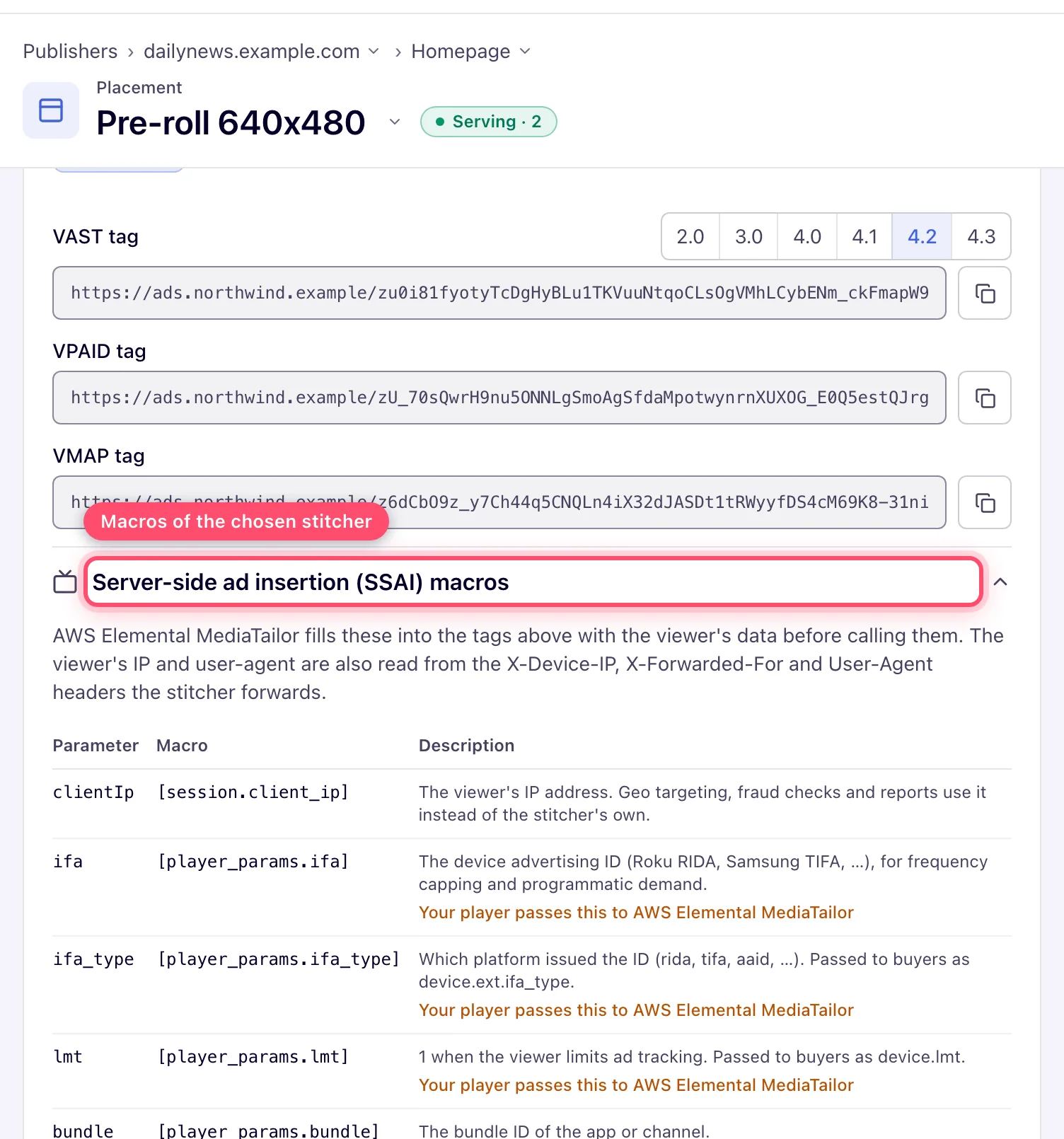
Server-side ad insertion (SSAI), in the placement’s VAST configuration block, names the service that calls this VAST tag on the viewer’s behalf. Its macros for the viewer’s IP, user-agent, device ID and app are added to the tag on the Ad tags & API → VAST tags tab. Pick it and Save; the tab then shows the tags with that vendor’s macros and, below them, the Server-side ad insertion (SSAI) macros table explaining each one. The setting needs no permission of its own — anyone who can edit the placement can change it.
| Setting | Macros added to the VAST and VMAP tags |
|---|---|
| Off (default) | none — players call the tag directly |
| IAB standard macros | clientIp=[DEVICEIP]&clientUa=[DEVICEUA]&ifa=[IFA]&ifa_type=[IFATYPE]&lmt=[LIMITADTRACKING]&bundle=[APPBUNDLE] |
| Google Ad Manager DAI | the same IAB macros, which is the syntax DAI documents |
| AWS Elemental MediaTailor | clientIp=[session.client_ip]&ifa=[player_params.ifa]&ifa_type=[player_params.ifa_type]&lmt=[player_params.lmt]&bundle=[player_params.bundle] — no user-agent macro: MediaTailor forwards the viewer’s User-Agent header |
| SpringServe (Magnite) | clientIp={{IP}}&clientUa={{USER_AGENT}}&ifa={{DEVICE_ID}}&ifa_type={{IFA_TYPE}}&bundle={{APP_BUNDLE}} — SpringServe has no limit-ad-tracking macro |
| Brightcove SSAI (VOD) | clientIp={{system.ip_address}}&clientUa={{system.user_agent}}&ifa={{url.ifa}}&ifa_type={{url.ifa_type}}&lmt={{url.lmt}}&bundle={{url.bundle}} |
What each parameter carries — the same descriptions the macros table shows:
| Parameter | What the stitcher fills in |
|---|---|
clientIp | The viewer’s IP address. Geo targeting, fraud checks and reports use it instead of the stitcher’s own. |
clientUa | The viewer’s device user-agent, for device, OS and browser targeting. |
ifa | The device advertising ID (Roku RIDA, Samsung TIFA, …), for frequency capping and programmatic demand. |
ifa_type | Which platform issued the ID (rida, tifa, aaid, …). Passed to buyers as device.ext.ifa_type. |
lmt | 1 when the viewer limits ad tracking. Passed to buyers as device.lmt. |
bundle | The bundle ID of the app or channel. |
- Player-provided values. MediaTailor’s
[player_params.*]and Brightcove’s{{url.*}}are filled only from what your player passes to the stitcher’s session — the table on the VAST tags tab marks them. Passifa,ifa_type,lmtandbundlefrom the player, or they arrive empty. - Your own defaults win. A parameter you already set as a
default parameter (say
ifa=${IFA}) keeps your value; the stitcher’s macro for it is not added. - A macro the stitcher leaves unfilled is ignored.
[DEVICEUA],{{IP}}and the like arriving literally count as “not sent”, so a stitcher that does not know a macro cannot turn it into one shared fake device. - Device IDs.
ifa_type(rida,tifa,aaid, …) andlmtare forwarded to programmatic demand as OpenRTBdevice.ext.ifa_typeanddevice.lmt. An all-zero ID — what a TV hands out once the viewer limits ad tracking — is treated as no ID, so those viewers are not merged into one for frequency capping. - Programmatic demand is told the impression is stitched server-side: bid requests from an
SSAI placement carry OpenRTB
imp.ssai = 3. - Macros go into the tag only, not into tracking pixels: the stitchers above document no substitution inside the VAST they return, so pixels rely on the forwarded headers described above.
The setting is also on the REST API (ssaiStitcher on /rest-api/placements/update/video) and is
copied when the placement is duplicated.
Warning: a stitcher that forwards no viewer IP sends every viewer’s pixels from a few addresses of its own. Impression-fraud detection then sees one address with thousands of impressions and bans it, and every ad request through that stitcher can then be blocked. Ask the stitcher to send
X-Device-IP(orX-Forwarded-For), and add its egress ranges as Whitelist rows on the Ban & white-listed iPs tab under Admin → Validation & anti-fraud → Validation settings — see Moderation & quality.
Options and fields
VAST configuration (in this order on screen):
| Field | Range / values | Default | Notes |
|---|---|---|---|
| Show skip ad button | on/off | off | Unlocks the seconds field |
| Show after (seconds) | 0–60 | 5 | Only when the skip button is on |
| Return (ads in pod) | 1–20 | 1 | >1 turns the response into an ad pod |
| Max. pod duration (sec) | 10–1800, whole numbers (arrows move by 10) | no restriction | Empty = unrestricted |
| Competitive separation in a pod | Off, One spot per advertiser domain, One spot per advertiser domain and advertiser category | Off | Applies only when the response is a pod — see below |
| Default ad title | text | — | Fallback VAST AdTitle |
| Server-side ad insertion (SSAI) | Off, IAB standard macros, Google Ad Manager DAI, AWS Elemental MediaTailor, SpringServe (Magnite), Brightcove SSAI (VOD) | Off | Adds the vendor’s viewer macros to the VAST/VMAP tags — see above |
VPAID, VMAP and RTB configuration:
| Field | Range / values | Default | Notes |
|---|---|---|---|
| Show no more than (ads) (VPAID) | read-only | — | Reflects the stored linear-break cap |
| Max pre-rolls (VMAP) | 1–10 | 2 | |
| Playback method / API framework | multi-select | none | RTB signal only; needs Video RTB Configuration |
| Min. ad duration / Max. ad duration / Skip min (sec) | seconds | — | RTB signal only; needs Video RTB Configuration |
Ad tags & API card:
| Field | Range / values | Default | Notes |
|---|---|---|---|
| VAST version (VAST tags tab) | 2.0, 3.0, 4.0, 4.1, 4.2, 4.3 | 4.2 | Sets the tag URL’s version; 4.1+ is required for viewability measurement |
| Domain (Settings tab) | one of the network’s serving domains | first configured | Present whenever the network has at least one domain, and saved on the placement as soon as you pick it |
A player can override Return (ads in pod) and Max. pod duration for a single break by
appending maxAds / maxPodDuration to the VAST tag URL — see
Overriding the ad pod for one VAST request.
Keeping competitors apart in a pod
A pod is filled one spot at a time, each the winner of the auction among what is left. Before a winner joins the pod it is compared with the spots already in it, and when it conflicts it is passed over for this break and the next winner is tried:
- The same spot never plays twice in one break, whatever the setting — two creatives with the
same ISCI / Ad-ID code, or a DSP bid whose VAST carries that code in
<UniversalAdId>. Creatives without a code are only told apart by creative. - One spot per advertiser domain — a second spot from an advertiser with the same domain
(the advertiser’s Advertiser domain;
https://www.toyota.com/andtoyota.comare one) is passed over. A DSP bid is compared by theadomainin its own bid, not by the advertiser its DSP creative belongs to in Epom. - One spot per advertiser domain and advertiser category — also passes over an advertiser that shares an Advertiser category with one already in the break, so two car brands never sit back to back. DSP bids carry no Epom advertiser category and are compared by domain only.
When nothing that fits is left, the break is simply shorter — no slot is left empty. The check runs in memory while the pod is assembled and adds no database work to ad serving.
The setting is also on the REST API (podSeparation on /rest-api/placements/update/video), is
read back by GET /rest-api/placements/{placementId}.do, and is copied when the placement is
duplicated.
Corner cases and gotchas
Corner case: a tag copied from the classic placement page cannot be viewability-measured. That page still shows a fixed row per tag — VAST 3.0, VAST 4.0, VPAID and VMAP — with no version picker, and every one of them is below the 4.1 floor Open Measurement needs. Take the tag from the new interface’s VAST tags tab instead. This also applies to tags already pasted into a player: a tag serving 3.0 or 4.0 carries no viewability. Re-copying it at 4.2 is the fix only if that player implements Open Measurement — in one that does not, no tag version produces viewability, and while Open Measurement is enabled such a player receives no
<ViewableImpression>either.
Corner case: VPAID and VMAP tags ignore the version picker. VMAP is pinned to VAST 3.0 and cannot move: the
templateTypeattribute in the VMAP 1.0 schema has no value abovevast3, so there is no legal name for a newer template. VPAID is pinned too, but the server has two answers — the endpoint that rebuilds tags against a chosen domain returns 3.0, while the fallback used when there is no domain to rebuild against returns 4.0. Either way both sit below the 4.1 floor, so neither can be viewability-measured, and neither follows the picker.
Corner case: the RTB Playback method / API framework / durations are bid-request signals, not filters for your directly-linked banners. A directly linked 60-second banner still serves even if Max. ad duration says 30 — the constraint applies to programmatic demand.
Corner case: the whole video preference block saves with the Basic info Save button. There is no separate save inside VAST/VMAP/RTB sections — if you edit pods and navigate away without saving Basic info, the changes are lost (the unsaved-draft banner will offer to restore them on return).
Corner case: in read-only mode the VAST tracking card hides entirely when nothing is configured (no events, no progress points, no pixels) — its absence doesn’t mean the feature is missing from the product.
Corner case: two different things are titled RTB configuration here. The group in this page’s step 4 lives inside Basic info and describes your player. The separate RTB configuration card further down the page carries the custom tag id and the IAB categories sent in bid requests; it appears on every saved placement if your role has OpenRTB access, not just on video ones — see Set a placement’s OpenRTB settings.
Note: the Advanced settings group on a video placement shows Domain as default channel, plus Disable auto-Linking and Flexible placement size if your role allows them. Branded overlay, Refresh after (sec) and Always redirect belong to the display family and are not offered on a video placement.
Per-role notes
- Publisher and network manager — the same page for both, including the VAST tracking card and the VAST / VPAID / VMAP tag tabs.
- Can View share — preference fields are read-only, tag URLs stay copyable, and VAST tracking shows only the events that are on.
- Demo account — Preview opens the demo showcase page with this placement’s VAST tag in the demo player.
Exact grants: see User roles.
