
Set a placement's OpenRTB settings
Use a placement's RTB configuration card — custom tag id, IAB category, blocked IAB categories and blocked banner attributes — to shape the bid requests DSP partners receive for that slot, in the console, over the REST API or through an AI assistant.
Every placement that sells to DSP partners sends them an OpenRTB bid request. The placement’s RTB configuration card lets you shape that request for this one slot: give it your own tag id, describe its content with an IAB category, and refuse creatives by IAB category or by creative attribute. None of these settings affect direct campaigns you trafficked inside Epom — they only travel in bid requests to programmatic demand.
Who this is for
Network managers who sell placements to DSP partners. The card needs the Open RTB permission — if it is missing, ask your network administrator to turn it on in Admin → Users & access → User roles & permissions. Changing the card also needs update rights on the placement’s site (your own site or an editable share).
The video bid-request fields — playback method, API framework, durations — are a different block with its own permission, Video RTB Configuration; see Video bid-request settings below.
Prerequisites
- A saved placement — the card appears only after the first save, on every placement type.
- At least one DSP partner that actually bids on this placement, or the settings have nothing to travel in (see Programmatic DSP demand).
Steps
- Open the placement (Account → Publishers → site → zone → placement) and find the
RTB configuration card, directly below Pre-targeting. It is collapsed unless something on
it is already set — click its title to open it.
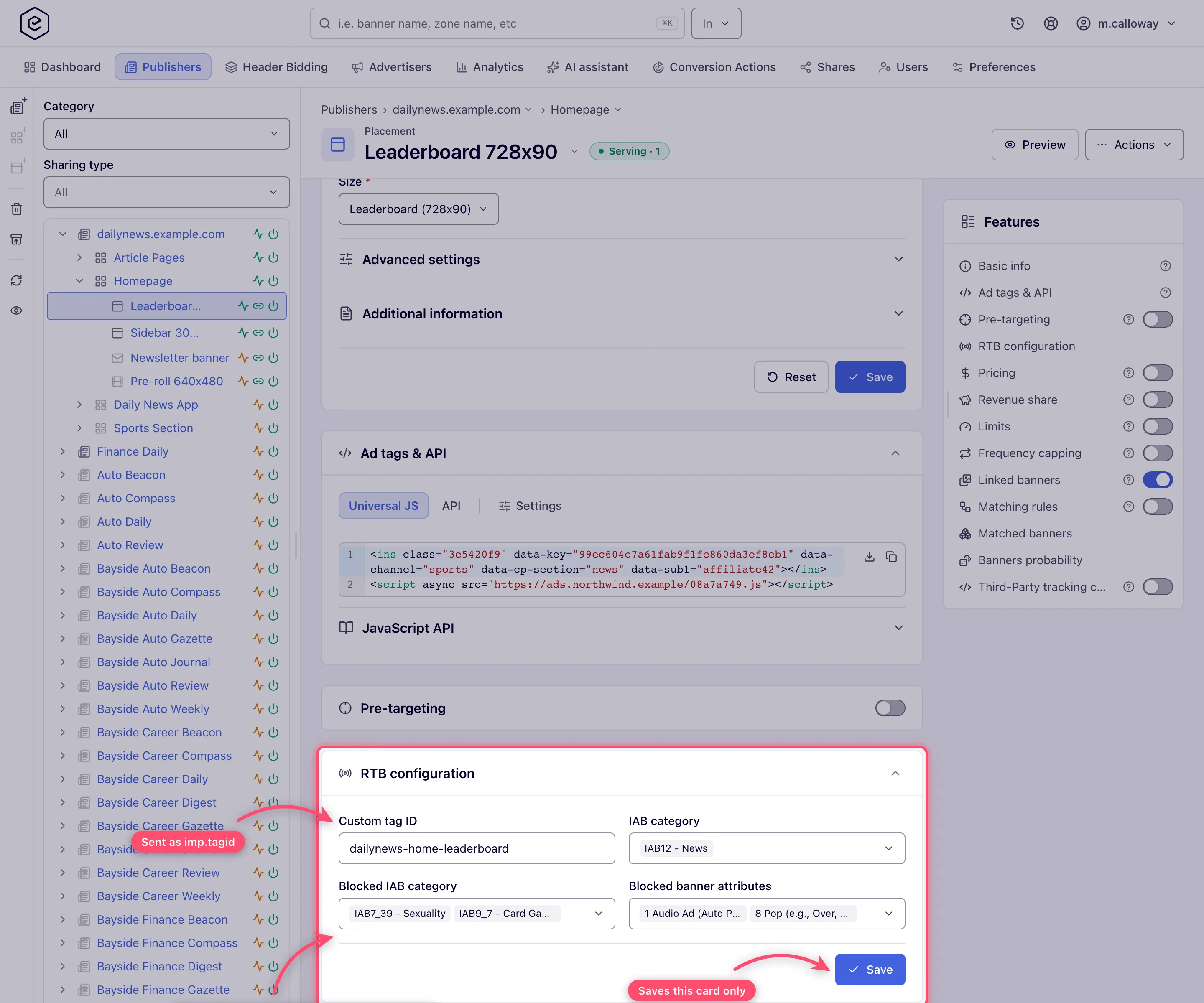
- Type a Custom tag ID — the id DSPs see for this slot instead of the placement key. Surrounding spaces are trimmed; leave it blank to send the placement key.
- Open IAB category and tick the categories that describe what the slot’s page is about. Type in
the box at the top of the list to narrow it — a code such as
IAB12or a word from the name such asnews. - Open Blocked IAB category and tick the categories you ask DSPs not to bid with. Blocking is a request, not a filter — see the corner cases below.
- Open Blocked banner attributes and tick the creative behaviours you refuse. Each row is the
OpenRTB attribute id and its description, for example
8 Pop (e.g., Over, Under, or upon Exit).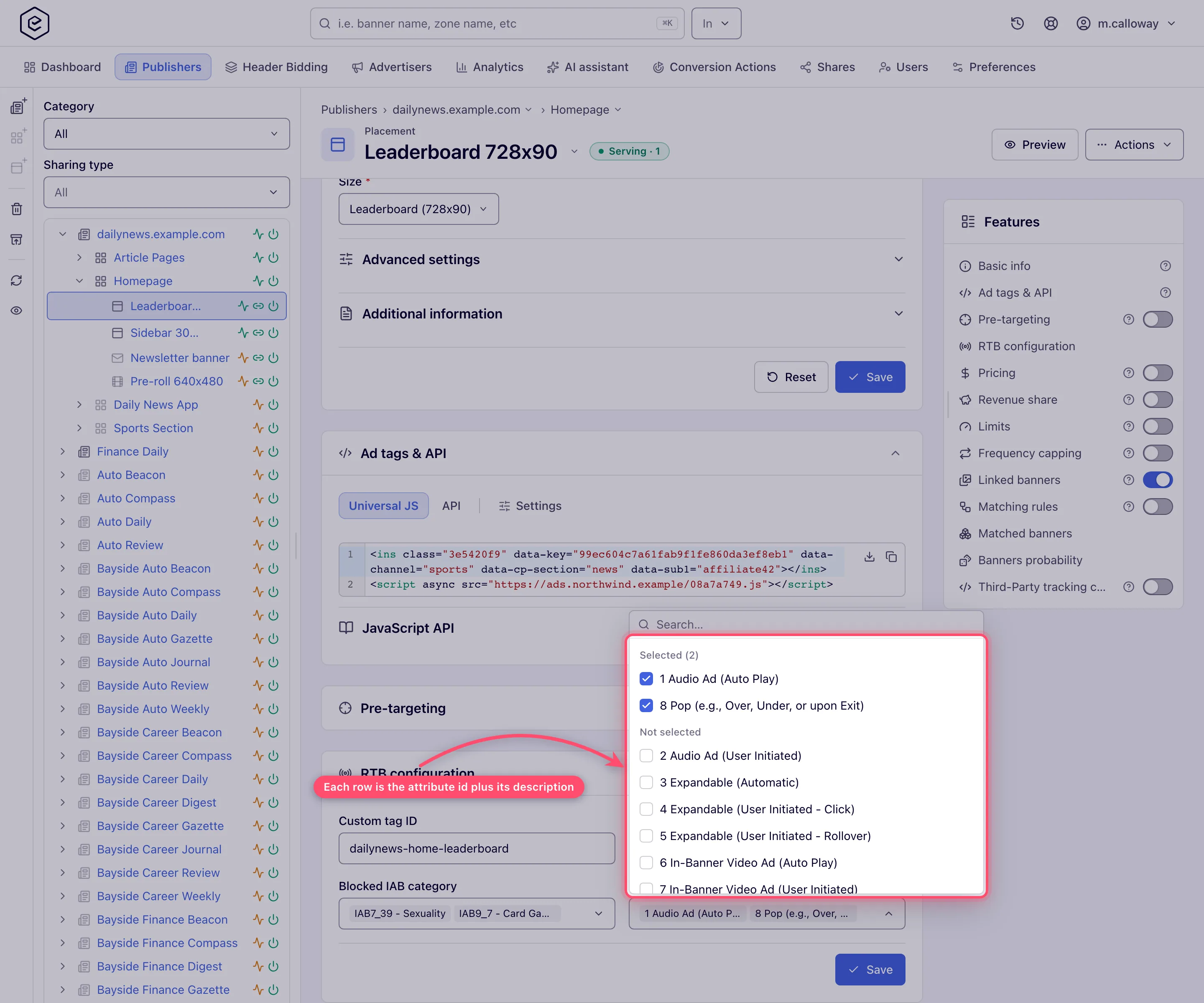
- Click the card’s own Save. A Done toast confirms it, and after a reload every pick comes back as a chip. The card saves on its own — the placement’s Basic info Save does not write it, and this Save does not write Basic info.
How the pickers behave
The three pickers are filled from two fixed lists: the 391 IAB content categories, each labelled
code - description (IAB25_3 - Pornography), and the 16 creative attributes, each labelled
id description. The site and zone cards use the same IAB list.
- Search matches text anywhere in the row, in any case. Both
IAB25_3andpornographyfindIAB25_3 - Pornography. For attributes, a word (audio,pop) or the id (8) works. - Type the code the way the label shows it. The label uses an underscore, so
IAB25-3finds nothing here, although the REST API accepts that spelling. The API names in the table below (AUDIO_AD_AUTO_PLAY) are not in the console labels either — searchaudio. - A short code matches more than it names.
IAB1lists 158 rows: IAB1, all its sub-codes and IAB10 to IAB19 with theirs. Add what follows the code to narrow it —IAB1 -finds only the top-level IAB1,IAB1_only its sub-codes. - Ticked rows come first. With more than ten options, opening a picker gathers what is ticked under Selected (N), above Not selected. The order stays fixed while the list is open and is not applied while you search.
- The field shows two chips and a counter. Only the first two picks are drawn, in list order rather than the order you ticked them, cut to a short width, then +N more. The chips have no ✕: open the picker to see every pick in full and to untick one.
What each field puts in the bid request
| Field | Bid-request field | What DSPs get |
|---|---|---|
| Custom tag ID | imp.tagid | This value instead of the placement key. Blank means the placement key is sent. Publisher macros such as $$PLACEMENT_ID$$ or $$CUSTOM_PARAM(section)$$ are expanded per request |
| IAB category | site.pagecat (or app.pagecat for app inventory) | The placement’s IAB content categories |
| Blocked IAB category | bcat | Merged with the site’s and the zone’s blocked categories |
| Blocked banner attributes | battr on the impression object | The OpenRTB creative-attribute ids — on imp.video for a video creative on a video placement, imp.native for a native creative, imp.banner otherwise |
The IAB categories come from the fixed IAB content taxonomy (IAB1…IAB26 and their subcodes,
391 entries), not from your network’s own advertising categories. The banner attributes are the
OpenRTB creative-attribute list; the console shows the id and description, the API takes the name
or the id:
| Id | Console label | Name over the API |
|---|---|---|
| 1 | Audio Ad (Auto Play) | AUDIO_AD_AUTO_PLAY |
| 2 | Audio Ad (User Initiated) | AUDIO_AD_USER_INITIATED |
| 3 | Expandable (Automatic) | EXPANDABLE_AUTOMATIC |
| 4 | Expandable (User Initiated - Click) | EXPANDABLE_USER_INITIATED_CLICK |
| 5 | Expandable (User Initiated - Rollover) | EXPANDABLE_USER_INITIATED_ROLLOVER |
| 6 | In-Banner Video Ad (Auto Play) | IN_BANNER_VIDEO_AD_AUTO_PLAY |
| 7 | In-Banner Video Ad (User Initiated) | IN_BANNER_VIDEO_AD_USER_INITIATED |
| 8 | Pop (e.g., Over, Under, or upon Exit) | POP |
| 9 | Provocative or Suggestive Imagery | PROVOCATIVE_OR_SUGGESTIVE_IMAGERY |
| 10 | Shaky, Flashing, Flickering, Extreme Animation, Smileys | SHAKY_FLASHING_FLICKERING_EXTREME_ANIMATION_SMILEYS |
| 11 | Surveys | SURVEYS |
| 12 | Text Only | TEXT_ONLY |
| 13 | User Interactive (e.g., Embedded Games) | USER_INTERACTIVE |
| 14 | Windows Dialog or Alert Style | WINDOWS_DIALOG_OR_ALERT_STYLE |
| 15 | Has audio on/off button | HAS_AUDIO_ON_OFF_BUTTON |
| 16 | Ad can be skipped (e.g., skip button on preroll video) | AD_CAN_BE_SKIPPED |
How the placement combines with its site and zone
Sites and zones have their own OpenRTB integration card (see Create and edit a site and Work with zones). Nothing overrides anything — each level either fills its own field or is merged:
| Setting | Site | Zone | Placement | In the bid request |
|---|---|---|---|---|
| IAB category | site.cat / app.cat | sectioncat | pagecat | All three, each in its own field |
| Blocked IAB category | yes | yes | yes | Union of all three in bcat — blocked at any level means blocked |
| Blocked banner attributes | — | — | yes | Placement only |
| Custom tag ID | — | — | yes | Placement only |
| Open RTB publisher ID | shown, read-only | — | — | Derived from the site; nothing to set |
So you cannot unblock at the placement a category the site blocks — remove it on the site (or zone) instead. To block a category on one slot only, block it on that placement and leave the site and zone lists alone.
Video bid-request settings
A video placement also tells DSPs what its player can do: Playback method, API framework, Min. ad duration (sec), Max. ad duration (sec) and Skip min (sec). These live in a subsection of the Basic info card, confusingly also titled RTB configuration, are saved with the Basic info Save, and need the Video RTB Configuration permission rather than Open RTB. A native placement shows the two duration fields only. Only an administrator can grant that permission. The full description is on Video placements.
Over the API
| Method | Path | Does |
|---|---|---|
| GET | /rest-api/placements/{placementId}/openrtb.do | Returns placementId, customOpenRtbTagId, iabCategories and blockedIabCategories (each {id, code, description}) and blockedBannerAttributes (each {name, id, description}) |
| POST | /rest-api/placements/{placementId}/openrtb.do | Sets any of iabCategories, blockedIabCategories, blockedBannerAttributes, customOpenRtbTagId; returns the settings after the save, in the shape of the GET |
| GET | /rest-api/iab-categories.do | The IAB catalogue: every category’s id, code and description |
Rules of the POST, as the server applies them:
- Only the fields you send change. A field you leave out keeps its stored value.
- A field sent empty clears it —
blockedIabCategories=removes every blocked category of the placement;customOpenRtbTagId=goes back to sending the placement key. - Categories are named by IAB code or by catalogue id, comma-separated. Codes are read in any case
and with
-or_:IAB7_39,IAB7-39andiab7_39are the same category. A bare number is the catalogue id from/rest-api/iab-categories.do, not the IAB number —7is a row id, notIAB7. Banner attributes are named by name (any case) or OpenRTB id:POPor8. - One unknown category or attribute refuses the whole request with a
400that names it — nothing is half-saved. A custom tag id over 256 characters is a400too, and so is a POST that sends none of the four fields. 403when your role lacks Open RTB (Your role lacks the OPEN_RTB permission.) or you have no rights on the placement’s site (view rights for the GET, update rights for the POST);404for a deleted or unknown placement (Placement 4012 not found.).
The video fields are videoPlaybackMethod and videoApiFramework (plus the durations) on
POST /rest-api/placements/update/video.do, read back by GET /rest-api/placements/{placementId}.do
— see Video placements.
Example: block pop-unders and auto-play audio on one slot of an invented site, and give it a tag id that carries the section the page passes in:
POST /rest-api/placements/4012/openrtb.do
  blockedBannerAttributes=POP,AUDIO_AD_AUTO_PLAY
  customOpenRtbTagId=northwind-$$CUSTOM_PARAM(section)$$-top
Through an AI assistant
An AI assistant connected through MCP sees these settings in
placement_overview, in its openRtb section (the body of the GET above). When your role may not
read them, openRtb is empty and openRtbNote says This account may not read it. whoami says
what your role may change: openRtbSettings for this card, videoRtbSettings for the video fields.
To change them, the assistant runs the POST above (or update/video for the video fields) with
api_write, under the same rules — ask it, for example, “block pop-under creatives on the Harbour
Gazette homepage leaderboard”. It works with the API’s names (POP, IAB7_39), not the console
pickers’ descriptive labels, and reads the result back with the same GET.
Corner cases and gotchas
Corner case: the card’s Save writes the whole card — Custom tag ID and all three pickers in one request — so what you see is what is stored afterwards. Untick every pick of a list and Save to clear it; clear the tag field to go back to the placement key. The REST POST works the other way round and only changes the fields it carries. A card left open while someone changes the placement over the API therefore puts its old values back on its next Save: reload before you save.
Corner case: a Custom tag ID over 256 characters is refused on Save with the toast Custom open rtb tag id: size must be between 0 and 256, and nothing is saved. The field itself does not stop you typing more.
Corner case: blocked categories and attributes are signals to the DSP, not a server-side filter. Nothing checks a returned bid against
bcatorbattr, so a partner that ignores them can still win with such a creative. If one gets through, block that creative or its partner by name — see Keep unwanted ad categories off your inventory.
Corner case: none of these fields affect direct banners you linked to the placement — they never go through a bid request. Keep direct demand off with rules and name blocks instead.
Corner case: a placement cannot lift a block set higher up.
bcatis the union of site, zone and placement, so a category blocked on the site stays blocked on every placement under it.
Corner case: some partners read the tag id elsewhere as well — TrafficHunt, for example, receives it again as
imp.ext.subid.
Corner case: a
$$CUSTOM_PARAM(…)$$in the custom tag id that the request does not fill (the page did not pass that parameter) is, by default, dropped — the DSP receives the tag id with a gap in it. If nothing is left after the macros are expanded, the placement key is sent instead. Test the tag with the parameter present and absent.
Corner case: changes reach live traffic on the next ad-serving cache reload — every 10 minutes by default — not on the next request, and saving does not trigger a reload. Allow up to 10 minutes before checking a bid request.
Corner case: a pop placement on some ad networks (ExoClick, HilltopAds, TrafficStars and others) sends no banner object at all, so its blocked banner attributes never reach those partners.
Corner case: the page has two sections called RTB configuration. The card below Pre-targeting is this one (Open RTB); the subsection inside Basic info is the video one (Video RTB Configuration) and saves with Basic info.
Per-role notes
- Can View share — the card is locked and has no Save.
- Custom-role users — without Open RTB the card is absent and the REST endpoints answer
403; without Video RTB Configuration the video subsection is absent and an API save ignores its fields. - Demo account — the example placements are shared read-only, so their card is locked; on a placement you created it follows your role. See Demo accounts.
