
Review the actions log and troubleshooting log tasks
Read the Actions log audit trail, and capture the ad requests that match a placement, banner, IP or country for a time window with a Troubleshooting log task.
Two admin tools help you answer “who changed this” and “what did the ad server do with that request”: the Actions log audit trail, and Troubleshooting log tasks, which record the ad requests matching your filters for a time window — including why a banner was or was not chosen. Server monitoring and maintenance are not part of your admin area — Epom support runs them.
Who this is for
Network administrators. Each tool is its own Admin UI permission on your role — Actions Log and Troubleshooting Log Tasks — so a role can hold either alone. If your role lacks one you need, ask Epom support or your account manager to add it.
Prerequisites
- An admin role holding the matching permission (see Users, roles & permissions).
Steps
Read the audit trail
- Go to Admin → Audit & diagnostics → Actions log.
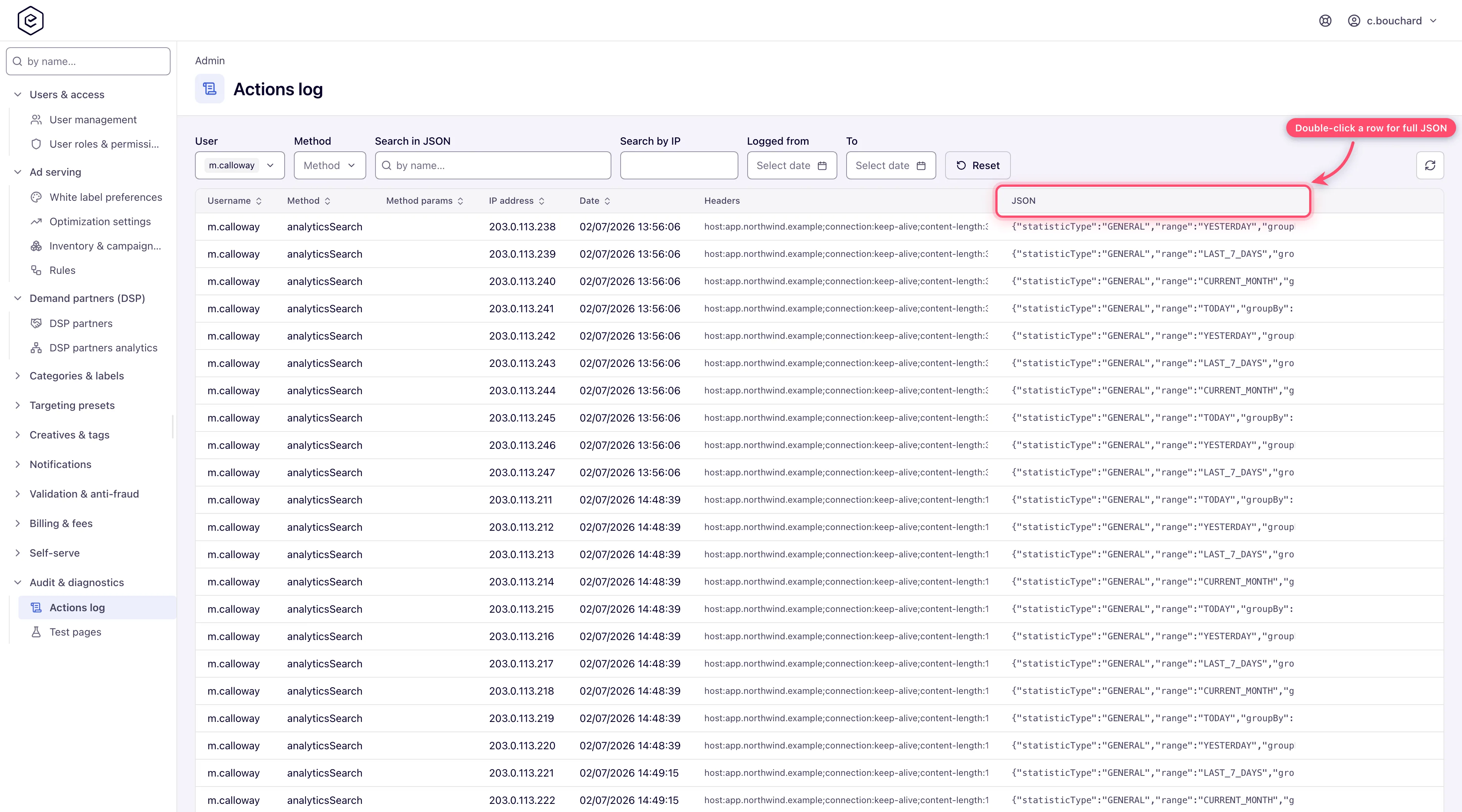
- Narrow with the six filters above the grid: User and Method are multi-selects built from the values already present in the log, Search in JSON and Search by IP are substring matches, and Logged from / To bound the date. Reset clears all six.
- Double-click a row to open the full JSON payload, pretty-printed, in a dialog. The JSON column in the grid only shows the first couple of lines.
Corner case: the grid opens oldest first, so the first page of a long-lived network is years old. Click Date once to get the recent end.
Capture ad requests with a troubleshooting log task
Use a task when a placement serves nothing, a header-bidding or RTB bid is refused, or a consent or deal question needs the ad server’s own verdict on a real request.
- Go to Admin → Audit & diagnostics → Troubleshooting log tasks. The grid lists ID, Title, Start date and End date, newest first, with a title search above it.
- Click Add. Give the task a Title and a Start and End — both in UTC. Keep the window short: a task records only the requests that arrive inside it.
- Narrow what is recorded. Under Filter by object: Param names / Param values, Placement IDs and Banner IDs. Under Filter by request: IPs, Countries, Cookie names / Cookie values, a Request URL mask, a Request body mask and HTTPS. Leave a field empty to not filter on it; the tighter the filters, the easier the result is to read.
- Pick the tracking mode — Track filtered events (sampled, with a Sampling ratio) or Track requests (full capture of each matching request) — and save. The toast reads Done.
- Reproduce the problem inside the window — load the page, play the video, send the bid.
- After the window ends, select the task and click Download. You get one archive with everything the task recorded.
Options and fields
Troubleshooting log tasks
| Control | What it does |
|---|---|
| Add / Edit | Opens the task form: title, UTC window, tracking mode and the filters above. |
| Download | Enabled with one row selected. Downloads one archive with everything the task recorded. |
| Delete | With one row selected: delete it alone (No, only selected), or it and every older task (Yes). With two: delete just those two, or every task between them too. With three or more: delete the selection after a confirm. |
Actions Log
| Column | Holds |
|---|---|
| Username | The signed-in user the action was attributed to. Blank for actions with no principal. |
| Method | A short label for the operation. Mostly a hand-written name (editCampaignPost, logIn, analyticsSearch), sometimes a URL — with any id-shaped path segment replaced by {id}. Capped at 63 characters. |
| Method params | The ids lifted out of the Method value by that substitution, comma-joined. Empty for the majority of rows. |
| IP address | The caller’s IP as resolved from the request. |
| Date | When the row was written. |
| Headers | Every request header except Cookie, joined with ;. Hover for the wrapped list. |
| JSON | The action’s payload — request parameters, cookies, or a serialized entity, depending on the action. A very long row has its longest string values shortened first so it stays valid JSON. Credential values are stored as *** (see the corner case below). A row that records a change also carries the values it replaced under before. |
| Filter | Behaviour |
|---|---|
| User | Multi-select. Lists only users who already have at least one row. |
| Method | Multi-select over the distinct Method values present in the log. |
| Search in JSON | Split on whitespace; every word must appear somewhere in the JSON payload. Substring, not word, matching. |
| Search by IP | Substring match on the IP column — 192.168 matches the whole subnet. |
| Logged from / To | Inclusive date bounds. |
| Reset | Clears all six and returns to page 1. |
Every row also records its source — UI, REST_API, LEGACY_REST, MCP,
or SYSTEM for rows written outside a request (older rows read SYSTEM). The
grid has no column or filter for it. A user can read their own rows, source included, with
GET /rest-api/action-log/mine.do (from, start, limit; newest first, never another
user’s).
Corner cases and gotchas
Corner case: deleting a user keeps their Actions Log rows. Each row stores the username it was written under, so the User column still names a deleted author; the User filter, which lists existing accounts only, can no longer select those rows, and the user’s own
GET /rest-api/action-log/mine.dois gone with the account.
Corner case: most of what the platform does is not in the Actions Log. Logging is opt-in per operation, so many leave no trace. Do not read a missing row as proof that nothing happened.
Corner case: credentials are masked, but the JSON column is still sensitive. Password and token parameters — and the password, API-key and set/reset-password link fields of a JSON body, at any depth — are stored as
***. The rows written for sign-ins include the request’s cookies as parsed values, and the Headers column keeps every header butCookie. Grant Actions Log only to people you would trust with session data.
Corner case: a troubleshooting log task records only requests that match its filters and arrive inside its window. An empty download usually means the window was in the wrong time zone (it is UTC) or a filter excluded the traffic — widen it and reproduce again.
Corner case: each task has a size cap. A busy placement with no other filter can reach it before the window ends, and nothing more is recorded after that. Filter by IP or country when you reproduce from a known machine.
Corner case: a serving trace started from the AI assistant is a troubleshooting log task too, and appears in this grid titled Serving trace of banner <id> by <user>. While it runs, no other serving trace can start in the network. Its summary is read through the assistant, by the user who started it.
Per-role notes
-
Admin without Actions Log or Troubleshooting Log Tasks — that page is not in the sidebar; opened by URL it shows Record not found.
-
Network manager, publisher, advertiser — cannot reach any admin page; they can read their own rows over the REST call above.
Exact grants: see Users, roles & permissions.
Related
- Admin area map
- Users, roles & permissions
- Test pages and your ad-serving domain — the hosted test pages in the same sidebar group
- Troubleshooting: ad not serving
- Report types and freshness
