
Ad tags, invocation codes and the API
The Ad tags & API card — which tag types each placement type offers, taking a tag live with the domain / ad-wrapper / protocol / fit-container settings and the default tag parameters, and installing it on WordPress or another CMS; the API and VAST reference, copy-and-preview and the FAQ have their own pages.
The Ad tags & API card on the placement editor is where inventory turns into code: one tab per available tag type, the knobs that change how the tag behaves, and — for API-served types — the integration documentation. This page takes a tag live: which tab to use, the settings and default parameters that shape every tag, and how to put the tag on a site.
The pages of this guide
| Page | What it covers |
|---|---|
| This page | Which tag types each placement type offers, the steps to take a tag live (Settings tab and default parameters), installing a tag on WordPress or another CMS |
| API tab, VAST tags and the JavaScript API | The API tab’s request URL and parameters, the VAST tags and Email tabs, ad-pod overrides on a VAST request, the loader’s JavaScript API, the same tags and defaults over REST and through an AI assistant |
| Copy and preview an ad tag | The copy-tag quick action in grids and the standalone preview page with its shareable link |
| Ad tag FAQ | Iframes and the ad wrapper, custom containers, Google Ad Manager, slot sizing and layout shift, several tags per page, auto-refresh, switching domains |
Who this is for
Publishers taking tags live and network managers supporting them. The card is on every saved placement that offers at least one tag tab; which tabs a given user gets is decided by per-tag-type permissions, see Per-role notes.
Prerequisites
- A saved placement that is switched on (the card doesn’t exist before the first save, and it disappears while the Active switch is off — straight away, before you save).
- Update rights on the placement’s site if you want to change the domain/wrapper/protocol settings or the default parameters — they persist on the placement, they’re not per-copy options.
Which tag types each placement type offers
| Tab | What it is | Site | Mobile site | Non-standard | Video | Native | Application | |
|---|---|---|---|---|---|---|---|---|
| Universal JS | Asynchronous JavaScript loader (an <ins> slot plus an async <script>) — the recommended default for web | ✔ | ✔ | ✔ | — | — | — | — |
| Mount JS | Bare JavaScript, no <script> tags: it creates the slot inside a container you pass in and loads the same loader — for single-page apps and late injection | ✔ | ✔ | ✔ | — | — | — | — |
| Simple Iframe | Plain iframe tag — maximum isolation, no page access | ✔ | — | — | — | — | — | — |
| Direct URL | The raw ad-serving URL — for systems that fetch markup themselves | ✔ | ✔ | ✔ | — | — | — | — |
| VAST tags | A VAST tag URL with a version picker (2.0–4.3, default 4.2), plus VPAID and VMAP tag URLs, for players | — | — | — | ✔ | — | — | — |
| Video Player | A ready-to-embed snippet with Epom’s demo player and a sample video, pointed at the placement’s VAST 4.0 tag | — | — | — | ✔ | — | — | — |
| Email-safe image + click URL pair and the Creative / Landing page URLs | — | — | — | — | ✔ | — | — | |
| API | Request-URL documentation with parameters and sample responses | ✔ | ✔ | ✔ | — | — | ✔ | ✔ |
Corner case: Universal JS and Mount JS need an ad-serving domain to exist. Both tabs are suppressed — on Site, Mobile Site and Non-standard alike — unless the network has at least one ad-serving domain (ask your network or Epom support to add one). On a network with none, each placement keeps only the tabs your role’s other permissions allow, and a placement left with none has no Ad tags & API card at all. For the stock Publisher, whose only tag on Site and Mobile Site placements is Universal JS, that means both lose the card, while a Non-standard placement keeps Direct URL. A role that holds Simple Iframe, Direct URL or API keeps those tabs. That is configuration, not a permission: granting Universal JS changes nothing until a domain exists. Over the REST API and the AI assistant, asking for either tag on such a network answers
400with the reason.
Every ✔ except VAST tags, Video Player and Email is also gated by its own per-tag-type permission — one set per placement family, so a role can hold Universal JS on Site placements and not on Mobile ones. If a tab you need is missing, ask your network admin for it; the Universal JS grants are set only on Admin → Users & access → Admin roles & permissions. Click-through placements have no tags at all — the card carries their tracking URLs instead (see Click-through placements). See the invocation codes reference for the full matrix and per-type markup samples.
What Mount JS expects. The snippet is a bare function call whose last line is
})(container, opts);. Paste it inside a <script> of your own where container (the element
the slot goes into) and opts are in scope; if container is undefined it falls back to the element
right after the script. opts can override the defaults baked in from the Settings tab:
channel, click, customParams (a list of one-key objects), bundle and ifa. It then calls
the loader’s init() (see The JavaScript API), or loads the loader the first
time.
If you still have an old tag on a page, act on it. The synchronous/asynchronous iframe and JS pairs, API JS Sync and the Lite tag are retired, and the URLs they call have been switched off — a page still carrying one serves nothing and reports nothing. The retired types, what each calls and what to re-issue it as are listed under Retired code types. (JSP and PHP are the exception: they call the still-live ad API and keep working.)
Steps: take a tag live
-
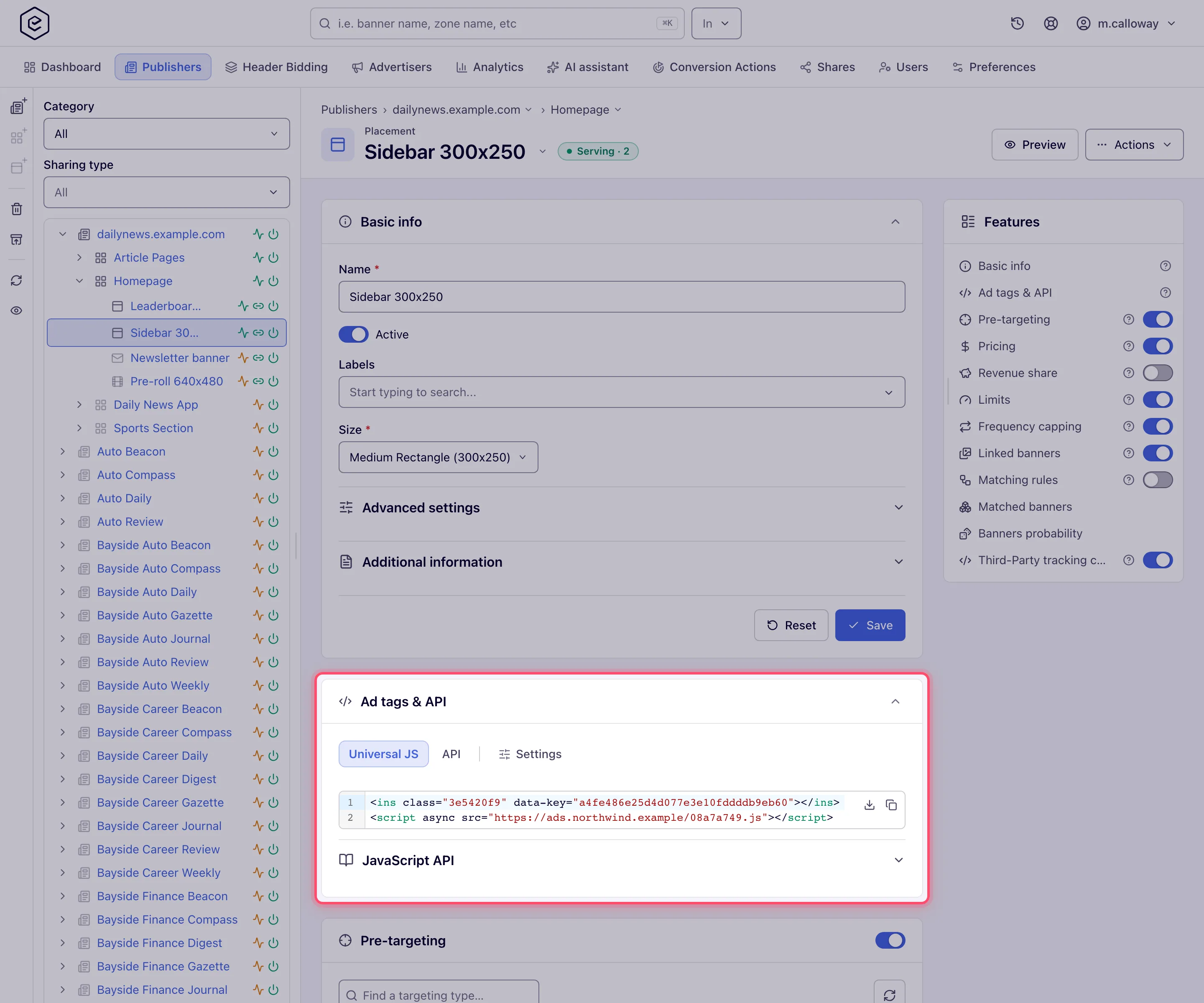
Open the placement and find Ad tags & API. The card opens on the placement’s first available tab.
-
Pick the tab that matches your integration (table above).
-
The Universal JS / Mount JS tab shows the generated code and a collapsible JavaScript API block. The knobs that shape the code live on the Settings tab (step 5) — they affect every tab, so they are configured once, centrally, rather than repeated on each tab. The video / email serving domain moved there too.
-
Copy the code with the copy button, or use the download button to save it as a file.
-
Open the Settings tab (last tab in the strip, editable placements only). It carries two things — the controls that shape the generated code, in a row at the top, and below them the default parameters, introduced by the line Default parameters added to every tag generated for this placement.:
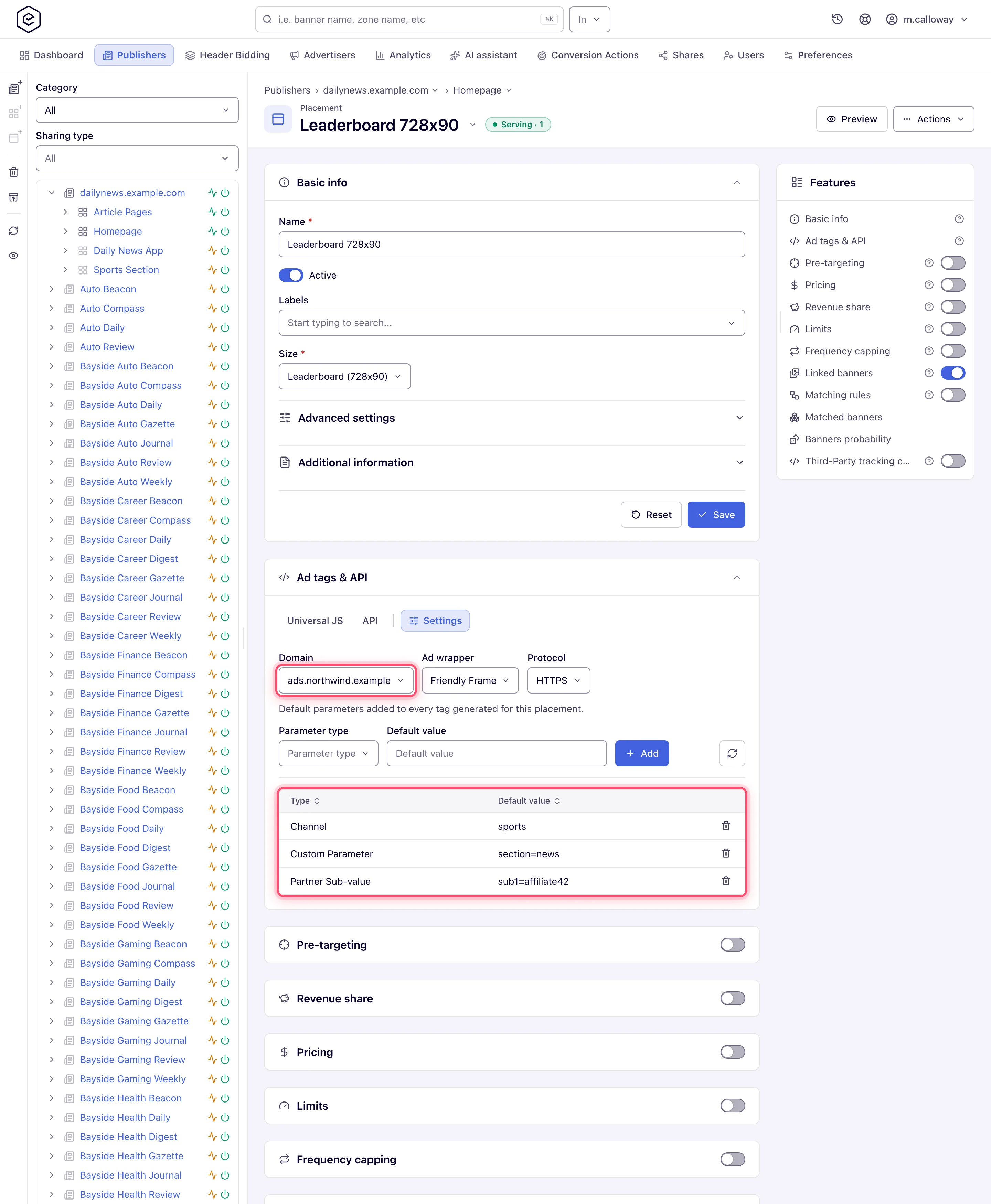 The controls row — each change re-generates the code on every tab and saves on the placement
(a Done toast confirms it). Over the API they are
The controls row — each change re-generates the code on every tab and saves on the placement
(a Done toast confirms it). Over the API they are servingDomain,ajaxCodeProtocol,ajaxCodeAdWrapperandfitContaineron the placement’splacements/update/*operation:-
Domain — the ad-serving domain the tag / URL calls (shown when the network has at least one and your role holds Set Ad-Serving Domain (Placement)). One domain per placement drives every URL it produces: the JS tags, Simple Iframe + Direct URL, the API request URL and the video / email URLs (VAST / VMAP tags, the email creative + landing URLs).
GET /rest-api/placements/{placementId}/serving-domains.dolists the values it accepts; -
Protocol — the URL scheme: Relative (
//, the tag takes the page’s own scheme), HTTPS or HTTP. Same reach as Domain: the JS tags, Simple Iframe + Direct URL, the API request URL, and the VAST / email URLs; -
Ad wrapper — how the ad server hands the creative to the page. It is not written into the tag: the ad server attaches it to every response. JS tags only, so it shows on Site / Mobile Site / Non-standard placements:
Option What the page gets Without Wrapper The creative markup is written straight into the page, next to the slot Friendly Frame The creative runs inside a same-origin iframe the loader creates Sandboxed Frame The same iframe with a sandboxattribute that allows scripts, forms, popups, modals and top-level navigationNo-redirect Frame The same, except top-level navigation is allowed only on a user click, so a creative cannot redirect the page by itself The exact sandbox flags of the last two can be overridden for your network by Epom (a server-side setting);
-
Fit container — scales the ad to its container (Mobile Site and Non-standard only). Like the wrapper, it is sent with every ad response, not written into the tag.
Default parameters — appended to every tag, URL and VAST/VMAP tag generated for this placement, and to the API request URL. JS tags carry them as
data-*attributes on the slot; URL-shaped codes append them to the query string. Pick a Parameter type, type a Default value (it cannot be blank) and click Add; the grid below, with the columns Type and Default value, lists each row, with a delete button on editable placements:- Channel — a default traffic channel (
chon a URL). Adding it again replaces it; - Custom Parameter — a Key + Value pair (repeatable — the same key can be added
more than once); on a URL it travels as
cp.<key>; - Partner Sub-value — the same shape, but the Key is a pick-list of
sub1tosub10and the value goes on the wire bare, as&sub1=…rather than&cp.sub1=…. A JS tag writes it as adata-sub1…data-sub10attribute, and the Universal JS loader reads those ten and forwards each in the ad request under its bare name. That is the name a partner arriving from Everflow, TUNE or Affise already sends, and the name the ad server stores with the click so it survives to the conversion. Over the API anything outside those ten is refused with a400, because a typo would otherwise ship as an ordinary request parameter and go missing at conversion time. The value is normally the partner’s own macro rather than a constant; - 3rd Party Click Tracking Url — a third-party click-tracking URL (
clickon a URL, always last in the query string). Adding it again replaces it; - pass-through signals the ad server forwards verbatim — GDPR Applies, IAB TCF
Consent String, App Bundle, Advertising ID (IFA), and under Advanced the
User ID, Transaction ID, Page Domain, Page URL and Ad-Loaded Handler. Their
value is usually an upstream macro; macros are emitted verbatim, never url-encoded, so the
caller’s CMP can still substitute them. Four of the nine suggest one: GDPR Applies hints
${GDPR}, IAB TCF Consent String hints${GDPR_CONSENT_849}, and Page Domain / Page URL hint Google Ad Manager’s%%SITE%%/%%REFERRER_URL_ESC%%(other players’ macros: Passing the page from a player or ad server). The other five show a generic Default value placeholder — the macro your upstream uses is yours to supply. User ID is tag-only (a JS slot attribute) and Ad-Loaded Handler is a JavaScript handler that runs in the page — neither is appended to a URL.
Adding or deleting a parameter re-generates the code on all tabs immediately, and each change is recorded in the action log.
-
-
Paste the tag into your page/player/app and verify it on the preview page.
Install a tag on WordPress or another CMS
There is no Epom plugin for WordPress or any other CMS, and none is needed: a tag is plain HTML
that you paste where the ad should appear. Use the Universal JS tag on web pages — it is an
<ins> slot plus one <script async>.
- Inside a post or page (WordPress block editor): add a Custom HTML block at the spot and paste the whole tag.
- In a sidebar, header or footer area: add a Custom HTML widget to that area and paste the tag.
- In a theme template, on every page: put the
<ins>where the slot belongs. The<script>is the same for every placement on the same serving domain, so with several slots you can load it once — in the theme’s footer, for example — and paste only the<ins>lines in the slots. - Other site builders work the same way: use their custom-HTML or embed-code element, not a plain text field, which would show the code as text.
Which tag to take:
| Situation | Tag |
|---|---|
| Ordinary pages, widgets, templates | Universal JS |
| A theme or app that inserts the slot with its own script after the page has loaded | Mount JS, or the <ins> plus init() — see The JavaScript API |
A builder that strips <script> from pasted HTML | Simple Iframe (Site placements, if your role has it) |
| A newsletter template | The Email tab of an Email placement |
Corner case: WordPress saves a
<script>only for users allowed to post unfiltered HTML (on a single site, Administrators and Editors). For anyone else it strips the script on save and only the empty<ins>is left. Paste the tag as an Administrator.
Corner case: keep the
<ins>exactly as copied. Optimisation or theme tools that add a CSS class or anidto it make the loader skip the slot. Page-caching plugins are no problem: the page can be cached, because the ad is requested by the visitor’s browser on every view.
Corner case: there is no AMP-specific tag type. For header bidding through Prebid, the page takes a different script, placed above the Google tag and without
async— see Header bidding: what a publisher installs.
Corner cases and gotchas
Corner case: the Settings JS tag settings persist on the placement, not on the copied snippet — but they do not all behave the same. Domain and Protocol are written into the tag’s script URL when you copy it, so changing them alters what colleagues copy next while tags already on pages keep the domain they were copied with. Ad wrapper and Fit container are not in the snippet at all: the ad server attaches them to every response, so changing either changes the tags already live on pages as soon as the ad cache next reloads.
Corner case: the Domain selector appears as soon as one serving domain is configured — it does not wait for a second one. If it is missing entirely, either the network has no ad-serving domain at all or your role lacks Set Ad-Serving Domain (Placement); the Protocol control shows either way.
Corner case: the pass-through GDPR / IFA / bundle defaults are usually macros (
${GDPR}, …). They are emitted verbatim — never url-encoded — into tags and URLs, so the caller’s CMP can substitute them. If a downstream system leaves the macro unsubstituted, the ad server receives the literal macro text (treated as absent), never a broken%24%7B…%7Dstring.
Per-role notes
- Publisher and network manager — see only the tag tabs their role grants; VAST tags, Video Player and Email need no grant. If Universal JS is missing, check the role, then the network’s ad-serving domains.
- Administrator — ad-serving domains are added by Epom support on request; with none, Universal JS and Mount JS are off network-wide.
- Can View share — tags stay copyable, but the Settings tab (domain, wrapper, protocol, fit container) is absent.
Exact grants: see User roles.
