
Targeting and pre-targeting overview
How targeting (demand side) and pre-targeting (supply side) work together — where each lives, in what order the six entity levels are evaluated, and how include/exclude, the AND/OR operator and the on/off switch actually combine.
Targeting rules decide which ad requests an ad may answer. One rule engine runs on both sides of the platform under two names, and every ad request is checked against both. This page explains what a rule is, how rules on one entity combine, how the six entity levels combine with each other, and which of those decisions you can change.
Who this is for
Advertisers who restrict where their campaigns run, and network managers who run both sides. Targeting is a default card for the Advertiser role, on the advertiser, every campaign and every creative; Pre-targeting, its inventory-side twin, is the network manager’s. A publisher does not get a Pre-targeting card as shipped — what their inventory accepts is set by the network on their behalf; see Per-role notes.
Which dimensions the card offers is decided per role and per side, so two people looking at the same campaign can be offered different lists.
One system, two names
- Targeting — set on the demand side: advertisers, campaigns, banners. “My campaign only runs on Android and iOS, never in Opera.”
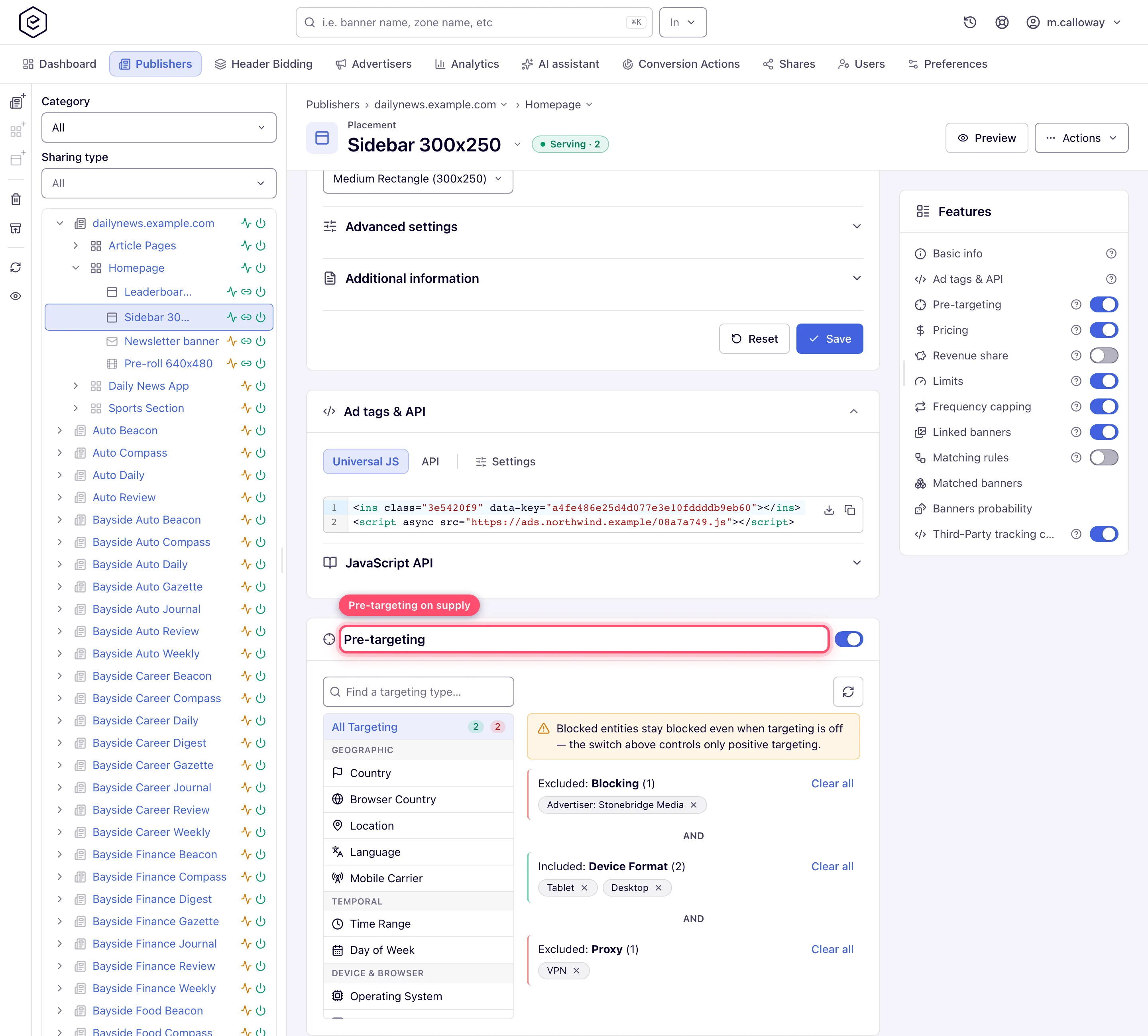
- Pre-targeting — set on the supply side: sites, zones, placements. “My placement never accepts proxy traffic, and never accepts advertiser X.”
Both use the same 38 dimensions (full reference), the same include/exclude model, the same per-entity operator, the same on/off switch, and literally the same card component. On demand entities the card is titled Targeting; on supply entities it is titled Pre-targeting.
Where each lives
| Side | Entity | UI location |
|---|---|---|
| Supply | Site | Account → Publishers → site → Pre-targeting |
| Supply | Zone | Account → Publishers → site → zone → Pre-targeting |
| Supply | Placement | Account → Publishers → site → zone → placement → Pre-targeting |
| Demand | Advertiser | Account → Advertisers → advertiser → Targeting |
| Demand | Campaign | Account → Advertisers → advertiser → campaign → Targeting |
| Demand | Banner | Account → Advertisers → advertiser → campaign → banner → Targeting |
What genuinely differs between the two sides
The title and the permission set are the obvious differences. These are the ones that change what happens to traffic:
| Demand side (advertiser / campaign / banner) | Supply side (site / zone / placement) | |
|---|---|---|
| What a failed check costs | That advertiser, campaign or banner drops out of the candidate list; other demand still competes | Nothing serves at all. The request is rejected before any demand is considered |
| Which entities it can block | Sites and placements | Advertisers, campaigns and banners — the blocking flows write to a site or a placement; none of them offers a zone |
| What a block does when it matches | Fails the entity’s own check, so that campaign/banner is dropped | Does not fail the supply entity — it removes the named demand from the candidate pool |
| Inherited rows shown in the card (needs Blocked by) | A banner also lists its campaign’s blocks | A placement also lists its site’s blocks |
Note: a zone holds ordinary pre-targeting rules, but no blocking flow writes to a zone: the Block popover on the Banners probability grid offers Placement, Site and All sites, and the REST API has a block-advertiser endpoint for placements only.
How rules combine
Three separate combinations stack, and they are frequently confused with each other.
1. Within one dimension — include ORs, exclude wins
A dimension group is everything you saved for one dimension on one entity. Each value you pick is stored as its own rule, so “Device Format: include Desktop, Mobile” is two rules in one group.
- Include rules are combined with OR: the request passes the group if it matches at least one of them. “Include Desktop, Mobile” means desktop or mobile.
- Exclude rules are checked first and win outright: if the request matches any exclude rule in the group, the group fails immediately, whatever the includes say.
- A group holding only excludes passes every request that doesn’t match one of them.
- A dimension with no rules at all imposes nothing.
| The group contains | Request matches | Result |
|---|---|---|
| Includes only | at least one include | pass |
| Includes only | no include | fail |
| Excludes only | no exclude | pass |
| Excludes only | an exclude | fail |
| Both | an exclude (even if it also matches an include) | fail |
| Both | an include and no exclude | pass |
2. Between dimensions on one entity — the AND/OR operator
When one entity has rules in several dimensions, a single per-entity operator decides how those groups combine. It appears as a small AND or OR label between the saved groups in the card.
- AND — the request must satisfy every dimension group.
- OR — satisfying any one group is enough.
Blocking groups (blocked advertisers, campaigns, banners, sites and placements) sit outside the OR: they always apply, even when another group already matched. A blocking group never counts as the matching group on its own, and a request it rejects is rejected whatever the other groups say.
AND is the default for all six entity types; no entity starts out on OR. Changing it requires the Manage Operation Between
TargetingRule Types permission — without it the operator still shows, but as a static label
rather than a button. Scripts set it with
POST /rest-api/{entity}/{id}/targeting/operation-between-rule-types.do?operator=AND|OR (entity is
advertiser, campaign, banner, site, zone or placement), which needs the same permission plus
update rights on the entity and the targeting permission of its side — see
Targeting via API.
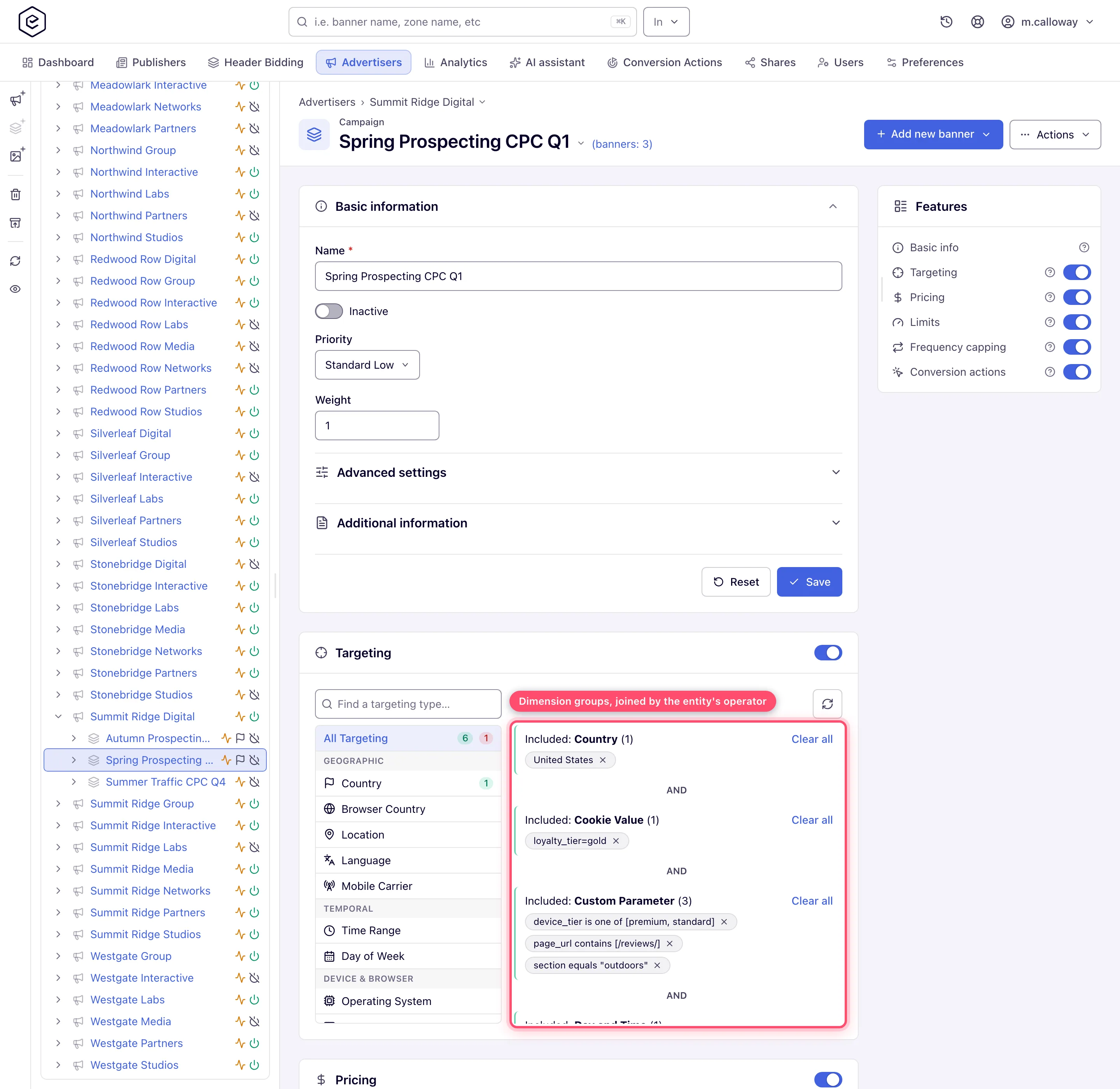
The operator sits inside one entity. It never describes the relationship between a campaign and its advertiser, and it is not per-dimension — one setting covers the whole card.
3. Between entity levels — always AND, never configurable
Each of the six levels is evaluated as its own independent check with its own operator, and the results are combined with a hard AND. A banner serves only if the site, the zone, the placement, the advertiser, the campaign and the banner all accept the request.
There is no operator, no inheritance and no override between levels. In particular:
- A campaign rule does not replace or relax its advertiser’s rules — it is added on top. An advertiser restricted to English and German traffic constrains every campaign under it, no matter what the campaigns say.
- Setting a level’s operator to OR loosens that level only. It cannot loosen the level above.
- The card on one entity never shows the levels above it (apart from inherited blocks), so a campaign that “looks unrestricted” can still be gated by its advertiser. When an ad is not serving, check all six cards, not just the one you edited.
Evaluation order for one ad request
ad request → placement resolved
  Site        ─┐
  Zone         ├─ pre-targeting: broadest first, fail fast
  Placement   ─┘   any level rejects → nothing serves, passback
      ↓
  Advertiser  ─┐
  Campaign     ├─ targeting: per candidate, top of the demand tree first
  Banner      ─┘   a level rejects → that branch drops out of the auction
      ↓
  capping → ranking → auction → markup
The two halves behave differently, and the difference matters when you are diagnosing a gap:
- Supply side is fail-fast for the whole request. The site is checked first, then the zone, then the placement, and the first rejection ends the request — no ad is chosen and the placement’s passback is served.
- Demand side is a per-candidate filter. For each candidate campaign the advertiser is checked, then the campaign, then the banner. A rejection removes only that advertiser’s campaigns, that campaign, or that one banner; everything else keeps competing.
- Each advertiser is evaluated once per request and the verdict reused for all of that advertiser’s campaigns.
Note: limits are applied before targeting, and capping after it. The full pipeline — including format filters, priority tiers and the RTB auction — is in How ad selection works.
The on/off switch
Each card has a master switch. Turning it off does not delete anything: the rules are kept and come back exactly as they were when you switch it on again. What changes is that the ad server stops loading that entity’s positive rules, so the entity accepts all traffic again. Empty or disabled targeting means serve to everyone, never serve to no one.
Two consequences worth knowing:
- Blocked-entity rules are the exception — they are loaded and enforced regardless of the switch, on advertisers, campaigns, banners, sites and placements alike.
- While the switch is off the card collapses to its header and lists none of the saved rules — blocks included, even though they still apply. The rules are still there; switch back on to review them, and nothing is lost.
Blocking
Supply and demand can also refuse each other by name, and those rules live in the same card as the dimension rules — but they are created by dedicated blocking actions, not from the add-rule picker, and they never appear in the dimension list.
| Blocks created on | Can name | Group heading in the card |
|---|---|---|
| Site, Placement | Advertisers, campaigns, banners | Blocking |
| Advertiser, Campaign, Banner | Sites, placements | Blocking |
With the Blocked by permission the card gains a second kind of group headed is Blocked by — who has blocked this entity from the other side — and, on a banner and a placement only, the blocks inherited from the campaign or site above them. Inherited blocks are listed inside the entity’s own Blocking group. Their chips lose the ✕ only when your Blocked by grant is Read-only; with the full grant the ✕ deletes the original rule where it lives.
See Blocking demand and inventory for the workflows, and Keep unwanted ad categories off your inventory for blocking by category rather than by name.
Targeting and DSP demand
A DSP partner enters the auction as an ordinary OpenRTB banner inside a campaign, so its advertiser, campaign and banner rules are evaluated by exactly the same gate, before the bid request goes out. No dimension is skipped for programmatic demand.
What targeting cannot do is filter the individual creatives a DSP returns. Your rules decide whether that partner is asked to bid on a request at all; what comes back in the bid response is governed by the partner’s own targeting and by creative scanning, not by these rules. A dimension that has no equivalent field in the outgoing bid request — a cookie value, a custom parameter, a channel — therefore filters your side of the transaction only; the DSP never sees it and cannot honour it.
Related capabilities
- Presets — long domain, IP-range and app-package lists maintained once by an administrator and targeted as a single rule. See Preset groups.
- Custom Parameter and Cookie Value — make eligibility depend on an arbitrary
key=valueyou pass in the ad tag, or on a value stored on the visitor’s browser. Both are available on the supply side as well as the demand side. See Target on custom parameters. - Matching rules — a separate card that pairs an entity with the opposite side by class (“only premium inventory”, “no gambling demand”) using the network’s rules catalogue rather than the add-rule picker. See Attach matching rules to an entity.
Corner cases and gotchas
Corner case: an entity with the switch off still enforces its blocks. Turning Pre-targeting off on a placement does not un-block the advertisers you blocked there — and because the card stops listing rules while the switch is off, you cannot see them either. To stop blocking, delete the block; switching the card off is not enough.
Corner case: setting an entity’s operator to OR can silently stop its blocks being applied. Blocked-entity groups are evaluated last, and OR stops at the first group that passes — so a placement with, say, a Device Format rule that the request matches may never reach its blocked-advertiser list. Keep entities that block on the default AND.
Corner case: before offering “switch this entity to OR” as a workaround, check that someone holds Manage Operation Between TargetingRule Types. Without it the operator is a plain label, every entity stays on AND, and an API attempt returns Permission denied.
Corner case: the add-rule picker only shows the dimensions your role is granted, per side. A dimension missing from the list is a permission result, not a product limitation — and a rule already saved for a dimension you have since lost stays enforced, it just loses its remove button.
Corner case: rules are stored one row per value. Removing “Desktop” from a Device Format include group leaves the group in place with its remaining values; removing the last value removes the group, and the dimension then constrains nothing. That is a real change of meaning — a group that is gone is not the same as a group that matches nothing.
Corner case: a saved rule is not live on the next impression. Ad serving runs from an in-memory snapshot that refreshes on a short cycle, so allow for the refresh before concluding that a rule “does not work”.
Per-role notes
- Advertiser — the Targeting card on the advertiser, every campaign and every creative; a rule on the advertiser narrows everything below it.
- Network manager — the same, plus Pre-targeting on sites, zones and placements.
- Publisher — no Pre-targeting card: supply-side filtering is the network’s, so a rule refusing demand on your inventory is one you cannot see.
- Shared-entity viewer — on a Can View share, saved rules are read-only and the card is hidden when targeting is off; editing needs Can Edit or Is Owner.
Related
- Add, edit, and remove targeting rules
- Blocking demand and inventory (pre-targeting)
- Keep unwanted ad categories off your inventory
- Preset groups: domains, IP ranges, app packages
- Target on custom parameters passed in the ad tag
- Attach matching rules to an entity
- Targeting dimension reference
- How ad selection works
