
Macros
Complete reference of $$…$$ macros — meaning, example output, what each returns when the data is missing, and which contexts resolve which — plus the custom-parameter syntax and processing rules.
Macros are $$NAME$$ tokens that the ad server replaces with live values while it builds the ad
markup. You can put them in banner HTML, banner and click-through URLs, piggyback pixels, passback
tags, a placement’s Default code, templates, server-side trackers and tracking URLs.
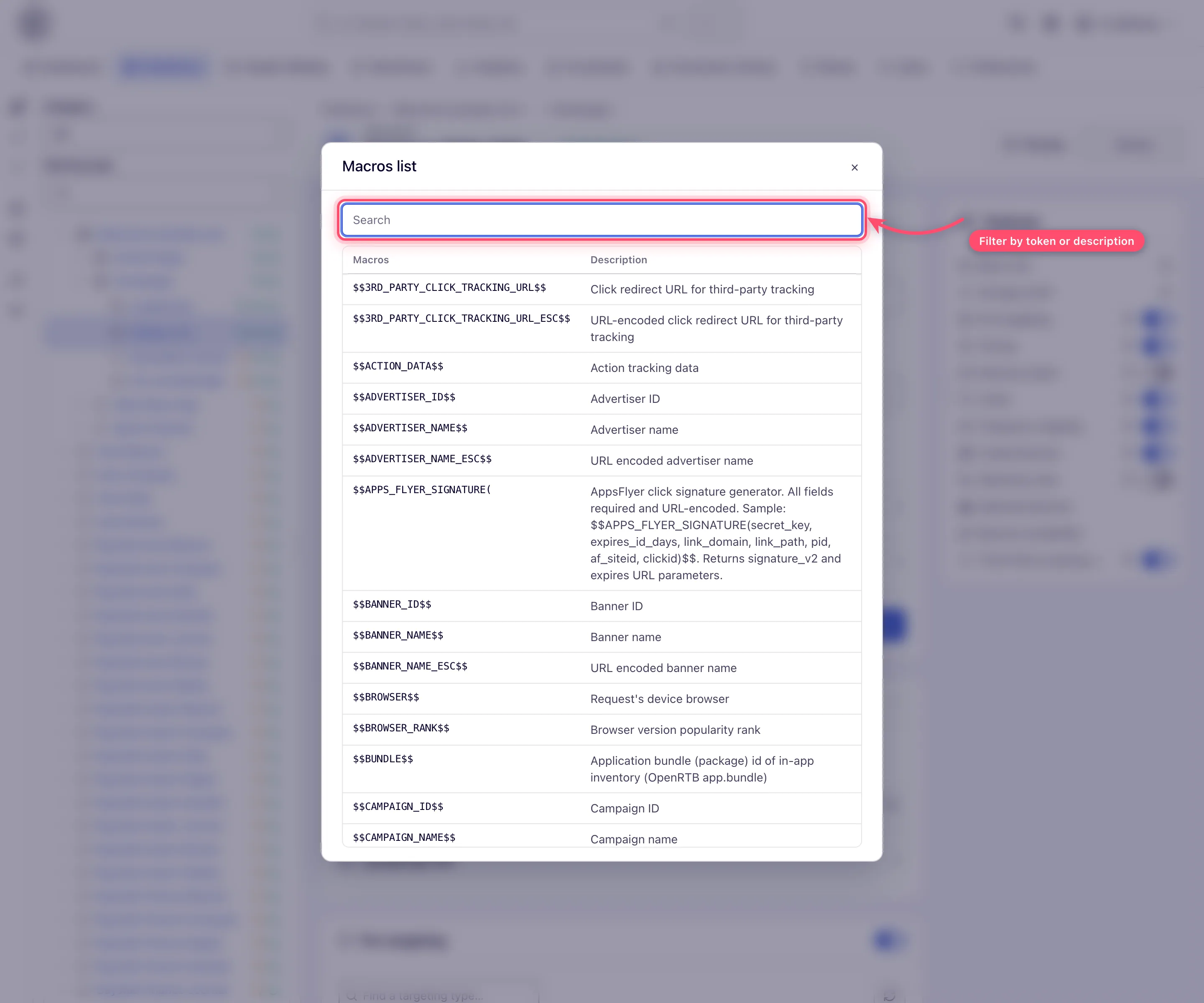
Three in-product lists show them, and they are not the same list.
| Where | Opened from | Shows |
|---|---|---|
| Macros list | Banner or placement editor → Actions → Macros list | The 103 everyday macros: 101 fixed names plus the two $$CUSTOM_PARAM(<key>)$$ / $$CUSTOM_PARAM_ESC(<key>)$$ rows |
| Macros list (with reserved) | Template editor → Macros list; Admin → system template editor | 149 — the 103 above plus 46 reserved ones |
| Piggyback macros | Any piggyback dialog (campaign, site, placement) | The 50 that resolve at conversion time |
Escaping convention: most text macros have a twin ending in _ESC that returns the URL-encoded
value — use the _ESC form whenever the value goes inside a URL parameter.
$$CLICK_REDIRECT_URL_2_ESC$$ is double-encoded, for redirects that decode twice.
Where macros resolve
The set of macros is the same almost everywhere; what changes is whether the value behind a macro exists in that context.
| Context | What resolves |
|---|---|
| Banner markup, templates, VAST/VMAP responses, ad-tag and API responses, native response fields, click-through URLs, server-side trackers | Everything on this page — the value is present whenever the ad request carries it |
| Placement Default code (returned when nothing fills the request) — no creative chosen | Request, page, geo, device, consent, placement, zone, site, channel and custom-parameter macros — $$RANDOM$$, $$TIMESTAMP$$, $$PAGE_URL$$, $$COUNTRY$$, $$PLACEMENT_ID$$ and the like. Banner, campaign and advertiser macros and the click URLs come out empty |
| Piggybacks (fire at conversion time) — no ad request attached | Only the 50 marked ✓ in the Piggy column below |
| Native adapter template | Only the nine $$NATIVE_*$$ macros, plus the ordinary macros resolved before them |
| Third-party cookie-sync beacons, cookie-value-targeting URLs | Request and context macros only — no entity name or ID, no $$ACTION_DATA$$ / $$CLICK_ID$$, no $$PASSBACK_INFO$$, no $$APPS_FLYER_SIGNATURE(…)$$ |
Note: in every serving context the ad server is told not to leave macros behind. A macro it recognises but cannot resolve is replaced with nothing — you get an empty value, not the literal token. A macro it does not recognise (a typo, or a partner’s own
{placeholder}) is left exactly as written. That is the quickest way to tell the two mistakes apart in a rendered tag.
Request and context
| Macro | Expands to | Piggy | Example output |
|---|---|---|---|
$$RANDOM$$ | Random integer 0–2147483647 (cache buster) | ✓ | 1804289383 |
$$RANDOM(min, max)$$ | Random integer, min inclusive to max exclusive | ✓ | $$RANDOM(0,100)$$ → 42 |
$$TIMESTAMP$$ | Current timestamp, milliseconds | ✓ | 1751712000000 |
$$PAGE_URL$$ / _ESC | URL of the page the ad is shown on, query string included — where it comes from is below | — | https://news.example.com/article?utm_source=feed |
$$PAGE_DOMAIN$$ | Host of that page, subdomain included — no scheme, no port | — | news.example.com |
$$PAGE_ORIGIN$$ / _ESC | Origin of the page — scheme and host (and a non-default port), no path | — | https://news.example.com |
$$CHANNEL$$ / _ESC | Channel value passed in the ad tag | ✓ | sport-section |
$$WIDTH$$ / $$HEIGHT$$ | Ad size — see the size corner case below | ✓ | 300 / 250 |
$$TRANSACTION_ID_STR$$ | Per-impression transaction ID, base-36 string | ✓ | k3j9x1a0 |
$$TRANSACTION_ID_LONG$$ | The same transaction ID as a number (this is the one analytics logs) | ✓ | 8256113587381 |
$$TRANSACTION_ID$$ still resolves but is deprecated and has been moved to the reserved list —
use $$TRANSACTION_ID_STR$$.
Corner case:
$$WIDTH$$and$$HEIGHT$$can take their value from three places, and the precedence is worth knowing: a size the ad request itself supplied wins first, unless it was only a placement default; otherwise the banner’s ad unit; otherwise the placement’s. If none of those is set the macro resolves to nothing. So the same$$WIDTH$$can return the banner size inside a creative and the placement size inside an invocation code — check which entity owns the code you are writing.
Geo and locale
| Macro | Expands to | Piggy | Example output |
|---|---|---|---|
$$REMOTE_COUNTRY$$ / _ESC | Visitor country, ISO 3166-1 alpha-3 code | ✓ | USA |
$$REMOTE_COUNTRY_NAME$$ / _ESC | Full country name | — | United States |
$$REMOTE_COUNTRY_SUBDIVISION$$ | ISO 3166-2 subdivision code | ✓ | CA |
$$REMOTE_REGION$$ / _ESC | Region / state name | — | California |
$$REMOTE_CITY$$ / _ESC | City | — | Los Angeles |
$$LAT$$ / $$LONG$$ | Latitude / longitude of the ad request | — | 34.05 / -118.24 |
$$REMOTE_LANGUAGE$$ / _ESC | Visitor locale language | — | en |
$$REMOTE_TIME_ZONE$$ / _ESC | Visitor IANA time zone from the browser | — | Europe/Kyiv |
$$REMOTE_BROWSER_COUNTRY$$ / _ESC | Country code derived from the browser time zone | — | GB |
$$MOBILE_CARRIER$$ | Mobile carrier / ISP — unknown when not detected | — | Vodafone |
Device and browser
The device-detection macros in this table return the literal string unknown when the device
cannot be identified; the request-level ones (IP, protocol, user agent, screen size, incognito flag,
advertising ID) return an empty value, as their rows say — see
When the value is missing. None of them resolves in a piggyback.
| Macro | Expands to | Example output |
|---|---|---|
$$REMOTE_IP$$ / _ESC | Visitor IP address (empty if unknown) | 203.0.113.42 |
$$REMOTE_PROTOCOL$$ | Request scheme, lower-case (empty if unknown). The in-product list says “HTTP/HTTPS”; the value is the scheme the request arrived on, or whatever a fronting proxy set | https |
$$CLIENT_USER_AGENT$$ / _ESC | Browser user-agent string (empty if unknown) | Mozilla/5.0 (…) |
$$DEVICE_FORMAT$$ | Device class — desktop, mobile, tablet | mobile |
$$SCREEN_WIDTH$$ / $$SCREEN_HEIGHT$$ | Device screen size in pixels — the sw / sh values the ad tag sends, else the size on the matched device record; empty if neither is known | 1080 / 2340 |
$$OS_NAME$$ / $$OS_VERSION$$ | Operating system and version | Android / 14 |
$$BROWSER$$ | Browser name | Chrome |
$$DEVICE_VENDOR$$ | Device manufacturer | Samsung |
$$DEVICE_MODEL$$ / $$DEVICE_MODEL_CODE$$ | Device model / model code | Galaxy S24 / SM-S921B |
$$DEVICE_MARKET_NAME$$ | Device marketing name | Galaxy S24 |
$$DEVICE_RELEASE_YEAR$$ | Device release year | 2024 |
$$DEVICE_RAM$$ | Device RAM in MB | 8192 |
$$DEVICE_PRICE_BAND$$ | Device price range, USD | 800 |
$$IS_WEB_APP$$ | Whether the browser is a WebView — true, false or unknown | true |
$$INCOGNITO_MODE$$ | Private-browsing flag: 1 incognito, 0 normal, empty when unknown | 0 |
$$BROWSER_RANK$$ / $$HARDWARE_RANK$$ / $$PLATFORM_RANK$$ | Popularity rank of the browser version / device model / OS+version | 12 |
$$IFA$$ | Mobile advertising ID — Android AAID or iOS IDFA, whichever the request carries. Empty if absent, all zeros (a viewer who limits ad tracking), a placeholder word such as null or unknown, or a macro token the caller never substituted | 38400000-8cf0-11bd-b23e-10b96e40000d |
Note: behind a server-side ad insertion (SSAI) stitcher the request comes from a data centre, so Epom reads the viewer from the stitcher’s headers.
$$REMOTE_IP$$takesX-Device-IP(an explicitclientIpparameter still wins, and the header beatsX-Forwarded-For);$$CLIENT_USER_AGENT$$takesX-Device-User-Agentinstead of the stitcher’s own (an explicitclientUastill wins);$$PAGE_URL$$takesX-Device-Refererahead ofReferer, and$$PAGE_ORIGIN$$falls back to it when there is nooparameter orOriginheader; the reserved$$HTTP_ACCEPT_LANGUAGE$$takesX-Device-Accept-Language. Without those headers the macros describe the stitcher. See Video placements.
Tip: the JavaScript ad tag sends the viewer’s screen size as
sw/shon its own. Server-side and SDK integrations that build the request themselves should add those two parameters — otherwise these macros (and the Screen width / Screen height columns in raw-log reports) depend on the device database recognising the device, and come out empty when it does not.
In-app inventory
| Macro | Expands to | Piggy | Example output |
|---|---|---|---|
$$BUNDLE$$ | Application bundle (package) id of in-app inventory | — | com.example.game |
Both $$IFA$$ and $$BUNDLE$$ follow OpenRTB naming (device.ifa, app.bundle), so the request
parameter, the macro and the outgoing bid request all use the same word.
Pass the values in as the ifa and bundle request parameters. Older per-platform parameter names
(googleAdId, appleAdId, udid, apn, appBundle, …) are still accepted and resolve to the same
macros, so existing integrations keep working — but new ones should use ifa and bundle.
From an ad tag you can supply them directly:
- Universal JS — add the attributes to the
<ins>element:<ins class="…" data-key="…" data-ifa="38400000-8cf0-11bd-b23e-10b96e40000d" data-bundle="com.example.game"></ins> - MountJS — pass them in the options object:
(container, { ifa: '…', bundle: '…' })
Entity names and IDs
| Macro | Expands to | Piggy | Example output |
|---|---|---|---|
$$ADVERTISER_NAME$$ / _ESC, $$ADVERTISER_ID$$ | Advertiser name / ID | ✓ | Northwind Media / 9 |
$$CAMPAIGN_NAME$$ / _ESC, $$CAMPAIGN_ID$$ | Campaign name / ID | ✓ | Brand Awareness Q3 / 4 |
$$BANNER_NAME$$ / _ESC, $$BANNER_ID$$ | Banner name / ID | ✓ | Northwind Leaderboard 728x90 / 1 |
$$PUBLISHER_NAME$$ / _ESC, $$PUBLISHER_ID$$ | Site (publisher property) name / ID | ✓ | Harbour Gazette / 4 |
$$ZONE_NAME$$ / _ESC, $$ZONE_ID$$ | Zone name / ID | ✓ | Homepage / 4 |
$$PLACEMENT_NAME$$ / _ESC, $$PLACEMENT_ID$$ | Placement name / ID | ✓ | Article MPU / 11 |
$$PLACEMENT_KEY$$ | The placement’s unique tag key | ✓ | a1b2c3d4e5f6a7b8 |
$$ADVERTISER$$, $$ADVERTISER_ESC$$, $$CAMPAIGN$$ and $$CAMPAIGN_ESC$$ are deprecated
aliases of the _NAME forms. They still resolve, but they are hidden from the everyday Macros list
and appear only under the reserved list.
Corner case: the six name macros can be switched off network-wide, and when they are they resolve to nothing — the parameter arrives empty, it is not masked or replaced with a placeholder. The switches are two separate Active/Inactive settings under Admin → Ad serving → Inventory & campaigns settings → Macros accessibility: Publisher-side entity names in macros (Placement, zone, site) and Advertiser-side entity names in macros (Advertiser, campaign, banner). Both are Active by default, and the ID macros are never affected. When a switch is off, the names also disappear from the Macros list, so an empty value with the macro missing from the list is the symptom to look for.
Click and conversion tracking
| Macro | Expands to | Piggy | Example use |
|---|---|---|---|
$$CLICK_REDIRECT_URL$$ / _ESC / _2_ESC | The click-tracking redirect URL — prepend it to a landing URL so the click is counted | — | href="$$CLICK_REDIRECT_URL$$https://brand.example.com" |
$$CLICK_URL$$ / _ESC | Click-tracking pixel URL (counts a click without redirecting) | — | fire from custom code |
$$3RD_PARTY_CLICK_TRACKING_URL$$ / _ESC | The third-party Click URL configured in the placement’s default tag parameters | — | chain external click trackers |
$$ACTION_DATA$$ | Conversion-tracking data token for S2S attribution | ✓ | put it in the landing page URL; your server replays the value it receives on the postback |
$$CLICK_ID$$ | The same token, under the name the rest of the industry uses | ✓ | identical to $$ACTION_DATA$$ in every way — pick whichever reads better to whoever wires up your integration. This is what the landing-page helper reads out of the landing URL, and what a campaign with Add the click id to landing page URLs appends for you on Local File and External File creatives — every other creative type needs it written into the landing URL by hand |
$$SUB_ID(ActionName_ID)$$ | The same thing keyed on one conversion action instead of the action key | — | put it in the landing page URL for the Sub ID method |
$$ATTRIBUTION_TYPE$$ | How the conversion was attributed — click, view, system, expired_click or expired_view; empty for unattributed conversions | ✓ | forward the attribution type downstream in piggyback / postback URLs |
$$PASSBACK_INFO$$ / _ESC | Passback context value | ✓ | forward to fallback ad servers |
$$IMPRESSION_IMG_URL$$ | Impression beacon URL (1×1 pixel) | — | third-party markup |
$$IMPRESSION_TAG_JS$$ | Impression-counting JS tag | — | third-party markup |
$$IMPRESSION_REDIRECT_URL$$ | Impression redirect URL | — | server-side counting |
$$ATTRIBUTION_TYPE$$ is a reserved macro: it resolves everywhere, and the Piggyback macros
list shows it, but the everyday Macros list does not.
Corner case:
$$ATTRIBUTION_TYPE$$only carries a value in a conversion context — anywhere else it is removed. The list namesexpired_clickandexpired_viewbecause the attribution type has them, but an expired conversion never fires a piggyback or a forward postback, so nothing carrying this macro is ever sent for one. In practice you will seeclick,view,systemor an empty value.
Corner case: a piggyback resolves a smaller macro set than banner markup does — the 50 in the Piggyback macros list. Forty of them are marked ✓ in the tables above and two more are the
$$CUSTOM_PARAM$$forms; the remaining eight are reserved macros the piggyback dialog shows anyway, because it has no everyday/reserved split — among them$$COUNTRY$$,$$UUID$$/_ESCand the four pricing macros. A piggyback fires at conversion time with no ad request attached, so everything derived from the visitor’s request — IP, user agent, referer, origin, device and browser details, advertising id, bundle, incognito, time zone, and the click-URL macros — is simply removed there. Prefer the in-dialog list over this page when writing a piggyback URL or snippet.
Corner case: the server-to-server Conversion Tracking URLs are not built out of macros, even though they sit next to two that are.
$$SUB_ID(...)$$and$$ACTION_DATA$$belong in the landing page URL, where the ad server expands them. The tracking URL your own server calls carries(subid)or(clickid)instead: nothing expands those — the integrator substitutes them before firing the URL.$$ATTRIBUTION_TYPE$$is a third thing again, a real macro that reports how a conversion was attributed, for forwarding downstream.att=is not in the generated URL at all; it is one of the optional parameters listed beside it, for a partner that knows what it measured. Accepted values areclick,postclick,clickthrough,ctfor post-click andview,impression,imp,postview,viewthrough,postimpression,vt,vtafor post-view (case-insensitive,-/_ignored). Sent as nothing — or left unreplaced in an older URL that was generated with a placeholder — it is read as “not sent”: the conversion is then recorded as whatever the stored value carries, or as the action’s Default attribution type, which is Unattributed until someone sets it on the action. See Get the pixel and S2S tracking code.
Compliance
| Macro | Expands to | Piggy | Example output |
|---|---|---|---|
$$GDPR$$ | GDPR-applies flag, 0 or 1 | ✓ | 1 |
$$GDPR_CONSENT_IAB$$ | IAB TCF consent string | ✓ | CPc9aQAPc9aQ… |
$$COOKIE_POLICY$$ | Data cookie policy value | ✓ | 1 |
The IAB TCF spellings work too. Before anything else runs, the ad server rewrites ${GDPR} to
$$GDPR$$ and ${GDPR_CONSENT_XXXX} to $$GDPR_CONSENT_IAB$$, where XXXX is a vendor ID — it
must be digits only, or the token is left alone. It does this at three encoding levels, so the IAB
form is also recognised URL-encoded (%24%7BGDPR%7D) and double-encoded
(%2524%257BGDPR%257D) — which is what you need when the macro sits inside a nested redirect
parameter. Epom’s own GVL vendor ID is 849.
Utility and advanced
| Macro | Expands to | Piggy |
|---|---|---|
$$ENCR_TIMESTAMP(key)$$ | Current timestamp, Blowfish-encrypted with your key — for partners that verify link freshness | — |
$$DECR_TIMESTAMP(hex, key)$$ | Decrypts a value produced by $$ENCR_TIMESTAMP$$ | — |
$$COOKIE(name)$$ | Value of the named first-party cookie | — |
$$APPS_FLYER_SIGNATURE(secret_key, expires_in_days, link_domain, link_path, pid, af_siteid, clickid)$$ | Signed AppsFlyer link — returns the signature_v2 and expires URL parameters. All seven arguments are required and URL-encoded. The second argument is a number of days | ✓ |
Note:
$$ENCR_TIMESTAMP$$,$$DECR_TIMESTAMP$$and$$COOKIE$$resolve normally but appear in no in-product list — not even the reserved one — because they carry no description. This page is the only place they are written down.
When the value is missing
Two different things happen, and which one you get is a property of the macro, not of the situation. This is the single most common surprise in a tracking URL.
| Behaviour | Macros | What lands in your URL |
|---|---|---|
| Removed — replaced with an empty string | Most macros: referer, origin, IP, user agent, geo, entity names and IDs, click URLs, $$IFA$$, $$BUNDLE$$, $$INCOGNITO_MODE$$, $$REMOTE_TIME_ZONE$$, $$SCREEN_WIDTH$$, $$SCREEN_HEIGHT$$, … | ?ref= |
The literal word unknown | $$MOBILE_CARRIER$$, $$DEVICE_FORMAT$$, $$OS_NAME$$, $$OS_VERSION$$, $$BROWSER$$, $$DEVICE_VENDOR$$, $$DEVICE_MODEL$$, $$DEVICE_MODEL_CODE$$, $$DEVICE_MARKET_NAME$$, $$DEVICE_RELEASE_YEAR$$, $$DEVICE_RAM$$, $$DEVICE_PRICE_BAND$$, $$IS_WEB_APP$$, $$BROWSER_RANK$$, $$HARDWARE_RANK$$, $$PLATFORM_RANK$$ | ?carrier=unknown |
If a partner’s endpoint rejects or mis-buckets unknown, keep those macros out of required
parameters, or send them under a parameter the partner treats as optional.
Custom parameters
Anything you pass in the ad tag as a custom parameter — or set in the placement’s default tag parameters — is available as a macro:
$$CUSTOM_PARAM(keyname)$$        raw value
$$CUSTOM_PARAM_ESC(keyname)$$    URL-encoded value
Example: a tag carrying data-cp-article_id="8817" (cp.article_id=8817 in a request URL) lets
the banner’s click-through URL pass it on to the landing page —
https://shop.example.com/offer?aid=$$CUSTOM_PARAM_ESC(article_id)$$ opens as
https://shop.example.com/offer?aid=8817 — and a tracking pixel use it the same way.
Both forms resolve in click URLs, banner markup and piggybacks.
How the key is looked up. An exact-case match wins. If there is none, the lookup retries
case-insensitively, so $$CUSTOM_PARAM(Article_ID)$$ still finds a parameter named article_id.
What happens to a macro with no matching parameter. By default it is deleted from the output. A network-level, server-side setting makes the ad server leave such macros in place instead — ask Epom support or your account manager which your network uses before relying on either behaviour.
Chaining. A custom parameter’s value may itself contain macros, including other
$$CUSTOM_PARAM(...)$$ references, and they are resolved in turn. The chain is bounded by the
number of custom parameters on the request, so a chain longer than that stops part-way.
Corner case: a parameter whose value references itself is skipped rather than expanded — otherwise the substitution would never terminate. Its macro is then also left in the output rather than deleted, because the parameter was supplied; only macros naming a parameter that was never sent get removed. So a stray
$$CUSTOM_PARAM(foo)$$surviving in a rendered tag meansfooexists and points at itself, not that it is missing.
Corner case: the
_ESCform trims leading and trailing whitespace from the value before encoding it; the raw form does not. A parameter whose value has a trailing space therefore produces different output through the two macros.
Sub-values: sub1 to sub10
Ten names are recognised without the cp. prefix, because that is how the rest of the market
passes partner data — Everflow uses sub1–sub10, Affise sub1–sub8, TUNE aff_sub1–aff_sub5.
Append them to a tracking URL exactly as an affiliate would:
https://<ad-serving-domain>/...&sub1=affiliate42&sub2=creative-bThey become custom parameters like any other, so they travel with the click through to the conversion, and each has a short macro of its own:
$$SUB1$$ … $$SUB10$$ raw value, identical to $$CUSTOM_PARAM(sub1)$$ … $$CUSTOM_PARAM(sub10)$$For a value going into a URL, use $$CUSTOM_PARAM_ESC(sub1)$$ — there is no $$SUB1_ESC$$.
The ten $$SUB<n>$$ macros are part of the everyday Macros list but not of the piggyback list.
Only sub1 through sub10 are recognised bare. Anything else — sub11, subid, mysub — needs
the cp. prefix to become a custom parameter; without it a typo stays an ordinary request
parameter rather than silently creating a new custom parameter.
Deprecated aliases
The older names still work and resolve like the new ones — existing tags and landing URLs need no
change. New integrations should use the PAGE_* names, which is why the macros list in the console
offers only those.
One difference: a server-to-server partner that names the page by a bare domain (news.example/sport,
no https://) still gets it from $$REFERER$$, $$REFERER_ESC$$ and $$REFERER_DOMAIN$$, as before;
the PAGE_* names read only a full URL there and skip such a value.
| Old name | Same as |
|---|---|
$$REFERER$$ | $$PAGE_URL$$ |
$$REFERER_ESC$$ | $$PAGE_URL_ESC$$ |
$$REFERER_DOMAIN$$ | $$PAGE_DOMAIN$$ |
$$ORIGIN$$ | $$PAGE_ORIGIN$$ |
$$ORIGIN_ESC$$ | $$PAGE_ORIGIN_ESC$$ |
A network that lists an old name in its skip processing setting keeps it untouched; the new name is still resolved.
Why is $$PAGE_DOMAIN$$ (or $$REFERER_DOMAIN$$) empty?
The page macros all describe the page the ad is shown on, read from the ad request when the ad server
builds the markup or URL. Any value that names no page is skipped — null, a file:// address,
the Google IMA SDK frame, a Google ad frame, your own serving or CDN host.
$$PAGE_ORIGIN$$ takes the first of: the o request parameter (the JS loader fills it; the
Page Domain tag parameter or data-page-domain sets it), the Origin header, then the origin
of the X-Device-Referer / X-Referer headers.
$$PAGE_URL$$ takes the first of:
- the
requestUrlparameter — the JS loader sendsdata-page-url(or the olderdata-page) when the tag has one, else the top page’s address when it can read it, else its own address when it is not inside a frame from another site; set it yourself with&requestUrl=(the Page URL tag parameter); - the
X-Device-Refererheader (server-side ad insertion), then the browser’sReferer, thenX-Referer(server-to-server supply partners); $$PAGE_ORIGIN$$followed by/, when only the origin is known.
$$PAGE_DOMAIN$$ is the host of $$PAGE_ORIGIN$$, else of $$PAGE_URL$$.
When nothing names a page the macro is removed — the parameter is left empty (sub1=). That
is normal for:
- Direct URL, Simple Iframe, VAST and pop / direct-link requests — they carry no
requestUrlorounless you add them, so they rely on theRefererheader, which browsers often shorten to the origin or drop (the site’s referrer policy, a link opened in a new tab or an app, a redirect chain from a traffic source). - Video players. A player that loads the VAST from its own frame (Google IMA, for example)
sends its address as the Referer, which is skipped — so under IMA the macros are empty rather
than
imasdk.googleapis.comunless the tag passes the page.
What to do then:
- On a VAST or Direct URL set the Page Domain tag parameter (
&o=) and the Page URL tag parameter (&requestUrl=) to your player’s or traffic source’s page macros — see Passing the page from a player or ad server. - A custom parameter —
&cp.pubdomain=sports-daily.exampleon the tag, then$$CUSTOM_PARAM_ESC(pubdomain)$$in the link. The most reliable option when a traffic source can put its own domain macro into your tag.
Corner case — the report shows a Top Domain but
$$PAGE_URL$$was empty. Top Domain in reports is the page origin the ad request carried, so it matches$$PAGE_ORIGIN$$, not$$PAGE_URL$$: a request with only an origin gives$$PAGE_URL$$as that origin plus/.
Page URL without the query string (path only)
No macro gives it. $$PAGE_URL$$ is the whole page URL as received, query string included;
$$PAGE_DOMAIN$$ is the host alone and $$PAGE_ORIGIN$$ is scheme and host. To get
https://news.example.com/sport/article-12 without ?utm_source=…, let the page compute the
value and send it with the ad request, then read it back with a macro.
As a custom parameter (recommended). It changes nothing else.
-
Mount JS tag — pass it in the options’
customParamslist, which becomes adata-cp-attribute on the slot:{ customParams: [ { pagepath: location.origin + location.pathname } ] } -
Universal JS tag — its attributes are plain HTML, so set the value from a script before the loader runs, right after the
<ins>:<ins class="<slot class>" data-key="<placement key>"></ins> <script> document.currentScript.previousElementSibling .setAttribute('data-cp-pagepath', location.origin + location.pathname); </script> <!-- the tag's own <script async src=…> follows --> -
Direct URL / VAST / Simple Iframe — append
&cp.pagepath=with the value URL-encoded by whatever builds the URL.
Then use $$CUSTOM_PARAM_ESC(pagepath)$$ in a link or tracker (the _ESC form, because the
value is itself a URL).
As the page URL itself. Setting data-page-url (or &requestUrl=) to the trimmed URL makes
$$REFERER$$ and $$REFERER_ESC$$ return it — but requestUrl is also one of the hosts Domain
targeting reads, so use this only when the trimmed URL is what you want everywhere.
See Ad request parameters.
A misspelled macro or a {clickid} placeholder reaches the landing page as typed
Only names from the lists on this page are replaced. A macro with a typo — $$REFERERDOMAIN$$,
$$CLICKID$$ — is not an Epom macro, so it is left in the URL exactly as typed and the
partner receives the literal text (often URL-encoded by the browser as %24%24…). The same goes
for another platform’s placeholder syntax — {clickid}, {{click_id}}, [timestamp],
%%CACHEBUSTER%%: Epom does not translate it. Replace each one with the Epom macro that carries
the value (for a click ID, $$CLICK_ID$$).
A valid macro with no value is different: it is replaced by an empty string (sub1=) — see
the section above for the referer macros.
To check, open the click through Epom (preview, or the live ad) and read the landing URL in the
browser’s address bar: anything still written as $$…$$ or {…} was not a macro Epom knows.
A deep link (tg://, market://) or a macro in a URL is rejected as “not a URL”
Click, landing and tracking URL fields accept http, https and ftp plus the app schemes
your ad server is configured to allow (for example itms, itms-apps, market and tg). A
deep link with any other scheme (myapp://…) is refused until that scheme is added to the server’s
list — ask Epom support or your account manager. Schemes that can run script or read local files
(javascript:, data:, file: …) are never accepted.
Macros do not make a URL invalid: before checking, the ad server replaces each $$NAME$$,
${NAME}, {name}, {{name}}, [name], %%NAME%% and __NAME__ with a placeholder, so
tg://resolve?domain=sportsdaily&start=$$TRANSACTION_ID_STR$$ validates like the URL around
it. A macro that is the scheme or the host ($$CUSTOM_PARAM(link)$$ on its own) cannot be
checked — put a literal scheme and host in front of it.
Processing rules
- Values that contain macros. A value that itself contains macros (a custom parameter whose
value is
$$RANDOM$$, say) is resolved too. - Do not nest macros. A macro used as another macro’s argument is not reliably expanded first:
$$ENCR_TIMESTAMP($$RANDOM$$)$$can pass the literal text$$RANDOM$$as the key. Use a single literal value per argument. - An argument may not contain a closing parenthesis. Everything up to the first
)is read as the argument, so a value containing)truncates the macro. - Skipped macros. Epom support or your account manager can configure specific macros to be passed through untouched on your network, wherever they appear.
Reserved macros
The template editor’s Macros list shows 46 reserved macros. They resolve exactly like the others but are hidden from the everyday Macros list, either because they are deprecated or because they exist for built-in templates and custom integrations. The ones you may use are:
| Macro | Purpose |
|---|---|
$$GROSS$$, $$NET$$, $$GROSS_PRICING_TYPE$$, $$NET_PRICING_TYPE$$ | Price and pricing-model values. All four also resolve in piggybacks |
$$ATTRIBUTION_TYPE$$ | Conversion attribution type — documented above |
$$UUID$$ / _ESC | The visitor’s unique user ID. Also resolves in piggybacks |
$$COUNTRY$$ | Country code, ISO 3166-1 alpha-3 — same value as $$REMOTE_COUNTRY$$, and unknown rather than empty when absent. Also resolves in piggybacks |
$$ADVERTISER$$, $$ADVERTISER_ESC$$, $$CAMPAIGN$$, $$CAMPAIGN_ESC$$ | Deprecated aliases of the _NAME macros |
$$TRANSACTION_ID$$ | Deprecated alias of $$TRANSACTION_ID_STR$$ |
$$ADVERTISER_DESCRIPTION$$ / _ESC, $$SITE_DESCRIPTION$$ / _ESC | The advertiser’s and site’s description text |
$$SERVE_DOMAIN$$ | The ad-serving domain the response was built for |
$$VAST_COMPANION_CLICK_THROUGH$$ | Click redirect URL for a VAST companion |
$$BRANDED_OVERLAY_CODE$$ | The branded placement’s overlay HTML |
$$HTTP_ACCEPT_HEADER$$, $$HTTP_ACCEPT_LANGUAGE$$ | Raw request headers |
$$AJAX_INVOCATION_CODE_KEY$$, $$AJAX_INVOCATION_CODE_JS$$, $$AJAX_INVOCATION_CODE_DOMAIN$$, $$INVOCATION_PREFIX$$, $$INVOCATION_BASE$$, $$TARGET_ID$$ | Legacy invocation-code plumbing, used by retired tag types |
$$GOOGLE_AD_ID$$, $$DEVICE_AAID$$ / _MD5 / _SHA1, $$DEVICE_APPLE_IDA$$ / _MD5 / _SHA1 | Per-platform advertising IDs and their hashes. Deprecated — use $$IFA$$ |
$$BB_DEVICE_ID_PARAM$$ / _MD5 / _SHA1 | BlackBerry device IDs. Deprecated — BlackBerry OS reached end of life in January 2022 |
$$WIN_PHONE_DEVICE_ID$$ / _MD5 / _SHA1 | Windows Phone device IDs. Deprecated — Windows Phone reached end of life in January 2020 |
The remaining reserved macros are for Epom’s built-in templates; do not use them in your own markup.
Native adapter template macros
These nine are resolved separately, only in a placement’s native adapter template (a template of type Placement content adapter), against the native response the ad server just built. They resolve nowhere else. The ordinary macros in the same template body are resolved before them.
| Macro | Expands to |
|---|---|
$$NATIVE_TITLE$$ | The creative’s title |
$$NATIVE_SUB_TITLE$$ | The creative’s sub-title |
$$NATIVE_DESCRIPTION$$ | The creative’s description text |
$$NATIVE_CTA_TEXT$$ | Call-to-action text |
$$NATIVE_CLICK_URL$$ | The click-through URL for the native unit |
$$NATIVE_ICON_URL$$ | Icon asset URL |
$$NATIVE_IMAGE_URL$$ | Main image asset URL |
$$NATIVE_VIDEO_URL$$ | Video asset URL |
$$NATIVE_IMPRESSIONS$$ | The impression-tracking HTML block — include it or the unit records no impression |
Anything left unresolved there is removed, so a template referencing an asset the creative does not carry renders an empty attribute rather than a visible token.
Per-role notes
- Publisher and advertiser: the Macros list opens from the placement or banner editor’s Actions menu; network managers get both.
- Administrator: the reserved list opens from any template editor. Turning off the
advertiser-side name macros removes
$$ADVERTISER_NAME$$,$$CAMPAIGN_NAME$$and$$BANNER_NAME$$; the publisher-side switch does the same for$$PLACEMENT_NAME$$,$$ZONE_NAME$$and$$PUBLISHER_NAME$$. Both then resolve to nothing. - Can View share: the list opens, but nothing on a read-only entity can be saved.
Related
- Invocation code types
- HTML & template banners
- Piggybacks
- Get the pixel and S2S tracking code
- Server-side trackers
- Third-party tracking codes
- Daisy chaining & passback
- Banner templates
- Target on custom parameters passed in the ad tag
- Content replacement
- Configure GDPR / TCF consent enforcement
- Keep unwanted ad categories off your inventory
