
Creative ad specs
One consolidated spec sheet — accepted file types, size caps, native asset and text limits, and field lengths — for every Epom creative format.
The spec sheet to hand a designer: what you can upload, how big it can be, and the field-length caps for each Epom creative format. Every number below is enforced server-side — exceeding it fails the save or rejects the upload, whatever the browser accepted first. For how to build each creative type, follow the per-format guides linked in each section; for which format runs on which placement, see Banner types.
Two caps are network preferences — Epom support sets them in bytes for your network, any whole number from 1 byte to 2 147 483 647, and the breach message quotes the current value (see the corner case below):
| Preference | Default | Applies to |
|---|---|---|
| Max allowed file size (bytes) | 200 KB (204 800 bytes) | image creative files, native icon and image assets, library images, and a linked or hosted-copy image — not HTML5 ZIPs, which have their own archive limits |
| Max allowed video file size (bytes) | 20 MB (20 971 520 bytes) | uploaded video files, native video assets, Advanced Local Video(s) files, library videos, and a linked or hosted-copy video |
Corner case — the preferences apply exactly as stored. There is no floor under either number: lowering one tightens uploads, and a value of 1 byte refuses every file. The System preferences form takes whole numbers from 1 to 2 147 483 647 bytes and puts a field error on a value outside that range. Both are entered in bytes, and the ad servers pick up a saved value within a minute.
Corner case — how the breach message prints the cap. It uses the largest unit the cap reaches — MB, then KB, then bytes — with at most two decimals, cut off rather than rounded up: a 1 500 000-byte video cap reads File is bigger than 1.43 MB, a 1 000-byte image cap File is bigger than 1000 B. The media library prints it the same way.
Everything else on this page is a fixed limit.
Display creatives (Local File / External File)
The standard image banner — uploaded (Local File) or hosted elsewhere (External File). See Image banners.
| Spec | Value |
|---|---|
| Accepted upload | Any file whose declared content type starts with image/ — there is no extension allow-list on this path |
| Ways to supply the file | Local File takes an upload, From link, or a pick from the media library; see Files given by link |
| Image file size | ≤ Max allowed file size (200 KB default). Breach: File is bigger than N KB, with the network’s current cap as N |
| External creative | Provided by URL instead of upload; the image and video file-URL fields cap at 1 023 characters each. With Serve from our server on, Epom downloads a copy and holds it to the upload limit |
| Ad unit (size) | Required. Pick an ad unit or Custom to type width × height by hand |
| Click-through URL | Required (see below); up to 4 000 characters; no whitespace |
Corner case — the upload gate here is weaker than it looks. Local File checks only the browser-declared
Content-Type. There is no extension list, no magic-byte sniff and no image-readability test on this path, so a file of any kind posted asimage/pngis stored. The content-type/extension mismatch check that does sniff bytes belongs to the native asset path only — see the native section below. A file given by link is different: Epom types it from its own bytes before the same checks run.
Corner case — SVG is sanitised only when it is declared
image/svg+xml. The SVG sanitiser (which strips scripts, event handlers andjavascript:URIs) runs on a Local File creative whose declared content type is exactlyimage/svg+xml, on native icon and image uploads, and on SVGs stored in the media library. It does not run on a template file property or on an SVG inside an HTML5 ZIP, so treat markup from an outside party in those two places as untrusted.
When the click-through URL is required. For Local File and External File it is required on every non-video placement (May not be empty), and on Video placements too (Required). Local Video and External Video need it on Email placements. A Third Party VAST/VPAID Tag URL creative always needs its tag URL, which uses the same field.
When an ad unit is required. The rule is short: Local File and External File always, and HTML Code on Site and Video placements. Never on a Native placement, and never for OpenRTB. Which sizes appear in the combo is a separate question, answered by the placement type ticked on the ad unit plus its Campaigns side flag — see Admin tools.
HTML / template creatives
Third-party tags, custom markup, or a network rich-media template. See HTML & template banners.
| Spec | Value |
|---|---|
| Code field (HTML/JS body) | Required, up to 100 000 characters |
| Ad unit | Required on Site and Video placements (an ad unit or Custom) |
| HTML5 ZIP creative | Filename must end .zip, in any case (.ZIP too), else Should be a .zip file. Not held to the image file-size cap; the archive must unpack within the limits below |
| HTML5 ZIP unpacking limits | At most 1 000 files; no single file unpacking past 20 MB; 50 MB in all; no entry whose path climbs out of the archive’s own folder. All three numbers are configurable by Epom. The ZIP itself may be no larger than the 50 MB total — see HTML5 ZIP requirements |
| Click-through URL | Up to 4 000 characters where the type uses one |
Macros are resolved inside the code, and HTML Code creatives do not run on Email placements (email clients don’t execute scripts).
Corner case — the compressed HTML5 ZIP is capped by the unpacked total, not the image cap. The image Max allowed file size preference is not applied to the upload; the archive as sent may be no larger than the 50 MB it may unpack to. A refused archive answers The archive is larger than N MB., The archive holds more than N files., X in the archive unpacks to more than N MB., The archive unpacks to more than N MB. or The archive contains a file outside its own folder: X. It is also refused when no page in it can open the ad: no page at the top level, several pages none of which is
index.html, or several creative folders. A creative zipped as its folder, or with its only page under another name, is laid out withindex.htmlat the top instead. Member types are not filtered, so upload only archives you built or trust. See HTML5 ZIP creatives.
Native creatives (Local Native / External Native)
Native banners are assembled from assets plus texts, and run only on native placements. See Native banners.
Assets
| Asset | Accepted formats | Size rule |
|---|---|---|
| Icon | .gif, .jpg, .jpeg, .png, .svg | Declared width and height must both be non-zero; file ≤ Max allowed file size (200 KB default) |
| Image | .gif, .jpg, .jpeg, .png, .svg | Same as icon |
| Video (optional) | .mp4 only | ≤ Max allowed video file size (20 MB default); the file’s real dimensions must be ≥ the declared size, and its orientation must match |
- The declared width and height for each attached asset must be non-zero and at most 3 000 each. Leaving either at 0 raises Invalid value on that input even though the file uploaded fine. Defaults are icon 128×128, image 1200×627, video 640×480.
- A GIF asset must match the declared width × height exactly — Animated GIF should match
banner’s width and height. The rule fires for every
image/gifupload, animated or not. - Once a
.gifis in place you cannot resize it while editing: Animated GIF width cannot be changed when creative is present. Delete the file first. Icon and image only, not video. - The icon and image file names must differ (case-insensitively). The video file name is not part of that check.
- Uploaded file names are compared case-sensitively against the extension list, so
LOGO.PNGis rejected wherelogo.pngpasses. - A native video whose declared height exceeds its width must be a portrait file, and vice versa: Vertical oriented video expected / Horizontal oriented video expected.
Corner case — the content-type sniff lives here. For a native icon or image the server reads the file’s leading bytes and compares the result with the content type the browser declared. A mismatch is rejected with File’s content type doesn’t match its extension. This check exists on the native asset path only.
Corner case — SVG native assets skip every binary check. An
.svgicon or image returns from validation before the size cap, the dimension checks and the content-type sniff run, so it is subject to neither the file-size cap nor the GIF-style dimension rules. It is still sanitised on write.
Corner case: the native video asset is stricter than a standalone video creative — it accepts only
.mp4(avideo/*content type and an.mp4file name), while a Local Video banner accepts anyvideo/*type,.flvincluded.
Texts
These are the maximum native text lengths. Epom support or your account manager can set them lower for your network (a server-side setting), never higher:
| Field | Max characters |
|---|---|
| Title | 255 |
| Subtitle | 255 |
| Description | 32 000 |
| Call to action | 255 |
| Click URL | 4 000 |
| Rating | Numeric 0–5; outside it: Must be between 0 and 5. |
An overrun is rejected with Maximum number of symbols exceeded. attached to the field that overran. Length is measured after trimming, and invisible/zero-width characters are stripped before the count.
The native click URL, and the icon / image / video URLs on an External Native creative, are checked for whitespace (Please remove whitespace characters from URL) on every network, and then against your network’s strict URL validation, which is on unless Epom support has relaxed it for your network (a server-side setting):
- Strict (default) — the URL must carry an
http,httpsorftpscheme (plus any custom scheme Epom has allowed for your network) and a host under a registered top-level domain, or it fails with Invalid URL. Tracker macros are tolerated inside it:$$NAME$$,${NAME},{name},{{name}},[name],%%NAME%%and__NAME__. - Relaxed — the console form accepts any text without whitespace. Through the API the check
refuses only the schemes that run script or read local files (
javascript:,vbscript:,livescript:,data:,blob:,file:,filesystem:,view-source:,jar:) with Invalid URL.; everything else is stored, a malformed address included.
The same rule is spelled out for every API URL field under Entities → two create-or-update styles.
Video creatives
Five creative types are video-specific (Local and External Video also run on Email); Local File, External File, HTML Code and OpenRTB also run on video placements. See Video banners.
| Spec | Value |
|---|---|
| Uploaded video file (Local Video) | A file whose declared content type starts with video/, or flv-application/octet-stream, or a generic application/octet-stream named .flv or .mp4. Anything else gives Must be video (mp4 or flv) — the wording names two formats, the check does not enforce them. Over the Max allowed video file size (20 MB default) gives File is bigger than 20 MB |
| External video | Provided by URL — the file URL field (Banner link) caps at 1 023 characters, and the save refuses an empty one: Please, provide a video file link |
| Third-party tag | A VAST / VPAID tag URL in the URL field, required for that type |
| VPAID Framework / Advanced Local Video(s) | No creative file on the banner itself. Advanced Local Video(s) media files are uploaded, linked or picked from the media library in the Video files section and each is held to the video preference; they are served highest bitrate first, and a banner with none is not served |
| Click-through URL | Required on Email placements; up to 4 000 characters |
| VAST 4.0 wrapper properties | Three checkboxes on the tag type: follow additional wrappers, allow multiple ads, fallback on no ads |
| ISCI / Ad-ID code, Ad-ID registry | Up to 64 characters each; Video placements only, with the Banner ISCI / Ad-ID Code permission |
Companion ads, media-file renditions and VAST tracking exist only on saved video creatives — they are configured after the banner is created, not from this table.
A publisher can also set video requirements on a site (resolution, bitrate, length and the like). An uploaded video that misses them is still linked but is not served on that site; see Video creative requirements.
What size is an interstitial or in-video ad?
Interstitial (in-app). The standard ad-unit catalogue has four interstitial sizes, offered on Application placements and on banners:
| Ad unit | Size |
|---|---|
| Vertical Phone Interstitial | 320 × 480 |
| Landscape Phone Interstitial | 480 × 320 |
| Vertical Tablet Interstitial | 768 × 1024 |
| Landscape Tablet Interstitial | 1024 × 768 |
Build the creative at the size of the unit the placement uses. There is no “full-screen” unit that stretches to the device: the size is fixed per unit, and an interstitial on a Mobile Site or Non-standard placement is a template that draws its own full-screen layer (see Rich media formats). Any other size your apps need, your network administrator adds under Custom Ad Units & Sizes.
In-video. A Video placement’s ad unit describes the player, not the ad: Landscape Video
Player (1024 × 768), Landscape Video Player (480 × 320) or Custom Video Player. The video
file itself has no required resolution or aspect ratio — for a Local Video banner the VAST
MediaFile carries the uploaded file’s own width and height, and the player scales it into its
frame. Encode at the player’s aspect ratio (most web players are 16:9) so the player does not
letterbox it, and keep the weight in line with the recommendations below. A non-linear
(overlay) video ad is the exception: it is drawn at the banner’s size, marked scalable with its
aspect ratio kept — the catalogue’s unit for it is Video Overlay (450 × 50).
OpenRTB (programmatic) creatives
An OpenRTB creative carries no uploaded file — the winning DSP bid supplies the markup. See OpenRTB (DSP) banners.
| Spec | Value |
|---|---|
| Creative upload | None — markup comes from the bid |
| Ad unit | Never required; shown on Site, Mobile Site, Application and Non-standard placements only. Use placement size can drive it instead |
| Mime types | Comma-separated accepted video formats (Video placements only), up to 2 048 characters |
Files given by link and hosted copies
Instead of uploading, a creative’s file can be named by address: From link in the editor, or
the imageFileUrl, videoFileUrl, nativeIconFileUrl, nativeImageFileUrl,
nativeVideoFileUrl, html5ZipUrl and fileUrl parameters of the Banners API. External File,
External Video and External Native creatives can also keep a copy that Epom serves
(Serve from our server). Either way Epom downloads the file once, on save. See
Image banners and the
Media library.
| Spec | Value |
|---|---|
| Address | http or https with a host and no embedded user name or password. A host that resolves to a private, loopback, link-local or multicast address is refused: only public hosts are fetched |
| Time and redirects | 10 seconds per connection step, 30 seconds in all, at most 3 redirects |
| Download ceiling | Never above 100 MB. A linked video stops at the video preference; a linked image or template file is read up to at least 10 MB and then held to the same validation as an upload; a linked HTML5 ZIP is read up to 10 MB |
| Hosted copy | Held to the upload limit exactly: the image preference for an image, the video preference for a video |
| File type | Decided from the downloaded bytes (the address’s file name only breaks a tie), then stored under a name with the extension the content really has |
| Refusals | Each names the field: X is not an http or https URL., X does not point at a public internet address; only public hosts are fetched., X is larger than the N-byte limit., X answered HTTP N., X could not be downloaded (the connection failed or took too long)., X is not an image: its content is T., X is not a video: its content is T., X is not a ZIP archive. |
Through the API a link and an upload for the same file are mutually exclusive (Send imageFileUrl or upload imageFile, not both.), and a link parameter that does not fit the banner type is refused (imageFileUrl applies to LOCAL_FILE banners only.).
The media library accepts a video, an image (JPG, PNG, GIF, WebP or SVG) or an HTML5 ZIP. Videos and images are held to the same two preferences; an HTML5 ZIP is held to the archive limits above instead. The library needs the file storage service switched on.
Shared limits (all creative types)
| Field | Limit |
|---|---|
| Banner name | 1–512 characters, must not be empty |
| Banner title | 128 characters |
| Click-through URL | 4 000 characters |
| Image file link, video file link | 1 023 characters each |
| Ad code | 100 000 characters |
| Mime types | 2 048 characters |
| Banner weight | 1–32 767 |
| ISCI / Ad-ID code, Ad-ID registry | 64 characters each |
Corner case — in the console the click-through URL is checked for whitespace, not for validity. Macros (
$$…$$and${…}) are blanked out first, then any remaining space character — including a non-breaking space or an ideographic space pasted in from a document — fails the save with Please remove whitespace characters from URL. The URL itself is only required to parse; a value with no scheme is accepted and treated ashttp://. Invisible zero-width characters are stripped silently rather than reported. Through the API theurlandimageBannerLinkfields are also held to the network’s URL-validation switch (see Texts above for what it checks).
Corner case: the file-size cap is checked per file. A native creative’s icon and image are measured independently. A 1 GB absolute ceiling applies per file and per request at the server level (see Platform limits), but the two network caps (200 KB / 20 MB by default) bite long before that.
Corner case: resize images is a native-only, server-side setting, off by default — it is not in the admin Preferences page; ask Epom support or your account manager to switch it on. With it on, a native icon or image whose dimensions differ from the declared size is scaled on upload instead of stored as-is. A GIF is never scaled — a mismatched one is rejected either way. The setting has no effect on Local File creatives.
How heavy should a banner or video be? Recommended weights vs hard limits
The numbers above are hard limits — what the server refuses. They are not targets. A creative that just fits under them can still load slowly, start late or never be seen. As a working rule (a recommendation, not something Epom enforces):
| Creative | Hard limit in Epom | Recommended |
|---|---|---|
| Display image (PNG / JPG / GIF) | 200 KB per file by default (network preference) | Within the default limit you are already fine; if Epom raised it for your network, still keep a display banner at about 500 KB or less — and lighter on mobile placements |
| HTML5 ZIP | 1000 files, 20 MB per file, 50 MB unpacked | About 500 KB or less in total for the initial load; load anything heavier (a long animation, a video) only after the ad is shown or on interaction |
| Video file (Local Video, VAST MediaFile) | 20 MB per file by default (network preference) | About 4 MB or less per rendition for a quick start — for a 15–30 s spot that is roughly a 1–2 Mbit/s H.264 encode at 720p or below |
| Native image / icon | 200 KB per file | As small as the slot allows — the publisher scales it down anyway |
Why lighter is better:
- Load time and viewability. An impression is counted when the ad’s code runs, but the visitor sees nothing until the image or the HTML5 bundle has downloaded. A heavy creative on a slow mobile connection is often scrolled past before it paints — counted, but not viewable. That is the gap a partner’s viewability numbers show (see Analytics discrepancies).
- Video start and player timeouts. The player, not Epom, decides how long it waits for an ad to load and start; many players and SDKs give up after a few seconds and fire the VAST error URL or move to the next ad. A large file over a mobile network misses that window more often, which shows up as No ads or VAST errors rather than impressions — see VAST errors and playback.
- Several renditions beat one big file. On a saved video banner you can add media-file renditions of different sizes and bitrates; the player picks the one that suits the connection. One small rendition (360p–480p) next to a 720p one covers slow networks.
- Publishers set their own caps. A site’s video spec can demand a smaller file or a lower bitrate than Epom’s upload limit; a video that fails it is not served on that site — see Check video creatives against a publisher’s spec.
Note: Epom can raise the two upload limits (never lower them under 200 KB / 20 MB). A higher limit only lets bigger files in; it does not make them load faster.
Creative weight and the Heavy warning
Every saved banner is weighed: the bytes one impression downloads from the network’s servers and CDN, split by file — the image, the video (for an advanced video, its largest rendition, since the player fetches only one), native assets, the files of the template, the unpacked files of an HTML5 ZIP, the VPAID script. Files the creative loads from the advertiser’s own host cost the network nothing and count 0. The weight is computed in the background within minutes of saving.
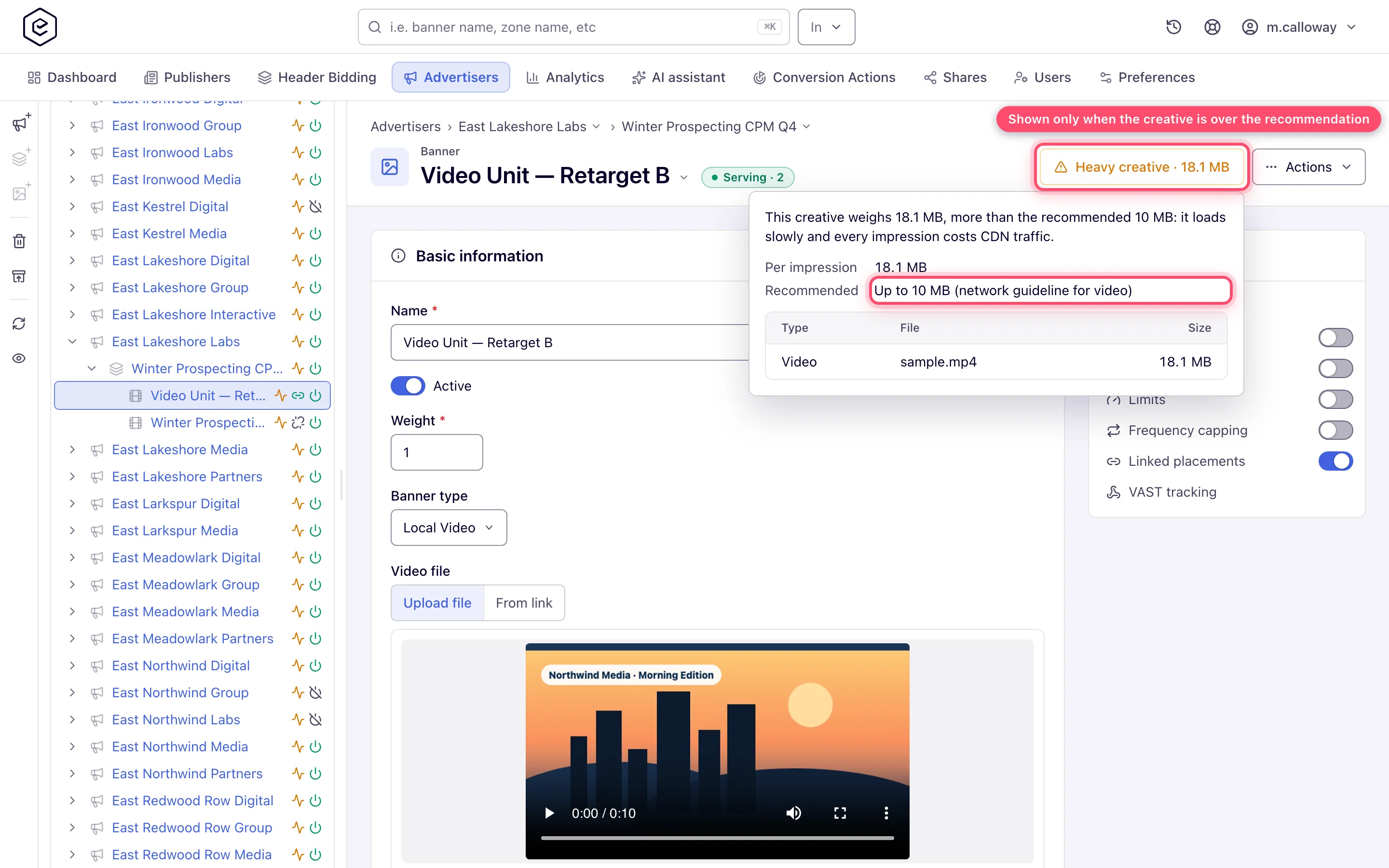
A banner heavier than recommended shows a Heavy creative button with its weight in its page header, next to Preview; click it for the recommended weight and the files that make up the weight. A banner within the recommendation shows nothing. These are recommendations, not limits: a heavy banner still saves and serves. The recommended weight depends on the creative:
| Creative | Recommended weight |
|---|---|
| Serves a video file of the network’s own — a video creative, a native with a video, or a template with a video among its files (an outstream player) | The network’s video limit, 10 MB by default |
| Display creative of an IAB standard size | The IAB New Ad Portfolio subload limit for that size: 320×50 and 300×50 — 100 KB; 300×250, 728×90 and 160×600 — 300 KB; 970×90 and 300×600 — 400 KB; 970×250 and 300×1050 — 500 KB; 320×480, 480×320, 768×1024 and 1024×768 — 600 KB |
| Any other size | The network’s limit for non-IAB sizes, 300 KB by default |
The subload figure is used rather than IAB’s smaller initial load, because the weight counts everything an impression pulls, not only what paints first.
To find the heavy creatives across an account, ask the AI assistant (the creative_weights
tool with heavyOnly) or call GET /rest-api/banners/weights.do?heavyOnly=true. To look for a size
rather than the limit, say which media: media=VIDEO&minBytes=4194304 lists the videos over 4 MB,
media=DISPLAY&minBytes=307200 the display creatives over 300 KB — a threshold without the media
mixes the two, and 300 KB is heavy for a banner but small for a video. See
MCP.
Related
- Banner types — which format runs on which placement, and the fields each shows
- Image banners
- Native banners
- Video banners
- HTML5 ZIP creatives
- Media library
- Video creative requirements
- Admin tools — where the ad units in the Size combo come from
- Platform limits
