
OpenRTB (DSP) banners
Plug programmatic demand into a campaign — picking the DSP partner, what the auction options really do, and which fields each placement type shows.
An OpenRTB banner is not a creative — it is a bridge to programmatic demand. When ad selection reaches it, Epom sends an OpenRTB bid request to the chosen DSP partner; if the partner bids and wins, the bid’s own markup is served.
Who this is for
Network managers running programmatic demand. The DSP partners you pick from here are configured by your network administrator in the admin console; see DSP partners.
The OpenRTB banner type needs the Open RTB permission; your network administrator grants it in Admin → Users & access → User roles & permissions. Without it the type is missing from the Banner type combo and the DSP fields never show.
Prerequisites
- The Open RTB permission on your role.
- At least one active DSP partner with an integration type set — that is what puts it in the DSP list.
Steps
- On the campaign, Add new banner → the placement type. OpenRTB is offered on Site, Non-standard, Mobile site, Video, Application and Native placements — every placement type that takes banners except email.
- Set Banner type to OpenRTB and choose the DSP. Required.
- Fill any partner parameters that appear. The set is defined by that partner’s own configuration, and the ones it marks required block the save until filled.
- Set the auction options — see what the auction options do.
- Save and link the banner to placements like any other banner.
What each placement shows
Verified by opening the form on each placement type OpenRTB accepts:
| Placement | Ad unit | Use placement size | Always 2nd price | Mime types | Adapter template |
|---|---|---|---|---|---|
| Site | ✓ | ✓ | ✓ | — | — |
| Non-standard | ✓ | ✓ | ✓ | — | — |
| Mobile site | ✓ | ✓ | ✓ | — | ✓ |
| Application | ✓ | ✓ | ✓ | — | — |
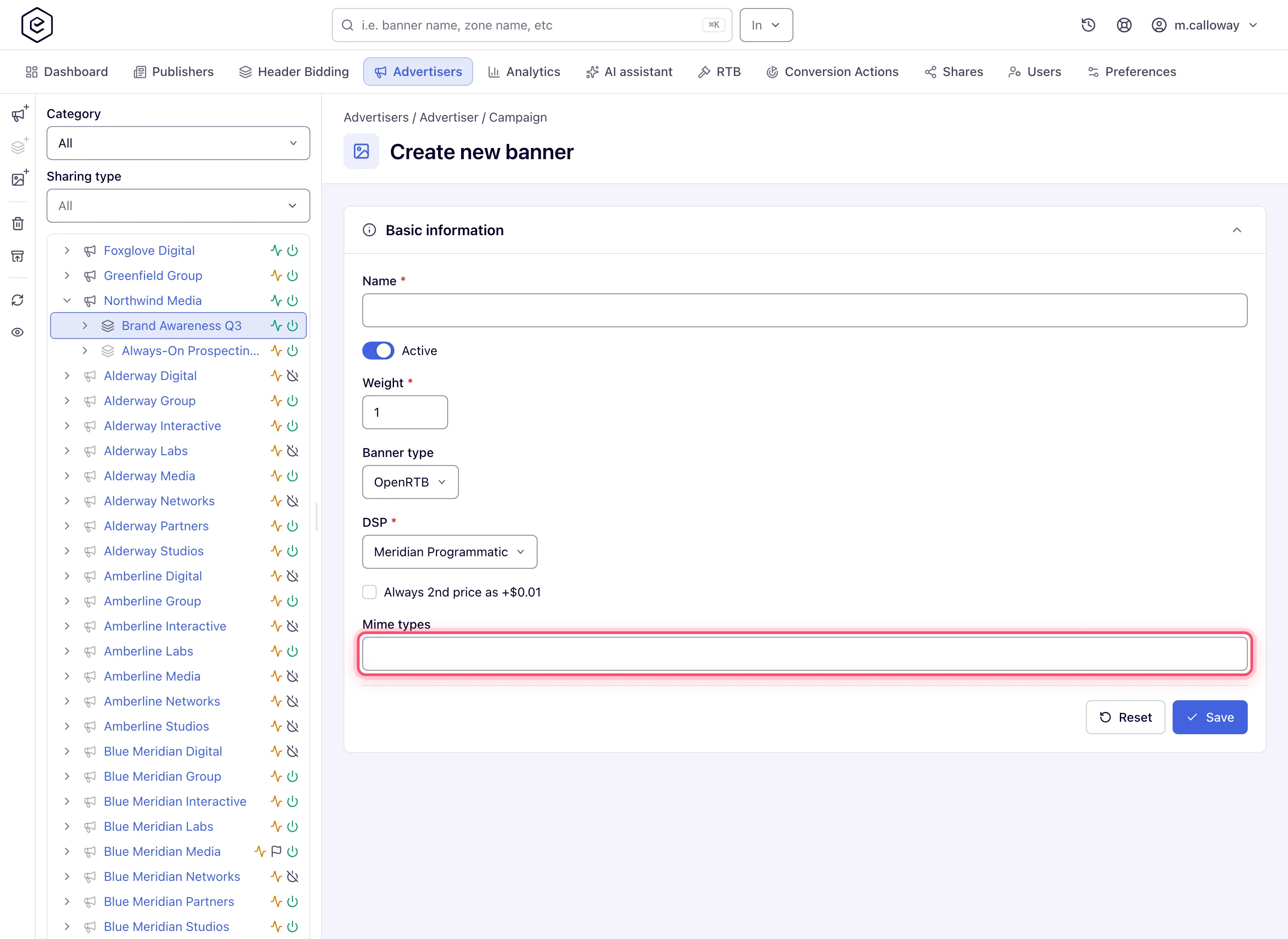
| Video | — | — | ✓ | ✓ | — |
| Native | — | — | ✓ | — | — |
On video and native placements the format is dictated by the placement itself, so there is no ad unit to set and nothing for Use placement size to switch between.
What the auction options do
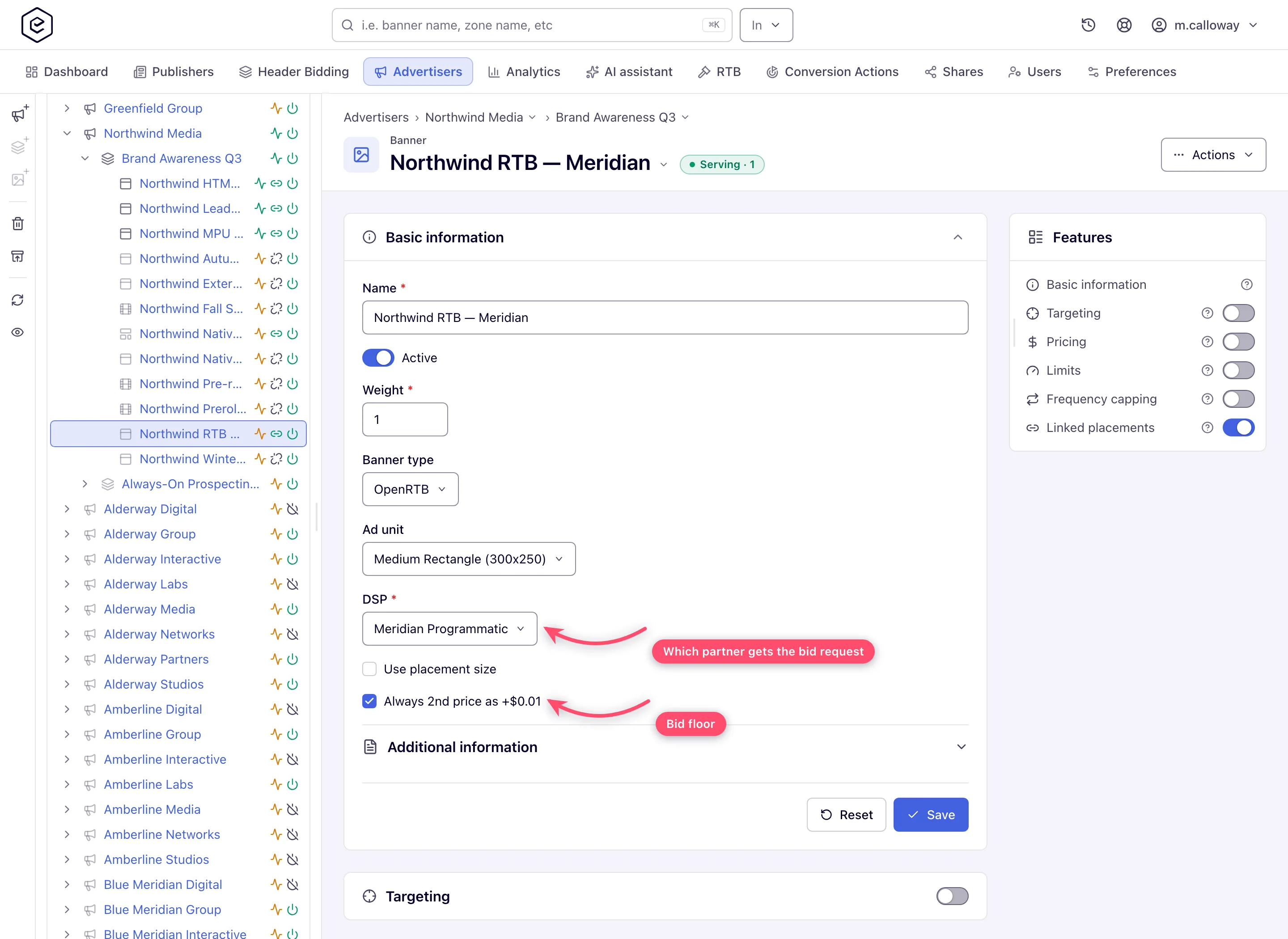
Always 2nd price as +$0.01 changes what happens when your banner is the only candidate in the auction. Normally a lone bid clears at first price — the bid amount. With this on, the auction is treated as second-price and clears at the bid floor plus one cent, capped at the bid, so the partner pays the floor rather than its full bid. With more than one candidate the usual auction rules apply. A PMP deal’s own auction type overrides this.
Use placement size makes the bid request carry each placement’s size instead of the banner’s own ad unit — and it also makes the banner match placements of any size, since there is no fixed creative size to compare. Use it for one banner that should bid on everything; leave it off when the DSP expects a specific slot size.
Mime types (video only) is a free-text field listing the video creative formats you will accept in bids; it goes into the bid request’s video object. Left empty, the request offers the platform’s default list of video mime types.
Options and fields
| Field | What it does |
|---|---|
| DSP | The partner that receives the bid request. Required. |
| Partner parameters | Extra fields the selected partner defines; the ones it marks required are enforced. |
| Ad unit | The banner’s own size for the bid request. Shown on non-video, non-native placements and never required for OpenRTB. |
| Use placement size | See above. Absent on video and native. |
| Always 2nd price as +$0.01 | See above. Always shown. |
| Mime types | Accepted video formats. Video placements only. |
| Adapter template | Optional rendering template for the returned markup. Mobile site placements only. |
Where the DSP list comes from
The DSP combo is filled from Admin → DSP Partners. Two things about it are easy to get wrong:
- It is not filtered by placement type. Every active partner with an integration type set appears in the list on every placement type. (The endpoint takes a placement-type parameter and ignores it.)
- Deactivated partners disappear from the list. Only a banner that already bids through one still shows it, greyed out as Name — Inactive, with an inline warning under the field: ”…” is deactivated, so this banner sends it no bid requests and serves nothing. Pick another DSP partner to put it back in the auction. Nobody else can pick it.
So a partner missing from the combo is either deactivated or has no integration type
configured. Both are fixes your network administrator makes on the partner. Over the API,
GET /rest-api/banner/dspPartners.do lists the active partners the same way.
Corner cases and gotchas
Corner case: a banner whose DSP partner was deactivated afterwards keeps its selection and saves without complaint. The banner stays Active and looks healthy, but it sends no bid requests and serves nothing. Read the warning under the DSP field and pick another partner.
Corner case: the ad unit is shown but never required for OpenRTB, unlike file banners. With Use placement size on it is ignored for matching entirely.
Corner case: if the network runs creative scanning, a partner’s creative can be blocked from serving even though your banner is active — the runner-up bid wins instead. See creative policy protection.
Corner case: pricing for OpenRTB banners is effectively CPM-only on the banner’s Pricing card — the auction price, not a manual price list, is what is earned.
Corner case: if the partner’s pricing model is CPC, clicks are only counted when your network administrator has enabled Wrap click-through on the partner. Without it the creative links straight to the DSP’s own click tracker, the ad server never sees the click, and the banner reports impressions with zero clicks and zero earnings. See DSP partners (admin).
Note: the Adapter template on mobile site placements uses the
CONTENT_ADAPTERtemplate type, which is deprecated in the platform. Avoid building new ones on it.
Per-role notes
- Network manager — picks from the DSP partners your network administrator has already configured. The partner list and its parameters live in the admin console, not on this form; see DSP partners.
- Can view share — the DSP combo and the auction options are disabled and the card carries a Read-only pill.
