
Keep unwanted ad categories off your inventory
What Epom's two category levers really do — blocked IAB categories are an advisory signal to DSP partners, and for direct demand only a name block is a hard stop. Where each lives, how the levels combine, and the current limits.
There are ad categories you never want on your property — gambling, adult, a competitor’s vertical, whatever your brand-safety policy says. Epom has no single “sensitive category blocklist” switch. It has two separate mechanisms, and which one applies depends on where the demand comes from — with a different strength of guarantee behind each.
| Demand source | The control | What it actually does |
|---|---|---|
| Programmatic — DSP / OpenRTB partners | Blocked IAB category on the site, zone or placement | Adds the categories to the bcat field of every bid request. Epom does not check what comes back — it is a request to the partner, not a filter. |
| Direct — campaigns and banners trafficked inside Epom | Matching rules (by category) and name blocks (by entity) | Rules only decide what gets paired automatically — they never unpair anything. Only a name block is a hard stop. |
Two consequences worth absorbing before you start:
- A blocked IAB category does nothing to a direct campaign. Direct banners carry no IAB category at all, so there is nothing for the block to match.
- Nothing in Epom blocks direct demand by category. Category-based matching rules add pairings; they cannot remove one. To stop a specific advertiser, campaign or banner on your inventory you block it by name.
Who this is for
Network managers, who reach all three levers on this page, and the network administrator who maintains the category vocabularies behind them.
A publisher reaches none of the three as shipped — the OpenRTB card, the Matching rules card and the by-name Block action are all absent from a publisher’s site and placement pages. Keeping a category off your inventory is a request to the network; see Per-role notes.
Prerequisites
- The site, zone or placement must already be saved. The card does not exist while you are
creating an entity, and the save endpoint refuses an id of
0. - Blocking programmatic demand only matters if you actually take it — at least one DSP partner and OpenRTB traffic on the placement.
- Category taxonomies are maintained by your network administrator; see Manage category taxonomies.
Steps
Programmatic and direct demand are blocked with different levers; set the one you need, or both.
Lever 1 — block programmatic demand by IAB category
-
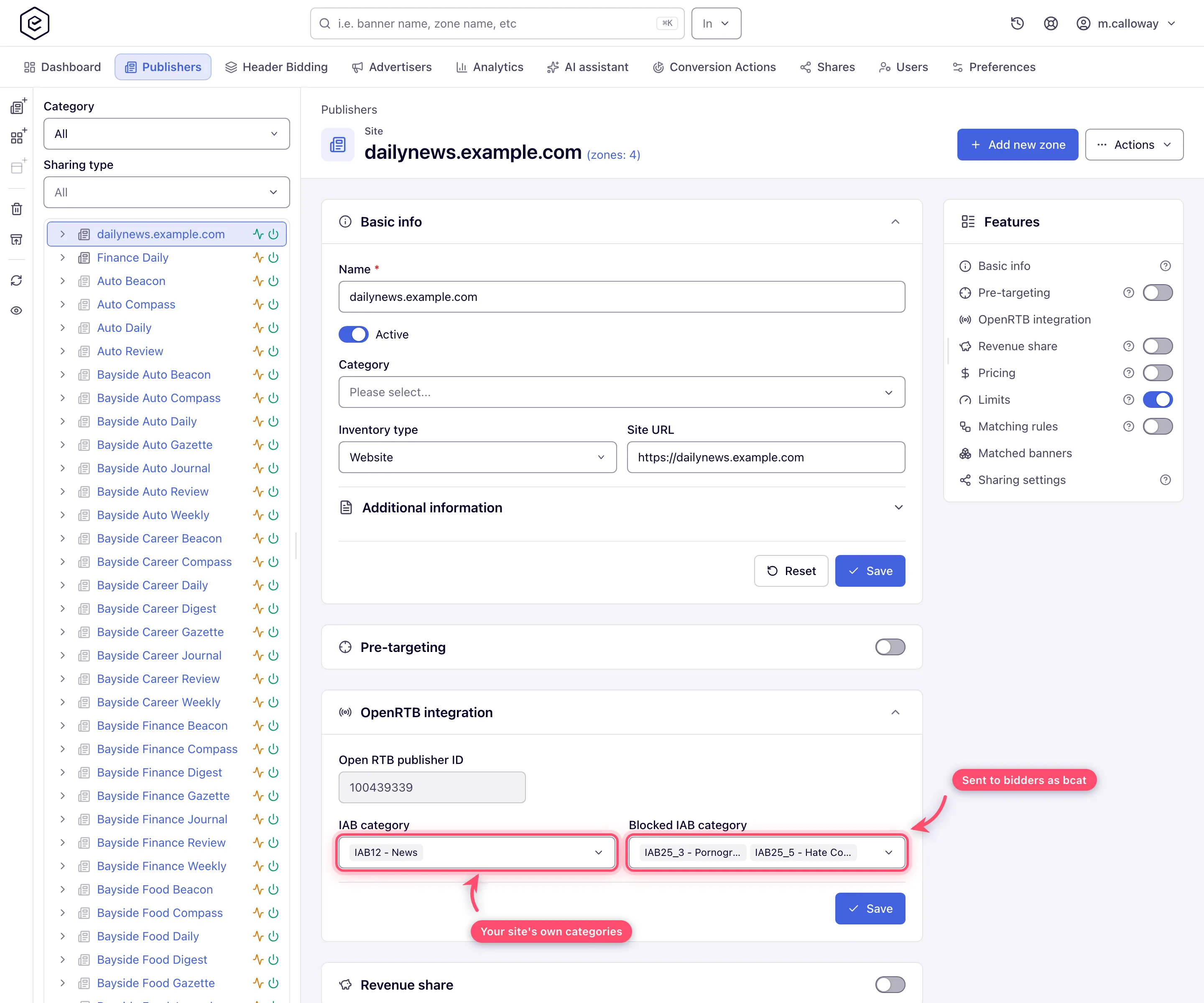
Go to Account → Publishers, select the site in the tree, and find the OpenRTB integration card. It is collapsed unless something is already selected — click the header to open it.
-
Open Blocked IAB category and tick every content category you want kept off the property. The list is the fixed IAB Content Taxonomy 1.0 — 391 entries, 26 top-level codes (
IAB1…IAB26) plus their sub-codes, each labelledcode - description, for exampleIAB25_3 - Pornography. Type a code (IAB25) or a word from the name (pornography) to filter; past ten options the picker gathers what you have already ticked into a Selected (N) group at the top when you reopen it. How the search matches — and whyIAB25-3finds nothing — is under How the pickers behave.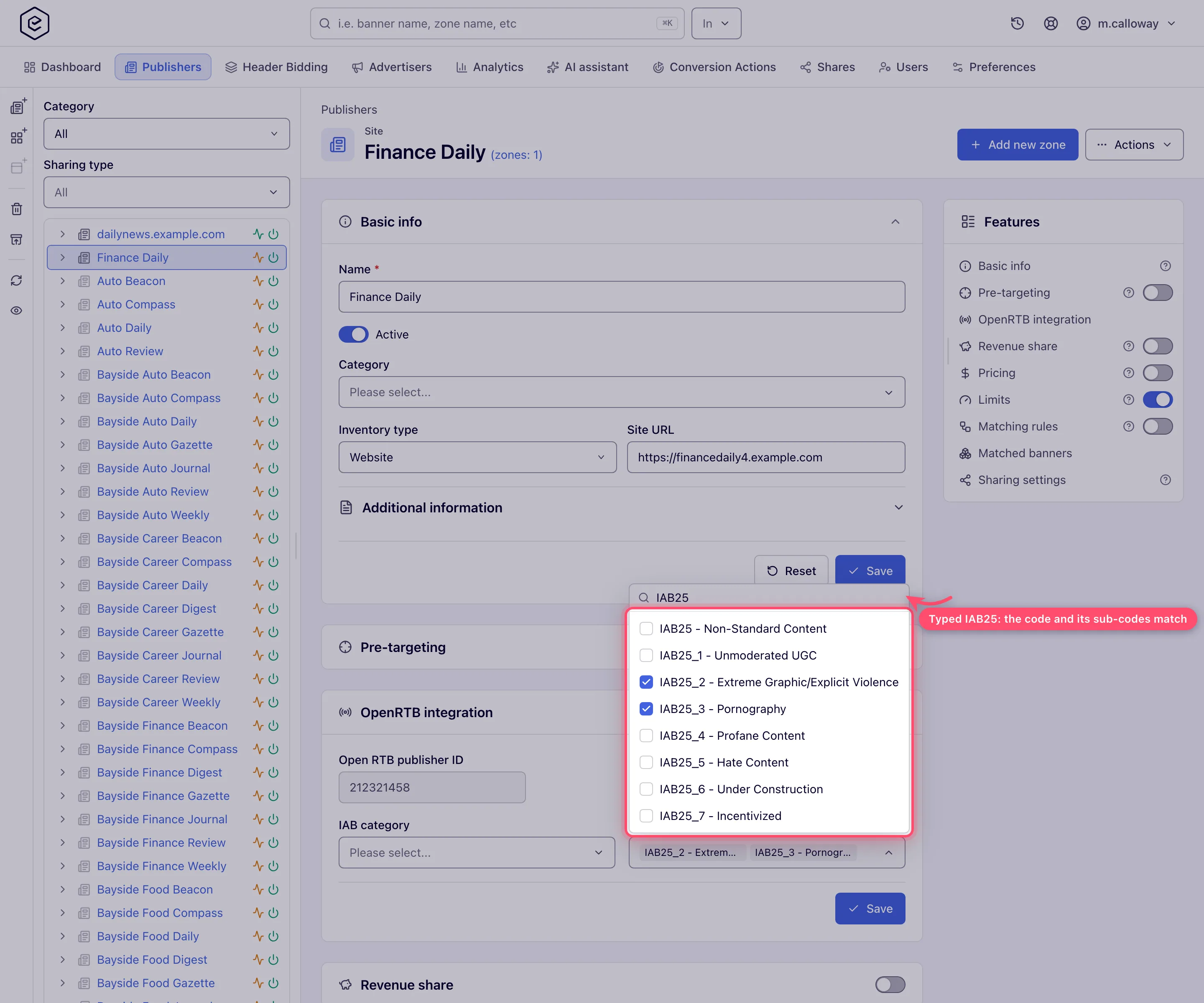
-
Click Save. A Done toast confirms it, and the picks show in the field as chips — the first two, then +N more; open the picker to see them all.
-
Optionally repeat on individual zones (same OpenRTB integration card) and placements (the card is called RTB configuration there — see Set a placement’s OpenRTB settings). The ad server takes the union of the three lists on every request, so a category blocked at any one level is blocked for that placement.
From then on, every bid request Epom sends for that inventory carries the combined list in the
OpenRTB bcat field, and the DSP is expected to withhold matching creatives.
Note: the two IAB fields on the card do opposite jobs. IAB category describes your content so buyers can target it. Blocked IAB category asks buyers not to send creatives in those categories. “My site is IAB7 Health” and “block IAB7 creatives” are different statements.
What Epom sends, and where each level lands
The descriptive IAB category field does not merge — each level maps to its own OpenRTB field. Only the blocked list merges.
| Card field | Site | Zone | Placement |
|---|---|---|---|
| IAB category → | site.cat / app.cat | site.sectioncat / app.sectioncat | site.pagecat / app.pagecat |
| Blocked IAB category → | bcat (all three merged into one list) | ↑ | ↑ |
Two details that trip people up when they compare notes with a DSP:
- The wire format differs from the label. The picker shows
IAB25_3(underscore); the bid request carriesIAB25-3(hyphen), which is the form the OpenRTB spec uses. Same category. - An empty list means the field is omitted, not sent as
[].
Lever 2 — direct demand: rules pair, only blocks stop
Direct campaigns never generate a bid request, so bcat is irrelevant to them. Two different
mechanisms apply, and they are not interchangeable.
Matching rules — a pairing mechanism, not a blocklist
A rule matches categories and labels and produces a set of banner ↔ placement pairings that the ad server adds on top of whatever a trafficker linked by hand. There are two types:
| Rule type | Matches on | Attached to | Answers |
|---|---|---|---|
| Campaign Rule | Advertiser categories and labels | Sites, zones, placements | ”Which campaigns may serve here automatically?” |
| Inventory Rule | Publisher categories and labels | Advertisers, campaigns, banners | ”Where may these ads serve automatically?” |
As a publisher you want a Campaign Rule attached to your inventory. Your network administrator creates it in Admin → Ad serving → Rules; you attach it from the Matching rules card on your site, zone or placement. See Attach matching rules to an entity for that workflow and Matching rules and network defaults for the rule form.
The important limit: an exclude line, or an excluded rule group, narrows which pairings the rule creates. It subtracts from the rule’s own result set — never from the pairings that already exist. A banner linked to your placement by hand keeps serving no matter what any rule says.
Two more conditions, both easy to miss:
- Rules are inert unless Matching rules is on for both sides — on your site, zone or placement and on the banner, campaign or advertiser. One side alone does nothing.
- A rule matches an advertiser’s categories. A banner has no category of its own: it inherits its advertiser’s advertising categories through its campaign. An uncategorised or miscategorised advertiser is invisible to the rule.
Name blocks — the only hard stop
To actually stop demand, block it by name.
-
Open a placement and expand Banners probability. Each row is a banner, campaign or advertiser that can currently win here, with its probability.
-
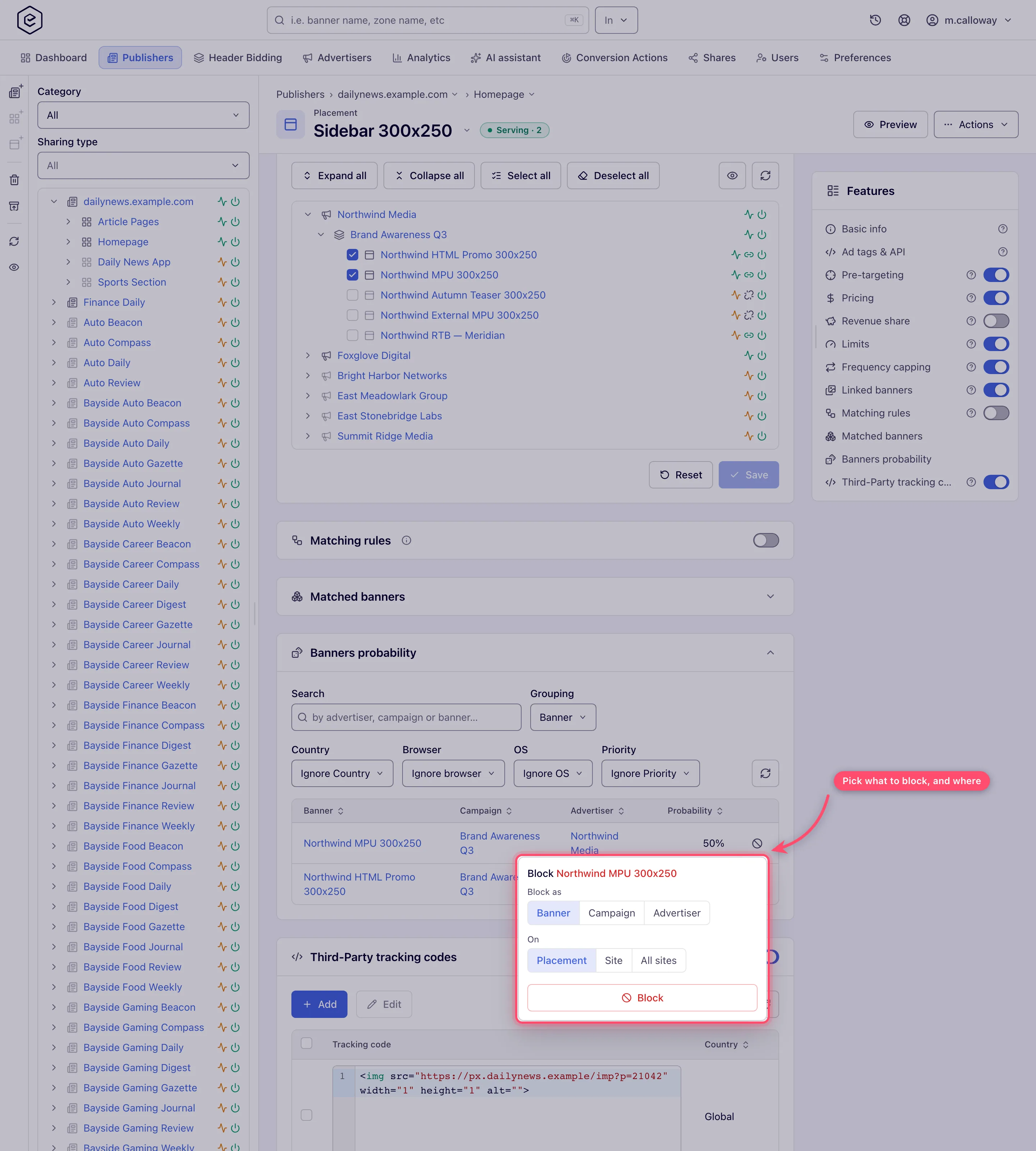
Click the red ⊘ button at the end of the row. A popover opens, headed Block <name>.
-
Pick Block as — Banner, Campaign or Advertiser. The choices are limited by the grid’s current Grouping: grouped by Advertiser you can only block the advertiser.
-
Pick On — Placement, Site or All sites. Each scope is a separate permission, so you may see fewer than three.
-
Click Block and confirm. A Successfully blocked … on the specified scope toast follows, and the block appears as a group on the Pre-targeting card.
This is enforced by the ad server before selection, and — unlike ordinary targeting — it applies even when the Pre-targeting switch is off. With the switch on, the card body says so itself: “Blocked entities stay blocked even when targeting is off — the switch above controls only positive targeting.” With the switch off the card is collapsed and lists nothing, blocks included (on a window wide enough for the Features rail it leaves the page, and only its rail switch remains), so switch it on to review them. Full workflow in Block demand and inventory.
Options and fields
The OpenRTB card
| Field | Site | Zone | Placement | What it does |
|---|---|---|---|---|
| Open RTB publisher ID | ✔ read-only | — | — | Derived from the site id; sent as publisher.id. Nothing to configure. |
| Custom tag ID | — | — | ✔ | Overrides the tag id sent in the impression object. Macros are resolved. |
| IAB category | ✔ | ✔ | ✔ | Describes your content to buyers. Maps to cat / sectioncat / pagecat respectively. |
| Blocked IAB category | ✔ | ✔ | ✔ | Categories you ask buyers not to bid with. All three levels merge into bcat. |
| Blocked banner attributes | — | — | ✔ | Creative behaviours you refuse (auto-play audio, pop, expandable…). Sent as battr on the impression — advisory in exactly the same way as bcat. |
The card is titled OpenRTB integration on a site and a zone, and RTB configuration on a placement. All three save independently of the rest of the page — the card has its own Save.
Which category vocabulary is which
Epom has three separate category lists. They are stored in three different tables and never interchange, even though two of them ship with identical default names.
| Vocabulary | Used for | Edited where | Applies to |
|---|---|---|---|
| IAB categories | OpenRTB cat / bcat signalling | Nowhere — fixed platform list of 391 entries | Sites, zones, placements only |
| Advertising categories | Campaign-rule matching | Admin → Categories & labels | Advertisers (banners and campaigns inherit) |
| Inventory / publisher categories | Inventory-rule matching, site classification | Admin → Categories & labels | Sites, zones, placements |
Blocking IAB7 - Health & Fitness on the OpenRTB card and excluding the advertising category
Health in a rule are two unrelated actions on two unrelated lists. See
The four category systems.
Corner cases and gotchas
Corner case:
bcatis advisory and Epom never verifies it. The bid response object Epom parses has no category field at all, and no stage of the auction inspects one — so a partner that ignoresbcatcan return a creative in a blocked category and it will serve. Treat the blocked list as a contractual request to the partner, not a filter. If a forbidden creative gets through, block that DSP partner’s banner by name as the hard stop and raise it with the partner. The same applies to Blocked banner attributes (battr).
Corner case: the merge across site → zone → placement is a union with no override. There is no way to unblock at a narrower level something the site blocks — the placement can only add to the list. If one placement needs a category the rest of the site does not, block it on the individual placements instead of on the site.
Corner case:
bcatdoes nothing to direct demand. A publisher who blocks IAB7 Health and assumes their directly-trafficked pharma campaign also stops will be surprised: it keeps serving. Direct banners carry no IAB category anywhere in Epom, so there is nothing to match.
Corner case: an exclude line in a matching rule is not a block. The ad server unions the hand-linked banners with the rule-derived ones; the rule’s exclusions only shrink its own half of that union. If the point is to stop a specific advertiser, use a name block.
Corner case: there is no network-wide default blocked list. A newly created site starts with an empty blocked list and inherits nothing — each site, zone and placement is set on its own. (Matching rules do have platform defaults, applied when you switch Matching rules on.)
Corner case: a change reaches the ad servers asynchronously, after the save commits — it is not applied to requests already in flight, and each ad server picks it up independently. Expect a short window in which the old list is still being sent.
Corner case: if all your demand is direct, the OpenRTB card is a no-op for you. Nothing on it affects a campaign trafficked inside Epom.
Over the API
The IAB categories a site or zone sends in bid requests and the ones it blocks are read and set with
GET / POST /rest-api/sites/{siteId}/openrtb.do and /rest-api/zones/{zoneId}/openrtb.do, parameters
iabCategories and blockedIabCategories (ids or IAB codes, comma-separated). Only the lists you send change; an
empty list clears it; an unknown category refuses the whole request. The site read also returns its OpenRTB publisher
id. Both need the Open RTB permission and view or update rights on the site.
A placement’s OpenRTB card is GET / POST /rest-api/placements/{placementId}/openrtb.do: the same two category lists,
plus blockedBannerAttributes (the creative attributes it refuses, sent to DSPs as battr — by name such as POP or
by OpenRTB id) and customOpenRtbTagId (sent as imp.tagid instead of the placement key, up to 256 characters). The
same rules apply: only the fields you send change, an empty one clears, an unknown value refuses the whole request.
Set a placement’s OpenRTB settings covers the placement card field by field.
Per-role notes
- Network manager — all three levers: the OpenRTB card, the Matching rules card, and the by-name Block, once your network administrator switches a blocking scope on for the role.
- Publisher — none of them. Send the category list to your network manager.
- Advertiser — nothing on this page; both levers sit on inventory.
- Shared-entity viewer — on a Can View share the OpenRTB pickers are disabled with no Save button, and blocked groups show without remove controls.
Related
- Create and edit a site
- Set a placement’s OpenRTB settings
- OpenRTB integration reference
- Attach matching rules to an entity
- Block demand and inventory (pre-targeting blocks)
- Manage category taxonomies
- Matching rules and network defaults
- Targeting and pre-targeting overview
- Use case: brand safety with category rules, domain lists and advertiser blocks
