
Manage PMP deals on a campaign
Add, edit and remove private-marketplace deal rows on a campaign, switch it to a private auction, and understand how the rows reach DSP bid requests.
The RTB PMP deals card on a campaign stores private-marketplace deal terms — deal ID, buyer seat, floor price, auction type, country — and the platform copies them into every OpenRTB bid request that campaign sends to its DSP partner. This page documents the card itself: fields, validation, the private-auction toggle and the row lifecycle. For the end-to-end recipe (negotiating terms, structuring campaigns per deal, verifying and reporting delivery) see Sell premium inventory through PMP private deals.
Who this is for
Network managers managing private-marketplace terms on a campaign. If you don’t see the RTB PMP deals card, ask your network admin for the RTB PMP Deals permission. Managing the card also needs a campaign you own or hold as Can edit.
Prerequisites
- A saved campaign — the card exists only on the edit page, not on the create form.
- OpenRTB (DSP) banners in the campaign: deal rows travel inside the bid requests those banners generate, so without them the deals never leave the platform.
- The deal terms from the buyer: deal ID string, buyer seat ID, floor price, auction type, covered countries.
Steps
- Open Account → Advertisers → advertiser → campaign and scroll to the RTB PMP deals
card (that is its name on screen and in the Features rail). Turn the card’s switch on — deal rows are only attached to bid requests while
the switch is on.
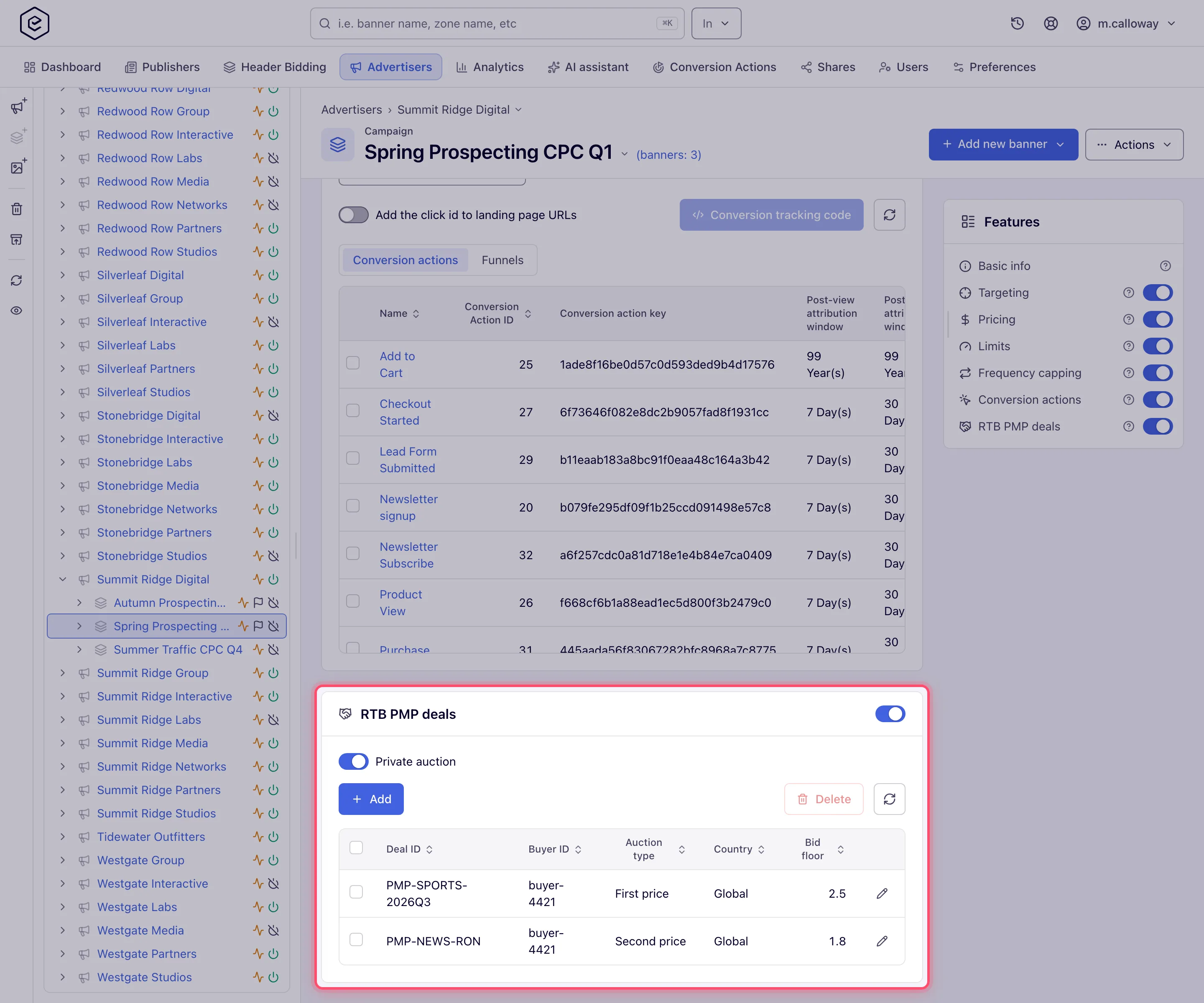
- Optionally turn on Private auction. This is saved immediately (the toast reads “PMP type changed to private”, or “…to public” when you turn it off) and marks the campaign’s bid requests as private-auction — only bids referencing a valid deal are then accepted.
- Click Add and fill the deal terms. The dialog carries the card’s name (RTB PMP deals)
rather than its own, Country starts at Global, Auction type at First price and
Bid floor at 0:
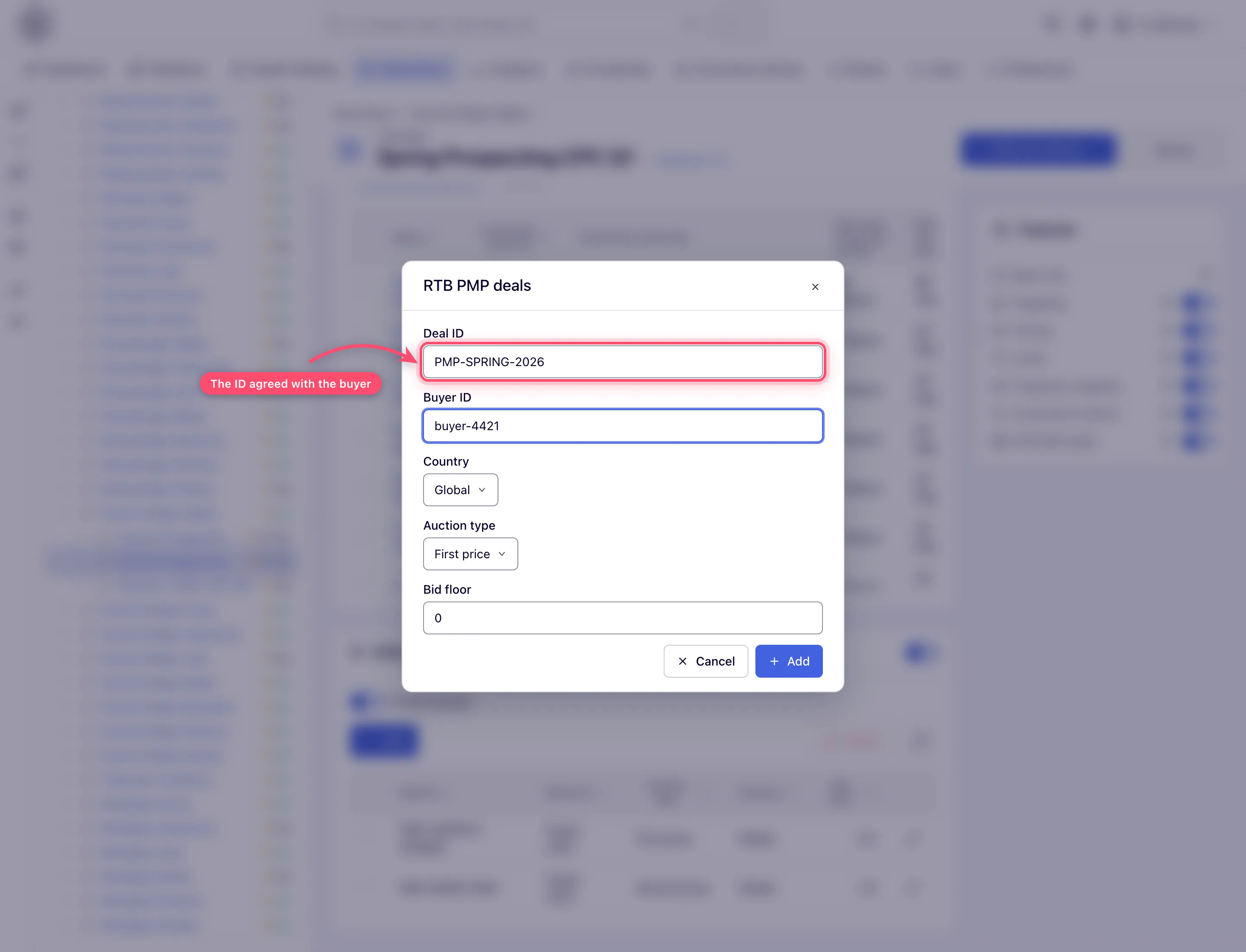
- Click Add in the modal footer. It stays greyed until Deal ID and Buyer ID are filled. The row appears in the grid and a “Done” toast confirms — rows save individually; there is no card-level Save button.
- Edit a row later with the pencil icon (same modal, Save, also greyed while Deal ID or Buyer ID is empty). To remove rows, tick them and click Delete (N), then confirm “Delete N record(s)?”.
Options and fields
| Field | What it does | Default | Validation |
|---|---|---|---|
| Deal ID | The external deal string both sides reference; the buyer’s bids must carry it back | empty | Required |
| Buyer ID | The buyer’s seat ID; sent as the deal’s allowed seat (wseat) | empty | Required |
| Country | Country the row applies to, or Global (*) | Global | Required; must be an ISO alpha-2 code or * |
| Auction type | First price, Second price or Bid floor price (fixed-price deal — the win clears at exactly the floor) | First price | Required |
| Bid floor | The negotiated minimum price for this deal | 0 | 0 or greater, 1000 at most (Bid floor cannot exceed 1000.). A deal saved earlier with a higher floor keeps it until you change the floor. |
The fields are listed in the dialog’s order. The grid shows the same five values in another order — Deal ID, Buyer ID, Auction type, Country, Bid floor — sorts client-side and refreshes with the reload button. Over the API a failed check answers with the message itself, for example “Deal ID is empty.”, “Bid floor should be positive.” or “Please provide ISO alpha-2 country code or * for global value.”; the dialog’s own button stays disabled instead. What each auction type means commercially — and how deal bids are treated in the auction — is covered in the PMP recipe.
How rows become deals in bid requests
For each bid request the campaign sends, the platform attaches the deal rows whose
Country matches the request’s country, plus every Global row, into the OpenRTB
pmp object (deal ID, floor, auction type, buyer seat). The pmp.private_auction flag
follows the card’s Private auction toggle. Rows are deduplicated, so two identical rows do
not produce two deals. Changes are picked up when the ad-serving cache next reloads — they
are not instantaneous.
Corner cases and gotchas
Corner case: the card only shows on an existing campaign. On the create form there is no RTB PMP deals card — save the campaign first.
Corner case: a deal with the same Deal ID + Buyer ID + Country as an existing row is rejected (“PMP Deal with such deal ID, buyer ID and country already exists”). The same deal ID with a different country is fine — that’s how you scope one deal to several countries.
Corner case: switching the card off does not delete the rows — it only stops them from being attached to bid requests. Switch it back on and the same deals resume.
Corner case: the Private auction toggle saves on click, independently of anything else on the page — there is no way to stage it together with other campaign changes.
Corner case: a country code the platform cannot resolve renders in the grid as
XX (Can't parse). The row still exists; fix it via the pencil editor.
Corner case: if the card is invisible to you but was previously enabled, the deals keep working — visibility is your permission, enforcement is the campaign’s stored state.
Corner case: over the REST API (tag PMP Deals) list deals with
GET /rest-api/campaign/{campaignId}/pmp-deals.do, create withPOST …/{campaignId}/pmp-deal.do, replace withPOST /rest-api/campaign/pmp-deal/{id}.do— all five fields are required, it is not a partial update — and remove withPOST /rest-api/campaign/pmp-deals/delete.do(ids). The campaign’s on/off switch is…/{campaignId}/pmp-deals/enable.doand…/disable.do(404for an unknown or deleted campaign); deals created through the API stay dormant until the switch is on. See Network & misc API.
Per-role notes
- Network manager, advertiser — the card appears only once your network administrator grants RTB PMP Deals; managing it also needs a campaign you own or hold as Can edit.
- Can view share — the grid and the toggles are visible but disabled; there is no deal management on a campaign you cannot edit.
Related
- Sell premium inventory through PMP private deals — the end-to-end recipe
- Epom PMP deal types compared — first/second/bid-floor decision table
- Create and edit a campaign
- OpenRTB (DSP) banners
- Plug programmatic DSP demand
- Configure DSP partners
