
Header bidding through a Prebid Server
Sell header-bidding slots through a Prebid Server — which server to use, the slot ids, our Prebid Server, a publisher’s own Prebid Server reading our stored requests or taking our adapter entry, and what its operator has to do.
Use this route when the auction runs on a Prebid Server rather than in the browser — the one the Code face offers, or the publisher’s own. A server-side auction asks for each slot by id, and Epom serves the slot definitions those ids resolve to. This page covers which server to use, the slot ids, the three server faces of the Code tab, and what the operator of their own server has to do. An app always takes this route; its SDK side is on Header bidding in an app with Prebid Mobile.
Who this is for
Network managers and admins who build the tag, and — for the publisher’s own server — whoever operates that Prebid Server. The tag needs the access listed under Permissions.
Prerequisites
- A saved tag whose slots point at placements and which has a Serving domain — the conditions under Slot ids.
- A network id on the ad server; without it the slot ids and documents never appear.
- For their own server, our
epom_asadapter in its build — see What their Prebid Server operator has to do.
Steps
- Decide which server runs the auction — Which Prebid Server to use.
- Build and save the tag as under Steps on the main page, with Serve this tag on.
- Open Code and pick the face on Where the auction runs — Our Prebid Server, Their Prebid Server, our setup or Their Prebid Server, our adapter — and copy the slot ids and what the face prints.
- For their own server, hand its operator What their Prebid Server operator has to do.
Which Prebid Server to use
Out of the box the Our Prebid Server face and the example apps point at pbs.eashb.com, with its
cache at cache.eashb.com. A network may use them for small volumes — a pilot, a first app, a
handful of publishers — with nothing to stand up.
For more than that we recommend a dedicated Prebid Server instance per client, with its own
capacity, timeouts and cache. Epom helps set one up when needed: ask Epom support or your account manager. The epom_as
adapter is not yet in a released Prebid Server build, so the instance is built with it as part of
that setup. Once it runs, either:
- have Epom support name it, and its cache, on the Our Prebid Server face, so the face prints its address instead; or
- hand your publishers Their Prebid Server, our setup.
Either way the server reads the slots from the network’s /hb/stored-requests and has to be given
the network’s account; nothing changes in the tags.
When the buyer runs a Prebid Server
The page routes assume the auction happens in the browser. A publisher can also buy through a Prebid Server — their own, or the one the editor offers (see Which Prebid Server to use) — and an app has no other option: Prebid Mobile always calls a server. The Code face is split by which of those it is, because the material differs completely and only one of them applies to any given publisher.
Slot ids
A server-side auction asks for a slot by id, so the id is the value that matters most on these
faces. It is {network}-{slot} — n1234-26 — and the publisher puts it in their own code:
configId on a Prebid Mobile ad unit, imp.ext.prebid.storedrequest.id in an OpenRTB request built
by hand. Nothing reaches us without it.
Our Prebid Server and Their Prebid Server, our setup list the ids under 1. The slot ids, one line per slot, container name first; the two adapter faces show one block per slot instead, headed by the container name. An id exists once three things are true: the tag has been saved, the slot points at a placement, and the tag has a Serving domain. A slot missing any of them is left out of the listing and has no document. Ids never change — both halves are fixed once the slot exists — so renaming the container or swapping its placement keeps the id; a new id is handed over only when a slot is added. If the listing stays empty on a tag that has been saved with placements and a domain, the network id is missing on the ad server, and Epom support or your account manager is the one to ask: without it the network serves no stored requests at all.
Beside the ids sits a link to the working iOS and Android example apps that send these ids —
epom/epom-prebid-mobile-demo, one short method
per format — banner, video, native, interstitial and rewarded among them — shipped pointed at
pbs.eashb.com and a demo network so a fresh clone fills before anything is changed. Hand it to an
app developer with the ids.
Our Prebid Server
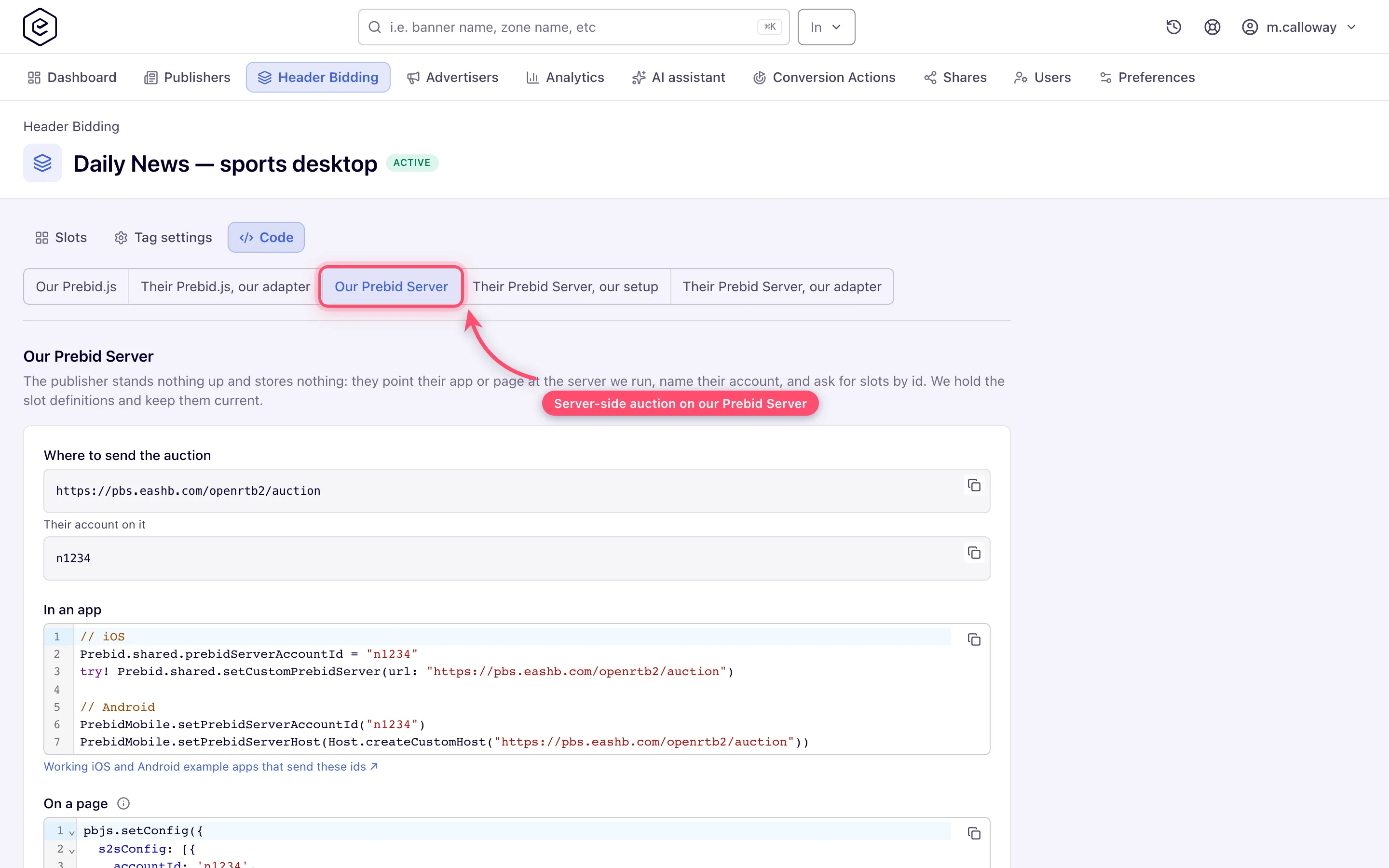
The publisher stands nothing up and stores nothing: they point their app or page at the Prebid Server this face names, name their account, and ask for slots by id. The slot definitions live here and are kept current here, so a change to a slot reaches their traffic without them touching anything. It is the quickest route for an app, because nothing has to be stood up.
Note: out of the box the server on this face is
pbs.eashb.com, with its cache atcache.eashb.com. A network may use them for small volumes; for more, we recommend a dedicated Prebid Server instance, which this face can name instead — see Which Prebid Server to use.
Set Where the auction runs to Our Prebid Server. The face hands over, in this order:
-
Where to send the auction — the auction endpoint of the configured Prebid Server, which on a network using
pbs.eashb.comishttps://pbs.eashb.com/openrtb2/auction. Give the SDK the full path; it does not add it. Captioned Their account on it beneath it is the account id, which is your network id — the same value that opens every slot id. -
In an app — the two SDK calls, ready to paste, with the address and account already in:
// iOS
Prebid.shared.prebidServerAccountId = "n1234"
try! Prebid.shared.setCustomPrebidServer(url: "https://pbs.eashb.com/openrtb2/auction")

// Android
PrebidMobile.setPrebidServerAccountId("n1234")
PrebidMobile.setPrebidServerHost(Host.createCustomHost("https://pbs.eashb.com/openrtb2/auction"))
Under it, the link to the example apps.
-
On a page — for a web page that wants the same server instead of an in-browser auction: a
pbjs.setConfig({ s2sConfig: … })block naming the account,bidders: ['epom_as'], the endpoint and the cookie-sync endpoint. The bidder named there is the one our server carries, so the page declares no alias. -
Our cache —
pbjs.setConfig({ cache: { url: 'https://cache.eashb.com/cache' } })with the default settings, only for a page that calls video bidders itself. An app never needs this: the Prebid Mobile rendering API uses the shared cache automatically. -
1. The slot ids — the listing described under Slot ids. Each id goes into the app as the
configIdof one ad unit.
The option appears on the switch only while a Prebid Server is set for the network.
pbs.eashb.com is set out of the box, so the option is there unless your network has had it
removed.
The account is also a stored request. Prebid Mobile sends the account id a second time, as a
stored request at the top of every bid request, and Prebid Server refuses the whole auction when
that lookup misses. The document filed under it also asks for the two targeting keys the rendering
API uses to recognise a winner (hb_pb and hb_bidder) — without them every bid the app
receives, priced or not, is one it never renders. The network’s ad server answers that lookup
itself: asked for request-id={network id}, its address returns the account document with the
targeting block already in it. The document is built from the network’s identity, not from any tag,
so it is there before the first tag is saved — which also means it proves nothing about whether the
network sells anything. Nothing in the app and nothing in the tag has to change for it. If an app that
sends a valid configId logs no winning bid in the bid response on every request, this document
is what to ask your contact to check.
Note: the
configIdis not the placement key. The serving host and placement key never appear in the app: they sit in the stored request we serve for that id, together with the placement’s channel and custom parameters. A slot changed here is live on the ad servers within about a minute; the Prebid Server on this face caches a resolved slot for five, so an app sees the change within five.
Their Prebid Server, our setup
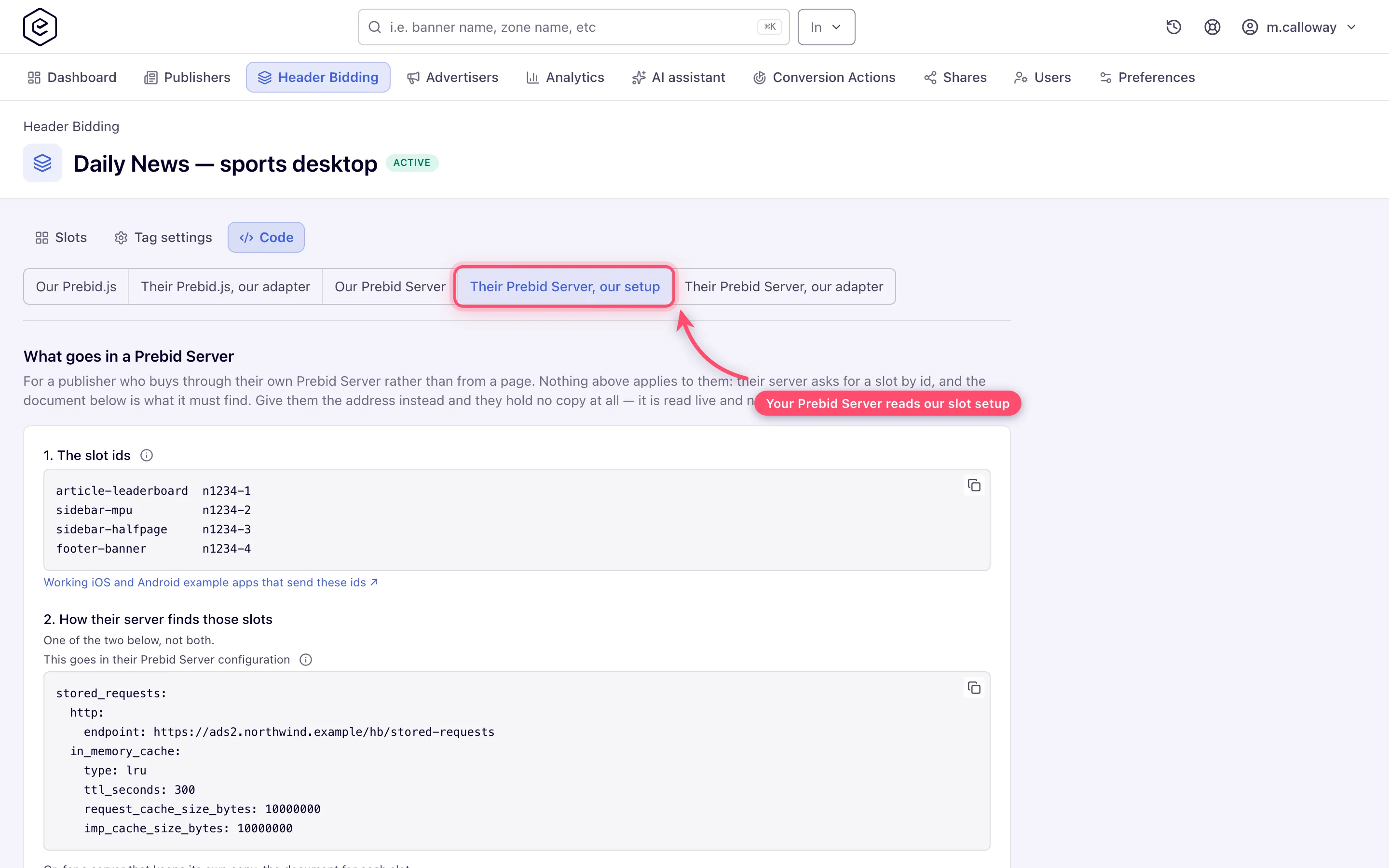
Pick this face for a publisher or buyer whose own Prebid Server will ask for these slots. It is titled What goes in a Prebid Server and walks three numbered steps — 1. The slot ids, 2. How their server finds those slots, 3. Check it answers. Step 2 offers two ways, and says to pick one rather than both.
The address. Every serving domain answers stored requests at
https://{serving-domain}/hb/stored-requests, and the face prints it inside the block their
server configuration takes:
stored_requests:
  http:
    endpoint: https://ads.example.com/hb/stored-requests
  in_memory_cache:
    type: lru
    ttl_seconds: 300
    request_cache_size_bytes: 10000000
    imp_cache_size_bytes: 10000000
Their server then reads the slots from us, and nothing they hold can go stale: a slot edited here reaches the address within a minute, and their server within its own cache window on top — five minutes with the block above. Three rules come with it:
- Beside whatever backend they already run, never instead of it. Prebid Server tries its backends in order and takes the first hit. A server that can only reach us answers an error for every id of its own and loses the whole auction with it. The request-level document a Prebid Mobile app asks for is one of those: the address answers it only for our own network id, and an app on their server asks under theirs. See Prebid Mobile against their server.
- Keep the cache block. Prebid Server’s in-memory cache defaults to none, and without it every auction fetches every slot again.
- Restrict the address at the edge. Ask Epom support or your account manager to limit
/hb/stored-requestson your serving domains to their server’s egress addresses.
The address reads both query shapes a Prebid Server fetcher can send:
https://ads.example.com/hb/stored-requests?imp-ids=["n1234-26","n1234-27"]
https://ads.example.com/hb/stored-requests?imp-id=n1234-26&imp-id=n1234-27
Either answers the same document, and an id we do not hold is simply absent from imps rather
than present as null — that is how Prebid Server tells not found from a broken answer:
{ "requests": {}, "imps": { "n1234-26": { … }, "n1234-27": { … } } }Asked for nothing at all, the address does not describe the network to whoever finds it: it
answers 401 and asks for an HTTP Basic password — any username, the listing secret as the
password — and only then lists which ids exist, with no placement keys and no hosts. Ask Epom
support or your account manager for the secret; with no secret set, listing is off altogether
while single-id lookups keep working. It is for your
own tooling, not for the publisher: Prebid Server never calls without ids.
The documents. For a server that keeps its own copy, step 2 also prints one document per slot, headed container name · id, to file under that id in their backend:
{
  "id": "n1234-27",
  "banner": { "format": [ { "w": 728, "h": 90 } ] },
  "ext": { "prebid": { "bidder": {
    "epom_as": {
      "networkId": "n1234",
      "host": "ads.example.com",
      "placementKey": "a4f21c9e7b",
      "channel": "sports-uk",
      "customParams": { "section": "sport" }
    }
  } } }
}
It states what only we know: which network and serving host answer, which placement, and the
channel and custom parameters set on that placement. banner.format appears only on a banner slot with ad
units picked; a Video or Native slot, and a Non-standard slot with no ad units, carry no media
block at all. That is deliberate: media type, sizes, instl and rwdd are the caller’s to state
on its own impression, and Prebid Server lets the incoming request win on conflict, so a document
that named them would only overrule an SDK that knows the screen it is filling. Our bidder is
always keyed epom_as in these documents; the choice of name exists only on the adapter face. A
document is a copy: change the slot here and the publisher has to be handed it again.
Other bidders travel too. A slot’s partners (see Other bidders on your tag)
are written into the document beside us, each under its bidder code — or under its alias when it
has one. An alias is unknown to their server until it is declared, and undeclared it is not an
error: the partner is dropped without a word and the slot runs with one bidder fewer. Whenever a
tag uses one, step 2 prints the declaration, which goes either in their request or as aliasOf in
their server’s bidder configuration.
3. Check it answers. The face ends with one URL that asks the address for every id on the tag
at once, in the repeated imp-id= form. Open it in a browser and you should see one entry per
slot. It uses that form on purpose: a browser sends the [ of the array form raw, and the server
refuses the request before we see it.
The address serves a slot only while its tag is active. The answer is built from active tags on the same one-minute pass that authorises bids. Switching Serve this tag off, deleting the tag, or removing the slot takes the id out of the answer within about a minute — and a Prebid Server that cannot resolve a stored request fails that auction with Stored Imp with ID=”…” not found rather than running it without us. A publisher who holds copies sees the quieter version: the document still resolves, the bid is refused, and their auction simply has no bid from us.
Their Prebid Server, our adapter
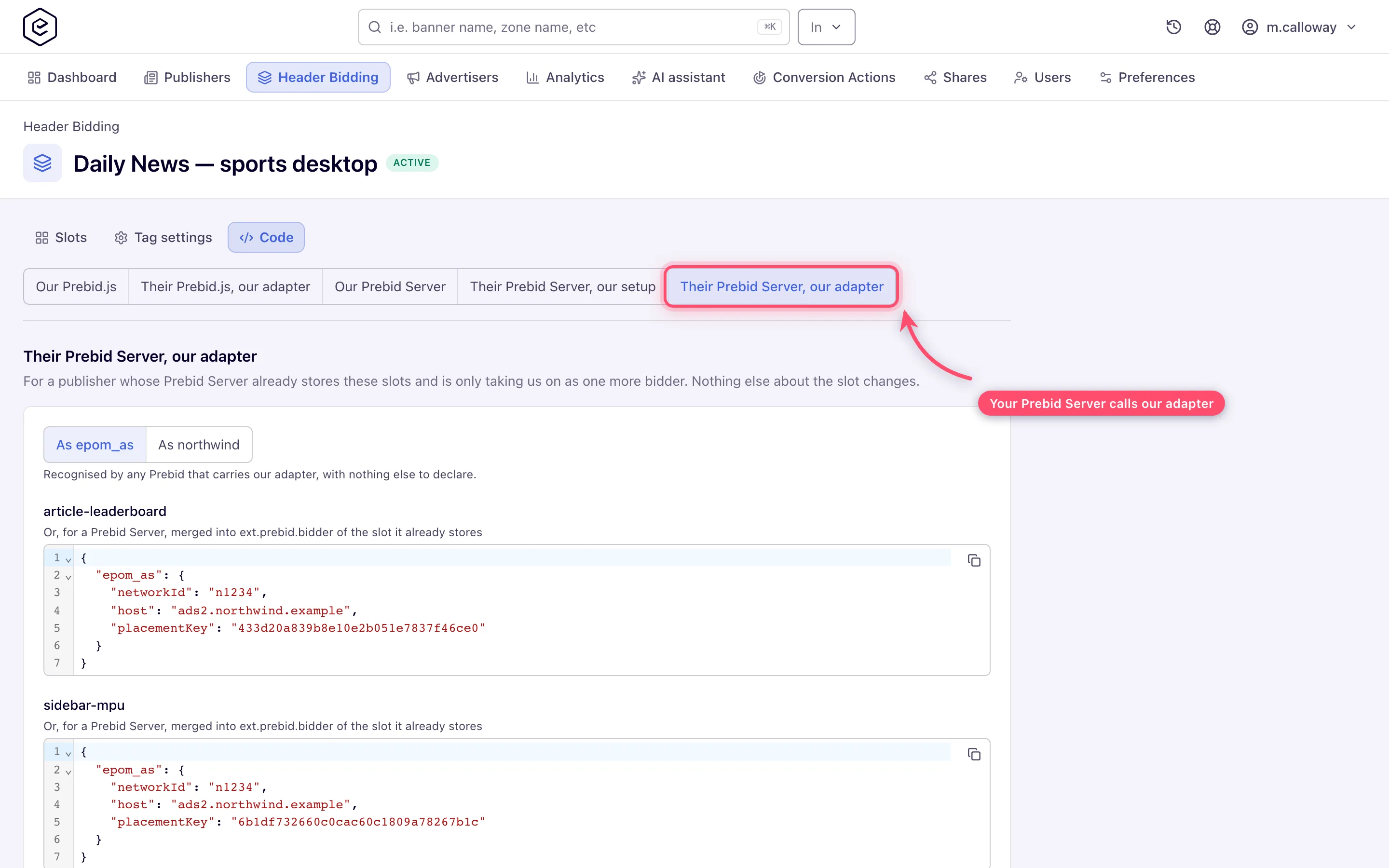
The last face is for a server that already stores these slots and is only taking us on as one more
bidder; nothing else about their slot changes. Per slot it prints our entry alone, headed with the
container name, to merge into ext.prebid.bidder of the document they already hold:
{
  "epom_as": {
    "networkId": "n1234",
    "host": "ads.example.com",
    "placementKey": "a4f21c9e7b"
  }
}
It is read back out of the same document the previous face prints, so the two can never disagree — and it carries the same channel and custom parameters, with the same copy-not-link caveat.
A switch at the top chooses the key. As epom_as is recognised by any Prebid Server carrying our adapter, with nothing else to declare. As epom_{network} — the network’s own code, suggested from the deployment’s network id, or the Bidder code typed on a tag in Bidder integration — keeps our name out of their configuration at the cost of one more thing they must not forget: the face then prints the declaration that makes the name resolve on their server. Without it we are not an error there; we are dropped, and the slot runs without our demand at all:
{ "ext": { "prebid": { "aliases": { "epom_n1234": "epom_as" } } } }The same switch exists on Their Prebid.js, our adapter. The faces that print whole documents have
no switch: there we are always epom_as.
What their Prebid Server operator has to do
Almost nothing, and the list is short enough to hand over as it is:
- The bidder ships enabled, with no per-publisher configuration. Impressions are grouped by network and sent one request per network, so several of our networks on one page cost one call each.
- The endpoint must not be configured. The adapter works out the address of each network’s
bid endpoint from the
networkIdin the params, per impression, because a Prebid Server may not take a bidder’s address from a publisher parameter. Overridingadapters.epom_as.endpointsends every network’s bids to that one address instead of each network’s own. There is no per-region variant either: the adapter’s geoscope is global. networkIdandplacementKeyare required. There is no server-side default for either, and an entry missingnetworkIdis not bid — the endpoint has nothing to resolve.hoststays in the entry for Prebid.js, which sends the bid to the network’s own domain, where its cookies live.- Banner, video and native, for both site and app inventory. The bid endpoint it calls reads and answers OpenRTB 2.6.
- No user sync until they configure one. The adapter declares iframe sync, but the sync URL lives on each publisher’s own deployment, so a host that has not set one gets no sync and lower match rates — nothing breaks, and there is no error.
- Our GVL vendor id is 849 — the same one the browser path uses, see Consent.
- To switch us off,
adapters: { epom_as: { disabled: true } }.
The adapter is not in a released Prebid Server build yet. It is open as
prebid-server PR #4916, so today their host
builds from that branch. A stock build refuses the request rather than ignoring it, which is at
least loud: request.imp[0].ext.prebid.bidder contains unknown bidder: epom_as. pbs.eashb.com
already carries it, so Our Prebid Server with the shipped hosts is unaffected, and a dedicated
instance Epom helps set up is built with it (see Which Prebid Server to use).
Corner cases and gotchas
Corner case:
stored_requests_timeout_msis a top-level key in Prebid Server’s configuration; placed underauction:it is silently ignored. Its default, 50 ms, is shorter than a round trip to your serving domain, so every slot the server does not hold in cache yet reads as not found. Set it to 1000–2000 ms on a server that reads our slots.
Corner case: Prebid Server tries its backends in order, so a document with the same id in its own store — a file in its
stored_requestsdirectory, a database row — answers instead of ours and never goes stale with your edits. Keep our ids out of their own store.
Corner case: asked without the listing secret, the address answers 401 with the body
{"requests":{},"imps":{}}. Read the status, not the body — an empty envelope does not mean the network has no slots.
Per-role notes
- Network manager — builds the tag and hands over what the server face prints.
- Publisher — receives the slot ids, or the address and documents for their own server; see Header bidding: what a publisher installs.
- Can View share — sees the site’s tags but cannot save or delete them; see the per-role notes on the main page.
