
Get the most out of the AI assistant
How to ask the built-in AI assistant so it gets it right the first time and costs less — seven habits, ready-to-use example prompts for reports, creatives, linking, delivery diagnosis, limits, macros, VAST and link checks, raw logs and restoring deleted items, which model to pick, what it cannot do, how to check its work and how to send feedback.
The AI assistant does real work in your account — it pulls reports, creates and links creatives, diagnoses delivery and changes settings, as you and with your permissions. How you ask decides how quickly you get a correct answer and how much it costs: a vague request costs a round of questions, a long chat makes every reply dearer. This page collects what works. For how the chat itself works — attachments, models, what it asks first — see Work with the AI assistant; for keys, limits and billing see AI assistant costs and keys.
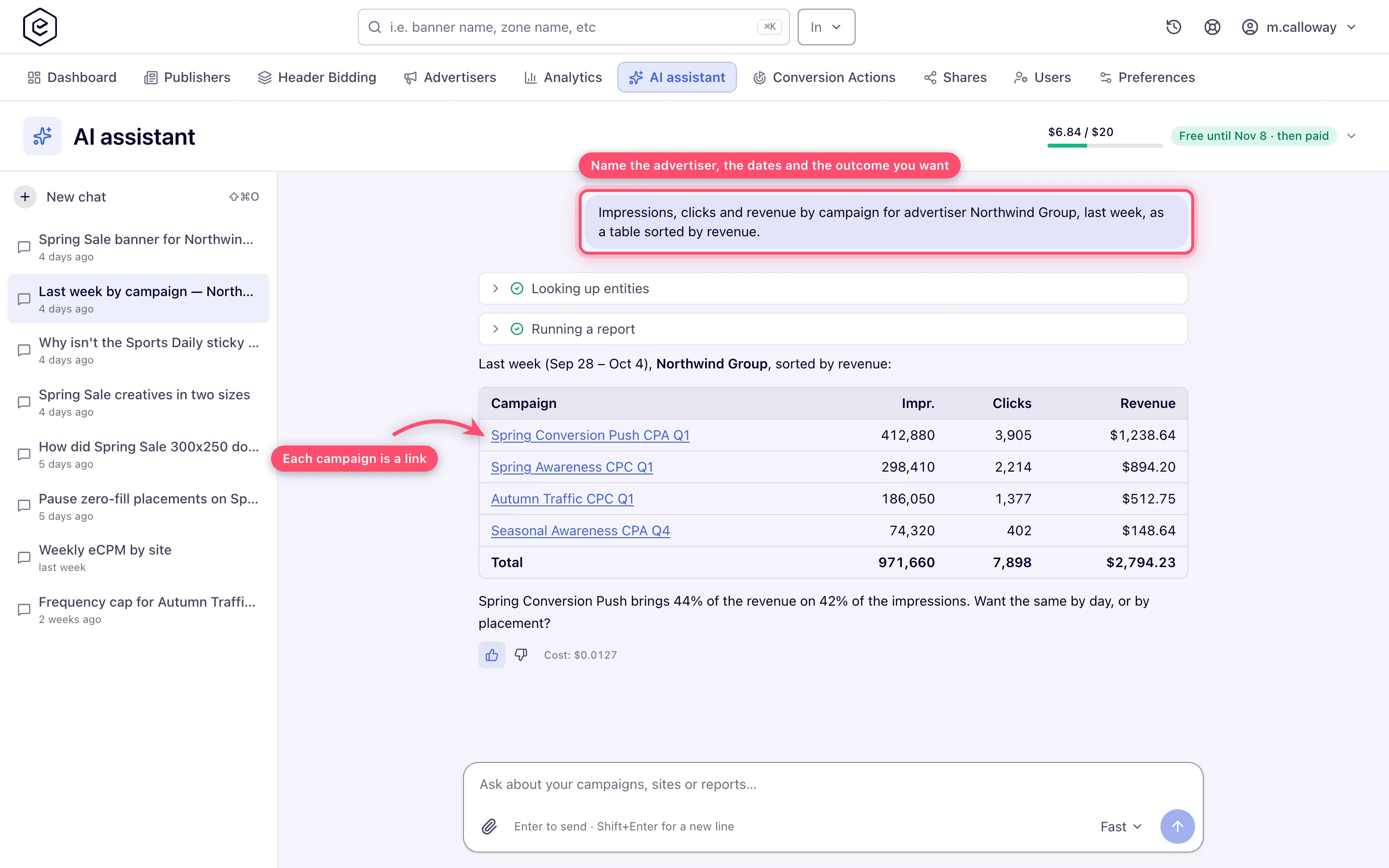
Example. “Impressions, clicks and revenue by campaign for advertiser Northwind Games, last week, as a table sorted by revenue.” names the entity, the dates and the outcome. The assistant runs two tool steps and answers with one table, each campaign a link — one reply, one cost line. “Show me the numbers” would have cost two questions back first, and the same reply afterwards.
Typical scenarios
| You want | Ask like this | Why it works |
|---|---|---|
| Last week’s numbers for one client | Impressions, clicks and revenue by campaign for advertiser Northwind Games, last week, as a table sorted by revenue. | Entity, dates, outcome in one line |
| A banner from a file, live on every fitting placement | (attach spring-sale-300x250.png) Create an image banner from this in campaign Spring Sale of Northwind Games. Click URL https://northwind-games.example/sale?src=epom&placement=$$PLACEMENT_ID$$. Link it to every placement it fits. | Size comes from the file, the click URL carries its macro, the linking rule is stated |
| To know why a placement fills at 40 % | Placement Sunrise News — Sidebar 300x250 fills badly this week. Why? | A serving check first; a live serving trace offered if nothing is found |
| A campaign that stopped at its cap back on air | Campaign Spring Sale stopped at its total impressions limit. Raise the total limit to 2,000,000 and switch the campaign back on. | Both halves asked for — a campaign switched off by a reached Total limit stays off after the limit is raised |
| A mistake from this morning undone | What did I change today? Undo the price change on campaign Spring Sale. | Your own recent changes, with the values they replaced |
Step by step
Eight habits that get you the answer you need on the first try.
How to ask the AI assistant
-
Name the entity. Give the advertiser, campaign, banner, site, zone or placement by its name or its id (
#4512). The assistant cannot see the page you have open, so “this campaign” means nothing to it. If a name matches several entities, it asks which one you mean — an id saves that round trip. -
Give the dates — and the time zone when it matters. “Last week” is fine; “Oct 1–6, UTC+2” is better when you compare with someone else’s numbers. The General report always counts days in your network’s reporting time zone; the Advanced report and the event logs can use another one — say which.
-
Give the sizes, links and values. For a creative: the size, the click URL with any macros, and the file (attached or as a link). For a limit: the number. For targeting: the countries or devices.
-
One task per message. “Create the banner” and then “now link it” works better than five tasks in one message — each step is confirmed before the next starts, and a mistake stays small.
-
Say the outcome you want, not only the action: “so it serves on mobile placements of Sunrise News”, “as a table sorted by revenue”, “I need the number for an invoice”.
-
Follow up in the same chat while you stay on the same task — “now the same for October”, “link it to the 728×90 one too”. The assistant keeps the context of the chat.
-
Start a new chat for an unrelated task. Every reply re-reads the whole conversation so far, so a long chat makes every next reply more expensive, even for a short question. A fresh chat for a new topic is cheaper and keeps old details from getting in the way.
-
Check the result. Open the links on the names it returns and the fields that matter before a creative goes live; open a step to see exactly what it sent and what came back; ask “What did you change in this chat?”; rate the reply with the thumbs — short, specific comments help most.
Before it deletes something, switches several entities on or off, changes a budget, a price, a bid or a payout, or touches more than a few entities, the assistant lists what it is about to change and waits for your yes. A single edit you asked for in so many words goes ahead directly.
Example prompts
Copy and adapt these — replace the names with your own. All names below are examples. Each needs the permission the same action needs in the console: a report needs the report type, creating a banner needs banner create rights, and so on.
Reports
| Who usually asks | Prompt |
|---|---|
| Network manager | Impressions, clicks and revenue by campaign for advertiser Northwind Games, last week, as a table sorted by revenue. |
| Publisher | Requests, impressions and fill rate for each placement of site Sunrise News, yesterday. |
| Network manager | Advanced report for site Sunrise News, Oct 1–6 in UTC+2: impressions by country and device. |
| Advertiser | Why did impressions of campaign Spring Sale drop yesterday compared with the day before? |
The Advanced report needs that report type in your role (and Advanced analytics switched on for your network), and each breakdown — region and city, referrer, custom parameter — needs its own report permission. The assistant names what is missing before it runs anything.
Creatives and templates
| Who usually asks | Prompt |
|---|---|
| Advertiser | (attach spring-sale-300x250.png) Create an image banner from this in campaign Spring Sale of Northwind Games. Click URL: https://northwind-games.example/sale?src=epom&placement=$$PLACEMENT_ID$$. Link it to every placement it fits. |
| Network manager | (attach an image) Make a catfish for mobile with this image in campaign Spring Sale. |
| Network manager | Move the catfish of banner Spring Sale Catfish to the top of the screen and turn off its close button. |
If the account has no catfish template yet and your network has not switched the template library off, the assistant says so, describes the template in one line and adds it only after you agree. See Templates.
Linking and delivery
| Who usually asks | Prompt |
|---|---|
| Network manager | Link banner Spring Sale 300x250 to placement Sunrise News — Sidebar 300x250. |
| Network manager | Why isn’t banner Spring Sale 300x250 serving on placement Sunrise News — Sidebar 300x250? |
| Publisher | Placement Sunrise News — Sidebar 300x250 fills badly this week. Why? |
| Advertiser | Campaign Spring Sale stopped at its total impressions limit. Raise the total limit to 2,000,000 and switch the campaign back on. |
| Publisher | Set a frequency cap of 1 impression per user every 30 minutes on placement Sunrise News — Interstitial. |
When the checks behind a “why isn’t it serving” question find nothing in the way, the assistant can offer a serving trace: it records a few minutes of live traffic on the creative’s placements, then says how often the creative was served, how often it was left out and why, and which creatives won instead. It asks before starting, and one trace runs per network at a time. See Why is my ad not serving?.
Ask for both halves of the limit change: a campaign switched off by a reached Total limit stays off after the limit is raised (see When a Total cap is reached).
Reports that look wrong
| Who usually asks | Prompt |
|---|---|
| Network manager | My General report for advertiser Northwind Games, Oct 1–5, grouped by placement, is empty. Why? |
| Network manager | Are there clicks without impressions on placement Sunrise News — Sidebar 300x250 yesterday? Which IPs repeat? |
Questions about single clicks, impressions and conversions read the raw event logs (up to 3 days at a time) and need the same permissions as the log reports: the log report type in your role, plus view access to all campaigns and all inventory. See Ask the assistant to analyse the raw logs and My report is empty.
Macros, capping and how the product works
| Who usually asks | Prompt |
|---|---|
| Advertiser | Which macro puts the site’s domain into my click URL, and how do I pass a sub1 custom parameter from the ad tag? |
| Network manager | Does frequency capping work for ads inside an app WebView? |
The assistant answers these from this help center; for an administrator it also links the page it used.
Checking a VAST tag or a link
| Who usually asks | Prompt |
|---|---|
| Network manager | Check this VAST tag: https://ads.adtech-partner.example/vast?id=4411. Does it return an ad, and which media files? |
| Publisher | What CSS selector does the video player have on https://sunrise-news.example/video/? I need it for the overlay’s Parent Selector. |
The check runs from the ad server’s datacenter and runs no JavaScript. A tag targeted by country, device or IP can answer no ad there and still fill for a real visitor, and a player that the page builds with JavaScript is not in the HTML the check reads.
Undo and restore
| Who usually asks | Prompt |
|---|---|
| Any | What did I change today? Undo the price change on campaign Spring Sale. |
| Any | Restore the campaign Autumn Promo I deleted this morning. |
The assistant sees only your own recent changes. Deleted advertisers, campaigns, banners, sites, zones and placements come back within 90 days — see Restore something you deleted.
Caveats and exceptions
- Who this is for. Network managers, publishers and advertisers whose role has the AI Assistant Chat permission (see Work with the AI assistant). Everything here applies equally to an assistant you connect yourself over MCP — it runs the same tools.
- It cannot see your screen or a live page. It knows what you write, the files you attach and what its tools return. It reads a page’s raw HTML, but does not run its JavaScript, so it cannot see what a visitor’s browser renders.
- It cannot change what only Epom support changes for your network — switch on a module or tab (SSP, HTML5 templates, Advanced analytics, traffic quality), connect an RTB endpoint, add a serving domain, grant access to a feature. It says so and offers to send a support request.
- It cannot go beyond your permissions. A refused action is refused for it too, and it names the missing permission. It cannot change passwords, API keys or Anthropic keys.
- It cannot make figures agree across time zones. A day in the General report is a day in your network’s reporting time zone; a day in the Advanced report or an event log is a day in the zone picked for it; a partner’s report may use a third. Ask for the same time zone on both sides before comparing.
- It cannot work with a file it has no link to. A file on your computer must be attached; a file behind a login or on a private network cannot be fetched. It does not edit images or videos — it passes the file you give it to the tool that creates the creative.
- Masked and cut values cannot be undone. A password, an API key or the token in a URL
(
…?token=***) is kept masked in the log, and a long value such as a creative’s markup is listed cut short, so an undo cannot bring either back. The assistant restores the other values and asks you to re-enter that one; a change that would store the mask or the cut value is refused and saves nothing. - Privacy and files. Conversations help the assistant improve and are kept for 180 days (see How Epom uses the conversations). Attachments may be removed after a while: an old chat still opens, and if the assistant needs a file that is gone it asks you to send it again. A creative never links to a chat attachment — the assistant makes a creative that stores its own copy of the file; for a creative served from an external link, give a link to your own hosting.
- Per role. Advertisers see and change only their own campaigns and creatives; prompts about placements they cannot see are refused. Publishers see their own sites, zones and placements and the statistics their role allows. With read-only or shared access the assistant can read what you can read and change nothing more.
Not working?
| Symptom | Cause | What to do |
|---|---|---|
| It asks “which one do you mean?” | A vague name finds several entities — “Spring Sale” may be a campaign and three banners | Give the type or the id (#4512) up front |
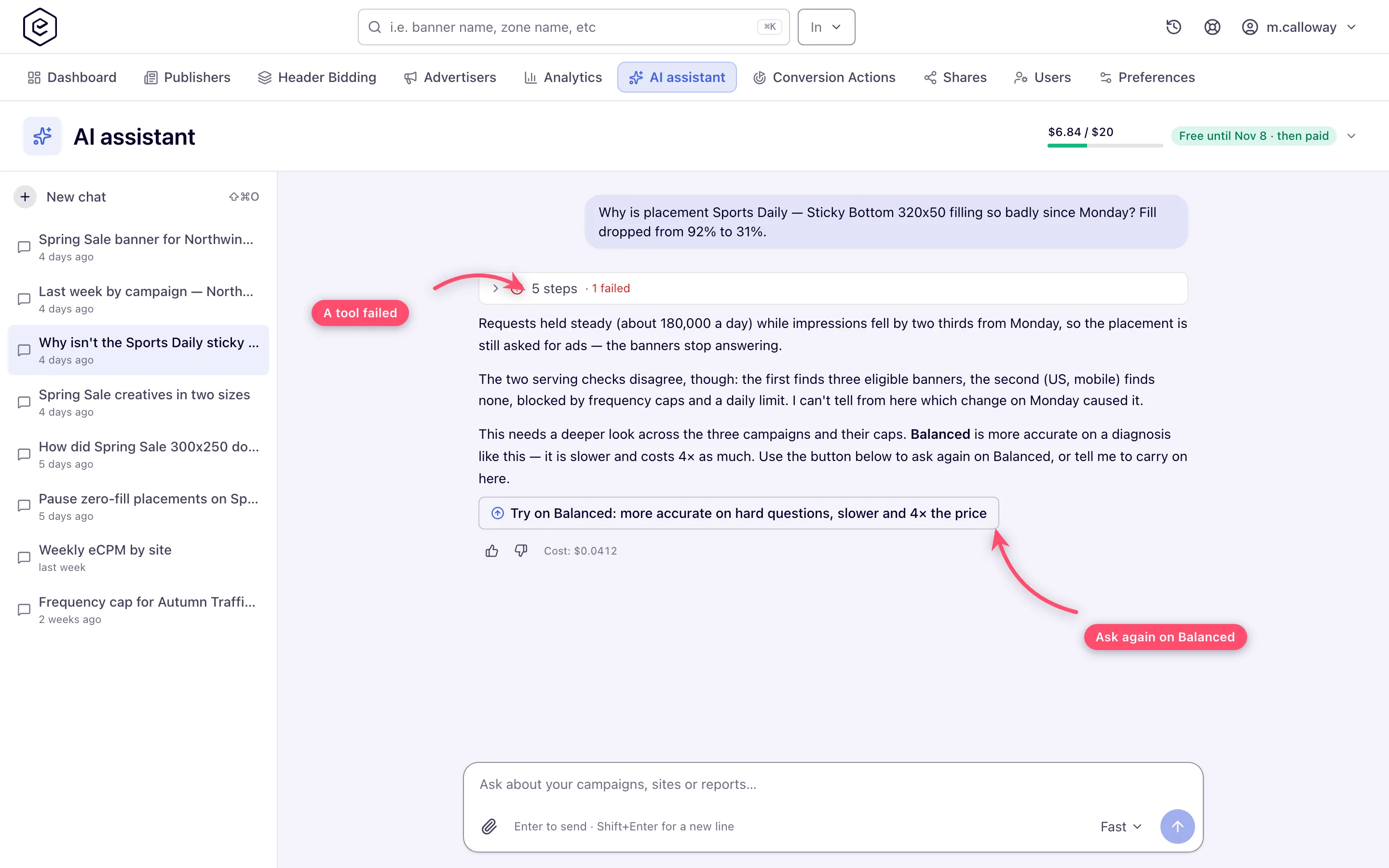
| The answer misses the point or contradicts what you see | Fast fell short on a hard diagnosis | Retry once on Balanced (the Try on Balanced button, or rate the reply Not helpful) before you report it |
| It answered about the wrong dates | ”Last week” in another time zone, or General vs Advanced counting days differently | State the dates and the zone; ask for the same zone on both sides when comparing |
| It refused with a permission name | Your role lacks that right; the assistant has exactly your permissions | Your administrator, or do it from an account that may |
| A report it ran is empty | Usually a filter, date or permission matter — the assistant checks | Ask “why is this report empty?”; see My report is empty |
| A VAST check says no ad but the tag fills for visitors | The check comes from a datacenter and runs no JavaScript; geo/device targeting on the tag | Test the tag from the intended country/device as well |
| The campaign is still off after it raised the limit | A campaign switched off by a reached Total limit stays off | Ask it to switch the campaign back on too |
| The message box is disabled with the allowance message | You hit your monthly limit mid-task; the reply in progress kept what it did | Wait for the 1st or ask for a higher limit — What it costs you |
| Every reply costs more than it used to | The chat is long; or you switched the model mid-chat and the history was re-read at full price | Start a new chat per topic |
| An undo brought back everything except one value | That value was a masked key/token or a cut-short markup | Re-enter it by hand |
Reference
Models and cost
| Model | Price per token | Use it for |
|---|---|---|
| Fast (default) | 1× | Most everyday work: reports, settings, creating and linking creatives, help questions. |
| Balanced | 4× | Tricky diagnosis — why something isn’t serving, numbers that don’t match — or many entities at once. |
| Deep | 8× | The hardest cases, when Balanced isn’t enough. |
Start on Fast. Switch up when an answer misses the point, contradicts what you see in the account, or the request spans many entities; switch back when the hard part is done. You do not have to watch for this yourself: the assistant suggests a switch with a button under its reply (Try on Balanced, or Switch back to Fast), and rating a Fast reply Not helpful offers Balanced the same way. The choice is per chat — see Models.
Ways to spend less
- Stay on Fast unless the task needs more.
- One chat per topic. A long chat makes every reply re-read more history; switching the model mid-chat makes the next reply re-read it at full price.
- Run it on your own Anthropic key (Preferences → AI assistant) — Anthropic bills you directly and the platform bills nothing — or use your own Claude through the MCP connector.
- Every reply shows its cost, and the header shows your month against your monthly limit (on the platform’s key, $20 per user unless your administrator sets another).
- During your network’s promo — set in your network’s billing plan; for existing networks through November 8, 2026 — usage on the platform’s key is not billed, up to the promo’s allowance for the whole network. See The promo month.
Send feedback to the team
Tell the assistant when something looks broken, when the product lacks something, or when a feature is awkward. It first tries to explain the problem with its own tools — most “bugs” are a setting — and when a request is warranted it drafts a bug report, feature request or improvement (or a support request for what only support can do) in three or four lines. Nothing is sent until you say yes; the reply then gives the request’s kind and number. See Report a bug or ask for a feature.