
API tab, VAST tags and the JavaScript API
Reference for the Ad tags & API card's integration side — the API tab's request URL, parameters and sample responses, the VAST tags (version picker, VPAID, VMAP) and Email tabs, per-request ad-pod overrides, the loader's JavaScript API (init, ad-loaded), and the same tags and default parameters over REST and through an AI assistant.
The integration side of the placement’s Ad tags & API card: what the API tab documents, the VAST tags and Email tabs, the parameters a player can add to a VAST request, the JavaScript API the loader registers on the page, and the same tags and default parameters over REST and through an AI assistant. Choosing a tab, the Settings tab and installing a tag are on Ad tags, invocation codes and the API.
Who this is for
Developers and integrators building against a placement — a server-side or app integration, a video player, a page that adds slots after load, or a script that fetches tags — and the publishers and network managers who hand them the details. Which tabs and tag types a user gets is decided by the same per-tag-type permissions as the card, see Per-role notes.
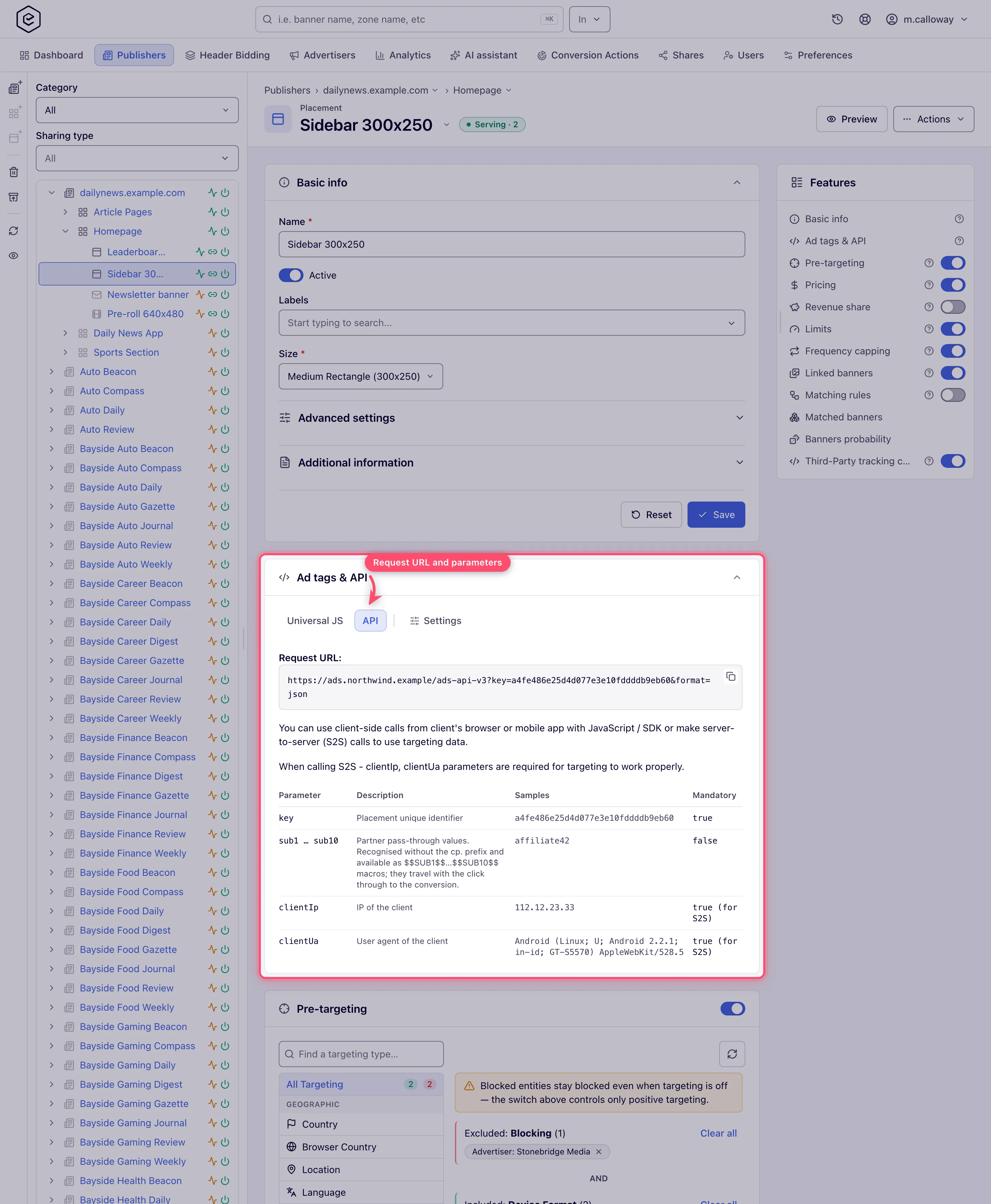
The API tab
On every type that offers it — Site, Mobile Site, Non-standard, Native and Application — the API tab is a self-contained integration reference rendered right in the card:
- the Request URL built for this placement, as a read-only, copyable field. Its path is
<prefix>-api-v3(-api-nativefor Native), it carries the placementkey, includesformat=json(non-native; the endpoint’s own default ishtml) and every default you configured in Settings — custom parameters, channel, click and the pass-through signals — so it stays in sync as you edit them; - the parameter table, one row each, with the sample value and whether it is mandatory:
key(mandatory),sub1…sub10(partner pass-through values),clientIpandclientUa(both marked mandatory for server-to-server calls —requestUrlis not, despite being easy to assume),clientOs,osv,requestUrl,requestRef,ch,click,format(html,jsonp,json,xml,xml-bids),maxBids(xml-bidsonly),callback(mandatory for JSONP),tz,tzn,latitude,longitude, the device / privacy signalsifa,bundle,gdpr,gdprConsentIab,uc,gpc,im, the screen and placement dimensionssw/sh/plWidth/plHeight, and on Native placementscount,rankandtmax. For what the native-only three actually do, the response shapes and the beacons a caller must fire, see the Native API reference; - sample responses per placement type, each with its “no banner” twin: HTML, JSONP, JSON and
XML for Mobile Site; JSON and XML (
xml-bids) for Site and Non-standard; the JSON success and error objects for Native. Application placements show the parameter table and the response-code text with no sample bodies.
Two behaviours worth knowing before you build against it (checked with plain GETs against the
ad server): a request whose key matches no placement answers 204 with an empty body, while a
valid request with nothing to show answers 200 with the no-impression beacon in the format you
asked for (format=json gives {"success":false,"code":"<script …no-impression.gif…>"}).
Corner case: the Request URL is built on the placement’s saved Domain — or, when none has been saved yet, on the domain the Domain picker pre-selects. If you switch the Domain, save the placement before you copy the URL, so the integrator gets the new host.
The VAST tags and Email tabs
On video placements the VAST tags tab (before Video Player) carries a read-only VAST
tag field with a VAST version picker on its label row — 2.0, 3.0, 4.0, 4.1, 4.2 or 4.3,
4.2 by default — and below it the read-only VPAID tag and VMAP tag URLs. All three are
copyable. Changing the version reloads only the VAST field; VPAID and VMAP do not follow the
picker. VMAP is pinned to VAST 3.0 by the VMAP 1.0 schema itself, which has no template name
above vast3; VPAID is pinned on the server, at 3.0 or 4.0 depending on which endpoint builds the
tag. All of those sit below the 4.1 viewability floor.
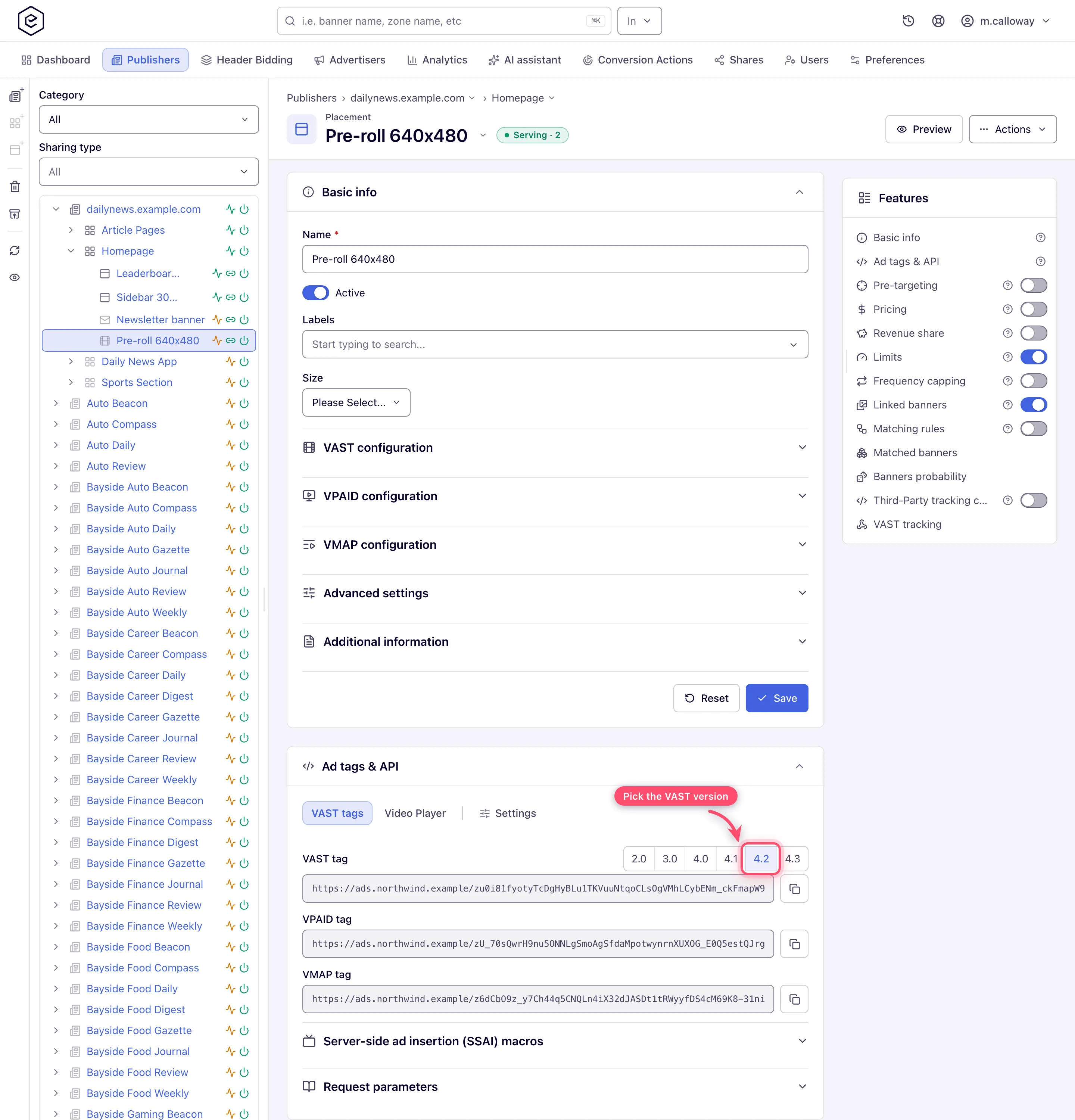
The tag URLs can look like an opaque token (https://<ad-serving-domain>/z8qHy…): when the serving domain is
an ad-serving domain, or URL encryption is switched on for the network (a server-side setting), the vast.xml?key=…&vastv=… part is encrypted into the path. The default parameters, vpaid=true and anything you append (such
as maxAds, below) stay plain query parameters after it.
The version is not a formality: 4.1 is the lowest version whose response can be viewability-measured, which is why the picker defaults to 4.2. It is the floor, not the whole requirement — the player also has to implement Open Measurement. See Video viewability and Open Measurement.
When the placement names a server-side ad insertion service (the Server-side ad insertion (SSAI) setting of its VAST configuration), the tab adds a collapsible Server-side ad insertion (SSAI) macros table under the tags: the stitcher macros the tags already carry, what each is for, and which ones only arrive if your player passes them on. See Serving behind server-side ad insertion.
Scope: this is the new interface. The classic placement page instead shows four fixed rows — VAST 3.0 tag, VAST 4.0 tag, VPAID tag and VMAP tag — with no version picker, so 4.1, 4.2 and 4.3 are only reachable here.
On email placements the Email tab shows the image + click tag and, below it, the Creative URL and Landing page URL as copyable fields (what the code does, and the site-level mailing of it, are on Email ad codes on a site).
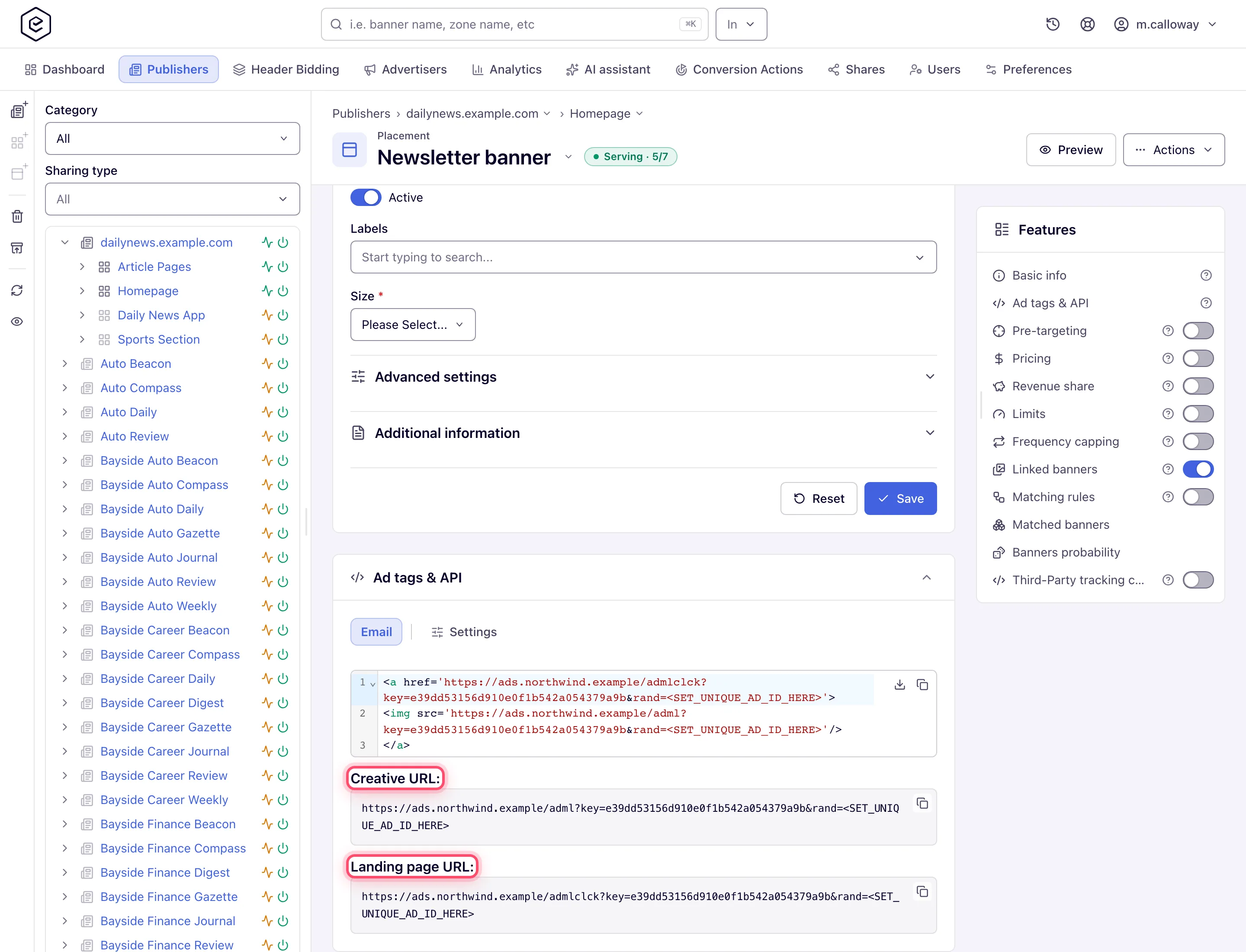
Their serving domain and protocol are set on the Settings tab (the same Domain / Protocol controls the other placement types use) — a change there re-builds these URLs against the chosen domain and scheme. They also carry the Settings default parameters, so adding or removing a default refreshes them in place.
Overriding the ad pod for one VAST request
The placement’s Return (ads in pod) and Max. pod duration (sec) settings decide the pod for every request. A player that needs a different shape for one break — a short mid-roll in an otherwise long-form session — can override them on the tag URL instead of on the placement. The VAST tags tab lists both under Request parameters.
| Parameter | What it does | Example |
|---|---|---|
maxAds | How many ads the pod may contain, 1 to 20 | 3 |
maxPodDuration | Total pod length in seconds, greater than 0 | 300 |
Both are optional and independent — send either, both or neither.
Corner case: a
maxAdsoutside 1–20, or amaxPodDurationof0or less, is discarded silently, and the placement’s own setting applies. There is no error in the response, so a player sendingmaxAds=25gets the configured pod and no hint that its parameter was ignored.
Corner case: with a pod duration in force — sent on the URL or set on the placement — the pod fills while the next ad still fits inside the budget, so it ends on duration, not on the ad count;
maxAdsno longer caps the number of ads. An ad whose duration is unknown (a DSP response the platform cannot read a<Duration>out of) is counted as 15 seconds.
The JavaScript API
The Universal JS and Mount JS tags register a small API on the page once the loader has initialised. Both tabs document it under JavaScript API, with the key and slot class of the placement you are looking at already filled in.
Filling slots added after load. The loader scans the page once. A single-page app that swaps
routes, or a feed that appends items as the reader scrolls, inserts its slots after that scan and
they stay empty. Calling init() rescans and fills every slot the loader has not claimed yet;
slots it has already handled — including ones that came back empty — are left alone, so it is safe
to call repeatedly.
window.EpomAdServer['<slot class>'].init();Reacting to a rendered ad. Every slot fires an ad-loaded event once an ad is in place — on
each rotation too, and not at all when the response carries no ad. event.detail carries key (the
placement key) and bannerId (the creative that won) — enough to resize a container, start a
viewability timer or log a render.
<ins class="<slot class>" data-key="<placement key>"
data-ad-loaded="(event) => console.log(event.detail.bannerId)"></ins>document.querySelector('ins.<slot class>')
.addEventListener('ad-loaded', (event) => console.log(event.detail));The data-ad-loaded attribute accepts an arrow function, a function expression or a bare
statement that uses event — all three are supported. A handler that throws is caught and logged
to the console; it never stops the ad from rendering. The event is dispatched on the slot’s <ins>
and does not bubble, so listen on the element itself, not on document.
Corner case: the object key is the slot’s class name, which is per ad-serving domain — not the placement key, and not the same across two placements on different domains. Read it off the tag in the card rather than hard-coding one you saw elsewhere.
Tags and default parameters over the API
Everything the card hands out is also reachable under /rest-api/placements, with the same
access rules as the card: view access to the placement’s site for reading, update access for
changing defaults, and the per-type tag permission for a tag. A script authenticates like on any other
REST call — an API key in the X-Api-Key header is enough (see
Authentication).
| Endpoint | What it does |
|---|---|
GET /rest-api/placements/{placementId}/invocation-code-types.do | The tag types this placement offers you, in the card’s order: {success, placementType, types:[…]}; types is empty when your role may generate none. These are the values type takes below |
GET /rest-api/placements/{placementId}/invocation-code.do?type=AJAX | The tag of that type, with the placement’s defaults applied: {success, type, code} |
GET /rest-api/placements/{placementId}/invocation-code/export.do?type=AJAX | The same tag as the .txt download the card’s download button saves ({placement}_invocation_code({type}).txt) |
GET /rest-api/placements/default-invocation-param-types.do | {success, data:[{key, value, multiValued, allowedKeys, advanced, placeholder, urlParameter}]} in picker order; value is what to send as type below |
GET /rest-api/placements/{placementId}/default-invocation-params.do | {success, data:[{type, value}]} — the placement’s defaults, one pair per value of a multi-valued type |
POST /rest-api/placements/{placementId}/default-invocation-params.do | Add one: type and value. CUSTOM_PARAMETER and SUB_VALUE take name=value (a SUB_VALUE name must be sub1–sub10); any other type has its value replaced |
DELETE /rest-api/placements/{placementId}/default-invocation-params.do | Remove one: type, plus value for CUSTOM_PARAMETER and SUB_VALUE (a 400 without it); any other type loses its value whatever is sent |
GET /rest-api/placements/{placementId}/preview-link.do | A shareable preview link, optionally for one codeType: {success, placementId, path, url, codeType, servesOnlyWhileActive}. It needs no login and works for 30 days — see Preview |
type for a tag is one of AJAX, JS_MOUNT, IFRAME_SIMPLE, DIRECT_URL, API, VIDEO_PLAYER
or EMAIL. Over REST, API is a code type of Mobile Site placements only, and it has no
snippet — its code comes back empty; the API documentation is the card’s API tab. The card
also shows an API tab on Site, Non-standard, Native and Application placements, but there it is
documentation only, with no REST code type behind it: invocation-code-types.do does not list
API for those types, and a Native or Application placement answers with an empty types, because
it has no snippet of any type. A code type the placement’s type does not
have is a 400 that lists the types it does have; a type the placement has but your role lacks the permission for is a 403 naming that
permission, as is missing view or update access to the site. A deleted or unknown placement is a
404, and so is deleting a default the placement does not have. The add and delete calls return
the placement’s defaults after the change. Which tag types each placement of a site offers you is
listed by GET /rest-api/sites/{siteId}/invocation-codes.do (see
Email ad codes on a site).
Corner case: on a network with no ad-serving domain, Universal JS and Mount JS are withheld everywhere, as the card hides them:
invocation-code-types.doand the assistant tools do not listAJAXorJS_MOUNT, a preview link without acodeTypefalls back to another tag, and askinginvocation-code.doorpreview-link.dofor either answers400AJAX codes are generated on an AJAX invocation domain, and none is configured on this network.
Note: the older
GET /rest-api/placement/{key}/code?t=is addressed by the placement’s public key and checks nothing beyond the key itself. Prefer the ID-based call above for anything that runs with a user’s credentials.
Through an AI assistant
An assistant connected through MCP can read the same tags:
placement_invocation_codereturns the tag. Name acodeType, or leave it out to get Universal JS where the placement and your role allow it and the first type they do allow otherwise; the answer lists every type available and, for a video placement, the bare VAST tag URL.whoamishows undertagTypeswhich tag types your role may generate for each placement type;placement_preview_linkreturns a preview link that opens without signing in and works for 30 days, so anyone you send it to can open it. It needs the same per-type tag permission as the card, for the type it renders — a type your role may not generate is refused with a403, and a role that may generate no tag at all cannot make a link;placement_overviewlists the ad-serving domains the placement’sservingDomainmay be set to.
Changing the domain, protocol, wrapper or default parameters goes through api_search / api_write
with the operations above and placements/update/*.
Corner cases and gotchas
The corner cases of each tab and call are in its section above. One more applies to every API integration:
Corner case: the Settings defaults reach the API request URL too (custom parameters, channel, click and the pass-through signals). Native and other API integrations do not need to re-add these on the request URL by hand — they are already spliced in.
