
Sell premium inventory through PMP private deals
End-to-end recipe for private marketplace deals — negotiate terms, attach deals to a campaign, control the auction with deal floors and private auction, and measure delivery per deal.
A buyer on a DSP wants guaranteed access to your inventory at negotiated terms — a fixed price for a homepage takeover, a preferred floor for a premium video slot, or first look before the open auction. A PMP (private marketplace) deal formalizes that agreement: you record the deal terms on a campaign, the platform carries them in every bid request that campaign sends, and bids referencing the deal get the negotiated handling. This recipe covers the whole path — negotiation inputs, setup, auction behavior, and how to measure delivery per deal.
Who this is for
Network managers running programmatic demand. The campaign’s RTB PMP deals card is off for every role out of the box — ask your network administrator to switch it on for your role. The underlying DSP partner is configured by your network administrator.
Prerequisites
- A working programmatic pipe to the buyer’s DSP: partner configured, an OpenRTB banner in a campaign, bids flowing. If you don’t have that yet, do Plug programmatic DSP demand first — deals ride on the bid requests that campaign’s OpenRTB banners generate.
- Terms agreed with the buyer (usually via the DSP’s deal workflow). You need four facts from them: the deal ID string, the buyer seat ID, the floor price, and the auction type — plus which countries the deal covers.
Steps
-
Dedicate a campaign to the deal. Deals attach at campaign level and reports have no per-deal dimension — one campaign per deal (with its own OpenRTB banners for the partner) is what makes the deal measurable later. Targeting, capping and linking on that campaign also become the deal’s delivery controls: link only the placements the deal covers, target only the agreed geography.
-
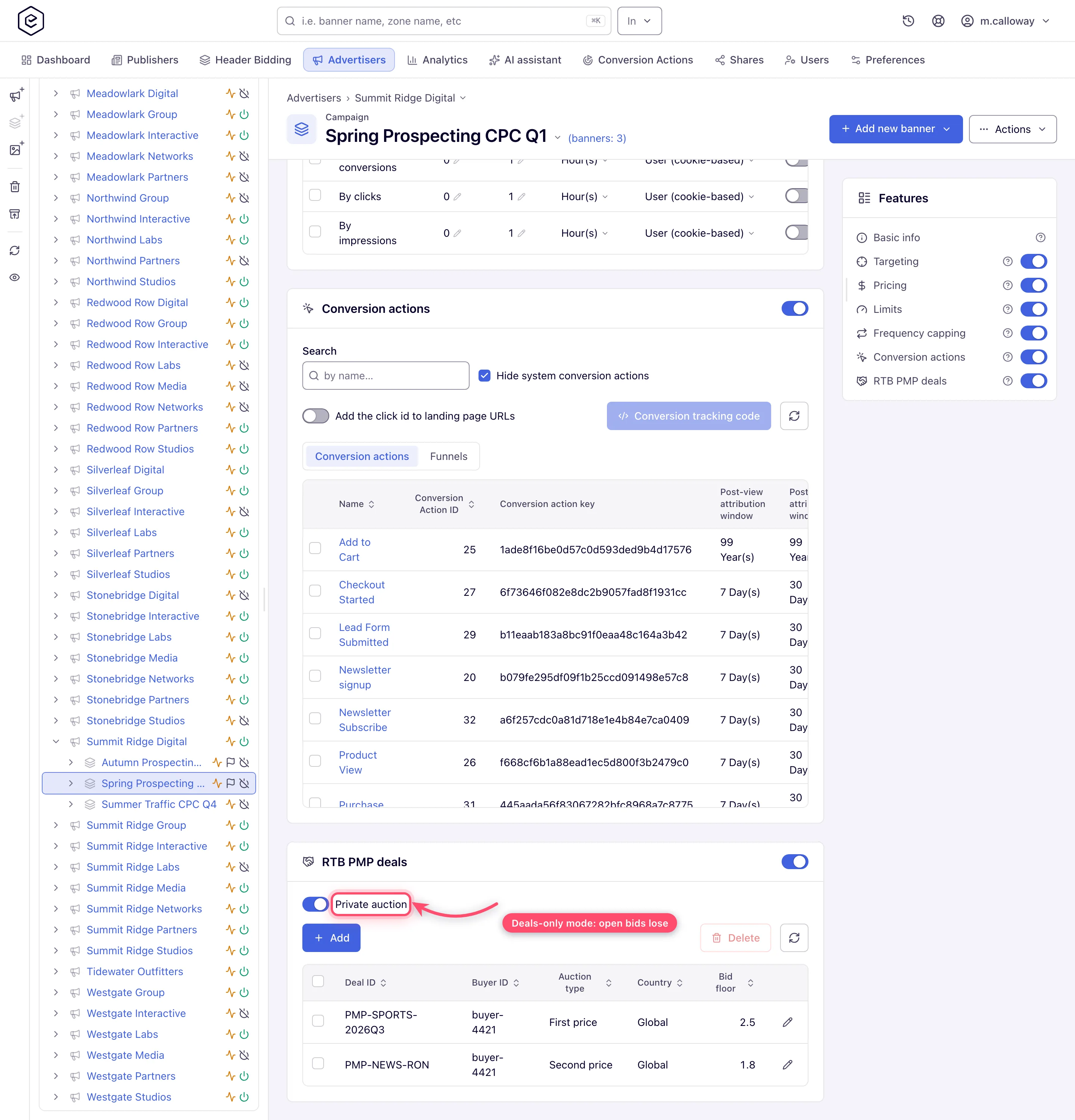
Open Account → Advertisers → advertiser → campaign and find the RTB PMP deals card. Switch it on.
-
Click Add and enter the negotiated terms:
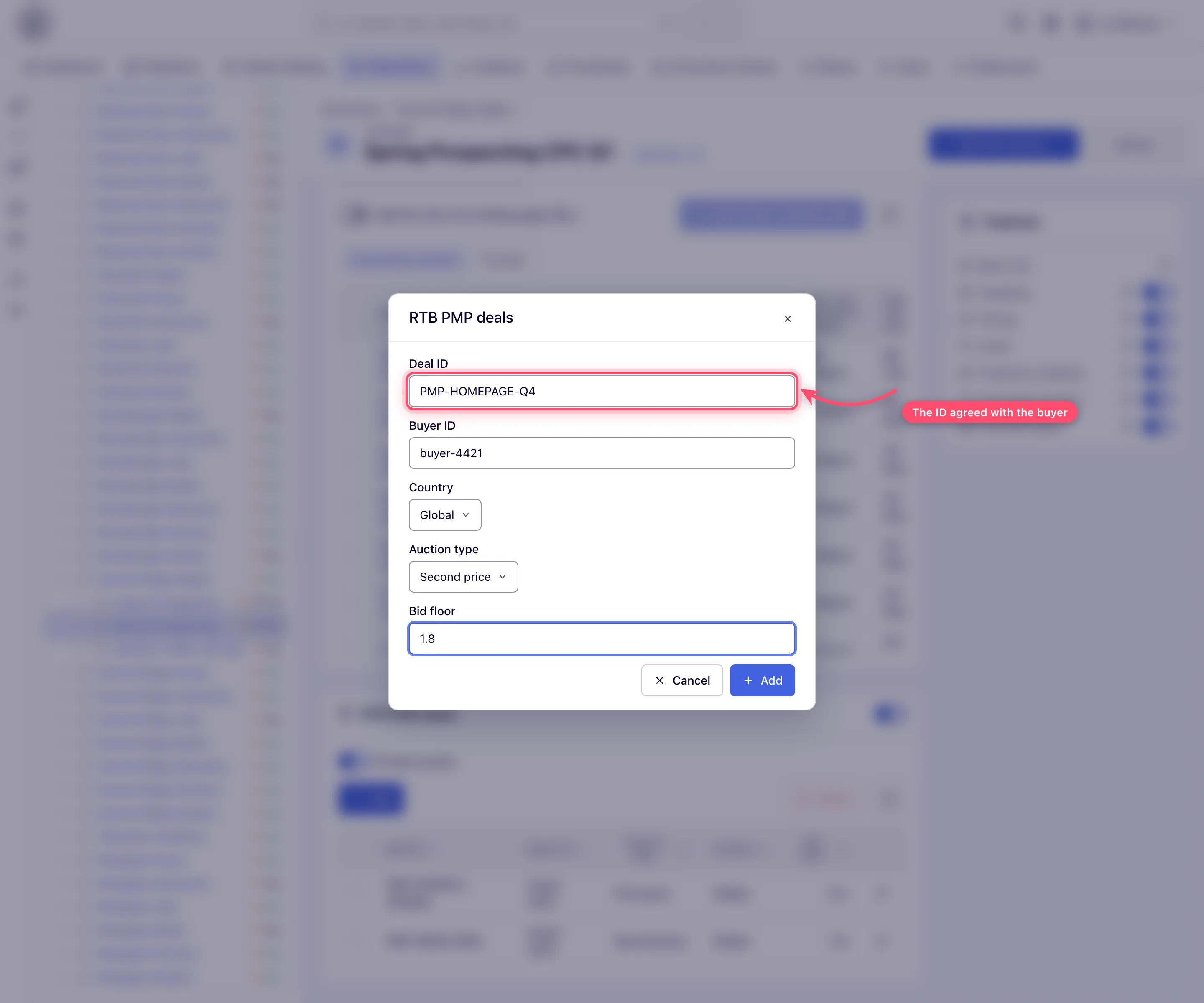
Field What it does Deal ID The external deal string both sides reference — must match what the buyer’s DSP sends back in its bids. Buyer ID The buyer’s seat ID. Bids on this deal must come from this seat. Country The country this deal row applies to, or Global ( *). A deal row is attached to a bid request only when the request’s country matches — add one row per country, or a Global row.Auction type First price, Second price or Bid floor price — see step 4. Bid floor The negotiated minimum price for this deal. -
Pick the auction type to match the commercial agreement:
- First price — the buyer pays their bid (any bid at or above the deal floor is accepted). Use for standard preferred deals.
- Second price — the win clears one cent above the higher of the runner-up bid and the deal floor, and never above the winner’s own bid; a winner with no competition clears one cent above the deal floor. Use when the buyer negotiated second-price billing.
- Bid floor price — a fixed-price deal: whatever the buyer bids, the win clears at exactly the deal floor. This is the “homepage takeover at $X CPM” option.
-
Private auction (optional): switch the toggle on to accept only deal bids on this campaign — open-auction bids from the same partner are rejected. Leave it off to let deal bids and open bids compete side by side.
-
Verify delivery. Ask the buyer to activate the deal on their side, then check Admin → Demand partners (DSP) → DSP partners analytics for Requests / Bids / Wins on the partner (administrator view), and the campaign’s own impression numbers in the account area.
-
Report on the deal. Because the campaign is the deal (step 1), run any report grouped by campaign — impressions, revenue and eCPM of that campaign are the deal’s delivery and yield. Deals can also be managed over the REST API.
How the auction treats deal bids
Understanding this saves most support conversations with buyers:
- A bid referencing your deal ID is matched against the deal terms: the seat must match the Buyer ID and the price must meet the deal floor — otherwise the bid is rejected outright.
- A valid deal bid skips the open-auction floor check. The deal floor replaces your placement/site bid floors — a deal negotiated below your open floor still clears. That is intentional: the deal terms are the contract.
- With Private auction on, bids that don’t reference a valid deal are rejected — the campaign becomes deal-only.
Corner cases and gotchas
Corner case: with Private auction on and only country-scoped deal rows, the platform sends no bid request at all for traffic outside those countries — a private auction with no eligible deals is an invalid request, so it is dropped before sending. If the buyer reports missing volume, check the deal’s Country rows against the traffic mix first.
Corner case: country matching is exact. When geo lookup fails for a request, country-scoped deal rows are not attached — only a Global row keeps the deal in play on unresolvable traffic. If the deal must always ride along, give it a Global row.
Corner case: the deal floor overrides your open-auction floors, in both directions. A generous placement Bid Floor does not protect you from a deal you priced too low — the deal clears at deal terms.
Corner case: a buyer bidding with the right deal ID but from a different seat than the Buyer ID you entered is rejected as an invalid deal bid. Seat IDs change more often than deal IDs on the buyer side — when a previously delivering deal suddenly goes quiet, re-confirm the seat first.
Corner case: there is no per-deal dimension in analytics reports. If you attach several deals to one campaign, their delivery blends into one set of numbers — the one-campaign-per-deal pattern in step 1 is the only way to keep deals separately measurable.
Per-role notes
- Network manager: the RTB PMP deals card appears once your network administrator switches it on for your role. Advertiser-role campaigns do not carry it.
- Admin: the DSP partner and partner-level analytics are in the admin area.
- Can view share: deals display read-only; changing one needs Can edit.
