
Target on custom parameters passed in the ad tag
Pass a key-value in the ad tag, then target on it with the Custom Parameter dimension — Expression, Value, One of and Substring kinds — and the persisted-cookie Cookie Value variant.
Other ad servers call this “key-value” targeting: attach an arbitrary key=value pair to the ad
request, then decide which line items are eligible based on it. In Epom it is two steps in two
different places — first put the value on the ad request, then add a Custom Parameter
targeting rule that reads it. This page covers both halves, because the reference documents
them apart: the macros reference covers the tag side and the
dimension reference covers the rule side.
Who this is for
- Publishers who want one placement to serve different demand depending on a value their page or app puts on the request — article section, content rating, A/B bucket. Part 1 of this page, getting the value onto the request, is yours. Part 2, the rule that reads it, is not: a publisher has no Pre-targeting card as shipped, so the network writes the rule and you supply the parameter — agree the key names with them first.
- Advertisers and network managers who want a campaign or creative to run only for certain key-values. The Targeting card is on all three demand levels for both roles.
- Network managers doing the same on the inventory side, on the Pre-targeting card of a site, zone or placement.
Cookie Value is a separate dimension from Custom Parameter — and, as the last section explains, it is not simply “Custom Parameter but persistent”.
Prerequisites
- The entity exists and you can edit it — a Can view share is not enough.
- You know the parameter’s key name and can control what the ad tag sends for it.
Steps
Part 1 — put the parameter on the ad request
Every query-string parameter on the ad request is targetable. There are two ways to get one there.
Per request, from the tag
Take the tag Epom generated for the placement and add the pair to it. The canonical form is
prefixed with cp. (cp_ is also accepted, because PHP’s $_GET rewrites . to _). The
prefix is stripped before targeting, so a rule on article_id matches a tag sending
cp.article_id.
Direct URL and API tags — append it to the query string, after the key and ch parameters
the generated URL already carries:
https://<ad-serving-domain>/<format>?key=<placement key>&ch=&cp.section=sport
                                                    └── add this ──┘
Simple Iframe — the same query string, inside the src:
<iframe src="https://<ad-serving-domain>/<format>?key=<placement key>&ch=&cp.section=sport"
        width="300" height="250" frameborder="0" scrolling="no"></iframe>
Universal JS — a data-cp- attribute on the <ins> element. The loader turns it back into
cp.section=sport when it builds the request, so you never edit the URL:
<ins class="<your-tag-class>" data-key="<placement key>" data-cp-section="sport"></ins>
<script async src="//<ad-serving-domain>/<loader>.js"></script>
The host, format and class name are whatever your generated tag already uses — copy them from the
placement’s Ad tags & API card and change only the cp. part.
Baked into the placement
Open the Settings tab of the placement’s Ad tags & API card, choose Parameter type → Custom Parameter, type a Key and a Value, and click Add. The pair is appended to every tag, URL and VAST/VMAP tag generated for that placement — see Ad tags and the serving API. Use this when the value is a property of the placement, not of the individual page view.
Once a parameter is on the request it is available two ways at once: as the
$$CUSTOM_PARAM(keyname)$$ macro in creatives,
click URLs and pixels, and as a targetable value — the subject of Part 2.
Corner case: the
cp.prefix is optional for targeting but not for reporting. A baresection=sportis targetable and resolves as a macro, but only prefixed parameters are packed into thecpsvalue that is carried onto click and conversion tracking and into the custom-parameter analytics. Prefix them unless you have a reason not to. The ten fixed parameterssub1…sub10are the one exception: they count as custom parameters without a prefix.
Corner case: there is no reserved-name list and no validation on custom parameter keys — any name is accepted. But every request parameter shares one map, so a key that collides with one of Epom’s own request parameters silently overwrites it, last one parsed winning. Avoid
key,u,cps,ch,tz,tzn,im,gdpr,gdprConsentIab,plWidth,plHeight,sw,sh,dW,dH,click,via,tsrc,gpc,vpaid,ec,rptdandtmax.uis the worst of them: it is overwritten with the raw remainder of the query string, so it can never be used as a custom parameter at all.
Corner case: an HTML parser lowercases attribute names, so a Universal JS tag cannot preserve the case of a key —
data-cp-Article_IDarrives asarticle_id. Iframe and URL tags keep the case you typed. This is harmless, because every lookup on this page is case-insensitive on the key, but it surprises anyone comparing two tag types side by side.
Part 2 — add the Custom Parameter rule
-
Open the entity and scroll to its Targeting (or Pre-targeting) card. Switch the card on if it is off.
-
Find Custom Parameter in the dimension list on the left — it is in the Content & Apps group, just below Cookie Value. The Find a targeting type… box at the top filters the list.
-
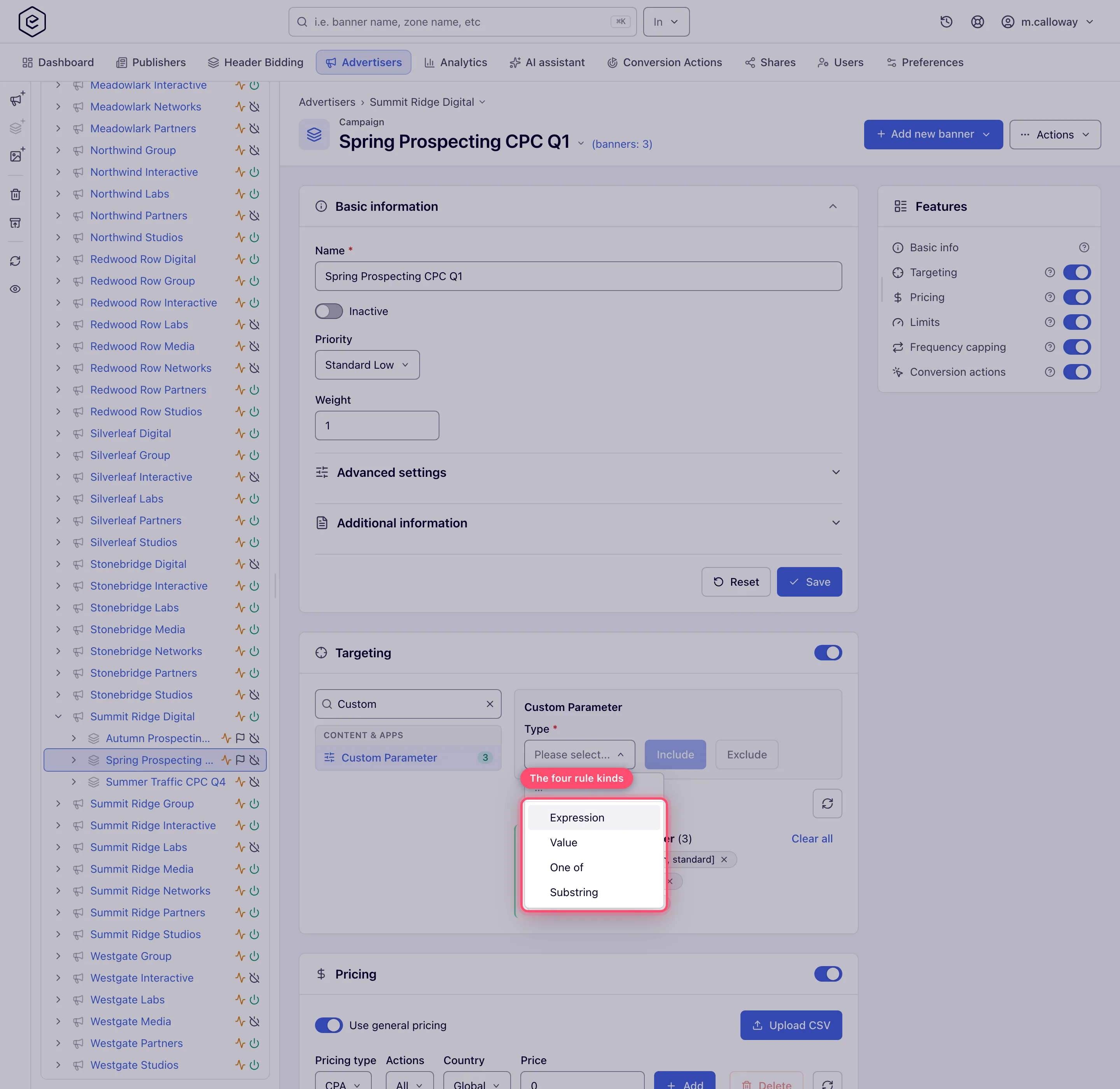
Choose the Type. This is the rule kind, and it decides what the rest of the editor asks for. The four kinds appear in this order:
-
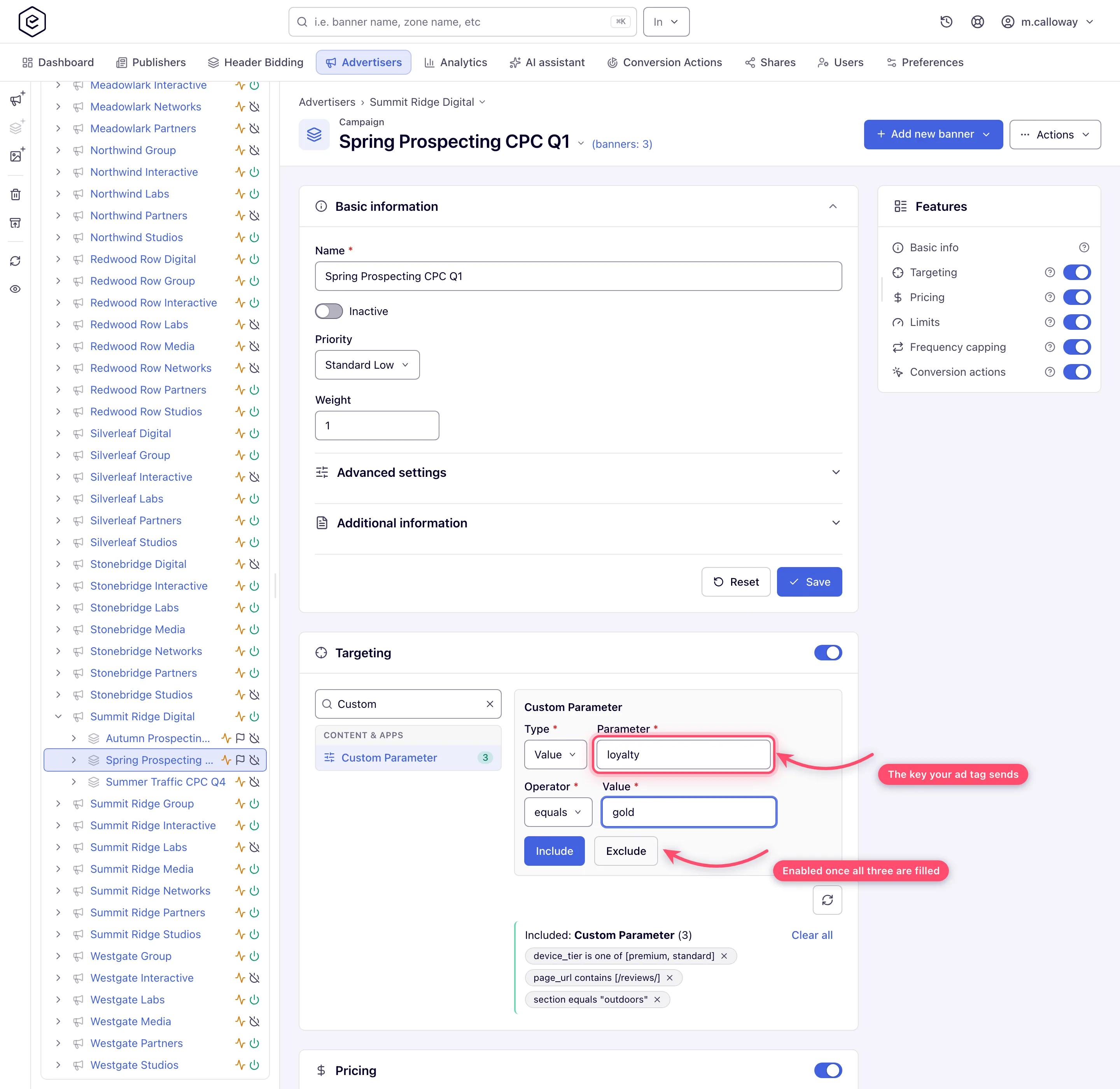
Fill the fields the kind reveals. Expression asks for one free-text expression; the other three ask for Parameter, Operator and Value — in that order, all three required.
-
Click Include to make the rule a whitelist or Exclude to make it a blacklist. Both buttons stay disabled until every field of the chosen kind is filled.
-
The rule appears immediately as a chip in an Included: Custom Parameter or Excluded: Custom Parameter group in the right-hand pane. The chip spells the rule back to you — a Value rule as
section equals "sport", a One of or Substring rule with the list exactly as you typed it in brackets (section is one of [sport,travel,finance]), and an Expression rule as the expression itself. There is no separate save: targeting rules apply as soon as they are added, exactly like every other dimension (see Add, edit, and remove targeting rules).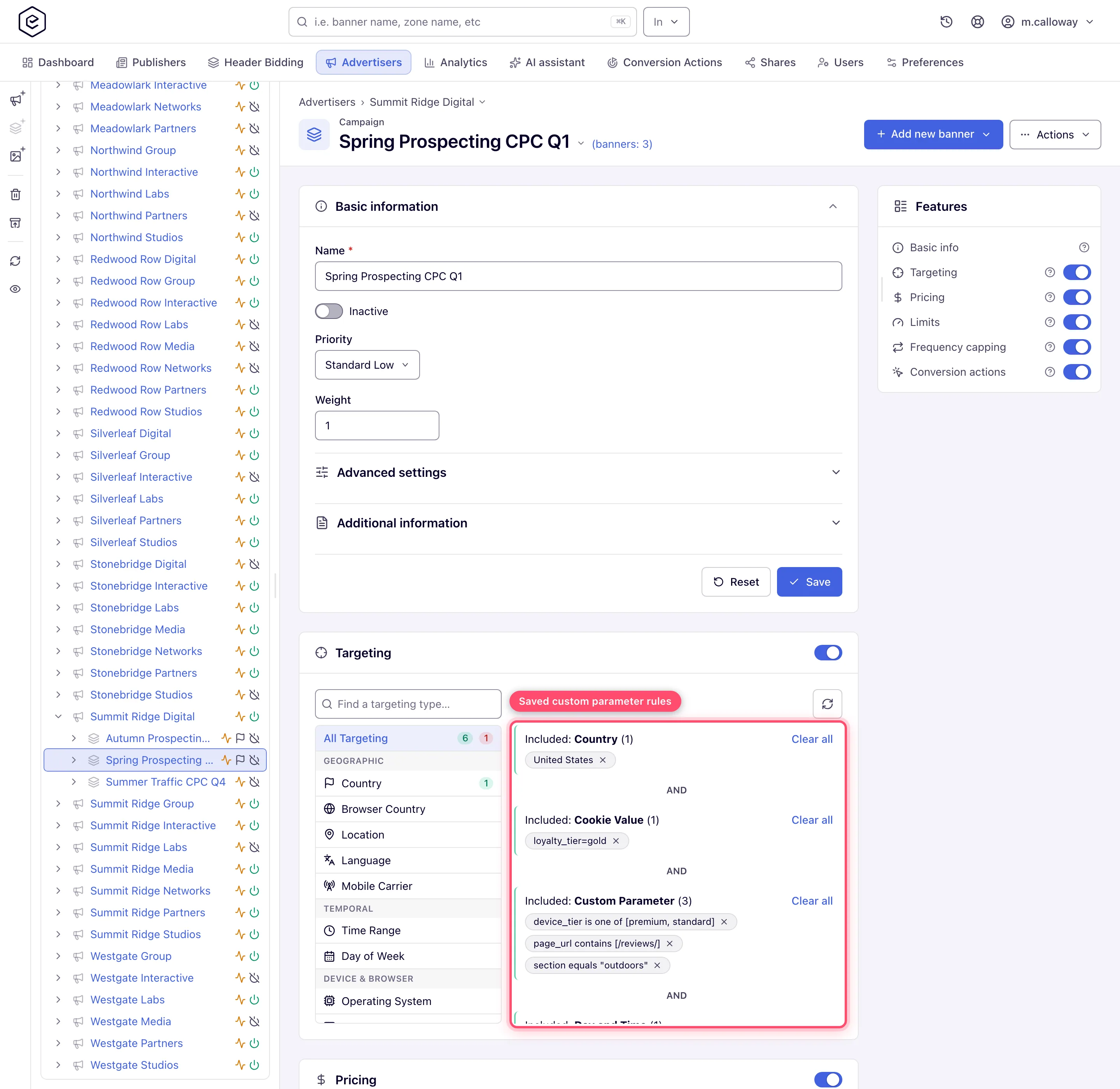
Options and fields
The editor
| Control | Shown for | What it does |
|---|---|---|
| Type | always | The rule kind: Expression, Value, One of or Substring. Changing it clears the other fields. |
| Parameter | Value, One of, Substring | The key name to read off the request. Matched case-insensitively, with any cp. / cp_ prefix already stripped. |
| Operator | Value, One of, Substring | Which comparison to apply. The choices depend on the kind — see the next table. |
| Value | Value, One of, Substring | What to compare against. One value for the Value kind; a comma-separated list for One of and Substring. |
| Expression | Expression | A single boolean expression. See The Expression kind. |
| Include / Exclude | always | Saves the drafted rule as a whitelist or a blacklist entry. Disabled until the editor is complete. |
What each kind matches
Every comparison below is case-sensitive on the value (only the key name is case-insensitive), and every value is compared as a string unless the operator is numeric.
| Kind | Operator | Matches when | Worked example |
|---|---|---|---|
| Value | equals | The value is exactly equal | section equals sport matches cp.section=sport, not Sport |
| Value | not equals | The value is anything else | section not equals sport matches cp.section=news |
| Value | > ≥ < ≤ | Both sides parse as numbers and the comparison holds | age ≥ 18 matches cp.age=18 and cp.age=18.5, not cp.age=17 |
| One of | is one of | The value exactly equals one entry in the list | section is one of sport, news, weather matches cp.section=news |
| One of | is not one of | The value equals no entry in the list | the same list rejects news, accepts travel |
| Substring | contains | The value contains at least one entry as a substring | path contains /sport/, /live/ matches cp.path=/2026/sport/final |
| Substring | not contains | The value contains no entry | the same list rejects that path, accepts /news/uk |
| Expression | — | Your expression evaluates to true | see below |
The operator dropdown has no meaningful order: the sequence you see can differ from another server instance or after a restart. Read the label, not the position.
How the Value list is split
One of and Substring take a list in a single Value field, so a multi-value rule is one click rather than one per value.
- The separator is a comma only. A semicolon is not a separator — it becomes part of the value.
- Escape a comma that belongs inside a value as
\,. - The whole list is URL-decoded before it is split, then each entry is trimmed and empties are dropped. Duplicates collapse — the entries are held as a set.
- For One of only, backslashes are stripped from each entry after the split. Substring
keeps them, so a Substring entry written as
a\,bmatches the literal texta\,b, backslash included. - Substring URL-decodes the incoming value too, so
/sport/matches a request carrying%2Fsport%2Fand vice versa. Value and One of do not — they compare the raw string.
The Expression kind
Expression is the only kind that can combine several parameters, or use || and &&. It is a
real JavaScript expression, evaluated server-side, in which each parameter is written $key.
The substituted value is quoted for you. $section is replaced by 'sport' — quotes
included — so write the comparison against a quoted literal or a bare number and never wrap the
$key yourself:
$section == 'sport' && $age >= 18For a request carrying cp.section=sport&cp.age=21 that becomes
'sport' == 'sport' && '21' >= 18, which is true — JavaScript coerces the quoted number for the
>=. Writing '$section' == 'sport' instead produces ''sport'' == 'sport', a syntax error.
Because it is real JavaScript, string and array methods work:
$cat.split(",").indexOf("a") >= 0
($a + $b) > 0
($p1 == 1 || $p1 == 'a') && ($p2 >= 12 && $p2 <= 22)
A $key name may contain letters, digits, underscores and $. Longer names are substituted
first, so $aa is not corrupted by a rule that also mentions $a.
One extra variable is always available: $CLIENT_USER_AGENT holds the request’s full
User-Agent string. It is not a custom parameter — the ad server injects it — and it is the
supported way to test something the dimension list has no picker for:
/Android (.*?);/i.exec($CLIENT_USER_AGENT)[1] >= '2.3'Corner case: an invalid expression is rejected when you add the rule, not silently ignored at serving time — with “Please enter valid expression (Sample: ($p1==1 || $p1==‘a’) && ($p2>=12 && $p2<=22))”. But the check is server-side only: the Include button enables as soon as the box is non-empty, so a malformed expression looks accepted right up until you click.
Corner case: an unquoted bare word is a JavaScript identifier, not a literal.
$section == sportthrows a reference error, which is treated as “could not evaluate” — and for an Include rule that rejects the request outright. The same applies to an expression that returns something other than a boolean:$sectionon its own passes the save-time check and then never matches.
Corner case: expression results are cached for an hour, keyed on the fully substituted text. Because the parameter values are already substituted into that key, this is harmless for an expression that is a pure function of its parameters — but an expression that depends on anything else, such as
new Date(), returns a stale answer for up to an hour. Don’t put wall-clock logic in an expression; use the Time Range or Day and Time dimensions.
When the request does not carry the parameter
A missing parameter is not an error and does not skip the rule. It resolves to the empty string, and the comparison then runs normally — which means the negative operators match. (One server-side exception: Epom can configure a default value for a parameter — none is set out of the box. Where one is set, an absent or blank parameter takes that default instead.)
| Kind and operator | Result when the parameter is absent | As an Include rule | As an Exclude rule |
|---|---|---|---|
Value equals | no match | request is rejected | rule does not fire; request passes |
Value > ≥ < ≤ | no match (empty is not numeric) | request is rejected | rule does not fire; request passes |
One of is one of | no match | request is rejected | rule does not fire; request passes |
Substring contains | no match | request is rejected | rule does not fire; request passes |
Value not equals | match | request passes | request is rejected |
One of is not one of | match | request passes | request is rejected |
Substring not contains | match | request passes | request is rejected |
Within the dimension, Include rules are combined with OR — one matching Include rule is enough — while the first Exclude rule that matches rejects the request immediately.
Corner case: this is the trap that takes an entity off air. Adding an Include rule with a positive operator before the tag actually sends the parameter rejects every request, and the entity silently stops serving on that placement. Wire the tag first, or verify with the macro that the value is arriving.
Corner case: the mirror-image trap is a negative operator. An Exclude rule using
not equals/is not one of/not containsfires on every request that omits the parameter, because “absent” reads as “not equal”. If you mean “exclude sport”, use Exclude withequals, not Include withnot equals— they behave differently when the parameter is missing.
The persisted variant — Cookie Value
Cookie Value is a separate dimension with two fields, Name and Value, both required. It reads a value that persists on the visitor’s browser rather than one on the current request.
It is easy to assume this reads any first-party cookie your own script writes. It does not. It
reads only cookies that Epom itself set, whose names carry Epom’s third-party cookie prefix —
eas_3p_ by default. The Name you type is the part after that prefix, so a cookie named
eas_3p_segment is matched by a rule on segment.
Those cookies are written by Epom’s own cookie-setting endpoints — /multi-cookie.gif,
/multi-cookie.js and /multi-cookie.html — which turn each query parameter into a cookie. Call
one from your page to place a visitor into a segment:
<img src="https://<ad-serving-domain>/multi-cookie.gif?segment=cart-abandoner|30d"
     width="1" height="1" alt="">
The value takes the form value|lifetime|format:
| Part | Meaning |
|---|---|
value | What the rule’s Value field is matched against. |
lifetime | 30d days, 12h hours, 45m minutes, 30s seconds, 1y years. A bare number means days. Omitted, the cookie lasts 365 days. |
format | PLAIN (the default) or BASE64. |
| Custom Parameter | Cookie Value | |
|---|---|---|
| Where the value lives | the current ad request | a cookie Epom set on the browser |
| Who writes it | the publisher’s tag or the placement defaults | Epom’s /multi-cookie.* endpoints |
| Lifetime | that one request | the cookie’s, 365 days by default |
| Rule kinds | four | one — name plus exact value |
| Value comparison | case-sensitive | case-insensitive |
Everything else matches Custom Parameter: same card, same Include/Exclude, applied immediately, Include rules OR’d together, first matching Exclude wins.
Corner case: Cookie Value’s value comparison is case-insensitive while every Custom Parameter comparison is case-sensitive. A Cookie Value rule on
Cart-Abandonermatches a cookie holdingcart-abandoner; the equivalent Custom Parameter rule would not.
Corner case: a Cookie Value rule whose Name is empty is skipped at serving time rather than failing — the editor will not let you create one, but a rule imported through the API can be in that state, in which case it silently does nothing.
Corner cases and gotchas
Corner case: rules set at a broader level cascade down. A Custom Parameter rule on a campaign applies to all of its banners; one on a site applies to every zone and placement under it. Put the rule at the narrowest level that needs it.
Corner case: these rules do apply to external DSP (RTB) demand, despite the DSP: No marking these two dimensions carry in the dimension reference. A DSP bid is served through an ordinary banner under an ordinary campaign and advertiser, so advertiser-, campaign- and banner-level targeting is evaluated against it like any other demand — and a DSP banner whose targeting fails is dropped from the auction pool before the bid request is built, so no bid is even requested for it. What a Custom Parameter rule cannot do is travel to the DSP: there is no OpenRTB field for an arbitrary key-value, so the buyer never sees the parameter and cannot bid on it. Filter on your side; do not expect the DSP to filter on theirs.
Corner case: the parameter name field is a template, not just a key. If you type a name that is not on the request, it resolves to empty — there is no “unknown parameter” warning anywhere in the UI. A typo in Parameter produces a rule that looks correct and matches nothing.
Corner case: the Value field of the Value kind also expands
$keyreferences, so a value of$otherparamcompares one request parameter against another. This is undocumented in the UI and easy to trigger by accident — a literal value that starts with$followed by letters will be substituted away.
Corner case: through the API the rule is
POST /rest-api/{entity}/{id}/targeting/custom/create.dowithrule,customValue, and for the non-expression kindscustomType,operationandparameter(entity isadvertiser,campaign,banner,site,zoneorplacement). The enum values are the names —customTypeisEXPRESSION,VALUE,ONE_OForSUBSTRING;operationisEQUALS,NOT_EQUALS,GREATER,GREATER_OR_EQUALS,LESS,LESS_OR_EQUALS,IN,NOT_IN,CONTAINSorNOT_CONTAINS(note the pluralEQUALS). A name that is not one of them is refused with a 400 that names the parameter and lists the accepted values; a missing operation or parameter, or an operation that the kind does not support (CONTAINSonVALUE), is a 400 too. An invalid expression is a 400 whose message starts Please enter valid customValue (Sample: …).
Per-role notes
- Advertiser — Custom Parameter and Cookie Value on the Targeting card of the advertiser, every campaign and every creative.
- Network manager — the same, plus both on the Pre-targeting card of a site, zone and placement.
- Publisher — Part 1 only: you put the parameter on the request; the network writes the rule. Tell them which keys you send and what the values mean.
- Shared-entity viewer — on a Can View share, sees saved rules but cannot add or remove them; that needs Can Edit or Is Owner.
