
Mobile carrier targeting and data
Mobile carrier targeting, the $$MOBILE_CARRIER$$ macro and carrier reports — where the carrier list comes from, how a visitor's carrier is detected, and why there is no admin page for carriers.
Mobile carriers (network operators — Vodafone, Verizon, Kyivstar, …) power the Mobile
Carrier targeting dimension, the $$MOBILE_CARRIER$$ macro, and the carrier breakdown in
Advanced reports.
Unlike categories, country groups or preset domains, carrier data is not managed by your network. There is no Mobile Networks admin page, no carrier table to edit, and nothing to import. The names come from the platform’s IP-intelligence service. This page covers where that data comes from, how a request gets a carrier attached, and what each consumer does with it.
Where the carrier list comes from
Every Mobile Carrier picker is filled from the platform’s IP-intelligence data, sorted alphabetically. The list changes when that data is updated; there is nothing for an administrator to import or edit.
Corner case: if the carrier picker is empty, the carrier lookup is temporarily unavailable — an empty list does not mean the network has no carriers. The REST lookups (
GET …/targeting/mobile-carrier/values.doandGET /rest-api/targeting/mobile-carrier/bycountry/values.do) answer 503 in that case instead of an empty list. If it stays empty, ask Epom support or your account manager.
How a visitor’s carrier is detected
A request can learn its carrier two ways: from the IP address, or from an in-app SDK that sends
it explicitly as the carrier_name parameter. The IP lookup wins. The SDK value is only
consulted when the IP produced nothing.
The neighbouring connection-type signal resolves in the opposite order, which is easy to get wrong when reasoning about the two together:
| Signal | Request parameter | Checked first | Checked second |
|---|---|---|---|
| Mobile carrier | carrier_name | IP lookup | SDK parameter |
| Connection type | net_access | SDK parameter | IP lookup |
If neither source yields a value, the request simply has no carrier — which is the normal case for desktop and wifi traffic, and it matters a great deal to targeting (see below).
Where carrier data is used
Targeting
Mobile Carrier is a multi-select targeting dimension available on all six entity levels: site, zone and placement on the supply side, advertiser, campaign and banner on the demand side. Each side has its own permission, and both read Mobile Carrier in the role editor — one in the pre-targeting group (supply), one in the targeting group (demand).
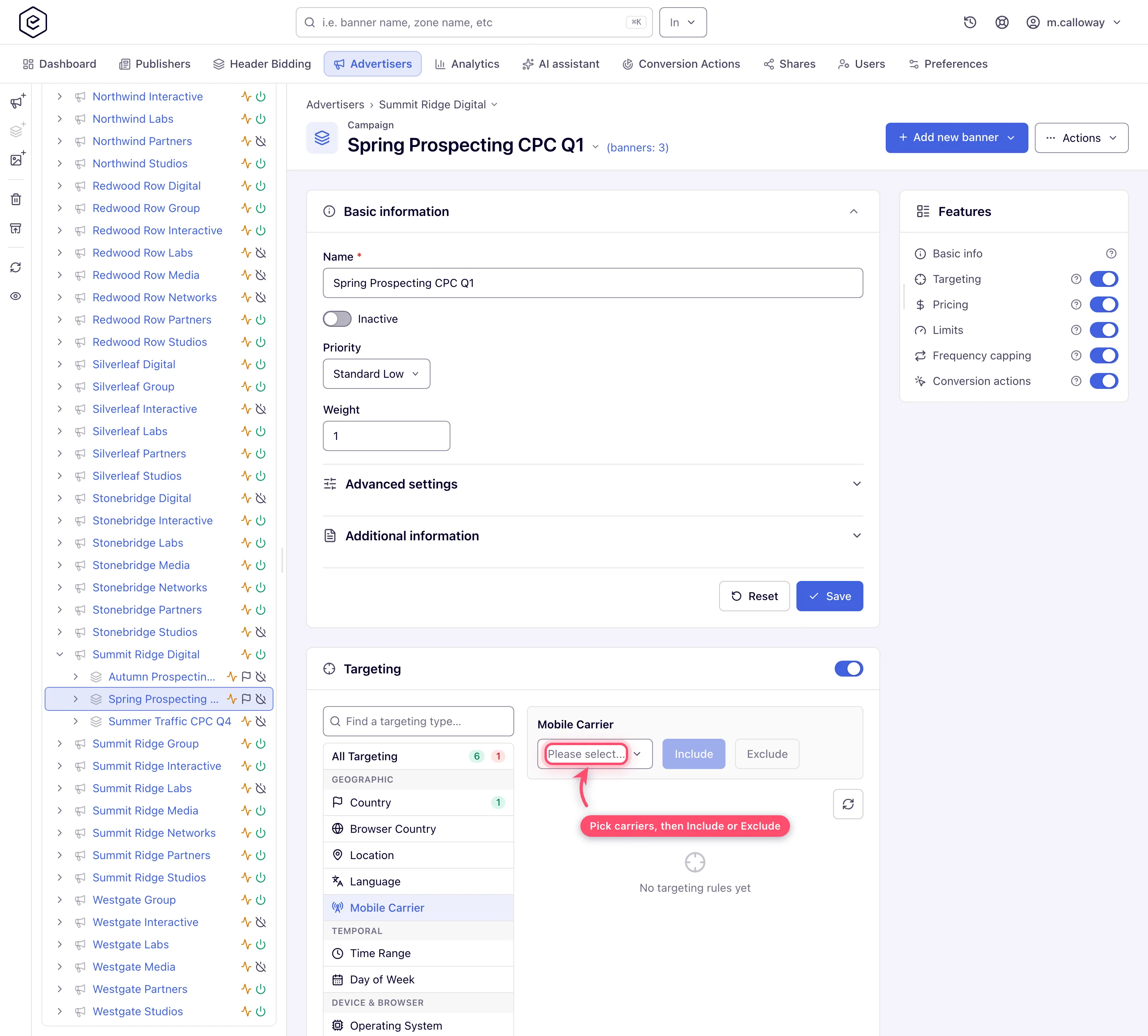
Rules are stored as the carrier name, as text, and matched at serve time with a case-insensitive string comparison. See Add targeting to an entity and the targeting dimension reference.
Macro
$$MOBILE_CARRIER$$ substitutes the request’s carrier into creative markup and tracking URLs.
When the request has no carrier it resolves to the literal string unknown, not to an empty
string — so a URL built from
it always has a value, and downstream systems must treat unknown as the empty case. Full list:
Macros reference.
Analytics
Carrier exists only in the cluster-backed reports — never in General, whose pre-aggregated statistics do not record it. It reaches you two ways:
| Report | How carrier appears |
|---|---|
| Advanced | As a group-by dimension. Carrier is in exactly one report type’s group-by list — the one shown in the UI as Advanced |
| Impressions / Clicks / Conversions Log | As a per-event column, projected as carrier — not as a filter |
Both need the analytics cluster to be reachable; see Report types.
Permission: like Connection Type, Language and Incognito Mode, Mobile Carrier has its own group-by/filter permission — Analytics Report Group/Filter By Mobile Carrier, in the role editor’s Analytic Reports Group/Filter By group. Every existing role was granted it on upgrade, so nothing changes until an operator withdraws it; a role without it does not see Mobile Carrier in Advanced’s group-by list, and a run that asks for it is refused. It is in addition to the report-type permission for Advanced, not instead of it.
Corner case: on a network whose Advanced report reads compacted logs, Mobile Carrier is silently stripped from the group-by list and keeps working only as a filter — the compacted logs do not carry it. Most networks do not use compacted logs; ask Epom support or your account manager which mode yours runs. See the dimension list in Analytics dimensions.
Corner cases and gotchas
Corner case: include and exclude carrier rules treat carrier-less traffic asymmetrically. A request with no carrier is rejected by an INCLUDE rule and passed by an EXCLUDE rule. Since desktop traffic — and phone-on-wifi traffic, which usually resolves to the broadband ISP rather than the mobile operator — normally has no carrier, an include rule quietly removes almost everything that is not on a cellular connection. That is usually what you want; it surprises people who expected it to be additive.
Note: every carrier name is checked against the live carrier list when the rule is created — in the account UI and through the REST API alike. If any one name is unrecognised the whole request is refused with an Unknown mobile carrier(s) message naming it, and nothing is created. Take names from the picker (or the
valueslookup below) to avoid this.
Corner case: that check needs the IP-intelligence service. While it is unreachable a carrier rule cannot be created at all: the account UI reports that the geo service did not answer, and the REST API answers
503. Retry later — the name you entered is not the problem.
Corner case: because rules store the carrier name as text, a geo-database update that renames a carrier (rebrands happen) leaves existing rules pointing at the old string. They keep saving and loading fine and simply stop matching. Recreate the rule from the picker after a rename.
Corner case: a carrier rule applies to OpenRTB (DSP) banners like any other creative: a banner, campaign or advertiser rule that excludes the request’s carrier removes that banner before the bid request is built, so no request goes to the partner for it. The rule is not translated into a filter on the partner’s side — what the partner does receive is the request’s carrier name in the bid request’s
device.carrier, whenever the request has one, whether or not any rule exists.
Corner case: on the legacy placement edit page, mobile and application placements get a carrier combo above the banner-probability panel. It is a simulator input, not a setting — it asks “which banners would be eligible if the visitor were on this carrier”. Its default, Ignore carrier, skips carrier rules entirely in the calculation. Nothing you pick here is saved.
REST API
| Endpoint | Purpose |
|---|---|
GET /rest-api/{entity}/{id}/targeting/mobile-carrier/values.do | Valid carrier names for that entity, as a JSON array. Needs update rights on the entity and the matching targeting permission (Manage Demand Targeting for advertiser, campaign and banner; Manage Supply Pre-targeting for site, zone and placement). Answers 503 while the geo service does not answer |
GET /rest-api/targeting/mobile-carrier/bycountry/values.do | Carrier names grouped by country code; optional countryCode (the older name country still works, countryCode wins). Needs Manage Demand Targeting; 503 while the geo service does not answer |
POST /rest-api/{entity}/{id}/targeting/mobile-carrier/create.do | Create rules from mobileCarriers, an array of names spelled exactly as the lookups list them, with the required rule (include or exclude); needs the Mobile Carrier targeting permission of that side. An empty array answers 400; an unknown name answers 400 with a message naming it, and nothing is created; 503 while the geo service does not answer |
{entity} is one of advertiser, campaign, banner, site, zone, placement — all six
expose the same lookup and create operations. The campaign endpoints additionally answer
the older …/targeting/mobilecarriers/values and …/targeting/mobilecarrier/create
spellings; they are not in the OpenAPI document, so use the kebab-case form.
There is no Mobile Networks admin page
Older builds shipped an admin dashboard called Mobile Networks — request counters, fill-rate charts and click-URL parse statistics for external ad-network relay traffic. It is gone, and it never managed the carrier list.
No URL serves that page and the admin navigation has no entry for it, so no role can reach it. This is not a permissions problem. For demand-side monitoring use DSP Partners Analytics instead.
Per-role notes
- Administrators have nothing to configure; if the carrier picker stays empty, ask Epom support or your account manager whether the carrier feed is up.
- Network managers set carrier rules on both sides; a dimension missing from a card means the role lacks that side’s Mobile Carrier permission.
- Advertisers set carrier targeting on their own advertiser, campaigns and banners when their role holds the demand-side Mobile Carrier permission; otherwise ask your network manager.
- Publishers set carrier pre-targeting on their own sites, zones and placements when their role holds the supply-side Mobile Carrier permission; otherwise ask your network manager.
