
Set a site CPM threshold
Guarantee a site a minimum CPM per 1000 impressions — a revenue floor applied to publisher reporting and payouts, and the last-resort bid floor sent to DSP partners as imp.bidfloor.
The CPM threshold is the minimum a site is expected to earn per 1000 impressions, set globally and optionally overridden per country. It is not a serving gate for your own campaigns. It does exactly two things:
- It floors publisher revenue in reporting and payouts. For every day the site serves,
the ad server records a minimum of
impressions × threshold ÷ 1000and publisher-facing revenue is reported as the greater of what was actually earned and that minimum. The advertiser is still charged the real price — the top-up comes out of the network’s margin. - It is the last-resort bid floor for RTB demand. When no more specific floor applies,
the threshold is sent to DSP partners as OpenRTB
imp.bidfloor, and a bid that comes back below it is thrown out before the auction picks a winner.
A directly linked campaign priced below the threshold still serves. Nothing stops it; its revenue is simply topped up in the reports. If you need cheap demand kept off a site, use a Bid Floor card or block the demand — see Configure pricing.
Who this is for
Network managers. On a stock network the card is missing until your network administrator grants Manage Publisher CPM Threshold — see Per-role notes. Treat the threshold as something the network sets on behalf of a publisher, usually to honour a guaranteed-CPM clause in a supply contract.
Prerequisites
- The site exists under Account → Publishers.
- You know the guaranteed CPM, in US dollars, globally and per country if it varies.
Steps
- Go to Account → Publishers → site and open the CPM Threshold card.
- Turn the card’s switch on. This creates the threshold record with a global value of
0, and only then do the card’s fields appear — with the switch off the card is a header and a toggle (see the corner case below). - Type the Global CPM threshold and click Save. A green Global CPM threshold has
been saved. toast confirms it. This value applies to every country that has no row of
its own.
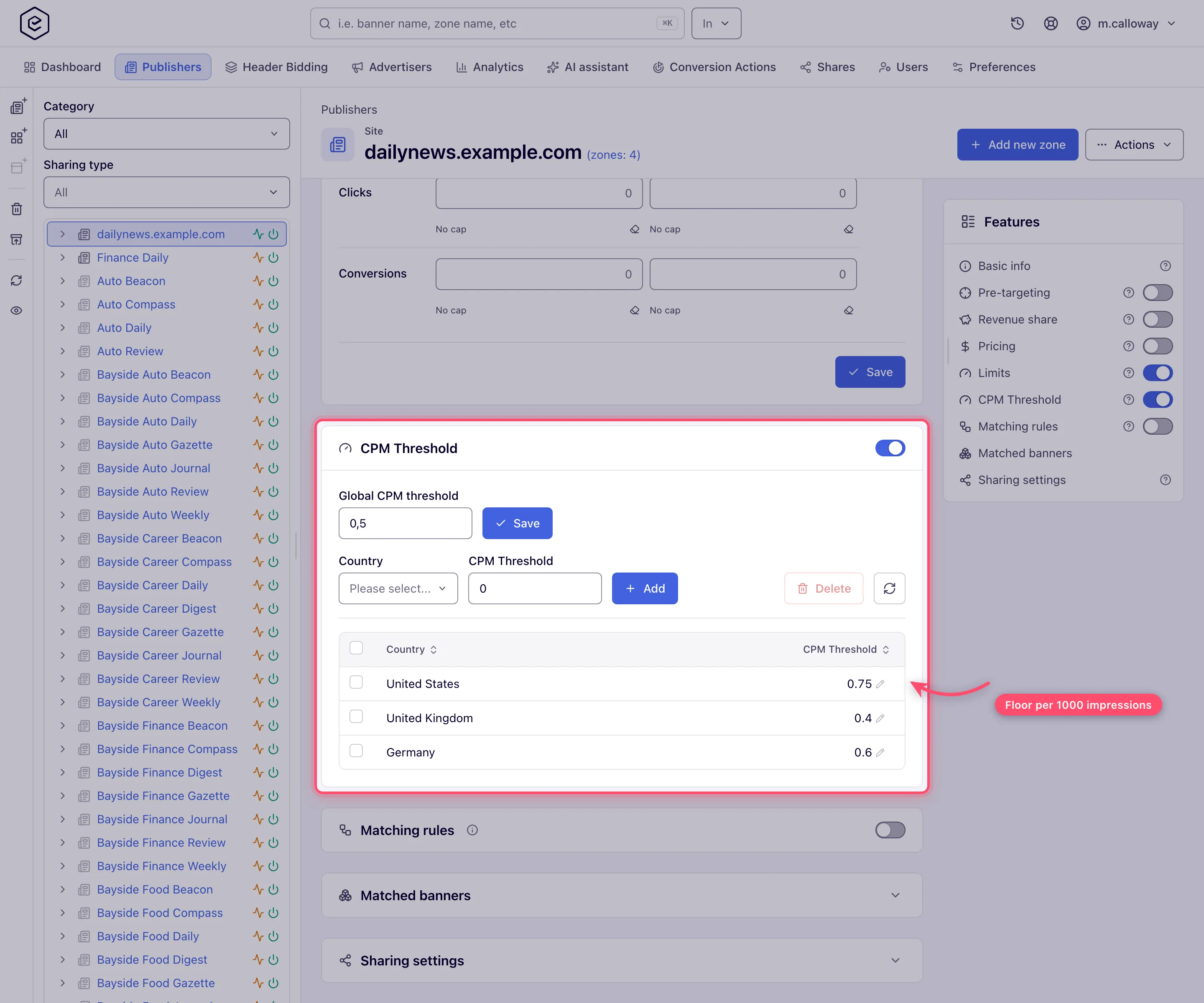
- To vary the floor by geography, pick a Country, type its CPM Threshold and click Add. The row appears in the grid immediately, showing the country’s full name. The picker is searchable and lists individual countries only — there is no “Global” or region entry, because the global value is the separate field above. A country that already has a row is refused with CPM threshold for this country has been set already; edit the existing row instead.
- To change a country’s value, click its cell in the grid, type, and press Enter or click away. It saves on the spot with no confirmation toast — only the global field has an explicit Save button. To remove overrides, tick their rows and click Delete; a confirmation dialog asks Delete N record(s)? first.
Options and fields
| Field | What it does | Range | Notes |
|---|---|---|---|
| Switch (card header) | Creates or destroys the site’s threshold record | on / off | Turning it off deletes the record and every country row with it, after a confirmation |
| Global CPM threshold | Minimum CPM for every country without a row | 0–999.999 | 0 means no floor. Needs the Save button next to it |
| Country | Country a row applies to | One country per row | Individual countries only — no “Global” or region entry, and one row per country |
| CPM Threshold (per country) | Minimum CPM for that country’s traffic | 0–999.999 | Replaces the global value for that country, including when set to 0. The inline edit has no range check of its own, so keep to 0–999.999 (see precision below) |
All values are US dollars per 1000 impressions, stored to three decimal places.
What the number is compared against
This is the part that decides whether the threshold does anything, and it differs between the two jobs the number does.
As an RTB bid floor
The floor sent to a DSP is the first non-zero value along this chain, evaluated for the request’s country:
banner Bid Floor → placement Bid Floor → site Bid Floor → the banner’s own price → the campaign price → the site CPM threshold
The threshold is the last link, so it only becomes the floor when everything ahead of it is unset or zero. The two price links behave differently depending on the pricing type of the OpenRTB DSP banner and its campaign — a non-CPM price yields no eCPM at all, so those links are skipped:
| Pricing type of the DSP banner / campaign | Does the cascade reach the site CPM threshold? |
|---|---|
| CPM, priced above zero | No — that price becomes the floor |
| CPM, priced zero | Yes |
| CPC | Yes — a CPC price is never converted to an eCPM here |
| CPA | Yes — same |
| Cost per day | Yes — same |
| Cost per month | Yes — same |
Whatever wins the cascade is placed on every impression of the outgoing bid request as
imp.bidfloor, in USD (converted to the partner’s currency if one is configured). It is
then compared against the returned bid.price — the gross CPM the buyer offers, before
your revenue share.
Note: the same number is therefore a gross figure in the auction and a net (publisher-side) figure in reporting. A threshold of 1.00 asks a DSP to pay at least $1.00 CPM, but guarantees the publisher $1.00 CPM out of whatever is collected. On a site with a revenue share, those are not the same amount of money.
As a reporting and payout floor
Here there is no eCPM conversion and no pricing-type logic at all. Per day, per banner, per
placement, per country, the server compares the row’s actual publisher net against
impressions × threshold ÷ 1000 and reports the larger:
| Pricing type of the banner that served | What the floor is compared against |
|---|---|
| CPM, CPC, CPA, Cost per day, Cost per month | The row’s real accrued net revenue, however it was earned — clicks, conversions or flat fee |
That has a consequence worth internalising: a CPC banner that gets impressions and no
clicks earns nothing, so the floor tops it up from zero to the full
impressions × threshold ÷ 1000. The threshold is charged against impressions regardless
of what the demand was actually paying for.
The floored figure feeds the Net, Revenue, eCPM Net, eCPM and Profit columns of a General report, the publisher payments aggregation, and referral revenue share. Profit is gross minus the floored net, so a threshold set above what the demand pays drives it negative. A separate Minimal Net column reports the raw floor on its own — add it to a report to see how much of the revenue is top-up rather than earnings.
What happens to a request below the floor
| Situation | Outcome |
|---|---|
| A directly linked campaign priced below the threshold | It serves normally. No passback, no house ad. Reported revenue is topped up |
| A DSP bid below the floor | Discarded before the winner is chosen; the DSP is told bid below auction floor. The runner-up wins |
| Every DSP bid below the floor, no other demand | The request is a no fill and takes the placement’s normal no-fill path (Default code / passback) |
| Every DSP bid below the floor, daisy chaining on | The RTB link yields nothing and the chain continues to the next, non-RTB link |
| A DSP bid below the floor that references a PMP deal | Accepted. Deal bids skip the floor check entirely — see PMP / private deals |
So the threshold only ever withholds an ad from RTB demand, and even then the request falls through the normal no-fill path — see Daisy chaining and passbacks.
Corner cases and gotchas
Corner case — the fields exist only while the switch is on. With the switch off the card cannot be expanded: the Global field, the Add bar and the grid are not drawn, so nothing can be saved before the record exists. Over the REST API the order is the other way round — see Over the API — where the first
POSTcreates the record itself.
Corner case — switching the card off deletes everything. Disable removes the site’s threshold record, and the per-country rows are cascade-deleted with it. Re-enabling starts from a global value of
0and an empty grid. There is no undo and no warning.
Corner case — Add waits for a country. The Country picker starts empty and Add stays disabled until you pick one. The list is served by the geo lookup service; when that service is unreachable the picker offers nothing, so no row can be added until it is back. Rows that already exist are unaffected: their names resolve through a different lookup that keeps working, so the grid stays correct and inline editing and Delete both behave normally.
Corner case — a country row replaces the global value completely. Including a row set to
0, which means “no floor in this country” even when the global threshold is high. Use it deliberately to exempt a market; delete the row to fall back to the global value.
Corner case — no country, no RTB floor. If the request’s country cannot be resolved, the bid-floor cascade returns zero immediately and never consults the threshold, so traffic from unresolvable IPs reaches DSPs with no floor at all. The reporting floor does not have this gap — a row with an unknown country matches no override and simply takes the global value — so those impressions are still floored in the reports even though they were auctioned without one.
Corner case — the floor is applied per row, not to the site total. Each banner × placement × country × day is floored on its own before the figures are summed, so losses on cheap rows are never netted against surpluses on rich ones. A site can therefore report more than
total impressions × threshold ÷ 1000, never less.
Warning: the Advanced report does not apply the floor. The minimum revenue is applied only on the General report. The Advanced report reads raw net, so the same site over the same dates shows a lower revenue there whenever the threshold has topped anything up. Reconcile payouts against the General report, which is what the payments aggregation uses.
Corner case — precision is three decimal places. The field accepts any number of decimals but the column stores three, so
0.0004rounds to0.000and silently becomes no floor at all. The largest value the column can hold is999.999, which is where the input stops; the REST API still lets1000through validation, and it does not save as typed.
Note: ad serving reads thresholds from an in-memory cache that reloads on a schedule, so a change is not instant on the RTB side. The reporting floor is applied when impression logs are aggregated, so it appears in reports on the same cadence as the rest of the day’s figures — not immediately after you press Save.
Over the API
GET /rest-api/sites/{siteId}/cpm-thresholds.do— a one-element array holding the globalcpmThresholdand, when the site has country rows,siteCountryCPMThresholdsas{"US": 1.2}pairs. A site with no threshold answers an empty object.POST /rest-api/sites/{siteId}/cpm-thresholds.dowith a JSON body such as{"cpmThreshold": 1.0, "siteCountryCPMThresholds": [{"UK": 1.5}, {"US": 2.0}]}. It creates the record when the site has none —cpmThresholdis then required, and a missing one is a 400 naming the field. AcpmThresholdyou leave out keeps the stored value, but asiteCountryCPMThresholdslist you send replaces every country row; leave the list out to keep them. A negative value, an entry that is not one country code mapped to one number, and an unknown country code are each a 400 naming the field; country codes are normalised (GBis stored asUK). Keep values within 0–999.999 — the check on this call only refuses negatives.POST /rest-api/sites/{siteId}/cpm-thresholds/delete.do— deletes the record and its country rows, exactly as switching the card off does.
The calls check Manage Publisher CPM Threshold — read-only or enabled for the GET, enabled to
write — plus Manage Pricing and CPM Pricing Type (CPM Pricing Type enabled for all of them,
Manage Pricing read-only or enabled for the GET and enabled to write) and access to the site:
view for the GET, update for a write. A refusal (403) names what is missing. The console and
the API both refuse threshold changes without Manage Publisher CPM Threshold — it does not just
hide the card. An unknown or deleted site is a 404.
There is no CPM-threshold task tool over MCP: an AI assistant uses api_search, api_describe
and api_write (see Connect an AI assistant (MCP)), and whoami
has no flag for this permission.
Per-role notes
- Network manager — the role the threshold is meant for, once your network administrator grants Manage Publisher CPM Threshold. With Manage Pricing read-only the values show but cannot be changed.
- Publisher — not their card; they see the revenue it produced in their reports, never the threshold itself.
- Can View share — values are readable but not editable; with the threshold off the card does not render at all.
Exact grants: see User roles.
