
Pricing precedence: which price is charged and paid
The order in which banner, campaign, revenue-share, fixed-price, CPA action and flat-fee prices resolve into gross and net, with worked examples.
Several cards can price the same event: a banner and its campaign on the demand side, revenue shares and fixed prices on the placement and its site on the supply side, and per-action rows for CPA. This page gives the order in which they are consulted, how gross and net are worked out for one event, and worked examples. How to fill each card in is on Configure pricing.
Who this is for
- Network managers reading the Gross and Net columns who need to know which card produced a figure, or why a publisher is paid more than the advertiser is charged.
- Advertisers checking whether a creative’s own price or the campaign’s applies.
Which price applies
Demand side — what the advertiser is charged
- The banner’s own price.
- Failing that, the campaign’s price.
- Failing that,
0.
A banner’s price only answers when all three of these hold: the banner has a pricing record,
its pricing type matches the event being charged, and a price resolves for it. Within one
entity the country row wins over the global price; an explicit 0 is a real price and stops
the search, while Not set continues it.
There is no advertiser-level and no zone-level pricing — those entities have no Pricing card and no pricing table.
Whatever price is found is then passed through price adjustment rules, applied advertiser → campaign → banner, with the banner’s rule applied last.
Supply side — what the publisher is paid
Read top to bottom; the first rule that answers wins, and everything below it is ignored.
| # | Rule |
|---|---|
| 1 | Placement revenue share bound to this campaign |
| 2 | Placement revenue share bound to this advertiser |
| 3 | Placement fixed price — country row, else global |
| 4 | Placement blanket revenue share (advertiser Any, campaign Any) |
| 5 | Site revenue share bound to this campaign |
| 6 | Site revenue share bound to this advertiser |
| 7 | Site fixed price — country row, else global |
| 8 | Site blanket revenue share |
| 9 | 0.00 |
Two consequences worth reading twice. Any rule on the placement answers before the site is
consulted at all — a blanket revenue share on a placement hides every per-country fixed price
on its site. And a share bound to one advertiser outranks a fixed price, so a carefully set
US $1.00 still loses to a 60% share pinned to that advertiser.
Because the two are so easy to get the wrong way round, the edit page states the order itself whenever Revenue share and Pricing are both switched on, in a warning above the two cards:
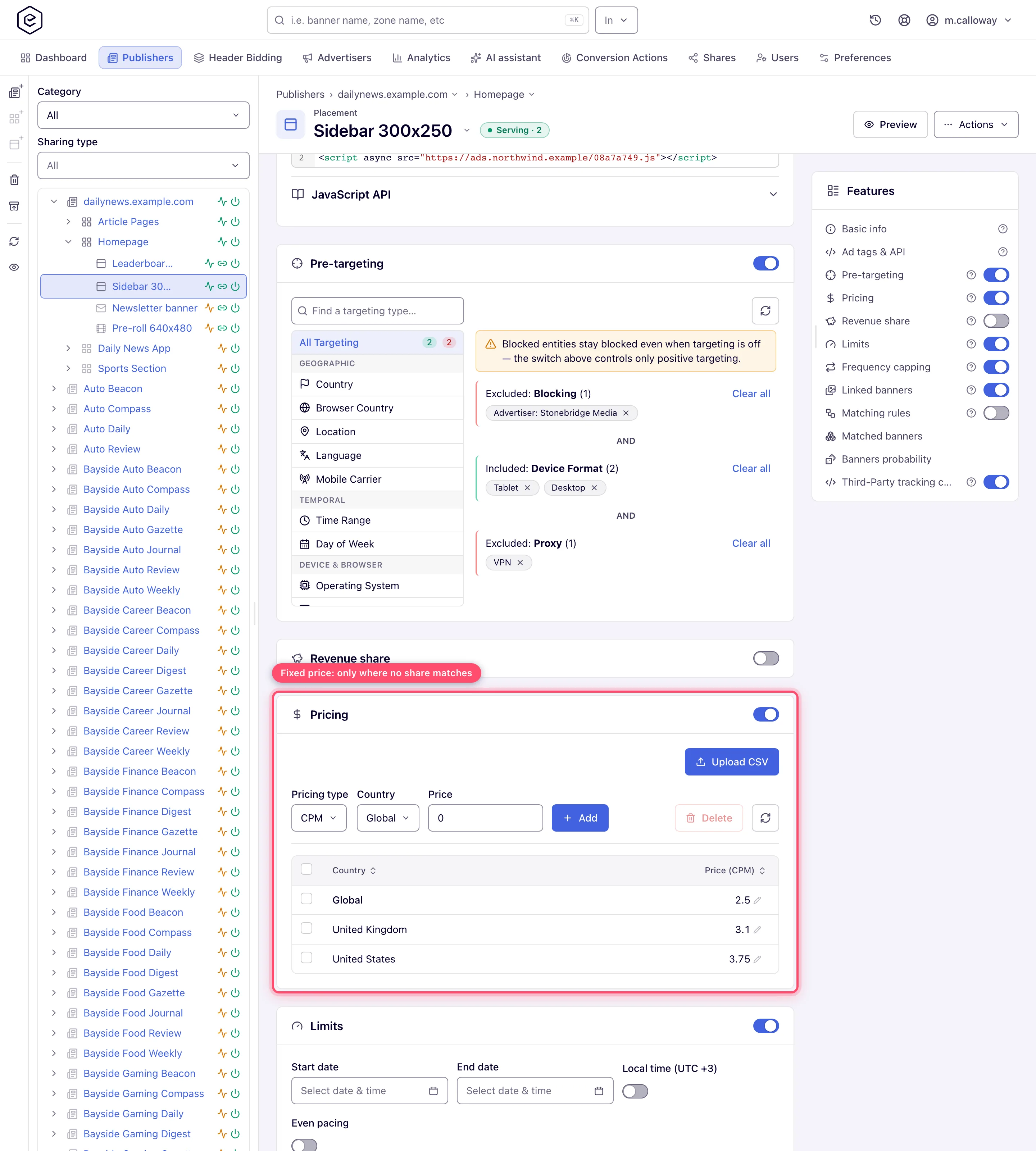
Revenue share is always a percentage of gross — the advertiser’s price for that same event, after price adjustment rules — never a percentage of some other payout.
For OpenRTB DSP creatives a bid floor marked Use as publisher price is consulted before all of this, banner then placement then site.
CPA — which action price applies
Within the entity that won above:
- This entity’s price for this action in this country
- This entity’s price for this action (any country)
- This entity’s All price for this country
- The network’s general price for this action in this country, or its All price for this country
- The network’s general price for this action (any country)
- This entity’s general (non-action) price — the Global row of All
Steps 4 and 5 are skipped unless Use general pricing is on for that entity, and step 5 is additionally skipped unless the entity’s own general price is unset or zero. An All row never beats a price the entity has for the action itself: step 3 answers only when step 2 found nothing.
Which price wins: gross and net, step by step
Every event — an impression, a click, a conversion — is priced on its own, at the moment it is counted. The ad server works out two figures: gross (what the advertiser is charged — the Gross column, and what a Budget limit counts) and net (what the publisher is paid — the Net column). Your margin is gross minus net. Each event asks for the price of its own type: an impression asks for a CPM price, a click for a CPC price, a conversion for a CPA price. A price of another type does not apply to that event at all.
How the advertiser price (gross) is chosen: banner, campaign or auction
- OpenRTB DSP banners use the auction: the gross is the price the DSP won at (the clearing price), not a card. Events the partner’s pricing model does not bill are priced at 0 on both sides.
- Banner Pricing card, if the banner has one switched on and its type matches the event: the country’s row, otherwise its Global price.
- Otherwise the campaign Pricing card, read the same way.
- Nothing matched → gross is 0. A CPM campaign earns nothing on clicks, a CPC campaign nothing on impressions.
- If the campaign allows it, a price passed in the click or impression URL replaces the card price (CPM values are passed per 1000).
- Price adjustment rules for the serving placement run last, in the order advertiser → campaign → banner, and only on events of the entity’s own pricing type.
How the publisher payout (net) is chosen: revenue share or fixed price
The placement is consulted first and the site only if nothing on the placement answers. At each level the order is:
- Revenue share pinned to this campaign, then pinned to this advertiser — a percentage of the gross.
- The fixed price on the Pricing card, if its type matches the event: the country’s row, otherwise Global. A Global left Not set does not answer.
- The blanket “Any” revenue share.
So the full order is: placement campaign/advertiser share → placement fixed price → placement blanket share → site campaign/advertiser share → site fixed price → site blanket share → 0. With every payout card on both levels switched off, net is 0. One exception comes before all of this: on an OpenRTB DSP banner’s impression, a Bid Floor with Use as publisher price on the banner, then the placement, then the site, pays that floor as the net.
Profit on programmatic (DSP) demand: why net is 0, or the whole price is profit
On an OpenRTB DSP banner the gross is the auction’s clearing price, so your profit depends only on what the publisher side pays — the same chain as above:
- No payout card on the placement or site → net is 0, and the whole clearing price shows as profit. That is correct for your own inventory; for a publisher you pay, it means their payout was never set up.
- A revenue share (pinned or blanket) → net is that percentage of the clearing price; the rest is your margin, and it moves with every auction.
- A Bid Floor with Use as publisher price → net is the floor itself, whatever the bid cleared at; your margin is the clearing price minus the floor. Bids below the floor are rejected, so on open-auction impressions it cannot go negative — a PMP deal bid is exempt from the floor and can clear below it.
- A fixed CPM pays that price per impression whatever the DSP paid — the one setup where a low-clearing auction loses money.
Events the partner’s pricing model does not bill (an impression on a CPC partner, for example) are priced 0 on both sides, so they carry neither revenue nor payout.
Worked example: CPM campaign, revenue share vs fixed price
A campaign priced at $4.00 CPM for every country; a price adjustment rule on the campaign sets Multiply 1.25 for placement Sports Daily — Top. One impression from Germany on that placement:
| Step | Calculation | Result |
|---|---|---|
| Gross from the campaign card | 4.00 / 1000 | $0.0040 |
| Adjustment rule (×1.25) | 0.0040 × 1.25 | $0.0050 gross |
| Net with a 70% blanket revenue share on the placement | 0.0050 × 70% | $0.0035 net, $0.0015 margin |
| Net with a $2.50 fixed CPM on the placement instead | 2.50 / 1000 | $0.0025 net, $0.0025 margin |
| Net with both: $2.50 fixed CPM and a 70% share pinned to this advertiser | the pinned share answers first | $0.0035 net |
A revenue share is a percentage of the gross after adjustment rules, so a Multiply rule raises the publisher’s payout too; a fixed price does not move.
Why the publisher payout is higher than the advertiser price
This is almost always a type mismatch or a fixed price that ignores the demand. Check, in order:
- The placement pays a fixed CPM but the campaign is CPC or CPA. Every impression pays the publisher the CPM while the advertiser is charged only for clicks or conversions, so net runs ahead of gross. Use a revenue share on such placements.
- The placement’s fixed price is higher than the campaign’s price. A fixed price is paid whatever the advertiser pays — a $3 CPM payout on a $2 CPM campaign loses $1 per thousand. Use a minimum margin (CPM only) or a revenue share.
- A revenue share was set on the site, but the placement has its own fixed price. The placement answers first, so the site share is never reached.
- The campaign has no price at all. Gross is 0, so a fixed publisher price is pure loss and a Budget limit never fills — a budget counts gross.
Past figures are not re-priced when you change a card.
Can a placement pay a different CPM for each advertiser?
Not as a fixed price. A placement’s (or site’s) Pricing card holds one price per country — a Global row plus country rows (and per-action rows for CPA). It has no advertiser or campaign column, so a fixed CPM on a placement is the same whichever advertiser’s ad fills it.
What can differ per advertiser or per campaign on one placement:
| You want | Use | Where |
|---|---|---|
| The publisher earns a different share of each advertiser’s money | A revenue share pinned to the advertiser or campaign — it answers before the placement’s fixed price | Placement (or site) → Revenue Share card → add a row for the advertiser or campaign |
| An advertiser pays a different price on this placement than elsewhere | A price adjustment rule on that advertiser, campaign or banner with the condition Placement is … — Multiply the price or Set it | Advertiser / campaign / banner → Price Adjustment Rules (guide) |
| Different prices per country | Country rows on the Pricing card | Placement, site or campaign → Pricing |
To get the effect of “advertiser A pays this placement $3 CPM, advertiser B $2 CPM”, combine the two: a price adjustment rule that Sets each advertiser’s CPM on that placement, plus a revenue share pinned to each advertiser on the placement. The payout is then the pinned share of the adjusted price — a predictable number per advertiser. Remember the order from above:
- Gross: banner or campaign price → URL price (if allowed) → adjustment rules (advertiser → campaign → banner, each feeding the next — a banner-level Set has the last word).
- Net: placement share pinned to the campaign → pinned to the advertiser → placement fixed price → placement “Any” share → the same three on the site → 0.
Corner case: a pinned revenue share beats the placement’s fixed price. Once you add an advertiser-pinned share, that advertiser’s events no longer get the fixed CPM — they get the percentage. Advertisers without a pinned row still fall through to the fixed price.
Corner case: a price adjustment rule only matches a placement; there is no site, zone or country condition. To change one advertiser’s price on a whole site, add one rule per placement (or use the campaign’s country rows if the difference is really by country).
Corner cases and gotchas
Corner case — “Use general pricing” does not switch anything off. The name reads as an either/or, and it is not one. With it on, this entity’s own action prices are still consulted first; the network’s general action prices only fill in where the entity has none. The network’s flat per-action price is additionally ignored unless the entity’s general price is unset or zero. So a campaign with its own CPA rows behaves identically whether the toggle is on or off — the toggle changes nothing until a row is missing.
Corner case — a banner price with the wrong model quietly disables the campaign’s rules. Suppose a banner is priced CPC and its campaign CPM. On an impression the banner’s price cannot answer (wrong model), so the campaign’s CPM price is used — correctly. But the engine still treats the banner’s model as the one in force, so the campaign’s CPM price adjustment rules do not fire and URL price overrides are ignored. If a rule “isn’t working”, check that the banner’s own Pricing card is either off or set to the same model as the campaign.
Corner case — flat fees are reported, not served. A Cost-per-day or Cost-per-month price is written into analytics by a scheduled job, not by ad serving, which has three consequences. A day with no impressions earns nothing, not the fee. Figures move as the period fills up, because the job recomputes the whole day (or the whole month) each time it runs — roughly every five hours during the day, with a final pass at 01:20 for the previous day and, for monthly pricing, at 01:50 on the 1st for the month just ended. And only daily analytics are rewritten: hourly reports for a flat-fee placement show zero revenue.
Corner case — for flat fees, the site overrides the placement. The job spreads placement fees first and site fees second, and the site pass rewrites every row under that site’s zones, whatever price the placement has: CPM, CPC, CPA or a flat fee of its own that the placement pass has just written. So the site’s figure is what survives in analytics, the exact inverse of the serving-time cascade, where the placement always wins. With different periods on the two levels the monthly fee wins, because the monthly pass runs after the daily one: a Cost-per-month placement under a Cost-per-day site keeps its own monthly fee, and every placement under a Cost-per-month site gets the site’s fee. Set a flat fee at one level only.
Corner case — OpenRTB DSP banners are CPM only. On an OpenRTB DSP banner the pricing-type dropdown offers CPM regardless of your CPC/CPA permissions, and unsupported pricing-model/event combinations pay the publisher 0. See OpenRTB DSP banners.
