
See where the CDN traffic goes
Compare the traffic your CDN zones report with an estimate built from each creative's weight and impressions, find the heavy creatives that actually serve, and read the figure behind the Traffic (gb) column of your ad-server fee.
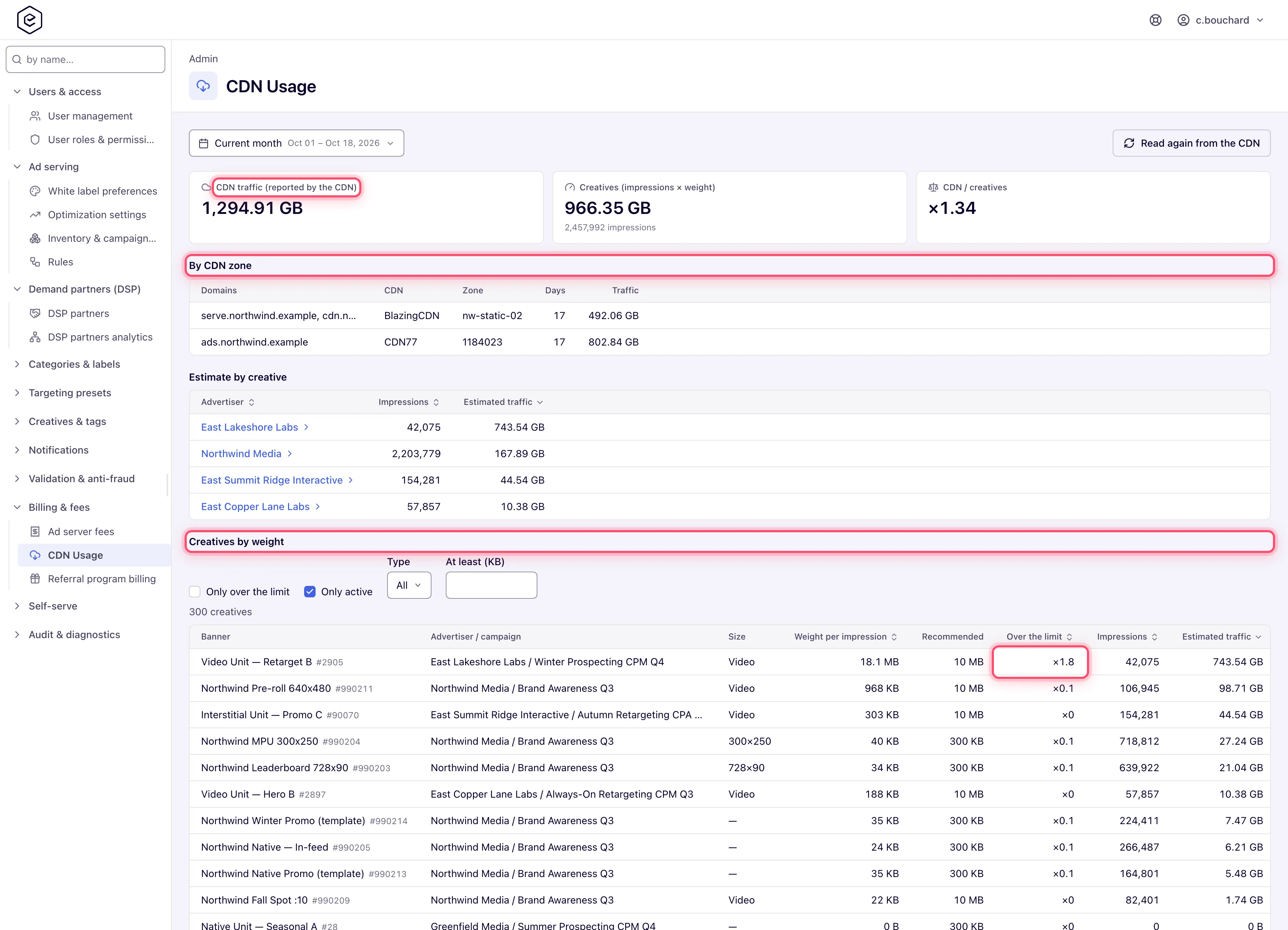
Your ad-server fee carries a Traffic (gb) figure — what the network’s CDN zones report themselves, every zone summed. CDN Usage shows that figure next to an estimate built from each creative’s weight × its impressions, breaks the estimate down by advertiser, campaign and banner, and lists the heaviest creatives that actually serve — so a traffic overage can be traced to the creatives that caused it.
Example. Northwind Media’s plan includes 2,000 GB a month and October closed at 2,640 GB. CDN Usage for October shows CDN traffic 2,640 GB, Creatives 1,950 GB and CDN / creatives 1.35×. Creatives by weight puts one 4.2 MB video — 1.8× its recommended size, serving 3.1 million impressions — at the top with 620 GB of the estimate on its own. A 2 MB rendition of the same video would have taken roughly 300 GB off the month.
Typical scenarios
| You want | Do | Where |
|---|---|---|
| Understand a Traffic (gb) overage on the fee | Open the month, read the three figures, then Creatives by weight sorted by traffic | Admin → Billing & fees → CDN Usage |
| Find which advertiser causes most of the traffic | Estimate by creative → click the advertiser → its campaigns → its banners | The same page |
| List every active display banner over 300 KB | Untick Only over the limit, Type display, At least (KB) 300, Export CSV | Creatives by weight |
| Check today’s figure after a CDN change | Read again from the CDN | Top of the page |
| Confirm the CDN figure for a month before questioning the fee | Pick the month; compare CDN traffic with the Traffic (gb) column on Ad server fees | CDN Usage and Ad server fees |
Step by step
-
Go to Admin → Billing & fees → CDN Usage. It takes the CDN Usage admin permission; a role that already sees Ad server fees has it.
-
Pick the period with the same picker as in reports — the page opens on the current month (UTC days, up to a year at a time).
-
Read the three figures at the top:
- CDN traffic — what the network’s CDN zones report themselves, every zone summed; the figure the Traffic (gb) column of the billing statistics is built from. A dash means no zone has been read for those days.
- Creatives — the estimate: each creative’s current weight times its impressions in the period. Creatives are weighed in the background; impressions of a creative not weighed yet are left out, and the figure says how many.
- CDN / creatives — how many times the real traffic exceeds the estimate. Expect it above 1: the ad loader, video players picking renditions, template code and repeated downloads are CDN traffic that no creative’s weight includes. Far below 1 means most creative files are not served through the network’s CDN at all — the ad servers or the file storage serve them — and the page says so.
-
By CDN zone lists each zone with its domains, its CDN, the days read and its traffic — one zone usually carries one serving domain; zones carrying several list them together.
-
Estimate by creative breaks the estimate down: advertisers first; click one for its campaigns, and a campaign for its banners, each with impressions, estimated traffic and, at banner level, the creative’s weight per impression. Sort by any of the columns; the trail above the grid goes back up.
-
Creatives by weight lists the network’s creatives one by one — by default the active ones over their weight limit, with the traffic each caused in the chosen dates first, so the heavy creatives that actually run lead. Untick Only over the limit and set Type and At least (KB) to look for a size instead: pick the type with the size, because 300 KB is heavy for a display banner and small for a video. Sort by weight, by how far over the limit, by impressions or by traffic; the banner name shows the banner id next to it, to find the banner in the account. Export CSV downloads every creative that matches the filters, not only the page on screen, with the banner id in a column of its own.
-
Read again from the CDN re-reads every zone for the chosen days right away — useful after a CDN change or before checking today’s figure. A zone the CDN does not answer for keeps the days it already had, and so does a day the CDN’s answer leaves out: only a day it reports replaces the stored figure.
Caveats and exceptions
- Weights arrive in the background. Right after a release that introduces weights, a large network needs a few minutes to be weighed in full; until then the Creatives figure says how many impressions were left out.
- A client’s own CDN is not yours to bill. When every serving domain goes out through the client’s own CDN, the page says so: that traffic is not the network’s, and the real figure stays empty.
- The fee reads the same source. Traffic (gb) on Ad server fees is what the CDN zones report — CDN77 and BlazingCDN, every zone of the network summed, in GB of 1024³ bytes — read nightly for the current month and re-read for the previous month on the first four days of the next one. A network with no CDN credentials configured falls back to an estimate: each creative’s file size × its impressions. When a CDN cannot be read, the month keeps the figure it already had.
- Days, not hours. The picker works in UTC days, up to a year at a time; there is no hourly view.
- Roles. The page takes the CDN Usage admin permission. Network managers, publishers and advertisers do not see it; the creative weight itself is shown to them on the creative’s own page as the heavy-creative warning.
Not working?
| Symptom | Check | Where |
|---|---|---|
| CDN traffic shows a dash | No zone has been read for those days. Click Read again from the CDN; if the dash stays, the CDN did not answer — the stored days are kept. | Top of the page |
| CDN / creatives is far below 1 | Most creative files are not served through the network’s CDN; the page says so. Nothing to fix on this page. | The note under the figures |
| Creatives says impressions were left out | Those creatives have not been weighed yet. Wait a few minutes and reload. | The Creatives figure |
| The CDN figure and Traffic (gb) on Ad server fees differ | The fee row was read nightly, or is frozen after the fourth day of the next month; CDN Usage re-reads on demand. | Ad server fees |
| A creative you expect is not in Creatives by weight | Only over the limit is ticked and it is under its limit, or Type / At least (KB) exclude it. Untick and widen the filters. | The filters above the grid |
| The page is not in the sidebar | Your admin role lacks CDN Usage. | Admin → Users & access → Admin roles & permissions |
Reference
| Figure | What it is | Source |
|---|---|---|
| CDN traffic | Every CDN zone’s reported traffic for the period, summed | The CDN zones, read nightly and on Read again from the CDN |
| Creatives | Σ (creative weight × impressions) over the period, creatives not weighed yet left out | Weights measured in the background; impressions from the daily statistics |
| CDN / creatives | CDN traffic ÷ Creatives | Derived |
| By CDN zone | Zone, its domains, its CDN, days read, traffic | The CDN zones |
| Estimate by creative | Advertiser → campaign → banner: impressions, estimated traffic, weight per impression | As Creatives |
| Creatives by weight | Banner (with id), type, weight, how far over the limit, impressions, traffic in the period | As Creatives; the limit per type from creative specs |
| Export CSV | Every creative matching the filters, banner id in its own column | — |
