
Pace a brand flight, collect viewability and read reach
The last stage of an awareness campaign — a 30-day flight with an Impressions Total cap and Even pacing, viewability signals for display and video creatives and third-party measurement, and the General report with Unique visitors as the effective-frequency check.
What it is and why
A fixed impression volume should arrive evenly over the flight, not in its first week; the buyer will ask whether the impressions were viewable; and the proof of “as many different people as possible” is impressions against unique visitors. This page sets the pacing, switches the viewability signals on and runs the reach report. It is the last stage of Run an awareness campaign with frequency control.
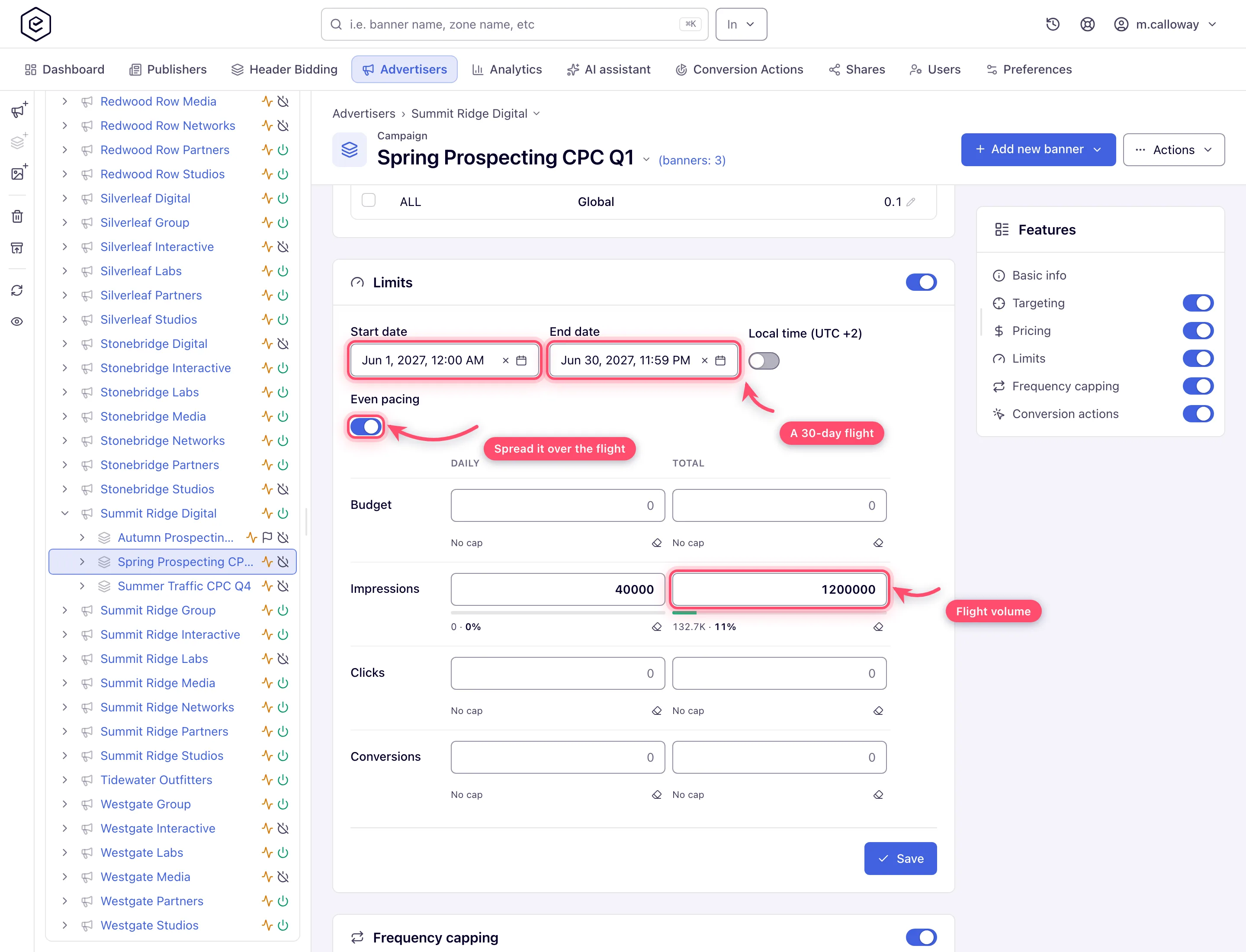
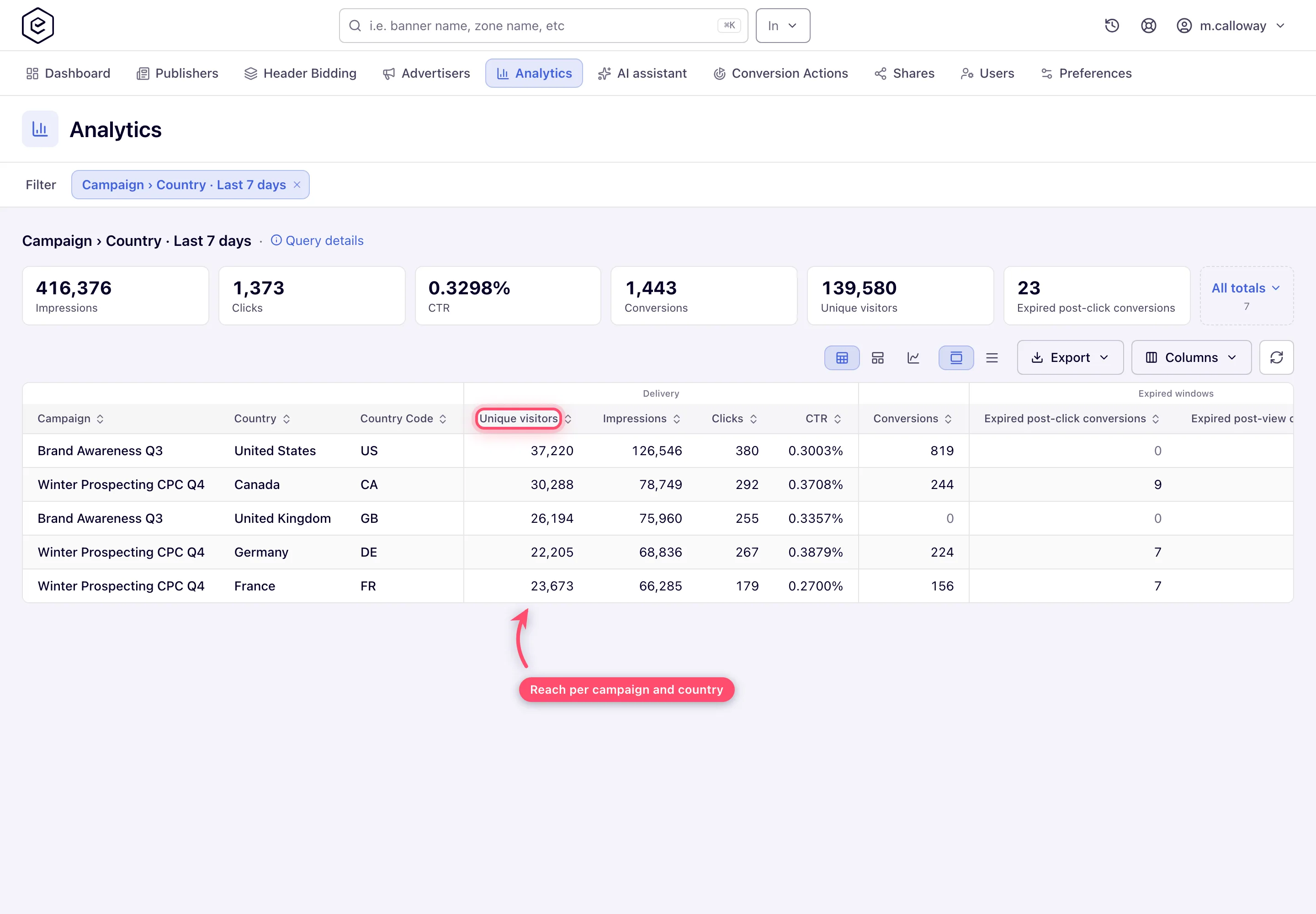
Example. Even pacing over a 30-day flight with Impressions · Total 1,200,000 delivers about 40,000 a day instead of burning out in the first week; a General report grouped by Campaign and Country with the Unique visitors column shows how many different people those impressions reached in each market.
Typical scenarios
| You want | Set | Where |
|---|---|---|
| 1,200,000 impressions evenly over 30 days | Limits: Start and End date, Impressions · Total 1,200,000 (and Daily 40,000 beside it), Even pacing on | the campaign’s Limits card |
Step by step
Pacing is set on the campaign’s Limits card; viewability on the creative and the video placement; reach in Account → Analytics.
-
Pace the delivery. If the flight has a fixed impression volume, set a start and end date on the campaign’s Limits card, put the volume in the Impressions row’s Total cap — and a Daily one beside it if the volume should arrive evenly — then turn on Even pacing so it spreads across the flight instead of burning out in the first days (Limits).
-
Collect viewability signals. Epom has no standard “viewable impressions” report column, but the signals are there:
- Display: on image banners served into Site / Non-standard placements, tick Enable viewability tracking (beta) under Advanced settings on the banner (Image banners).
- Video: enable the viewability events under Viewability & other on the video placement’s VAST tracking card (Ad Viewable Impression / Ad Repeated Viewable Impression / Ad Not Viewable Impression / Ad View Undetermined Impression). Each enabled VAST event is recorded through a system conversion action, so you can report on it with Split columns by → Viewability in the report builder, which picks and orders that family’s actions for you (Video viewability and Open Measurement, Video placements).
- Third-party measurement (IAS, MOAT-style vendors): on video, attach the vendor’s URL as a third-party pixel firing on a viewability event on the same VAST tracking card — Epom’s verification script then calls it from inside the player’s verification frame. Where that is not an option, the instrumented vendor tag rides along inside the creative markup itself — paste it as an HTML-code banner.
-
Read reach and delivery. Run a General report with Group by → Campaign (or Campaign and Country, to audit the geo split) and the Unique visitors metric column — impressions against uniques is your effective frequency check (metrics reference). Put the flight’s key chart on a dashboard for daily monitoring.
Caveats and exceptions
Pacing and limits
- A stock network shows only the Daily and Total columns; Weekly and Monthly are off for every role until your network administrator grants them.
- Pacing needs the end date: a total cap on a campaign with no end date is not paced.
- A filled Total cap (and a passed end date) switches the campaign off for good — turn it back on by hand if you extend the flight (why).
Viewability
- No stock role has the display Enable viewability tracking (beta) checkbox; ask your network manager (or, as a network manager, your network administrator) to switch it on.
- On a player that supports IAB Open Measurement — Google IMA and the other major SDKs — Epom measures the video events itself against the MRC criterion (50% of the ad on screen for 2 continuous seconds), provided the tag is VAST 4.1 or higher; the new interface’s version picker defaults to 4.2, so a freshly copied tag qualifies, while the classic placement page cannot reach 4.1 at all. In a player without Open Measurement there is no viewability at any version, and programmatic (OpenRTB) video is not measured by Epom at all.
- For third-party vendors only the URL is called; the vendor’s own script does not run in the verification frame.
The reach report
- Unique visitors is one of the most conditional columns in the product: it appears only when the Group by is exactly Campaign, or exactly Campaign plus Country, with no filter on Site, Zone, Placement, Placement Type, Placement Size, Banner, Channel, labels or templates set, and only for roles whose report columns include it — the stock Advertiser role’s reports do not show the column.
The caveats that apply to the whole flight — the roles — are on Run an awareness campaign with frequency control.
Not working?
Delivery burned out, there is no viewability, or the Unique visitors column is missing? The likely causes:
| Symptom | Likely cause | Check |
|---|---|---|
| Delivery burned out in week one | Even pacing is off, or there is no End date (a total cap without an end date is not paced) | Campaign → Limits → End date, Even pacing |
| The campaign switched itself off mid-flight | The Total cap filled, or the End date passed; it stays off after you raise or move them | Campaign → Limits, then the campaign’s Active switch |
| No Weekly / Monthly columns on Limits | Off for every stock role | Admin → Users and roles |
| No Unique visitors column | Group by is not exactly Campaign / Campaign + Country, a disallowed filter is set, or the role lacks the column | Report builder → Group by and filters; Admin → report columns for the role |
| No viewability for video | The player has no Open Measurement, the tag is below VAST 4.1 (classic placement page), or the demand is OpenRTB | Placement → ad tag → VAST version; player SDK |
| Enable viewability tracking (beta) is not on the banner | No stock role has the checkbox | Your network manager (or, as a network manager, your network administrator): Admin → Users and roles |
The other stages of the flight are on Run an awareness campaign with frequency control.
Reference
Caps and pacing: Set volume limits and budgets; the viewability events: Video viewability and Open Measurement; the column: Metrics reference.
