
Set up a server-to-server postback
Put the click-id macro in the creative's landing URL, store the value the page receives and have your server call the Conversion Tracking URL with it — the Click ID method step by step, the legacy per-action Sub ID method, which token each side replaces, the caveats and a fix-it checklist.
What it is and why
A server-to-server postback reports a conversion that never touches the visitor’s browser — an app install, a signed contract, an order confirmed in a back office. The ad server writes a click id into the landing URL when it serves the ad, the advertiser or their partner stores it, and their server hands it back on the Conversion Tracking URL when the user converts. This page covers the Postback (S2S) tab of the window you opened in Open the tracking window and pick the ad-serving domain; browser-side codes are on Copy the pixel or the landing-page snippet.
Example. The install action is linked to the campaign “Spring Prospecting CPC”. The
creative’s landing URL becomes https://yourlanding.com/product?easclid=$$CLICK_ID$$; the
app-install partner stores the easclid value with the visit and, on install, calls
https://ads.example.com/at?action=<key>&clickid=<that value>. The conversion is counted at the
campaign’s CPA rate, attributed to the click the id came from.
Typical scenarios
| You want | Copy | Where |
|---|---|---|
| App installs or offline conversions reported by a partner’s server | the Click ID Conversion Tracking URL, with $$CLICK_ID$$ in the landing URL | Postback (S2S) tab |
| A partner tracker already configured against another ad server’s postback | The same Click ID URL — the endpoint also reads cid, txid, event, goal and other spellings | Postback (S2S) tab |
| An integration that already runs on the per-action Sub ID value | Click ID (per action, legacy) — keep it as it is; new integrations use Click ID | Postback (S2S) tab, collapsed method |
Step by step
Open the Postback (S2S) tab. It offers two methods. Both work the same way: the ad server writes a tracking value into your landing page URL, you store it, and you hand it back on a Conversion Tracking URL when the user converts. Pick one per integration — running both buys you nothing.
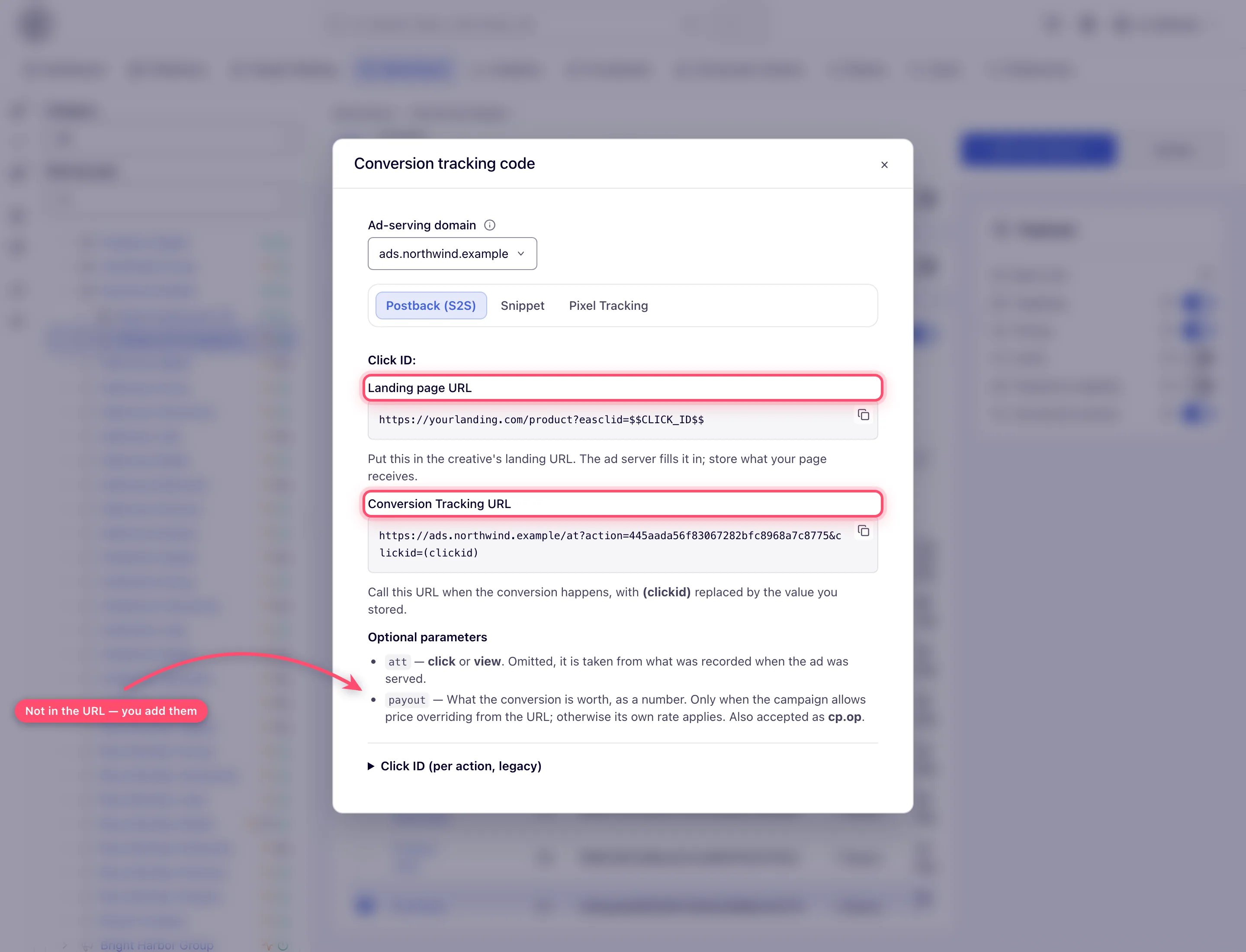
Which of the action’s two keys goes into the URL, and which into the pixel, is set out in Two keys, and which one goes where.
Click ID
-
In the landing page URL in your creative:
https://yourlanding.com/product?easclid=$$CLICK_ID$$If the URL already has a query string (UTM tags, for example), append with
&instead:https://yourlanding.com/product?utm_source=epom&easclid=$$CLICK_ID$$.On an image or video creative — and on a click-through placement’s URLs — you can let the campaign do this for you; see auto-tagging. HTML Code, Template, native and OpenRTB creatives need the macro written in by hand.
$$ACTION_DATA$$is the same token under its older name and still works — a creative carrying both spellings mints one value, not two. -
Call the Conversion Tracking URL from your server, with
(clickid)replaced by whatever your page received ineasclid=:https://<ad-serving-domain>/at?action=<conversion action key>&clickid=(clickid)The endpoint answers to more spellings than the two it generates, so a postback already configured against another tracker usually needs no change:
clickid,actionData,cidandtxidare all read as the click id, andaction,actionKey,event,goal,event_idandgoal_idare all read as the key. The first one present and non-blank wins.
An integration already on the per-action Sub ID macro, and which tokens you replace versus which the ad server fills in, are in Server-to-server (postback) on the hub.
Once the partner fires the URL, confirm it counts: Test a conversion.
Caveats and exceptions
There is no fingerprint-matching endpoint for app installs. An app integration posts to the
Conversion Tracking URL above, which matches by click ID — so the partner that reports the
install has to receive the click ID with the click and send it back as clickid. A postback
still pointed at /app/at answers 404.
Conversion caps on postbacks (since release 155). A postback comes from your server, so it never reaches the visitor’s cookie. Since release 155 a conversion cap with the User (cookie-based) or User (cookie-based + server-side storage) subject counts such a conversion in the server-side store too, on networks that have one, and serving stops the ad when the visitor reaches the amount. An IP conversion cap counts the postback under your server’s address instead. See Conversion caps count in both stores.
The caveats that apply to every tracking code — who can do this, the domain selector, which tabs exist outside a campaign — are on Get the pixel and S2S tracking code.
Not working?
| Symptom | Check | Where |
|---|---|---|
The postback is answered 400 | The URL carries < > | { } — the (clickid) placeholder was not replaced, or the key was pasted with brackets. | the URL your server fires |
The postback is answered 404 at /app/at | That endpoint no longer exists; post to the Conversion Tracking URL with clickid. | the partner’s postback template |
The partner’s postback uses cid= / txid= / goal= | Fine — those spellings are read too; the first non-blank wins. | — |
The landing page never receives easclid= | The creative is HTML Code, Template, native or OpenRTB and needs $$CLICK_ID$$ by hand; or Add the click id to landing page URLs is off. | the creative’s URL; the campaign’s Conversion actions card |
Expired conversions and the other symptoms are on Get the pixel and S2S tracking code; for the reason the ad server gives for a refused postback, see Why a conversion did not count.
Reference
The two methods, their URLs and the permission behind the tab are in the Reference on the hub, with the accepted parameter spellings; the REST call that returns the same URLs is under Via the API. Every optional parameter the URL takes is on Postback parameters and partner integrations.
Related pages:
